

toollery-dsh
Discovered★ 3A community-maintained Toollery integration for DeepSeek Harness, enabling scalable, training-free skill and tool retrieval.
Toollery for DeepSeek Harness
A DSH plugin implementing Toollery for both registered tools and DSH's native skill catalog. For tools it generates and caches three proxy queries per tool, then uses local BM25 retrieval to select tools for each user turn. For skills it can generate and cache intent queries from bodies obtained through DSH's scoped native loader, then search spec, manual or spec_manual representations. DSH's native skill loader still owns full-body loading and execution; bodies and manuals stay out of model-visible history.
Independently developed by Jikun Liu. Not affiliated with or endorsed by DeepSeek or the original Toollery authors. Based on XiangxiTian/toollery; see Acknowledgements.
Install and try it
In your existing DSH Desktop
Open Plugins → Add plugin → Install a third-party plugin and enter:
@jkl-agents/dsh-toollery
- Install and enable the plugin; restart if DSH requests it. It uses your existing chat model and tools—no second DSH installation is needed.
- On startup, Toollery automatically checks and installs its profile-local worker when DSH's bundled Python or an existing Python 3.12+ is available. This local setup makes no model calls and does not download Python. If no usable Python is available, open Toollery's plugin details and select Set up local worker; Windows x64 users can explicitly allow a private Python download. Skill
specmode needs no generator; manual-based skill modes use the configured generator only when cache entries are missing and you approve generation. - For any tool or skill representation using manuals (
manualorspec_manual): save the manual-generation model, OpenAI Chat Completions-compatible API base URL and key. These can differ from your DSH chat credentials and are stored locally.specmode does not need generation credentials. - For tool retrieval or
both: start a new native conversation (Standard preset), review the tool count and possible API charges, then select Generate missing manuals (uses API). For skills, set Target toskillsand choose the skill representation. In a manual-based skill mode, Toollery checks the local cache before submission and obtains eligible bodies through DSH's native loader only when needed. If entries are missing, the composer offers Generate missing skill manuals (uses API); the draft stays in the composer and can be sent once preparation finishes. Valid cached manuals are reused. - Ask for a registered tool or a relevant native skill. Inspect the selected/called cards, change k, or switch OFF.
No terminal or .env editing is required. The plugin adds no demo tools. First preparation may take time for large pools; progress and an approximate ETA are shown.
If DSH reports a missing npm metadata/cache blob while installing or reinstalling the plugin, this can be a local package-manager cache inconsistency even when the published package is valid. If the message names npm, close DSH, run npm cache clean --force in PowerShell, restart DSH and retry. This clears npm's cache, not Toollery's profile data or API settings. If DSH still reports a cache error, install the .tgz from the latest GitHub release and include the exact error when reporting it; see troubleshooting.
Desktop installation has been reported successful by the maintainer and a colleague on another computer. The local compatibility target is DSH Desktop 0.12.1 / DSH runtime 0.2.1-rc.2; see the verification summary for scope.
For CLI installation, pinned .tgz releases, upgrades and removal, see the plugin guide. npm resolves the current published package; downloadable bundles are on the latest GitHub release.
Try without an existing DSH: Windows demo
Download Source code (zip) from the latest release, extract it, and double-click Start-Toollery.cmd. Keep the terminal open while private dependencies install.
On the setup page, choose 12 utility tools and Scripted preview, then select Start demo. No API key or paid requests are needed. Try Use add_numbers to add 19 and 23.; the result should be 42. The scripted preview supports example prompts, not arbitrary chat.
This is a separate demo environment, not a plugin installation. See the launcher guide for real models, filesystem tools, startup progress and stopping the demo, or the manual setup guide for terminal/Web commands.
Everyday use
- Default after preparation: ON /
spec_manual/ top-k / tool k=3 and skill k=3. Choosespec,manualorspec_manual; useallto retain all host-allowed tools. - ON/OFF: OFF bypasses Toollery retrieval for the next turn and leaves DSH's host-eligible tools and native skill catalog available; host restrictions still apply. Settings apply to the next user turn; a turn's selection stays fixed through its model steps.
- Cache updates: registered tool changes reconcile on a later turn without restarting. Up to 15 missing tool manuals are generated automatically by default; larger tool batches require approval and resubmitting the message. Missing skill manuals use a separate local preflight and explicit composer approval before the prompt is sent. See generation policy.
- Compact panel: collapse controls and turn cards to a small ON/OFF button, then restore them without changing retrieval settings or losing draft inputs.
- Skill adaptation: set Target to
skillsto rank the current native skill catalog while keeping every host-eligible tool available. Choosespecfor metadata-only routing, ormanual/spec_manualto route with body-derived intent queries. Usetoolsfor tool retrieval orbothfor both paths. Skill bodies are loaded through DSH's scoped native loader and remain owned by DSH for invocation and execution. - Independent top-k:
toolsshowsTool repand tool k;skillsshowsSkill repand skill k;bothshows both reps and keeps separate k values with one Update k action.
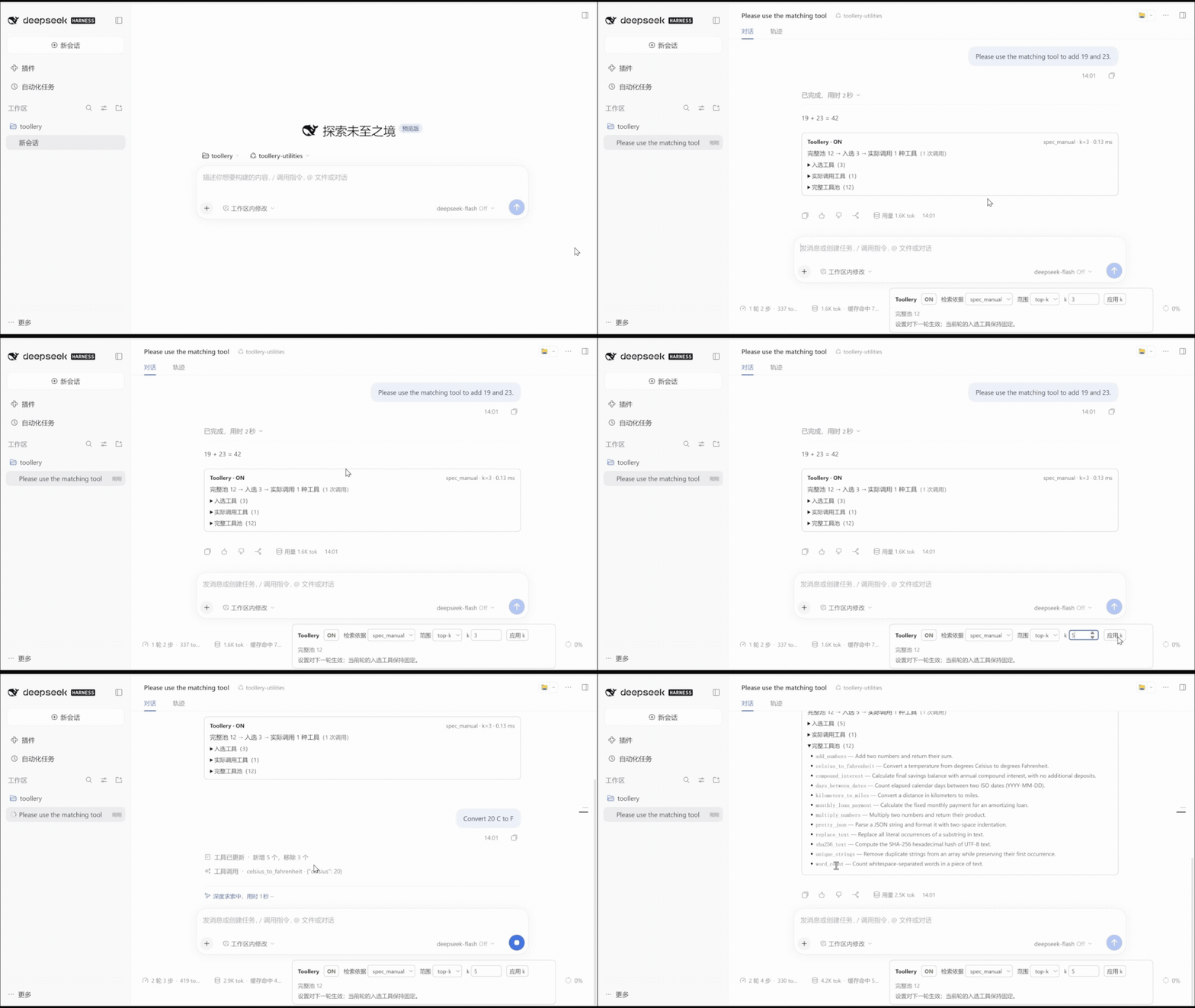
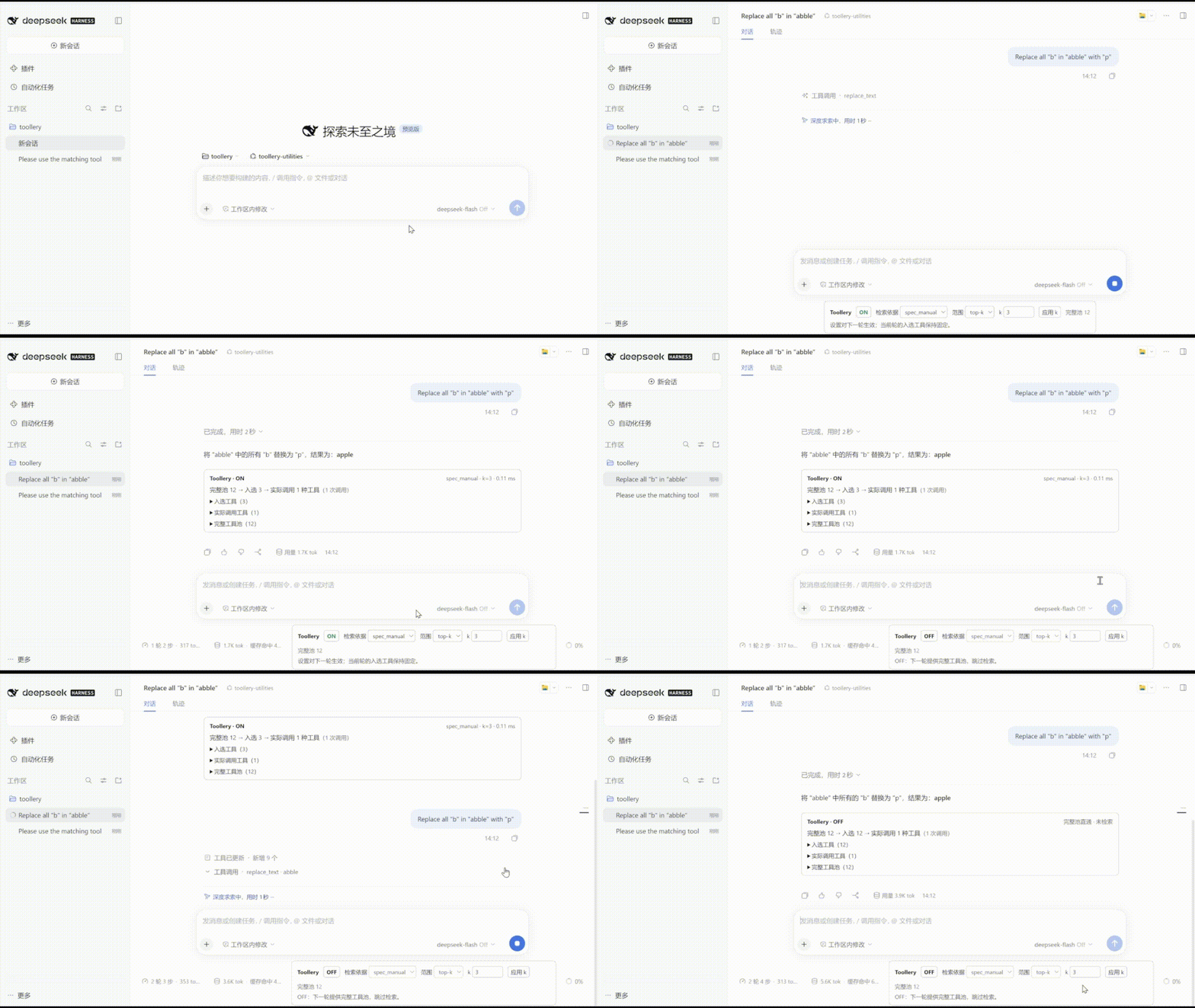
Watch the demos: change k, then switch OFF
Both recordings use the standalone 12-tool pool. The first changes k from 3 to 5 between prompts; the second switches OFF to restore all 12 tools for the next turn.
Results and boundaries
On our ToolRet development subset (10,656 tools / 5,679 queries), spec+manual improved Recall@3 from 32.52% to 37.23% and Recall@10 from 42.00% to 48.48%, compared with spec-only retrieval. These are implementation experiments, not a reproduction of the paper.
Retrieval uses the latest user text, without history rewriting or recovery search. Tight top-k settings can miss follow-up or dependency tools: the ToolTalk supplement reduced tokens but also reduced strict adapted turn success from 67/79 OFF to 51/79 ON. Increase k or switch OFF when broader access is needed. Token savings do not imply universal latency or quality gains.
Native root conversations are supported; PTC and subagent retrieval are outside this version's scope. Toollery observes tools supplied by DSH; it does not autonomously discover or install tools. An optional candidate-batch discovery example demonstrates provider-owned discovery and ranking without registering or executing candidates.
When the host publishes a native skill catalog, Toollery can route it with metadata (spec) or cached body-derived intent queries (manual / spec_manual). In manual modes, Toollery reads bodies only through DSH's scoped native loader to generate local retrieval evidence; it does not project bodies into model history or change skill-provider permissions. DSH's native skill tool remains responsible for loading and executing the selected body. Hosts without a native catalog retain their normal behavior.
The plugin bundle includes 95 sample-* prompt skills to try skill routing and DSH's native on-demand loader. They add no runtime packages, but some instructions refer to project files or optional external services. For example, ask DSH to use sample-meeting-minutes to turn a short transcript into decisions and action items. Source and license details are in plugin/sample-skills/README.md.
For skill-only testing, set Toollery's retrieval target to skills (UI Target control or /toollery target skills). This keeps the complete host-eligible tool pool and only narrows the skill catalog. Use tools for normal tool retrieval, or both to evaluate both paths together.
Documentation
| Guide | Contents |
|---|---|
| Plugin guide | Desktop/CLI setup, generation policy, compatibility, upgrade and removal |
| Configuration | Models, credentials and cache identities |
| Standalone demo · Manual setup | Windows launcher, real models and terminal/Web demos |
| Tool sources · Troubleshooting | MCP/Cordis sources and diagnostics |
| Verification · Experiments | Installation checks, retrieval quality, tokens, latency and limitations |
| Development · Publishing | Repository layout, build/test commands and release workflow |
| Changelog | Published and unreleased changes |
License
MIT for original code, copyright 2026 Jikun Liu. Third-party material retains its own terms; see LICENSE and ACKNOWLEDGEMENTS.md.
Comments
Loading…
Similar plugins
by Epiphany-Leon
Multi-Agent collaborative skill forging system for DeepSeek Harness — distill conversational experience into verifiable, reusable Agent Skills.
★ 0
MIT
TypeScript
Sep 6, 2026
dsh plugin --profile web add dsh-skill-forgeby everclear077
Progressive tool discovery for DeepSeek Harness — tiny stable surface, searchable catalog, real pipeline execution, context cache intact.
★ 10
↓ 23/wk
MIT
TypeScript
Oct 18, 2026
dsh plugin --profile web add dsh-progressive-toolsby andrepontesmelo
The DSH productivity suite: plugins + agent skills for the DeepSeek Harness, installable in one command.
★ 0
MIT
JavaScript
Sep 11, 2026
dsh plugin --profile web add @andrepontesmelo/dsh-suiteby coffee-man666
Repository and agent-runtime analysis skills as an installable DeepSeek Harness (dsh) plugin
★ 0
MIT
TypeScript
Aug 24, 2026
dsh plugin --profile web add @deepseek-ai/dsh-lensby qkycir-123
Automatically turn successful DeepSeek Harness sessions into reusable, reviewable Agent Skills.
★ 104
↓ 442/wk
MIT
TypeScript
Oct 20, 2026
dsh plugin --profile web add dsh-run2skillby sjh9714
Observe identical tool failures and optionally pause the next model step in DeepSeek Harness.
★ 0
MIT
JavaScript
Oct 4, 2026
dsh plugin --profile web add dsh-retry-guard