

dsh-run2skill
Manifest valid★ 104Automatically turn successful DeepSeek Harness sessions into reusable, reviewable Agent Skills.
dsh-run2skill
Chinese | English
Any of these familiar?
- You teach an Agent the same workflow today, then have to teach it all over again tomorrow in a new session;
- You need to correct the Agent at every step: "Don't touch that file," "Run the tests first," "You can't skip this step";
- You've finally trained the Agent, but the moment the conversation ends, so does all that experience.
If you're tired of repeatedly playing the master in the chat box, dsh-run2skill is here to fix exactly that:
Turn the corrections, constraints, and workflows you explicitly teach the Agent in DeepSeek Harness (DSH) into reviewable, reusable native Skills.
In one sentence: You teach it once in real work, and run2skill packages the reusable parts into a skill draft; it only persists after you approve it.
It will never let the Agent sneakily create its own rules. Every skill draft can be inspected for its source, scope, and full content before you decide to confirm and save or discard it. Only after confirmation is it written to DSH's native Skill directory.
The current stable version is
0.4.0. Currently only DSH Web0.1.2-rc.1is supported.
0.4.0 switches to the Remote/API Gateway and browser authentication contract of DSH 0.1.2-rc.1, and adapts to changes in Session, Storage/Profile, Settings, and the plugin lifecycle. It only supports the built-in standard preset retained by RC1; when using the older DSH 0.1.1-rc.2, please continue installing dsh-run2skill@0.3.1.
Low-noise status, "Organize Now," drafting from feedback, and long-workflow evidence retention are kept. "Organize Now" still waits for the Agent to stop and facts to be complete, and still passes dedup, review, and publish gates; the settings page hides internal batch counts.
Walk Through the Full Flow
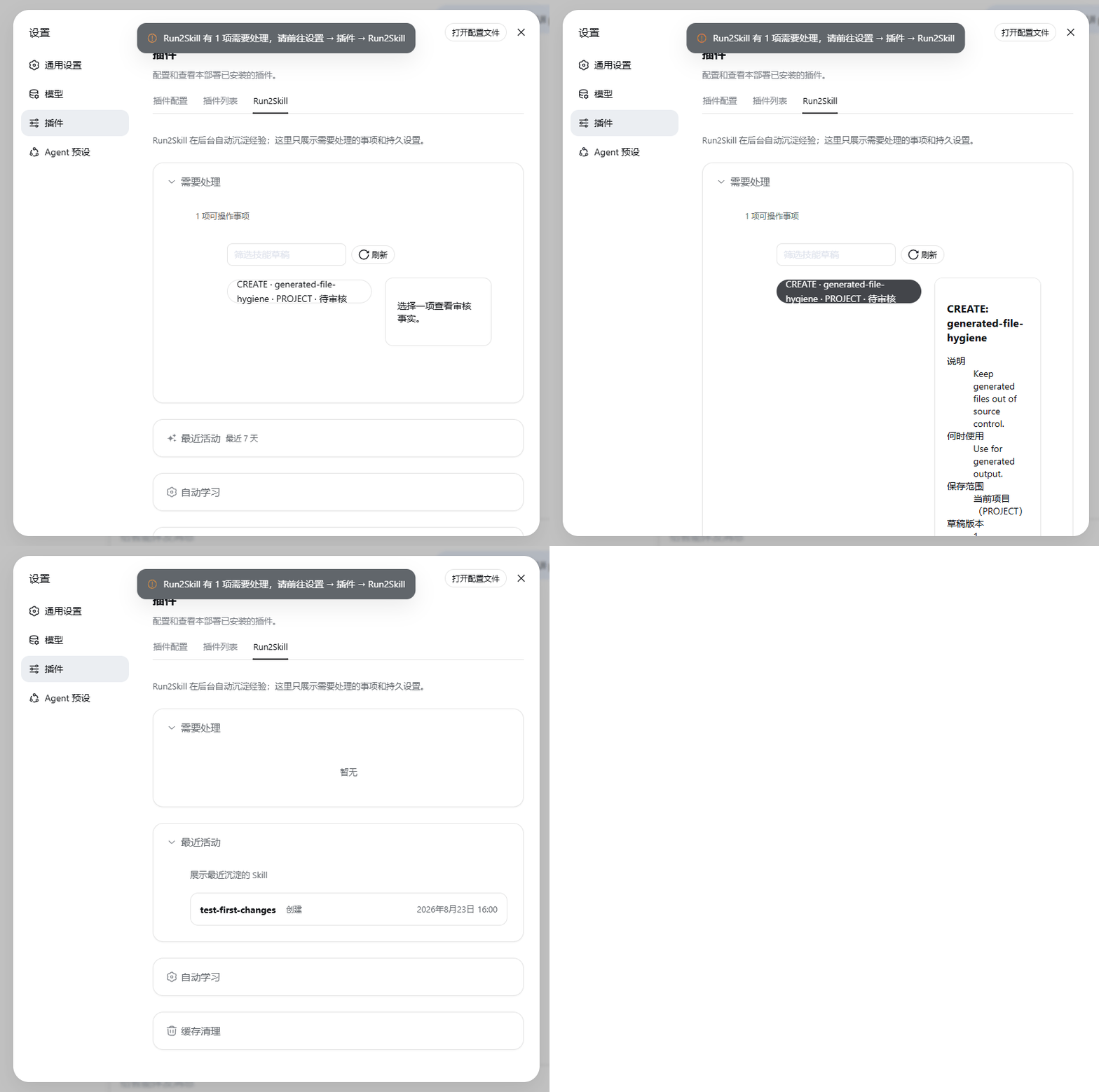
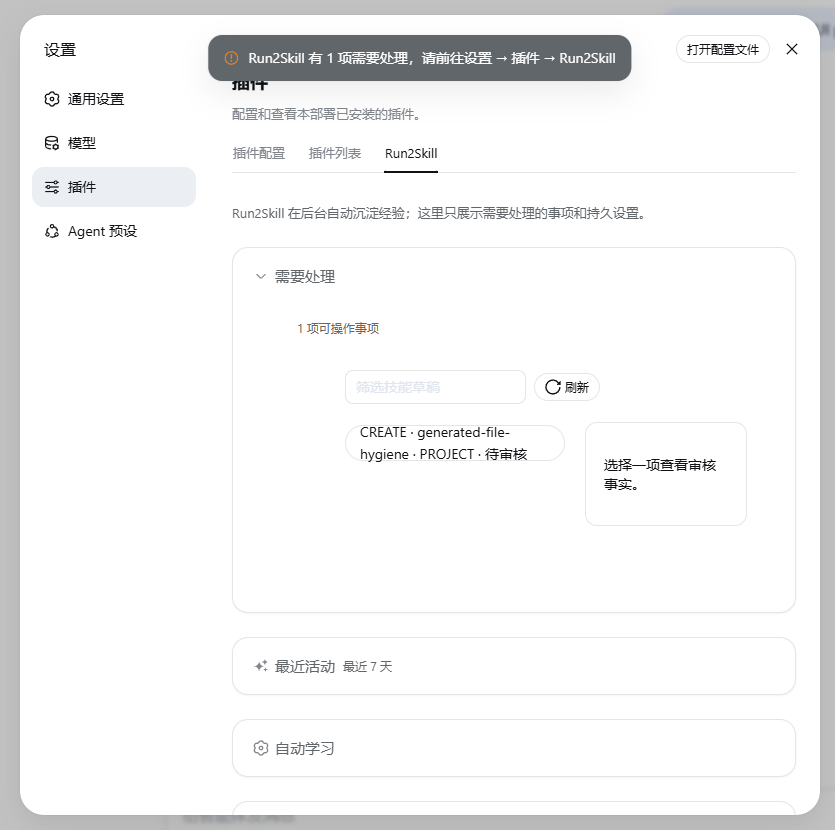
- Discover a skill draft: Run2Skill only reminds you when there is something to handle, and puts the draft under Settings → Plugins → Run2Skill.
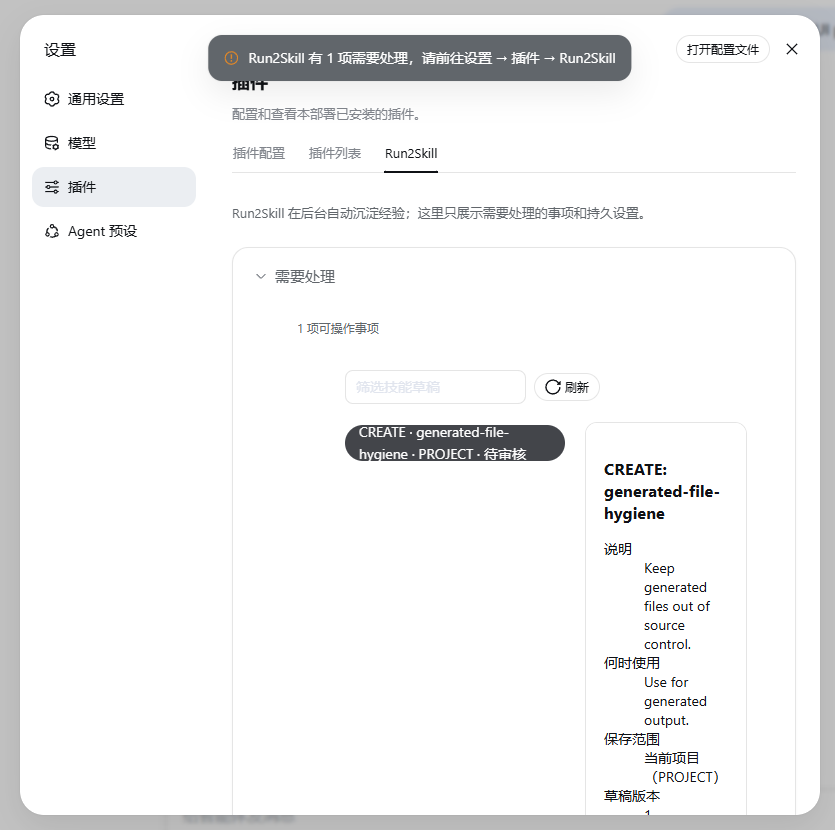
- Verify source and scope: Review the generation rationale, the filtered conversation evidence, the save scope, and the complete
SKILL.mdthat will be written. - Ask for changes if you are not satisfied: Write a short piece of feedback, and Run2Skill will generate a new complete draft; the old version will not be published directly, and the new version still requires your review.
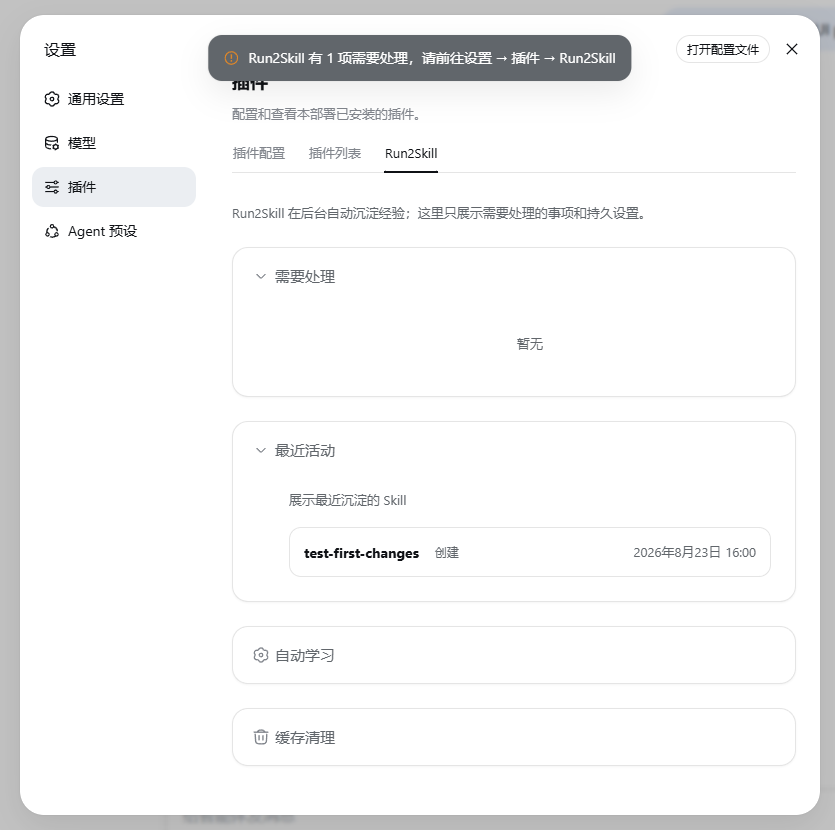
- Only saved after you confirm: Successful results appear in “Recent Activity”; the saved content is a regular DSH native Skill.
查看三张关键界面截图
Installation
First confirm that you are using DSH Web 0.1.2-rc.1, that Node.js ^22.19.0 || >=24.0.0 is installed, and that you can run dsh and pnpm in the terminal. Then run:
dsh plugin --profile web add dsh-run2skill@0.4.0
Restart DSH Web. Open Settings → Plugins and see the run2skill card to confirm the plugin has been loaded.
run2skill needs no separate model key. To analyze drafts it reuses the model already selected in the current DSH session; if none is available, learning stops with a reason shown — it will not silently switch to another model.
Usage: you keep working, it keeps the notes
As usual, just chat with DSH. For example:
把这个流程保存成 Skill,以后可以复用。
You can also correct an approach, state a long-term constraint, or give a reusable step-by-step process while working. No need to pause to "teach" it or open SKILL.md to edit by memory.
run2skill only does cheap logging after each turn — no per-turn model review. A batch check fires only at a bounded batch boundary, when the session goes idle, or when you explicitly request a save/organize; only when reusable experience is found does it proceed to dedup and draft generation.
When action is needed, DSH shows a native notification; no persistent run2skill status box appears at the top of the page otherwise. To handle drafts:
- Open Settings → Plugins → run2skill.
- In the pending list, review the skill draft, its scope of applicability, and content differences.
- Choose to confirm and save, request changes, discard the draft, or retry after a save failure.
- After a successful save, the result is a regular DSH native Skill; even if you later uninstall run2skill, it can still be used by DSH.
If a draft is unsuitable, write a revision note (≤ 2048 UTF-8 bytes). The Host then generates a new immutable version from the full current draft, keeps the parent–child link, and voids the old approval; you must review and confirm the new version. This is not a free editor and will not bypass dedup, human review, or safe publishing.
Skill drafts can be saved to the current project (PROJECT) or current user (USER) scope. The current version only writes to DSH's default Skill storage directory; if you have changed the Skill storage method or disabled the default directory, run2skill will stop saving and will not guess where to write.
What it learns
run2skill currently focuses on reusable experience that you explicitly express:
- Corrections: “Don't fix the implementation directly; write a failing test first.”
- Long-term constraints: “All GitHub wording in this project should be in Chinese.”
- Workflows: “First check the upstream version, then run the compatibility probe, and finally update the evidence.”
- Explicit save requests: “Save this process as a Skill.”
It will not turn a one-off Agent success into a permanent rule on its own. It learns what you explicitly taught, not mind-reading.
You stay in the driver's seat
In Settings → Plugins → run2skill, you can turn off automatic learning:
- On: explicit corrections, long-term constraints, and workflows can produce skill drafts.
- Off: ordinary auto-learning is paused; saying "save as Skill" explicitly still produces drafts.
run2skill is local-first. It stores no model keys and copies no full sessions; only filtered, truncated, sensitive-info-stripped content is sent to the model. Drafts always need your confirmation before saving.
In other words: run2skill can help you organize experience, but it will not sign on your behalf.
The settings page also provides a Clear all caches feature. It will delete Run2Skill's own intermediate caches, pending skill drafts, and failed, non-sensitive diagnostic records, but will not delete:
- DSH's original session records;
- Published native Skills;
- Provider, Agent, or other DSH settings.
For more detailed retention and upgrade rules, see Data Storage and Upgrades.
Update & Uninstall
Update:
dsh plugin --profile web add dsh-run2skill@<version>
卸载:
dsh plugin --profile web remove dsh-run2skill
Restart DSH Web after either operation. Uninstalling does not delete published Skills, and run2skill's data is kept by default; to clear that data, use Clear all caches on the settings page before uninstalling.
Troubleshooting
- run2skill card not visible: confirm you are using the DSH
webprofile and restarted DSH Web after installation. - "run2skill is currently limited" shown (internal status code:
DEGRADED): do not manually delete storage files; if it still cannot recover after retrying, report it on GitHub Issues. - "run2skill version incompatible" shown (internal status code:
INCOMPATIBLE): check that DSH is a supported version, then restore a compatible run2skill version. - No skill draft generated: confirm the current session has a usable model; you can also just say "save this process as a Skill."
- Cannot save to current project (
PROJECT): the current session must be in a project workspace DSH can recognize. - Changed the Skill storage directory or storage method: the current version only supports DSH's default settings; it will stop safely and will not guess where to write.
Report issues on GitHub Issues. Please do not attach keys, full Sessions, private paths, or logs containing sensitive information.
Learn more
- Changelog
- DSH compatibility
- Data storage and upgrades
- Product requirements
- Architecture baseline
- Design document index
- Single-owner design for Skill save intent
- Contributing guide
- Maintainer compatibility probes
This project is licensed under the MIT License. License notices for dependencies embedded in the client bundle are in THIRD_PARTY_NOTICES.md.
Compatibility
Versions
| Latest version | Published | Size |
|---|---|---|
| 0.4.0 | — | — |
| 0.3.0 | — | — |
| 0.1.0-alpha | — | — |
| 0.5.0-alpha.4 | — | — |
| 0.5.0-alpha.2 | — | — |
| 0.3.1 | — | — |
| 0.2.0 | — | — |
| 0.1.1-alpha | — | — |
| 0.5.0-alpha.3 | — | — |
Comments
Loading…
Similar plugins
by coffee-man666
Repository and agent-runtime analysis skills as an installable DeepSeek Harness (dsh) plugin
★ 0
MIT
TypeScript
Aug 24, 2026
dsh plugin --profile web add @deepseek-ai/dsh-lensby Epiphany-Leon
Multi-Agent collaborative skill forging system for DeepSeek Harness — distill conversational experience into verifiable, reusable Agent Skills.
★ 0
MIT
TypeScript
Sep 6, 2026
dsh plugin --profile web add dsh-skill-forgeby andrepontesmelo
The DSH productivity suite: plugins + agent skills for the DeepSeek Harness, installable in one command.
★ 0
MIT
JavaScript
Sep 11, 2026
dsh plugin --profile web add @andrepontesmelo/dsh-suiteby lau4tin1
Skill routing for DeepSeek Harness: embeds skills and each user task with a local model, keeps the clearly-relevant skills with a gap-based selection rule, and auto-injects their full bodies into the
★ 0
NOASSERTION
TypeScript
Oct 1, 2026
dsh plugin --profile web add dsh-skill-routerby bluefateludi
Local JSONL run tracing plugin for DeepSeek Harness — records agent runs, model steps, tool calls, timings, outcomes, and token usage.
★ 0
MIT
TypeScript
Aug 18, 2026
dsh plugin --profile web add dsh-agent-run-loggerby minivv
Discover and manage Agent Skills inside DeepSeek Harness
★ 16
↓ 463/wk
MIT
JavaScript
Oct 9, 2026
dsh plugin --profile web add dsh-agent-skills