
dsh-drive-manager
IdentifiedWindows multi-drive dashboard that labels cleanable, caution, and system space in green, yellow, and red, audits download folders, and suggests how to split data across drives.
磁盘分工管家 · DSH Drive Manager
一个 DeepSeek Harness 的只读磁盘面板:自动识别 C/D/E/F… 所有固定盘,按 绿 / 黄 / 红 分类磁盘空间,核对下载目录,并给出多盘分工与迁移建议。
只读:没有删除按钮,也不会执行删除命令。绿色项也会明确告诉你“怎么彻底删”,避免只删一半或删错。
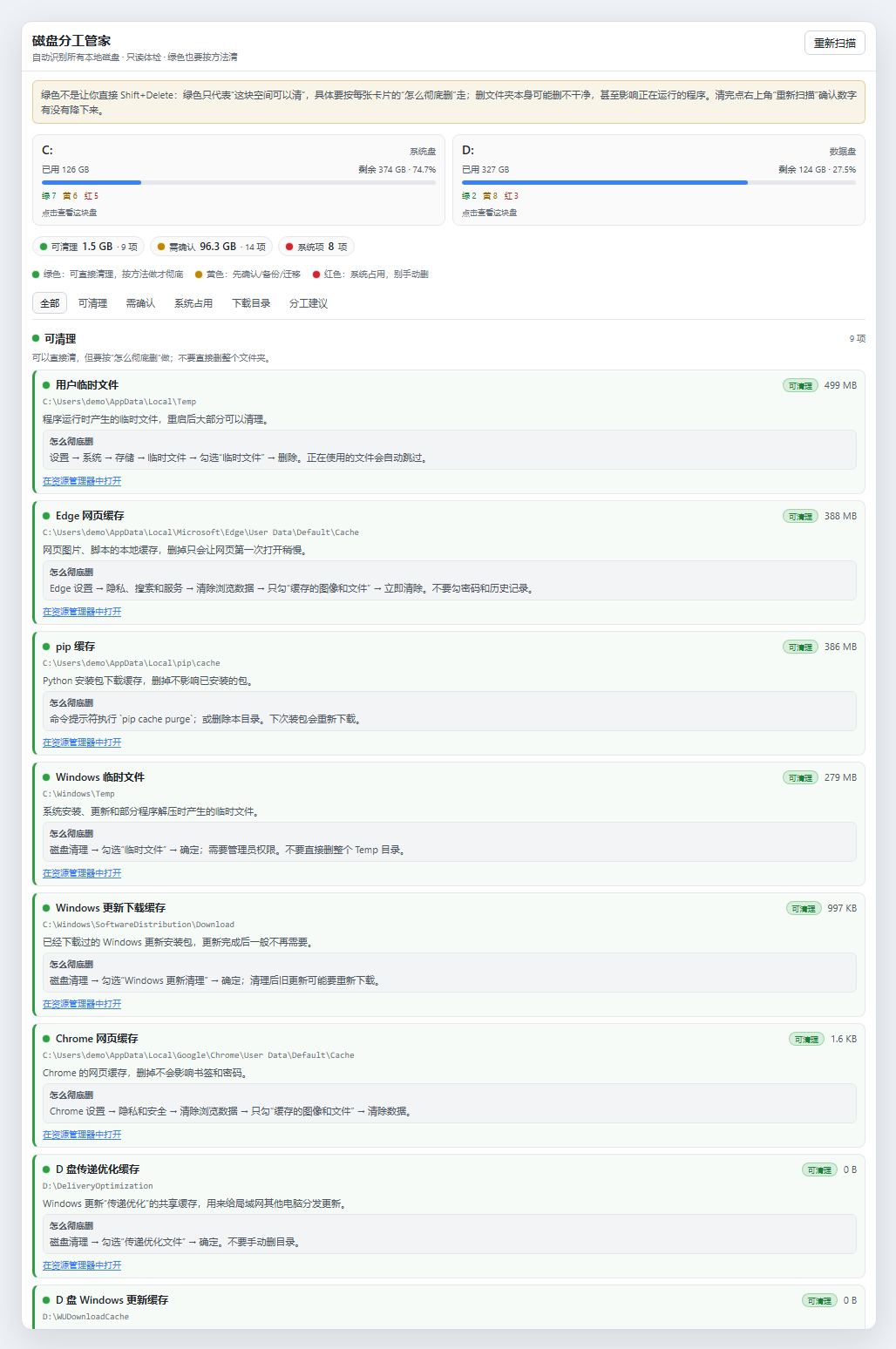
功能
- 自动识别多块盘:C、D、E、F…… 不需要配置盘符;左侧栏打开后自动扫描。
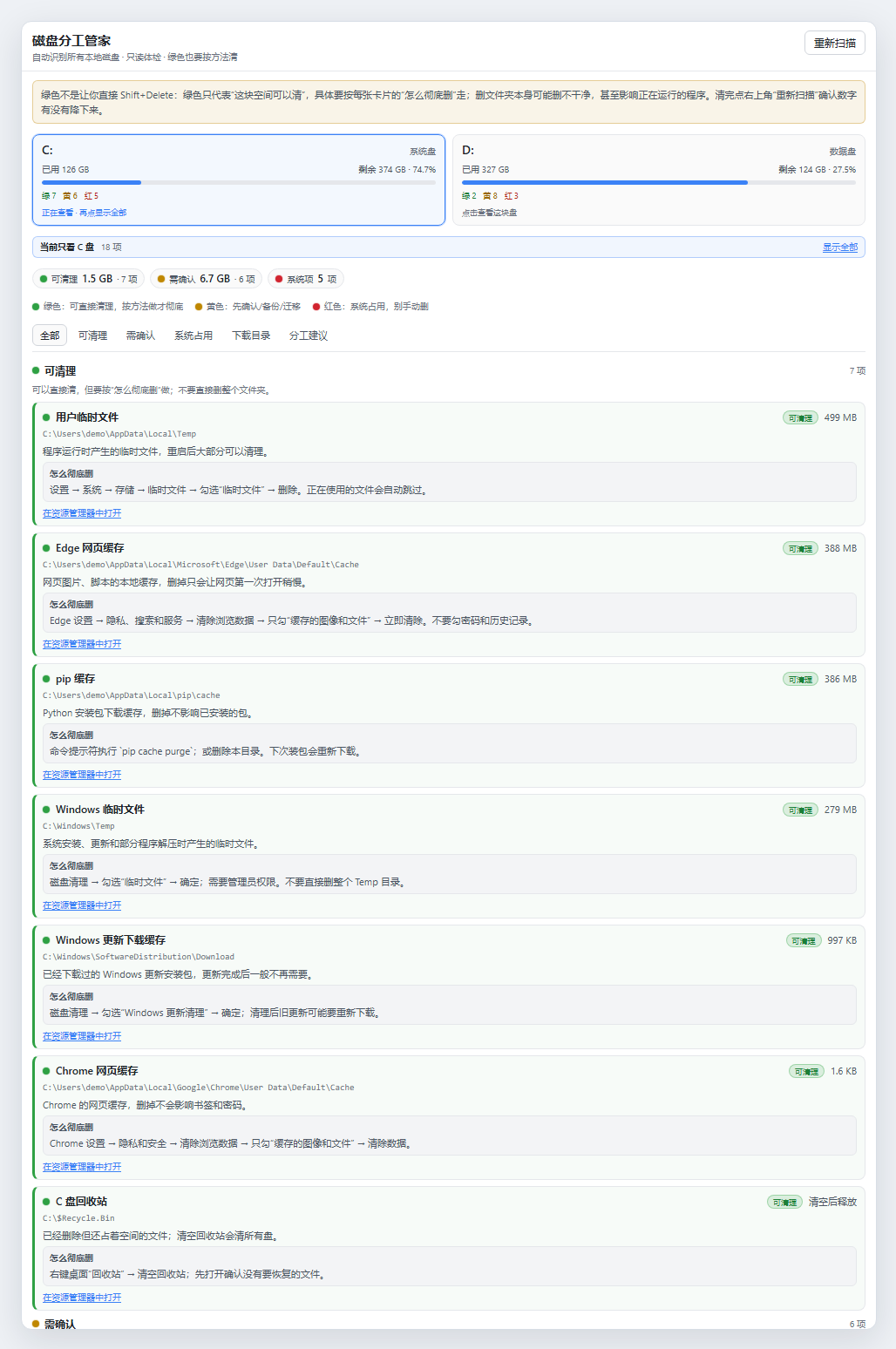
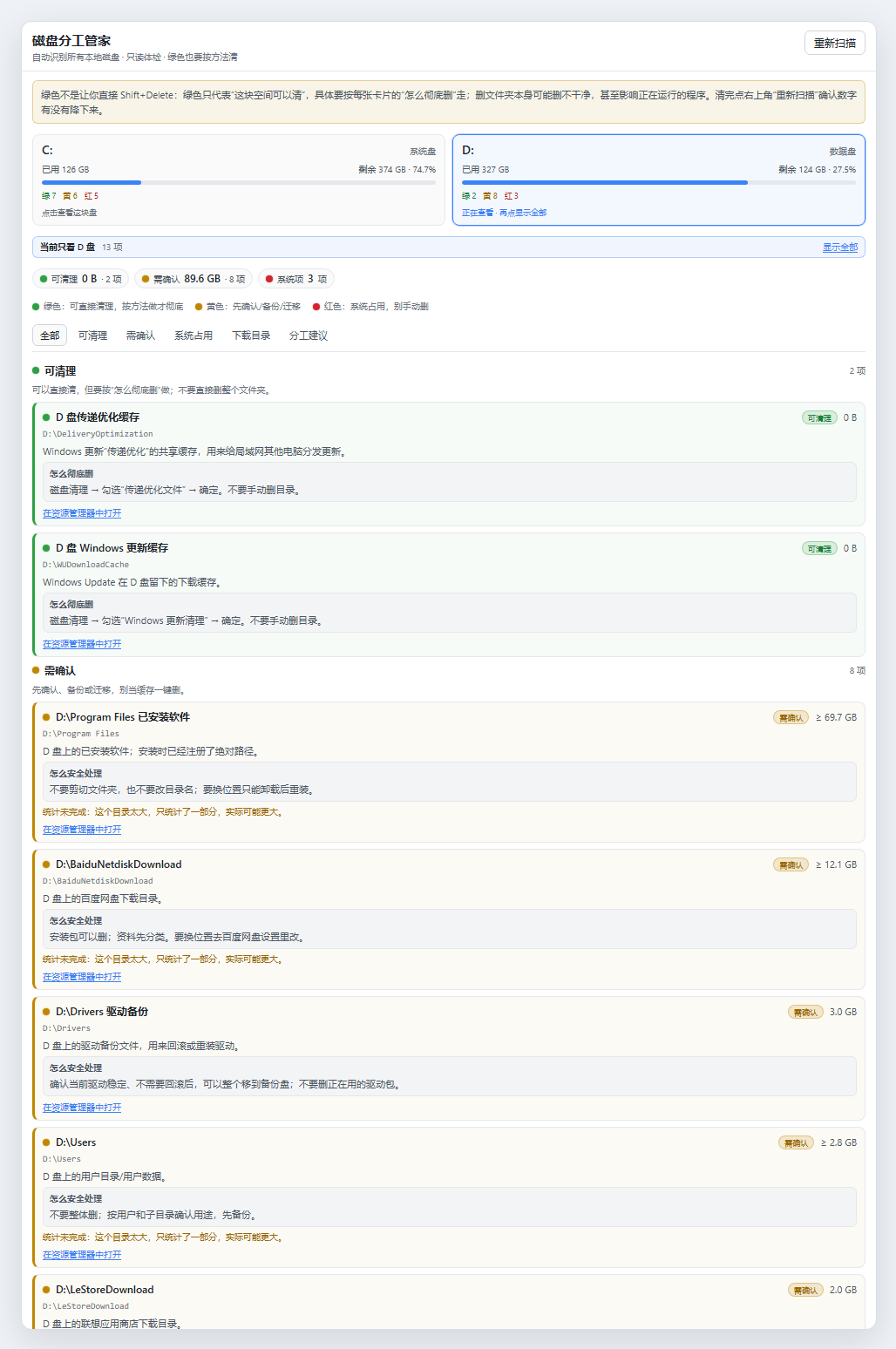
- 点击盘卡片过滤:点 C 只看 C,点 D 只看 D;再点一次或“显示全部”恢复。
- 绿 / 黄 / 红三色:
- 绿色:可以直接清理的缓存/临时文件,附“怎么彻底删”(磁盘清理、浏览器清缓存、
pip cache purge、清空回收站等)。 - 黄色:个人数据、已安装软件、聊天记录、项目文件、自定义目录;附“怎么安全处理”,提醒先备份/迁移/卸载重装。
- 红色:Windows、Program Files、ProgramData、还原点、商店应用、虚拟内存等系统占用;说明为什么不能手动删。
- 绿色:可以直接清理的缓存/临时文件,附“怎么彻底删”(磁盘清理、浏览器清缓存、
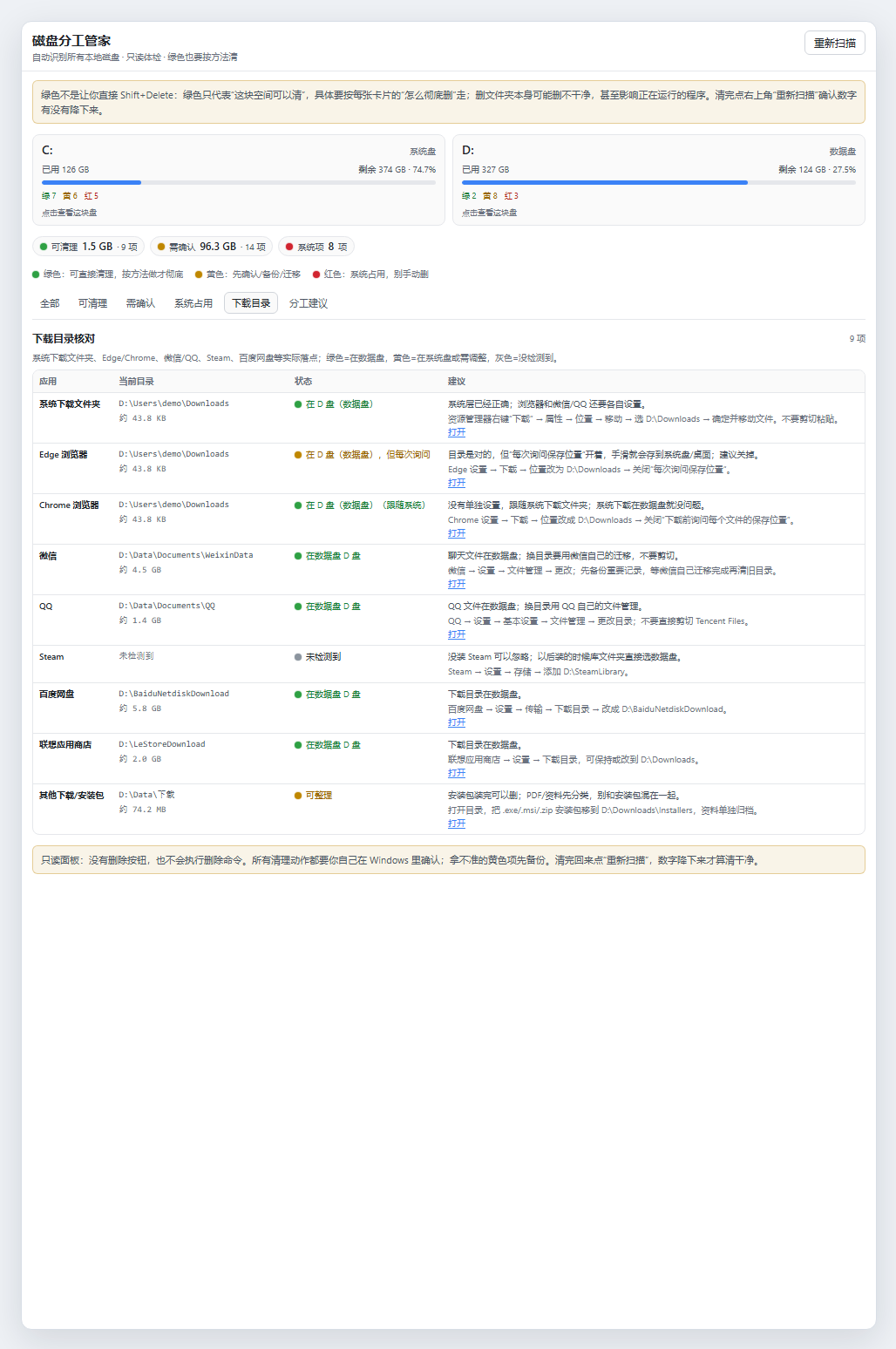
- 下载目录核对:系统下载文件夹、Edge、Chrome、微信、QQ、Steam、百度网盘、联想商店、其他安装包;绿色=在数据盘,黄色=在系统盘或需调整,灰色=没检测到。
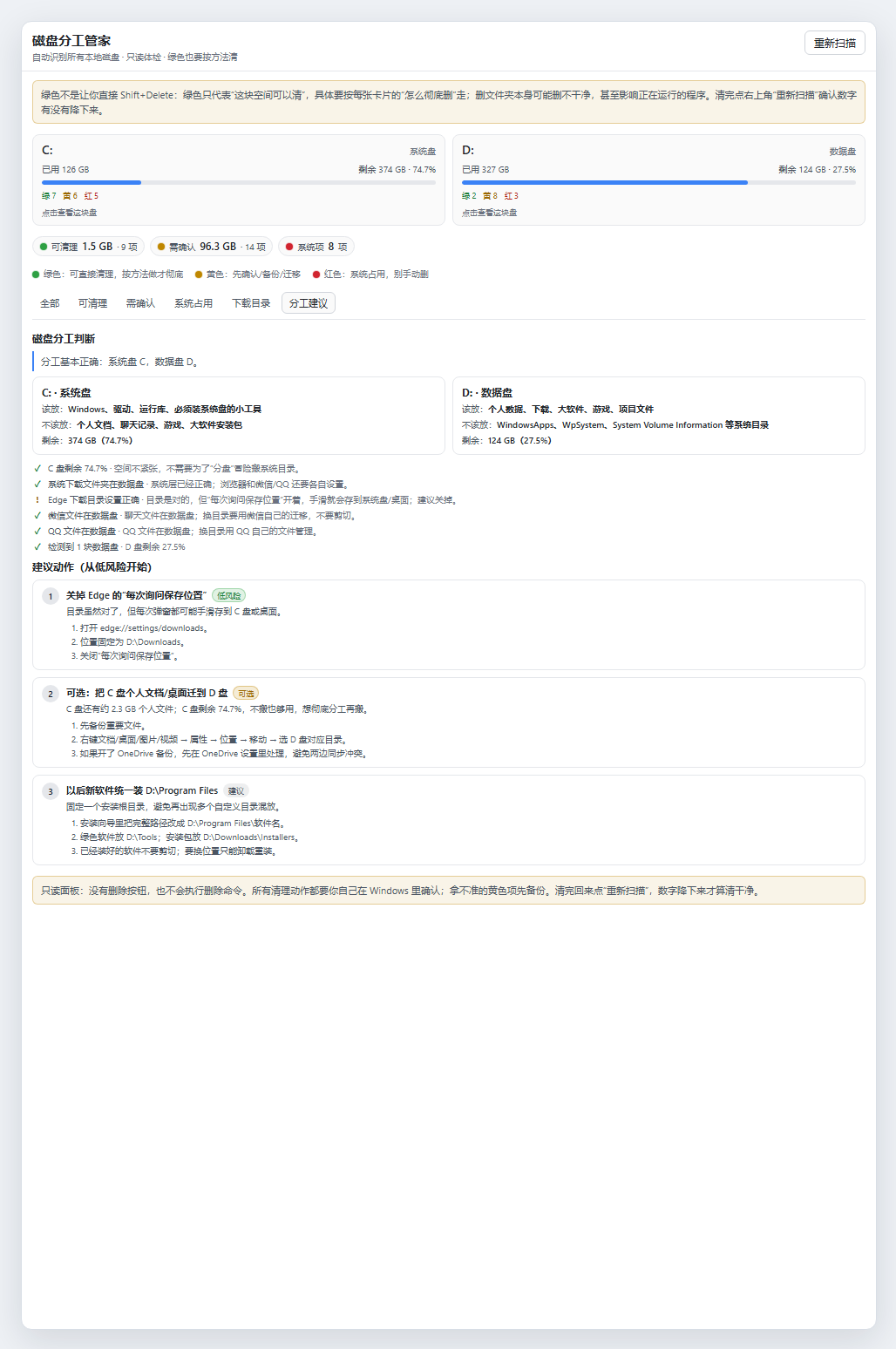
- 分工建议:系统盘/数据盘角色判断、检查项、按风险排序的迁移步骤。
- 自定义目录发现:每块数据盘顶层未识别的目录会标黄列出(不递归统计体积),方便发现
D:\Data、E:\Projects这类自定义目录。
多盘自动识别
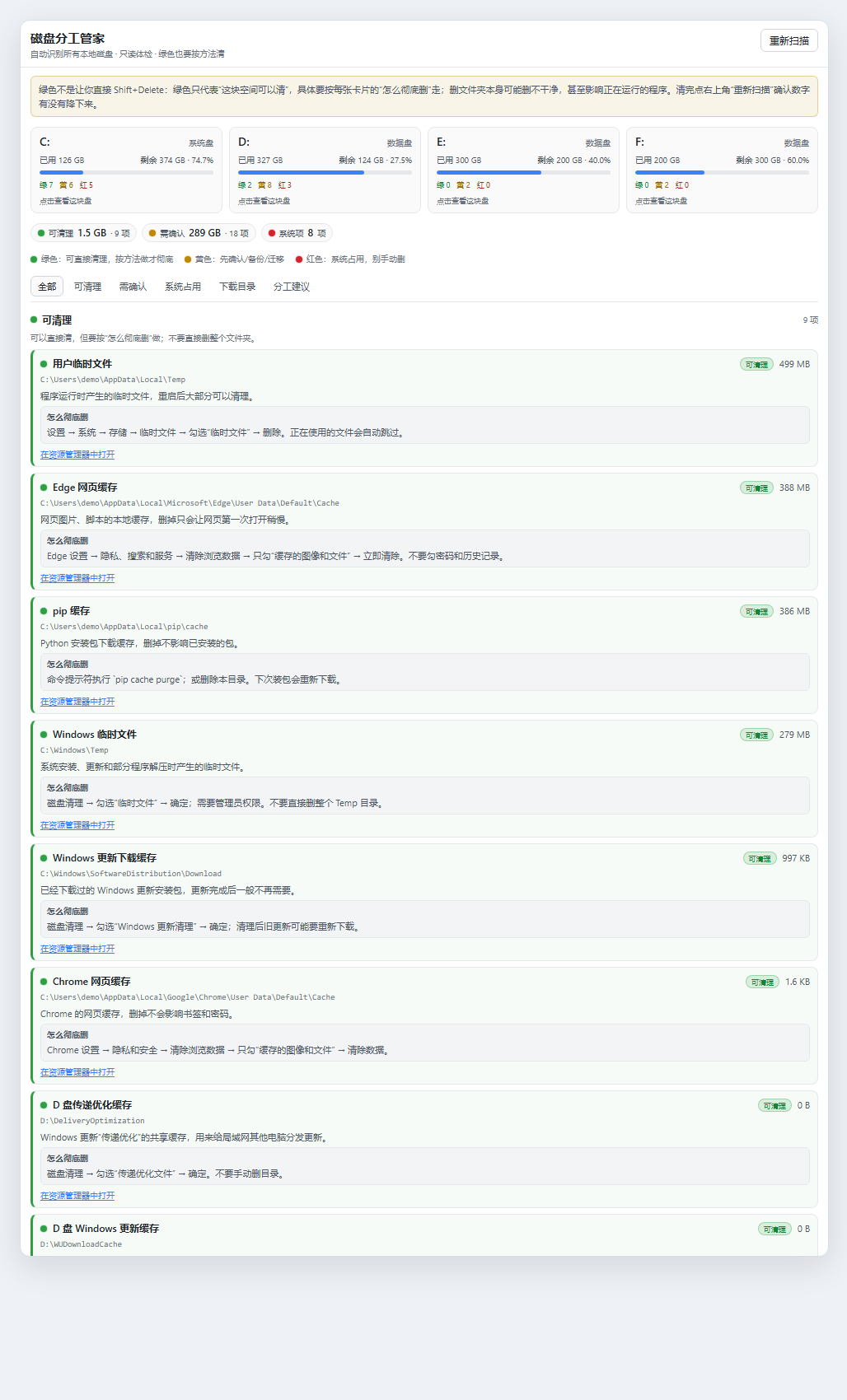
截图用 C/D/E/F 四块盘演示:每块盘都会有自己的容量卡和绿/黄/红计数,点卡片即可只看这一块盘。E/F 等盘不需要配置,接上就会被识别。
只看某一块盘
下载目录核对
分工建议
颜色含义
| 颜色 | 含义 | 面板里给什么 |
|---|---|---|
| 绿色 | 可以清理的缓存/临时文件 | “怎么彻底删”:系统/软件自带清理方式,避免只删一半 |
| 黄色 | 用户数据、已安装软件、聊天记录、项目文件 | “怎么安全处理”:备份、迁移、卸载重装 |
| 红色 | 系统/商店应用/还原点/虚拟内存 | “为什么不能删”:用系统工具或卸载器 |
安装
要求:Windows 10/11,DSH >= 0.2.1-rc.2。
从 GitHub 安装
dsh plugin --profile desktop add github:JKL-3484/dsh-drive-manager
如果 github: 解析不了,也可以用完整地址:
dsh plugin --profile desktop add https://github.com/JKL-3484/dsh-drive-manager
本地开发安装
git clone https://github.com/JKL-3484/dsh-drive-manager.git
dsh plugin --profile desktop add link:<仓库绝对路径>
安装/更新后完全退出 DSH(含托盘)再启动,左侧栏出现硬盘图标「磁盘分工管家」。
使用
- 点左侧栏硬盘图标。
- 第一次扫描约 10–20 秒(大目录会标
≥,表示只统计了一部分)。 - 点盘卡片过滤;点“在资源管理器中打开”跳转到对应目录。
- 按绿色卡片的“怎么彻底删”清理;清完点右上角“重新扫描”确认数字降下来。
安全边界
- 只读:没有删除接口,也不执行删除命令;只有“在资源管理器中打开”。
- 大目录按时间预算统计,显示
≥表示只算了一部分;Windows、WindowsApps、WpSystem、还原点等系统目录不统计。 - 自定义顶层目录只列名称、不递归统计体积,避免长时间扫盘。
- 清理动作需要用户自己在 Windows 里确认;黄色项请先备份。
数据来源
- 盘符/容量/卷标:
Get-CimInstance Win32_LogicalDisk(失败时回退fs.statfs) - 系统下载:
HKCU\...\User Shell Folders的{374DE290-...} - Edge/Chrome:
Preferences的download.default_directory/prompt_for_download - 微信/QQ:常见路径 + 数据盘浅层目录发现
- Steam:
HKCU\Software\Valve\Steam\SteamPath和libraryfolders.vdf - 百度网盘/联想商店:各盘常见下载目录
- 空间统计:Node
fs递归统计(带时间预算,跳过符号链接)
开发
# 语法检查
node --check plugin/index.js
node --check plugin/client.js

# 安装到 desktop profile(开发用 link)
dsh plugin --profile desktop add link:<仓库绝对路径>
面板接口:
GET /api/drive-manager/overviewPOST /api/drive-manager/scanPOST /api/drive-manager/reveal({ "path": "D:\\..." })
已知限制
- 仅 Windows。
- 首次扫描时间取决于磁盘数量和目录大小。
- 自定义目录不递归统计体积。
- 部分系统目录没有权限统计,会标“受系统保护,不统计”。
License
MIT
Comments
Loading…
Similar plugins
Windows system-drive (C:) cleanup for DSH: rule-based scan, five-tier safety grading, a staging area with a rollback ledger, UAC elevation, and migration to another drive — a model tool plus a Web GUI
★ 1
MIT
TypeScript
dsh plugin --profile web add dsh-windows-c-cleanupTo-do list in the session header: the button cycles through unfinished items and is tinted red, amber or green by due time, and the floating panel adds, edits and ticks off tasks with an optional dead
★ 0
dsh plugin --profile web add dsh-todoby Ananpng123
A Windows disk manager for the DeepSeek Harness right sidebar: volumes, folders, sizes, previews.
★ 0
MIT
JavaScript
Nov 2, 2026
dsh plugin --profile web add @ananyang/dsh-disk-managerWindows-native computer use for DeepSeek Harness: two tools drive and read any desktop app. One batch call runs find, click, type, key, read, wait and screenshot steps in a single engine pass, so a ta
★ 0
dsh plugin --profile web add dsh-win-computer-useby Very12345
Windows desktop control with window-bound screenshots and accessibility state, text readback, DSH approvals, and activity overlays.
★ 0
MIT
PowerShell
Oct 3, 2026
dsh plugin --profile web add @very12345/dsh-computer-use-windowsby Edge-Echo
Windows-native tools for DSH agents: clipboard read and write, system notifications, hosts file inspection and network diagnostics, each returning structured data with UI cards from injection-safe Pow
★ 4
↓ 165/wk
MIT
JavaScript
Oct 20, 2026
dsh plugin --profile web add dsh-win-toolkit