

dsh-win-toolkit
Manifest valid★ 4Windows-native tools for DSH agents: clipboard read and write, system notifications, hosts file inspection and network diagnostics, each returning structured data with UI cards from injection-safe Pow
dsh-win-toolkit
Part of the dsh-toolkit family: dsh-mcp-bridge · dsh-win-toolkit · dsh-netassist · dsh-driftwatch


Windows-native capability pack for DeepSeek Harness (dsh).
Gives your dsh agent real Windows superpowers — clipboard, system notifications, hosts file inspection, and network diagnostics — backed by safe, parameterized PowerShell. No extra installs, no admin rights required for the current toolset.
中文文档见 README.zh.md。
Check your environment first
dsh-win-toolkit doctor
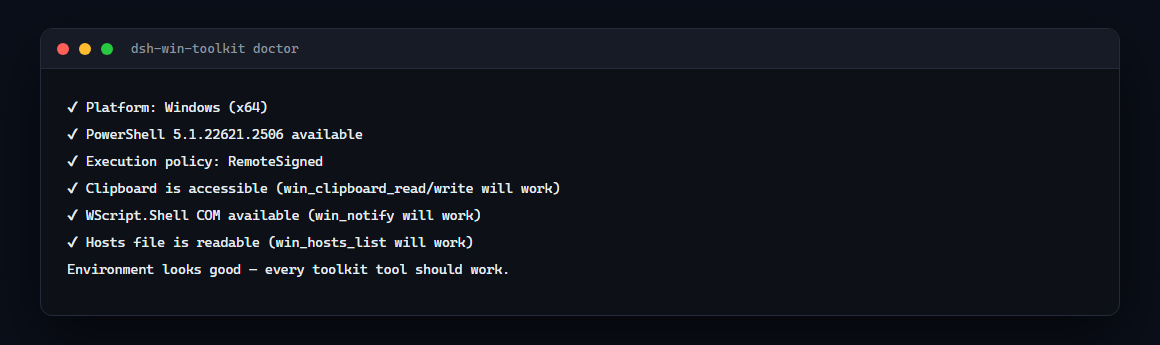
It verifies the platform, PowerShell, execution policy, clipboard access, WScript.Shell COM and hosts readability — everything the tools rely on.
Requirements
| OS | Windows 10 or 11 — the tools call powershell.exe |
| PowerShell | 5.1+ (the default on Windows 10/11); PowerShell 7 works as well but is not required |
| Privileges | none for the current tools — everything is read-only except clipboard write and the notification popup |
| Node | 22+ (for the plugin host) |
Run dsh-win-toolkit doctor to verify all of the above on your machine before blaming the plugin.
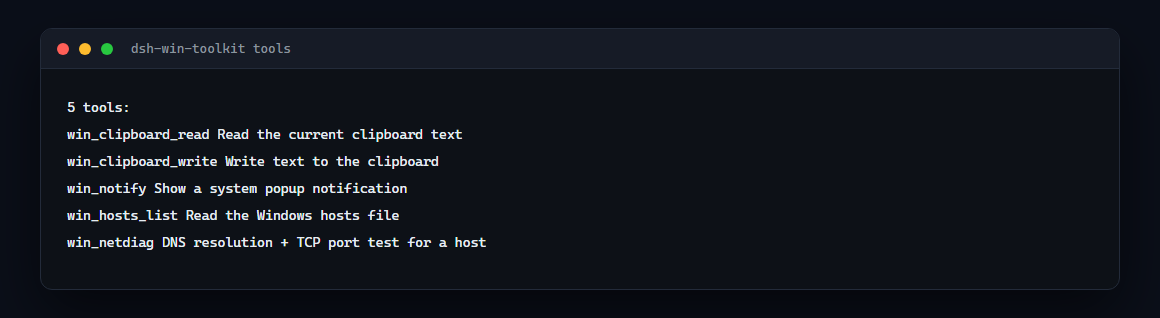
Tools
| Tool | What it does |
|---|---|
win_clipboard_read | Read the current clipboard text |
win_clipboard_write | Write text to the clipboard |
win_notify | Show a system popup notification (auto-closes) |
win_hosts_list | Read the Windows hosts file |
win_netdiag | DNS resolution + TCP port test for any host |
Install
dsh plugin --profile web add dsh-win-toolkit
dsh web   # restart
Then just ask your agent, e.g.:
- "check if github.com:443 is reachable" →
win_netdiag - "put this text on my clipboard" →
win_clipboard_write - "notify me when you're done" →
win_notify
How it works
Every tool runs a short PowerShell snippet through powershell.exe -NoProfile -NonInteractive. All user input crosses the script boundary as Base64 — never string-interpolated — so argument injection is structurally impossible.
- Config:
psTimeoutMs(default 20000) — per-call PowerShell timeout, settable in your profile'scordis.patch.ymlunder thewin-toolkitentry. - Windows-only: tools fail loudly with a clear error on non-Windows platforms (the entry itself is a no-op there).
Roadmap
win_hosts_edit(admin-gated hosts entries),win_env,win_service,win_window,win_task,win_netdiagdeep mode (proxy check, DNS server, traceroute).
Troubleshooting
- Tools fail with "PowerShell failed": usually an anti-virus or execution-policy quirk — the plugin uses
-NoProfile -NonInteractivebut policy still applies. CheckGet-ExecutionPolicy; the plugin does not require RemoteSigned. - Want to see exactly what runs? The PowerShell snippets are short and readable in
src/index.ts.
Links
- npm: https://www.npmjs.com/package/dsh-win-toolkit
- GitHub: https://github.com/Edge-Echo/dsh-win-toolkit
- License: MIT
Compatibility
Versions
| Latest version | Published | Size |
|---|---|---|
| 0.1.0 | — | — |
| 0.1.1 | — | — |
| 0.1.2 | — | — |
| 0.1.3 | — | — |
Comments
Loading…
Similar plugins
Windows-native computer use for DeepSeek Harness: two tools drive and read any desktop app. One batch call runs find, click, type, key, read, wait and screenshot steps in a single engine pass, so a ta
★ 0
dsh plugin --profile web add dsh-win-computer-useby gezi-wen
Windows desktop-control tools for DeepSeek Harness (DSH): screen layout, annotated screenshots, click / type / key / scroll, window management, and UI Automation structured queries. Zero dependencies, no resident service, no API key.
★ 2
Apache-2.0
JavaScript
Oct 13, 2026
dsh plugin --profile web add dsh-guikitby ltmroberthk915
Windows Computer Use for DeepSeek Harness with screenshots, UI Automation, 18 desktop tools, per-Agent activation, human-input handoff, approval prompts and prebuilt native workers.
★ 5
↓ 2.7k/wk
MIT
JavaScript
Oct 19, 2026
dsh plugin --profile web add dsh-codex-style-computer-useby zhang-tod
Windows native toast notifications plugin for DeepSeek Harness (DSH): agent turn done, subagent done, background job done - click to open the Web UI.
★ 1
MIT
JavaScript
Oct 7, 2026
dsh plugin --profile web add @zhang-tod/dsh-win-notifyby gezi-wen
Windows desktop-control tools for DeepSeek Harness (DSH): screen layout, annotated screenshots, click / type / key / scroll, window management, and UI Automation structured queries. Zero dependencies,
★ 0
MIT
JavaScript
Sep 24, 2026
dsh plugin --profile web add sage-guikitby 528085390
DSH 插件|每个回合结束弹一条 Windows 原生通知,开关在设置页 · Native Windows toasts for DeepSeek Harness, with a switch in Settings
★ 0
MIT
JavaScript
Oct 20, 2026
dsh plugin --profile web add dsh-windows-notify