

DeepVibe-dsh
Identified★ 2DeepVibe-dsh - live light-ring DSH plugin with immersive dock, approval card, real Platform billing and session topic
DeepVibe-dsh
Deep-ambience coding plugin for DeepSeek Harness
DeepSeek Harness 的深度氛围感编程插件
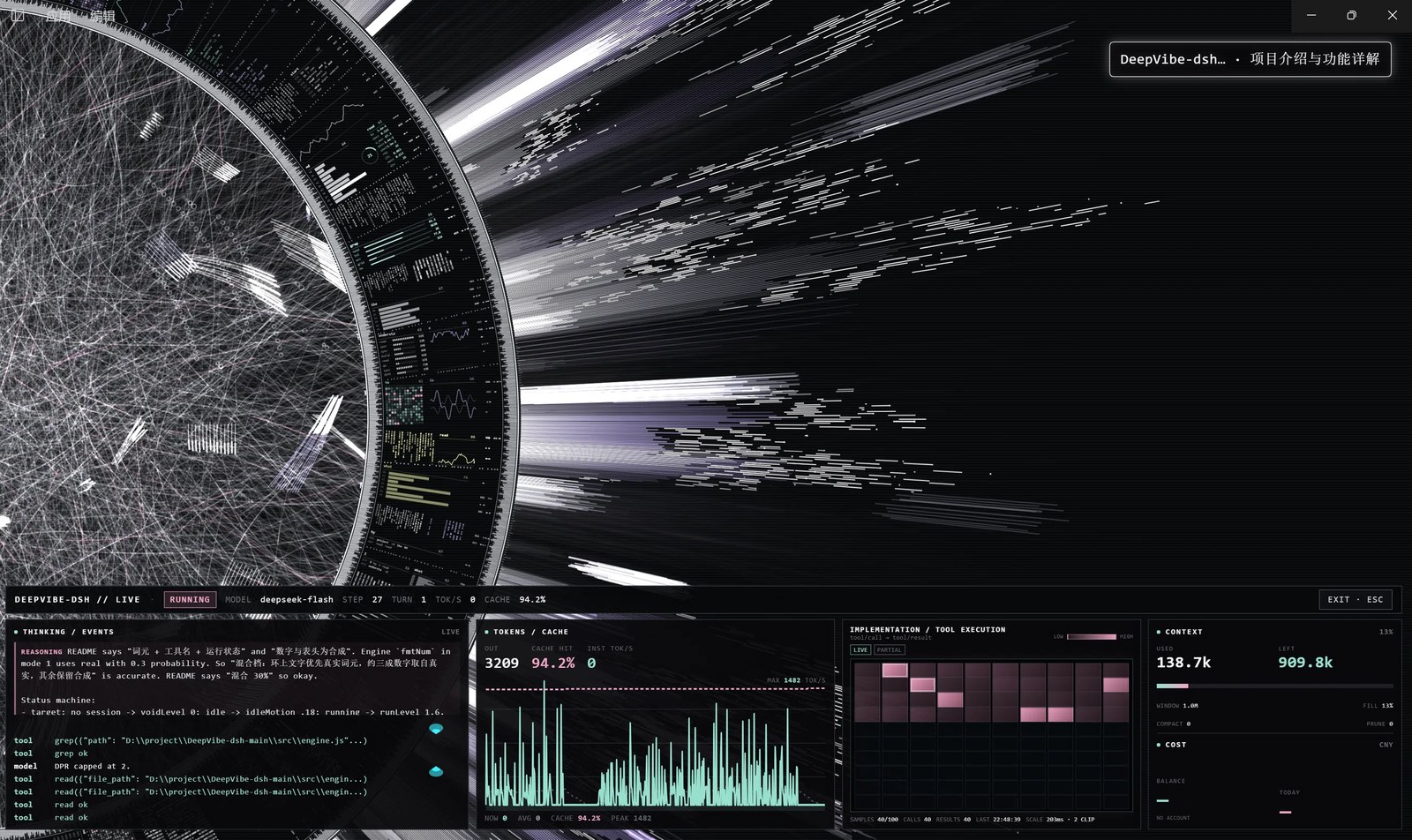
Actual runtime · 实机运行:immersion ring, session topic, and four live dock cards.
Overview · 概览
English
DeepVibe-dsh is not a wallpaper that gets in the way. It is a session-aware ambience layer for DeepSeek Harness: when the model starts working the ring wakes up, tokens flow as light, finished tools light up a 10×10 heatmap, and the whole frame settles when the task ends.
中文
DeepVibe-dsh 不是一个会抢戏的壁纸,而是一层会读会话的深度氛围感编程插件。模型开工,光环醒来;词元流出,光点聚散;工具执行,热力图逐格亮起;任务收尾,整个画面慢慢安静。
Why it feels different · 为什么它不一样
English
- It breathes, but does not shout. Running, idle, approval and question states each have their own rhythm.
- Data is not decoration. Every light, heatmap cell and cost can be traced back to a session event or the Platform bill.
- One plugin, not a pile of scripts. Host and Client ship together; there is no Chrome, CDP, Playwright or local bridge to keep alive.
中文
- 会呼吸,但不吵。 运行、空闲、审批、提问各有节奏;该亮的时候亮,该停的时候停。
- 数据不是装饰。 每一次亮起、每一格热力图、每一笔花费,都能在会话或平台账单里找到出处。
- 一个插件,不是一堆脚本。 Host + Client 打包在同一个插件里,装好即用,不额外拉起浏览器或本地服务。
Architecture · 架构
English
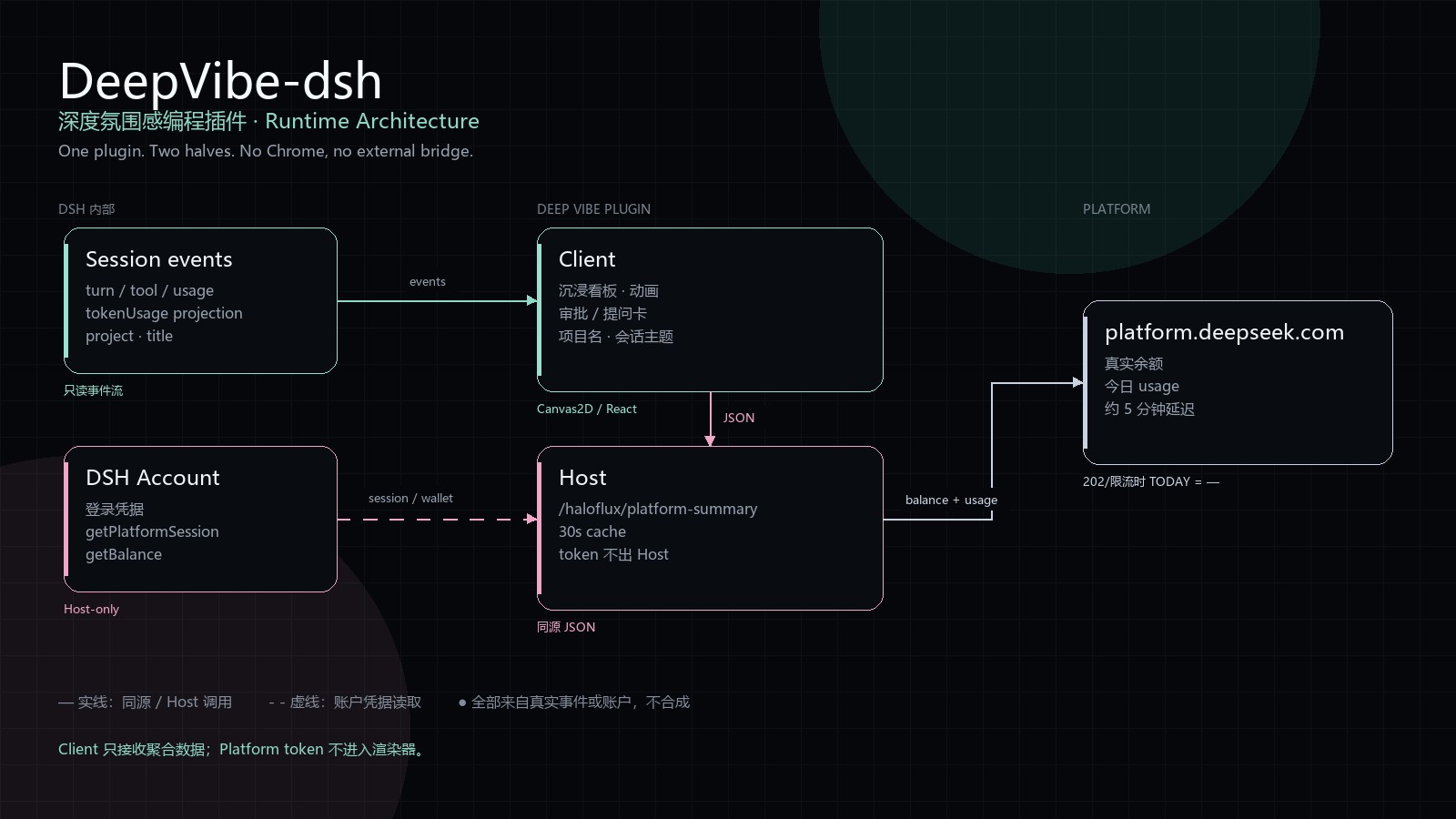
- Client consumes DSH session events and owns the ring, immersive dock, approval/question cards and session topic.
- Host uses the Host-only DSH account session to read Platform balance and today's usage; it sends only aggregate JSON to the Client.
- No external browser. Platform tokens never reach the renderer.
中文
- Client:消费 DSH 会话事件,负责光环、沉浸看板、审批/提问卡与会话主题。
- Host:用 DSH 账户的 Host-only 凭据读取平台余额与今日 usage,只把聚合 JSON 交给 Client。
- 没有外部浏览器。 平台 token 不进入渲染器。
Features · 功能
English
- Full-frame Canvas overlay mounted in
shell.overlay: transparent, additive light, click-through. - Session-driven ring: tokens, tool calls,
turn/step, tok/s and context all come from the live event stream. - Immersive dock with four real cards: model, context/cost, 10×10 tool heatmap, balance/today spend.
- Approval card: reject or allow once without leaving immersion.
- Question card: options, multi-select, free-form supplement, reject, submit.
- Cache hit from DSH's
tokenUsageprojection, whole-session denominator, one decimal. - Session topic:
project · session title, each capped at 12 characters. - 82 parameters, 6 groups, 3 presets. Everything is editable from Settings → DeepVibe-dsh.
中文
- 全帧 Canvas 背景,挂载在
shell.overlay:透明底、加色发光、点击穿透。 - 会话驱动:词元、工具调用、
turn/step、tok/s、上下文全部来自真实事件流。 - 沉浸看板四块真实数据卡:模型、上下文/花费、10×10 工具热力图、余额/今日消费。
- 审批卡:不用退出沉浸,直接「拒绝 / 允许一次」。
- 提问卡:选项、多选、补充输入、拒绝、提交。
- 缓存命中使用 DSH
tokenUsage投影,整个会话口径,固定一位小数。 - 会话主题:
项目名 · 会话标题,两部分各最多 12 个字。 - 82 个参数、6 个分组、3 个预设,都可在 设置 → DeepVibe-dsh 中调整。
Install · 安装
English
DeepSeek Harness is required (desktop app or dsh web).
From npm:
dsh plugin --profile web add deepvibe-dsh
From an extracted package directory:
plugin_manager install_bundle target=<absolute path to this package>
From the release tgz:
tar -xzf DeepVibe-dsh-0.5.18.tgz
plugin_manager install_bundle target=<absolute path to the extracted package directory>
Restart DSH and open Settings → DeepVibe-dsh.
中文
需要先安装 DeepSeek Harness(桌面版或 dsh web)。
从 npm 安装:
dsh plugin --profile web add deepvibe-dsh
从解压后的包目录安装:
plugin_manager install_bundle target=<本包目录的绝对路径>
从 Release tgz 安装:
tar -xzf DeepVibe-dsh-0.5.18.tgz
plugin_manager install_bundle target=<解压出的 package 目录绝对路径>
刷新页面,侧栏出现 设置 → DeepVibe-dsh 即成功。
Find it in DSH · 在 DSH 中找到
English
DSH does not ship a built-in index source. Discover is a custom plugin market: users add an index URL, then search inside it.
This repository provides an index:
https://raw.githubusercontent.com/HSYrc/DeepVibe-dsh/main/market/index.json
- Open Plugins → Experimental plugins → More, enable Custom plugin market.
- Open Discover → Add index source.
- Paste the URL above.
- Search
DeepVibe-dsh, check the source, then install.
The index now points to the npm package, so installs use deepvibe-dsh@0.5.18.
中文
DSH 官方不内置任何索引源,Discover 是一个可添加索引 URL 的自定义插件市场。
本仓库提供一个可直接添加的索引:
https://raw.githubusercontent.com/HSYrc/DeepVibe-dsh/main/market/index.json
- 打开 插件 → 实验性插件 → 更多,启用 自定义插件市场。
- 进入 发现 → 添加索引源。
- 粘贴上面的 URL。
- 搜索
DeepVibe-dsh,确认来源后安装。
索引已指向 npm 包,安装的是 deepvibe-dsh@0.5.18。
Community listing · 社区收录:仓库已添加
dsh-plugintopic,并提交到 DSH Plugin Hub。Hub is community-run, not an official DeepSeek catalog.
社区市场由 dsh-plugin.org 维护,不是 DeepSeek 官方目录。DeepSeek 官方内置目录没有公开自助上架入口。
Usage · 使用
English
Shortcuts work when focus is not inside an input:
| Key | Action |
|---|---|
C | Open/close the quick parameter console |
H | Toggle the HUD |
I | Enter/exit immersive mode |
Esc | Close the overlay / exit immersion |
When a run starts, the immersive dock rises automatically. Esc or EXIT · ESC leaves immersion without stopping the task; while it is still running, the bottom-right ENTER button brings it back.
中文
焦点不在输入框内时,快捷键可用:
| 按键 | 作用 |
|---|---|
C | 打开/关闭快速调参浮层 |
H | 打开/关闭 HUD |
I | 进入/退出沉浸模式 |
Esc | 关闭浮层 / 退出沉浸 |
模型开始运行后,沉浸看板自动升起。Esc 或 EXIT · ESC 只会退出沉浸,不会中断任务;任务仍在运行时,右下角 ENTER 可以重新进入。
Approval & questions · 审批与提问
English
In immersive mode, an approval request appears as a card on the right: Reject or Allow once. The card drives DSH's native approval panel, so there is only one decision path.
Model questions use the same surface: options, optional multi-select, a free-form field, Reject, and Submit. Submitting drives the native question waterfall, not a second answer path.
While either card is waiting, motion and particle generation ease to a stop; brightness stays at the running level.
中文
沉浸模式下,审批请求会显示在右侧卡片:拒绝 或 允许一次。卡片直接驱动 DSH 原生审批面板,只有一条决策路径。
模型提问使用同一套界面:选项、可选多选、补充输入、拒绝、提交。提交直接驱动原生提问 waterfall,不另开回答路径。
等待审批或回答期间,动画运动和粒子生成会逐渐停止,亮度保持在运行态。
Data modes · 数据档位
English
| Mode | Name | Ring text and numbers | Session reading |
|---|---|---|---|
| 0 | Animation only | sample words / synthetic numbers | tokens skipped; brightness still follows running/idle |
| 1 | Mixed 30% (default) | real tokens when available; synthetic headers | tokens + tool names + running state |
| 2 | Full capture | only real tokens, tools, STEP / TURN, tok/s, context; blank when unknown | full |
dataMode only affects text and numbers on the canvas. The H HUD is always a real session monitor.
中文
| 档 | 名称 | 光环上的文字与数字 | 会话读取 |
|---|---|---|---|
| 0 | 纯动画 | 原作示例词表 / 合成数字 | 不抓词元;亮度仍随运行/静默变化 |
| 1 | 混合 30%(默认) | 有词元时用真实回答,表头仍为合成 | 词元 + 工具名 + 运行状态 |
| 2 | 完全抓取 | 只显示真实词元、工具、STEP / TURN、tok/s、上下文;没有就留空 | 全部 |
dataMode 只约束画布上的文字与数字;H 打开的 HUD 始终是真实会话监视器。
Readings · 关键读数
English
The dock separates what each number means:
- OUT: output tokens from the current stream.
- CACHE HIT:
cacheRead / (uncachedInput + cacheRead + cacheWrite)over the whole session, one decimal; the top header, card and chart use the same value. - INST TOK/S: tokens arriving in the last 50 ms slice.
- CONTEXT: used / left, window size, fill %, compactions and prunes.
- BALANCE / TODAY: Platform wallet and actual billed spend for the local day.
中文
看板会区分每个数字的含义:
- OUT:当前流里的输出词元。
- CACHE HIT:整个会话的
cacheRead / (uncachedInput + cacheRead + cacheWrite),一位小数;顶部 CACHE、卡片和折线图共用同一个值。 - INST TOK/S:最近 50 ms 切片内到达的词元速率。
- CONTEXT:已用 / 剩余、窗口大小、占用百分比、压缩与 prune 次数。
- BALANCE / TODAY:平台钱包余额与本地今天实际账单。
Platform billing · 平台账单
English
BALANCE and TODAY are read by the Host through the DSH account's Host-only Platform session. The client receives only aggregates.
- Polling is 30 seconds; Platform data itself may lag about 5 minutes.
BALANCEprefers the DSH account'sgetBalance.- If Platform usage is unavailable (for example a 202/rate limit),
TODAYshows—. It never falls back to a made-up estimate. - A DSH account login is required. API-key-only mode has no wallet balance.
中文
BALANCE / TODAY 由 Host 通过 DSH 账户的 Host-only Platform session 读取,客户端只拿到聚合值。
- 轮询间隔 30 秒;平台数据本身可能有约 5 分钟延迟。
BALANCE优先使用 DSH 账户的getBalance。- 平台 usage 不可用(例如 202/限流)时,
TODAY显示—,不会回退到编造的估算。 - 需要 DSH 账户登录;纯 API Key 模式没有钱包余额。
Data provenance · 数据来源
English
Everything is read-only and derived from the current session:
ctx.sessions.binding(sessionId)→eventSource- transient
assistant/live-chunk→ streaming tokens - durable
turn/step,user/message,assistant/message,tool/call,tool/result useSessions/useSessionStatus→ current session and running state- DSH
tokenUsageprojection → whole-session cache hit - Host route
GET /haloflux/platform-summary→ Platform aggregates
No session log is written; bindings, timers and subscriptions are released on switch/dispose.
中文
所有数据都是只读的,来自当前会话:
ctx.sessions.binding(sessionId)→eventSource- transient
assistant/live-chunk→ 流式词元 - durable
turn/step、user/message、assistant/message、tool/call、tool/result useSessions/useSessionStatus→ 当前会话与运行状态- DSH
tokenUsage投影 → 整个会话缓存命中率 - Host 路由
GET /haloflux/platform-summary→ 平台聚合数据
不写会话日志;切换会话或销毁时会释放绑定、定时器和订阅。
Settings · 设置
English
Open Settings → DeepVibe-dsh. There are 82 parameters in 6 groups: original 56 (Global 5 / Ring 7 / Inner 18 / Outer 17 / Depth 9) plus 26 plugin parameters.
Useful defaults:
opacity       0.55   idle canvas opacity
runOpacity    1.00   immersive running opacity
readOpacity   0.22   running but outside immersion
runLevel      1.60   running intensity
idleMotion    0.18   idle motion
dataMode      1      mixed
attackMs      800    attack
releaseMs     2600   release
Three presets are included; Save as default writes to localStorage, so settings survive restarts.
中文
打开 设置 → DeepVibe-dsh。共 82 个参数、6 个分组:原作 56 项(全局 5 / 圆环 7 / 圈内 18 / 环外 17 / 空间层次 9),加上 26 个插件参数。
常用默认值:
opacity       0.55   空闲不透明度
runOpacity    1.00   沉浸运行不透明度
readOpacity   0.22   运行但退出沉浸时
runLevel      1.60   运行强度
idleMotion    0.18   静默态运动
dataMode      1      混合
attackMs      800    起势
releaseMs     2600   收势
内置 3 个预设;保存为默认写入 localStorage,跨重启保留。
Build & test · 构建与测试
English
The source is split into plain fragments and assembled into one browser artifact:
node build.mjs
node --check client.js
Headless tests (no browser, no files outside the package):
node tools/engine-smoke.cjs
node tools/live-selftest.mjs
node tools/client-smoke.cjs
node tools/dock-smoke.cjs
node tools/session-switch.cjs
After changing src/, rebuild and reinstall (or restart Host) before refreshing the page.
中文
源码按片段组织,最终拼成一个浏览器产物:
node build.mjs
node --check client.js
无头测试(不需要浏览器,也不依赖包外文件):
node tools/engine-smoke.cjs
node tools/live-selftest.mjs
node tools/client-smoke.cjs
node tools/dock-smoke.cjs
node tools/session-switch.cjs
改完 src/ 后需要重新构建并重装(或重启 Host),再刷新页面。
Compatibility · 兼容性
English
Tested on DeepSeek Harness 0.2.1-rc.5 (Windows desktop). It relies on the host contracts shell.overlay / settings.section, useSessions / useSessionStatus, and sessions.binding() → eventSource. A major DSH upgrade may change these; if the overlay disappears after an upgrade, check those contracts first.
中文
实测于 DeepSeek Harness 0.2.1-rc.5(Windows 桌面版)。依赖宿主约定:shell.overlay / settings.section 槽位、useSessions / useSessionStatus、sessions.binding() 的 eventSource。DSH 大版本升级后若背景消失,先排查这些接口。
License & credits · 许可与致谢
English
This port is released under PolyForm Noncommercial License 1.0.0: free for personal, noncommercial use; commercial use is not permitted. Keep LICENSE and NOTICE when redistributing or modifying.
Original HALOFLUX: Copyright (c) 2026 Ryder191 (RYDER CODE / Ms MAIKEBAIs CAT), https://github.com/Ryder191/haloflux, PolyForm Noncommercial License 1.0.0.
中文
本项目使用 PolyForm Noncommercial License 1.0.0:仅限个人非商业使用,禁止商业使用。再分发或修改时请保留 LICENSE 与 NOTICE。
原作 HALOFLUX:Copyright (c) 2026 Ryder191(RYDER CODE / Ms MAIKEBAIs CAT),https://github.com/Ryder191/haloflux,PolyForm Noncommercial License 1.0.0。
If DeepVibe-dsh helps your workflow, a ⭐ on GitHub is appreciated.
如果它让你的工作流更舒服,欢迎在 GitHub 点一个 ⭐。
Comments
Loading…
From the same category
by awesome-dsh-plugin
A curated list of plugins for DeepSeek Harness (dsh) · DeepSeek Harness 插件精选列表
★ 22.2k
CC0-1.0
Python
Nov 3, 2026
by 0xsline
DeepSeek Harness (DSH) ecosystem: curated plugins, tools, and infrastructure from dsh-external/hub and the public dsh-plugin topic.
★ 1.3k
CC0-1.0
Python
Oct 16, 2026
by Yuuyuko-uu
DSH 鱼的记忆:给会话一份会淡忘的长期记忆,每条都带时间
★ 464
MIT
JavaScript
Nov 3, 2026
dsh plugin --profile web add dsh-fish-memoryby uumit-ai
Open dsh web from your phone or another computer through a UUMit account, without running your own server or installing another program: a built-in tunnel client connects to UUMit's hosted tunnel, and
★ 454
↓ 268/wk
MIT
JavaScript
Oct 21, 2026
dsh plugin --profile web add @uumit-ai/dsh-uumit-remoteby SAOS-3624
Scene-aware storyboard for DeepSeek Harness: 9-16 numbered cells with timestamps + transcript + an audio envelope, packed into ONE image (384 tokens). Two tools: video_storyboard and video_zoom.
★ 419
↓ 17k/wk
MIT
JavaScript
Nov 3, 2026
dsh plugin --profile web add dsh-video-storyboardby xiajiajun516
DeepSeek Harness (DSH) backup & restore plugin — export, import, migrate and sync your complete DSH configuration, plugins, MCP servers, skills and workspace. One-click migration to another machine.
★ 292
↓ 8.8k/wk
MIT
TypeScript
Nov 2, 2026
dsh plugin --profile web add dsh-config-manager