

dsh-skill-stats
Manifest validSkill usage statistics panel for DeepSeek Harness: every installed skill with its use count, session coverage, and share of all skill use.
dsh-skill-stats



Which skills are actually being used — and which ones you installed and forgot. A left-sidebar panel for DeepSeek Harness that lists every installed skill with its use count, the number of conversations it appeared in, and its share of all skill use.
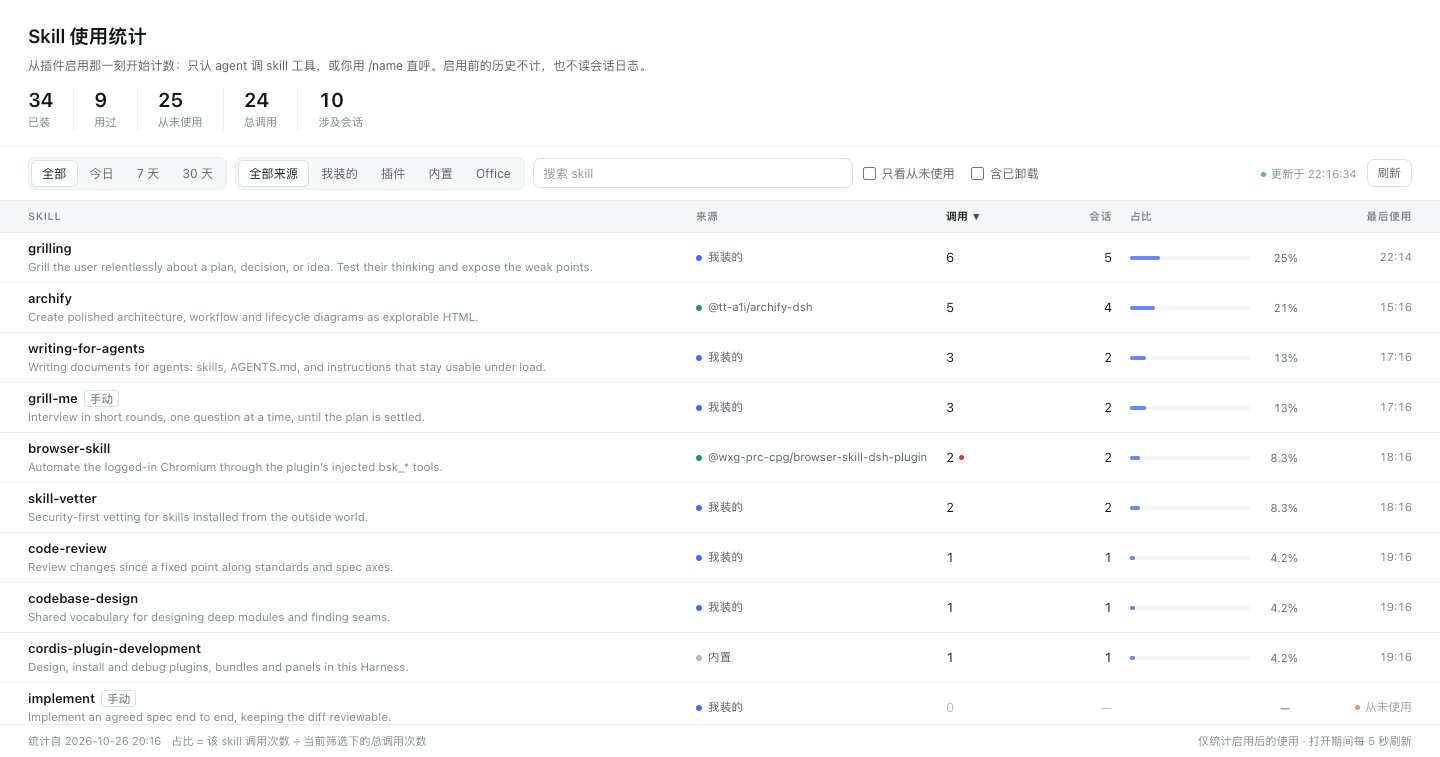
Screenshots use sample data; the panel reads its own counter file — never a session log.
Why
Harness shows you which skills exist. It does not show you which skills you use. Two consequences:
- A skill you installed months ago and never touched looks exactly like your most-loaded one.
- A skill you rely on constantly has no evidence you can point at.
This panel answers both with the smallest honest dataset: the two moments where a skill is really used.
What counts as one use
Counting starts the first moment the plugin is enabled, and no session log is ever read. One user request (a turn) counts at most one use of a given skill, whichever of these signals appears in it:
- the agent loads the skill (
skilltool); - you invoke it as
/name; - you name it again in a later turn, provided it was already loaded earlier in this session —
code-review,code review,codereviewandCodeReviewall match.
Everything else is ignored: a skill merely listed in the prompt, an agent reading a SKILL.md, or opening the panel.
| Column | Meaning |
|---|---|
| Calls | Turns in the selected window that used the skill |
| Sessions | Distinct conversations that used the skill |
| Share | This skill's calls ÷ every counted call in the current filter |
| Last used | When the most recent use happened |
| Source dot | Where the skill comes from: you, a plugin, bundled with Harness, a project, or uninstalled |
Features
- Live counting, no log parsing. Counts come from the host's committed session events, are de-duplicated per user request, debounced into a small JSON file, and survive restarts. Opening the panel costs one file read.
- Every installed skill is listed, including skills that are only callable as
/name(they carry a smallmanualtag) and plugin-provided skills. - Honest source labels.
bundledin the skills service only means "from a bundled skill root", so origin is resolved from the file's real location: a plugin's ownskill//skills/directory is labelled with that plugin's package name. - Time windows and filters: all time, today, 7 days, 30 days; filter by origin; search; "never used only"; optionally include skills that are no longer installed.
- Local only. The counter file lives in your own DSH home. No network requests, no telemetry.
Install
This package is plain JavaScript — no build step.
From GitHub (recommended until the npm release)
dsh plugin --profile web add github:HLhhh/dsh-skill-stats
Replace web with your profile name if it differs.
From a local checkout or tarball
npm pack                                   # produces dsh-skill-stats-0.1.0.tgz
dsh plugin --profile web add ./dsh-skill-stats-0.1.0.tgz
From an agent session
Point the plugin manager at the package directory:
plugin_manager install_bundle target=/absolute/path/to/dsh-skill-stats
After installing, refresh the page once — the sidebar icon appears next to the other panel icons.
Update / remove
dsh plugin --profile web update github:HLhhh/dsh-skill-stats
dsh plugin --profile web remove dsh-skill-stats
Usage
| Entry | What it does |
|---|---|
| Sidebar bar-chart icon | Opens the Skill usage panel |
| Panel header | Installed / used / never used / total calls / sessions |
| Filter bar | Time window, source, search, never-used-only, include uninstalled |
| Table header | Click any column to sort; click again to reverse |
Nothing else registers: no tools, no slash commands, no changes to other panels.
Compatibility
| Surface | Status |
|---|---|
| DeepSeek Harness | 0.2.x (built and tested against 0.2.1-rc.3 Desktop and Web) |
| Node | ^22.19.0 || >=24.0.0 (uses zlib.zstdDecompressSync) |
| Platforms | Desktop and Web profiles with the skills feature |
How the inventory is built
ctx.skills.list() only reports the layer visible to a host plugin's own scope, and a desktop profile mounts ~/.dsh/skills inside the agent preset's standing composition. The panel therefore merges four sources and de-duplicates by name:
ctx.skills.list()— everything the global scope can see;- the disk skill roots —
$DSH_HOME/skills,~/.agents/skills,$DSH_BUNDLED_SKILL_DIR, and the default working directory's.dsh/skills/.agents/skills, parsingSKILL.mdfrontmatter (CRLF and BOM tolerant,disable-model-invocationrespected); - skills shipped inside installed plugin packages (
skill/,skills/,assets/), which is what turns a plugin's skill intoplugin:<package>instead of the genericbundled; - each agent preset's scope, so preset-mounted skills appear too.
The result is cached for a minute and invalidated by skills/change.
Known limitations
- No history. Counting begins when the plugin is first enabled; anything before that is not counted — by design, because it would require reading old session logs.
- A mention only counts for a skill this session has already loaded; after a plugin restart that set is rebuilt from new loads.
- Name matching is intentionally forgiving, so a skill named in passing still counts once for that turn; short names (
pr,tdd) must appear as a whole token. - Deleting
$DSH_HOME/storages/dsh-skill-stats/usage.jsonresets the baseline; reload the plugin afterwards so the new file is created at that moment. - A skill that is used but cannot be discovered by any inventory source appears under "uninstalled" (toggle it in the filter bar).
- Duplicate skill names are resolved to the effective one; the shadowed copy is not shown.
- Failure marking knows only the
isErrorresult the host reports for the skill tool.
Development
npm test          # node --test test/ — 27 tests, no dependencies
npm pack --dry-run
The host half is modules with injected dependencies, so tests run against a
temporary directory and a fake clock; nothing touches your real ~/.dsh.
Repository layout:
index.js            adapter: wires host events and /dsh-skill-stats/api
lib/counter.js      counting: record / snapshot / flush
lib/inventory.js    installed skills: list / invalidate
lib/payload.js      pure row shaping for the API response
lib/window.js       day and window maths
lib/skills-md.js    frontmatter parsing + origin classification (pure)
lib/diagnostics.js  bounded record of swallowed failures
lib/usage-tracker.js turn-scoped counting over session events
lib/mentions.js     forgiving skill-name matching (pure)
client.js           browser half: sidebar icon + panel (plain JS, no build)
cordis.patch.yml    one Loader row
locale/             plugin-manager title/description (en, zh)
icon.svg            plugin and sidebar icon
docs/               screenshots
test/*.test.mjs     27 dependency-free tests (npm test)
How changes land
This repository has one maintainer and an AI agent working on it. Before changing code, the agent asks which path to take — it never decides alone:
| Path | When |
|---|---|
| Pull request | Behaviour changes, version bumps, UI changes, anything that touches counting — and whenever review is wanted |
Direct push to main | Only when the maintainer explicitly asks for it |
main has no branch protection, on purpose: the choice is made per change by the maintainer, not enforced by the platform. Pull requests use ./.github/pull_request_template.md.
License
MIT — see LICENSE.
Comments
Loading…
Similar plugins
by cransmathenia666-hash
Per-turn skill & MCP usage stats for DeepSeek Harness (dsh) - see what tools the agent used, with per-message stats and JSONL logs.
★ 0
TypeScript
Aug 19, 2026
dsh plugin --profile web add dsh-skill-mcp-statsby mengge237
DSH 技能用量面板:本机装了哪些 skill、当前会话真的用过哪几个,命中次数与首末轮次一目了然 | Skill usage panel for DSH: what is installed, what this session actually used, with hit counts and first/last turn
★ 0
MIT
JavaScript
Oct 20, 2026
dsh plugin --profile web add dsh-skill-meterby ugg-ki
Standalone Skills page for DeepSeek Harness: every skill listed with an enable switch at global, project and session scope; custom categories; Chinese descriptions.
★ 0
MIT
JavaScript
Oct 24, 2026
dsh plugin --profile web add dsh-skill-managerby VDERR
DSH 技能调用审计 + 应用内 skill 管理器
★ 6
↓ 300/wk
MIT
JavaScript
Sep 24, 2026
dsh plugin --profile web add dsh-echocat-skill-panelby XEsx630
All-session token usage statistics for DeepSeek Harness
★ 0
MIT
JavaScript
Oct 20, 2026
dsh plugin --profile web add dsh-usage-statsby yanglaofish
Three-layer skill management for DeepSeek Harness: a library pool, per-workspace enablement whitelists, and per-session picks, with a Web settings panel, a conversation-embedded view, a skill file bro
★ 4
↓ 266/wk
NOASSERTION
JavaScript
Oct 27, 2026
dsh plugin --profile web add dsh-skill-manager