

dsh-tavern
Manifest valid★ 1.4kA SillyTavern-style text game Agent based on DeepSeek Harness (DSH), supporting candidate generation, conversational character card editing, script mode, and asset extraction.
dsh-tavern
A text-game Agent based on DeepSeek Harness (DSH), with support for importing SillyTavern character cards.
Pick a card for free play, or bind a novel, script or outline to advance the main plot. Also chat with the Agent to make new cards from material, or edit character settings and world books.
Documentation · Getting Started Guide · Promo Video · Installation & Troubleshooting · Discord Community
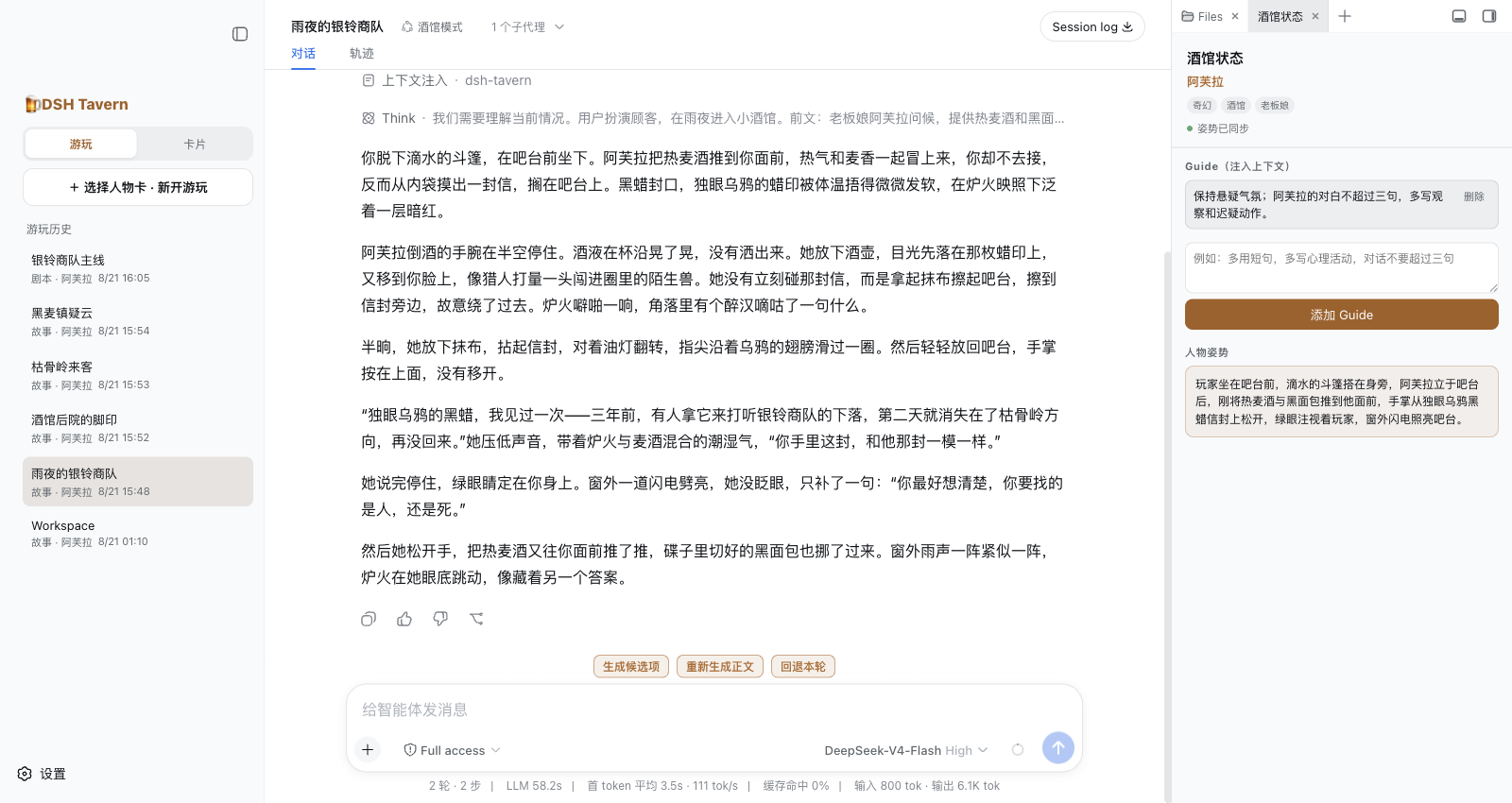
What You Can Do
- Free play or script-following: type freely or pick auto-generated action candidates; supports ongoing guidance, rewrite-with-feedback, and rollback. After an accidental rollback, restore via "More" → "Undo Rollback"; the restore point is invalidated after a new generation or edit.
- Conversational card authoring: manage character cards, world books, presets and scripts; the original is kept on import, changes apply to the working copy after discussion and confirmation.
- Tavern character cards: supports PNG/JSON cards, regex beautification, HTML display, MVU background variable updates, and adapted mini-phones; third-party script compatibility depends on specific interfaces.
- Story illustrations: manually generate scene images, with redraw-with-feedback and version browsing; requires a separately configured image service.
Just import a character card to get started; the built-in preset is used by default. See the Feature Guide for more features, interface screenshots, and public samples.
Key Features
- No preset tweaking: import a card and play; built-in preset used by default; adjust style and plot via the card or Guide.
- Story-focused body text: candidates and background state handled separately, reducing formatting overhead; script mode leverages source text to guide narrative style, cutting templated phrasing.
- Blazing fast: ~10 s per round, no long waits.
- Very high cache hit rate: over 95%.
- On-demand context: only loads what's needed, cutting wasted Token use.
- Card beautification & MVU: regex beautification and HTML display; background Agent updates MVU variables with a persistent right-side status bar.
- Mini-phone side by side: open the adapted mini-phone in the card app to read the plot and watch character chats together.
- Scene illustrations: manually generate images for the current scene, with redraw, version switching, large-image view; off by default, needs a separate image service.
- Multi-platform: Windows, macOS, Linux; Desktop on Win/macOS, DSHA on Android.
- Extensible plugins: write, install and combine DSH plugins; user-added plugins and configs survive updates.
Interface Showcase
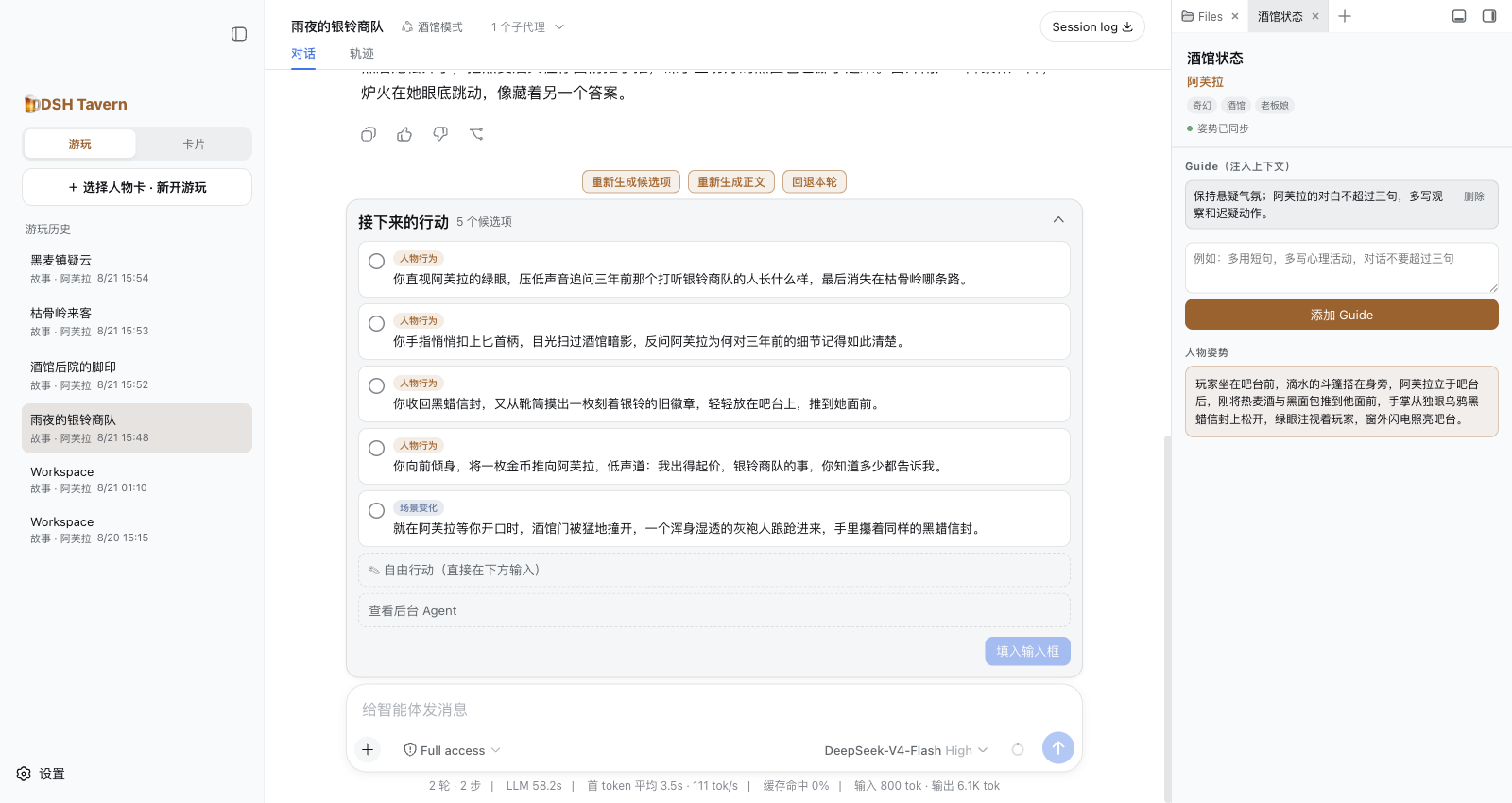
Free Play: Choose an Action, or Type Freely
Text and candidates are separate; right side shows guidance and posture.
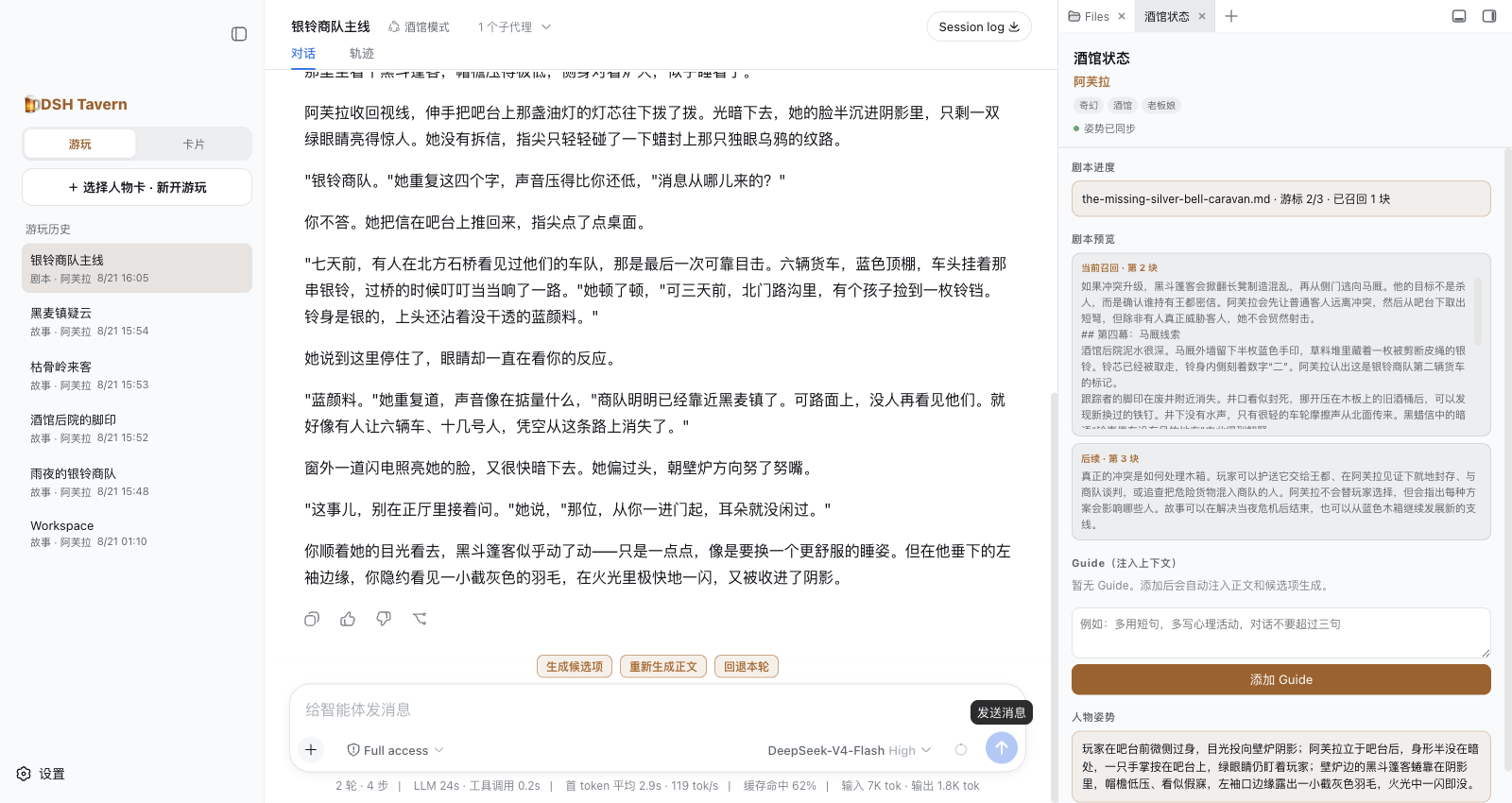
Script Play: Advance the Main Plot with Action Freedom
Right side shows script progress and this round's reference snippets.
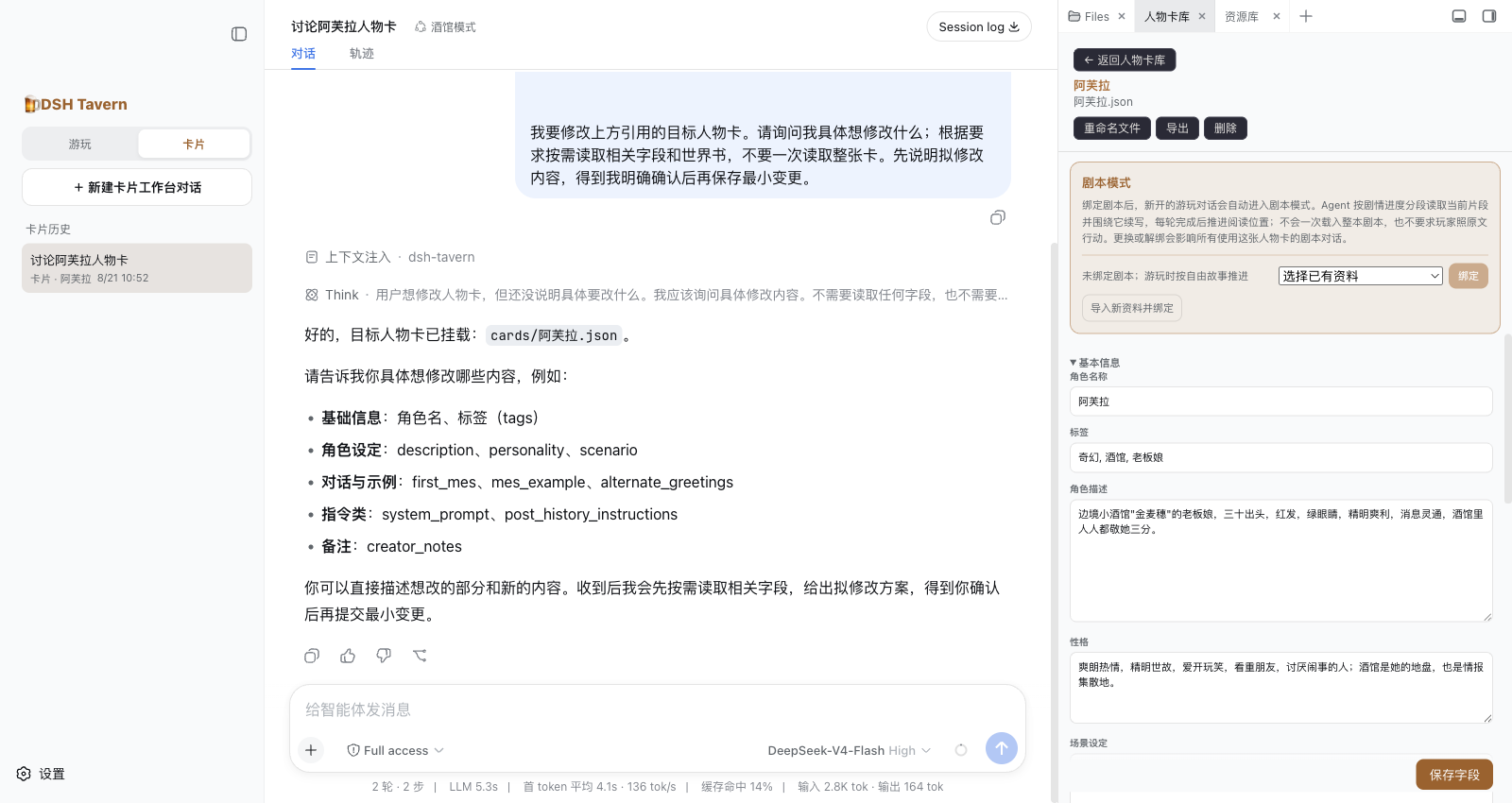
Conversational Card Editing: Discuss and Modify as You Go
Discuss changes with the Agent while viewing character-card fields, world books, and bound scripts.
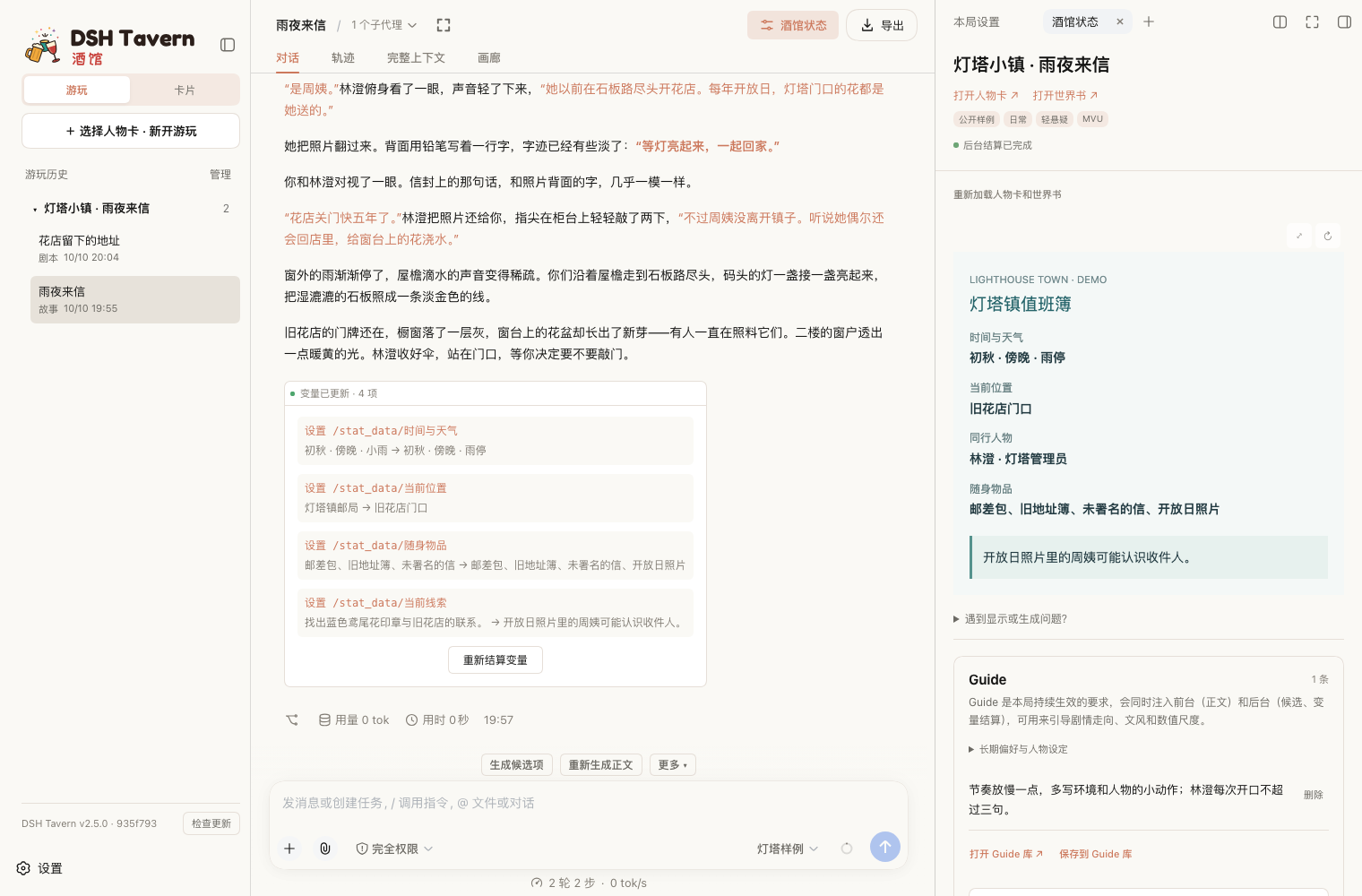
MVU: Character Status Changes With the Plot
Background updates shown in the right-side status bar; results below the body text.
Mini-Phone: Character Chat Beside the Body Text

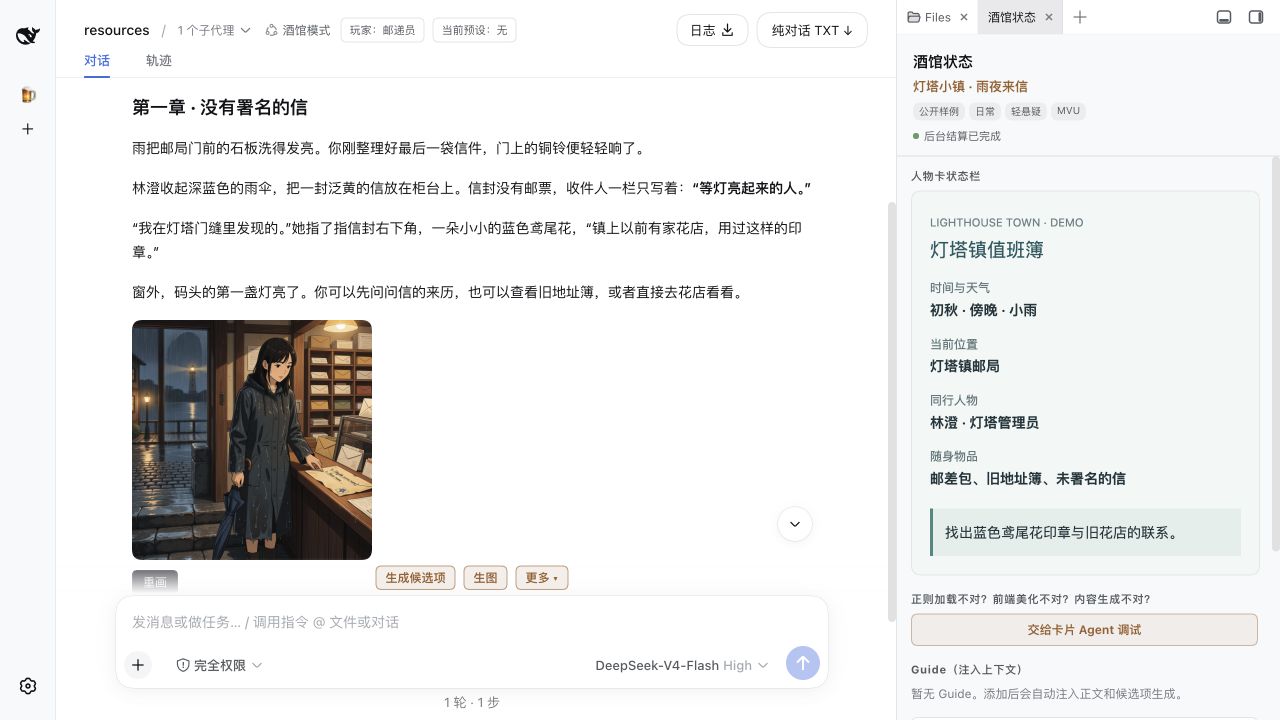
Scene Illustrations: Visualize the Plot
Images sit below their section; click to enlarge.
Installation & Update
Beginner-Friendly Install (Windows x64 only)
Click to download the Windows one-click online installer EXE
After downloading, double-click to run. The first launch needs a connection and auto-installs the latest Tavern version compatible with Desktop 2.0.5; no separate Node.js or DSH Desktop install needed. Desktop is pinned to 2.0.5; existing installs and data are kept, and you can update later from the Tavern UI.
Why pin the DSH version? DSH often ships breaking updates; DSH Desktop and DSHA update their built-in DSH accordingly, which can leave previously working plugins broken after a host upgrade. To keep Tavern from breaking on user updates, this project must pin a compatible DSH version: the installer only accepts compatible versions and stops if a non-compatible one is detected. Use the compatible versions listed below, and wait for this project to finish adapting a new version before upgrading the host.
Same command for first install, update, or reinstall; cards, chats, and settings are kept. All platforms need DSH 0.1.2-rc.1; install stops on version mismatch, so use the compatible version below.
DSH Desktop (Windows / macOS)
Compatible version: DSH Desktop 2.0.5 (past release downloads). The compatible version must be used; installation will stop if a non-compatible DSH version is detected.
After installing and opening DSH Desktop, go to Settings → General and click Open DSH Terminal at the top of the page (see figure below).
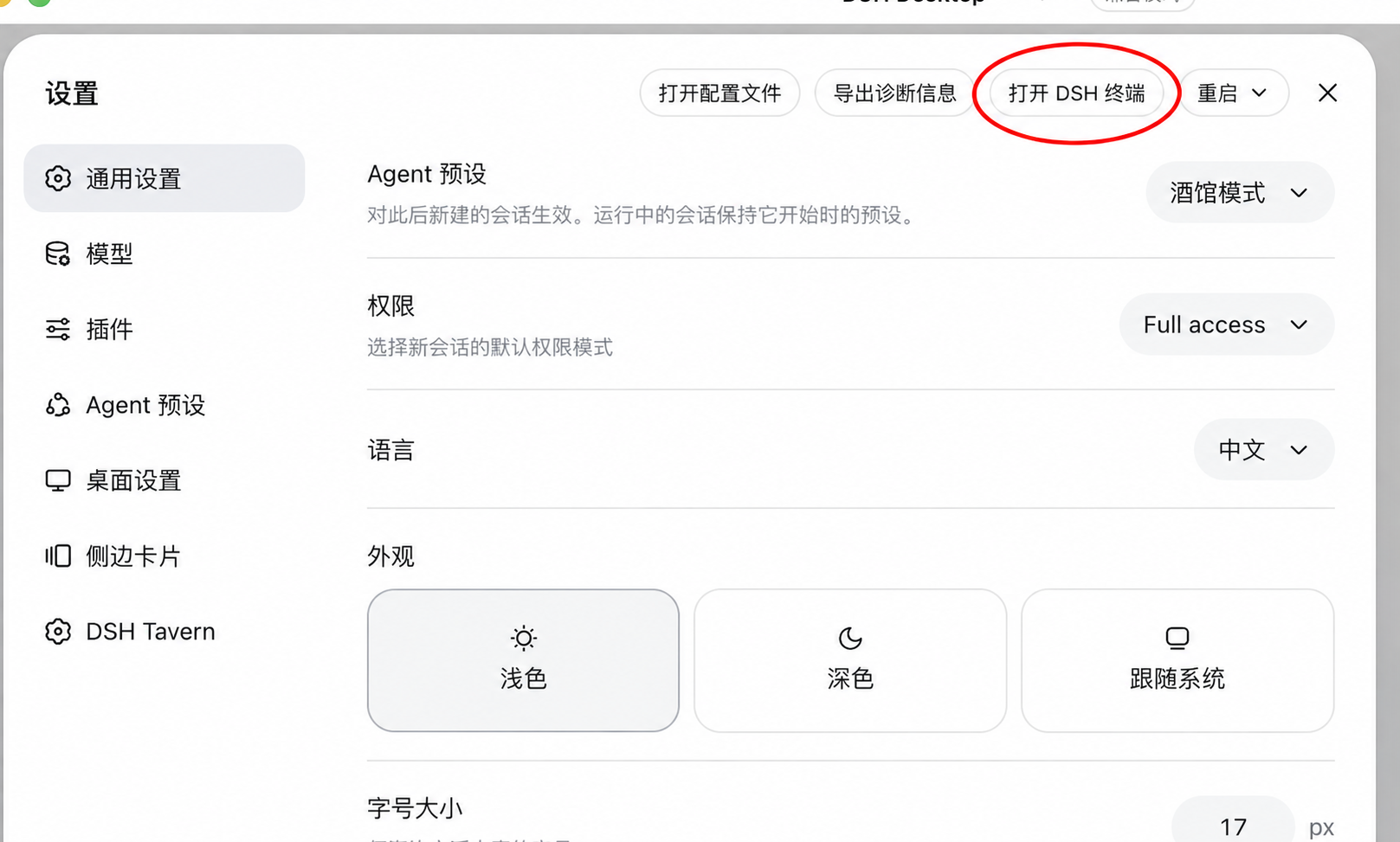
In the terminal window that pops up, copy the command for your system below, paste it, and press Enter.
Windows:
$env:DSH_TAVERN_HOST='desktop'; $tavernInstaller=[Text.Encoding]::UTF8.GetString((New-Object Net.WebClient).DownloadData('https://cdn.jsdelivr.net/gh/flizzywine/dsh-tavern@main/install.ps1')); Invoke-Expression $tavernInstaller
macOS:
curl -fsSL https://cdn.jsdelivr.net/gh/flizzywine/dsh-tavern@main/install.sh | DSH_TAVERN_HOST=desktop sh
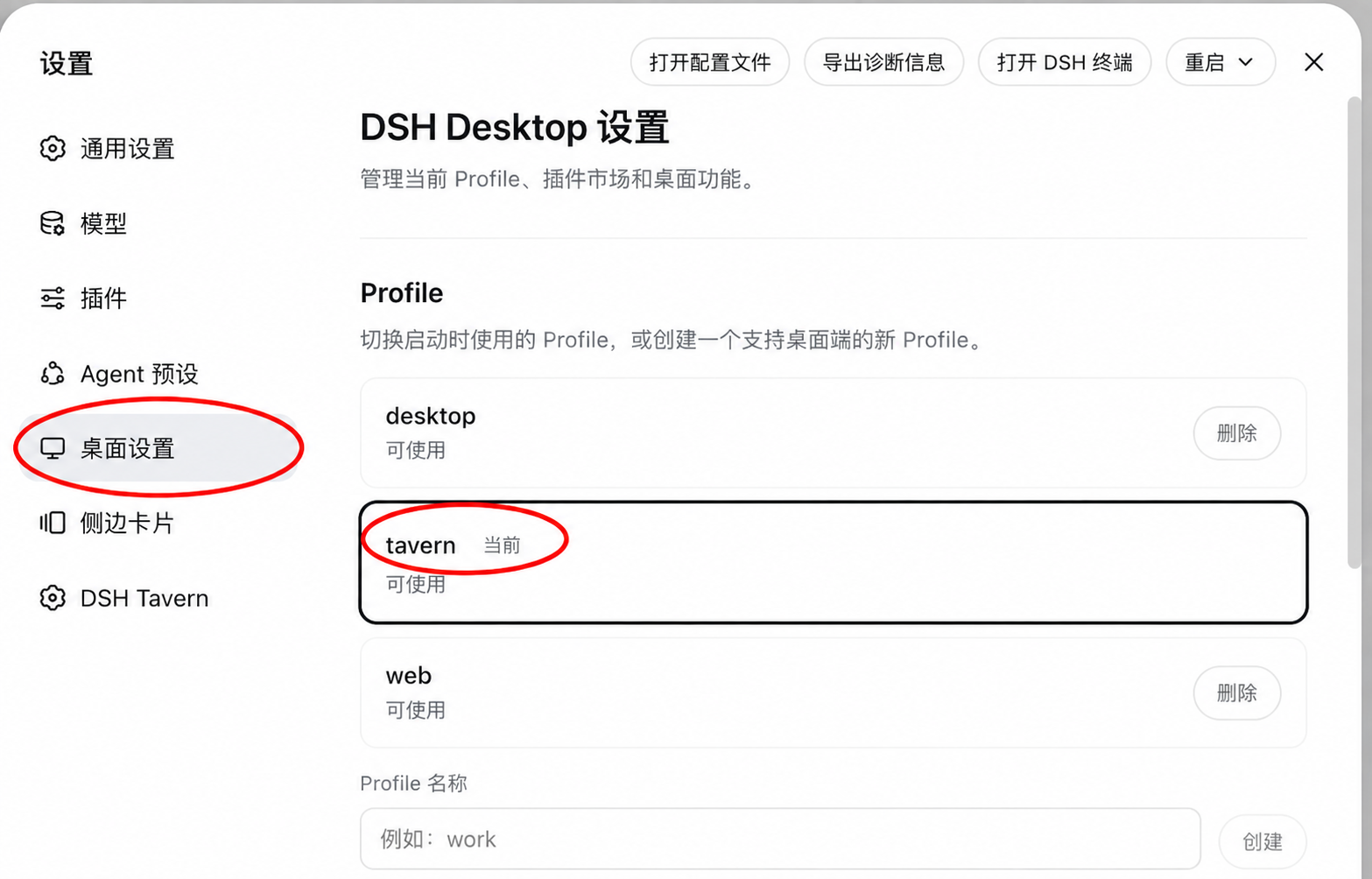
After installation is complete, restart DSH Desktop, go to Settings → Desktop Settings, and click tavern in the Profile list on the right. When Current appears next to tavern, the tavern profile is selected (see figure below).
Command Line (Windows / macOS / Linux)
Requires Node.js 22.19 or later; DSH does not need to be preinstalled. The installer uses a standalone DSH 0.1.2-rc.1 and does not modify your global DSH.
Windows PowerShell:
$env:DSH_TAVERN_HOST='cli'; $tavernInstaller=[Text.Encoding]::UTF8.GetString((New-Object Net.WebClient).DownloadData('https://cdn.jsdelivr.net/gh/flizzywine/dsh-tavern@main/install.ps1')); Invoke-Expression $tavernInstaller
macOS / Linux / WSL2:
curl -fsSL https://cdn.jsdelivr.net/gh/flizzywine/dsh-tavern@main/install.sh | DSH_TAVERN_HOST=cli sh
Auto-starts and opens the web page. Use this later:
dsh-tavern open      # 打开网页
dsh-tavern start     # 启动
dsh-tavern stop      # 停止
dsh-tavern restart   # 重启
dsh-tavern update    # 更新
On first install you will be asked for a directory: 1 default directory ~/.dsh-tavern/, 2 current directory (press Enter for default), 3 a full custom path. The program, standalone runtime, and game data are stored in the chosen directory; the command entry and npm/pnpm caches may live outside it. Updates reuse the installed location; when re-running the install command, run it in the original install root directory, or set DSH_TAVERN_CLI_HOME to point to the original location. Data is separate from Desktop / DSHA, and switching install methods will not automatically sync data. For backup, migration, custom directories, and manual installation, see full installation guide.
Android (Experimental)
Install via DSHA, compatible version: 1.2.0-rc1.4 (past release downloads). The compatible version must be used; installation will stop if a non-compatible DSH version is detected. Android is experimental support and availability is not guaranteed.
- Install DSHA: click the compatible version above, expand Assets, download the APK suited for your phone and install it (do not download Source code).
- Launch it once first: open DSHA, configure the model and API key, and confirm DSHA can start normally.
- Install the tavern: open the Terminal at the bottom of DSHA, copy the entire command below, paste it, and press Enter. Keep DSHA open and wait for execution to finish.
node -e "fetch('https://cdn.jsdelivr.net/gh/flizzywine/dsh-tavern@69d74f5/android/setup.sh').then(async r=>{if(!r.ok)throw Error('HTTP '+r.status);require('fs').writeFileSync('/tmp/dsh-tavern-setup.sh',await r.text())}).then(()=>{const r=require('child_process').spawnSync('bash',['/tmp/dsh-tavern-setup.sh'],{stdio:'inherit'});process.exit(r.status??1)}).catch(e=>{console.error(e);process.exit(1)})"
- Enter the tavern: when you see “All done”, restart DSHA, open the Launch page at the bottom → tap Launch → wait for “Ready to enter” → tap Enter → open Tavern Workbench from the sidebar.
- Start playing: import a character card and pick one to start. If the Download folder can’t be read, allow DSHA access to all files in Android system settings, or try the system file picker.
After clicking Tavern Workbench, the tavern opens directly inside DSHA — no extra window plugin or manual address entry needed. The Refresh at the top reloads the page, Open directly switches to the original tavern page, and Close returns to the DSHA main screen.
To open later: DSHA → Launch → Enter → Tavern Workbench. Keep DSHA running during use, and just enter through this route — no manual browser address needed.
Existing users updating: click Update to latest at the bottom of the tavern's left sidebar. If the tavern won't open, go back to the DSHA main screen and click Update/Repair next to Tavern Workbench. After the update finishes, tap Restart on the Launch page at the bottom of DSHA, then follow the path above to enter — the new window will be ready. For install errors or if you can't find the entry point, see Android install and troubleshooting guide.
Phone Remote Access (Optional Plugin)
Version reminder: the tavern is currently compatible with DSH 0.1.2-rc.1. When following the plugin tutorial, do not reinstall or upgrade to another DSH version.
The tavern runs on a computer or server; phones access it via browser. Pick per scenario:
- Runs on your own computer, phone connects via QR scan: dsh-pocket. After installing and restarting, go to Settings → Phone Access and choose LAN or public access; the phone just scans the QR code.
- Deployed on a server, phone logs in remotely: dsh-webui-auth. Adds username/password authentication for the remote WebUI; the server address, listen, and port must be pre-configured to be accessible — the plugin itself does not provide tunneling. See the plugin README for first-time account setup and configuration.
Start Playing
- Configure the model service and API key in Settings → Model.
- Import a character card and pick one to start playing; you can also open the card workbench to create new cards.
The full user guide provides detailed instructions, screenshots, and sample downloads. The documentation site itself is not an online game service.
Community & Feedback
Feel free to join the Discord discussion channel to share experiences, character cards, or report issues. You need member access to the Leinao community to join.
To report bugs, download the run log from "Log" at the top of the chat; check for private content before sharing.
Credits & Thanks
Thanks to @huajiao1998 (meng) for consistently submitting detailed issue reports, reproduction steps, performance analyses, and fix suggestions, and for helping verify improvements that strengthened long-session handling, background tasks, and UI stability.
Comments
Loading…
Similar plugins
by RiemannRe3
DeepSeek Harness 的 Tavern 角色卡兼容与原生 Agent RolePlay 插件。
★ 8
↓ 46/wk
MIT
TypeScript
Aug 30, 2026
dsh plugin --profile web add @riemannre3/dsh-roleplayby Lindemellis
DSH Tavern plugin: send SillyTavern preset entries with their own role (system/user/assistant) instead of forcing system/user | 游玩时预设条目按自身 role 发送
★ 0
MIT
JavaScript
Oct 7, 2026
dsh plugin --profile web add dsh-tavern-preset-rolesby Amakurai
A DeepSeek Harness (dsh) plugin — turns dsh web into a SillyTavern-style roleplay frontend: character cards, prompt presets, lorebooks, personas, BM25 long-term memory, world-state deltas, and rollbac
★ 228
MIT
JavaScript
Oct 28, 2026
dsh plugin --profile web add dsh-liketavernby a86582751
原生 Agent 驱动的长篇角色扮演:交互式创作、主动世界书、动态记忆、多角色推演与小说导出。创作一个世界,走进它,再把它带走。
★ 206
↓ 418/wk
MIT
JavaScript
Oct 28, 2026
dsh plugin --profile web add dsh-nexttavernby LingyeSoul
DSH plugin: SillyTavern-compatible roleplay workspace with Character Card V2/V3/PNG import, World Info lore engine, presets, swipes, chat editing and streaming LLM generation. Official bundle, install
★ 15
↓ 1.6k/wk
GPL-3.0
JavaScript
Aug 17, 2026
dsh plugin --profile web add dsh-tavernby Cyrene-xl
DeepSeek Harness 插件:增加「纯文本对话模式」agent 预设——整份替换系统提示词进行纯角色对话,只保留联网搜索与表情包。随包人设文本整理自开源项目 Cyrene-Agent(MIT)。
★ 20
↓ 87/wk
MIT
JavaScript
Oct 25, 2026
dsh plugin --profile agent add dsh-cyrene