

dsh-nexttavern
Manifest valid★ 208Native Agent-driven long-form roleplay: interactive creation, proactive worldbook, dynamic memory, multi-character simulation, and novel export. Create a world, step into it, and take it with you.
dsh-NextTavern
Simplified Chinese · English
Role-play solo; the world follows your choices.
A single character card, a fleeting idea, or one uncompromising choice can all become the starting point of a story. dsh-NextTavern brings the native Agent Loop into long-form roleplay: the AI proactively consults the world, organizes memory, and reasons about characters, while you set the direction and co-write the story.
Create a world, step into it, then take it with you.
One-click Install · Getting Started · Windows · Linux · Core Capabilities · Memory System · Architecture Design · Phone/PC Public Access Guide · All Screenshots · Report an Issue
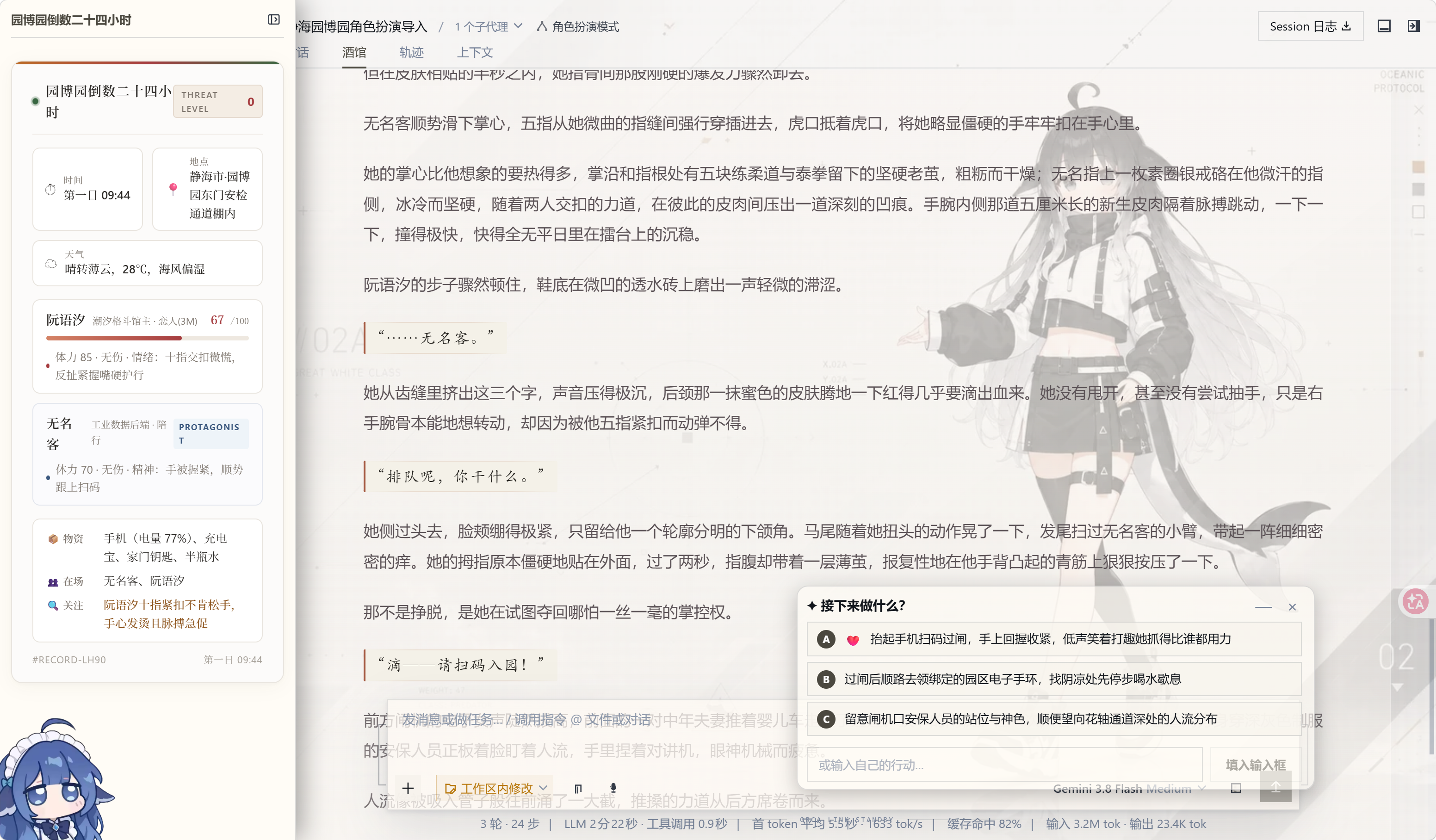
Roleplay workspace for DeepSeek Harness: interactive character creation, on-demand worldbook reading, long-form memory, multi-model collaboration, character agents, branching stories, novel exports and one-click installers.
0.2.5 Preview · Harness 0.1.2-alpha.3 · pi-ai 0.84.4 · Proprietary Code GPL-3.0
Want to start a chapter fast? Use 一键安装. Want to control runtime and patches yourself? Follow 安装 to set up the six compatibility patches.
One-Click Install
Rather not configure the runtime or patch it by hand? Two one-click paths are available now. The installer does one thing: prepare the runtime and workspace. You decide models and keys.
Windows
Download NextTavern-Setup.exe, double-click, pick an install directory, then wait for it to finish. It sets up a portable PowerShell and Node.js runtime, installs Microsoft Visual C++ runtime libraries on demand, creates the workspace and start/stop shortcuts, and opens your browser when done. Default install path is %LOCALAPPDATA%\NextTavern. On Windows on ARM, use NextTavern-Setup-arm64.exe.
In-place upgrades are supported starting from 0.2.5: just run the new installer over your existing installation, and your stories, character cards, and settings will all be kept. For the full steps and caveats, see the Windows One-Click Install Guide.
The Windows installer is not yet code-signed, so you may see a SmartScreen warning on first run. The ARM64 installer is new in this release; if you run into any issues after installing, please let us know via feedback.
Linux
NextTavern-Setup.sh is a self-contained script new in 0.2.5, with very low baseline requirements: a POSIX shell, curl or wget, tar, and any tool that can compute SHA-256. The script downloads and verifies a portable Node.js runtime by itself, then prepares the install directory, desktop entry, and start/stop launchers. It supports x86_64 and aarch64 (glibc) and requires no root or system package manager. For full steps, see the Linux One-Click Install Guide.
What Both Paths Have in Common
| Item | Description |
|---|---|
| Localhost only | The local service binds to 127.0.0.1, with the port auto-selected from 3510–3599; it is not exposed to the LAN or public internet by default. |
| You enter the key | Model API keys are entered and stored locally by the player; the installer neither ships nor distributes any keys. |
| Verified downloads | Mirror-preferring download sources with per-file SHA-256 verification; verified files are cached and reused. |
| Resumable | If the network fails or you close the installer mid-way, re-running it skips verified files and continues the installation. |
Both installers are just more convenient entry points: the presets and compatibility patches they produce are identical to the 手动安装 path.
Getting Started
Complete the one-click install (or manual install) and configure your model, then:
- Create a dedicated workspace. Give this roleplaying session its own folder so that character cards, story resources, and export files all live together.
- Select the “Roleplay Mode” preset. When creating a new session, switch to it from the preset menu to enter your story workspace.
- Upload a character card, or simply chat one into existence. Supports SillyTavern / TauriTavern PNG and JSON character cards; you can also just describe the subject, characters, relationships, and atmosphere, and let the AI work with you conversationally to craft the card.
- Start the experience. Enjoy it! Follow the opening to advance the story, input your actions, switch worldlines, or open “Tavern Management” at any time to adjust the settings.
No card on hand? Start with a line like:
Make me a steampunk-city mystery card. I'll play a new investigator at the port. Slow burn, multiple factions, evolving relationships. You fill in the rest.
Tell the AI who you want to meet and what story you want to live. Polish details together, or just say "you decide" and let it keep building the world, character, opening, and style. DOCX/PDF card reading is enabled via Document Extensions. Only have a long novel at hand? It can read that straight into a card — see Long Text to Character Card.
Import SillyTavern / TauriTavern Character Cards
Upload the raw card file directly, then tell the AI: "Read this character card and get ready to roleplay." No decoding on your part, no importing-tool parameters to fill in.
| Format | Supported scope |
|---|---|
| PNG character card | Reads Base64-encoded character data from the chara / ccv3 tEXt chunks; when both are present, ccv3 takes priority. |
| JSON character card | Recognizes v1, v2 (chara_card_v2), and v3 (chara_card_v3). |
| Embedded worldbook | Reads character_book, reviews it according to the current import flow, and maps it to settings and the worldbook. |
请选保留元数据的原始 PNG 卡:普通头像、截图或被移除元数据的图片里没有可导入的角色数据。PNG/JSON 解析是内置能力,不需要 anydoc;上传入口随完整安装提供。
导入后可以继续打磨人物、世界书与创作规则,原始卡片和扩展数据都会一并保留。卡片里的三个文风字段会完整保留,怎么和预设配合由你决定,见预设系统。
Core Capabilities
这是这个版本的能力总览,也是后面各章的索引。 想先知道这一版能做什么,看这张表;想细看某一项,按下面的章节顺序翻。
| Capability | What you get |
|---|---|
| One-click install | Two self-contained installers for Windows and Linux: portable runtime, workspace, shortcuts, and mirror-priority checksum downloads; Windows supports in-place upgrades. |
| SillyTavern / TauriTavern card import | Directly reads PNG chara/ccv3 and JSON v1/v2/v3 character cards, preserves the original, and supports embedded worldbooks. |
| Fixed settings + hard-cut window + director notes + hybrid retrieval | Fixed settings are never compressed and are always injected; the window retains recent complete prose with tail continuity; background notes carry source hashes and worldline anchors; history recall supports three modes: keyword / semantic / hybrid. |
| Preset and writing-style system | A standalone preset page, with scope selectable as current conversation / designated conversation / global, three writing-style modes, 16 built-in styles, and 200 custom slots. |
| Long-Text-to-Character-Card | Reads a long TXT file into a playable character card: two reading granularities (close reading or coarse granularity), original-text freezing with hashes, every research note traceable back to the source, and an independent semantic index. |
| Embedding model management | Online access to DashScope, OpenAI-compatible endpoints, and the official OpenAI API; locally installable BGE small zh, Qwen3-Embedding 0.6B, Jina Nano/Small INT8, and Nomic q8 — no Key or network required. |
| Multi-model collaboration | Configure model routing for tasks such as main prose and memory, card read/write, state, decision-making, and novel export, dividing the work as needed. |
| Multi-character Agent cluster | Launch independent reasoning for key characters, each thinking through its own language, behavior, and intentions, then have the main agent coordinate the results into the final story; supports per-character model override. |
| Decision card and status bar | Action suggestions are centralized in a dedicated decision card — collapsible, deferrable, and draggable; the author's status HTML/CSS is preserved across import, generation, and recovery paths. |
| Custom skin | The project's first custom skin, with dual day/night themes and a fully unified UI re-render; bundled with the package, off by default. |
| Conversation branching | Regenerate, edit and resend, or switch versions to explore different worldlines within the same conversation; can also explicitly branch into a new conversation. |
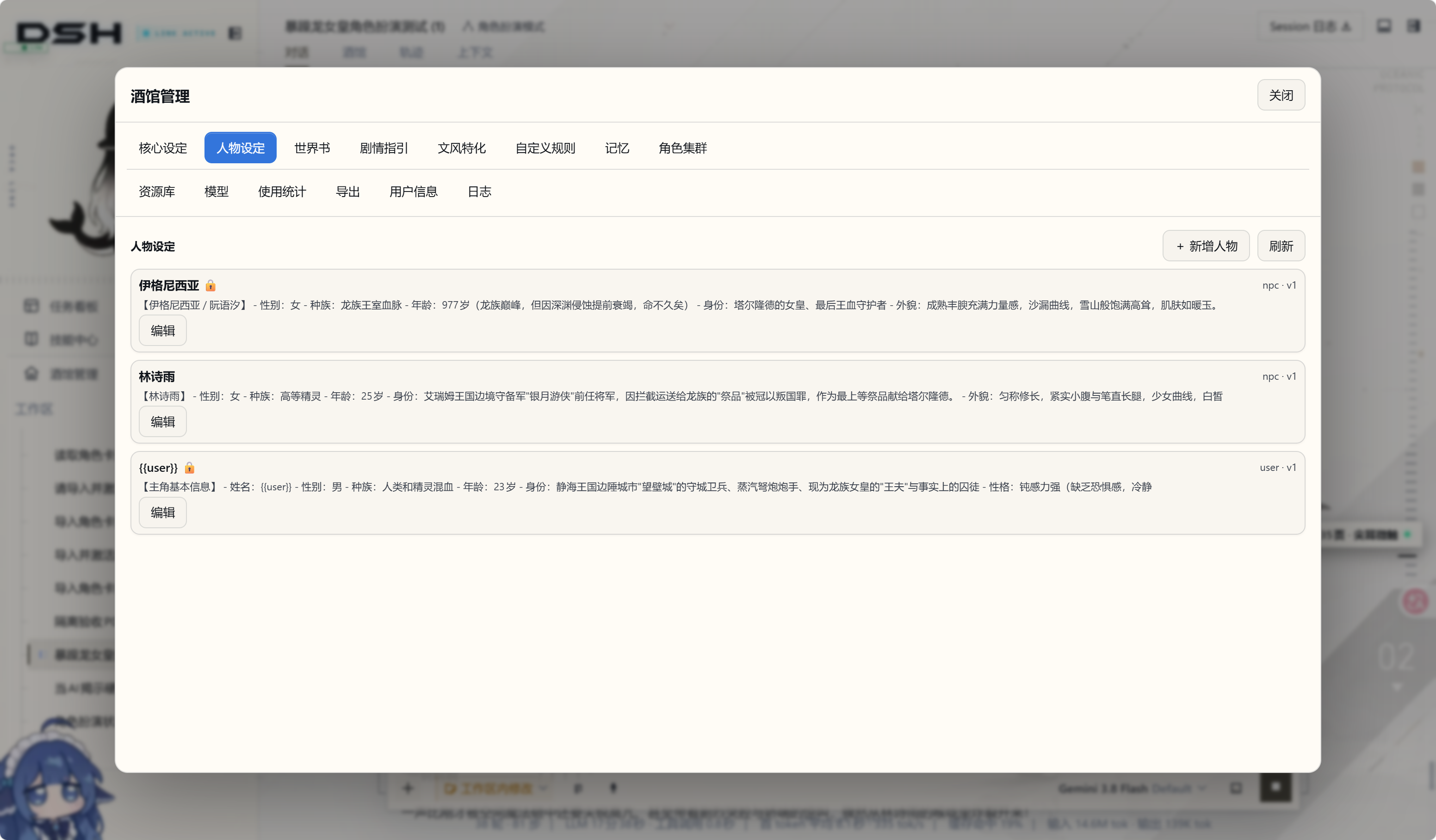
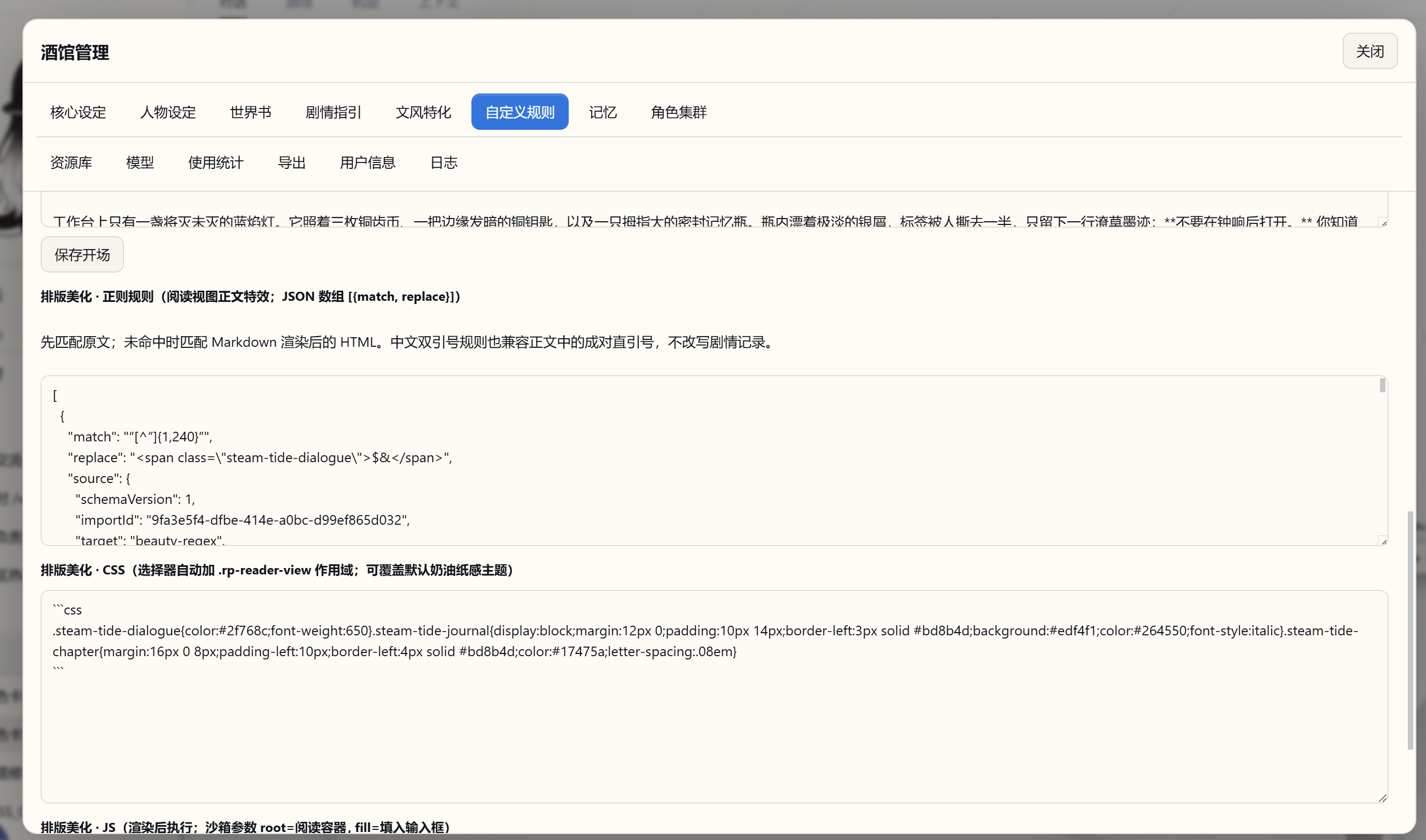
| Custom creative rules | Manage core settings, characters, worldbook, plot guidance, writing style, and rules separately — controlling perspective, pacing, character knowledge boundaries, and reply expansion. |
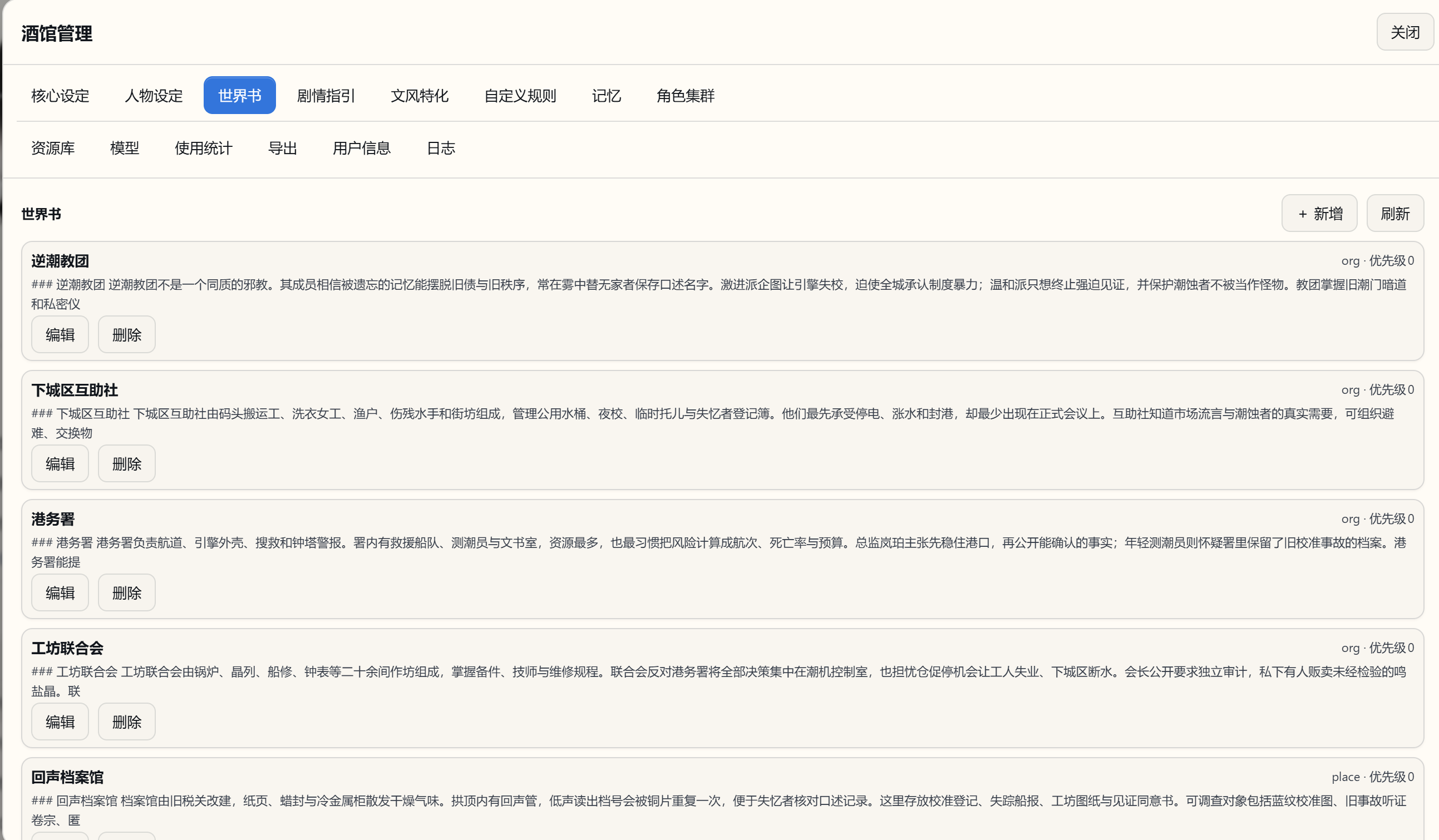
| Active worldbook reading | The main agent consults locations, factions, and background details on demand as the story progresses, letting the worldbook participate in the narrative as a queryable settings library. |
| HTML/CSS reading beautification | Customize the reading presentation via HTML/CSS in the character card, status bar templates, and regex rules; the main prose supports streaming display; author scripts run in an isolated environment. |
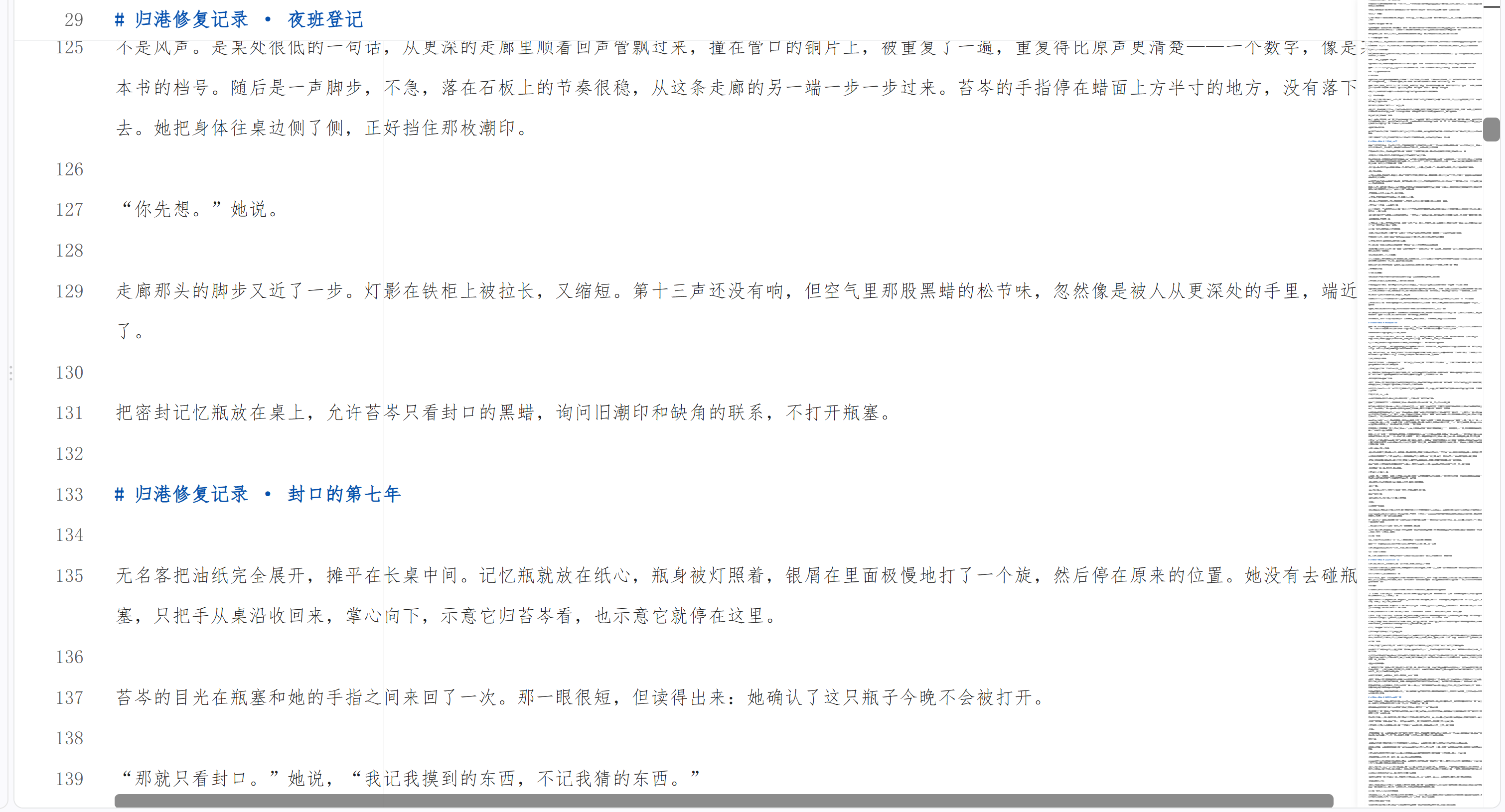
| One-click novel export | Organize a selected worldline into a novel manuscript; can also export the current complete character card — results go into the resource library for download. |
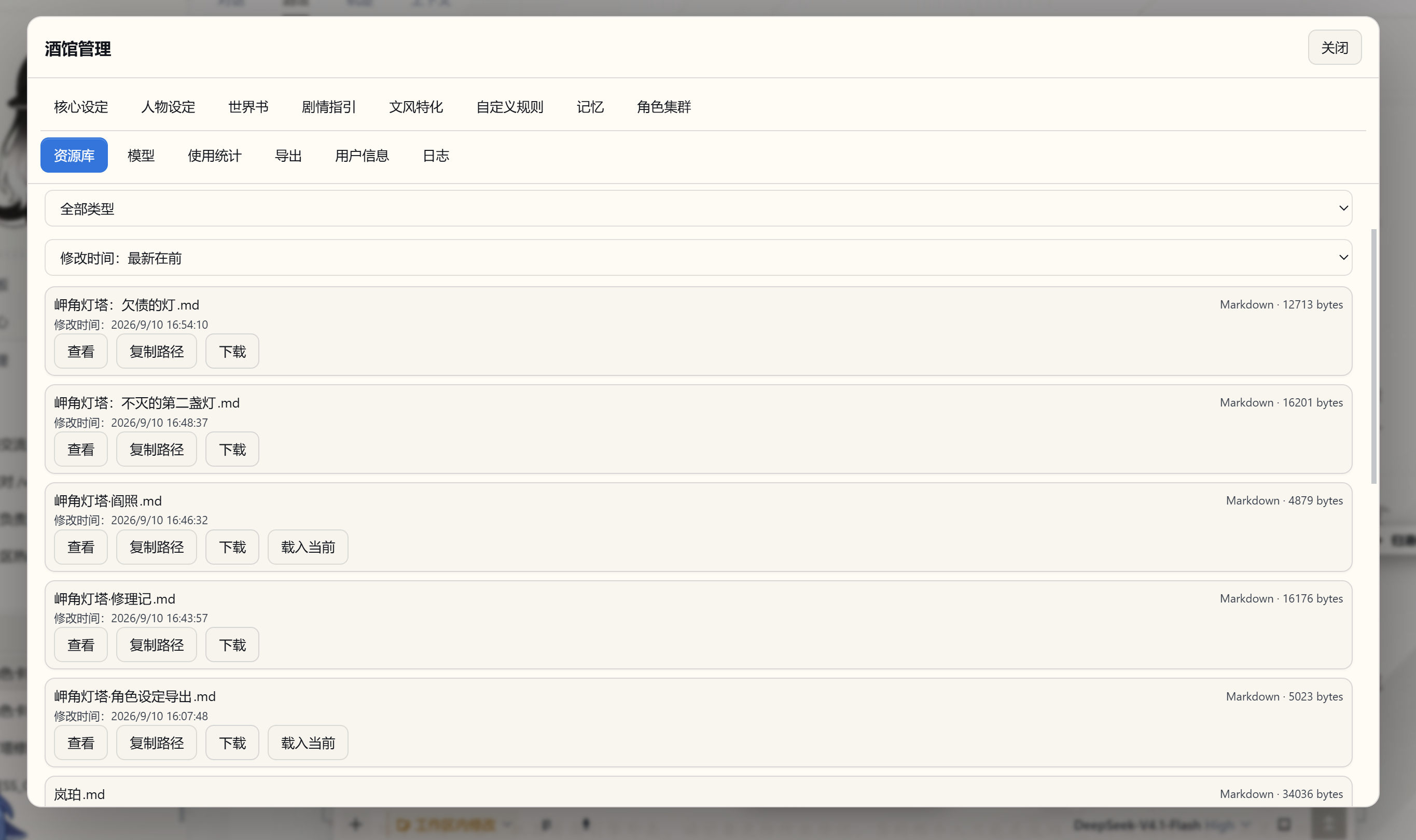
| Resource library management | Centrally view character cards, story-related files, and export results; sort by time or name, refresh, and download. |
| Interactive new character card authoring | Start from an idea and build the world, multi-character profiles, opening, writing style, and layout step by step through conversation, verified by a twelve-item completeness check. |
| Model usage and cache statistics | View requests, input/output tokens, cache, speed, and known costs by session, provider, or model, including regeneration, embedding calls, and failed attempts. |
下面从长篇体验最吃重的记忆系统开始,逐章展开这张表。
Memory System
故事越写越长,人物的经历、埋下的伏笔和未完成的约定也在积累。NextTavern 借鉴 Codex 类长任务的上下文管理思路,把长篇记忆拆成四件各有边界的事:固定设定不压缩始终注入 + 有尾部保留的上下文硬切窗口 + 可追溯来源的后台导演笔记 + 关键词和语义混合历史上下文查询召回。
| 支柱 | 它做什么 | 写长篇时有什么用 |
|---|---|---|
| 固定设定不压缩,始终注入 | 冻结的设定与系统前缀每轮都在场,从不进入压缩流程。 | 身份、作者规则和叙事约束是长期契约,不该被一段摘要替换掉。 |
| 硬切窗口 + 尾部保留 | 程序按完整正文边界推进上下文窗口,并在推进时保留尾部连续正文。 | 近期正文保持完整细节,你正在读的那一段不会因为切窗口而丢失,也不会在场景中途被摘要掉。 |
| 可追溯来源的后台导演笔记 | 由独立的后台任务撰写,每条笔记带来源哈希与同一世界线锚点。 | 每条笔记都能追回到写出它的那段正文;追不回来的旧记录会留在原处,程序不会替它猜。追加式原始历史从不删除。 |
| 关键词和语义混合的历史召回 | 主代理按需查询历史,三种方式:关键词(默认)/语义/混合。 | 需要旧细节时再回查原文,而不是每轮都先强制召回一次。 |
flowchart TD
    Player[玩家输入与角色卡] --> Program[程序装配:固定设定 + 硬切窗口 + 有效笔记]
    Program --> Writer[主代理与原生 Agent Loop]
    Writer <--> Recall[按需历史查询:关键词 / 语义 / 混合]
    Writer <--> Lore[按需读取世界书]
    Writer --> Story[流式正文与追加式剧情记录]
    Story --> Background[后台任务:整理导演笔记]
    Background --> Anchor[来源哈希与世界线锚点校验]
    Anchor --> Program
Three Query Modes, One Shared Corpus
查询的语料是玩家输入与有效剧情正文,包含已经归档或被淘汰的正文;状态、工具输出、CSS、决策卡和推理过程都不会进去。
| Mode | Who computes it | When to use |
|---|---|---|
| Keyword (default) | Deterministic program-side matching, no model call. | Fastest when you're looking for exact words, names, or places. |
| Semantic | Requires an embedding model to encode the query into a vector. | More effective when you remember the gist but not the exact wording. |
| Hybrid | Ranks keyword and vector results together. | Balances precise hits with semantic proximity. |
向量是派生的共享数据,查询时会过滤到当前世界线,所以切换世界线不用重建索引。每份向量索引都带一个配方指纹(模型、修订、维度、任务角色、池化方式、量化与运行时):指纹对不上时,索引会被标记为 stale 并停止对外服务,直到你重建为止——它宁可让你重建,也不会拿旧向量凑出错误答案。分块大小全局可配置,默认 480 字符(192/480/960 三个选项,128–2048 区间,80 重叠),本地模型使用 512 的分词预算。清空、重建与填充都限定在当前可见对话及其全部世界线;清空只清索引,正文、来源和账本都留着。
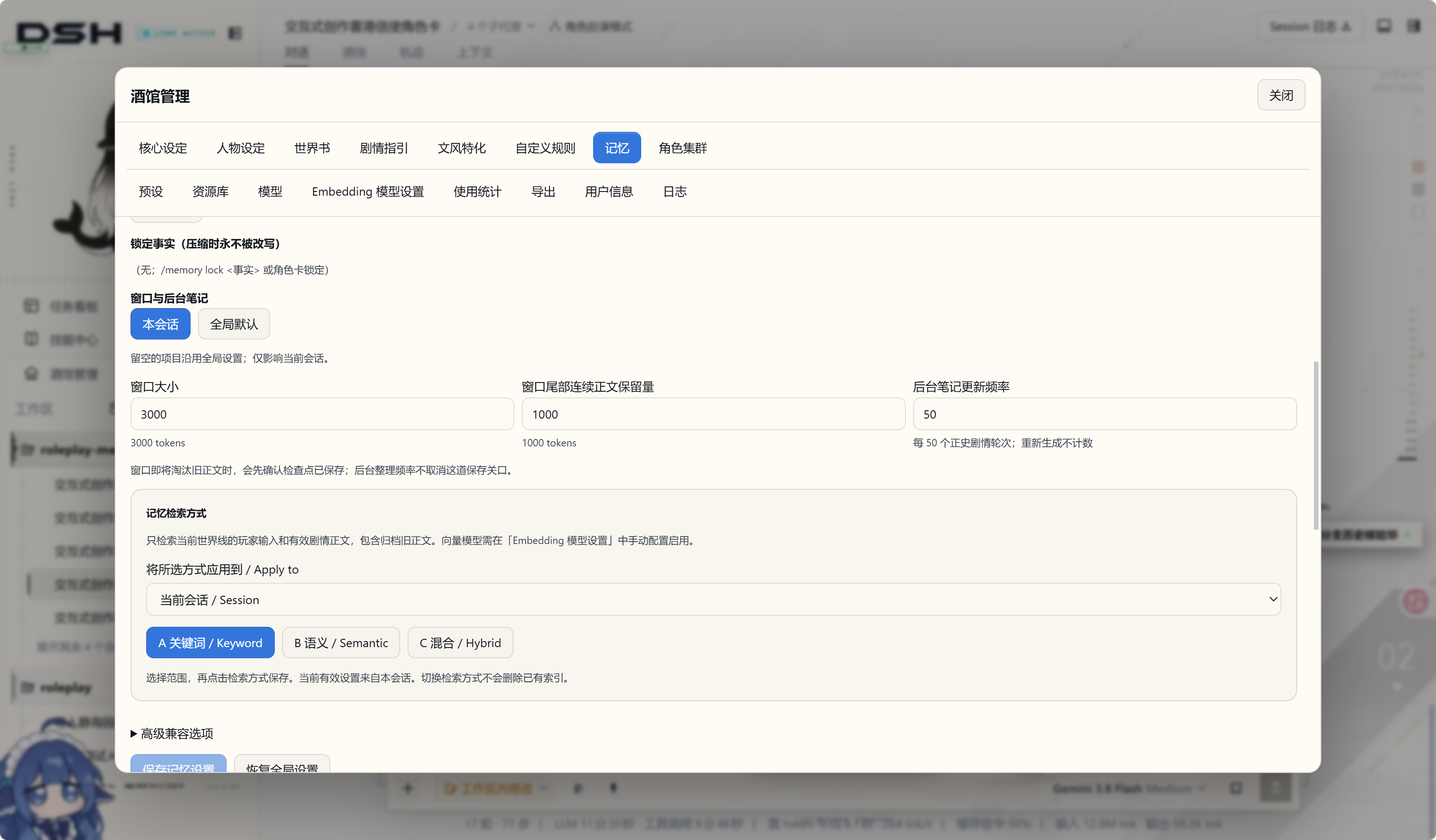
旧笔记与旧状态不再随每次请求发送
旧导演笔记与旧状态快照以前会跟着每次请求一起走(约 52k 字符)。现在它们只在有效的新锚点准备好之后才被替换:没被替换的引用保持原本的精确内容,回滚时重新提供完整文本,原始事件始终是追加式的。写长故事时,请求里不会一直拖着越来越重的旧笔记。
The same "confirm before replace" is applied to very long tool results: once a research note is confirmed, the corresponding long tool result is replaced with the matched checkpoint, provided that ownership, source hash, generation, and packetIds all agree. Partial saves, source mismatches, write failures, and re-reads after confirmation are all not reclaimed.
All of This Is Tunable Per Session
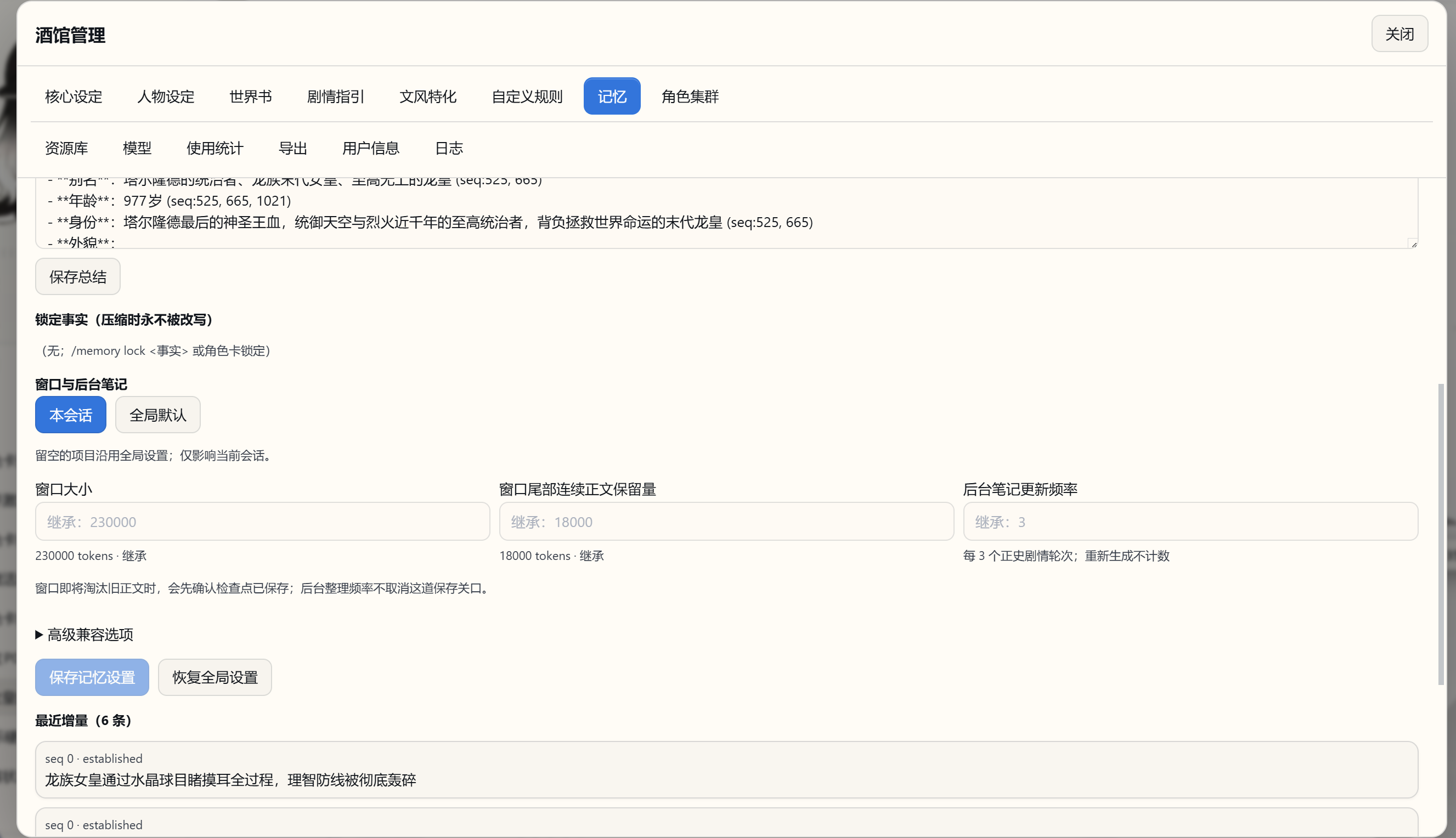
窗口大小、尾部保留量和后台笔记更新频率支持全局默认与会话覆盖,留空就沿用全局设置。截图里能看到的一组实际取值:
| Setting | Meaning |
|---|---|
| Window size | The prose budget for the current window — set it against the context capacity of the model you actually use. |
| Window tail contiguous-prose preservation | The amount of recent prose that must be kept when cutting the window, guaranteeing the passage you're reading stays intact. |
| Background-note update frequency | How often to consolidate after every N new canon story turns; regeneration does not count. |
| Memory retrieval mode | Keyword / semantic / hybrid, and which sessions it applies to. |
切换检索方式不会删除已有索引。窗口即将淘汰旧正文时,会先确认检查点已保存;后台整理频率不会取消这道保存关口。
窗口装配、来源校验、笔记淘汰和原文回收都由程序完成,不产生模型请求。只有主代理真的决定去查历史时,才按你选的方式付出一次查询代价(语义与混合还需要嵌入模型,见嵌入模型)。
换一条世界线,就带着那条路线的经历继续向前;反复打磨同一幕,记忆会跟随你选中的版本。章节交接前,系统会先把需要延续的故事线索整理妥当。
Preset System
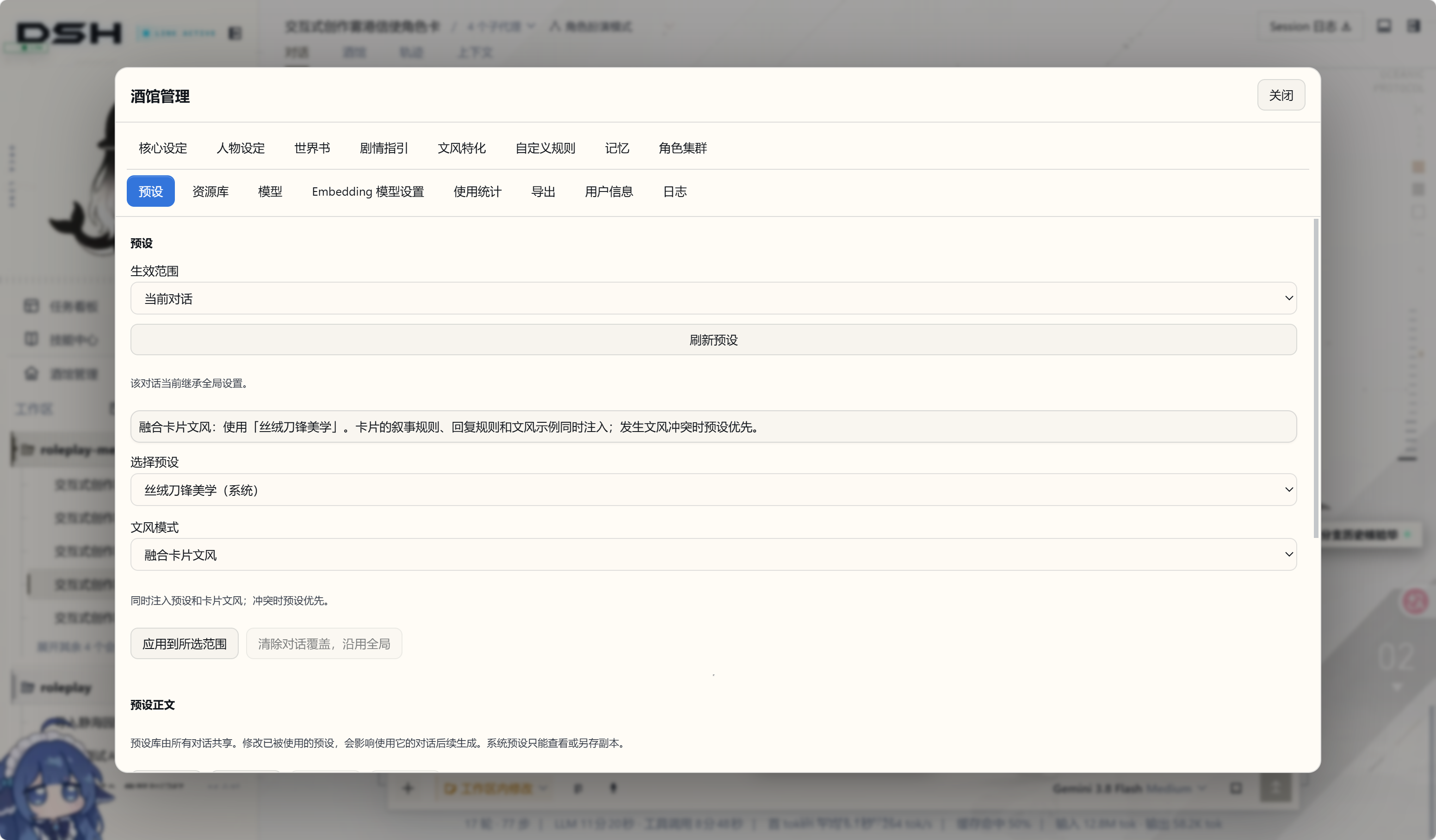
文风不再只能靠改卡片。管理界面里多了一页独立的预设页(位于资源库之前),可以新建、编辑、另存副本、选用和删除;自带预设是只读的,自定义预设给你 200 个槽位。
| Dimension | Options | Meaning |
|---|---|---|
| Scope | Current conversation / designated conversation / global | All worldlines in the same conversation share this override; leave blank to inherit the global settings. |
| Writing-style mode | Foreground system aesthetic (default) / fuse with card style / card style only | The first two inject both preset and card styles simultaneously, with the preset winning on conflict; the third uses only the card style. |
预设库由所有对话共享,所以编辑一个正在被使用的预设,会影响使用它的对话后续生成——界面会明确提示这一点。要是两个窗口同时改同一个预设,后提交的一方会收到冲突提示,你的草稿仍然留着,不会被悄悄覆盖。
卡片导入、编辑、导出与持久化都保留三个卡片文风字段,排除只发生在故事上下文装配阶段,原始卡片不会被改写。
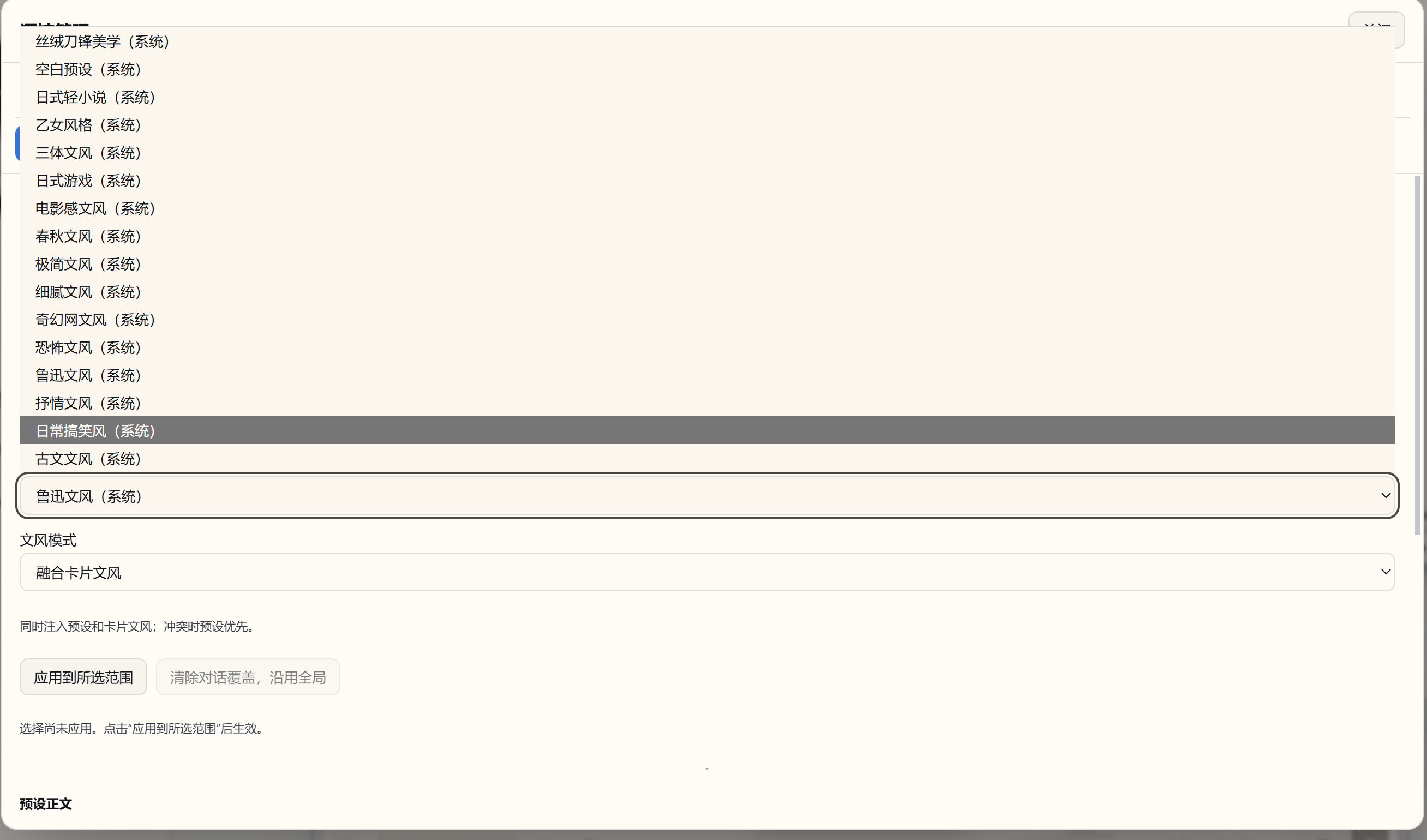
自带 16 种文风。 除了默认预设和空白预设,还准备了 14 种可直接选用的写作风格:日式轻小说、乙女风格、三体文风、日式游戏、电影感文风、春秋文风、极简文风、细腻文风、奇幻网文风、恐怖文风、鲁迅文风、抒情文风、日常搞笑风、古文文风。每一种都有完整的七段式指南和原创示例,不是只有一句风格描述。
查看自带文风预设库
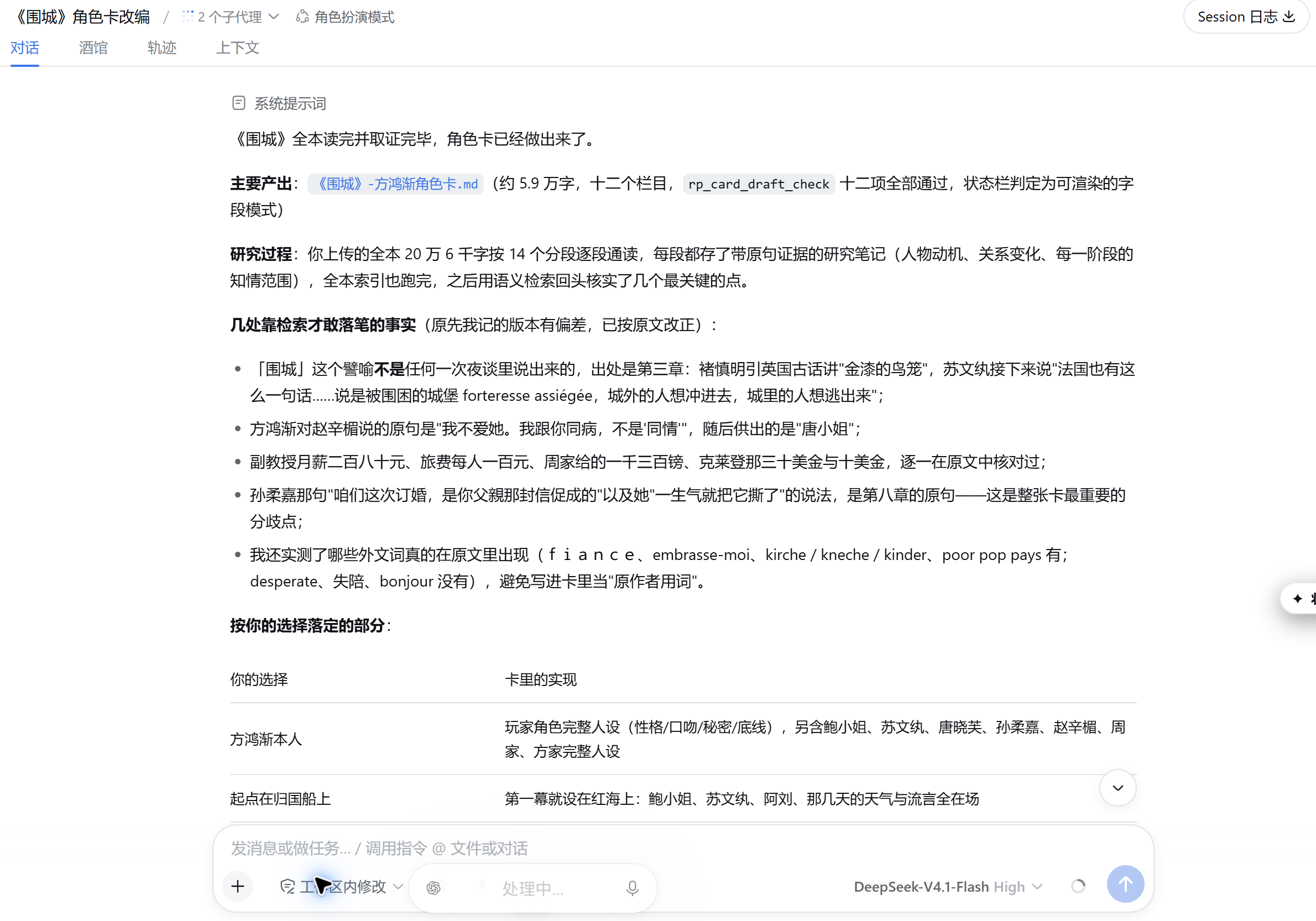
Long-Text-to-Character-Card
手边有一部长篇小说,想把它变成能玩的世界?管理界面里多了一个**「长文本转角色卡」TAB(位于角色集群之后)**。它做的不只是总结:读过什么、笔记记在哪、卡片里的话有没有原文依据,都要能对得上。
两种阅读方式,在研究开始前选。
- 精读(默认):分段逐段完整阅读,每一段都留下带原文引证的研究笔记。
- 粗颗粒度:围绕人物、组织与事件面做多轮关系前沿检索,再做主角的纵向追踪。它需要一个可用的小说模型和完整的当前索引;条件不满足时,界面会引导你先把配置补上并结束本轮,不会悄悄降级成另一种模式。
The original text is frozen first. The workspace TXT limit is 64 MB; decoding is attempted in the order UTF-8 → GB18030 → BOM-aware UTF-16, recording the raw byte hash, decoded text hash, and size, and the original file you uploaded is never modified. Segmentation is deterministic, and the batch size is bounded below the native splitter's limit.
笔记要有证据。 一条研究笔记要成立,得同时满足两件事:这一批确实被读过,引用的原话也确实出现在这一批里。笔记分事实/改编机会/未决问题三节;只在检索里命中,不算这一批已经被读过。
小说有自己的索引。 它和故事记忆的语义索引分开,小说模型也可以与故事记忆模型分开配置。相同的原始哈希复用研究基线,相同配方复用向量——同一部原著可以服务多张卡、多个对话。
举个例子:一部约 119 万字符的长篇网络小说(前 354 章)建立了 3027 条在线向量,程序为等待索引完成挂起约 292 秒;交付角色卡与打开导入是两个独立回合,开场输入约 52k tokens。改编复用与交互式创作相同的问卷和十二项写卡检查。
小说很长时,个别细节仍可能写错,成稿后建议自己通读一遍。
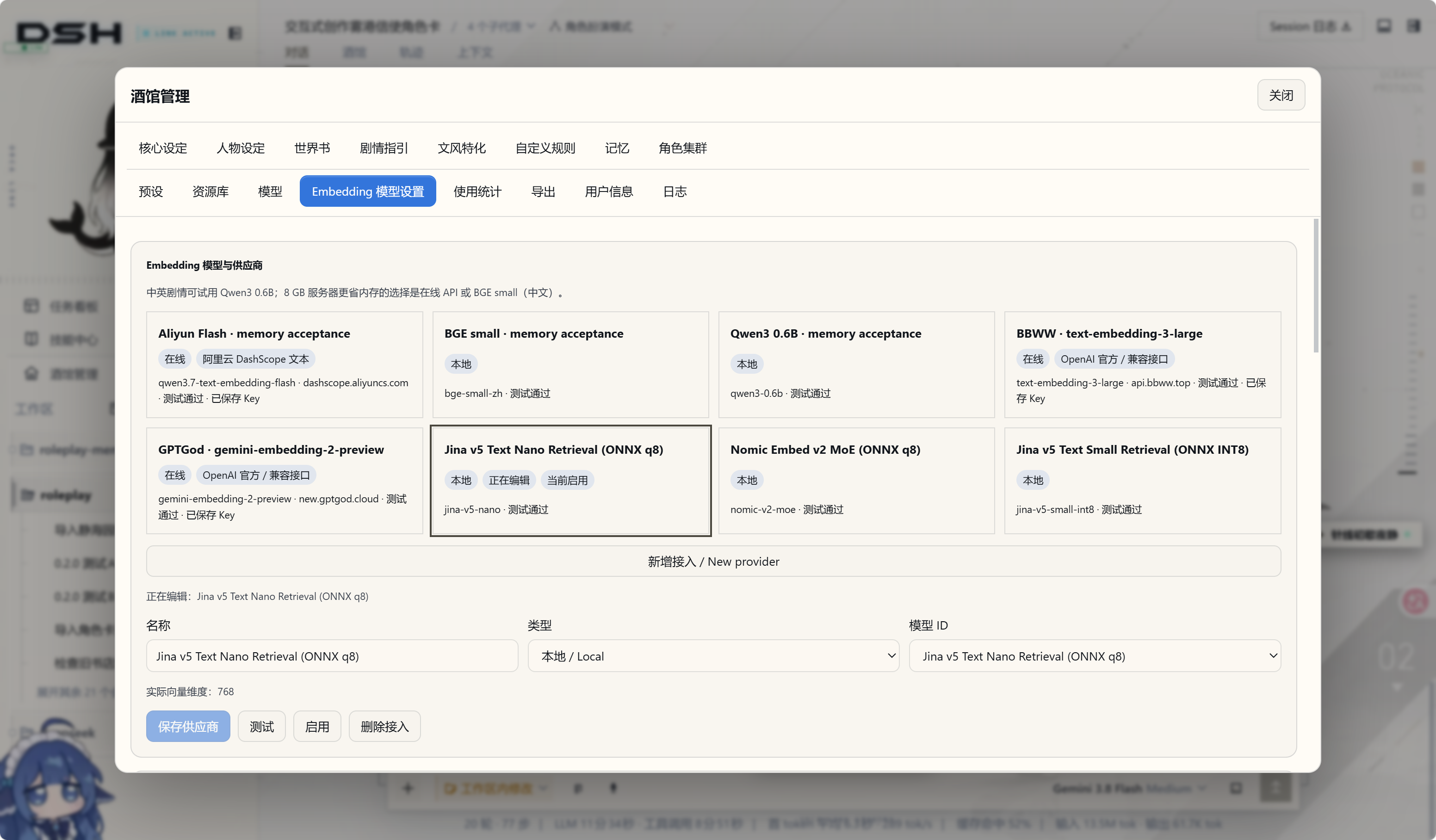
Embedding Models
语义与混合检索需要向量,所以管理界面里多了一页独立的嵌入模型页(位于模型与使用统计之间)。
在线接入。 支持 DashScope、OpenAI 兼容接口和 OpenAI 官方:模型列表可刷新,也可以手动填写模型 ID,密钥只保存在服务端,并提供连接测试。
本地接入。 五种本地模型可以直接装:BGE small zh、Qwen3-Embedding 0.6B、Jina Nano、Jina Small INT8、Nomic q8,在独立编码进程中使用 ONNX Runtime 1.29.0 运行。下载显示真实字节进度、速度与预计剩余时间,支持暂停/取消/继续,并有 queued → downloading → verifying → preparing-runtime → self-testing → installed 的安装状态机。本地推理不需要 API Key,也不需要网络。
真实的索引/查询/测试/重试都会进入既有的用量统计。未知价格保持 N/A,失败不会虚构 token 数。
选哪个?BGE 快,跨语言能力弱一些;Qwen 在长正文上建索引更慢;分块到 5 万条时,检索时间已经接近上限。
角色集群
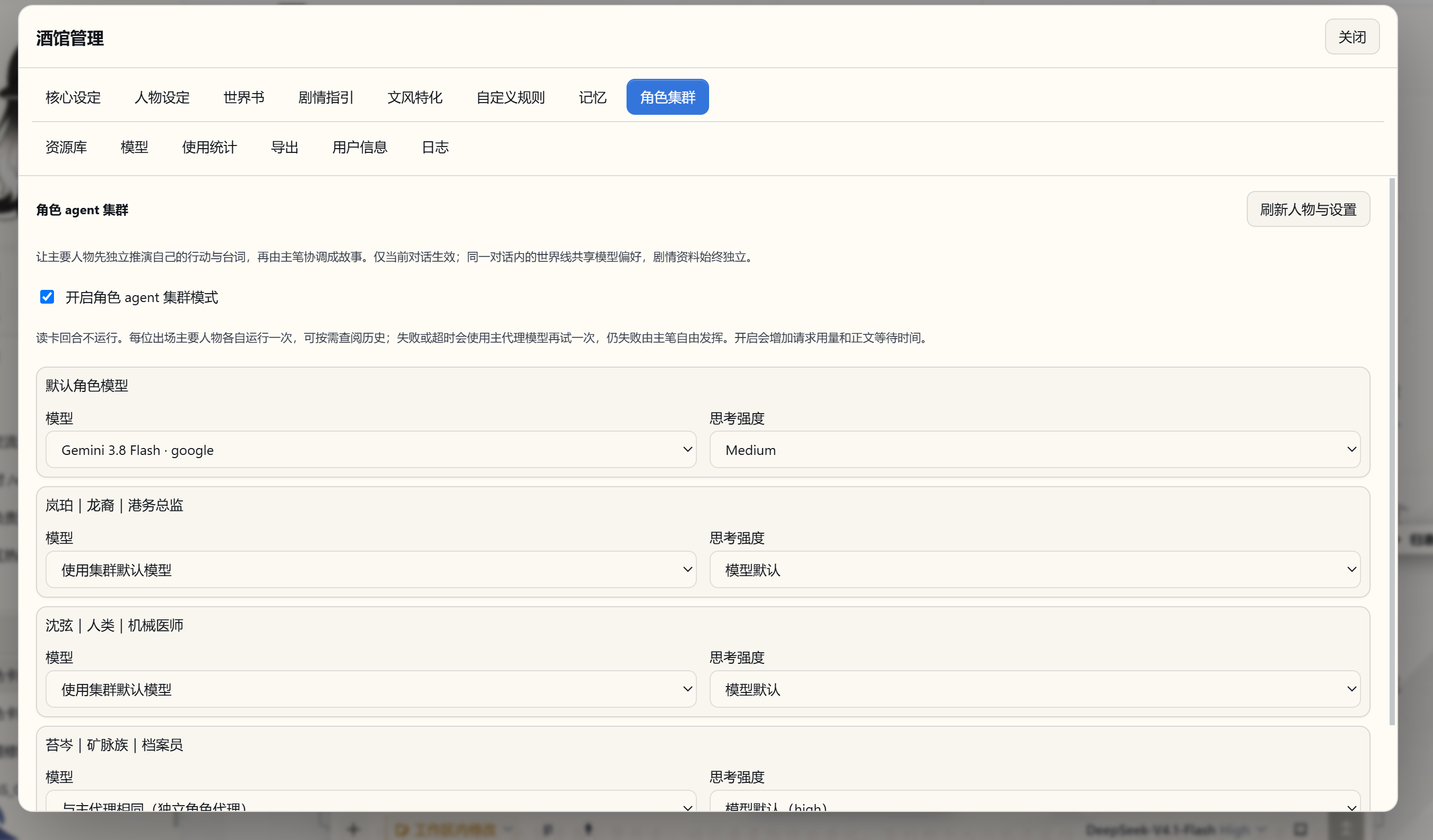
开启角色 Agent 集群后,主要人物分别在独立上下文中推演。每个角色可以选择模型与思考强度,即使用同一个模型也独立运行。它们获得自己的人设、当前剧情、导演笔记和近期已读取的世界书资料,主代理再综合各方建议推进故事。
模型配置分两级:全局默认模型 + 单角色覆盖。单角色覆盖属于当前可见对话,并与其世界线共用;但每个实际世界线的输入与结果仍然互相隔离——共享的是偏好,剧情历史各写各的。
后台的子代理不会再出现在会话列表里;保存草稿、资源与导出回复、任务操作也不会再重复提交或过期。
想让一场相遇拥有更多角度,就为这段故事开启角色集群。让每个人物带着自己的性格、立场和打算参与推演,再由主代理把碰撞与交锋写成一幕完整的戏。
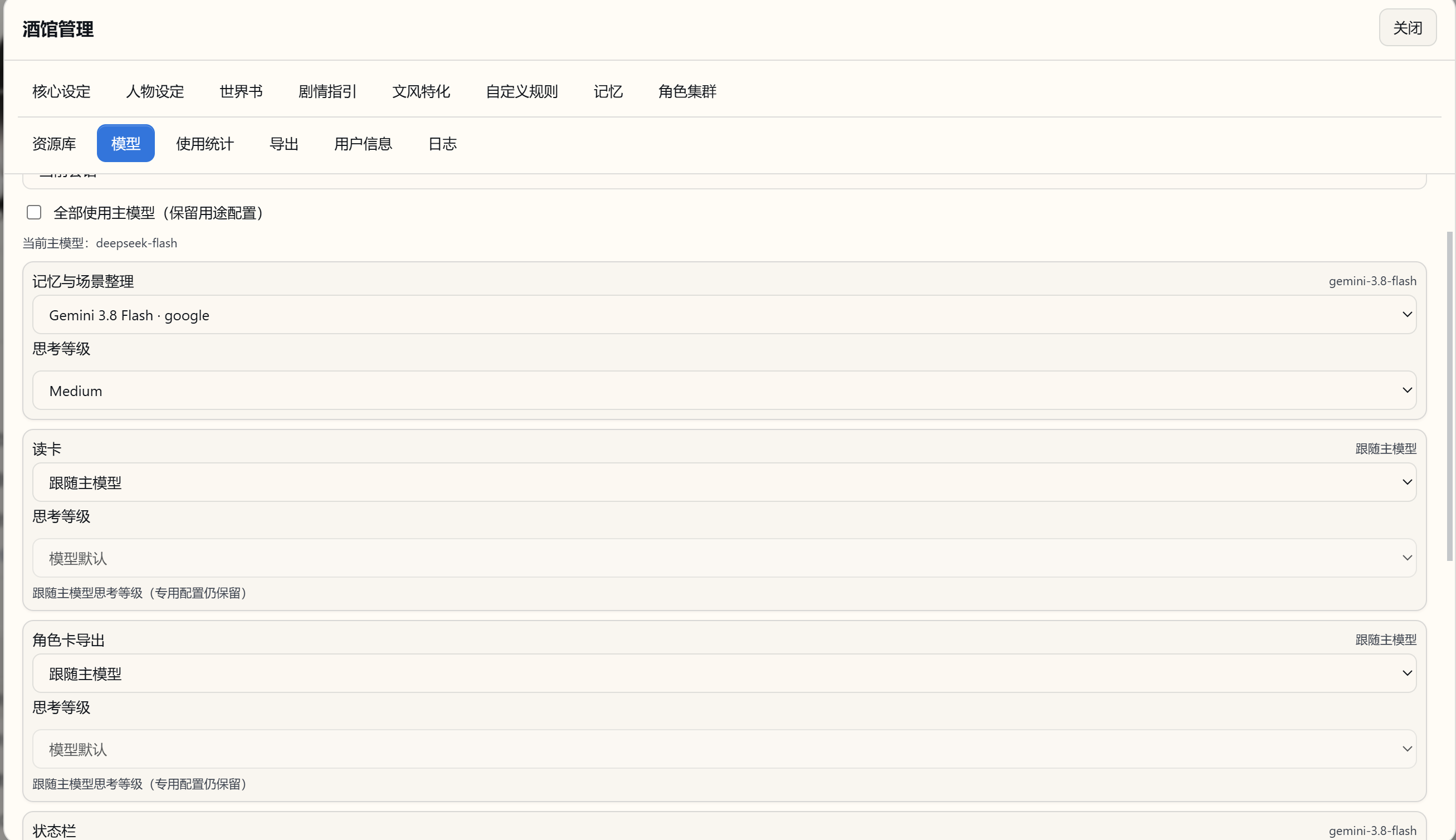
人物各自推演之外,模型也可以分工。 你可以让正文、后台记忆、读卡、状态与导出任务使用适合的模型,也可以统一跟随主模型;模型设置支持全局默认和当前会话覆盖。
查看多模型协同设置
状态栏与决策卡
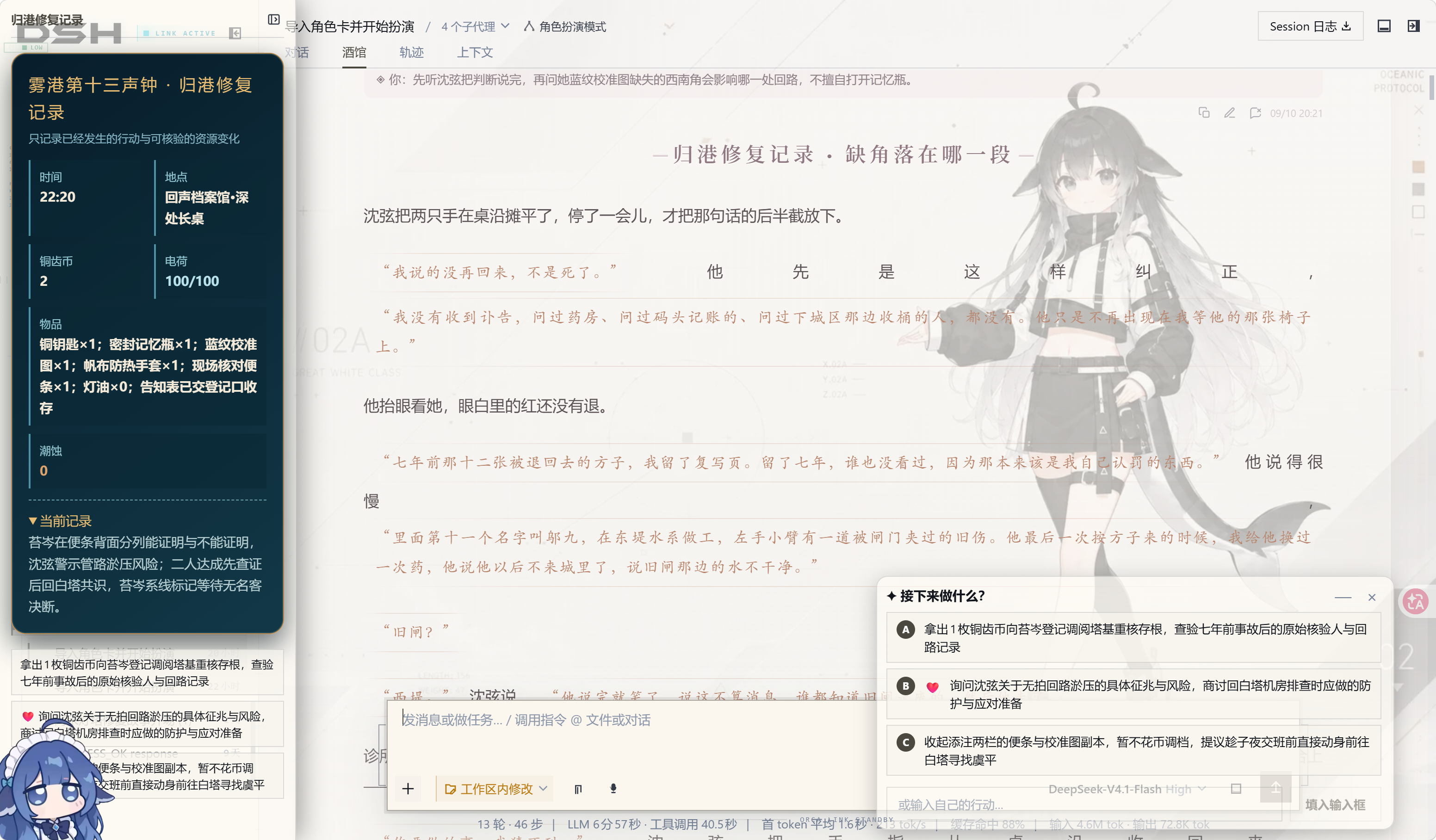
行动建议只出现在独立决策卡里,不再重复塞进状态栏或正文尾部。旧卡片里遗留的行动区域会被隐藏,但原卡本身一个字都不改。
决策卡现在有自己的操作:折叠/恢复(⌃ / —)、独立的 × 稍后处理、拖动移动,双击或按 Home 复位,可视高度有上限,不会吃掉整个屏幕。
阅读呈现也顺手顺了一批:作者写的状态 HTML/CSS 在导入、生成和旧数据恢复三条路径上都会被校验并保留;围栏状态样式与不透明面板恢复;状态面板撑满可用高度同时保留内部滚动;折叠后的侧栏重新展开按钮保持可见。状态模板的动态槽位可以接收真实数值,同时保留作者原有的 HTML/CSS/JS 结构;任务校验失败会带上结构化诊断、失败时间和重试指引。
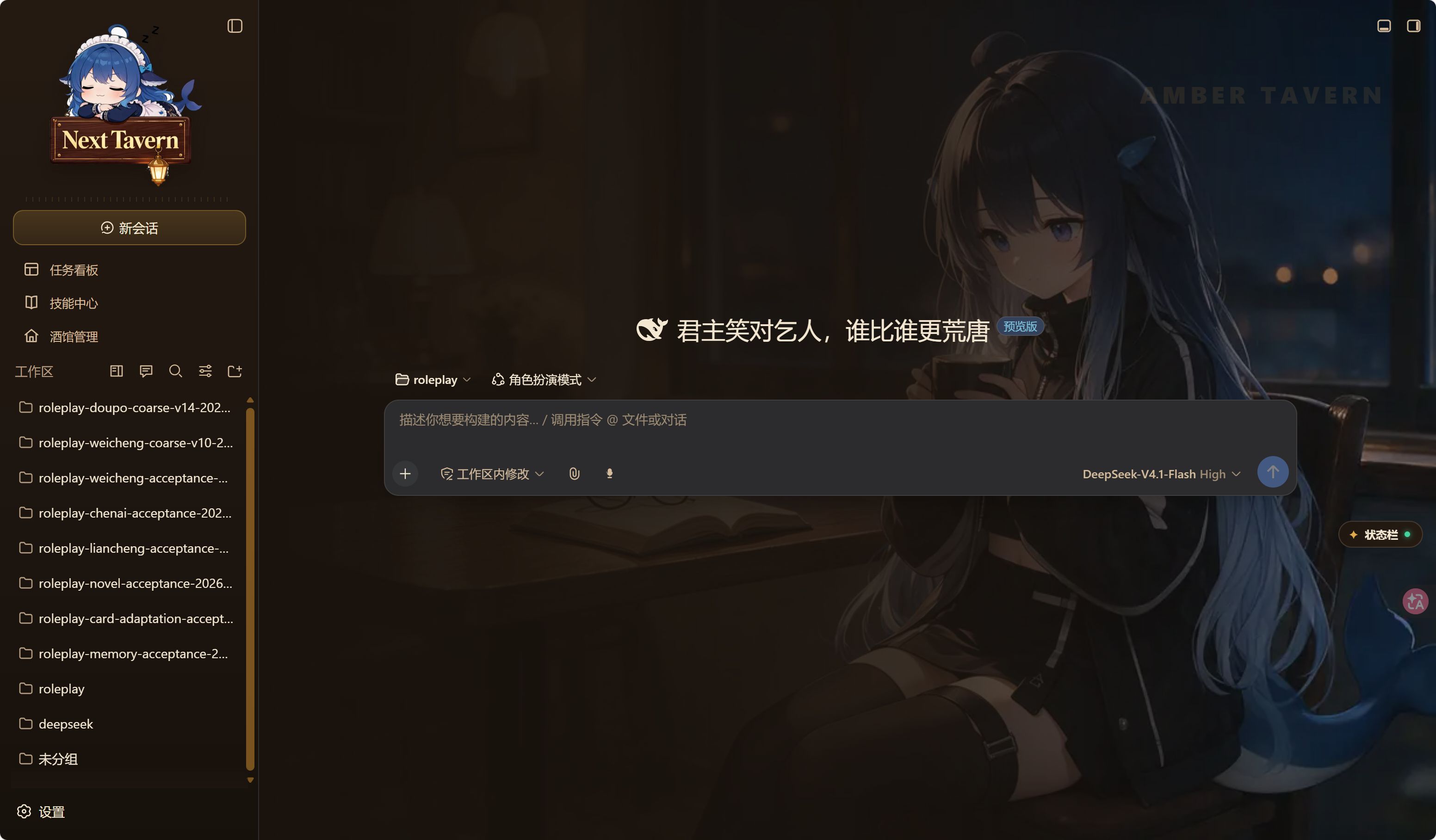
全新自有皮肤
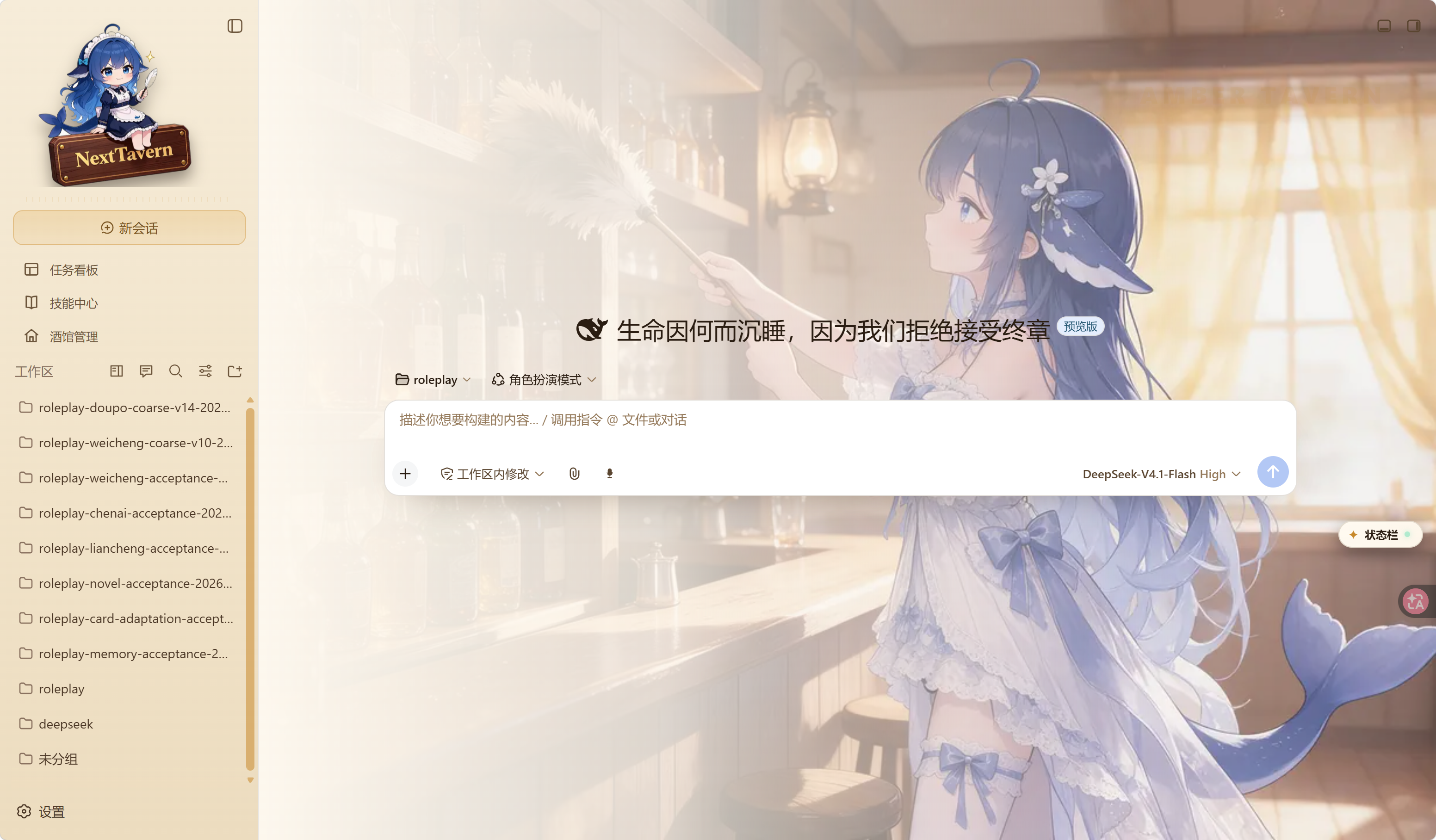
0.2.5 带来了项目第一套自有皮肤 dsh-nexttavern-amber:整套界面用同一套设计 token 重绘,日间与夜间两套主题切换一次就是两种气氛;侧栏坐着一位 Q 版酒馆看板娘,日夜各是一张不同的画;夜间主题下的酒馆阅读模式铺在陈旧羊皮纸上,作者自己写的墨色一点没动——喜欢安静地读完一篇长文的人,会喜欢这一版。
皮肤随安装包一起装好,但默认不开,所以你的界面还是原来的样子。想换上它:打开 设置 → 插件市场 → 已安装,找到 dsh-nexttavern-amber,把开关打开。它写进 profile 的 cordis.patch.yml,热加载大约一秒生效,不用重启;看腻了拨回去就行,你的选择在重启后依然保留。这个开关由随包的第三方插件市场提供,来源、出站请求与关闭方法见补丁与依赖来源。
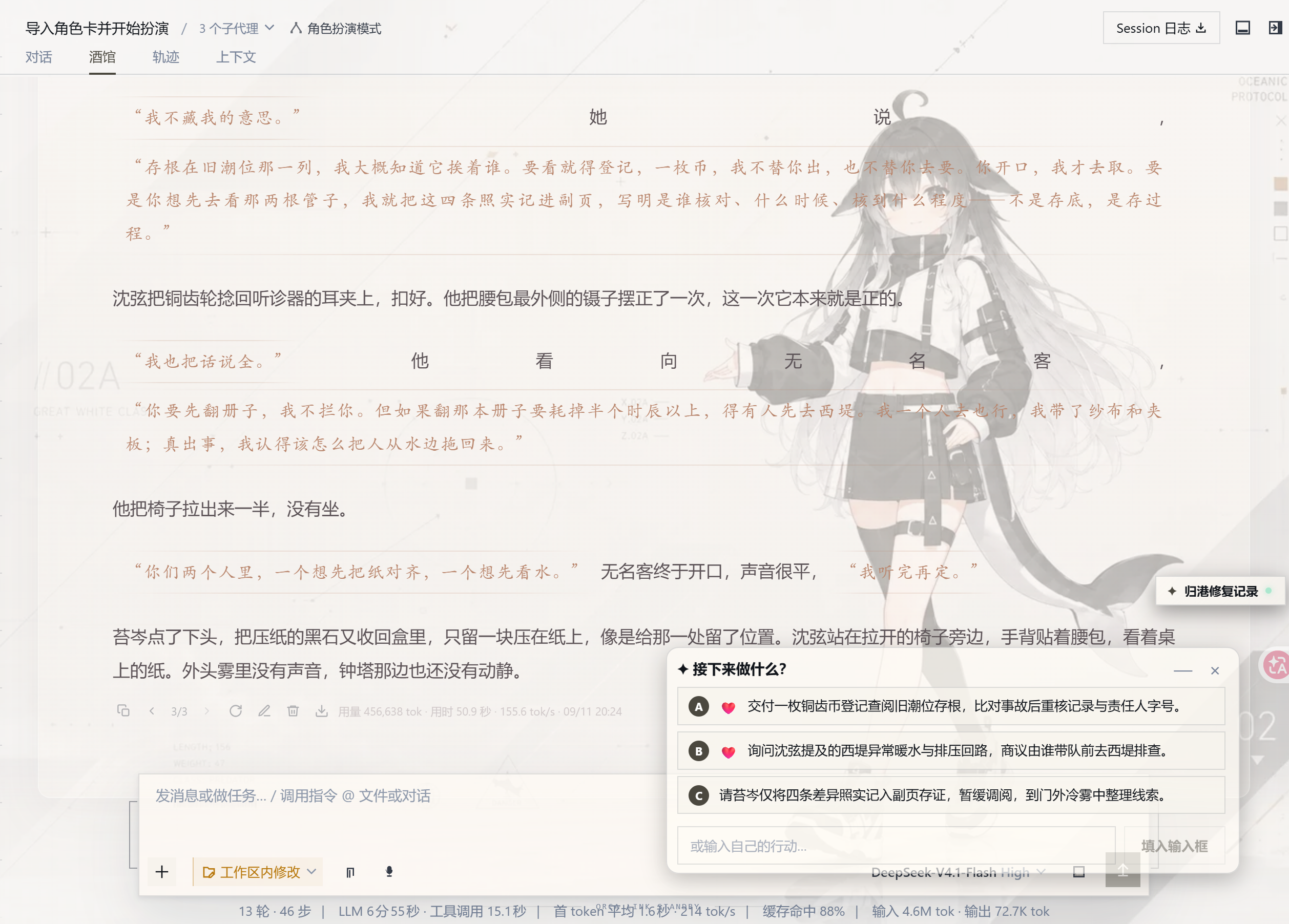
世界线与分支
不满意某段发展,可以重新生成;想改一个选择,可以修改玩家消息后发送。不同版本组成当前对话内的世界线,可以来回切换查看。只有在显式选择“在新对话中分支”时,才会创建独立对话。
每条世界线有自己的剧情、状态与记忆;笔记属于实际世界线,而角色的模型偏好与向量索引按对话或查询世界线共享。小说导出跟随你选中的世界线,方便保留你喜欢的故事版本。
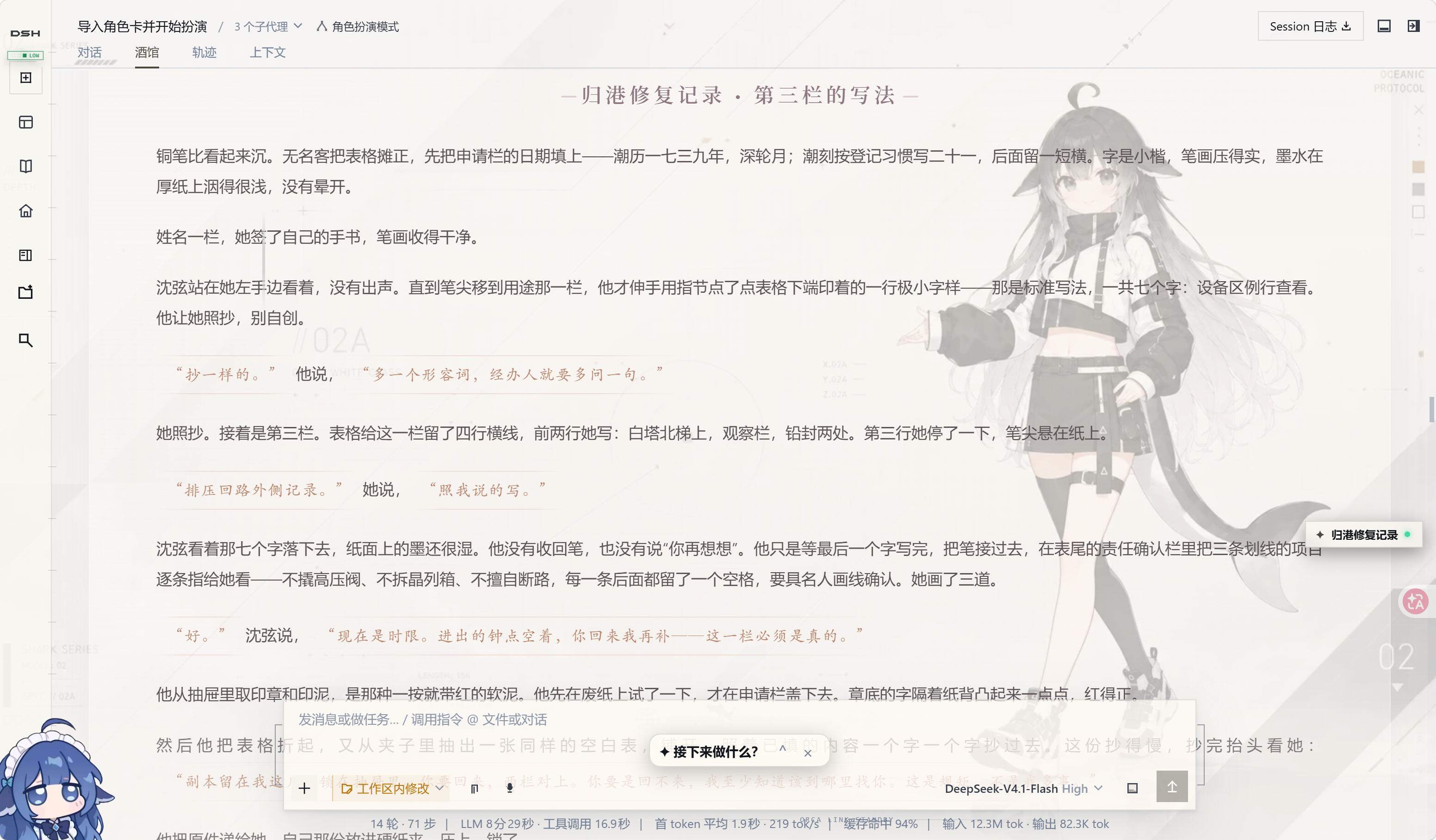
按你的方式阅读与创作
在“酒馆管理”中分别调整人物、世界背景、剧情方向、文风和自定义规则。把镜头、节奏与人物边界写进规则,把 HTML/CSS、状态栏和正则美化写进卡片,让不同故事拥有不同的阅读呈现。
正文生成时就能读;局后状态与笔记维护有独立进度。继续输入的玩家行动进入原生队列。
查看管理界面、自定义规则与世界书
从角色卡到可带走的小说
那些反复推敲的对白、意想不到的转折、终于抵达的结局,都值得成为一份真正的作品。选中你喜欢的世界线,一键整理成小说稿;也可以导出打磨后的完整角色卡,让这个世界继续被阅读、被分享、被创作。
查看资源库
资源库按时间或名称排序,支持刷新、查看文件与下载;角色卡和导出文件保留可识别的主题名称。
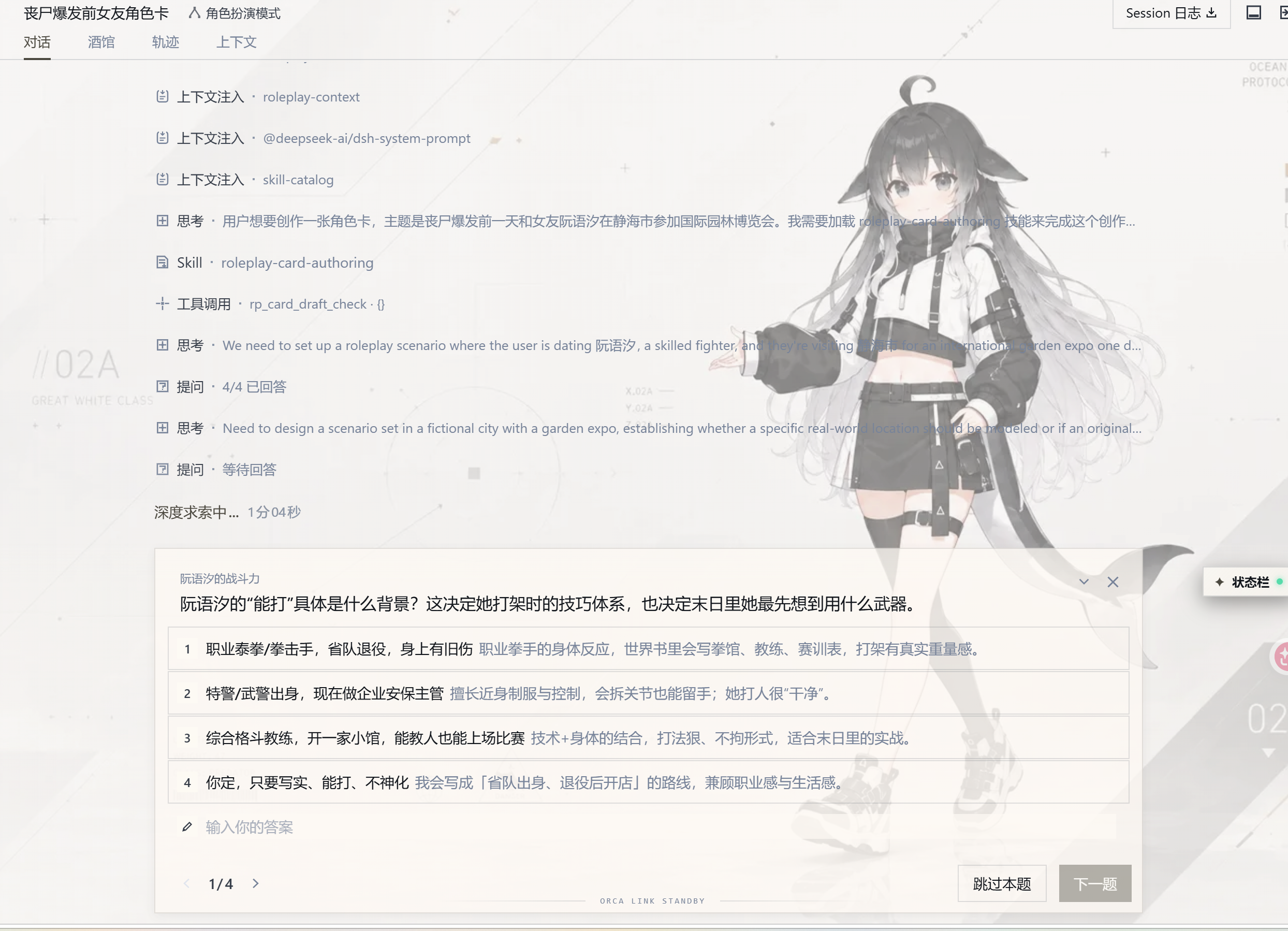
交互式创作
不必先准备一张完整角色卡,带着想象力来就够了。 一座永远下雨的港城、一段针锋相对的关系,或只是“我想经历一场慢热的冒险”,都能成为创作的开端。
AI 会和你聊人物、关系、氛围与剧情方向,把你的回答逐步展开成世界背景、多角色人设、开场、文风和阅读排版,再用十二项完整性检查过一遍。你可以亲自雕琢每一处细节,也可以把留白交给它:“你来决定。”从最初的灵感到可以开玩的角色卡,创作本身就是旅程的一部分。
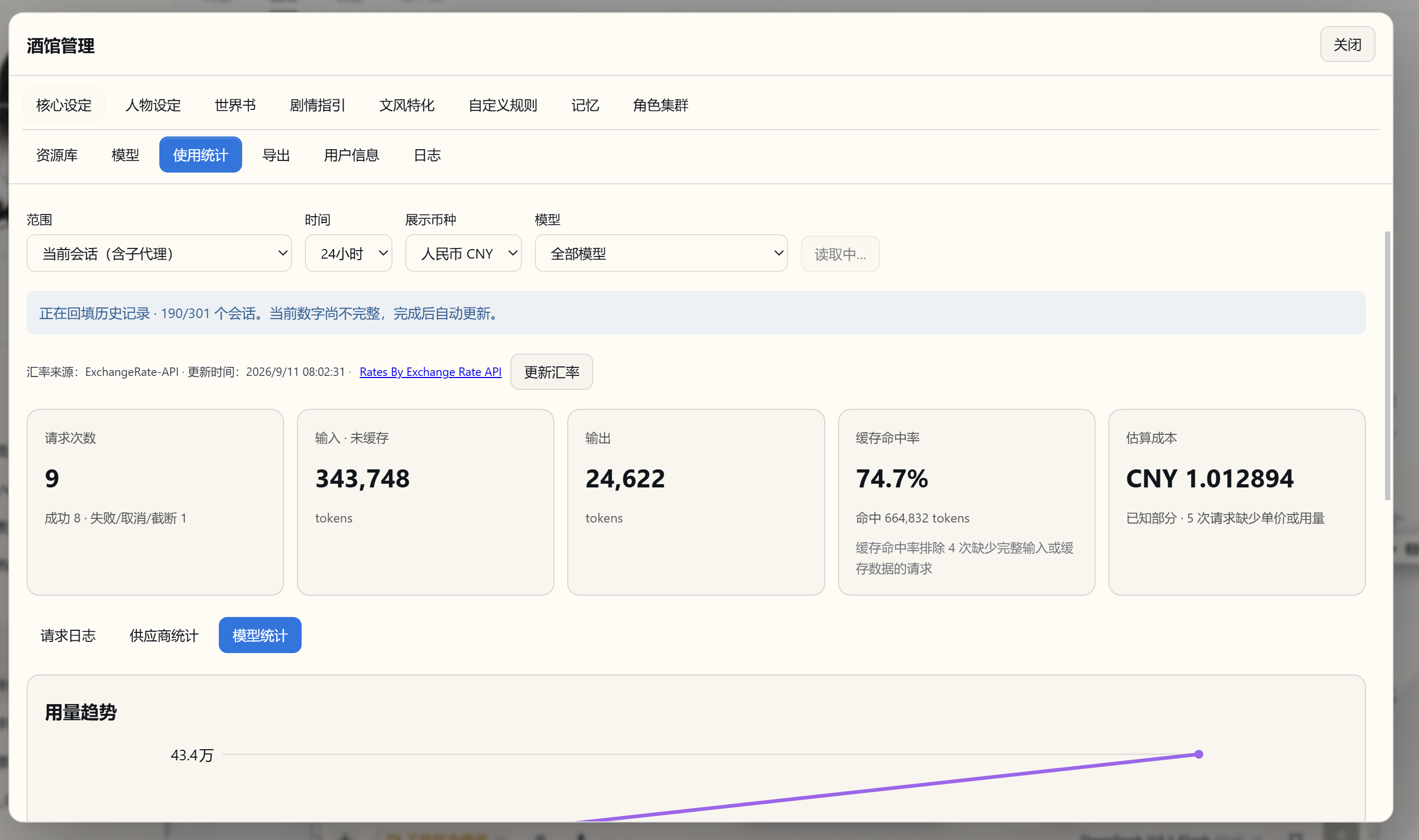
用量统计
尽情探索,也把模型的表现与开销看清楚。 请求日志、供应商统计和模型统计集中在同一个面板,按会话、时间与模型切换,就能查看输入输出 tokens、缓存命中率、生成速度和费用。嵌入模型的索引、查询、测试与重试也计入同一份统计。
比较不同模型的创作投入,观察长篇推进时的缓存变化,回看一次重生成或角色集群调用的消耗,都有据可查。支持模型价格倍率、手动单价与币种换算,让你按自己的预算与偏好安排下一段故事。
架构设计
功能都在上面了,这一章说它们在同一套运行时里是怎么接起来的。 写长篇,需要沿途积累的记忆、可随时翻阅的世界资料,也需要人物各自的动机。NextTavern 将这些能力连接进原生 Agent Loop:主代理推进叙事,记忆代理整理长线,角色代理独立推演,程序把当前故事需要的上下文准备好。 从读卡、开场到分支与导出,整个创作过程由这套架构贯穿。
flowchart TD
    Player[玩家输入与角色卡] --> Queue[原生输入队列]
    Queue --> Context[程序装配当前世界线的设定、正文与导演笔记]
    Context --> Writer[主代理与原生 Agent Loop]
    Writer <--> Lore[按需读取世界书与原始历史]
    Writer <--> Cast[可选角色 Agent 集群]
    Writer --> Story[流式正文与追加式剧情记录]
    Story --> Reader[沉浸阅读、世界线切换与小说导出]
    Story --> Tasks[局后状态与决策任务]
    Story --> Memory[后台导演笔记与检查点]
    Memory --> Context
五个设计,贯穿你的每一次创作:
- 让 AI 主动探索世界。 当前设定、正文和笔记随时可用;需要世界知识或早期细节时,主代理自己查阅资料,再把发现融入故事。
- 给长篇一套会整理的记忆。 固定设定始终在场,近期正文保留眼前细节,导演笔记承接长线,历史查询让旧事有迹可循。从当前场景到早期伏笔,信息各有归处。
- 把“换一种选择”变成真正的世界线。 重写一句行动,重新生成一次回应,就能沿另一条路线继续。每条世界线保留自己的剧情、状态与记忆,也能单独导出。
- 让不同角色带着自己的想法登场。 角色分别推演,主代理综合他们的行动与意图;记忆、状态、读写卡等工作还能交给不同模型协作完成。
- 让阅读跟上灵感。 正文边写边读,状态与笔记随后整理。你可以继续酝酿下一步行动,让创作自然衔接。
阅读完整架构说明:上下文组成、记忆四支柱、预设作用域、长文本流水线与请求成本
下载
架构说完,下面是取用与维护这一版需要的材料。 先看这一版发布了哪些文件。
- 主包 dsh-nexttavern.tgz,含预构建 UI、源码、preset、参考卡、补丁器、CLI 和可选公网鉴权源包。
- 独立 dsh-debug.tgz。
- 公网鉴权插件 dsh-auth-webserver.tgz,安装步骤见手机电脑公网访问指南。
一键安装器:
- NextTavern-Setup.exe(Windows x64)
- NextTavern-Setup-arm64.exe(Windows on ARM)
- NextTavern-Setup.sh(Linux,x86_64 / aarch64)
- nexttavern-setup.tgz(安装器的 npm 归档)
校验与来源:
- SHA256SUMS 与 provenance.json
- 版本说明。未发布到 npm,不要使用
npm install dsh-nexttavern。
安装
一键安装器已经覆盖了绝大多数场景;这一节是手动路径,适合想自己控制运行时版本、自己应用补丁、需要固定端口,或者要接进自己运维流程的用户。
需要 Node.js 22+、npm、Python 3 和 tgz 解压工具。以下为 PowerShell 7 示例,使用独立的新目录。先下载主包;每条命令成功后再继续。
$ReleaseDir = Join-Path $PWD 'nexttavern-release'
$HarnessRoot = Join-Path $PWD 'nexttavern-harness'
$env:DSH_HOME = Join-Path $PWD 'nexttavern-home'
New-Item -ItemType Directory -Path $ReleaseDir,$HarnessRoot -ErrorAction Stop | Out-Null
tar -xzf ./dsh-nexttavern.tgz -C $ReleaseDir
Copy-Item -LiteralPath "$ReleaseDir/package/harness/package.json" -Destination $HarnessRoot
Copy-Item -LiteralPath "$ReleaseDir/package/harness/package-lock.json" -Destination $HarnessRoot
npm ci --prefix $HarnessRoot --ignore-scripts --no-audit --no-fund
node "$HarnessRoot/node_modules/@deepseek-ai/dsh/lib/bin.js" web --dump-config | Out-Null
$ProfileDir = Join-Path $env:DSH_HOME 'profiles/web'
npm install --prefix $ProfileDir --legacy-peer-deps --ignore-scripts --no-audit --no-fund "$PWD/dsh-nexttavern.tgz" "$HarnessRoot/node_modules/@deepseek-ai/dsh-tools"
$PackageRoot = Join-Path $ProfileDir 'node_modules/dsh-nexttavern'
随包 Harness 锁文件固定 alpha.3 官方依赖,避免旧 prerelease 的宽范围解析到新版本。本地目录依赖让社区文档工具复用 Harness 的同一个 dsh-tools 实例;不要在 profile 中另装不同版本的官方工具注册表。
安装 preset 和修改 Harness 前,停止目标实例,为每次操作选择新的备份目录:
node "$PackageRoot/tools/install.mjs" --home $env:DSH_HOME --harness $HarnessRoot
node "$PackageRoot/tools/install.mjs" --home $env:DSH_HOME --harness $HarnessRoot --apply --stopped --backup "$PWD/nexttavern-preset-backup-1"
node "$PackageRoot/tools/patch-harness.mjs" --harness $HarnessRoot
$env:DSH_ALLOW_HARNESS_PATCH = '1'
node "$PackageRoot/tools/patch-harness.mjs" --harness $HarnessRoot --apply --stopped --backup "$PWD/nexttavern-harness-backup-1"
Remove-Item Env:DSH_ALLOW_HARNESS_PATCH
node "$HarnessRoot/node_modules/@deepseek-ai/dsh/lib/bin.js" web --host 127.0.0.1 --port 3510
浏览器中配置自己的供应商,选择工作区,在新会话预设菜单中选择“角色扮演模式”。打开角色扮演会话后,可见“酒馆管理”侧栏入口和“酒馆”TAB。未打补丁也能加载插件,但会缺少完整的 UI slots 和世界线支持,那不算完整安装。
已有 alpha.3 的用户可以用自己的 HarnessRoot/DSH_HOME,先跑一次 audit。已有但不受安装器管理的 roleplay preset 会被拒绝覆盖,请先自行备份和迁移。遇到未知版本或文件指纹,安装会停下,不会降级成部分安装。--stopped 是你的停机确认,工具不会替你终止服务或会话。
文档扩展
上传和 read_document 随完整安装提供。anydoc 的 DOCX/PDF 转换与 office 的 DOCX 导出定义和配置入口也随包交付;启用需安装依赖后重新安装 preset:
npm install --prefix $ProfileDir --legacy-peer-deps --ignore-scripts --no-audit --no-fund 'https://github.com/a86582751/dsh-plugin-anydoc/releases/download/v0.1.0-nexttavern.1/dsh-plugin-anydoc-0.1.0-nexttavern.1.tgz' '@huiliyi37/dsh-office@0.2.2'
node "$PackageRoot/tools/install.mjs" --home $env:DSH_HOME --harness $HarnessRoot --documents
node "$PackageRoot/tools/install.mjs" --home $env:DSH_HOME --harness $HarnessRoot --documents --apply --stopped --backup "$PWD/nexttavern-documents-backup-1"
省略 --documents 再安装可关闭这两个挂载,不删除文档。显式启用但缺依赖会报错。扫描版 PDF 走 OCR,能否读出内容取决于文件本身;能读哪些格式,也取决于系统里可用的组件。office 的 docx_read 有长度上限,完整读卡使用 read_document 分页或 anydoc。长文本转角色卡读的是工作区 TXT,不依赖这一节的扩展。
补丁与依赖来源
| 单元 | 目标版本 | 作用 |
|---|---|---|
| ui-chat | 0.1.2-alpha.3 | slots、动作栏与维护投影 |
| ui-workspace | 0.1.2-alpha.3 | 侧栏 slots、CSS 标识符 |
| token-meter | 0.1.2-alpha.3 | 编辑计量与热路径 |
| session-projection | 0.1.2-alpha.3 | 投影热路径与缺事件恢复 |
| Session Controller | 0.1.2-alpha.3 | 原生 forkPrepared 世界线准备 |
| pi-ai | 0.84.4 | Google、OpenAI Completions/Responses、Anthropic 流终止 |
全部目标先在内存里转换、核对,再备份和写入。重复应用完全相同的补丁是幂等的;失败会恢复本批改动,中断后可按事务备份回滚。被其他升级或你自己改过的文件不会被强制覆盖。npm 安装没有 postinstall 补丁。
社区兼容包使用正式 fork,保留上游历史和署名,不会被误认作原作者发布:
- dsh-file-upload,上游 HongMing-Huang/dsh-file-upload 0.4.3。修复上传回调、稳定引用、附件关闭不删资源、完整分页和 Markdown 转义;基础包保留原版 Host 检查。显式安装公网兼容后,额外接受鉴权插件完成 JWT 与 Origin 校验后写入的服务器标记。
- anydoc,上游 beancookie/dsh-plugin-anydoc 固定提交的 0.1.0,保守还原 Markdown 转义。
- pi-ai 差分,上游 earendil-works/pi 0.84.4。统一补丁器解析 Harness 实际使用的实例,不另装无效的 profile 副本。
随包还装了一个第三方插件市场,上面那套皮肤的开关就由它提供:
- dsh-market(npm 名
dshmarket)固定 1.39.0,MIT,就是 dshmarket.com 的插件市场:在设置里浏览、搜索、一键安装社区插件。 - 它是独立的第三方项目,由 dsh-market 维护,不是我们写的。打开市场会读取 awesome-dsh-plugin.com 的公共插件目录,打开评论会连 giscus 和 GitHub——这是我们「本地服务只监听 127.0.0.1」之外额外出站请求的来源。我们固定版本、不跟随上游,也不改它的代码。
- 不想让它联网,可以在 设置 → 插件 → 插件配置 里把它关掉;那之后皮肤也能继续用,只是换肤要手动改 profile 的
cordis.patch.yml。
better-sidebar 不是必需依赖,用官方侧栏就好。公网玩家可按手机电脑公网访问指南显式安装随包提供的 @isund/dsh-auth-webserver(0.1.0-alpha.3.2),配置自己的 Cloudflare Access、域名和登录身份。鉴权源码、脱敏模板、三个可回滚的公网兼容选项都已交付;默认的本机安装不会自动开放网络。个人密钥、地址、systemd/Nginx 实例配置和私有模型路由不随包分发。通用 Qwen reasoning 配置辅助工具保留在 integrations 目录,只在你的路由确实需要时使用。
更新、卸载与回滚
用一键安装器的玩家,更新就是在旧安装上运行新安装器(Windows 支持原地升级,保留故事与设置);卸载则在停止服务后删除安装目录和快捷方式。细节见 Windows 与 Linux 指南。
手动安装的更新流程:先停止实例并备份,核对新版本兼容情况;安装新 tgz 后运行新安装器和补丁 audit。你改过的受管 preset 文件不会被覆盖,但要先保留并核对改动。安装器用 .nexttavern-install.json 管理文件。
# 卸载 preset 与 bundle 注册,保留故事、资源、笔记和模型配置。
node "$PackageRoot/tools/install.mjs" --home $env:DSH_HOME --harness $HarnessRoot --uninstall --apply --stopped --backup "$PWD/nexttavern-uninstall-backup-1"
# 回滚指定的安装或卸载事务。
node "$PackageRoot/tools/install.mjs" --rollback "$PWD/nexttavern-uninstall-backup-1" --stopped
# 单独恢复原版 Harness,完整酒馆功能随之不可用。
$env:DSH_ALLOW_HARNESS_PATCH = '1'
node "$PackageRoot/tools/patch-harness.mjs" --rollback "$PWD/nexttavern-harness-backup-1" --stopped
Remove-Item Env:DSH_ALLOW_HARNESS_PATCH
卸载器不删除 npm 依赖。确认不再使用后,可以从 profile 里移除插件包;其他插件仍然依赖的上传/文档工具要留着。回滚只用对应实例的原始备份。
源码与验证范围
如果你想自己重建一套界面,或者核对这个包是怎么做出来的,这一节就是路线图。
TypeScript 是唯一维护源码。 手写 .ts / .mts,.js / .mjs 由共享构建清单经 TypeScript 5.9.3 生成。本版发布包含 637 个构建产物、24 个 schema 和 158 个 TypeScript 模块,运行时已经整体迁移过来,包括核心、UI、记忆、鉴权、读卡、任务、遥测、分支与世界线路由,以及发布与安装工具链。
provenance.json 记录维护源码提交、逐文件来源、工具版本和 SHA-256;tools/harness-patches.json 记录上游固定来源及前后指纹。主仓库不携带完整官方补丁快照。想重建 UI:
npm ci --prefix ./build-tools --ignore-scripts --no-audit --no-fund
npm run build
同一份源码和锁文件应当重建出相同的 lib/client.js。改动源码后请更新自己的版本号与 provenance,不要冒充原始 Release。兼容 fork 各自有无需维护仓库的独立重建命令和归档摘要。
架构设计与各部分的取舍写在架构说明里。安装、补丁和记忆部分的改动都有对应的测试;两个一键安装器各自适用哪些场景,写在 Windows 一键安装指南 与 Linux 一键安装指南 里。
社区支持
感谢 @ljs1997sh 在 NextTavern 发布后迅速带来 dsh-nexttavern-qq-mobile,为手机玩家提供 QQ 风格界面、紧凑布局,以及手机、局域网和远程访问方案,让更多人能随时继续自己的故事。0.2.5 的自有皮肤是本仓库内的独立实现,没有合并它的界面,也没有转发它的代码。
这是一个由作者独立维护的社区项目,请按它的仓库说明了解安装方式和适用场景。这里提供的 CF Access 鉴权插件和公网访问指南需要按指南一步步配置和确认。
反馈与许可
带着你的世界来,也把体验和想法带回来。分享反馈与建议,一起打磨下一段更好的创作旅程。反馈问题时请附版本与复现步骤,并隐去密钥和私密内容。
自有代码以 GPL-3.0 开源。随包的上游补丁与社区改动各自保留原许可(DeepSeek 与 pi 的 MIT 条款、上传与 anydoc fork 的 MIT、office 的 Apache-2.0),逐项列在 NOTICE 里。
Compatibility
Versions
| Latest version | Published | Size |
|---|---|---|
| 0.2.5 | — | — |
| 0.2.8 | — | — |
| 0.2.9 | — | — |
| 0.2.9-rc.4 | — | — |
Comments
Loading…
Similar plugins
by RiemannRe3
DeepSeek Harness 的 Tavern 角色卡兼容与原生 Agent RolePlay 插件。
★ 8
↓ 46/wk
MIT
TypeScript
Aug 30, 2026
dsh plugin --profile web add @riemannre3/dsh-roleplayby LingyeSoul
DSH plugin: SillyTavern-compatible roleplay workspace with Character Card V2/V3/PNG import, World Info lore engine, presets, swipes, chat editing and streaming LLM generation. Official bundle, install
★ 15
↓ 1.6k/wk
GPL-3.0
JavaScript
Aug 17, 2026
dsh plugin --profile web add dsh-tavernRole-play plugin for DeepSeek Harness: imports SillyTavern character cards (JSON/PNG) and world books (lorebooks), binds DSH skills to a character, and registers the combination as a native agent pres
★ 0
dsh plugin --profile web add dsh-bardby XCNXNXNX
DeepSeek Harness 的「便携酒馆」插件:RPG 式 SillyTavern V2/V3 角色卡生成器 + 酒馆角色扮演聊天。支持世界书、角色卡 JSON/PNG 导入导出、面板主题与本地音乐。独立插件,仅依赖官方 @deepseek-ai SDK。
★ 24
↓ 75/wk
MIT
TypeScript
Oct 3, 2026
dsh plugin --profile web add dsh-portable-tavernby Amakurai
A DeepSeek Harness (dsh) plugin — turns dsh web into a SillyTavern-style roleplay frontend: character cards, prompt presets, lorebooks, personas, BM25 long-term memory, world-state deltas, and rollbac
★ 230
MIT
JavaScript
Oct 29, 2026
dsh plugin --profile web add dsh-liketavernby Lindemellis
DSH Tavern plugin: send SillyTavern preset entries with their own role (system/user/assistant) instead of forcing system/user | 游玩时预设条目按自身 role 发送
★ 0
MIT
JavaScript
Oct 7, 2026
dsh plugin --profile web add dsh-tavern-preset-roles