
dsh-desktop-pet
Manifest validDeepSeek Harness desktop pet: an official-whale widget in the shell overlay showing live agent status and the API balance as a circular sea level
dsh-desktop-pet
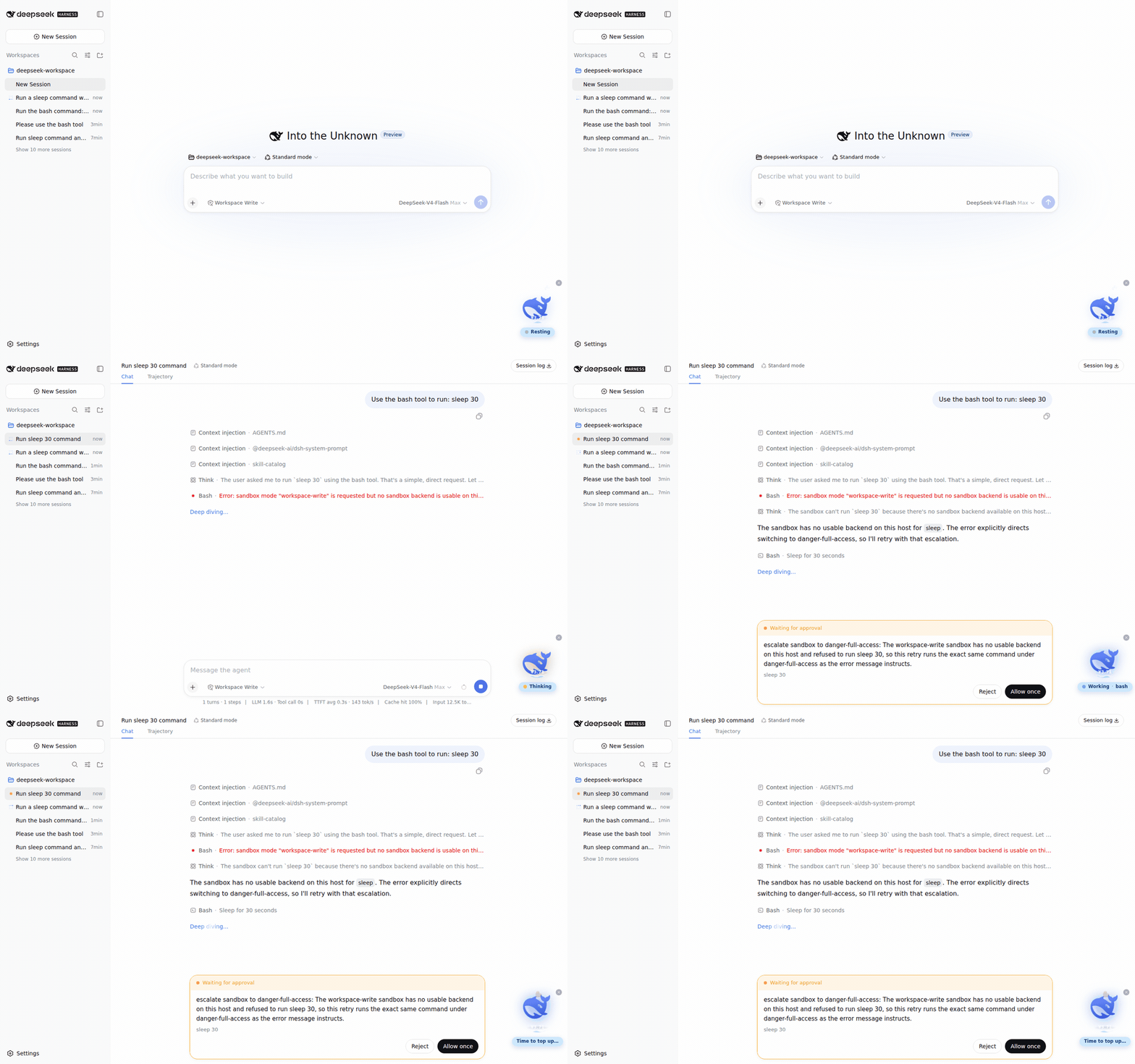
A desktop pet for DeepSeek Harness: the official whale mark lives in the shell overlay, floats in a circular sea whose level mirrors your DeepSeek API balance, and reacts to your agent's every move.
Features
- Live agent status — the whale rests, thinks, works, or cries (
❗) exactly as your agent does, with a status pill that shows the phase, the current tool, and elapsed time. - Balance as sea level — the circular sea around the whale fills to
balance / balanceScale(¥100 = full by default), the surface is a scrolling wave with a slow tide, and the amount is printed on the water. Low balance also makes the whale droop and complain. - Interactive — click to pet it: a springy jump most of the time, or a rare (40%) charged dive with a 360° spin that lands with a big splash, a high rebound, a little hop, and a final tiny splash. Random chatter lines (zh/en) per state, floating hearts, rising bubbles while thinking, drag it anywhere, minimize to a dot.
- Zero runtime dependencies — the bundle ships prebuilt; all
@deepseek-ai/*services come from the harness itself, so installing needs no build step and no build authorization.
Install
Prerequisite: a DeepSeek Harness install (web profile recommended).
# GitHub direct install (prebuilt artifacts, no build authorization needed)
dsh plugin --profile web add github:FenyxHuang/dsh-desktop-pet

# or from a local checkout
dsh plugin --profile web add link:/path/to/dsh-desktop-pet

# or as a tarball
pnpm pack
dsh plugin --profile web add ./dsh-desktop-pet-0.1.0.tgz
Restart dsh after installing (bundle layers compose at startup). The whale appears in the bottom-right corner of the web UI.
Configuration
The bundle applies the cordis.patch.yml layer, which mounts two rows:
| id | package | config |
|---|---|---|
pet-status | dsh-desktop-pet | balanceScale: 100 (the CNY amount at which the sea reads full; the sea level is balance / balanceScale, capped at 1) |
ui-pet | dsh-desktop-pet | — |
The host row reads your DeepSeek API key through the harness's normal credentials (DEEPSEEK_API_KEY) and refetches https://api.deepseek.com/user/balance at most every 15 seconds. Override any key in your own profile's cordis.patch.yml:
- update:
    - id: pet-status
      config:
        balanceScale: 500
        balanceRefetchMs: 60000
How it works
One npm package carries both halves, mirroring the official split packages:
- Host half (
lib/index.js) — a Cordis service (PetStatusService) that foldsagent/status,tools/pre-execute,tools/result, andagent/errorevents into a per-session snapshot and serves it over a generated Typert Remote (petStatus.snapshot). Thelib/typert.*artifacts are generated by@deepseek-ai/dsh-typert-generatorand committed, so consumers install prebuilt code. - Browser half (
lib/client.js) — a module-loader bundle that mounts its own Remote contribution, polls it once per second for the current session, and registers the shell-overlay widget. React, Cordis, and the platform modules stay external (the app provides them); everything else is inlined.
The package declares no runtime dependencies: the loader resolves @deepseek-ai/* names from the dsh install itself, which is the official plugin contract.
Development
The repo is a self-contained single package (TypeScript + tsdown). Building and testing require an enclosing DeepSeek Harness checkout (the tests alias @deepseek-ai/* to its source tree):
# from inside a harness checkout (e.g. <harness>/.dsh-build/dsh-desktop-pet)
pnpm install
pnpm run build          # tsc both faces + tsdown host bundle + browser bundle
pnpm run test           # 34 pass; the 7 jsdom widget tests need a supported Node (^22.19 || >=24)
Regenerate the Typert artifacts only when the Remote surface changes, by copying the output of the harness's own build for the equivalent package and re-patching the package name, or by running the official generator in a <workspace>/packages/* layout (its discovery requires that shape).
License
MIT — derived from the DeepSeek Harness codebase (MIT, © 2026 DeepSeek). The whale mark is DeepSeek's official brand artwork and is used for the widget's own display.
Comments
Loading…
From the same category
by ccch1mneyyy
DSH 官方公众号收录的 TUI 补位插件:Claude Code 风,鲸鱼顶栏/实时状态/流式思考/双击 Esc 回滚/上下文进度+TPS。npm 一键装。 DSH official WeChat featured TUI plugin — Claude Code style: whale bar, live status, streaming thoughts, double-Esc rol
★ 4.3k
↓ 10.9k/wk
MIT
TypeScript
Oct 11, 2026
dsh plugin --profile terminal add @deepseek-harness-tui/dsh-tuiby strukto-ai
The World's First Virtual Terminal for AI Agents
★ 3.7k
↓ 355/wk
Apache-2.0
TypeScript
Oct 11, 2026
dsh plugin --profile agent add @struktoai/mirage-dshby bowenliang123
The best DeepSeek Harness plugin for context insight and management, with context dashboard / browser / sidebar and context command, for context statistics, composition, breakdown, evolution details,
★ 2k
↓ 34.4k/wk
Apache-2.0
TypeScript
Oct 11, 2026
dsh plugin --profile web add dsh-contextby huiliyi37
官方 DeepSeek Harness 的交互式终端 UI 插件:自研 ANSI 极简交互渲染、流式 Markdown/工具卡、16+ 主题、slash 命令与选择器、输入历史与本地偏好持久化、LSP 诊断、memory记忆,很丝滑的开发体验。
★ 287
↓ 462/wk
Apache-2.0
TypeScript
Sep 30, 2026
dsh plugin --profile terminal add @huiliyi37/dsh-tianshu-tuiby Hilbert-beinghappy
面向 DeepSeek Harness 的 Claude Code 风格终端界面,支持 Windows、macOS 与 Linux,兼容透明终端、VS Code 主题和自定义配色。
★ 197
↓ 108/wk
MIT
TypeScript
Oct 1, 2026
dsh plugin --profile web add seekttyby T-Auto
deepseek-harness Plugin Access and Implementation Standards / deepseek-harness交互生态插件规范与实施标准
★ 83
MIT
JavaScript
Oct 10, 2026