
dsh-theme-endfield-contour-rework
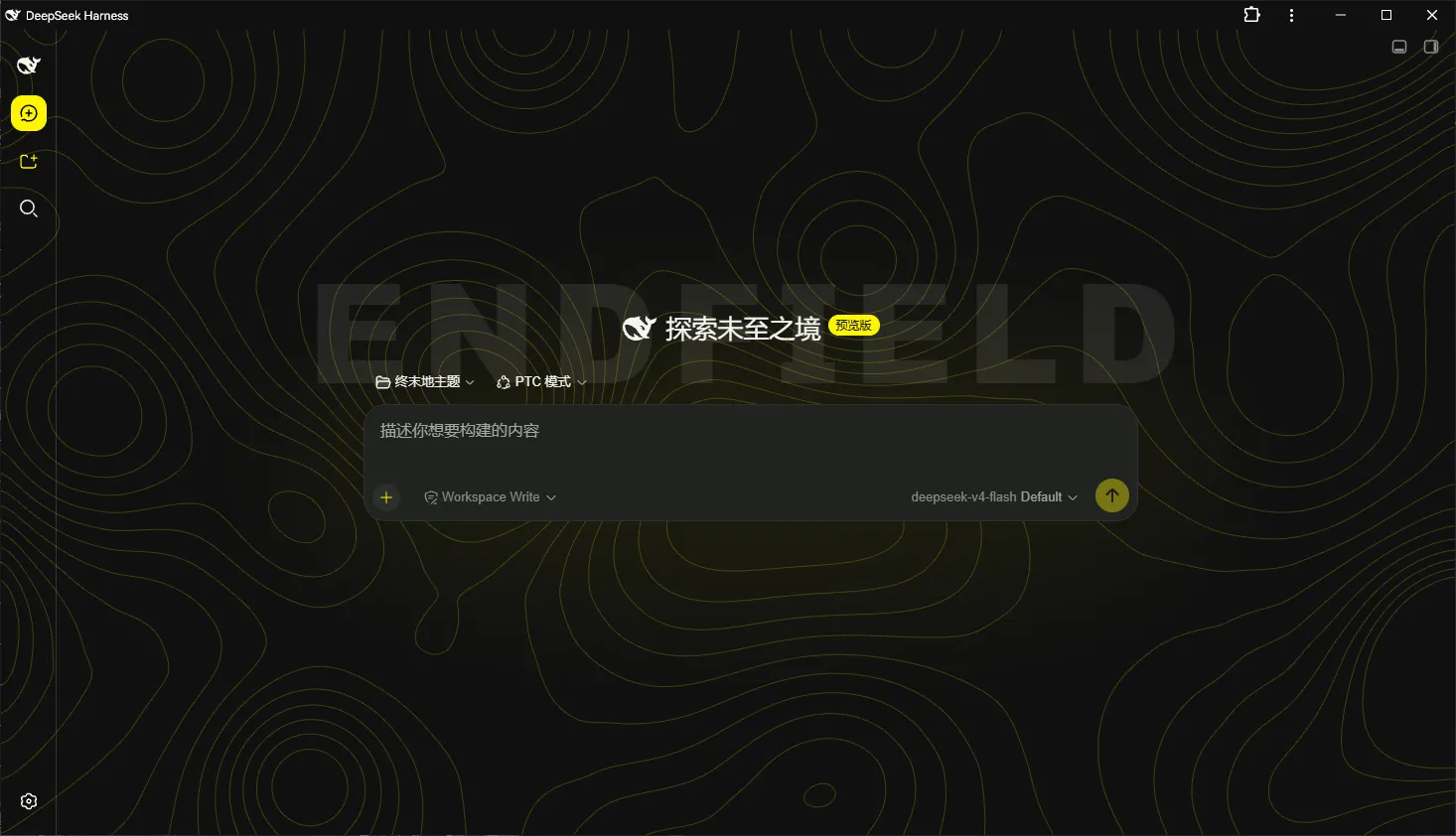
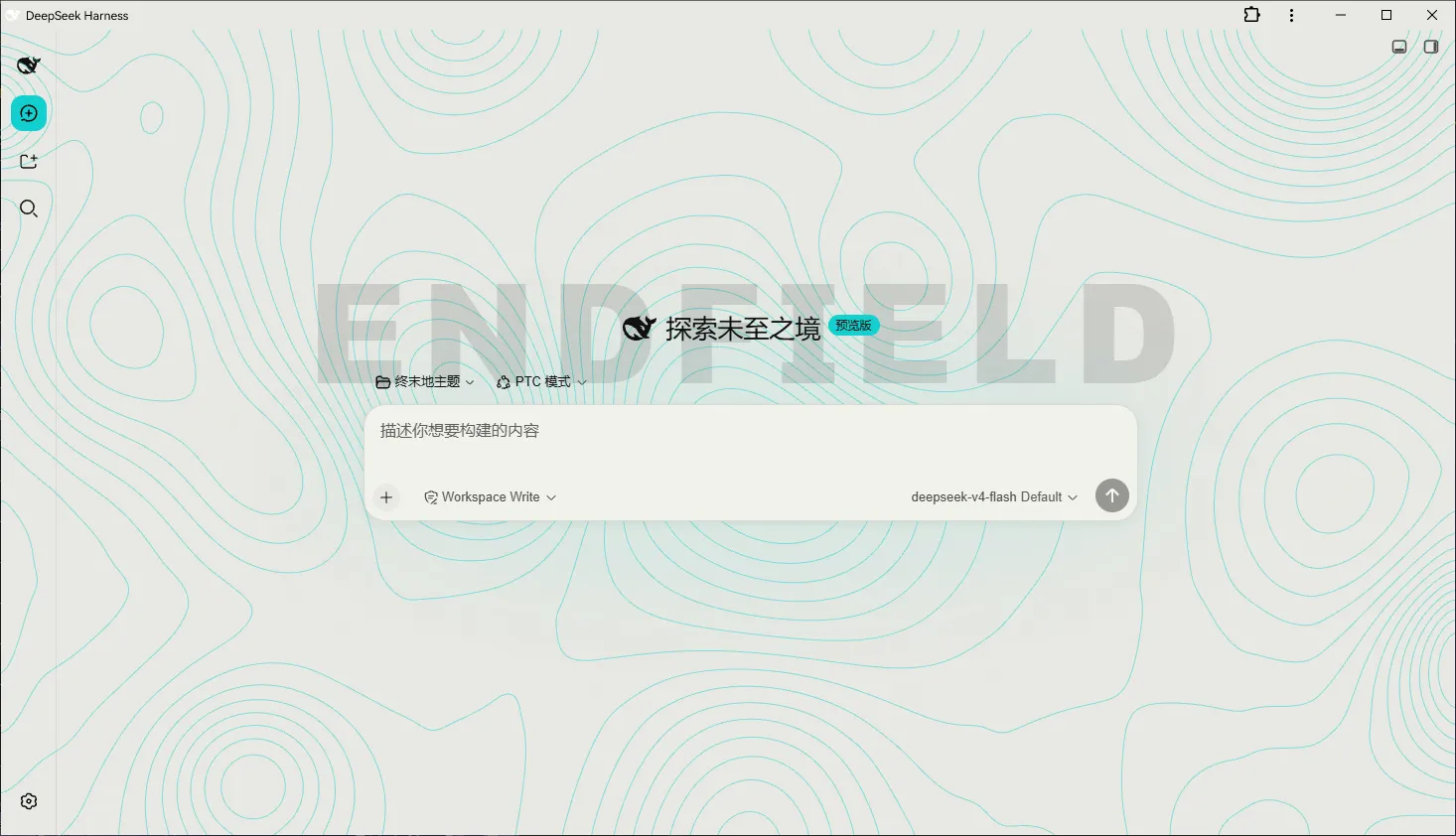
Manifest validFork of dsh-theme-endfield (Arknights: Endfield industrial editorial theme for DeepSeek Harness) with a redesigned contour animation engine: precomputed tileable Perlin terrain, marching-squares contours, cached-texture scrolling. AI-assisted fork; only tested on DSH 0.1.1-rc.2.
dsh-theme-endfield-contour-rework
A fork of dsh-theme-endfield with a reworked contour animation engine, for DeepSeek Harness (DSH) Web.
Fork. A fork of dsh-theme-endfield — Copyright (c) ymh0000123. The upstream MIT licence is kept unmodified in
LICENSE; seeNOTICE.md.AI assistance. Developed with extensive AI assistance: most implementation changes were generated by AI-assisted workflows, then verified by running tests, debugging and iterating. Review the changes before using this fork in a production environment.
Tested only on DSH 0.1.1-rc.2 (
webprofile, Windows).
About this fork
Upstream provides the original theme framework, styling system, loader, settings infrastructure and testing scaffolding. This fork focuses on replacing the contour animation subsystem.
The contour background is now rendered from a precomputed, seamlessly tileable terrain: the pattern is drawn to a texture once, and scrolling only translates that texture. The previous engine deformed the field and re-extracted its contour lines every frame, so it is replaced (with its frame-rate setting) rather than adjusted, and the contour settings now describe scroll direction, speed and density.
Implementation details, the defects found while building it and their measurements are in docs/engineering-notes.md; the full change list is in CHANGELOG.md.
Install
dsh plugin --profile web add github:DoctorxPriestess/dsh-theme-endfield-contour-rework
Reload or restart the web profile to apply. To uninstall:
dsh plugin --profile web rm dsh-theme-endfield-contour-rework
To pin a version instead of tracking main, install the release tarball — this is the form DSH
records in the profile, so it is exactly what a rolling github: install resolves to:
dsh plugin --profile web add https://codeload.github.com/DoctorxPriestess/dsh-theme-endfield-contour-rework/tar.gz/refs/tags/v1.0.0
Pinning matters here for one reason worth stating plainly: the profile dependency is a tarball
URL, so a later pnpm install in that profile re-fetches whatever the URL points at. Pin a tag
and nothing you did not choose can overwrite the plugin.
The plugin mounts itself: cordis.patch.yml declares the bundle row, so no profile file needs editing.
The repository and the package share one name, dsh-theme-endfield-contour-rework: add takes the repository, rm takes the package name. That package name is what DSH records in the profile, and the settings namespace is derived from it.
Coming from another install?
Settings are stored per namespace, so this package starts from its own defaults. If you are switching from upstream dsh-theme-endfield (or from the earlier fork package name), you can copy the existing theme section over:
node tools/migrate-prefs.js                      # dry run: prints what it would write
node tools/migrate-prefs.js --kebab --write      # apply (timestamped backup first)
It only copies fields the current schema declares, leaves every other part of settings.yaml byte-for-byte untouched, and refuses to overwrite an existing section unless you pass --force. Close the DSH app (or expect a hot-reload) before running it.
Features
Everything lives in Settings › Endfield Theme Settings:
- master switch; palette (Valley Yellow / Wuling Cyan); radius (square / round);
- contour background, contour scroll switch, scroll direction (8 directions), scroll speed (
12 / 24 / 48 / 96 / 192px/s), contour density (sparse / medium / dense / very dense), terrain roughness (a 12-stop slider: plains → hills → high mountains, stacking plateaus / cliffs / ridge lines / deep valleys / water and landform primitives stop by stop); - watermark, and keep-watermark-visible;
- start-up loading animation;
- thunder title, and its entrance animation.
Behaviour worth knowing:
- scroll speed is in pixels per second and advances with the real frame interval, so it looks the same at 60 / 120 / 144 / 240 Hz;
- changing direction or speed only updates two cached numbers; changing density re-extracts contours from the same terrain; changing terrain roughness regenerates the terrain from the same seed (low stops are flat plains, high stops are rugged high mountains; plateaus appear at stop 6 and shrink to none by stop 10, cliffs start at stop 8 and are heaviest at stop 12; landform strengths grow along a convex curve so the steps near the top buy the most, and stop 12 covers about 61% of the sheet while no landform layer ever passes the 75% ceiling);
- a new random terrain is generated each time the contour background is switched on, and the same seed and size always reproduce the same terrain within a session;
prefers-reduced-motionis read live: with it on, the pattern renders statically.
Settings are persisted through DSH's settings namespace (host index.js registers it, the browser half reads/writes it through ctx.settingsScope), so they survive restarts and port changes and work in DSH Desktop. UI text follows the DSH language setting (Chinese / English).
Screenshots
| 1 | 2 |
|---|---|
 |  |
Compatibility
Tested environment:
- DSH: 0.1.1-rc.2
- Profile:
web - Platform: Windows
Other DSH versions have not been tested and may not work correctly; future DSH releases may require migration, especially if the settings API, bundle-row format or client bundle loader changes.
This fork is a separate package (dsh-theme-endfield-contour-rework) with its own settings namespace, so it can be installed next to upstream without clobbering it. Because the namespace differs, upstream settings do not carry over — the fork starts from its own defaults. Both plugins also drive the same <body> classes, so enabling both at once is not recommended; disable upstream if you install this fork.
Two bounds on the pattern itself: the texture is capped at 4096 device pixels per side and 8.3e6 CSS px² (on very large canvases the pattern repeats more often), and the OS "reduce motion" setting renders it statically.
Test results
Last run: 27 / 27 in test:ci (76 s), on Windows + DSH 0.1.1-rc.2 with Edge 152 (the Store build — see below), plus the non-blocking coverage and performance checks.
| Check | What it covers | Result |
|---|---|---|
npm run test:node | Engine geometry, per-frame cost, settings page, palette contrast, stylesheet guards — no browser needed | pass |
npm test / test:ci | The same 27 tests, of which 13 drive a real browser | 27 / 27 |
test:fork | Fork identity: package name vs bundle row vs namespace vs key prefix (a half-finished rename fails silently) | pass |
contour-coverage, contour-perf | Ink coverage over 8×5 regions; one-time build cost and per-frame cost | pass |
npm run test:node              # everything that does not need a browser
npm test                      # full suite (13 tests drive a real browser)
CHROME_PATH="/path/to/chrome" npm test   # PowerShell: $env:CHROME_PATH="C:\...\chrome.exe"
The geometry and cost checks slice the real functions out of client.js and run them against a stubbed 2d context, so they work without a browser and measure the drawn curves and per-frame work directly.
Browser tests need a Chromium build. Discovery honours CHROME_PATH (also CHROME_BIN / EDGE_PATH / PUPPETEER_EXECUTABLE_PATH), then searches PATH, per-user installs, machine-wide installs and EdgeCore\<version>, and prints every path it checked when it finds nothing. Results are fetched over the DevTools protocol rather than from the browser's stdout, because on machines where Edge is the Store/AppX build the launcher forwards arguments into the running session and stdout comes back empty. If a browser window is already open on such a machine, close it before running the browser tests — the launcher hands the request to that session and ignores the debug port. What each check asserts, and how its thresholds were calibrated, is in docs/testing.md.
This fork has not been verified against upstream's test suite: some inherited browser tests assert exactly what this fork intentionally changed.
Documentation
| Document | Contents |
|---|---|
| docs/features.md | Feature behaviour, defaults, storage keys, edge cases |
| docs/design-language.md | Palette, token mapping, contrast rules |
| docs/engineering-notes.md | Algorithms, defects found and their measurements, layering, animation and performance |
| docs/testing.md | What each check asserts and how it was calibrated |
| CHANGELOG.md | What this fork changed |
| NOTICE.md | Attribution and AI disclosure |
The docs/ pages are written in Chinese (inherited from upstream).
Licence and credits
- Original work: Copyright (c) ymh0000123 — https://github.com/ymh0000123/dsh-theme-endfield
- This fork is released under the same MIT licence; see LICENSE (retained verbatim from upstream) and NOTICE.md
- Theme style referenced from the Arknights: Endfield official site: https://endfield.hypergryph.com (design reference only; no assets are redistributed)
Comments
Loading…
From the same category
by ccch1mneyyy
DSH 官方公众号收录的 TUI 补位插件:Claude Code 风,鲸鱼顶栏/实时状态/流式思考/双击 Esc 回滚/上下文进度+TPS。npm 一键装。 DSH official WeChat featured TUI plugin — Claude Code style: whale bar, live status, streaming thoughts, double-Esc rol
★ 4.3k
↓ 10.9k/wk
MIT
TypeScript
Oct 11, 2026
dsh plugin --profile terminal add @deepseek-harness-tui/dsh-tuiby strukto-ai
The World's First Virtual Terminal for AI Agents
★ 3.7k
↓ 355/wk
Apache-2.0
TypeScript
Oct 11, 2026
dsh plugin --profile agent add @struktoai/mirage-dshby bowenliang123
The best DeepSeek Harness plugin for context insight and management, with context dashboard / browser / sidebar and context command, for context statistics, composition, breakdown, evolution details,
★ 2k
↓ 34.4k/wk
Apache-2.0
TypeScript
Oct 11, 2026
dsh plugin --profile web add dsh-contextby huiliyi37
官方 DeepSeek Harness 的交互式终端 UI 插件:自研 ANSI 极简交互渲染、流式 Markdown/工具卡、16+ 主题、slash 命令与选择器、输入历史与本地偏好持久化、LSP 诊断、memory记忆,很丝滑的开发体验。
★ 287
↓ 462/wk
Apache-2.0
TypeScript
Sep 30, 2026
dsh plugin --profile terminal add @huiliyi37/dsh-tianshu-tuiby Hilbert-beinghappy
面向 DeepSeek Harness 的 Claude Code 风格终端界面,支持 Windows、macOS 与 Linux,兼容透明终端、VS Code 主题和自定义配色。
★ 197
↓ 108/wk
MIT
TypeScript
Oct 1, 2026
dsh plugin --profile web add seekttyby T-Auto
deepseek-harness Plugin Access and Implementation Standards / deepseek-harness交互生态插件规范与实施标准
★ 83
MIT
JavaScript
Oct 10, 2026