

dsh-agent-board
Manifest validLive two-column card board of the current session's main and sub agents in the DeepSeek Harness right sidebar (independent fork of agent-trees).
Agent Board / 智能体看板
Agent Board / 智能体看板 — a DeepSeek Harness UI plugin that renders the current
session's agents as a live two-column card board in the right sidebar: the main
agent on top, every sub-agent below it in creation-time order. It is a standard
DSH bundle (dsh.bundle, bundle id dsh-agent-board) with a Web Client half and
no build step.
中文简介:在 DeepSeek Harness 右侧边栏中以两列卡片实时展示当前会话的主/子智能体:主 agent 在最上方,子 agent 按创建时间往下排;每个卡片显示状态、计划进度、Token、费用和运行时间。
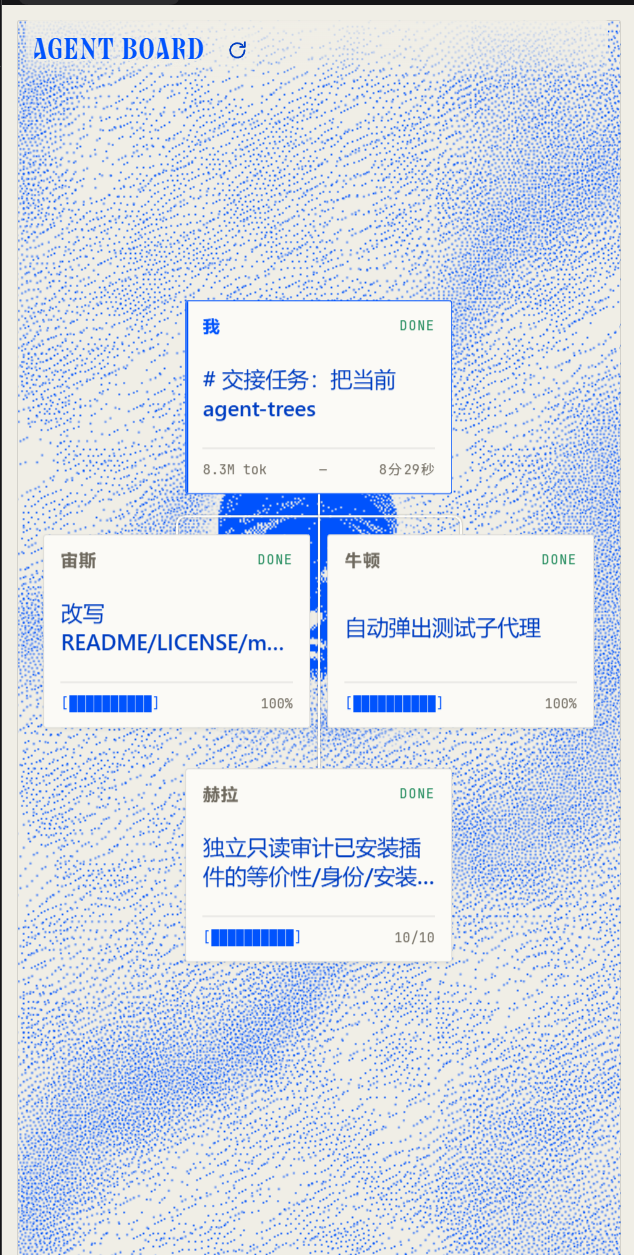
Each agent is a compact card ("小方块") with a minimal 1px outline:
- the task it owns (the delegation label, or the session title when no label exists),
- an agent label on the left of the status row:
我on the main agent's card, and a short Greek-god / modern-scientist name (宙斯,牛顿,居里, …) on every sub-agent card, - a status tag beside it —
RUNwith a blinking dot,WAIT,DONE,IDLE,FAIL, orEXTfor an external task, - a static progress bar based on its todo plan (no flowing animation),
- a footer with current tokens, USD cost, and live duration.
The session you are viewing keeps a thin blue outline; there is no separate "current" badge any more. When the current session is itself a subagent, the chart walks up to the topmost available parent, so the main agent is always the first card on screen.
Install
Install straight from GitHub (no npm package needed):
dsh plugin --profile <your-profile> add github:Denis-Tang/dsh-agent-board
On DSH Desktop, open the sidebar Plugins page → Add plugin (or
Install a third-party plugin) and paste github:Denis-Tang/dsh-agent-board
(the desktop app owns its profile, so the CLI does not change the running app's
profile). After installation the plugin appears in the right sidebar's +
guide; reload the page if the new tab does not show up immediately.
The plugin is also being prepared for the
dsh-market catalog through
awesome-dsh-plugin.
Once the catalog entry is live, search Agent Board / 智能体看板 in
Plugins → Plugin Market.
Repository: Denis-Tang/dsh-agent-board.
Requires DeepSeek Harness >=0.2.1-rc.1 <0.3.0; this independent build is
version 1.0.0.
Screenshots
Where it appears
The view lives in the right sidebar:
- The right sidebar's
+guide lists an Agent Board capsule, so the tab can be opened from there. - The sidebar tab is a native
sidebar.right.pane.tabbody with a compact layout, and it stays open beside the chat while the session changes.
The sidebar is not opened automatically for an ordinary session. It opens
when you pick the capsule from the sidebar + guide. While a session is on
screen, every newly created sub-agent pops the sidebar open and focuses the
Agent Board tab (expanding the column if it is collapsed), so the new branch
shows up without a manual click. Agents that already exist when the page mounts
do not trigger it, and a new agent only announces itself once.
Layouts
The view opens in Chart layout: a strict two-column card grid on the Hermes-blue paper canvas. The main agent's card owns the first row on its own; every sub-agent (whatever its depth) then fills two-card rows below it, ordered by creation time, so reading top to bottom is reading the delegation timeline. A paper-white (warm off-white) bus leaves the bottom of the main card and branches into every sub-agent card, which keeps the main-to-sub relationship visible without drawing a full tree that the time order would contradict. New agents append at the end, so existing cards never jump around.
The panel is never wider than its content needs: the card width follows the measured panel width, so a wide sidebar panel shows two roomy columns while the default right sidebar keeps exactly two narrow ones. Cards keep a fixed aspect ratio: the column width picks a single scale factor and the whole card — text, padding, borders and progress bar included — is scaled uniformly by it, so a wider panel produces proportionally bigger cards instead of only flatter ones. The card scale is clamped to the sidebar range (about 0.7×–1.9×); when the chart is taller than the panel it is scaled down as a whole (auto-fit can reach 30%, manual wheel zoom stays at 35%–250%) so all cards stay in view; use the mouse wheel to zoom around the cursor and double-click the background to reset pan and zoom. Each card is three rows: the status row (agent label first, then the status tag with its blinking dot) at the top, the left-aligned title in a deeper blue vertically centred in the middle, and the progress bar pinned to the bottom edge (hover swaps it for tokens, cost, and runtime). All three rows share the card's content-box left edge, so the label, the title and the progress bar start on the same vertical line.
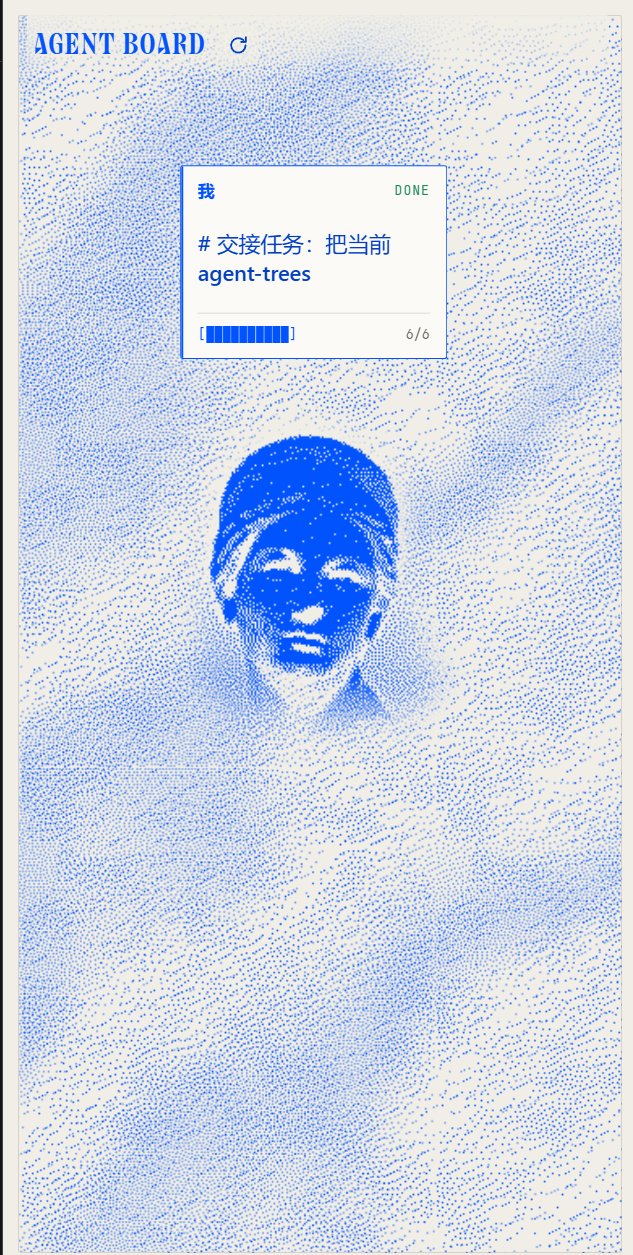
The paper/particle-cloud artwork is a full-panel layer: it runs behind the
header, the wordmark and every card, with the same breathing margin on all four
sides. The blue AGENT BOARD wordmark floats on the cloud (with a soft paper
halo so it stays readable), the old three-square logo is gone from the header,
and the refresh button sits right next to the wordmark.
Press and drag anywhere — on a card or on the empty background — to pan the whole chart: every card and connector moves together, so the shape never breaks apart. A plain click (no movement) still opens the agent or toggles the tree. The pan lives until you double-click the background or switch sessions. Click the empty canvas to collapse every sub-agent card; click it again to bring the whole chart back. There is no per-card collapse chevron.
How the data is derived
The plugin is Client-only and reads existing client-visible session projections — it writes no session events and registers no Host route:
| Projection | Used for |
|---|---|
subagentCatalog | parent → child topology, delegation mode, task label |
subagentTiming | last-turn completion, settled/active duration |
tokenUsage | per-agent token total |
costUsage | per-agent token buckets and USD cost (when dsh-cost-meter is mounted) |
todos | per-agent task progress, when the agent used todo_write |
Session summaries (useSessions().byId) supply titles, running state, blank,
and the parent link. useSessionStatus supplies the live status map.
Progress rules
- If the agent has a todo list, progress is
(completed + 0.5 × in_progress) / total, and the card showsdone/total. - A running agent without a todo plan shows a static empty track labelled
无计划; the blinkingRUNtag indicates that it is running. Nothing flows or animates. - A finished agent whose latest closed turn completed shows 100% and a green
DONEtag. - A finished agent whose todo list is fully completed is also 100%, even when the timing projection has not settled yet.
- A finished subagent whose latest closed turn did not complete shows a red
FAILtag; its bar stays at its actual todo progress, or无计划when it had no plan. - A blank, not-yet-started agent shows 0% and a grey
WAITtag. - External tasks (
mode: "external") have no local session, so their bar is neutral and labelled "外部". - The main agent never turns into
FAILjust for being idle between turns: it shows the greyIDLEtag.FAILis reserved for a subagent that ended without completing. The main agent's todo projection is cleared at each turn start, so the card shows无计划until a new plan is written; it keeps the last plan it observed.
Naming rules
- The main agent's card always shows
我; it never gets a personal name. - Every sub-agent gets one short name from a fixed mixed pool of 80 Greek gods and
modern scientists (
宙斯,牛顿,赫拉,爱因斯坦, …). Names follow child creation time across the whole tree, so the first sub-agent is宙斯, the second牛顿, and so on. - Names are derived from the creation timestamps, so once a session's catalogs
have loaded they stay put: a later agent takes the next name and existing cards
keep theirs. After the 80-name pool wraps, names get a numeric suffix (
宙斯2,牛顿2, …).
Order
Cards no longer display sequence numbers or priority levels. The main agent is always the first row, every other card follows by creation time two per row, and the agent label on each card carries the identity instead of a depth tag.
Interactions
- Click a card to open that agent's conversation; the card of the session you are viewing (normally the main agent) is inert and keeps a thin blue outline.
- The refresh button sits beside the
AGENT BOARDwordmark in the header. - Use the mouse wheel to zoom around the cursor; double-click the background to reset pan and zoom.
- Drag anywhere to pan the whole chart. Pressing on a card and pressing on the empty background start the same gesture; every card and connector moves together, so the shape never breaks apart. Once the pointer moves a few pixels the press becomes a drag and releasing does not open the agent or toggle the tree; a click without movement still opens the conversation (on a card) or collapses and expands the chart (on the background). The pan outlives the gesture and is reset by double-clicking the background or switching sessions.
- Click the empty canvas to collapse all sub-agent cards; click it again to expand the chart.
- The refresh button re-reads projections for every visible agent.
- There is no summary/statistics strip above the chart: the cards themselves carry status, progress, tokens, cost and runtime, so the panel opens straight onto the chart. No progress card, search bar, filter row, or legend either.
- Keyboard:
ArrowUp/ArrowDownmove between cards,ArrowRight/ArrowLeftexpand or collapse,Home/Endjump to the ends,Enter/Spaceopens.
Projection updates arrive through the normal Client store, so topology, status, todos, duration, and token counts update live. A one-second clock refreshes durations while any agent runs.
Compatibility
Built and tested against DeepSeek Harness 0.2.1-rc.3. The package declares
engines.dsh: >=0.2.1-rc.1 <0.3.0.
It depends only on the Web Client slot surface and the standard session hooks:
sidebar.right.pane.tabslot withsessionId,useSessions,useSessionStatus,useProjection('todos')(optional, falls back to the projection store)ctx.sidebarRightTabs.register(tab type) andctx.get('sidebarRight')(open/focus)conversation.session.header.utilities(invisible helper that opens the tab when a sub-agent is created)ctx.sessions.refreshProjectionsctx.uiWorkspace.openSessionctx.localeandctx.slots
No Harness Client package is imported as a module; React comes from the browser module table.
Files
| File | Purpose |
|---|---|
index.js | Host half (metadata only) |
client.js | Browser module: view, two-column board, cards, styles, locale dictionaries |
cordis.patch.yml | Inserts the dsh-agent-board row |
locale/en.json, locale/zh.json | Plugin Manager display metadata |
fonts/ | Embedded Collapse wordmark and JetBrains Mono web fonts |
icon.svg | Original artwork |
screenshot-main.png, screenshot-sidebar.png | Marketplace screenshots |
screenshots.json | dsh-market screenshot manifest |
assets/icon.png | Marketplace tile icon (512×512 PNG) |
marketplace/dsh-agent-board.yml | Entry prepared for the awesome-dsh-plugin catalog |
LICENSE | MIT |
Notes and limits
- The board reflects what the Client projection store knows. An agent that is not
reachable through a parent's
subagentCatalog(for example an external task without a parent-owned catalog fact) cannot be shown as a local child. - External tasks have no local execution status; they appear as normal cards without a local session to open.
- When a running agent has no todo list, the bar is a static empty track labelled
无计划; the card never invents a percentage. - The plugin does not mark the main session as "completed" merely because it is idle; completion always follows the last closed turn or an all-completed todo list.
Development
The plugin has no build step. Edit client.js (a browser module registered
through window.__ModuleLoader__) and let DSH HMR reload it, or reload the page.
Run node --check client.js for a syntax check. The host half index.js is a
no-op metadata module; the bundle patch inserts the client row.
上游与致谢 / Upstream and acknowledgements
Agent Board is an independent, rebranded fork based on the upstream project xiezouqu12/agent-trees, used and modified under the MIT License. Credit for the original board concept, two-column layout, interaction model and paper-cloud visual design belongs to the upstream author; this repository only renames the plugin, maintains it independently, and adds its own documentation and icon artwork.
License
MIT © 2026 xiezouqu12 (upstream work); modifications © 2026 Denis-Tang. See LICENSE.
Credits
The full-panel backdrop is a 1-bit dithered print of a Greek marble head from The Metropolitan Museum of Art (CC0 / public domain, object Marble head of a goddess), converted offline with a Floyd–Steinberg dither and printed as Hermes-blue ink on warm paper (single theme, no dark mode). A seamless paper-dot tile keeps the dot field covered at any sidebar width, and a few wide wavy dot bands with uneven widths drift and breathe at non-linear speeds, their widths changing over time.
The bundled Collapse wordmark font and JetBrains Mono web fonts are
distributed under the SIL Open Font License 1.1; see
fonts/OFL.txt for the full license text.
Comments
Loading…
Similar plugins
Replaces the DeepSeek Harness sidebar with a fixed 2x4 board of eight standing agent seats — each seat shows its own status, latest tool call, reasoning and result; a settings switch restores the stock sidebar.
★ 1
NOASSERTION
JavaScript
dsh plugin --profile web add dsh-agent-gridby manny333
Session-scoped checklists for DeepSeek Harness — the agent tracks work as a tree, the model always sees a compact digest, and a read-only sidebar tab mirrors it.
★ 0
MIT
TypeScript
Oct 22, 2026
dsh plugin --profile web add dsh-checklistsby Napstablooky233
Visible dispatch panel for DeepSeek Harness — decide whether other agents help, pick free-lane helpers, and inject the division-of-labour policy.
★ 3
MIT
JavaScript
Oct 17, 2026
dsh plugin --profile web add dsh-agent-dispatchby TINGOD2006
Live tokens-per-second card for DeepSeek Harness sessions: docked to the sidebar or draggable as a floating card.
★ 0
MIT
JavaScript
Oct 21, 2026
dsh plugin --profile web add dsh-tpsby zoe1nan
Live command deck for DeepSeek Harness agent teams: roster telemetry, task board, approvals, write actions, built-in Windows desktop capsule, and phone access.
★ 21
↓ 19/wk
MIT
JavaScript
Oct 21, 2026
dsh plugin --profile web add dsh-cockpitby LeemanCheung
Persistent live DAG visualization for DeepSeek Harness subagents and workflows
★ 12
MIT
JavaScript
Sep 26, 2026
dsh plugin --profile web add dsh-task-dag