
dsh-git-conventions
Manifest validEnforce configurable git commit / push / PR conventions for DeepSeek Harness agents
dsh-git-conventions
兼容 DSH 0.1.7-rc.2 的 Config / volatile 配置 API。旧版 settings.register API 不再使用。升级前请备份配置;若 DSH 已将旧设置改名为 settings.yaml.imported,但插件当时加载失败,请从该备份恢复本插件的设置到当前 profile,勿覆盖整个 profile。
简体中文 | English


为 DeepSeek Harness 提供可配置的 Git 提交 / 推送 / 拉取请求规范(静态插件,Host + Client 双端)。采用固定的结构检查,并在拒绝时回显可配置的重写指引。设置通过宿主持久化到当前 profile 的 cordis.patch.yml;自定义文字不会自动转为可执行校验规则,也不会主动注入模型上下文。
功能特性
- 提交规范校验:对
git commit -m的内联消息做 Conventional Commits 结构检查,不合规即拒绝,并回显不合规点与当前规则 - 推送安全:
git push使用--force/-f(含组合短选项)或+refspec时,提示改用--force-with-lease - PR 完整性:
gh pr create缺少非空标题或正文来源(--body/--body-file)时拒绝,并给出补齐提示 - 可配置重写指引:固定检查 Conventional Commits 结构、空消息、句号结尾与 PR 必要参数;自定义语言、scope 或章节要求仅作为拒绝后的指引
- 一键放行:关闭「强制拦截」后守卫不再介入,全部命令放行
- 多语言:设置页与拦截消息支持简体中文 / 英文,跟随宿主语言偏好
截图
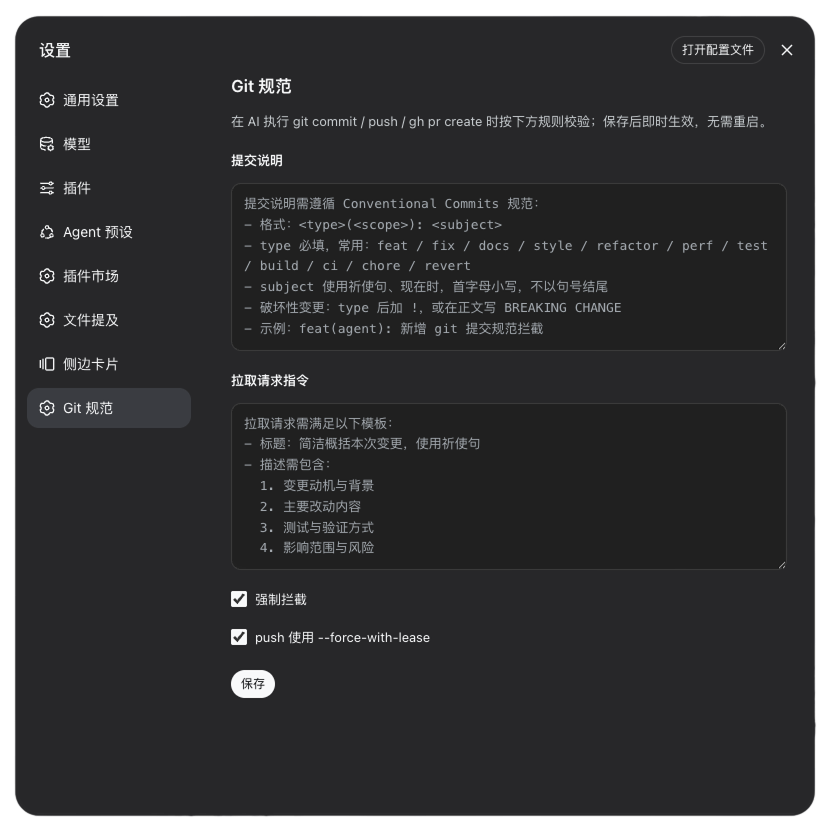
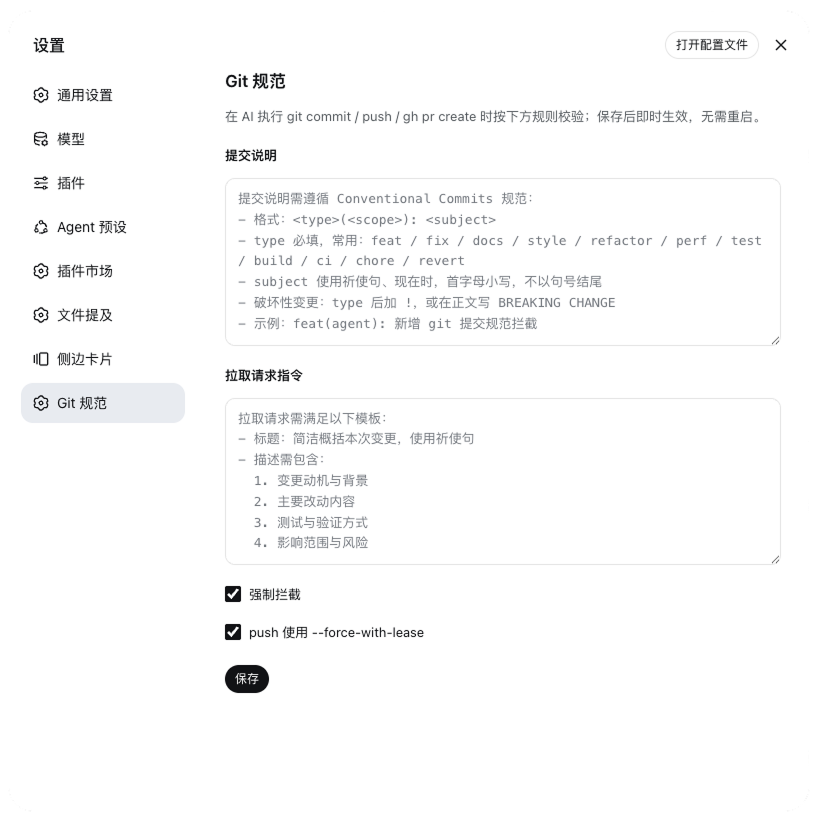
以下为历史界面示例;当前导航图标使用宿主默认样式,说明文案与保存流程已更新。
设置页中的「Git 规范」面板(深色 / 浅色模式;图中为默认中文规则示例,可在设置页改为任意语言):
安装
本包已发布到 npm,在目标 profile 按包名安装即可。dsh plugin add 会读取 package.json 中 dsh.bundle.patch 指向的 cordis.patch.yml,并把包名追加进 dsh.profile.bundles:
dsh plugin --profile web add dsh-git-conventions
dsh web
重启后设置页出现独立的「Git 规范」页。更新 / 卸载:
dsh plugin --profile web update dsh-git-conventions   # 更新
dsh plugin --profile web remove dsh-git-conventions  # 卸载
本地开发
以工作区路径安装会建立 link: 依赖(改源码后重启即生效)。此时宿主解析 import z from '@deepseek-ai/schemastery' 走模块真实路径,需在工作区补一个可解析的依赖:
dsh plugin --profile web add <本包路径>
npm ci
按 npm 包名安装则无需手动安装工作区依赖(包被复制进 profile 的 node_modules,依赖沿 profile 正常解析)。
配置项
命名空间 git-conventions:
| 字段 | 类型 | 默认 | 含义 |
|---|---|---|---|
commitInstructions | string | Conventional Commits(zh/en 随语言) | 重写指引;固定结构检查拒绝时回显 |
prInstructions | string | PR 模板(zh/en 随语言) | PR 重写指引;不自动检查描述章节 |
enforce | boolean | true | 是否强制拦截;关闭后全部放行 |
useForceWithLease | boolean | true | git push 出现强制选项或 +refspec 时提醒改用 --force-with-lease |
保存通过宿主原子操作一次提交全部修改,成功后即时生效。未编辑时跟随宿主更新;编辑过程中配置若被其他页面修改,保存会被版本检查拒绝,请点击「重新加载设置」放弃草稿并重新编辑。
国际化
界面文案、默认规则文本与拦截消息均支持 zh / en,跟随宿主语言偏好(dsh 设置 → 通用 → 语言,持久化为当前 profile 中 locale 条目的 preference)。未显式选择时,客户端回退浏览器语言,服务端回退中文。自定义规则文本与语言无关,一旦保存始终优先于默认规则。
使用示例
合规:正常放行
git commit -m "feat(agent): 新增 git 提交规范拦截"
git commit -m "fix(commit): 修正 subject 校验的空消息边界"
git push --force-with-lease
gh pr create --title "feat: 支持 scope 校验" \
  --body "动机与背景 / 主要改动 / 测试与验证 / 影响范围"
违规:被拦截
# 缺少 <type>(<scope>): <subject> 前缀 → 拒绝
git commit -m "新增提交规范拦截"

# subject 以句号结尾 → 拒绝
git commit -m "feat: 新增提交规范拦截。"

# 裸 --force(useForceWithLease=true 时)→ 提醒改用 --force-with-lease
git push --force
git push -f

# 缺少 PR 标题或描述 → 拒绝
gh pr create --title "feat: 新增校验"          # 缺 --body
gh pr create --body "缺少标题"                  # 缺 --title
拦截时 reason 列出具体不合规点、当前配置的完整规则文本,并提示「请重写后重新提交」。以 git commit 为例,agent 收到的拒绝消息形如:
提交信息不符合配置的提交说明规则:
  - 提交首行需符合 "<type>(<scope>): <subject>" 格式,例如 "feat(agent): 说明"

当前提交说明规则:
提交说明需遵循 Conventional Commits 规范:
- 格式:<type>(<scope>): <subject>
- type 必填,常用:feat / fix / docs / style / refactor / perf / test / build / ci / chore / revert
- subject 使用祈使句、现在时,首字母小写,不以句号结尾
- 破坏性变更:type 后加 !,或在正文写 BREAKING CHANGE
- 示例:feat(agent): 新增 git 提交规范拦截

请重写后重新提交。
范围与默认值
git commit -F commit-msg.txt:不读取文件内容,仅检查内联消息- 关闭「强制拦截」(
enforce=false)后的所有命令 - 规则文本留空(或清空)时回退到当前语言默认规则,校验仍生效
工作原理
Host 端通过 ctx.tools.guard() 守卫 bash 工具:
git commit带-m/--message时提取消息并做 Conventional Commits 结构校验;不合规则 deny,reason 含不合规点、完整规则与「请重写后重新提交」。git push含--force/-f(含组合选项)或+refspec且useForceWithLease=true时,提醒改用--force-with-lease。gh pr create(含gh pr new)要求非空标题与正文或正文来源;--body-file/-F仅检查来源参数存在,不验证文件或标准输入内容。--fill/ 编辑器流程不会自动视为满足要求。
已知限制
- 本插件只检查
bash工具的常见显式命令,不改写参数,也不覆盖 PowerShell、外部脚本、别名或其他执行工具;不是不可绕过的安全边界。 - 支持普通引号、空参数、命令分隔与常见重定向。变量展开、命令替换、here-document 和复杂 shell 语法不做运行时求值;包含未求值变量/通配符的命令会跳过;包含命令替换、括号、here-document 或不匹配引号的整个调用不检查。这是尽力而为的守卫,不是完整 Bash 解析器。
- 不读取
-F/--file指向的文件,文件消息不校验(仅处理-m/--message内联消息)。 - 自定义文字不会改变固定检查:中文、scope 必填、祈使句、PR 章节等自然语言要求不被自动验证。
许可证
MIT License © 2026 雨果,详见 LICENSE。
Comments
Loading…
From the same category
by ccch1mneyyy
DSH 官方公众号收录的 TUI 补位插件:Claude Code 风,鲸鱼顶栏/实时状态/流式思考/双击 Esc 回滚/上下文进度+TPS。npm 一键装。 DSH official WeChat featured TUI plugin — Claude Code style: whale bar, live status, streaming thoughts, double-Esc rol
★ 4.3k
↓ 10.9k/wk
MIT
TypeScript
Oct 11, 2026
dsh plugin --profile terminal add @deepseek-harness-tui/dsh-tuiby strukto-ai
The World's First Virtual Terminal for AI Agents
★ 3.7k
↓ 355/wk
Apache-2.0
TypeScript
Oct 11, 2026
dsh plugin --profile agent add @struktoai/mirage-dshby bowenliang123
The best DeepSeek Harness plugin for context insight and management, with context dashboard / browser / sidebar and context command, for context statistics, composition, breakdown, evolution details,
★ 2k
↓ 34.4k/wk
Apache-2.0
TypeScript
Oct 11, 2026
dsh plugin --profile web add dsh-contextby huiliyi37
官方 DeepSeek Harness 的交互式终端 UI 插件:自研 ANSI 极简交互渲染、流式 Markdown/工具卡、16+ 主题、slash 命令与选择器、输入历史与本地偏好持久化、LSP 诊断、memory记忆,很丝滑的开发体验。
★ 287
↓ 462/wk
Apache-2.0
TypeScript
Sep 30, 2026
dsh plugin --profile terminal add @huiliyi37/dsh-tianshu-tuiby Hilbert-beinghappy
面向 DeepSeek Harness 的 Claude Code 风格终端界面,支持 Windows、macOS 与 Linux,兼容透明终端、VS Code 主题和自定义配色。
★ 197
↓ 108/wk
MIT
TypeScript
Oct 1, 2026
dsh plugin --profile web add seekttyby T-Auto
deepseek-harness Plugin Access and Implementation Standards / deepseek-harness交互生态插件规范与实施标准
★ 83
MIT
JavaScript
Oct 10, 2026