

dsh-paper-harness
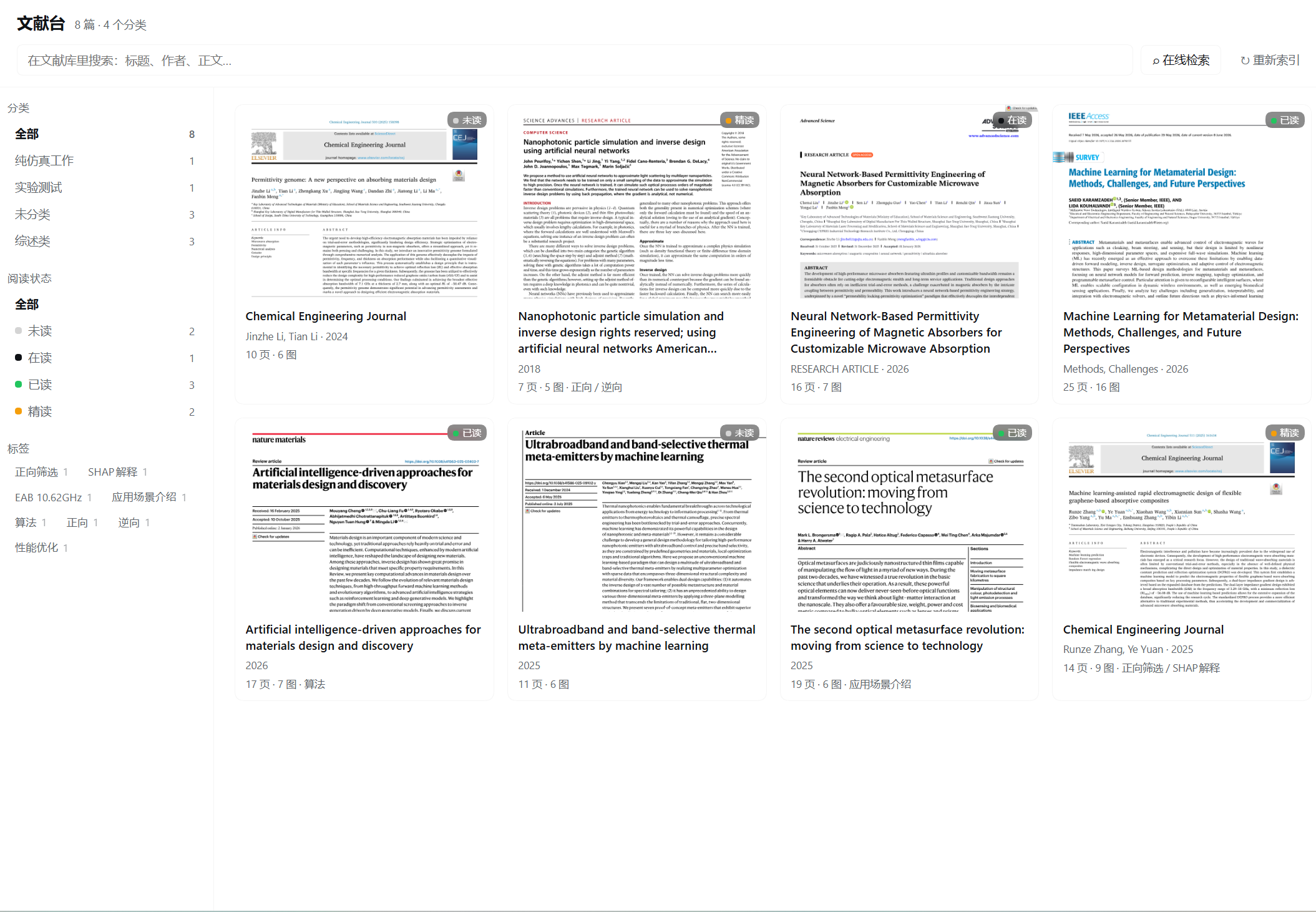
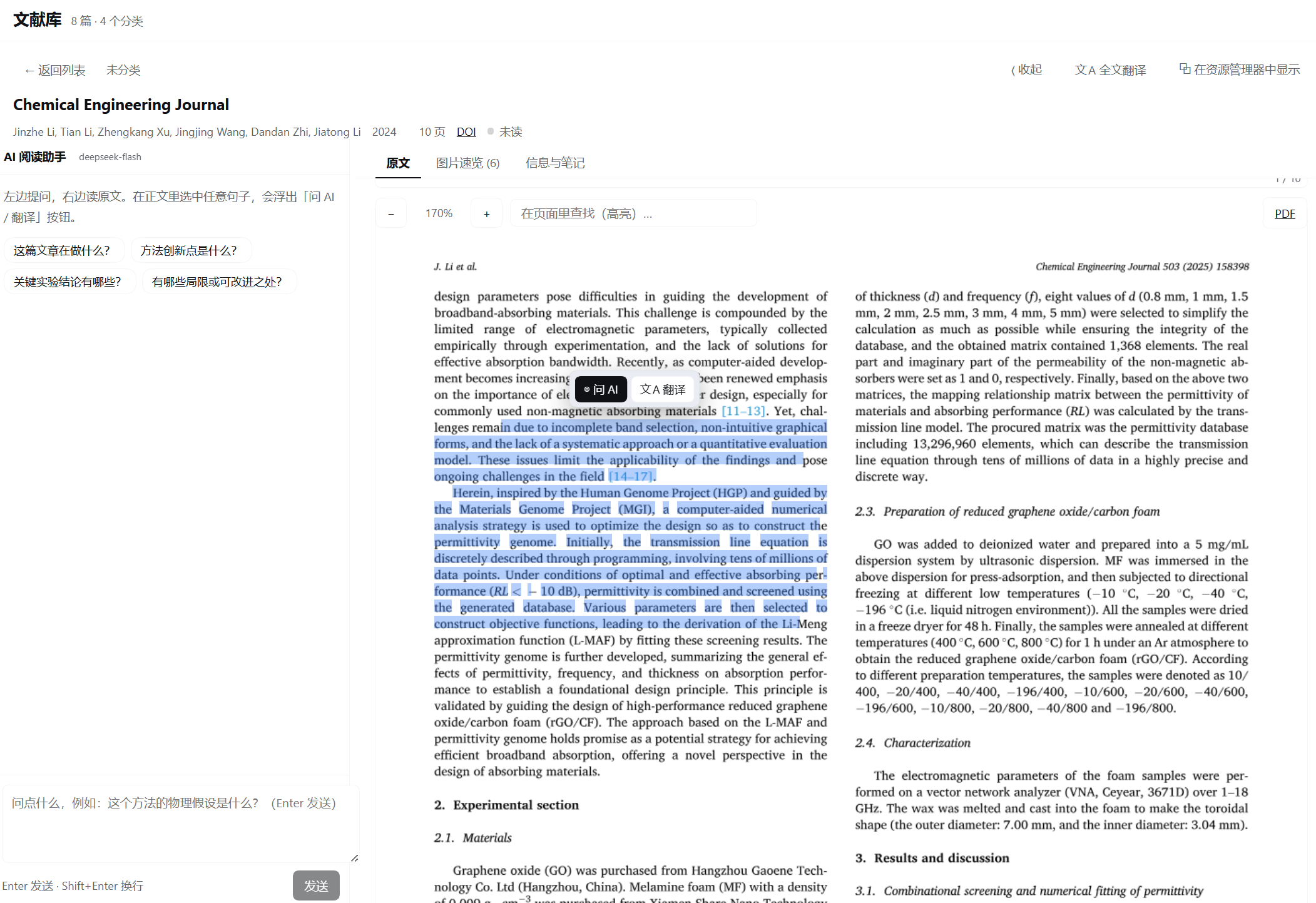
Manifest validPaper Harness is the literature reading workspace for DeepSeek Harness. Drop a PDF into a folder, and it automatically builds an index, extracts each image, and crops them along with their captions. Once opened, the left side features an AI assistant, the center displays the original text, and the right side shows the translation. Any sentence in the original text can be directly selected and dragged for querying or translating, and the entire document can be translated in a streaming manner by page range, saving as it translates. Read literature is archived by category, status, rating, and tags, with full-text search within the library and online search (arXiv, Semantic Scholar...
Paper Harness · 文献台
A literature workbench for DeepSeek Harness: drop PDFs into a folder and read them with an LLM — original layout on screen, every sentence selectable, one-click translation.
给 DeepSeek Harness 用的文献阅读工作台插件。把 PDF 丢进文献库文件夹,自动建索引; 阅读时左边问 AI、中间是原文、右边是译文,原文上任何一句都能直接拖选去提问或翻译。
界面
| 文献库 | 原文 · AI · 译文 三栏 |
|---|---|
 |  |

它能做什么
| 能力 | 说明 |
|---|---|
| 拖入即索引 | PDF 放进文献库目录(或其下任意分类文件夹)就自动解析:标题、作者、年份、DOI/arXiv、逐页正文、插图、文字坐标 |
| 原文即阅读 | 整页渲染的原文上覆盖一层隐形文字层:版面、公式、插图都在,同时任意句子都能选中、复制、提问 |
| 图片速览 | 自动把每张图连图注一起裁出来(矢量图、多面板图、流程图都支持),先看图 30 秒判断这篇值不值得读 |
| AI 陪读 | 三栏并排,选中正文任意一句 → 浮出「问 AI / 翻译」;也能直接对整篇提问(自动带题目、摘要、当前页、正文) |
| 一键翻译 | 选中语段即时翻译;整篇按页流式翻译,可指定页码区间(只译第 5–6 页 / 从当前阅读页开始 / 单页补译),逐页落盘、中断可续、一键复制 |
| 整理归类 | 分类(= 文件夹,可直接在资源管理器里整理)、阅读状态、评分、标签、笔记;分类与标签都是筛选维度 |
| 文献检索 | 库内全文检索 + 在线检索(arXiv / Semantic Scholar / Crossref 三源合并),一键下载入库 |
| 给 agent 用 | paper_library 工具:检索、读全文与图注、写笔记,让助手直接基于你的文献库干活 |
前置要求
- DeepSeek Harness(桌面端或 Web 端均可)
- Node.js ≥ 22(Harness 自带运行时也行)
- pnpm(推荐)或 npm
安装
git clone https://github.com/baigaobai/dsh-paper-harness.git
cd dsh-paper-harness
pnpm install
然后在 Harness 里把这个目录作为 bundle 装上(任选一种):
A. 让助手装(最简单)——对助手说:
把
<你 clone 下来的绝对路径>这个 bundle 装进当前 profile
助手会调用 plugin_manager install_bundle。
B. 命令行:
dsh plugin --profile <profile> add link:<你 clone 下来的绝对路径>
装好后重启 Harness,侧边栏出现「文献台」图标。
如果启动时报
Cannot find native binding,说明平台预编译包没装上,按你的平台手动补: Windowspnpm add @napi-rs/canvas-win32-x64-msvc、macOS@napi-rs/canvas-darwin-arm64、 Linux@napi-rs/canvas-linux-x64-gnu。
快速开始
- 侧边栏点「文献台」。
- 把 PDF 拖进文献库目录(默认是仓库下的
library/,可在配置里改成任意目录)的分类文件夹。 - 几秒后卡片出现,点进去开始读。选中正文任意一句 → 问 AI 或翻译。
文献库根目录默认 <仓库>/library,也可以在 profile 的 cordis.patch.yml 里改:
- insert:
    - id: paper-harness
      name: paper-harness
      config:
        libraryRoot: 'D:\papers'   # 文献库根目录
        maxPages: 80               # 每篇最多解析多少页
        pageScale: 1.7             # 阅读视图页面渲染倍率
        figureScale: 2             # 插图裁剪渲染倍率(越大越清晰、越慢)
        maxFigures: 16             # 每篇最多抽多少张图
        watch: true                # 监听目录,拖入即索引
        autoIndex: true            # 启动时自动扫描
数据放在哪
library/
  <分类文件夹>/
    xxx.pdf
  .paper-harness/            # 索引缓存,可删,删了会重建(不影响原 PDF)
    papers/<id>.json         元数据 + 正文 + 文字坐标
    figures/<id>/f1.png      裁出来的插图
    covers/<id>.png          首页缩略图
    pages/<id>/p3@1.70.png   按需渲染的整页图
    translations/<id>.json   译文缓存
不要把 library/ 提交到仓库(.gitignore 已忽略),里面是你自己的论文。
给 agent 用的工具
paper_library,action 取值:
| action | 用途 |
|---|---|
state | 库概况(篇数、分类、标签、状态计数) |
list / search | 按分类/状态/标签列出;库内全文检索 |
read | 读一篇:元数据、摘要、图注、正文(maxChars 默认 12000) |
figures | 列出插图与图注 |
update | 改阅读状态 / 评分 / 标签 / 笔记 |
online | 在线检索 arXiv / Semantic Scholar / Crossref |
import | 把在线结果或 PDF 链接下载入库 |
reindex | 重新扫描文献库 |
HTTP API(页面侧,同源)
GET  /api/paper-harness/state
GET  /api/paper-harness/papers?q=&category=&status=&tag=
GET  /api/paper-harness/paper/:id
POST /api/paper-harness/paper/:id            {patch:{status,rating,tags,note,title}}
POST /api/paper-harness/paper/:id/reparse
POST /api/paper-harness/reindex
GET  /api/paper-harness/sources?q=&source=all|arxiv|s2|crossref
POST /api/paper-harness/import               {item|url, category}
POST /api/paper-harness/reveal               {id}
GET  /api/paper-harness/file/:id             原始 PDF
GET  /api/paper-harness/cover/:id
GET  /api/paper-harness/fig/:id/:n
GET  /api/paper-harness/page/:id/:n?scale=
POST /api/paper-harness/chat                 {paperId, question, history, focus}   → SSE
POST /api/paper-harness/translate            {paperId, text}                        → SSE
POST /api/paper-harness/translate/paper      {paperId, from, to}                    → SSE(逐页)
GET  /api/paper-harness/translation/:id      已缓存的译文
POST /api/paper-harness/translation/:id/clear
实现要点
- 解析:
pdfjs-dist(文本层 + 页面渲染)+@napi-rs/canvas(离屏光栅化)。 - 解析在独立进程里(
lib/worker.js):pdf.js 与原生 Skia 只在子进程跑,宿主通过 stdin/stdout 发请求。原生层崩了只杀掉子进程,宿主不受影响。 - 只允许一个 Skia 实例:pdf.js 自带
@napi-rs/canvas@0.1.x,本插件用1.1.x。两个原生模块 同进程时,互相传递画布 / Path2D 会直接段错误(不是异常)。lib/pdf-core.js把进程内所有对该包 的 require 统一到同一实例,才彻底修掉崩溃。 - 逐页容错:每渲染一页前上报进度;某页把渲染器搞崩了就重启子进程跳过它,其余页照常索引。
- 可选文字层:入库时把每个文字对象的坐标一起存下来(
layouts),前端按百分比铺透明 span, 所以窗口怎么缩放、页面怎么缩放都对得上。 - 插图定位:把「文本层之外的非白像素」当图形墨水逐行统计,从图注向上走、跨越子图间隙合并 —— 对矢量图、多面板图、流程图都有效,不依赖 PDF 内嵌位图。
- 大模型:调用 Harness 自己的
llm服务,模型取「设置 → 模型」里的默认项,不需要任何 API Key。 每次调用前会解析该模型支持的推理档位并选最低一档,否则整篇翻译会慢一个数量级。
已知边界
- 扫描版(无文本层)PDF:页面照常显示,但没有可选中文字,也提取不到正文。
- 极少数页面会让渲染器崩溃(Skia 的坑):该页显示占位提示,不影响整篇索引。
- 图注不规范的文献可能裁不到图:可直接看原文页面。
- 在线检索受各站点限流影响;Crossref 多数条目没有开放 PDF,只有元数据。
- 目前以 Windows + DeepSeek Harness 桌面端为主要验证环境。
隐私
- 所有文献、索引、译文都只存在你本机的
library/目录里,不会上传任何服务器。 - 只有「问 AI / 翻译」时,才会把你选中的那段文字和论文上下文发给当前配置的模型服务。
License
MIT © baigaobai
欢迎提 Issue / PR。想加的功能(Zotero 导入、生词本、多篇对比……)比较有意思的话,可以先开 Issue 聊聊。
Comments
Loading…
Similar plugins
by GGboya
DeepSeek Harness (dsh) 插件:论文伴读工作台 —— PDF 转录 / 检索 / 流式问答 + 内置阅读器页面。
★ 54
↓ 709/wk
NOASSERTION
TypeScript
Nov 10, 2026
dsh plugin --profile web add @ggboy123/dsh-paper-readerby HaoKuo
dsh-notebook-studio 是 DeepSeek Harness(dsh)插件:上传多篇 PDF,用提示词做文献综述、关键信息提取与研究设计,并生成带页码引用的报告(DOCX/PDF)或演示文稿(PPTX/PDF)。 | dsh-notebook-studio is a DeepSeek Harness (dsh) plugin: upload PDF papers and use prompts for a literature review, key-finding extraction and a study design, then generate page-cited reports (DOCX/PDF) or slide decks (PPTX/PDF).
★ 0
MIT
JavaScript
Sep 28, 2026
dsh plugin --profile web add dsh-notebook-studioby Z8906
读取 Office / PDF 前先转成 Markdown,用一行路径代替整份全文 —— 省 token 的 DSH bundle 插件。0 npm 依赖,转换全在本地,产物归你所有,卸载自动清理 Python 环境。 Convert Office/PDF to Markdown before reading in DeepSeek Harness — one path instead of the whole document.
★ 1
MIT
JavaScript
Nov 8, 2026
dsh plugin --profile web add dsh-plugin-office-markdownby 58catmiao
dsh-sciwork 把「科研模式」装进 DeepSeek Harness:一个落在自己硬盘上的科研库、一套技能与一块面板。课题、图、草稿、文献、数据表、期刊档案、投稿台账各有其位,写入都经库脚本落盘并登记,面板只读为主、自己不出图。技能把「怎么画、怎么写、怎么引」固化成纪律:出图交给 Origin 链路,写作、引用、投稿格式各有专门技能,外加 12 份期刊档案兜底。零 npm 依赖,路径运行时解析,换台机器照样跑。
★ 3
MIT
JavaScript
Nov 8, 2026
dsh plugin --profile web add dsh-sciworkby HaoKuo
Bundles a deep-read paper library and the paper-deepread-html skill: a sidebar panel to browse interactive reading reports, upload PDFs into a managed library, deep-read them with an agent (or through
★ 0
MIT
HTML
Oct 30, 2026
dsh plugin --profile web add dsh-paper-deepreadby aiyacharley
DSH plugin for DeepSeek Harness: 25 model tools spanning PubMed, Europe PMC, PubTator3 & Semantic Scholar — entity-aware search, cross-source unified search, metadata, full text, citations, MeSH & ID tools, citation counts & recommendations — plus a personal literature knowledge graph with an AI-powered PubTator3 concept layer.
★ 4
↓ 441/wk
Apache-2.0
JavaScript
Sep 30, 2026
dsh plugin --profile web add dsh-pubmed