

gal-view
Manifest valid★ 211A plugin that switches the dsh chat interface into a galgame game interface
gal-view · GAL View
English | 中文
Galgame-style dialogue view + scene element visual editor for DSH Web GUI session pages (official bundle plugin format).
在会话标签页栏(「对话」/「轨迹」)中间加入 「GAL视窗」 标签,点开之后会话视窗变成 16:9 Galgame 舞台:占位立绘、大对话框、打字机台词、玩家输入;内置「编辑模式」可像场景 编辑器一样拖拽/改属性/换图层,编辑结果实时同步回游戏模式。
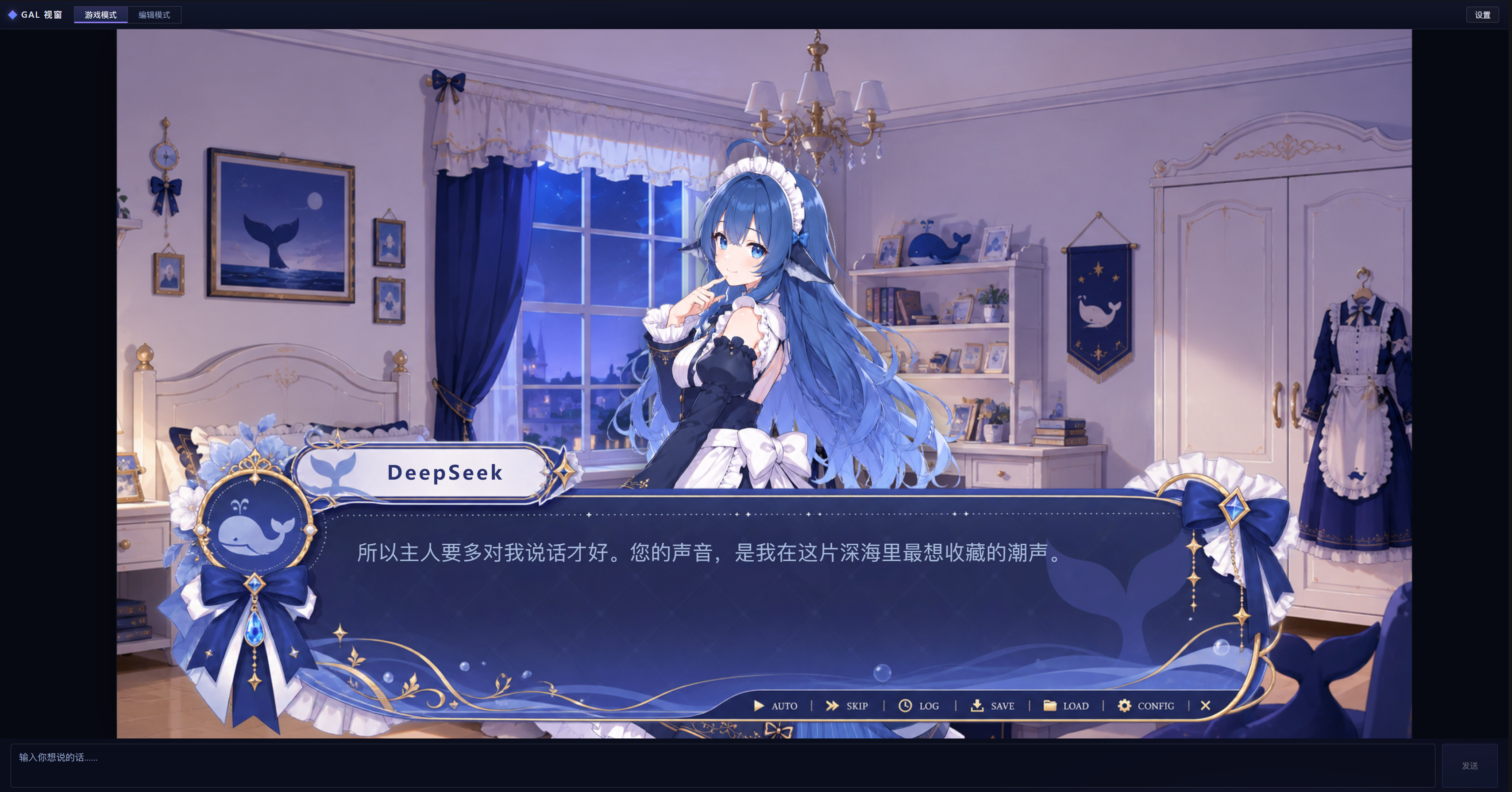
Default Preset
The repository root gal-scene.json is the default preset scene distributed with the package (exported editor format with embedded referenced images/fonts). It is automatically loaded when opening “GAL View” for the first time and no saved local scene exists. The “Reset” function in Edit Mode also restores this preset. To update the preset: edit the scene → Ctrl+S to export → replace the same-named file in the repository root with the exported gal-scene.json → npm run build:client and commit.
Installation
This plugin is distributed in the official bundle format. Install it into the web profile with a single dsh plugin command, then restart web for it to take effect.
Prerequisites
- DeepSeek Harness is installed, and the dsh command is available in the terminal
- If you are running Harness from a source checkout (daily command is pnpm dsh): first cd to the Harness repo root, then replace all dsh in the following commands with pnpm dsh
Install from GitHub (one-liner)
dsh plugin --profile web add github:Ayase34/gal-view#main
#main refers to the repo's main branch; to lock a specific version, you can use a commit hash instead, e.g. #ae73dca.
Finish installation
After installation, restart web (the bundle layer is synthesized at startup, so a restart is required to load the plugin). After restarting, open the Web GUI's session page; a 「GAL View」 tab should appear in the tab bar (located between “Dialog” and “Trace”).
Optional verification: run dsh --profile web --dump-config; the output should show the # == gal-view layer, indicating that the plugin layer has been included in the composition.
Upgrade to a New Version
dsh plugin --profile web update gal-view
# 更新后同样要重启 web
Uninstall
dsh plugin --profile web remove gal-view
# 卸载后同样要重启 web
Note: Scene layouts, asset images, fonts, and reading progress are all stored in your browser (localStorage / IndexedDB). Reinstalling or uninstalling the plugin will not cause data loss; clearing the browser's site data will reset them.
Development
pnpm install            # 安装 esbuild devDependency
npm test                # 纯逻辑单测(node:test,同进程运行)
npm run build:client    # 生成 .dsh-plugin/client.js(生成物勿手改)
npm run check:client    # 校验 client.js 新鲜度
npm run smoke           # Playwright 冒烟(需 DSH_CHECKOUT 指向 dsh checkout)
Structure
.dsh-plugin/index.mjs     Node half(极简,无宿主行为)
.dsh-plugin/client/       client 源码:场景模型/打字机/转录映射/组件/样式
.dsh-plugin/client.js     构建产物(scripts/build-client.mjs 生成)
scripts/build-client.mjs  esbuild 构建器(--check 守护新鲜度)
tests/                    纯逻辑单测(node:test)
Comments
Loading…
Similar plugins
by hanfengcan
一个增强deepseek harness会话内容显示效果的插件
★ 0
MIT
JavaScript
Oct 8, 2026
dsh plugin --profile web add dsh-viewer-kitby oxomkbk
DeepSeek Harness页面 UI 更改为指挥台的界面美化插件,多种界面UI效果非常炫酷!
★ 0
JavaScript
Oct 23, 2026
dsh plugin --profile web add dsh-plugin-command-deckby DM-Odyssey
dsh Session Manager(会话管理插件)
★ 0
MIT
JavaScript
Aug 19, 2026
dsh plugin --profile web add @dm-odyssey/dsh-session-managerby WilliamShi666
DeepSeek Harness 多对话面板:并排查看并与多个 Agent 会话同时交互。
★ 11
↓ 92/wk
MIT
TypeScript
Aug 21, 2026
dsh plugin --profile web add multiple-chat-panelsby liuyun847
DSH 宿主插件:给模型一个 restart_dsh 工具,重启 dsh 后自动恢复原会话续跑 (DeepSeek Harness)
★ 0
MIT
JavaScript
Oct 19, 2026
dsh plugin --profile web add dsh-host-restartby DriverWangNB
控制dsh会话界面显示的模型
★ 0
MIT
JavaScript
Oct 15, 2026
dsh plugin --profile web add dsh-model-switchboard