
@wxysskd/dsh-projects
Manifest validClaude-Desktop-style Projects for DSH Desktop: group conversations into projects and pick a working directory per conversation.
dsh-projects


Claude-Desktop-style Projects for DSH Desktop (the desktop DSH profile
only — Web and headless profiles are untouched).
The shipped DSH sidebar groups conversations by Workspace (directory). This plugin replaces that sidebar region with a project-first browser:
- create projects (name, color, one or more working directories);
- every conversation lives inside a project;
- each conversation can use a different directory, chosen when it is
created (or switched later through Change working directory), backed by the
Host's real
workingDirectoryservice — the same durable, model-visible mechanism as theworking_directorytool; - sessions outside any project stay visible under Other conversations, still grouped by Workspace, so nothing is lost;
- empty conversations are hidden and can be deleted for real: the Host keeps
reusable blank Sessions from every "New Session" click (
blank: true); only the empty Session that is currently open is shown. The Host also scans legacy Sessions whose catalog row is not marked blank but whose log contains no conversation events at all (only tiny header/metadata logs are inspected), so old "Badstuff"-style empty chats are hidden too. View options → Delete empty conversations (N) permanently removes both kinds from disk through a validated Host route (never touches a conversation with content; sessions still live in the current app run are archived and can be purged after the next start); - projects keep the workspace hierarchy: inside a project, conversations
stay grouped under their workspace (folder + title + count), so moving a
workspace into a project preserves its identity instead of flattening the
chats; workspace headers have their own
+(new conversation directly in that directory — assigned to the containing project, or ungrouped under Other conversations) and⋯menu (new conversation, move to another project, rename, remove from project, delete workspace); - pinned sessions, relative times, running/pending/unread status dots, archive/unarchive, rename, fork, pin and copy-ID work from the new rows.
Install (desktop profile)
The plugin ships as a normal DSH bundle and is published on npm as
@wxysskd/dsh-projects.
Three equivalent ways to install it into the desktop profile
(~/.dsh/profiles/desktop):
# 1. from npm (registry install; also works from Plugins -> Add plugin)
plugin_manager install_bundle target=@wxysskd/dsh-projects@1.0.0
#   or: desktop-cli plugin --profile desktop add @wxysskd/dsh-projects@1.0.0

# 2. from the self-contained release tarball
npm run pack                                  # -> dist/wxysskd-dsh-projects-1.0.0.tgz
plugin_manager install_bundle target=/abs/path/dist/wxysskd-dsh-projects-1.0.0.tgz

# 3. source link for development (client.js edits hot-reload)
desktop-cli plugin --profile desktop add link:"$PWD"
The npm package contains only runtime files (index.js, client.js,
cordis.patch.yml, locale/*.json, icon.svg, package.json, README.md,
LICENSE), plus SHA-256/manifest in dist/. See
docs/INSTALL.md for installation, the market index,
activation/verification and rollback details.
Plugin market (Discover tab)
DSH has no official built-in market; the Discover tab reads index sources the user adds. This repository publishes a format-1 index with a commit-pinned Git install target:
https://aobakaolengmian.github.io/dsh-projects/market/index.json
Add that URL as an index source in Plugins → Discover and install
Projects from the card; the same index is readable by the plugin_market
tool and by any other DSH Desktop user:
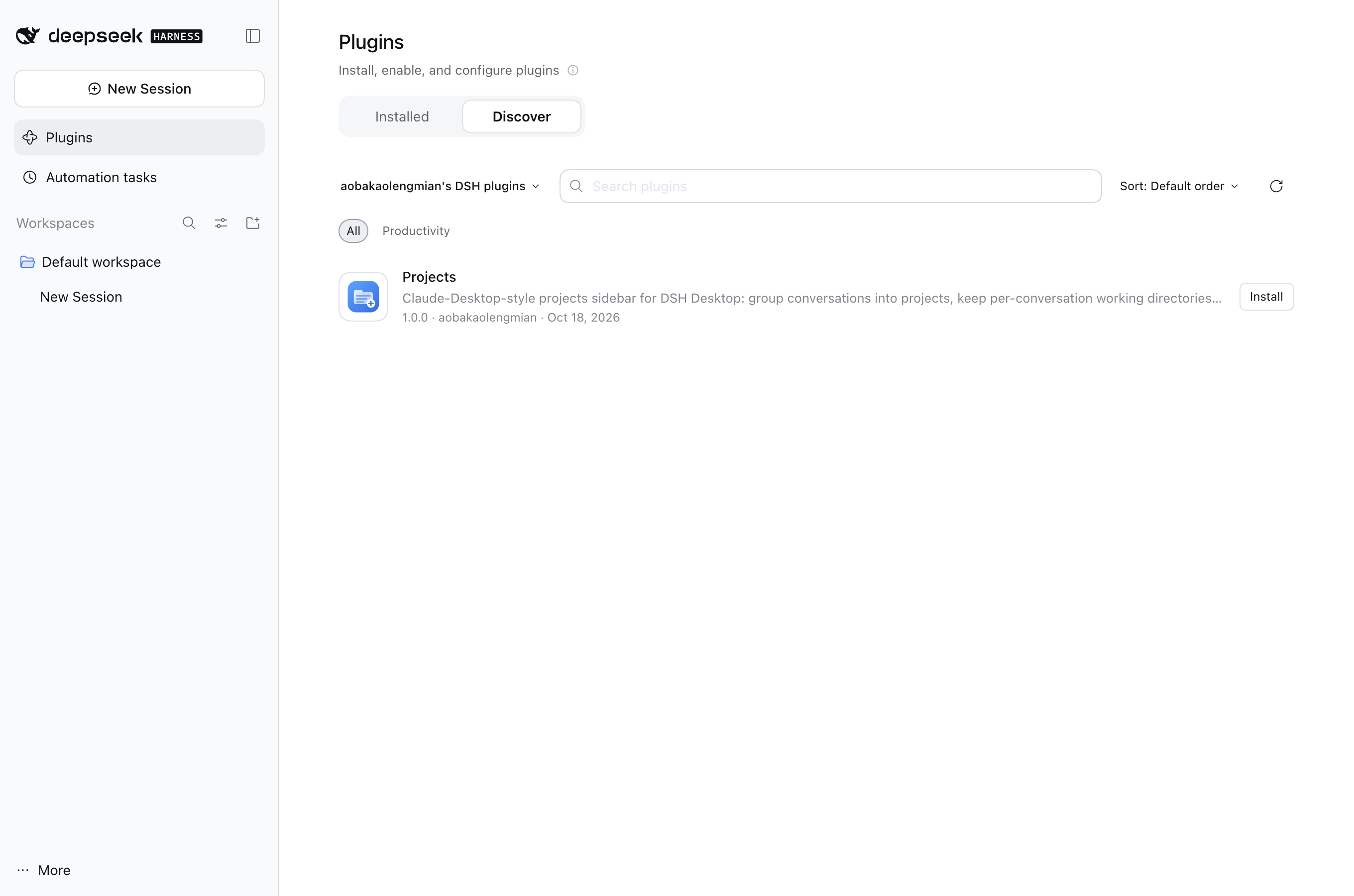
The market entry installs the published npm package
(@wxysskd/dsh-projects@<version>), the same artifact as the tarball. See
market/README.md for the format and how to regenerate it
(npm run market). Installing from the market still needs one app restart for
the Host row.
Data
Project metadata is Host-owned and durable, independent of session logs:
$DSH_HOME/storages/dsh-projects.json— projects, session→project assignments, last recorded working directory per session;- sessions themselves stay owned by the Session Controller (nothing is rewritten into session logs by this plugin).
HTTP routes served from the existing DSH web server (same origin as the GUI):
| Method | Path | Purpose |
|---|---|---|
| GET | /dsh-projects/state | complete project state |
| GET | /dsh-projects/health | liveness + counts |
| POST | /dsh-projects/mutate | project.create, project.update, project.delete, session.assign |
| POST | /dsh-projects/cwd | change one conversation's working directory |
| POST | /dsh-projects/purge | permanently remove validated empty sessions (rejects content) |
| GET | /dsh-projects/empty-sessions | list sessions that hold no conversation content |
POST routes require content-type: application/json and x-dsh-projects: 1
and a 64 KiB body limit.
Build
npm install          # dev-only: esbuild, react, react-dom, playwright
node scripts/build.mjs   # src/client/* -> client.js (committed artifact)
npm run pack             # build + dist/<name>-<version>.tgz + SHA-256 + manifest
node harness/build.mjs   # mock harness bundle
node harness/shoot.mjs   # screenshots -> harness/shots/
npm test                 # host/model tests (node --test)
Design notes
- The browser entry registers into the shipped
sidebar.workspacessingle slot atpriority: -1, shadowingui-workspace's browser. The shipped entry stays registered underneath: if our component crashes, its entry is abdicated and the original sidebar comes back. - The client bundle imports only
react/react-dom/react/jsx-runtimefrom the shell's shared module table and usesctxservices for everything else (sessions,workspaces,uiWorkspace,locale,slots). - Styles use
--dsw-*theme tokens; literals are limited to project accent artwork. All classes are prefixedpj-.
Moving workspaces and conversations between projects
Everything can be migrated without deleting or recreating sessions, through the project metadata only (session logs are never touched):
- Drag a conversation row onto any project section → the session is assigned to that project (drag it onto Other conversations to remove it from its project).
- Drag a workspace group header (under Other conversations) onto any project section → the directory moves into that project (removed from any other project's directory list, never duplicated) and every conversation in that directory is assigned to it. While dragging, every project shows a dashed drop outline and the hovered target is highlighted.
- Menu path (same result without dragging):
- workspace group
⋯→ Move workspace to project → pick the target; - project
⋯→ Move working directory to another project… → pick the directory → pick the target project (or Remove from project (back to Other conversations)); - conversation
⋯→ Move to project → pick the target (or No project).
- workspace group
Moving a directory between projects also makes future sessions created in that directory (including the shipped Cmd+N flow) land in the target project, and the project keeps the workspace title as a nested folder group.
Workspace headers (both inside projects and under Other conversations) expose their own menu: Rename workspace…, Move workspace to project, Remove from project and Delete workspace. Deleting a workspace removes only its registration, puts its conversations back under Other conversations, and never deletes a conversation.
Compatibility with other sidebar plugins
The installed sidebar-touching plugins were audited and the browser keeps their integration surfaces intact:
| Plugin | Integration surface | Status with Projects |
|---|---|---|
dsh-timeline | DOM-injects its starred-folder section before [data-slot="sidebar.workspaces"]; resolves session rows as div[role="treeitem"][aria-selected]; injects "Star Chat to Folder" into host menus found as body > [role="menu"] | Works: the slot anchor is preserved (its folder section renders above Projects), every row follows the shipped treeitem/title DOM contract, and menus/modals are portaled to document.body, so its injected menu item appears and opens its own dialog |
dsh-cost-meter | Registers sidebar.footer.action entries and styles its own footer stack | Works unchanged: footer actions are outside the replaced region |
dsh-notification, dsh-plugin (hub), dsh-thoughtdag, dsh-dafeiyu, dsh-plugin-whale-pet | No sidebar.workspaces DOM or row-slot usage (audited client bundles) | No interaction |
shipped ui-workspace browser | Registers the slot at priority 0; its child row-extension slots (e.g. schedule marks) are only rendered by its own component | Our entry shadows it at priority -1; if our component crashes it abdicates and the shipped browser returns. Child-slot extensions are not rendered while Projects is active (non-crashing degradation) |
Live verification with dsh-timeline + dsh-cost-meter + Projects mounted in one
real DSH host: our sidebar rendered 57/57 sessions as timeline-compatible
treeitems, timeline's starred-folder section appeared above Projects, timeline's
"Star Chat to Folder" item was injected into our session menu and opened its
dialog, cost-meter's footer card rendered normally, our menus/search stayed
functional, and the browser console reported no errors.
Known limits (v1)
- The shipped
ui-workspacebrowser's child extension slots (sidebar.workspaces.session.menu.item,sidebar.session.row.leading, …) are not rendered by our browser, so shipped/third-party row decorations registered there (for example the schedule mark) do not appear while it is active. The shipped built-in session actions are re-implemented directly in the project menus, anddsh-timeline's DOM-based decorations do work (see above). - Global shortcuts owned by
ui-workspace(Cmd+N / Cmd+K) keep their shipped behavior; our search field is opened through the header icon. - Collapsed sections, archived filter and the last viewed state are stored in
the browser's
localStorage; project data lives Host-side. - The empty-Session scan and permanent deletion run through the Host half, so a client bundle that hot-reloads before the Host half does cannot see them: the scan is skipped and the cleanup falls back to archiving blank Sessions, telling the user to restart the app once. After that restart the sidebar hides legacy empty chats automatically and the same menu entry deletes them from disk. Empty Sessions created during the current app run are always archived first and purgeable on the next start.
Comments
Loading…
From the same category
by ccch1mneyyy
DSH 官方公众号收录的 TUI 补位插件:Claude Code 风,鲸鱼顶栏/实时状态/流式思考/双击 Esc 回滚/上下文进度+TPS。npm 一键装。 DSH official WeChat featured TUI plugin — Claude Code style: whale bar, live status, streaming thoughts, double-Esc rol
★ 5k
↓ 10.4k/wk
MIT
TypeScript
Oct 20, 2026
dsh plugin --profile terminal add @deepseek-harness-tui/dsh-tuiby strukto-ai
The World's First Virtual Terminal for AI Agents
★ 3.7k
↓ 227/wk
Apache-2.0
TypeScript
Oct 20, 2026
dsh plugin --profile agent add @struktoai/mirage-dshby bowenliang123
The best DeepSeek Harness plugin for context insight and management, with context dashboard / browser / sidebar and context command, for context statistics, composition, breakdown, evolution details,
★ 2.4k
↓ 43.4k/wk
Apache-2.0
TypeScript
Oct 20, 2026
dsh plugin --profile web add dsh-contextby huiliyi37
官方 DeepSeek Harness 的交互式终端 UI 插件:自研 ANSI 极简交互渲染、流式 Markdown/工具卡、16+ 主题、slash 命令与选择器、输入历史与本地偏好持久化、LSP 诊断、memory记忆,很丝滑的开发体验。
★ 288
↓ 274/wk
Apache-2.0
TypeScript
Sep 30, 2026
dsh plugin --profile terminal add @huiliyi37/dsh-tianshu-tuiby Hilbert-beinghappy
面向 DeepSeek Harness 的 Claude Code 风格终端界面,支持 Windows、macOS 与 Linux,兼容透明终端、VS Code 主题和自定义配色。
★ 196
↓ 108/wk
MIT
TypeScript
Oct 13, 2026
dsh plugin --profile web add seekttyby c3cvld7aag
富江DSH完美破甲|富江破甲 DSH 本地插件,内置提示词规则,支持 Windows 一键安装、环境自动准备与一键卸载,全中文使用说明。
★ 176
JavaScript
Oct 3, 2026
dsh plugin --profile web add fujiang-armor