
dsh-plugin-balance
Manifest validdsh-plugin-balance
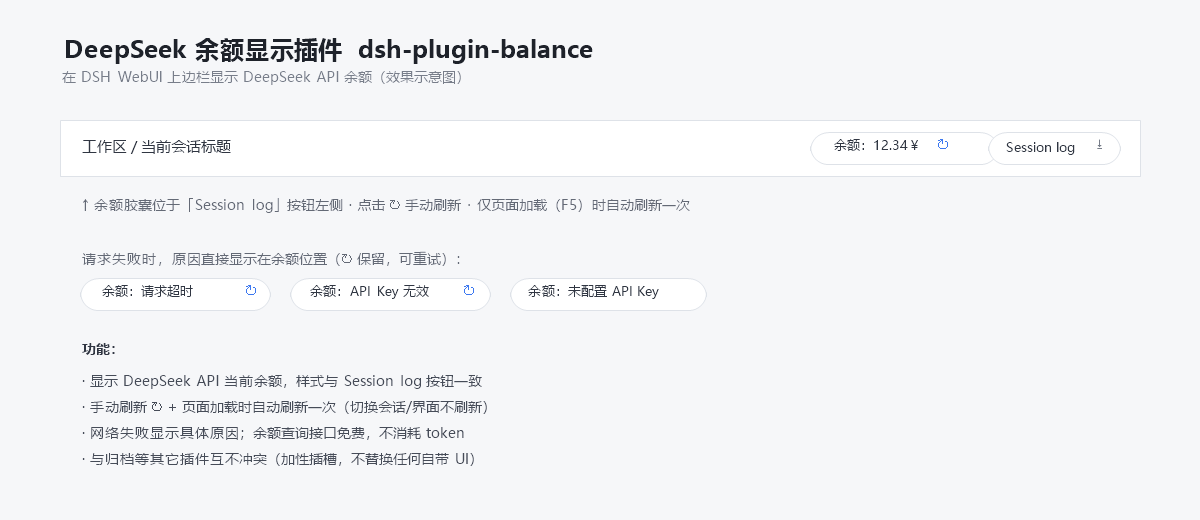
A lightweight, zero-build plugin for DeepSeek Harness (DSH) that shows your DeepSeek API account balance in the web session header, right next to the built-in "Session log" button:
[Balance: 12.34¥ ↻] [Session log]
Features
- Displays the current DeepSeek API balance at the top-right of the session header, styled to match the built-in "Session log" button.
- Manual refresh: click the ↻ button.
- Auto refresh: once per page load (F5) only — switching sessions or views never triggers a refresh.
- Localized UI: the label (
Balance/余额), the loading text, and every error reason follow your DSH UI language (English / Simplified Chinese). - Clear failure reasons: on network or credential errors the capsule shows the concrete reason in the active language (e.g.
Balance: Request timed out,Balance: Invalid API key,Balance: No API key configured). - Free to use: the balance query (
GET https://api.deepseek.com/user/balance) consumes no API tokens. - No conflicts: registered in the additive slot
conversation.session.header.utilities(replaceRisk: none) — it never replaces any built-in UI.
The API key is resolved through DSH's own credential seam (~/.dsh/.credentials.yaml → DEEPSEEK_API_KEY) and never leaves the host process.
Download
Clone:
git clone https://github.com/anonRTtty/dsh-api-balance-displayer-plugin.git
Or download the ZIP: open the repository page → Code → Download ZIP, then extract dsh-plugin-balance/.
Install
Pick one of the three methods — do not mix them (mixing may register the plugin twice). After installing, restart DSH (or let the patch HMR apply), then hard-refresh the browser (
Ctrl+Shift+R).
Method 1 — One-command install (Windows PowerShell, recommended)
No clone needed; the script downloads the release ZIP, copies it into the profile and enables it:
irm https://raw.githubusercontent.com/anonRTtty/dsh-api-balance-displayer-plugin/main/scripts/install.ps1 | iex
Or after cloning/extracting:
cd dsh-plugin-balance
powershell -ExecutionPolicy Bypass -File .\scripts\install.ps1
Non-default profile: powershell -ExecutionPolicy Bypass -File .\scripts\install.ps1 -ProfileName headless
Method 2 — Official CLI (dsh plugin)
dsh plugin --profile web add github:anonRTtty/dsh-api-balance-displayer-plugin
This plugin declares dsh.bundle, so the official command adds it to dsh.profile.bundles and applies the in-package cordis.patch.yml automatically — no manual config editing needed.
Method 3 — Manual install
-
Copy the whole
dsh-plugin-balance/directory to:C:\Users\Administrator\.dsh\profiles\node_modules\dsh-plugin-balance\ -
Append to the insert list in
C:\Users\Administrator\.dsh\profiles\web\cordis.patch.yml:- insert: - id: dsh-plugin-balance name: dsh-plugin-balance -
Restart DSH.
Uninstall
One-command (Windows PowerShell):
irm https://raw.githubusercontent.com/anonRTtty/dsh-api-balance-displayer-plugin/main/scripts/uninstall.ps1 | iex
Or locally: powershell -ExecutionPolicy Bypass -File .\scripts\uninstall.ps1
Or manually: remove the dsh-plugin-balance entry from cordis.patch.yml, delete C:\Users\Administrator\.dsh\profiles\node_modules\dsh-plugin-balance\, then restart DSH.
(If you installed via Method 2, also run dsh plugin --profile web remove dsh-plugin-balance.)
File structure
dsh-plugin-balance/
├── package.json        # package manifest + dsh.bundle (auto-activate via CLI) + dsh.client
├── cordis.patch.yml    # bundle patch (applied automatically on CLI installs)
├── src/
│   ├── index.js        # Host half: /api/plugin.balance route (webServer exact route)
│   └── client.js       # Browser half: localized balance capsule (module-loader bundle)
├── scripts/
│   ├── install.ps1     # Windows one-command install script
│   └── uninstall.ps1   # Windows uninstall script
├── screenshot.png      # Screenshot
├── README.md           # English
├── README.zh-CN.md     # Simplified Chinese
└── LICENSE
Notes
- Balance endpoint:
GET https://api.deepseek.com/user/balance(free, consumes no tokens). The credential is read fromDEEPSEEK_API_KEYin~/.dsh/.credentials.yaml(the same seam the built-in model route uses); the key never leaves the host process. - The host registers the exact route
/api/plugin.balanceviawebServer(same extension point as dsh-plugin-session-delete); the browser fetches it same-origin. - License: MIT
Comments
Loading…
From the same category
by Ebony-Vinyl
在 dsh 里装上这个插件即可,无需登录、注册或填 API Key,就能使用包括 Muse Spark 1.3、MiMo V2.6 在内的前沿模型——完全免费,不限量。 All you do is install this plugin in dsh: no login, no sign-up, no API key — the frontier models are just there, Mu
★ 7.5k
MIT
JavaScript
Oct 11, 2026
dsh plugin --profile web add dsh-our-free-modelby V1ki
Use ChatGPT (Codex), Claude, and Grok (X Premium) subscriptions as DeepSeek Harness LLM providers — OAuth login in the web UI, no API keys
★ 444
↓ 3k/wk
MIT
TypeScript
Oct 9, 2026
dsh plugin --profile web add dsh-plugin-subscriptionsby corrinehu
将 WorkBuddy 桌面 App 包含的模型自动接入 DeepSeek Harness,零配置使用。Bring the models in the WorkBuddy desktop app into DeepSeek Harness with zero configuration.
★ 393
↓ 3.9k/wk
MIT
TypeScript
Oct 11, 2026
dsh plugin --profile web add dsh-workbuddy-connectby Mars-Sea
Command Code provider plugin for DeepSeek Harness (dsh). Adds Command Code model access, live model catalog, plan-aware model selection, reasoning effort, image input, web search, and multi-account su
★ 377
↓ 3.5k/wk
MIT
TypeScript
Oct 11, 2026
dsh plugin --profile web add @mars-sea/dsh-commandcode-providerAdds a deepseek-web provider that uses chat.deepseek.com web models in DSH, with browser login capture, PoW request signing, SSE streaming, and prompting-based tool calls.
★ 223
↓ 3.8k/wk
Apache-2.0
JavaScript
dsh plugin --profile web add dsh-deepseek-web-loginby zouyuxuan122
在 dsh 里装上这个插件即可,无需登录、注册或填 API Key,就能使用包括 Muse Spark 1.3、MiMo V2.6 在内的前沿模型——完全免费,不限量。 All you do is install this plugin in dsh: no login, no sign-up, no API key — the frontier models are just there, Mu
★ 219
MIT
JavaScript
Oct 5, 2026
dsh plugin --profile web add dsh-our-free-model