

dsh-workbuddy-connect
Manifest valid★ 10Bring the models in the WorkBuddy desktop app into DeepSeek Harness with zero configuration.
DSH WorkBuddy Connect
English | Chinese
Automatically connects all the models included in the WorkBuddy desktop app (GLM-5.3, GLM-5.2, DeepSeek-V4-Pro, DeepSeek-V4-Flash, Kimi-K3, MiniMax-M3, Hy3, etc.) to DeepSeek Harness, enabling zero-config usage in the DSH chat window.
Both the China-domestic WorkBuddy and international WorkBuddy AI are supported (international from v0.5.0 onwards): whichever app you install gets its own model group; if you install both, both groups coexist, each using its own account and credits.
Features
- Zero config: after install, use directly in DSH.
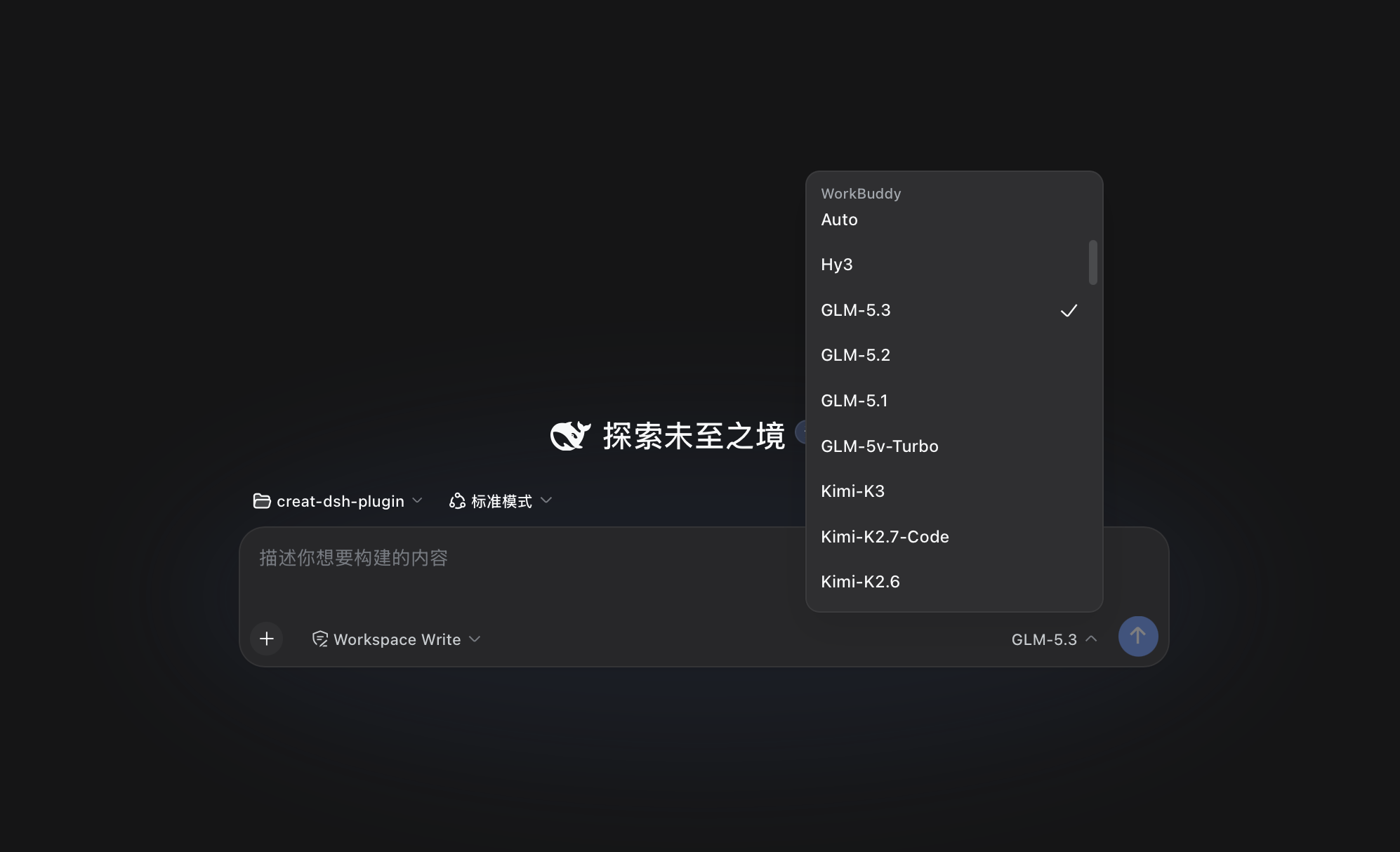
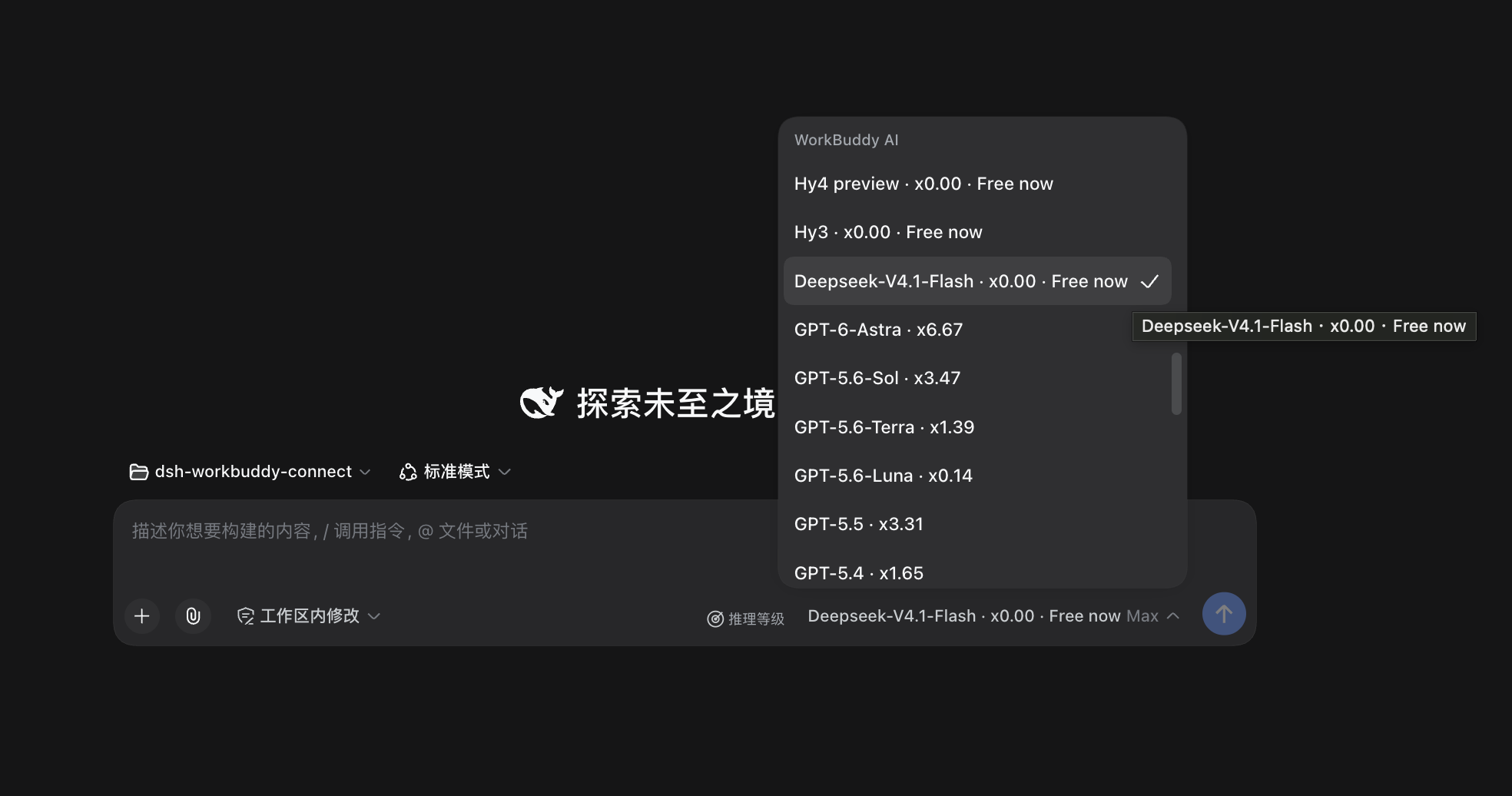
- Domestic and international versions coexist: the domestic version shows up as a "WorkBuddy" group, and the international version (WorkBuddy AI) as a "WorkBuddy AI" group. The models, accounts and credits of the two versions are kept strictly separate. Each only looks at its own app's login state: install only the international version and only "WorkBuddy AI" appears; install both and both groups are present; log out of one and its group disappears. The settings page shows two cards, each displaying its own account and balance.
-
Image input: most models accept images — just paste or drop one into the conversation (GLM-5.3-Flash, GLM-5.2, DeepSeek-V4 family, etc.); text-only models (e.g. GLM-5.1) will clearly state they don't support it.
-
Reasoning levels: levels explicitly declared by WorkBuddy show up directly, e.g. GLM-5.3 and GLM-5.3-Flash offer low / high / max. For models without declared levels, Web and Desktop let you click "Reasoning Level" in the model selector to probe manually; probing sends a few requests and may consume credits. Undetected models or those without available levels still use WorkBuddy's default level.
-
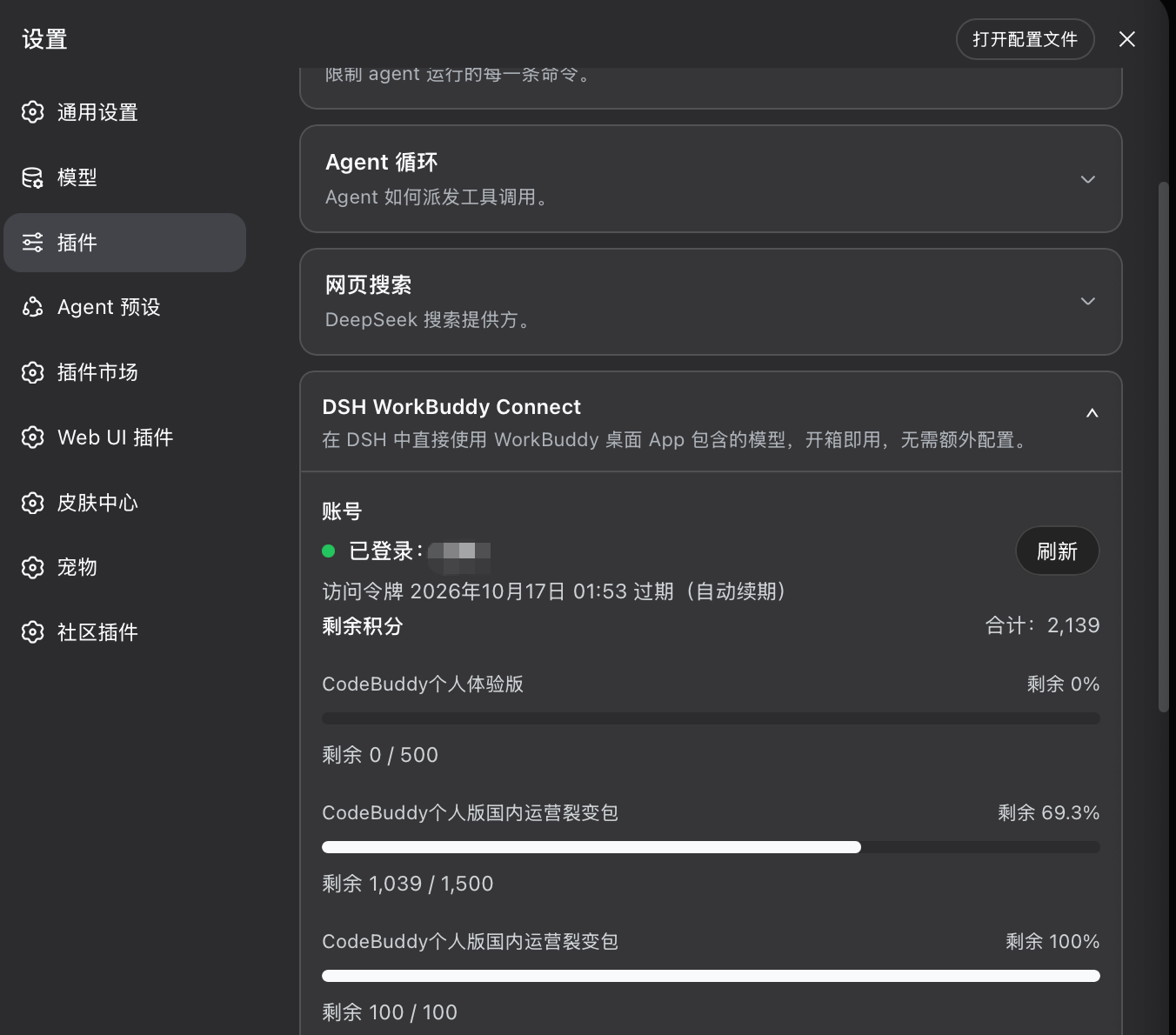
Info & probing: Settings → Plugins → the corresponding card shows account, token expiry, remaining credits, and model promotions; you can also manually refresh the model list and see on the card whether it comes from upstream or the built-in fallback. For probeable models, manual reasoning-level probing is available here too.
-
Enterprise account credits: domestic enterprise accounts (non-empty
enterpriseId) use the enterprise-specific billing endpoint to read the period quota; the card shows "Enterprise quota" and the period reset time. -
Rate multipliers: each model name in the selection list shows its credit multiplier right after it (e.g.
GLM-5.2 · x0.79,Hy3 · x0.00), visible in the/modeldialog and the input field's model dropdown. Multipliers are display-only and don't affect actual requests. -
Badges: promotional badges (limited-time free, night discount) follow the model name directly (e.g.
Hy4 preview · x0.00 · 限时免费), visible at a glance when picking a model; the settings card also aggregates currently-promoted models. Data is authoritative from the WorkBuddy server, synced on every DSH startup. International promotions come from the server'smodelPromotions(including active time windows): when a promotion expires the badge is withdrawn; since the server writes the discounted price directly into the model's multiplier field, the original price cannot be recovered, so the model's multiplier then shows "价格未知 — 刷新后更新" instead of continuing to show the discounted price or "free".
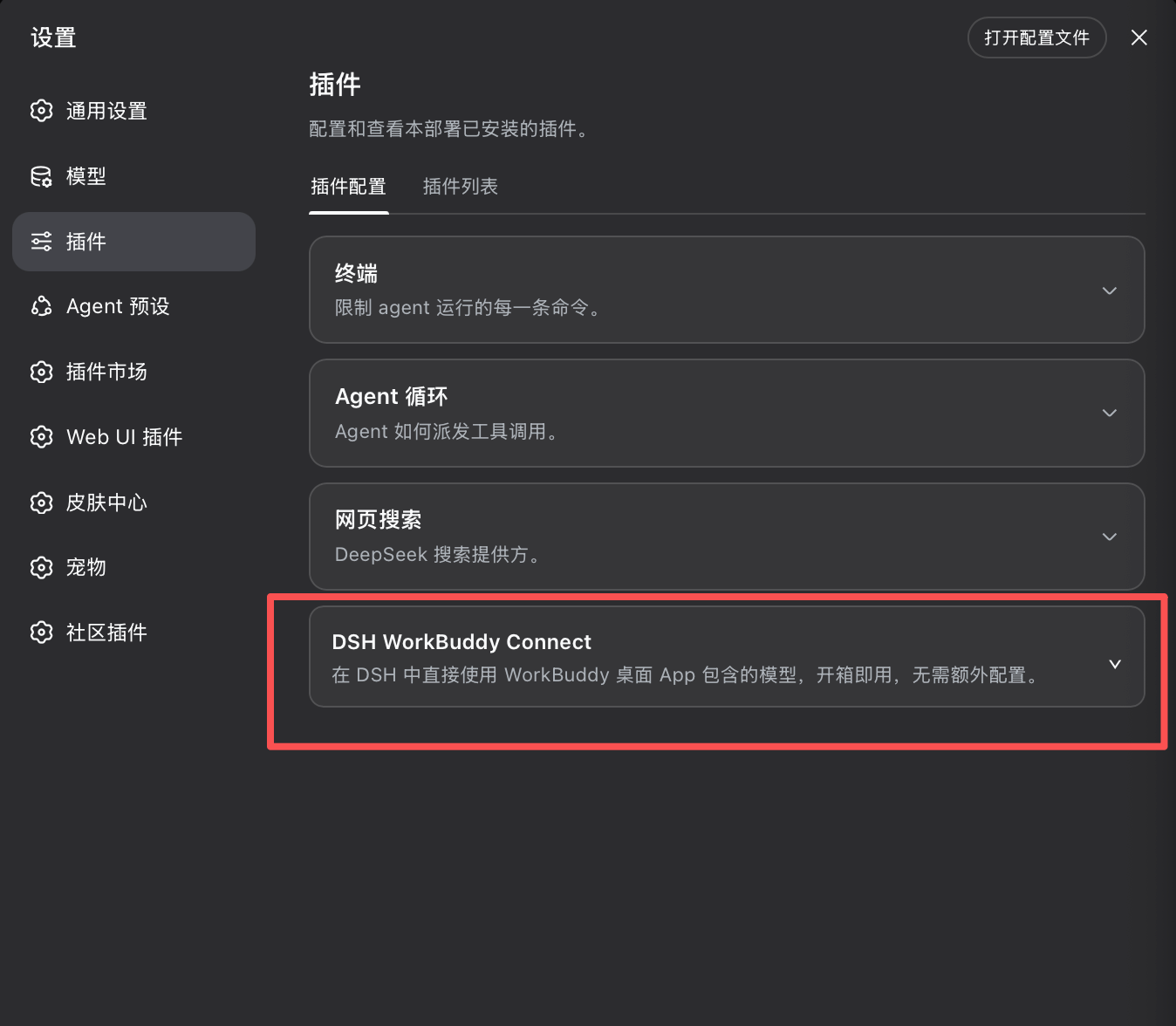
The card has three tabs: Status / Context / Details. Status shows account, token expiry, total credits, model list source, and reasoning-level probing; Context lists each model's context window. For international, when upstream declares a larger selectable window, toggle "Use upstream's max declared context window"; this switch is on by default, and DSH will schedule context compression per the upstream max; to use the upstream default instead, turn it off — the preference is persisted and survives restarts. Details shows each plan's remaining quota and model promotions. Domestic and international each have their own card, each showing its own account info.
Why These Reasoning Tiers
Reasoning tier info in WorkBuddy is scattered across upstream APIs and the client's private UI, and the model catalog changes fast. Filling in a unified tier set for all undeclared models would require constantly chasing these unpublished, unstable product behaviors.
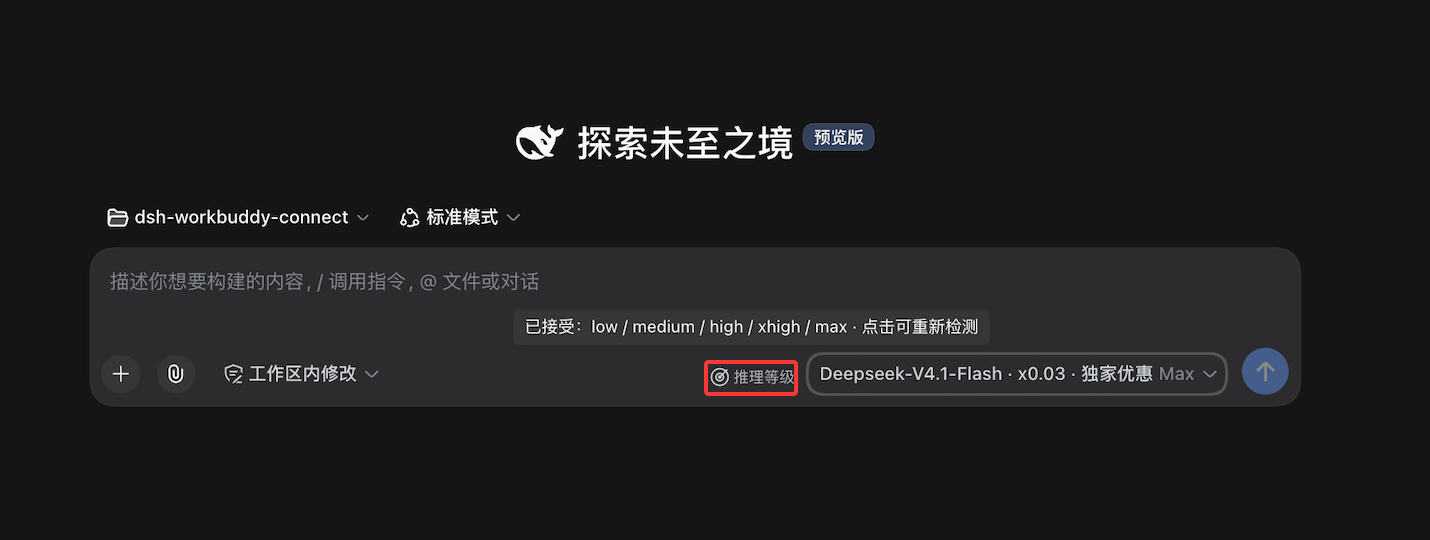
Empirical testing also found that some models accept the reasoning_effort param but may ignore unknown values and fall back to defaults; a successful response from one request does not prove a particular level is actually usable.
So for models that don't declare a tier, Web and Desktop use user-triggered authorization with dynamic tier fetching: first verify the upstream validates this parameter, then check which standard tiers it accepts. The check sends a few requests and may use credits; results only confirm the current upstream accepts the tier, with no guarantee on reasoning quality, speed, or credit impact.
Installation
Prerequisite: WorkBuddy desktop app is installed and logged in. The plugin reuses the app's login state; account switching follows automatically. The international WorkBuddy AI works the same way; the two versions do not affect each other.
Version pairing (important): This plugin maps 1:1 to a DSH core version and must not be mixed — mismatched pairs will cause DSH to fail to start:
| Plugin version | Required DSH core | Desktop App |
|---|---|---|
0.3.2+ (international support from 0.5.0) | 0.1.5-rc.1 or above | 2.0.7+ (built-in core has caught up to 0.1.5-rc.1) |
| 0.3.0 – 0.3.1 | 0.1.2-rc.1 | 2.0.5 |
| 0.2.6 | 0.1.1-rc.2 (legacy line) | 2.0.3 / 2.0.4 |
- DSH
0.1.5-rc.1and later: just install the latest version as normal:dsh plugin --profile web add dsh-workbuddy-connect - Still on DSH
0.1.2-rc.1: stay on0.3.1:dsh plugin --profile web add dsh-workbuddy-connect@0.3.1 - Still on DSH
0.1.1-rc.2: stay on0.2.6:dsh plugin --profile web add dsh-workbuddy-connect@0.2.6 - Desktop App from
2.0.7onward has the built-in core at0.1.5-rc.1, so you can use0.3.2or later; Apps at2.0.5or earlier (built-in0.1.2-rc.1) should continue using0.3.1
The plugin works in all three DSH interfaces: Web, Desktop, and TUI. Choose the corresponding command based on the profile you use.
# Web(推荐,自带预构建产物)
dsh plugin --profile web add dsh-workbuddy-connect
dsh web

# 或从 GitHub 源码安装 Web 版
dsh plugin --profile web add github:corrinehu/dsh-workbuddy-connect
dsh web
# Desktop(DSH Desktop 桌面版)
dsh plugin --profile desktop add dsh-workbuddy-connect
dsh --profile desktop
# TUI(终端界面)
dsh plugin --profile dsh-tui add dsh-workbuddy-connect
dsh --profile dsh-tui
TUI users, watch the version pairing: the terminal-interface plugin
@deepseek-harness-tui/dsh-tuirequires0.10.0-beta.5or later (earlier versions fail to start with this plugin installed, reportingevents is not iterable). First upgrade the TUI shell to beta.5 or later using TUI's built-in update method, then install this plugin; the current latest is a beta release, and it will still work once a stable release comes out.
The manual reasoning-level probing entry is currently only provided to Web and Desktop; TUI does not offer probing.
Note: the
dsh-tuiprofile requires pnpm 11 to install (a different version in PATH will reportERR_PNPM_UNEXPECTED_STORE; usenpx pnpm@11).
After installation, switch to WorkBuddy models in the model selector of the corresponding interface to use them. On Web and Desktop, the settings card lets you view account information, token expiry and remaining credits, manually refresh the model list, and manually probe the reasoning levels of qualifying models; domestic and international versions each have their own card. On TUI, you can configure authFile under /settings (international version: authFileAI).
Command line
dsh plugin --profile <web|desktop|dsh-tui> exec dsh-workbuddy-connect status: login state and remaining credits (--json for machine-readable output; plus doctor diagnostics and logout for clearing credentials).
By default operates on the domestic version; add --provider workbuddy-ai for the international version:
dsh plugin --profile web exec dsh-workbuddy-connect status --provider workbuddy-ai
dsh plugin --profile web exec dsh-workbuddy-connect doctor --provider workbuddy-ai
logout only removes this plugin's own credential copy, leaves the desktop app's login untouched, and does not guarantee the model group will disappear (the app's credential file still works if present).
Known limitations
- Verified on DSH Web / Desktop / TUI on macOS (requires
0.1.5-rc.1+ and Node 22+ since 0.3.2; TUI requires terminal UI plugin0.10.0-beta.5or later, see the installation section). On Windows, both Local and Roaming AppData are probed in sequence; WSL preferentially reads login credentials from the mounted Windows user directory. If the Windows and Linux usernames differ and Windows environment variables are not passed into WSL, specify the actual location viaWORKBUDDY_AUTH_FILE(WORKBUDDY_AI_AUTH_FILEfor the international edition). - The international edition's model catalog comes from the App's UI interface: the server dispatches based on User-Agent, which is a private implementation and upstream changes may break it. In that case, the plugin falls back in order via "last successful catalog for this account → built-in catalog", and the card will indicate the source (live / saved / built-in), update time, and failure reason, but long-term compatibility cannot be guaranteed. The domestic edition's catalog uses the same official CLI interface and is not affected.
- Environments not yet covered by the international edition: a reliable source for reading the international edition App's version on Windows / WSL / Linux has not been found yet; it will fall back to the most recently saved version or the built-in value. On macOS, GPT-family full responses, tool calls, and multi-turn continuation have been verified through a real shim.
- Behavior change when no credentials exist: if a given App version has never been logged in and has left no plugin-maintained copy, its model groups will no longer be displayed. Previously, the domestic edition would show a built-in fallback list, but selecting those models would always result in errors.
- Enterprise account credits currently only cover the domestic edition: the billing interface for international edition enterprise accounts has not yet been verified and still reads via the personal edition interface; expansion will follow after empirical results are available. The enterprise account branch cannot be self-tested on this machine (the dev machine uses a personal account); it is implemented based on the official App's interface contract, and feedback from enterprise account users is welcome.
- Relies on WorkBuddy client interfaces (not an official open API); the plugin may need adjustments after WorkBuddy updates.
Disclaimer
- This project is for personal learning and research only, driving the user's own WorkBuddy account locally. No commercial or beyond-reasonable-personal-use scenarios.
- Users must follow WorkBuddy's terms of service; all consequences of using this project (account limits, quota loss, service disruption, etc.) are the user's own responsibility.
- Authors are not liable for any direct or indirect losses from use or abuse of this project.
- This project is unaffiliated with Tencent, WorkBuddy, or DeepSeek and has no authorization or endorsement from them; names are mentioned only to describe compatibility, and trademarks belong to their respective owners.
Thanks
- Sliverkiss/workbuddy2api (MIT) — a reference implementation of the WorkBuddy upstream protocol.
- franksong2702/dsh-codex-connect (Apache-2.0) — a reference for DSH plugin structure and provider registration.
License
Compatibility
Versions
| Latest version | Published | Size |
|---|---|---|
| 0.2.1 | — | — |
| 0.2.2 | — | — |
| 0.2.3 | — | — |
| 0.2.4 | — | — |
| 0.4.0 | — | — |
| 0.3.0 | — | — |
| 0.2.6 | — | — |
| 0.5.2 | — | — |
| 0.5.1 | — | — |
| 0.5.4 | — | — |
| 0.6.5 | — | — |
| 0.3.1 | — | — |
| 0.5.3 | — | — |
| 0.3.2 | — | — |
| 0.2.5 | — | — |
| 0.5.0 | — | — |
| 0.6.0 | — | — |
| 0.6.1 | — | — |
| 0.6.2 | — | — |
| 0.6.3 | — | — |
Comments
Loading…
Similar plugins
by dsh-plugin-lab
DSH 插件:把 WorkBuddy 桌面 App 里的模型接入 DeepSeek Harness,零配置直接用。(原生嵌入"设置-插件-插件配置")
★ 25
↓ 1.7k/wk
MIT
TypeScript
Oct 29, 2026
dsh plugin --profile web add dsh-workbuddy-bridgeby zlZayn
DSH 插件:把 WorkBuddy 桌面 App 里的模型接入 DeepSeek Harness,零配置直接用。(原生嵌入"设置-插件-插件配置")
★ 21
↓ 1.7k/wk
MIT
TypeScript
Oct 3, 2026
dsh plugin --profile web add dsh-workbuddy-bridgeby gaoqiaoliangjie666
将 QwenWork 桌面 App 包含的模型自动接入 DeepSeek Harness,零配置使用。Bring the models in the QwenWork desktop app into DeepSeek Harness with zero configuration.
★ 4
JavaScript
Sep 24, 2026
dsh plugin --profile web add dsh-qwen-connect将 WorkBuddy 桌面 App 包含的模型自动接入 DeepSeek Harness — bring WorkBuddy desktop app models into DeepSeek Harness with zero configuration.
★ 0
dsh plugin --profile web add dsh-workbuddy-connectby masknull
将 WorkBuddy(国内版 / 国际版)的模型接入 DeepSeek Harness —— 插件自带浏览器登录,无需 WorkBuddy 桌面 App。WorkBuddy CN & international models for DeepSeek Harness; the plugin signs itself in. 支持 DSH 0.1.5-rc.1+。
★ 55
↓ 28.6k/wk
MIT
TypeScript
Oct 21, 2026
dsh plugin --profile web add dsh-workbuddy-connectby sixzjd
将 WorkBuddy(国际版 / 国内版)模型接入 DeepSeek Harness — WorkBuddy models in DSH
★ 2
MIT
JavaScript
Oct 21, 2026
dsh plugin --profile web add dsh-workbuddy-connect