

dsh-settings-size
Manifest validResizable DSH settings dialog: size presets plus width/height sliders in Settings → General, persisted per browser
dsh-settings-size
把 DSH 的设置弹框调到舒服的大小。 为 DeepSeek Harness(
dsh)Web GUI 加一行「设置弹框尺寸」——预设一键切换,滑块实时微调,选择保存在本地。



简介
DSH 的设置弹框是硬编码 800×800 的,在宽屏上显得局促:左侧 188px 导航栏吃掉一块之后,右侧内容列只剩约 612px。它没有走 --dsw-* 设计 token,所以无论换皮肤还是调外观设置都碰不到它。
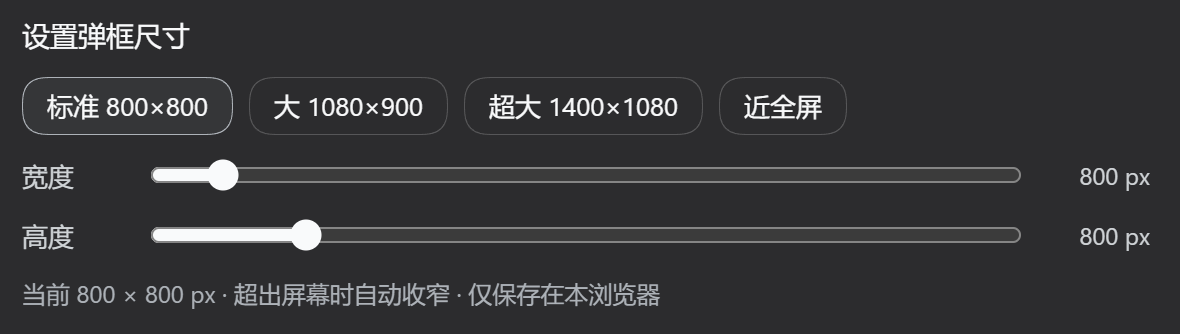
dsh-settings-size 在 设置 → 通用 里加一行控件(就在「字体大小」下面),提供四档预设和宽高双滑块,改动实时生效,弹框开着就能看到变化;选择写入 localStorage,刷新后保留。
- 插件类型:双面包(host no-op + browser bundle)
- 生效范围:DSH Web GUI
- 持久化:
localStorage,键dsh-settings-size:size - 无构建步骤:
lib/*.js就是最终产物
安装
把本仓库加入 web profile:
dsh plugin --profile web add -w <本仓库路径>
-w 是必需的:每个 profile 目录都带 pnpm-workspace.yaml,pnpm 会把 profile 当作 workspace 根,
裸 add 会报 ERR_PNPM_ADDING_TO_ROOT。
该命令会链接本包并把 dsh-settings-size 追加进 dsh.profile.bundles。运行中的 web 服务器需要重启才会加载新的 bundle 层:
# 停掉当前实例,然后
dsh web
重启后打开 设置 → 通用,在「字体大小」下方应能看到 设置弹框尺寸 一行。
手动安装(等价写法)
编辑 ~/.dsh/profiles/web/package.json:
{
  "dependencies": {
    "dsh-settings-size": "link:<本仓库路径>"
  },
  "dsh": {
    "profile": {
      "bundles": [ /* …原有条目…, */ "dsh-settings-size" ]
    }
  }
}
然后在 ~/.dsh/profiles/web 下执行 pnpm install,再重启 dsh web。
卸载
dsh plugin --profile web remove -w dsh-settings-size
随后重启 dsh web。插件的 <style> 标签由 ctx.effect 持有,卸载时会自动移除;
localStorage 里的键可以留也可以手动清掉。
功能
预设
| 预设 | 目标尺寸 | 说明 |
|---|---|---|
| 标准 | 800 × 800 | shipped 原样 |
| 大 | 1080 × 900 | 默认值 |
| 超大 | 1400 × 1080 | |
| 近全屏 | 3000 × 2000 | 故意超出屏幕,由 min() 夹到视口 |
滑块
| 项目 | 范围 | 步进 |
|---|---|---|
| 宽度 | 640 – 3000 px | 10 px |
| 高度 | 560 – 2000 px | 10 px |
拖动过程中弹框即时改变,不需要关闭重开。
其他
- 超出视口自动收窄:规则写作
min(<目标>px, calc(100vw - 32px)),小屏或窄窗口下不会溢出屏幕。 - 仅保存在本浏览器:换浏览器或清空站点数据会回到默认值。
参数与默认值
| 项目 | 值 |
|---|---|
| 首次使用尺寸(本机未设置过时) | 1080 × 900 |
| 宽度范围 / 步进 | 640 – 3000 px / 10 px |
| 高度范围 / 步进 | 560 – 2000 px / 10 px |
| 视口留边 | 四边各 32 px |
| 存储键 | dsh-settings-size:size |
| 存储格式 | "<宽度>x<高度>",例如 "1080x900" |
| 设置行位置 | settings.general.item,id: settings-size,order: 15 |
| 依赖服务 | slots、locale |
| 语言命名空间 | settings.size(zh / en,跟随 DSH 语言自动切换) |
| DSH 兼容范围 | ^0.1.0(peerDependencies 里的 @deepseek-ai/dsh) |
兼容性与已知限制
版本兼容性
本插件在以下 DSH 版本上手动验证通过:
| DSH 版本 | 结果 |
|---|---|
0.1.5-rc.2 | ✅ 通过 |
0.1.7-rc.2 | ✅ 通过 |
未列出的版本预期同样可用。插件只依赖少数稳定契约——settings.general.item 槽位、slots 与 locale
两个客户端服务、以及设置弹框的 DOM 结构——不读取任何内部实现或未公开字段,因此升级带来破坏性变更的
概率很低。第三方平台整理的兼容性结果(如 dsh.so)也值得一并参考。
插件在 package.json 中声明了 "@deepseek-ai/dsh": "^0.1.0",DSH 启动时会用 semver.satisfies()
自动校验,不满足时给出明确的版本冲突告警。
如果你在某个版本上遇到问题,或者有改进建议,欢迎提交 Issue
或直接发起 PR;报告时请附上 dsh --version 的输出与具体现象。
已知限制
- 依赖弹框的 DOM 结构
role="presentation" > role="dialog"[aria-modal]。若未来 DSH 改版换了这层结构, 只需要改lib/client.js里的PANEL常量,其余逻辑不受影响——这也是不用哈希类名的原因。 - 只影响 Web GUI。TUI / desktop profile 不加载
dsh.client,插件对它无副作用。 - 不修改任何 shipped 文件:全部通过覆盖式 CSS 与槽位注册实现。
- 版本兼容声明只能写在
peerDependencies:dsh-app-boot的evaluatePluginCompatibility只扫描package.json里@deepseek-ai/dsh与@deepseek-ai/dsh-*开头的 peer,用semver.satisfies(runtime, range, { includePrerelease: true })比对,不满足时给出插件名、版本与 运行版本的告警(另有 exact-version 豁免机制)。cordis.yml/cordis.patch.yml里的dshCompatibility之类字段不会被读取——那个文件是 patch 数组,多塞一个键只会让 loader 告警并跳过。 - 尺寸以 CSS 像素计,浏览器缩放会等比影响观感(与 DSH 其他 UI 一致)。
开发
本仓库没有构建步骤:lib/client.js 就是手写的 CJS bundle。
web profile 带有 dsh-client-hmr,它用 fs.watchFile 轮询每个已安装的客户端 bundle,
文件一变就调用 clientModules.rebuilt(id) 重新读取并合成,再通过 /plugins/events SSE
把新模块推给浏览器热替换。所以改完保存即生效,既不需要刷新也不需要重启(轮询有极短的延迟)。
只有当改动落在 host 半(lib/index.js)、cordis.patch.yml、package.json
或 profile 组合时,才需要重启 dsh web。本地开发用 link: 安装最方便:
dsh plugin --profile web add -w <本仓库路径>
深入阅读(可选)
为什么需要它 —— shipped 的两层尺寸限制
一层:面板尺寸写死
@deepseek-ai/dsh-client-ui-settings-general 的 SettingsRoot.module.css:
.VOzbGW_panel {
  width: 800px;
  max-width: calc(100vw - 48px);
  height: min(800px, 100vh - 48px);
}
.VOzbGW_nav { width: 188px; }   /* 左侧导航固定宽 */
二层:各分区内容列另有上限
只把面板改宽没有用——每个分区自己还卡着内容列宽度,多出来的空间会是一片空白:
| 分区 | 内容列上限 |
|---|---|
.zGbnIq_section(模型) | max-width:720px |
.rtSEdW_section(Agent 预设) | max-width:720px |
.pbvGtq_section(插件) | max-width:760px |
.qSYn7G_section(插件清单) | max-width:760px |
本插件同时覆盖这两层。
工作原理 —— 双面包结构、选择器策略、持久化边界
双面包结构
和 shipped 的 ui-* 包同构:
- Host 半(
lib/index.js)—— 一个dsh.bundlepatch 层,插入一条 loader 条目(settings-size);apply是空实现。 - Browser 半(
lib/client.js)—— 一个dsh.clientbundle,由dsh-client-modules在/plugins/dsh-settings-size/client.js提供,通过window.__ModuleLoader__.load的 CJS 工厂执行,require()解析 shell 模块表里的react。它维护一个自有<style>标签,把中英字典注册进settings.size语言命名空间,并向settings.general.item注册那一行(注册时带locale, 由 owner 注入命名空间绑定的t,并在语言切换时重渲染)。
选择器策略
覆盖规则走 DOM 结构,不用 CSS Module 的哈希类名(那个哈希会随文件内容变化):
div[role="presentation"] > div[role="dialog"][aria-modal="true"] {
  width: min(<w>px, calc(100vw - 32px)) !important;
  height: min(<h>px, calc(100vh - 32px)) !important;
  max-width: calc(100vw - 32px) !important;
}
div[role="presentation"] > div[role="dialog"][aria-modal="true"] [class*="_section"] {
  max-width: none !important;
}
两点考量:
- 不会误伤别的弹窗。附件灯箱也是
role="dialog"+aria-modal="true",但它是 portal 根节点, 不是role="presentation"容器的直接子元素,因此这个组合只会命中设置面板。 - 权重足够。该选择器权重
0,2,3,高于 shipped 的.VOzbGW_panel(0,1,0);!important是为了抵御未来 shipped 样式变化,并非当前必需。
为什么用 localStorage 而不是 Host settings
DSH 的 Host settings 通道只向浏览器暴露一个 allowlist(WEB_SETTINGS_NAMESPACES,见 dsh-host-apiproxy),
第三方命名空间会得到 settings-not-exposed。弹框尺寸属于浏览器侧的视觉偏好,用 localStorage
既符合产品自身对远程浏览器偏好的边界,又能在同源刷新后保留。
项目结构
dsh-settings-size/
├── package.json         # dsh.bundle.patch + dsh.client 声明
├── cordis.patch.yml     # profile patch 层:插入 loader 条目 id=settings-size
├── lib/
│   ├── index.js         # host 半:no-op apply
│   └── client.js        # browser 半:CSS 覆盖 + 设置行 + 本地化 + 持久化
├── docs/
│   ├── screenshot-zh.png
│   └── screenshot-en.png
└── README.md / README.en.md
给插件作者的两条坑 —— 变量遮蔽导致的静默失败
写这个插件时踩到的两个静默失败,都是变量遮蔽,记在这里省得别人再花时间:
- 动态 Cordis 插件里不要把自己的样式表命名成
styles。 动态客户端代码由new Function("React", "console", "styles", "host", "harness", …)求值,const styles = {…}会遮蔽注入的styles.insert,于是每次插入样式表都抛styles.insert is not a function——如果外面套了try/catch,它连报错都不会浮上来。 - 模块级状态更新函数不要和组件内的 state setter 重名。
const [size, setSize] = React.useState(current)会遮住模块级的setSize(w, h); 而 React 的 setState 只接受一个参数,setSize(1080, 900)会把状态存成数字1080, 表现为界面显示undefined × undefined且设置完全无效。
共同点是:内层作用域声明了与外层同名但语义不同的绑定,且失败是静默的。 调试这类问题时,先拿运行态数据(DOM 探针 / 实际计算样式),不要凭猜测改选择器。
License
MIT
Comments
Loading…
Similar plugins
by funswe
Makes the DSH Settings dialog resizable from its edges and corners and movable by its top strip, remembering the chosen size across opens.
★ 0
MIT
JavaScript
Oct 15, 2026
dsh plugin --profile web add dsh-resizable-settingsby hansomgar
Resize the Settings dialog and set its transparency from three sliders in General settings; the choice persists across restarts.
★ 0
JavaScript
Oct 22, 2026
dsh plugin --profile web add dsh-settings-resizeby myxiyues
DSH 客户端插件:在「设置」里保存主窗口尺寸/位置,重启自动恢复。koffi/user32 进程内改窗口,无计划任务、无外部进程。
★ 0
MIT
JavaScript
Oct 21, 2026
dsh plugin --profile web add dsh-window-sizeby Nishikinov
DSH plugin: puts a Settings row in the sidebar header, immediately before Plugins, and opens the native Settings panel in one click.
★ 0
MIT
JavaScript
Oct 6, 2026
dsh plugin --profile web add dsh-sidebar-settings-buttonby Alail691
把 DSH 侧栏的「插件」整体收进设置:在「设置 → 插件」里新增一个「插件管理」标签页,内嵌官方插件面板的全部能力(浏览 / 安装 / 开关 / 卸载)。Bring the sidebar's Plugins page into Settings as a tab, embedding the official plugin manager.
★ 0
MIT
JavaScript
Oct 16, 2026
dsh plugin --profile web add dsh-plugins-in-settingsby OctoberaYours
DSH Web plugin: right sidebar defaults to a configurable fraction of the viewport (1/6 by default) instead of half the screen, while keeping drag-to-resize and remembering the width you dragged to.
★ 0
MIT
JavaScript
Sep 28, 2026
dsh plugin --profile web add dsh-rightbar-default-width