

dsh-plugin-library-search
Manifest valid★ 1DSH (DeepSeek Harness) plugin: On the Settings-Plugins page, search the official GitHub plugin library (topic:dsh-plugin), browse plugins in a waterfall layout, install with one click, and jump to GitHub
dsh-plugin-library-search
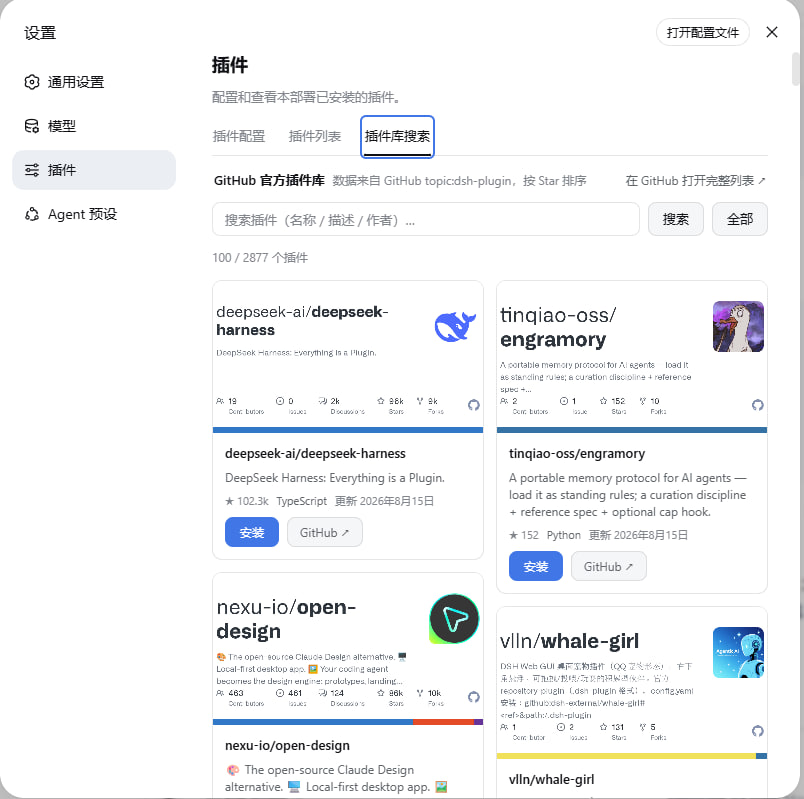
在 DeepSeek Harness(DSH)桌面端和网页端浏览、搜索 GitHub 上的 dsh-plugin 仓库,并从界面安装插件。
- 桌面端:左侧栏的「插件库搜索」面板。
- 网页端:「设置 → 插件 → 插件库搜索」标签页。
- 搜索结果展示仓库图片、名称、描述和 GitHub 链接;支持分页加载与一键安装。
数据来自 GitHub dsh-plugin topic。这是社区仓库索引,不是经过安装验证的官方插件商店:其中也有文档、主题或其他非插件仓库。
桌面端安装
- 打开 DeepSeek Harness 桌面应用,进入左侧栏的「插件」,点击「添加插件」。
- 输入本仓库地址
https://github.com/AiLi1337/dsh-plugin-library-search,完成安装后选择「立即启用」。也可以输入本地仓库的绝对路径安装。 - 如应用提示需要重启,退出并重新打开。随后从左侧栏进入「插件库搜索」。
本次桌面适配尚未发布到 npm,因此现在请使用 GitHub 地址或本地路径;仅推送仓库不会更新 npm 上已有的 dsh-plugin-library-search 包。
桌面应用独立管理 desktop profile。不要使用 dsh plugin --profile desktop(CLI 不支持该 profile);网页端已安装的插件也不会自动迁移到桌面端。
网页端安装
dsh plugin --profile web add "github:AiLi1337/dsh-plugin-library-search"
重启 dsh web 并刷新浏览器,在「设置 → 插件」中选择「插件库搜索」。待包含桌面适配的版本发布到 npm 后,也可用包名 dsh-plugin-library-search 安装。
下图是网页端界面预览,桌面端入口位于左侧栏:
使用
在搜索框输入名称、作者或描述中的关键词;默认按 Star 数排序。滚动到列表底部会继续加载结果,每次最多约 100 项,总浏览上限为 500 项。点击卡片的 GitHub 链接可查看仓库说明和安装要求。
点击「安装」时,插件会尝试读取仓库的 package.json,优先从 npm 安装,必要时回退到 GitHub 源:
| 环境 | 安装行为 |
|---|---|
| 桌面端 | 通过 DSH 内置插件管理器安装并启用声明了 dsh.bundle 的组合包;遵循其兼容性检查、构建脚本许可和启用流程。纯 Cordis 包不支持从本页面一键安装。 |
| 网页端 | 沿用原有的 profile 安装方式:组合包加入 bundle 层栈,重启后生效;纯 Cordis 包写入 profile 的 cordis.patch.yml。 |
搜索结果不保证可安装。安装失败时请先查看错误信息,再阅读对应仓库的 README;不要在不信任仓库的情况下允许运行构建脚本。安装作用于当前环境的 profile,可能影响其中的所有会话。
对话工具
| 工具 | 环境 | 作用 |
|---|---|---|
plugin_library_search | 桌面端、网页端 | 搜索 dsh-plugin 仓库,可传入 query 和 page。 |
plugin_library_installed | 桌面端、网页端 | 列出当前 profile 的已安装插件。 |
plugin_library_install | 仅网页端 | 根据 owner/name 安装仓库。 |
桌面端不会注册本插件的模型安装工具。若当前 Agent 预设启用了 DSH 内置 plugin_manager,可用其 install_bundle 操作,并按 DSH 的权限流程审批;否则请在插件页面手动安装。启用或重启后,新会话才会看到新增的对话工具。
GitHub 限流与网络
GitHub Search API 的未认证配额较低,遇到 HTTP 403 或请求失败时会回退抓取 topic 页面。回退结果按 GitHub topic 页默认顺序展示,搜索词只在抓取到的结果中筛选,不再保证全库匹配或按 Star 排序。
可以在 DSH 宿主进程的环境中设置 GITHUB_TOKEN(或 GH_TOKEN)提升 Search API 配额。宿主端还会缓存搜索结果约 5 分钟。网页端一键安装要求 pnpm 在 dsh web 进程的 PATH 中;桌面端使用应用的插件管理器与内置包管理器。
开发与验证
宿主逻辑在 lib/index.js,前端在 lib/client.js。新版 DSH 通过 dsh.client 元数据加载前端;旧版网页端保留数组引导图注入。桌面 API 请求使用宿主连接服务校验认证与来源。
npm test
自动化测试覆盖桌面 profile、安装管理器委托、API 拒绝路径、前端槽位和网页端旧引导。尚未在实际桌面窗口中完成安装与界面验收。
License
MIT
Compatibility
Versions
| Latest version | Published | Size |
|---|---|---|
| 0.1.0 | — | — |
Comments
Loading…
From the same category
by awesome-dsh-plugin
A curated list of plugins for DeepSeek Harness (dsh) · DeepSeek Harness 插件精选列表
★ 24.1k
CC0-1.0
Python
Nov 10, 2026
by 0xsline
DeepSeek Harness (DSH) ecosystem: curated plugins, tools, and infrastructure from dsh-external/hub and the public dsh-plugin topic.
★ 1.3k
CC0-1.0
Python
Nov 6, 2026
by woniuniuniu
DeepSeek Harness 自媒体工作台插件:一句话记灵感,一键生成脚本、封面、配图和分镜
★ 771
↓ 3.7k/wk
MIT
JavaScript
Nov 8, 2026
dsh plugin --profile web add dsh-media-deskby uumit-ai
Open dsh web from your phone or another computer through a UUMit account, without running your own server or installing another program: a built-in tunnel client connects to UUMit's hosted tunnel, and
★ 521
↓ 268/wk
MIT
JavaScript
Oct 21, 2026
dsh plugin --profile web add @uumit-ai/dsh-uumit-remoteby Yuuyuko-uu
DSH 鱼的记忆:给会话一份会淡忘的长期记忆,每条都带时间
★ 508
MIT
JavaScript
Nov 9, 2026
dsh plugin --profile web add dsh-fish-memoryby SAOS-3624
Scene-aware storyboard for DeepSeek Harness: 9-16 numbered cells with timestamps + transcript + an audio envelope, packed into ONE image (384 tokens). Two tools: video_storyboard and video_zoom.
★ 499
↓ 17k/wk
MIT
JavaScript
Nov 10, 2026
dsh plugin --profile web add dsh-video-storyboard