
paper-skin
Manifest validA scholarly journal-desk skin for DeepSeek Harness: Nature, Science, IEEE and Elsevier covers, manuscript stages, and a professional editorial letter behind the conversation.
Paper Skin · Journal Desk
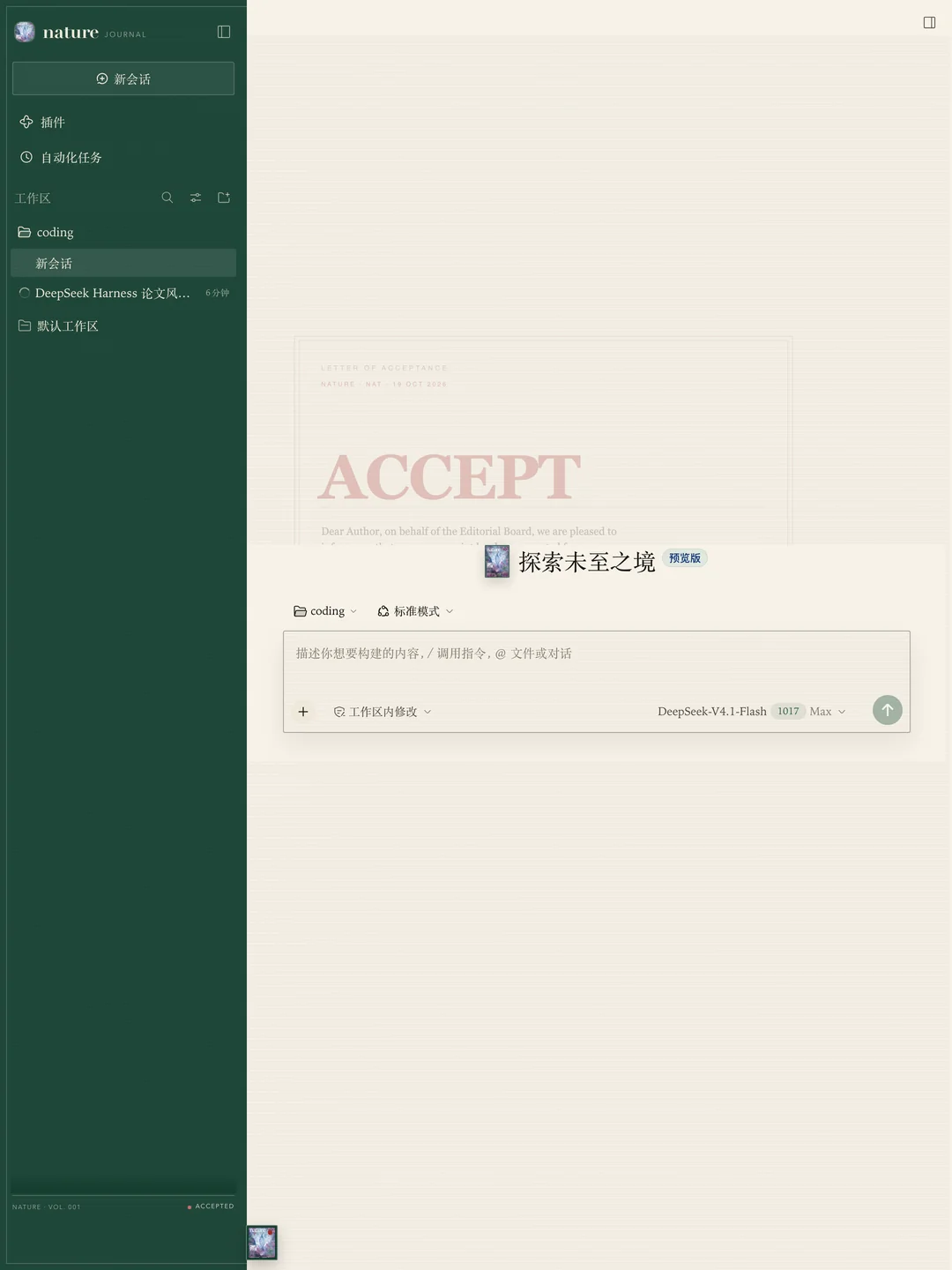
A quiet, scholarly skin for DeepSeek Harness. Choose the paper you are publishing today — Nature, Science, IEEE or Elsevier — set the manuscript stage, and a professional editorial letter settles behind the conversation.
A typographic homage only. This project is not affiliated with Nature, Science, AAAS, IEEE or Elsevier.
What it does
- Journal masthead. The sidebar becomes a deep cover-coloured spine with a typographic wordmark, a circular cover thumbnail, a journal descriptor and a slim colophon showing volume and stage.
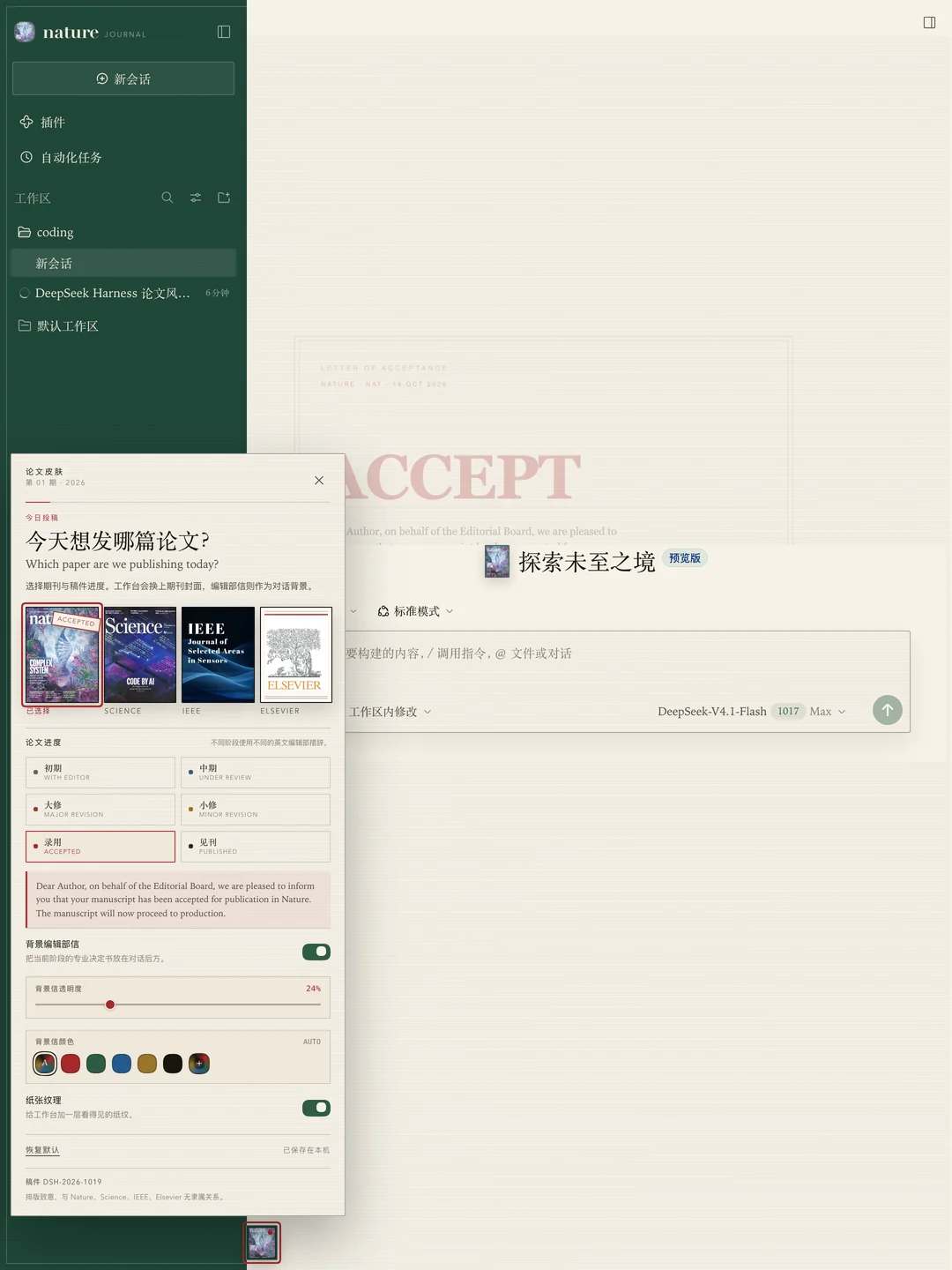
- Four covers. Pick a journal from the small journal-cover button beside Harness Settings. The lower-left sidebar carries a slim colophon instead of a bulky journal switcher.
- Manuscript progress. Choose the stage in the same skin panel:
- 初审 · With Editor — initial editorial assessment
- 中期 · Under Review — peer review
- 大修 · Major Revision — revise and resubmit
- 小修 · Minor Revision — minor revision anticipated
- 录用 · Accepted — formal letter of acceptance
- 见刊 · Published — final article online
- A professional letter, behind the conversation. The selected stage renders a letter as the conversation background: a large stage word, editorial-office wording, manuscript number, date and a circular seal. It is a real CSS background layer, not a composer banner. Its visibility is adjustable from 5% to 80%, and its colour can follow the manuscript stage or be set from a palette or the custom colour picker.
- Journal artwork. All four covers use the artwork in
assets/: the Nature, Science and IEEE covers, and the Elsevier tree plus wordmark. The same artwork appears in the small journal button, the hero seal and the sidebar mark. - Visible paper grain. A laid-paper texture runs across the conversation, composer, settings panel and sidebar, and can be switched off entirely.
- Light & dark. Paper, cover ink and watermark adapt to the Harness colour scheme.
- Local only. Choices live in this browser’s
localStorageunderdsh.paper-skin.v1. The skin makes no external network requests and collects no data.
Use
After installation, reload the page once.
- The small journal-cover button sits beside Harness Settings at the lower left.
- Click it to choose a journal and a manuscript stage.
- The sidebar, cover colour, typography and the editorial letter behind the conversation change together.
Accepteduses a formal letter of acceptance; every other stage uses the corresponding editorial-office language.
The floating quick-settings pattern takes after open-sea-skin; the panel and skin here are an independent implementation. open-sea-skin is not required.
Install
Paper Skin is a self-contained DeepSeek Harness bundle: one Host row (paper-skin), one Web client module, and a read-only local asset route. There are no runtime dependencies and no build step.
From GitHub
Install the tagged release straight from the public repository:
dsh plugin --profile desktop add github:1552421144-cloud/paper-skin#v1.0.0
Or open Harness Plugins → Add plugin → Install a third-party plugin, paste the same github:... spec, install, then enable Paper Skin · Journal Desk.
From a release tarball
Download paper-skin-1.0.0.tgz from the release page, then install it into the same profile that runs Harness:
dsh plugin --profile desktop add /absolute/path/to/paper-skin-1.0.0.tgz
For the macOS Desktop app, the bundled CLI is:
"/Applications/DeepSeek Harness.app/Contents/Resources/runtime/cli/bin/dsh" \
  plugin --profile desktop add /absolute/path/to/paper-skin-1.0.0.tgz
Restart Harness, reload the page once, then open Plugins and confirm Paper Skin · Journal Desk is enabled. The bundle row is paper-skin.
From npm
Once the package is published to npm, install an exact version:
dsh plugin --profile desktop add paper-skin@1.0.0
Or open Harness Plugins → Add plugin, enter paper-skin@1.0.0, install, and enable Paper Skin · Journal Desk.
From a checkout
For development against a working copy:
dsh plugin --profile desktop add "link:/absolute/path/to/paper-skin"
Uninstall
Remove Paper Skin in Plugins, or:
dsh plugin --profile desktop remove paper-skin
Unloading removes the CSS, root attributes, background watermark and every slot entry. The localStorage key remains until cleared.
Compatibility
Verified against DeepSeek Harness Desktop 0.2.1-rc.2 on macOS. The client half uses the standard Web slots listed below, so it also works in a dsh web profile that has the same client packages. It does not modify the Harness checkout.
Files
| File | Purpose |
|---|---|
client.js | Browser skin: React slots, covers, stage letters, colour and opacity controls, CSS and the settings panel. |
index.js | Host half; serves the cover artwork from assets/. It registers no tools, model context or session routes. |
cordis.patch.yml | Bundle patch inserting the paper-skin row. |
locale/*.json | Plugin-manager metadata (English and Chinese). |
icon.svg | Original journal-cover icon. |
assets/* | Optimised Nature/Science/IEEE covers, the Elsevier cover, and the transparent Elsevier tree mark. |
docs/*.webp | Screenshots used by this README. |
THIRD_PARTY_NOTICES.md | Trademark and artwork attribution. |
Slots
sidebar.brand.mark,sidebar.brand.namesidebar.footer.action(slim colophon, not a switcher)conversation.hero.brand.markshell.overlay(the only journal/stage switcher)
The conversation letter is a CSS background on the transcript surface; it adds no transcript rows. Cover artwork is served locally by the Host half from assets/. No app-root replacement, no external network requests.
Packaging a release
npm pack
The resulting paper-skin-1.0.0.tgz contains only the runtime files, locales, icon, artwork, screenshots and documentation. The repository and release are at 1552421144-cloud/paper-skin. Publishing to npm is optional and would allow installation by package name:
npm publish
Licence
MIT for the plugin code. Journal and publisher names and the cover artwork are used descriptively; they are not official endorsements, and the artwork is not covered by the MIT licence. See THIRD_PARTY_NOTICES.md. All trademarks remain with their owners.
Comments
Loading…
From the same category
by ccch1mneyyy
DSH 官方公众号收录的 TUI 补位插件:Claude Code 风,鲸鱼顶栏/实时状态/流式思考/双击 Esc 回滚/上下文进度+TPS。npm 一键装。 DSH official WeChat featured TUI plugin — Claude Code style: whale bar, live status, streaming thoughts, double-Esc rol
★ 5k
↓ 10.4k/wk
MIT
TypeScript
Oct 20, 2026
dsh plugin --profile terminal add @deepseek-harness-tui/dsh-tuiby strukto-ai
The World's First Virtual Terminal for AI Agents
★ 3.7k
↓ 227/wk
Apache-2.0
TypeScript
Oct 20, 2026
dsh plugin --profile agent add @struktoai/mirage-dshby bowenliang123
The best DeepSeek Harness plugin for context insight and management, with context dashboard / browser / sidebar and context command, for context statistics, composition, breakdown, evolution details,
★ 2.4k
↓ 43.4k/wk
Apache-2.0
TypeScript
Oct 20, 2026
dsh plugin --profile web add dsh-contextby huiliyi37
官方 DeepSeek Harness 的交互式终端 UI 插件:自研 ANSI 极简交互渲染、流式 Markdown/工具卡、16+ 主题、slash 命令与选择器、输入历史与本地偏好持久化、LSP 诊断、memory记忆,很丝滑的开发体验。
★ 288
↓ 274/wk
Apache-2.0
TypeScript
Sep 30, 2026
dsh plugin --profile terminal add @huiliyi37/dsh-tianshu-tuiby Hilbert-beinghappy
面向 DeepSeek Harness 的 Claude Code 风格终端界面,支持 Windows、macOS 与 Linux,兼容透明终端、VS Code 主题和自定义配色。
★ 196
↓ 108/wk
MIT
TypeScript
Oct 13, 2026
dsh plugin --profile web add seekttyby c3cvld7aag
富江DSH完美破甲|富江破甲 DSH 本地插件,内置提示词规则,支持 Windows 一键安装、环境自动准备与一键卸载,全中文使用说明。
★ 176
JavaScript
Oct 3, 2026
dsh plugin --profile web add fujiang-armor