
dsh-deepseek-chat
Manifest validAdd a native menu item, "DeepSeek chat", to the left sidebar of DSH: clicking it opens chat.deepseek.com in a standalone browser window (persist login state; if the window already exists, bring it to the foreground); support bidirectional selection transfer (select text in DSH to send it to the web input box with one click / select text on the web page to trigger a floating bubble that relays it back to the DSH input box with one click).
dsh-deepseek-chat
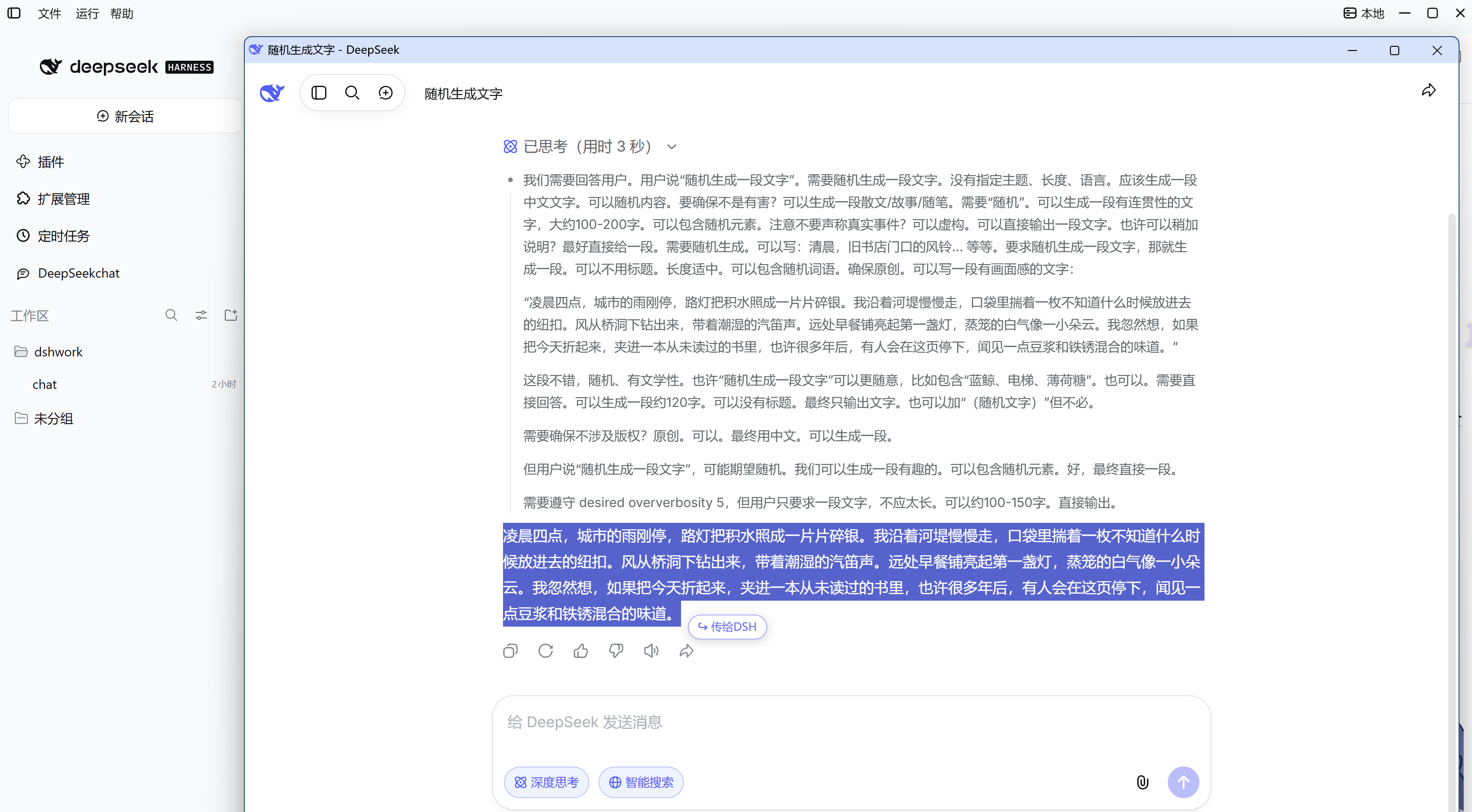
在 DSH(DeepSeek Harness) 左侧边栏添加一个原生菜单项, 一键打开 chat.deepseek.com 独立窗口,支持与 DSH 双向划词互传。



🌟 特性亮点
- 一键直达 —— 左侧边栏原生菜单项,点击即开独立窗口,登录一次长期保留。
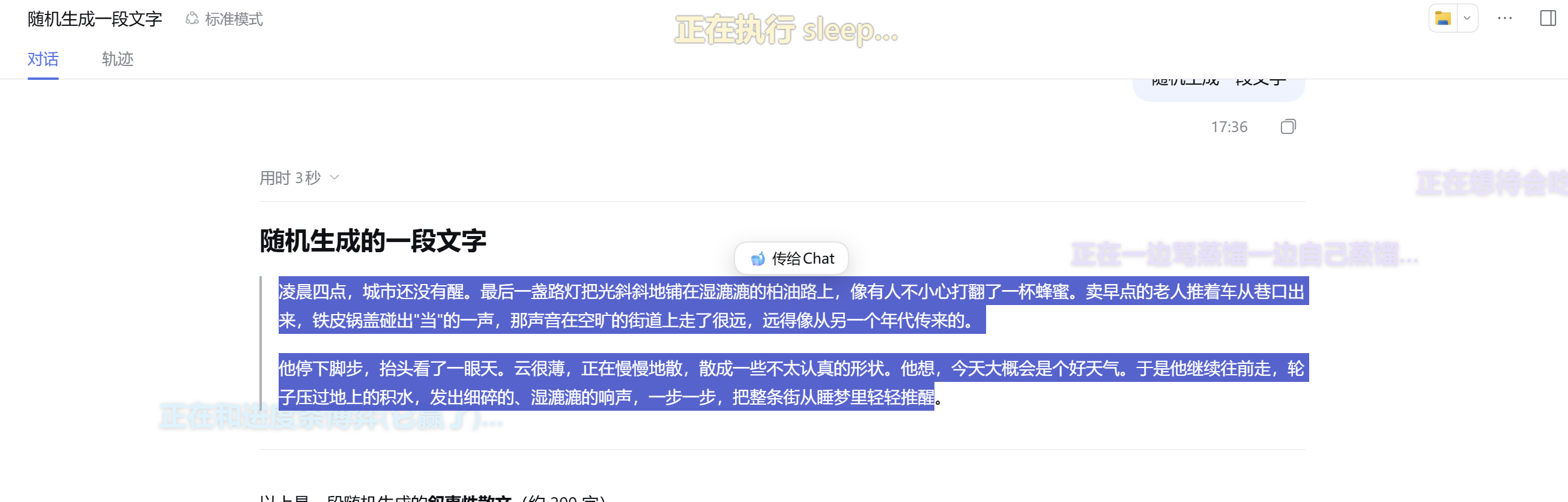
- 双向划词互传 —— DSH 里划词直接送进网页端;网页端划词一键接力回 DSH。
- 零依赖、免构建 —— 无
node_modules、无编译,装完重启即可用。 - 故障不静默 —— 打开失败、注入失败都会在右下角提示具体原因。
🚀 快速开始
环境要求:DSH ≥ 0.1.5-rc.3 · 系统装有 Chrome 或 Edge · Windows
一条命令安装:
dsh plugin --profile <profile> install acdsh4869/dsh-DeepSeek-chat
装完重启 DSH 实例,再按 Ctrl+Shift+R 硬刷新页面。
也提供幂等的
install.ps1安装脚本,详见技术文档。
📖 使用指南
打开窗口
- 点击左侧边栏的 DeepSeek chat 菜单项(侧边栏收起时,先点左上角展开)。
- 首次在弹出的窗口里登录一次 DeepSeek,此后一直保持登录。
双向划词互传
- 在 DSH 里选中文字 → 点 🐋 传给Chat → 送入网页端输入框。
- 在网页端选中文字 → 点气泡 → 接力回 DSH 输入框。
🛠️ 常用设置
配置写在插件自身的 cordis.patch.yml 的 config: 下,改完需重启 DSH 实例生效。
| 配置项 | 默认值 | 说明 |
|---|---|---|
relayAppendMode | replace | 接力写入方式;append 为追加 |
placement | over-dsh | 窗口位置;center 交给系统放置 |
browserPreference | auto | 浏览器选择;可强制 chrome 或 edge |
sidebarInset | 268 | 窗口给侧边栏留的宽度;挡住侧边栏就调大 |
relay | true | 划词互传总开关;设 false 彻底关闭 |
例如切换为追加模式:
config:
  relayAppendMode: append
完整配置表见技术文档。
❓ 常见问题
为什么是独立窗口,不直接嵌进 DSH?
chat.deepseek.com 的站点安全策略(禁止 iframe 嵌入、WAF 机器人挑战、Cookie 限制)让「内嵌」技术上不可行。独立窗口是当前最接近的方案,详细分析见技术文档。
为什么接力默认是覆盖,不是追加?
追加会让草稿越攒越长,DSH 输入框变卡、内容重复出现;覆盖每次写入规模恒定,从机制上杜绝累积。确实要攒多条,就开 append 模式。
菜单项点不动或找不到?
- 侧边栏收起时菜单不可见,先展开侧边栏。
- 窗口可能开在其他显示器,或被别的窗口挡住。
- 看右下角提示,它会告诉你具体原因。
📄 更多
- 技术文档 —— 安装脚本、卸载方式、完整配置表、实现原理
📝 更新日志
- v1.0.0(2026-09-29)初始版本正式发布。实现在 DSH 左侧边栏一键打开 DeepSeek 独立窗口,并支持双向划词互传。
License
Comments
Loading…
From the same category
by ccch1mneyyy
DSH 官方公众号收录的 TUI 补位插件:Claude Code 风,鲸鱼顶栏/实时状态/流式思考/双击 Esc 回滚/上下文进度+TPS。npm 一键装。 DSH official WeChat featured TUI plugin — Claude Code style: whale bar, live status, streaming thoughts, double-Esc rol
★ 4.3k
↓ 10.9k/wk
MIT
TypeScript
Oct 11, 2026
dsh plugin --profile terminal add @deepseek-harness-tui/dsh-tuiby strukto-ai
The World's First Virtual Terminal for AI Agents
★ 3.7k
↓ 355/wk
Apache-2.0
TypeScript
Oct 11, 2026
dsh plugin --profile agent add @struktoai/mirage-dshby bowenliang123
The best DeepSeek Harness plugin for context insight and management, with context dashboard / browser / sidebar and context command, for context statistics, composition, breakdown, evolution details,
★ 2k
↓ 34.4k/wk
Apache-2.0
TypeScript
Oct 11, 2026
dsh plugin --profile web add dsh-contextby huiliyi37
官方 DeepSeek Harness 的交互式终端 UI 插件:自研 ANSI 极简交互渲染、流式 Markdown/工具卡、16+ 主题、slash 命令与选择器、输入历史与本地偏好持久化、LSP 诊断、memory记忆,很丝滑的开发体验。
★ 287
↓ 462/wk
Apache-2.0
TypeScript
Sep 30, 2026
dsh plugin --profile terminal add @huiliyi37/dsh-tianshu-tuiby Hilbert-beinghappy
面向 DeepSeek Harness 的 Claude Code 风格终端界面,支持 Windows、macOS 与 Linux,兼容透明终端、VS Code 主题和自定义配色。
★ 197
↓ 108/wk
MIT
TypeScript
Oct 1, 2026
dsh plugin --profile web add seekttyby T-Auto
deepseek-harness Plugin Access and Implementation Standards / deepseek-harness交互生态插件规范与实施标准
★ 83
MIT
JavaScript
Oct 10, 2026