
dsh-llm-opencode-go
Manifest validDeepSeek Harness LLM adapter for OpenCode Go (opencode.ai/zen): /models discovery with cache, three wire protocols (OpenAI Responses, OpenAI-compatible Chat Completions, Anthropic Messages), tool calling, reasoning mapping, streaming, and the required x-opencode-session affinity header.
dsh-llm-opencode-go
English | 简体中文





Introduction
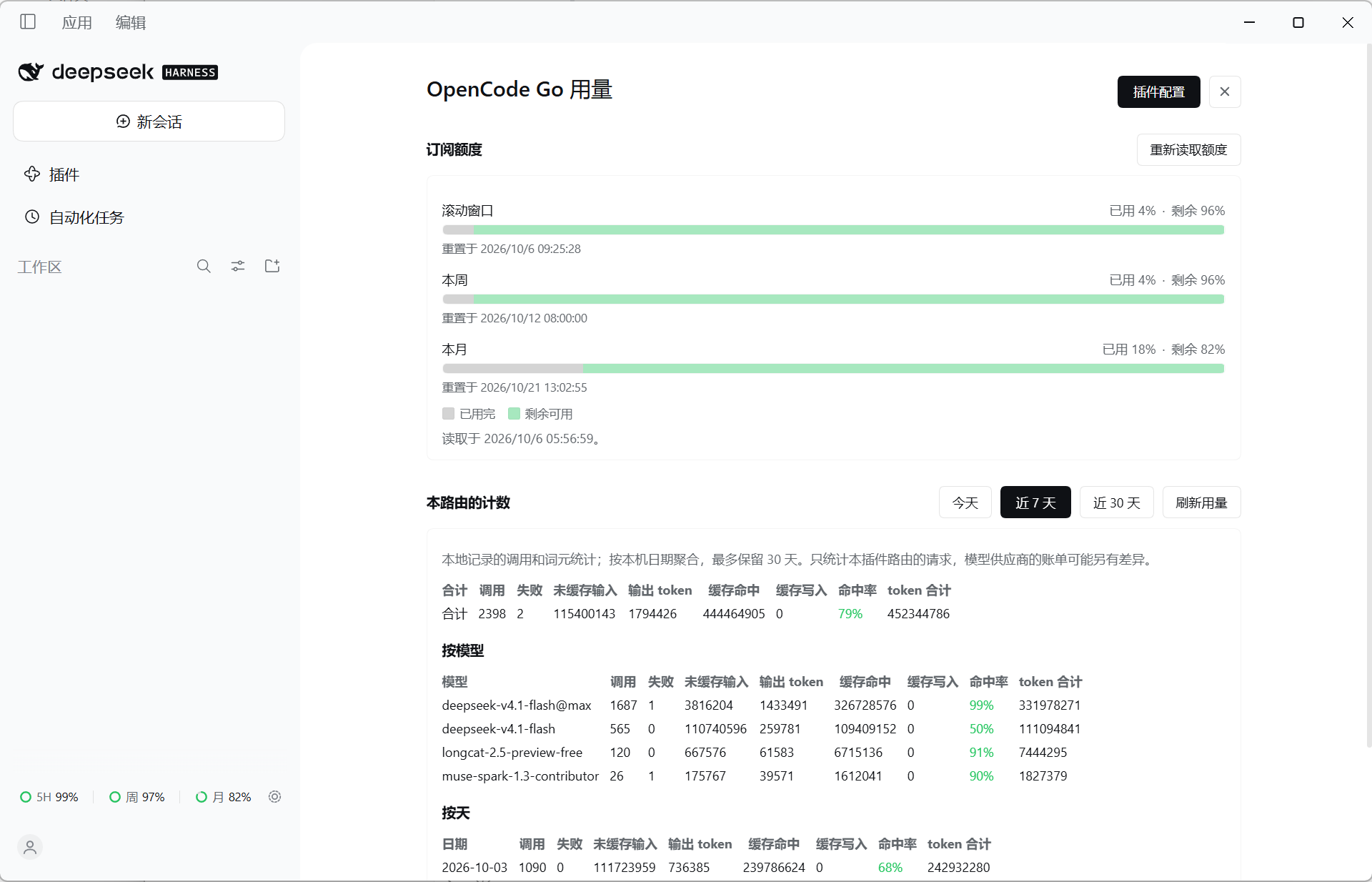
The usage panel and the quota capsule, as they ship on the web client.
A DeepSeek Harness (DSH)
plugin that serves OpenCode Go (https://opencode.ai/zen/go/v1) as a native
DSH model provider.
The plugin implements OpenCode Go's three wire formats itself: it translates
harness messages, tools, and reasoning into each protocol's request, and
translates the streamed response back into DSH StreamChunk values.
- insert:
    - id: opencode-go
      name: dsh-llm-opencode-go
      config:
        apiKeyEnv: OPENCODE_GO_API_KEY
That is the whole required configuration. apiKeyEnv names a credential
reference, not the key itself: the key value never enters the config file, and
the plugin resolves the reference through the harness credential seam on every
request, so a key written by the web Models page reaches the next call with no
restart.
Features
| Provider route | opencode-go (configurable) |
| Protocols | OpenAI Responses, OpenAI-compatible Chat Completions, Anthropic Messages |
| Model discovery | GET /models, with a memory + on-disk cache |
| Session affinity | x-opencode-session, one stable id per conversation |
| Tool calling | Full round trip for every dispatched call: definitions, fragmented arguments, tool results, follow-up turn |
| Reasoning | Per-protocol effort mapping, including Anthropic thinking budgets |
| Streaming | SSE → StreamChunk, with usage, finish reason, and an idle watchdog |
| Failures | Stable provider-neutral codes (AUTH, RATE_LIMIT, QUOTA, CONTEXT_WINDOW_EXCEEDED, …) |
| Configuration UI | One page in the web client, with a row in Settings' own navigation and a Configure control on the plugin's row: API key, credential reference, model visibility, model variants, fetching the model list, usage |
| Fast entries | A quota capsule at the sidebar's foot (one ring per window — 5H / Wk / Mo — with what is left of each), a usage panel of its own (from that row, or the keyboard), and a usage page under Settings |
| Runtime | Node.js ≥ 20; no runtime dependencies |
Install and use
Install
dsh plugin add dsh-llm-opencode-go
Then fully restart the profile: bundle layers are read at startup. The startup log should carry:
dsh-llm-opencode-go: provider "opencode-go" ready at https://opencode.ai/zen/go/v1 (credential OPENCODE_GO_API_KEY, models discover)
Give it a key
Either export OPENCODE_GO_API_KEY in the environment that launches DSH, or
store it through the credentials seam — the web Models page writes it. The plugin
resolves the reference per request, so both work and neither requires a restart.
See the usage
Usage has three entries, all reading the same facts:
| Entry | Where |
|---|---|
| The quota capsule at the sidebar's foot | Beside Settings. One row, three groups — ◉ 5H 92% │ ◉ 周 58% │ ◉ 月 9% — visible without a click; that row opens the usage panel, and the gear beside it opens the plugin's configuration page. |
| The usage panel | From that row, or the keyboard (desktop Ctrl/Cmd+U): the subscription's three windows first, this route's counters under them, and a header that stays on screen as they scroll — the way to the plugin's configuration page, and an × back to the conversation. |
| Settings → Built-in plugins | A tab carrying the same content as the panel. |
All three need the web client; a deployment without one has none of them and is otherwise unchanged. See Configuration.
Configuration
The config block above is all that is required; every other key is optional.
The full field table, catalog shaping, and image input live in
Configuration.
Point it at another credential reference, if you would rather the plugin read a differently-named variable:
config:
  apiKeyEnv: OC_KEY
The value is never read from the config file itself, only the variable name.
Or configure it from the web client. Settings carries an OpenCode Go
settings row of its own, beside the pages the shell ships, and the same page is
behind the sidebar's Plugins page: the dsh-llm-opencode-go bundle's
opencode-go row has a Configure control. Either door opens the plugin's own
page: the API key, the credential reference it is stored under, one switch per
catalog model for what the picker offers, the model variants, a control that
re-reads the service's model list, and what this route has spent. The key is
written to the credential store, never to cordis.patch.yml, and the page is
mounted only by a deployment that serves the web client. See
Configuration.
Docs
Details live under docs/; start with what you need:
- Models — per-model protocol table, training-data gate, capacity snapshot, text/image split
- Configuration — full field table, shaping the catalog, image input, the graphical and fast entries
- Wire protocol — endpoints and auth,
x-opencode-session, reasoning and tool-calling translations - Reliability — stable failure codes and limits
- Development — project status, verification suites, re-measure probes, architecture
License
MIT
Comments
Loading…
From the same category
by ccch1mneyyy
DSH 官方公众号收录的 TUI 补位插件:Claude Code 风,鲸鱼顶栏/实时状态/流式思考/双击 Esc 回滚/上下文进度+TPS。npm 一键装。 DSH official WeChat featured TUI plugin — Claude Code style: whale bar, live status, streaming thoughts, double-Esc rol
★ 4.3k
↓ 10.4k/wk
MIT
TypeScript
Oct 10, 2026
dsh plugin --profile terminal add @deepseek-harness-tui/dsh-tuiby strukto-ai
The World's First Virtual Terminal for AI Agents
★ 3.7k
↓ 355/wk
Apache-2.0
TypeScript
Oct 10, 2026
dsh plugin --profile agent add @struktoai/mirage-dshby bowenliang123
The best DeepSeek Harness plugin for context insight and management, with context dashboard / browser / sidebar and context command, for context statistics, composition, breakdown, evolution details,
★ 2k
↓ 29.4k/wk
Apache-2.0
TypeScript
Oct 10, 2026
dsh plugin --profile web add dsh-contextby huiliyi37
官方 DeepSeek Harness 的交互式终端 UI 插件:自研 ANSI 极简交互渲染、流式 Markdown/工具卡、16+ 主题、slash 命令与选择器、输入历史与本地偏好持久化、LSP 诊断、memory记忆,很丝滑的开发体验。
★ 287
↓ 462/wk
Apache-2.0
TypeScript
Sep 30, 2026
dsh plugin --profile terminal add @huiliyi37/dsh-tianshu-tuiby Hilbert-beinghappy
面向 DeepSeek Harness 的 Claude Code 风格终端界面,支持 Windows、macOS 与 Linux,兼容透明终端、VS Code 主题和自定义配色。
★ 197
↓ 108/wk
MIT
TypeScript
Oct 1, 2026
dsh plugin --profile web add seekttyby T-Auto
deepseek-harness Plugin Access and Implementation Standards / deepseek-harness交互生态插件规范与实施标准
★ 83
MIT
JavaScript
Oct 10, 2026