
dsh-theme-tide
Manifest validTide & Timber (Tidal Wood Tone) — a coastal light/dark theme for the DeepSeek Harness Web GUI, built on the official ThemeRuntime alias-token layer.
Tide & Timber · 潮汐木色
一套给 DeepSeek Harness Web GUI 的海岸线配色主题:白天的「海盐晨雾」与夜里的「潮汐夜航」,都只通过官方 ThemeRuntime 的 --dsw-alias-* token 层叠加,不注入壁纸、不改布局、不劫持 DOM。
| Light — Salt & Timber | Dark — Twilight Cove |
|---|---|
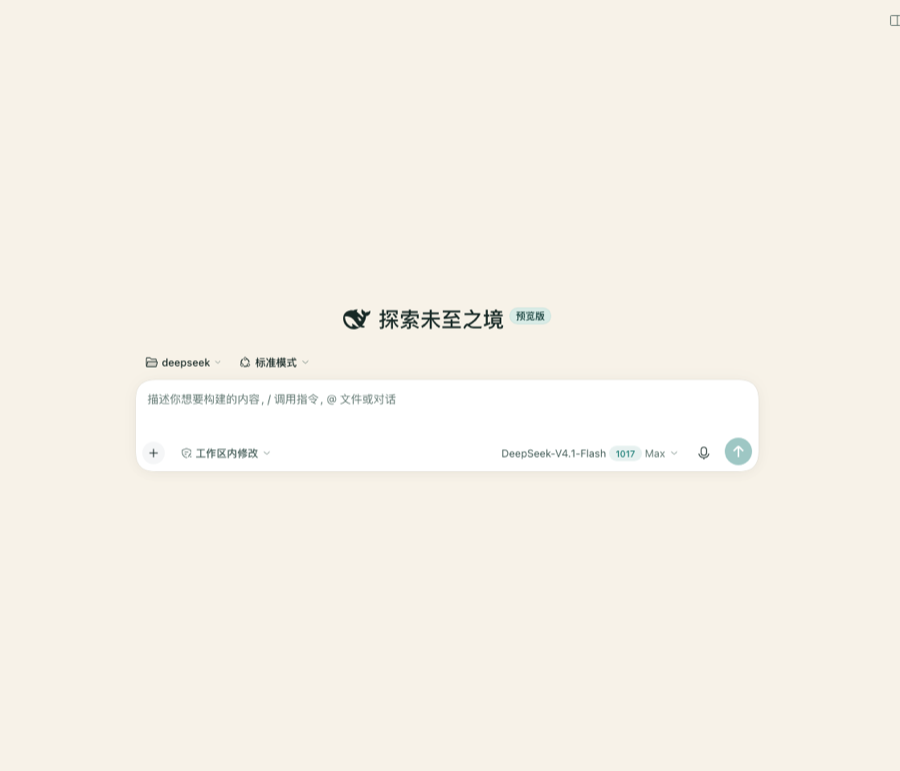 | 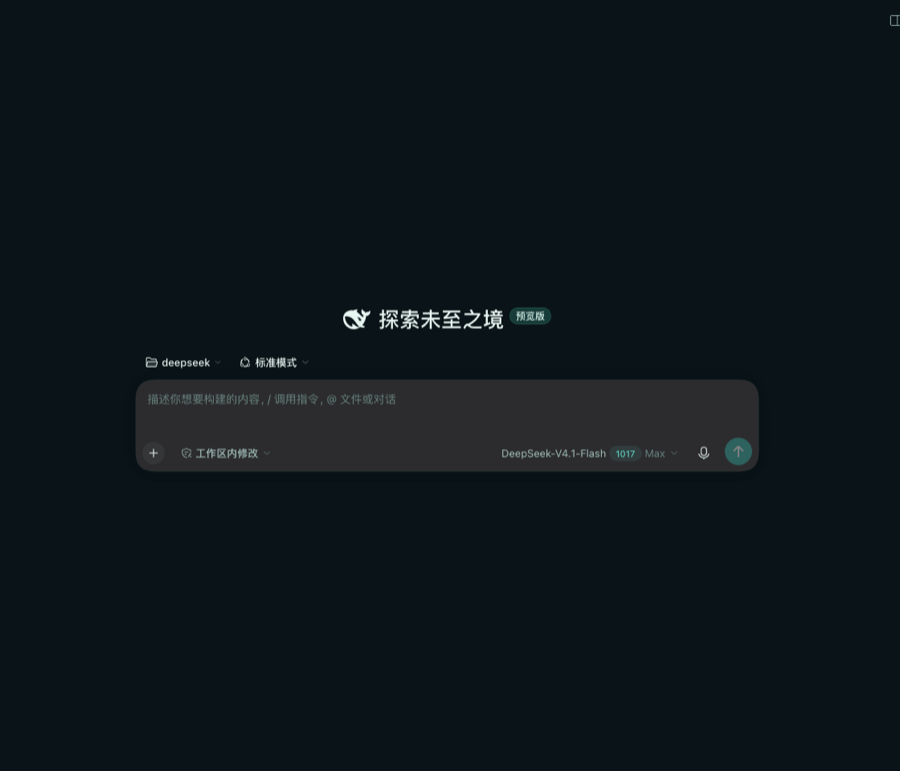 |
2026-10-20 已在本机
~/.dsh/profiles/web通过 profile patch + 符号链接热挂载,并用 headless Chromium 做了 light/dark 双模式计算样式与截图验证(详见dsh-daily-learning/2026-10-20.md§4)。
- Light — Salt & Timber:暖象牙沙、海玻璃青、浮木墨色。主按钮是深海青,选中/链接是潮水绿。
- Dark — Twilight Cove:落潮后的深蓝绿、月光海玻璃、暖铜色状态点。整体低饱和、长时间阅读不刺眼。
- 自适应:跟随 DSH 自带的 浅色 / 深色 / 跟随系统 设置,不需要另设开关。
- 可热插拔:主题注册在
ctx.effect内,禁用插件或热重载会精确撤回这一层 token。
安装
需要 DeepSeek Harness 0.2.1-rc.2 及以上(dsh-client-ui-theme 的第三方主题入口在该版本提供)。
# 直接从仓库安装(当前可用)
dsh plugin --profile web add github:zys2026/dsh-theme-tide
装完重启 dsh(或在插件管理器里重载),主题会跟随 DSH 自带的「浅色 / 深色 / 跟随系统」设置自动切换,不需要额外开关。
卸载 / 临时停用:
dsh plugin --profile web remove dsh-theme-tide # 卸载
或在插件管理器里把 dsh-theme-tide 设为禁用——主题注册在 ctx.effect 内,禁用会精确撤回这一层 token,不会残留。
要求:主题只通过官方 --dsw-alias-* token 覆盖上色,不改布局、不注入壁纸、不劫持 DOM;因此 DSH 升级若增删 token,未覆盖的新 token 会回落到内置默认色,不会破坏界面。
设计要点
| 项 | 值 |
|---|---|
| 扩展点 | ctx.theme.overrideTokens(source, tokens)(dsh-client-ui-theme 官方第三方主题入口) |
| 覆盖范围 | 0.2.1-rc.2 声明的全部 107 个 --dsw-alias-* token,每个都提供 light/dark 一对值 |
| 运行时依赖 | 无;client.js 是零依赖 IIFE,不需要 React、three.js 或打包器 |
| 持久化 | 不写设置、不写 localStorage;主题随插件的启用/禁用生效 |
| Host 半侧 | 空(只用于让 Loader 发现 ./client) |
可验证质量(2026-10-20 审计)
tools/audit.mjs 会对照官方 token 契约做覆盖率检查,并对 21 组关键「文字/背景」和「图标/背景」组合计算 WCAG 2.x 对比度:
node dsh-theme-tide/tools/audit.mjs                 # 控制台表格
node dsh-theme-tide/tools/audit.mjs --json          # 机器可读
node dsh-theme-tide/tools/audit.mjs --write-preview # 写入 previews/audit.md
当前结果(light 与 dark 两套):
- 覆盖率 107/107:与
dsh-client-ui-theme@0.2.1-rc.2的 alias 清单完全一致(含onboarding-checkbox-border、settings-card-stroke两个边角 token)。 - 必需的 21 组配对全部达到 WCAG AA(正文/次级/三级/说明文字、链接、代码块、Toast、主按钮、状态色、菜单图标等)。
- 审计还发现并修掉了 3 个真实问题:light 的
label-tertiary(4.31→4.78)、label-caption(3.06→4.56)、dark 的state-warn-label与state-warn-tertiary配色错位(1.36→9.35)。 border-l3/scrollbar-bg-l1与背景的对比度低于 3:1 属刻意的低对比装饰(与官方内置主题同量级),审计标记为 advisory,不阻断。
完整报告:previews/audit.md。
安装
方式 A:作为 bundle 安装(推荐,持久)
dsh plugin --profile web add link:/Users/ys/Documents/deepseek/dsh-theme-tide
然后重启 DSH(或让插件管理器在 HMR 开启时热挂载)。插件的 dsh.bundle.patch 会插入 dsh-theme-tide 行,dsh.client.immediately 让它在页面启动时立即应用。
方式 B:运行中热挂载(本次会话采用)
-
把包链接进 profile:
ln -s "$(pwd)" ~/.dsh/profiles/web/node_modules/dsh-theme-tide -
在
~/.dsh/profiles/web/cordis.patch.yml追加:- insert: - id: dsh-theme-tide name: 'dsh-theme-tide' config: {} -
dsh-hmr监听 profile patch 变化,会重组合成并热挂载;页面无需重启 Host。 -
若页面没有自动应用,刷新一次页面即可;Host 重启后该行依然存在。
开发
node dsh-theme-tide/tools/build.mjs             # 生成 client.js
node --check dsh-theme-tide/client.js           # 语法检查
node dsh-theme-tide/tools/audit.mjs             # token 覆盖 + WCAG AA
node dsh-theme-tide/tools/audit.mjs --write-preview  # 更新 previews/audit.md
src/palette.mjs:两份完整调色板(唯一需要改的颜色文件)src/official-tokens.json:0.2.1-rc.2 官方 alias token 契约快照(107 个)src/client.template.js:浏览器半侧 IIFE 模板tools/build.mjs:校验两份调色板 key 一致、全部为--dsw-alias-*,注入模板生成client.jstools/audit.mjs:覆盖率 + WCAG 2.x 对比度审计(零依赖,可复用为通用主题检查器)
卸载
删除 ~/.dsh/profiles/web/cordis.patch.yml 里的 dsh-theme-tide insert 行,再删除 profile 的 node_modules/dsh-theme-tide 链接即可;页面刷新后恢复默认配色。
兼容性
- 构建/验证环境:DSH
0.2.1-rc.2(dsh-client-ui-theme0.2.1-rc.2,overrideTokens与ThemeTokenModes契约)。 - 第三方主题 id 属于进程内扩展;本主题刻意不注册新 theme id,而是叠加 token 层,因此与官方 Appearance 的 light/dark/system 完全兼容。
- 若未来 DSH 新增 alias token,未覆盖的 token 会回退到内置调色板;在
src/palette.mjs补齐即可。
English: Tide & Timber is a dependency-free coastal light/dark theme for the DSH Web GUI. It registers a ThemeRuntime.overrideTokens layer covering every --dsw-alias-* token in 0.2.1-rc.2 (107 tokens, light+dark pairs), follows the built-in Appearance preference, and retracts cleanly when the plugin is disabled or hot-reloaded. No wallpaper, no DOM overrides, no settings writes.
Comments
Loading…