
dsh-vscode-themes2
Manifest validBrowse, search, install, and apply VS Code color themes to the DeepSeek Harness Web UI: bundles 14 curated themes with live color-swatch previews, searches the official VS Code Marketplace for more, a
VS Code Themes for DeepSeek Harness
Browse, search, install, and apply VS Code color themes to the DeepSeek Harness (DSH) Web UI — one click re-skins the whole interface live, in that theme's own palette.
Category: UI & Experience · License: MIT · Works with: DSH 0.2.1-alpha.1 (web profile)
What it does
- Adds a "VS Code Themes" section to Settings in the Harness Web UI.
- Bundles a curated catalog of 14 popular VS Code themes (One Dark Pro, Dracula, GitHub Light, Nord, Catppuccin Mocha, Tokyo Gogh Alt, Monokai Classic, Solarized, Kanagawa, Palenight Italic, Kimbie Dark, …), each with a live color-swatch preview rendered in that theme's own colors.
- A single search filters local themes (installed + bundled) and simultaneously queries the official VS Code Marketplace. Marketplace hits appear in their own section with a live swatch and an Install button.
- One-click install downloads the theme's
.vsix, extracts its color palette, and maps it onto the DSW design tokens. Installed themes persist across restarts and sort to the top (most recent first). - Clicking any card applies the theme immediately — the whole UI re-skins live.
Your selection persists across restarts (browser
localStorage). - A theme that fails to download, parse, or map (e.g. format incompatibility) shows a visible error and is otherwise left alone — it never breaks the plugin or the rest of the UI.
- Every card — surface, preview, pill, ring, and buttons including hover states — is themed in that theme's own palette, so the gallery reads as a faithful preview no matter which theme is currently applied.
Screenshots
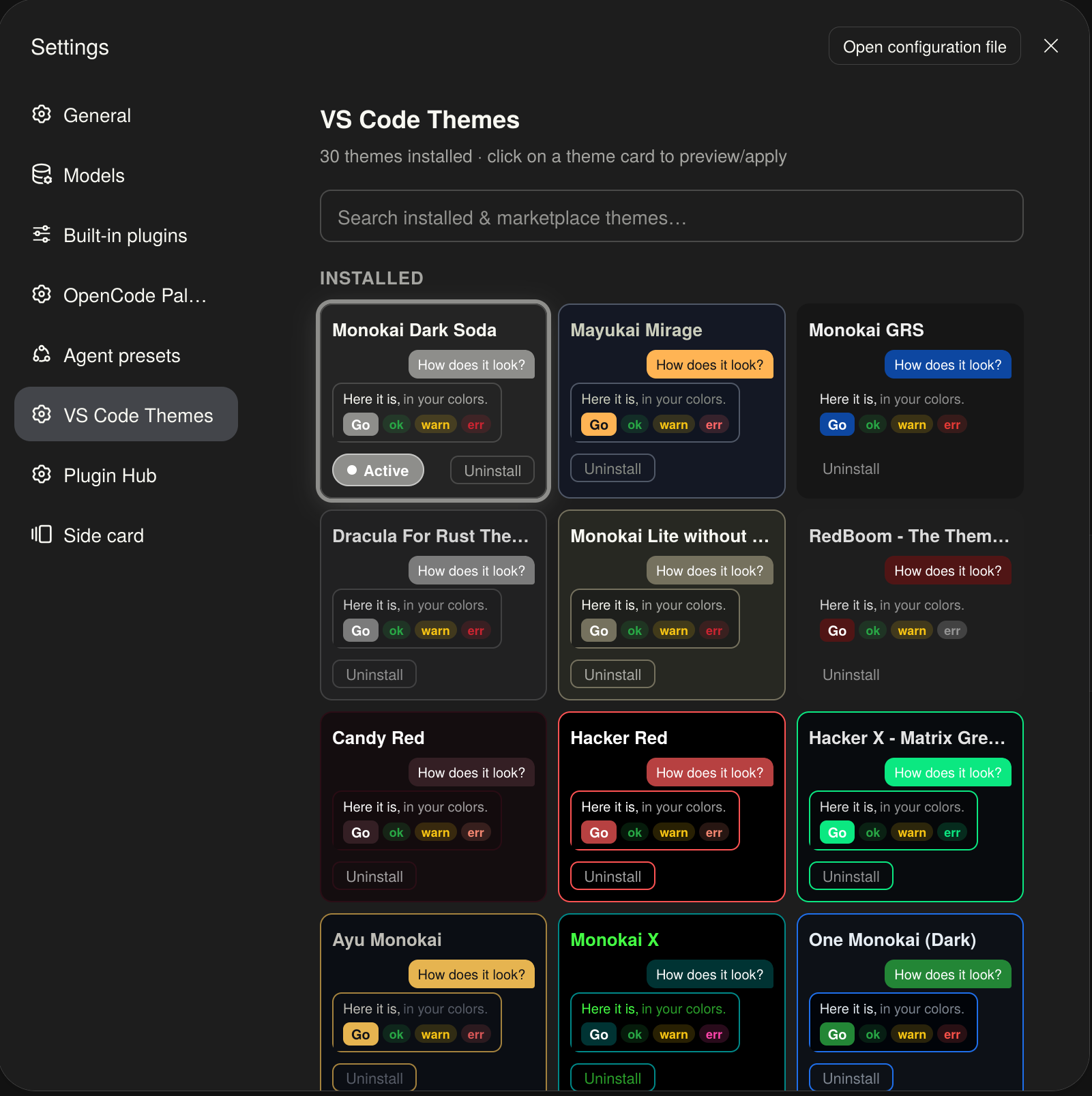
The panel in a real browser, with marketplace themes installed (30 installed above). Each card previews its theme live (sample text, semantic chips, accent button); the applied card carries the Active ring + pill in its own accent colour:
Install
From a DSH profile (e.g. the default web profile):
dsh plugin --profile web add dsh-vscode-themes2
Or from a local clone:
dsh plugin install /path/to/dsh-vscode-themes2
The package is named
dsh-vscode-themes2— the trailing2is historical (an early specifier got cached as failed inside a running harness process during development) and is part of the install name; don't "fix" it when typing commands.
How it works
This is a two-half DSH plugin: the browser is network-restricted, so everything
that talks to the VS Code Marketplace runs in the host half and is exposed to the
browser through a TypertRemoteService named vscodeThemes (self-mounted by the
client via ctx.remote.$mount).
- Browser half (
client.js) — renders the settings section, registers themes withctx.theme.register({ id, colorScheme, tokens }), applies the persisted selection on load, and persists state inlocalStorage(dsh.vscodeThemes.selected,dsh.vscodeThemes.installed— JSON array, most recent first). - Host half (
index.js+marketplace.js) — exposessearch(query)andfetchTheme(ext)on the remote service, delegating to the pure, unit-testable logic inmarketplace.js(no Cordis wiring).
Search queries the official VS Code Marketplace gallery API (themes category only);
install downloads the theme's .vsix from the publisher's gallery.vsassets.io CDN,
parses the ZIP in-process, and reads the theme's JSONC color definitions (which are
stripped of comments/trailing commas before parsing). See PROGRESS.md for the full
protocol facts and edge cases.
Permissions & external services
- Outbound network (host half only):
POST https://marketplace.visualstudio.com/_apis/public/gallery/extensionquery— theme search, only when you type a query (2+ characters).GET https://{publisher}.gallery.vsassets.io/…vspackage—.vsixdownload, only when you explicitly click Install.
- No telemetry, no other network calls. All parsing and token mapping happens locally in the host process.
- Browser state:
localStorageonly (dsh.vscodeThemes.*). Nothing is uploaded.
Compatibility
- DSH 0.2.1-alpha.1, web profile (the client half is injected into the Web UI).
- Host half: Node 18+ (uses
DecompressionStreamto unzip.vsixfiles). - Known limitation: marketplace themes without a parseable
editor.background/editor.foregroundare skipped with a visible error message.
For developers
PROGRESS.md is the project's development log: architecture notes,
marketplace protocol facts, the critical contracts and pitfalls, and the session log.
It is agent-maintained — read it before changing client.js or marketplace.js.
Files
| File | Purpose |
|---|---|
index.js | Host half: VscodeThemes remote service (search / fetchTheme). |
client.js | Browser half: theme catalog, marketplace search UI, install, persistence, settings UI. |
marketplace.js | Pure host logic: marketplace search, vsix fetch/parse, token mapping. |
cordis.patch.yml | Inserts the vscode-themes2 entry into the profile tree. |
locale/en.json | Display title/description for the Plugin Manager. |
icon.svg | Plugin icon. |
screenshots/ | Gallery screenshot embedded in this README. |
PROGRESS.md | Development log & session notes. |
License
Comments
Loading…
Similar plugins
No screenshots
Look & theme plugin for the DSH Web UI: built-in palettes, light/dark/follow-system appearance modes, Open VSX theme search & install, and VS Code theme import with a persisted theme library.
★ 1
MIT
TypeScript
dsh plugin --profile web add dsh-themes 6
6No screenshots
by zhijun-dai
Solarized + Selenized themes for DeepSeek Harness (dsh): four faithful palettes registered into the theme runtime, with a Settings picker row and canonical code-block syntax colors
★ 8
↓ 321/wk
NOASSERTION
JavaScript
Sep 24, 2026
dsh plugin --profile web add @yuquexianzhou/solarized-dsh-theme 4
4No screenshots
by Erbsen16
把 VS Code 的 Dracula(吸血鬼)配色搬到 DeepSeek Harness 的网页界面,顺带做了一组程序员向的排版调优。深色模式专用,随时可整页还原。
★ 1
MIT
JavaScript
Oct 1, 2026
dsh plugin --profile web add dsh-client-ui-dracula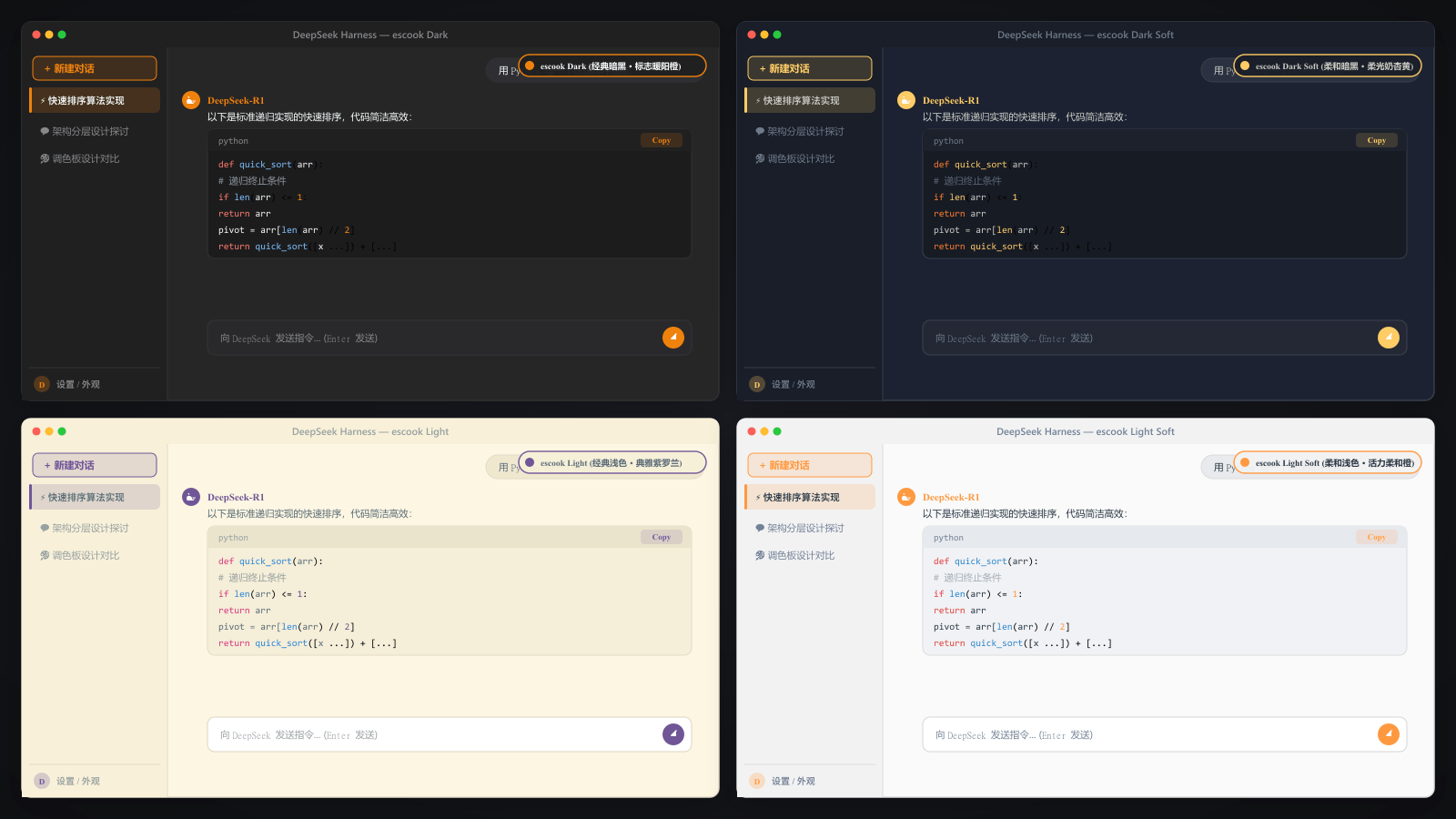
No screenshots
Signature escook theme ported from VS Code: 4 classic aesthetic color schemes (Dark, Dark Soft, Light, Light Soft) with high-contrast syntax highlighting for DeepSeek Harness.
★ 0
dsh plugin --profile web add dsh-theme-escook✦
No screenshots
by Smith-yue
Adds two switchable themes, built-in and local-folder background slideshows, and per-session token usage details to DeepSeek Harness Web and Desktop.
★ 1
↓ 119/wk
MIT
TypeScript
Aug 23, 2026
dsh plugin --profile web add dsh-skin-token-dashboard 8
8No screenshots
by mykeura
18 minimalist color themes for DeepSeek Harness. Pick one with a single click — it's just another plugin.
★ 1
MIT
TypeScript
Sep 17, 2026
dsh plugin --profile web add @mykeura/dsh-minimalist-themes