
dsh-plugin-upgrader
Manifest validAdds a Versions tab to the Plugins page: one-click upgrade of all upgradable plugins or a multi-selected subset, version history back to any published release, and GitHub links for each repo and each
dsh-plugin-upgrader


给 DeepSeek Harness(DSH)的「插件」页补上一键升级和版本历史 / 回滚。
DSH 自带的插件页能装、能卸、能看已安装列表,但缺两件事:一次把全部插件升到最新,以及退回某个旧版本。 这个插件在插件页里加一个「版本」标签,把这两件事补齐。
English · 中文
功能
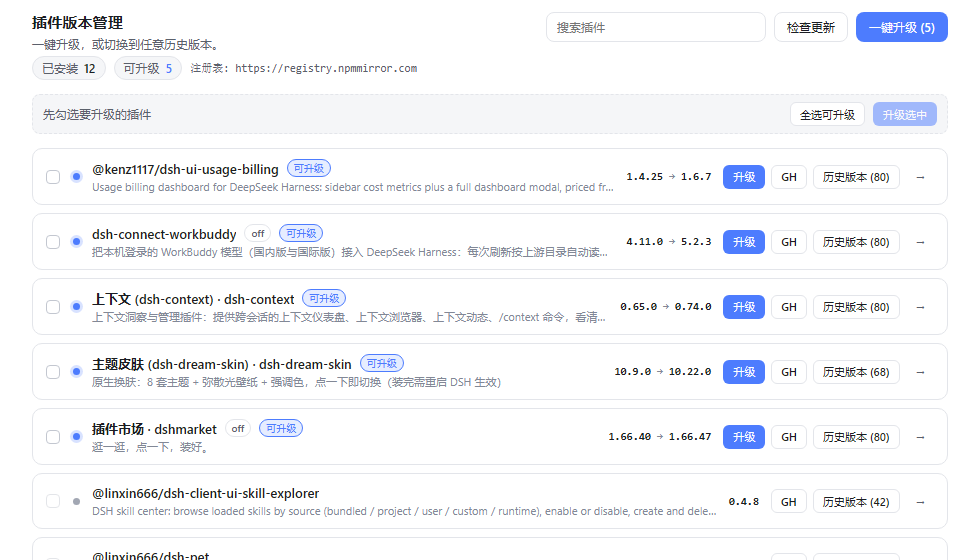
- 一键升级 —— 一次把全部可升级插件升到最新版,带进度、逐项结果和失败原因。
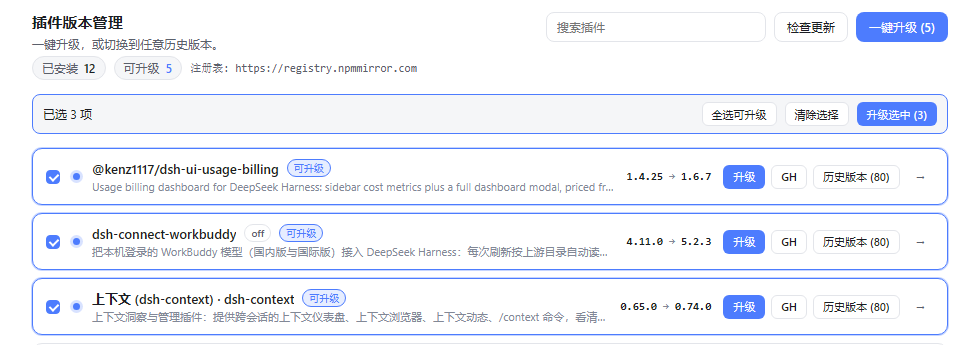
- 多选升级 —— 勾选任意几个插件,只升级选中的这些。
- 版本历史 / 回滚 —— 展开任意插件即可看到已发布的全部版本(含发布时间与引擎要求),点一下切到那个版本。
- 一键跳 GitHub —— 每行的
GH按钮打开插件仓库主页;点版本号直接进该版本的 GitHub 发布页。
界面位置
插件页顶部标签栏多出一个「版本」标签,与「已安装」「发现」并列:
- 顶部统计:可升级数量 / 已安装数量 / 每个插件的版本数
- 「一键升级」升全部可升级插件;下面一条选择栏负责「升级选中」
- 「检查更新」强制刷新 registry 缓存(默认缓存 5 分钟)
- 搜索框按包名过滤
- 每个插件一行,展开「历史 (n)」后是该插件的完整版本列表
GH打开仓库主页(没有仓库的插件不显示该按钮)- 版本列表里每个版本号本身就是链接,点开直接进 GitHub 的发布页:
- 该版本打过 tag →
releases/tag/v<version>(tag 是否真实存在由 GitHub tag 列表确认, 不是猜的,所以不会点进 404) - 该版本没打 tag,或 GitHub 列表读不到(限流 / 离线)→ 退回仓库的发布列表
releases, 不在页面上放一个点进去是 404 的版本号
- 该版本打过 tag →
安装
在「插件」页的发现标签里搜索 dsh-plugin-upgrader,点安装即可。
桌面版请用它自带的插件管理界面安装,命令行改动不了正在运行的桌面 profile。
用 dsh 命令行(把 web 换成你自己的 profile 名):
dsh plugin --profile web add dsh-plugin-upgrader
从源码安装:
git clone https://github.com/zuwenyin/dsh-plugin-upgrader.git
cd dsh-plugin-upgrader
dsh plugin --profile web add "$PWD"
装好后打开「插件」页,顶部会多出「版本」标签。不需要重新构建,也不用重启。
工作原理
浏览器端读不到 profile 的依赖清单,也无法可靠直连 npm(CORS、私有源、token), 因此所有包操作都放在宿主端:
| 路由 | 作用 |
|---|---|
GET /api/plugin-upgrader/overview | 已安装插件 + 各插件已发布版本(registry packument,5 分钟缓存,10 秒超时) |
POST /api/plugin-upgrader/job | 提交一批升级 / 切换步骤,立即返回 job id |
GET /api/plugin-upgrader/job?id=… | 轮询进度与逐项结果 |
POST /api/plugin-upgrader/cancel | 中断当前步骤 |
所有路由仅限本机回环访问:批量操作会安装软件包,配对设备或跨站页面一律拒绝。
为什么「切换版本」是「先卸载再安装」
pluginManager.installBundle 对已安装的包名会以 already-installed 拒绝,
所以换版本必须是 remove + install(官方「更新」走的也是同一条路)。
旧版本号会回传给界面,用于提示这是降级。
enabled 状态保留
卸载会丢掉插件原有的启用 / 禁用状态,因此每一步在安装完成后会按操作前的状态
重新 setBundleEnabled,禁用中的插件升级后仍然是禁用状态。
同一时刻只跑一批
宿主端一次只允许一个 job。重复提交会拿到 409 busy(带正在跑的那个 job id),
界面据此接管那一批的进度显示,而不是弹一条看不懂的错误:
- 新开一个插件页标签、或在进度跑着时再点「一键升级」,都会看到正在进行的那一批
overview里带active字段,标签页一挂载就能接上正在跑的任务- job 每隔几秒写一次心跳时间戳,宿主重启后遗留的「僵尸 job」会按心跳超时自动作废,
不会永久占着位置让之后所有升级都撞
busy
主进程重启会让正在跑的 job 中断,界面会把这种情况显示为失败而不是永远转圈。
项目结构
dsh-plugin-upgrader/
├── src/                  源码(TypeScript)
│   ├── index.ts          宿主端入口:路由注册、job 调度
│   ├── host/             宿主端逻辑(Node,无 DOM)
│   │   ├── overview.ts   组装 overview 载荷
│   │   ├── registry.ts   registry packument 拉取 / 裁剪、GitHub tag 列表
│   │   ├── install.ts    单步安装 + enabled 状态恢复
│   │   ├── bundle.ts     插件元数据(来源分类、多语言字段、图标)
│   │   ├── repo.ts       仓库 URL 归一化
│   │   ├── version.ts    semver 比较、发布页链接
│   │   ├── http.ts       回环校验、JSON 读写
│   │   └── manager.ts    宿主 pluginManager 服务的最小类型契约
│   └── client/           浏览器端(拆成模块,由 esbuild 打成一个文件)
│       ├── index.ts      createPlugin(require):槽位注册入口
│       ├── components/   Tab / PluginRow / VersionLine / JobPanel
│       ├── copy.ts       zh / en 文案
│       ├── styles.ts     作用域 CSS
│       ├── hooks.ts      locale 订阅、overview 拉取
│       ├── api.ts        fetch 封装、job 轮询
│       ├── format.ts     版本号 / 日期 / 外部链接
│       ├── env.ts        window 上的最小类型声明
│       └── types.ts      载荷类型
├── lib/                  构建产物(git 忽略,`pnpm run build` 生成)
│   ├── index.js          宿主端入口(tsc 输出)
│   ├── host/*.js         宿主端模块 + .d.ts
│   └── client.js         浏览器端单文件 bundle(含 __ModuleLoader__ 包装)
├── scripts/build.mjs     构建脚本:tsc 编译宿主端 + esbuild 打包 client(加 --watch 即 dev)
├── test/                 node:test 单元测试(.ts,Node 24 直接剥离类型)
├── locale/               (保留)语言包
├── assets/icon.svg       图标
├── cordis.patch.yml      bundle 注册
└── package.json
浏览器端虽然拆成了多个 .ts 模块,但最终由 esbuild 打成一个 lib/client.js,
外面套上 window.__ModuleLoader__.load({ id, factory(require) { … } })。
运行时它只能 require('react') 这类由宿主提供的模块,不能 require 自己的其它文件,
所以「拆模块」只发生在源码层,产物仍然是单文件。
开发
本项目用 pnpm 管理依赖(package.json 里钉了 packageManager,CI 也用 pnpm):
pnpm install       # 安装依赖(会自动跑 prepare → 构建一次)
pnpm run dev       # 监听 src/,宿主端和浏览器端改完即编译(Ctrl+C 停止)
pnpm run build     # tsc 编译宿主端 + esbuild 打包 client → lib/
pnpm run typecheck # tsc 检查 src 和 test
pnpm test          # node:test 单元测试(.ts 直接运行)
pnpm run check     # 以上全部(typecheck + build + test)
宿主端在 src/index.ts(webServer 前缀路由 /api/plugin-upgrader),
浏览器端在 src/client/index.ts(注册 plugins.tab 槽位)。
pnpm run dev 会并行跑两个监听器:tsc --watch 负责 lib/index.js 和
lib/host/**,esbuild 负责 lib/client.js,两者输出互不覆盖。注意 esbuild
打包时会直接剥掉类型而不做检查,所以改浏览器端时顺手跑一次 pnpm run typecheck。
改完代码后必须重新构建(profile 里的 link: 指向本目录,但加载的是 lib/,
不是 src/)。pnpm run dev 已经替你重建了产物,但插件本身不会热更新——
要让宿主重新加载本插件,无需重启应用:先 pluginManager.setBundleEnabled(name, false)
再 setBundleEnabled(name, true)。
发布
见 RELEASING.md。首次手动发一次,之后打 v* tag 由 CI 通过 npm trusted publishing 自动发布:
pnpm publish --access public # 仅首次
许可
Comments
Loading…
Similar plugins
by Gty2408
Publish or update a DSH plugin on GitHub in one command: validates the manifest and bundle identifiers, creates or reuses the repo, uploads the tree as one commit, honours .gitignore, and sets the req
★ 0
MIT
JavaScript
Oct 1, 2026
dsh plugin --profile web add dsh-plugin-publishby m1452700576
Sidebar button that checks for DSH updates on startup, shows red dot for new versions, supports ignoring specific versions, and displays changelog preview with live download progress and GitHub mirror
★ 0
Apache-2.0
JavaScript
Sep 11, 2026
dsh plugin --profile web add dsh-app-updaterby windrover
A DeepSeek Harness plugin that adds a Check-updates button to the Plugins settings: scans every installed bundle for published updates and DSH-runtime compatibility, with a per-plugin update action.
★ 0
MIT
JavaScript
Oct 19, 2026
dsh plugin --profile web add dsh-plugin-update-checkerby fazhu4
DSH plugin manager: official/community grouped plugin list with localized descriptions, one-click enable/disable and uninstall, plus a GitHub dsh-plugin market tab.
★ 4
↓ 203/wk
MIT
TypeScript
Aug 18, 2026
dsh plugin --profile web add dsh-plugin-studioby Zhucy123
One-click update for the local DeepSeek Harness checkout — compare versions, pull and rebuild, then restart, and roll back to any past release, all from a sidebar panel with live progress.
★ 0
↓ 212/wk
MIT
JavaScript
Sep 15, 2026
dsh plugin --profile web add @zhucy123/dsh-updateby Max-Null
Plugin center for DeepSeek Harness: installed-plugin metadata, a community market with stars and versions, one-click install and update, and a What's New dialog.
★ 1
↓ 353/wk
MIT
TypeScript
Oct 20, 2026
dsh plugin --profile web add @max-null/dsh-plugin-center