
dsh-model-flatmap
Manifest validIt replaces the composer's conversation.input.model seat with a single flat panel rendered in the Web GUI.
dsh-model-flatmap
A flat, two-level-free model picker for the DeepSeek Harness (DSH) composer: every model and reasoning level on one surface, no second-level menus.
What it is
dsh-model-flatmap is a client-side DSH plugin that runs in both the Web GUI and the
Desktop app. It replaces the composer's conversation.input.model seat with a single flat
panel rendered in the client UI.
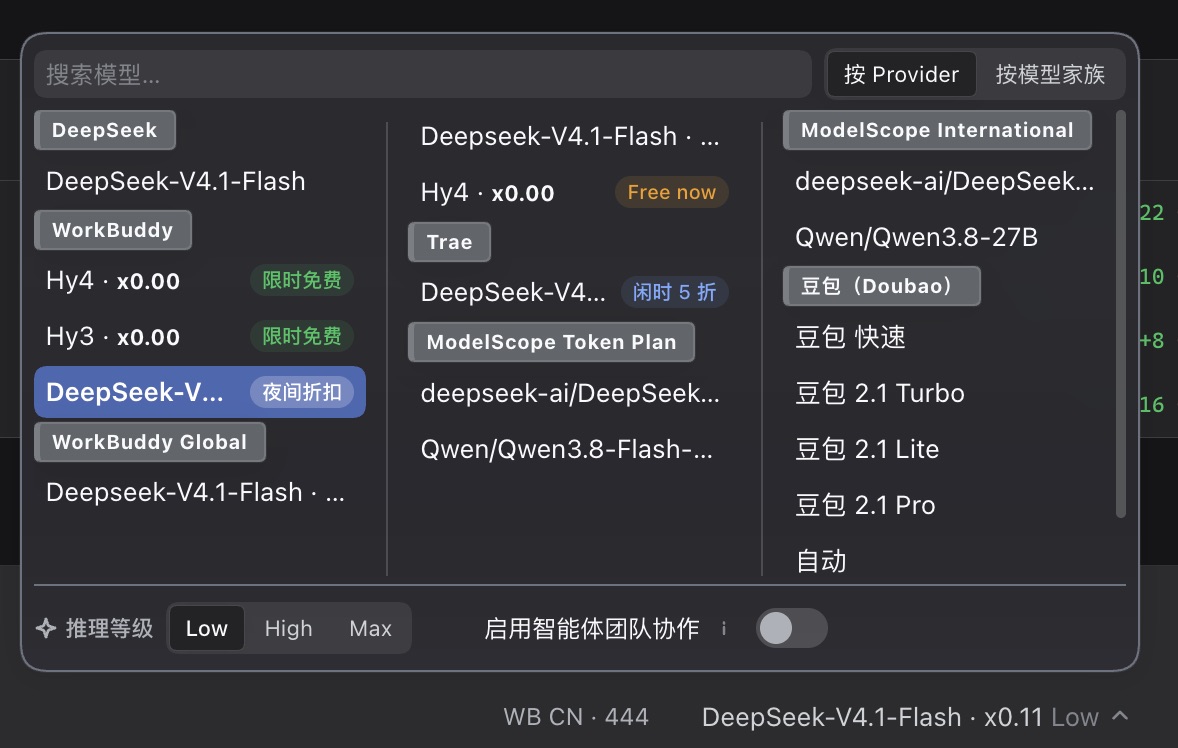
Instead of nested popovers, the whole catalogue is one searchable grid where the
model grid, the current model's reasoning levels, and the agent-teamwork switch
are all visible at once.
The plugin reads and writes through public Client APIs only — the per-Session
model directory, the teamwork setting, and the host's locale. The host half
(index.js) contributes no service, tool, or event; the UI lives in client.js,
which registers with a negative priority so it shadows the shipped ModelSelect
while active. Disabling the plugin restores the native control with no residue.
The host half has one job of its own: an anonymous daily heartbeat
(telemetry.js). It sends at most one request per machine per local day to
https://dsh.zuos.us/api/e — installation id, plugin id, plugin version,
platform, architecture, event kind and the protocol version — and nothing else:
no prompt, no session content, no model name, no path, no username, no IP. A
process that stays open across midnight re-checks every six hours, so a window
left running all night still counts for the new day rather than only for the day
it was launched.
The installation id is a random UUIDv4 created on first run and unrelated to any
account; deleting ~/.dsh/dsh-model-flatmap/analytics.json gives the machine a
new one. The heartbeat is void-ed and every failure is swallowed, so the picker
never waits for it and never fails because of it. It exists because npm download
counts cannot answer "how many machines actually run this, and how many ran it
today" (installs, CI and mirrors all count), and a Client-side counter cannot
either (a tab nobody reloads reports nothing).
You can switch it off. Settings → Model list carries an Anonymous usage
statistics toggle at the bottom of the panel, on by default. The choice is
opt-out, so a machine whose owner never opens Settings keeps reporting exactly as
before — the toggle is a genuine choice, not a disguised default. It lives in the
browser (localStorage) but the heartbeat sends from the Host, so flipping it
mirrors the choice to the Host through a trust-fenced route, which re-reads it
before every send: the next heartbeat (within the day, or on the next launch)
honours it with no restart. See DEC-035. Disabling the bundle still stops the
heartbeat with the UI.
Screenshot
The panel in action — a flat grid of models, the current model's reasoning levels, and the agent-teamwork switch on one surface:
Features
- One surface. The trigger opens one panel capped at 320 px. The header, the reasoning row, and the teamwork row stay fixed; only the model grid scrolls.
- The trigger and every model row show what the native one shows. Their
names are not strings: the shipped picker renders the
conversation.input.model.labelslot there, and connection plugins use it for a promotion chip (夜间折扣), a rate, or a load mark (queued people / a rocket when idle). This plugin renders that slot's winning component on its own trigger and on every selectable row under By provider — with the seats they need — so the two modes show the same content row for row. A missing or crashing occupant falls back to the catalog name plus the model's ownmodel.badge. Under By family the row's primary text is the provider, so the rows keep the quieter model tail and the slot stays on the trigger only. - Global search. Filters across every provider and every family. Groups that end up empty are dropped, so no stray headings remain. Prefix matches rank first, then substring matches, then ordered character matches.
- Word-wise search. Whitespace splits the query into tokens, and every token must land somewhere in the name. A hit ranks by its weakest token.
- Provider-wide search. A query that matches a provider (its id, catalog name, or section label) keeps that provider's entire catalogue in the grid.
- Two grouping modes. A segment control switches the grid between By provider and By family. Grouping and search are independent.
- Model families. A built-in dictionary recognises DeepSeek, Grok, Opus, Haiku, Sonnet, Claude, Qwen, GLM, Kimi, GPT, Gemini, Llama, Mistral and others. Unrecognised models are inferred from their id; anything unjudgeable falls into Others (always sorts last). Families stay flat — no nesting.
- Generations are kept apart. A registered brand splits by generation:
hy3→HY3,hy4free/hy4std/hy4-preview→HY4, and a barehy→HY. Unregistered brands still collapse their version tail; dictionary families (GPT, Qwen…) are never split. - Rows are provider-primary, with a model tail. Under By family the
heading already says what the models are, so the family name is not repeated
in a row: the primary text is the provider name. What neither the heading nor
the provider can say — which model of the family the row is, and the
catalog's rate multiplier — is drawn as a quieter tail at the end of the row,
with the family name and the provider label stripped off:
Qwen3.8-27Bunder Qwen reads3.8-27B, andDeepseek-V4.1-Flash · x0.01under DeepSeek readsV4.1-Flash · x0.01with the multiplier drawn smaller and bold. The full model name and description stay in the tooltip. - Long names and long headings scroll on hover. A clipped model name or group heading runs one eased leftward pass after the pointer rests on it for 0.5 s, then stops; leaving resets it instantly. Only the text moves — the trailing badge and the title's band never do.
- Reasoning effort. The current model's reasoning levels render as an exclusive, keyboard-operable group ("推理等级" / "Reasoning effort") driven by radio semantics.
- Adaptive footer. The reasoning group and the agent-teamwork switch share one line when both fit with a 30 px gap, and fall back to one row each when they do not — the break is CSS flex wrapping, not a measured pixel threshold.
- Out-of-balance models are struck through — everywhere, for a day. A model
whose last call failed on insufficient balance, credit, or quota keeps a
line-throughon its row text until a later call for that same model returns anything else, and until the mark has gone 24 hours without a new attempt — whichever comes first. A balance is topped up and a quota resets daily, so a strike nobody refreshed is stale information, not a warning. The strike follows the model the failing request actually used, and covers the Host'sQUOTA/ACCOUNT_QUOTAcodes, a provider402, and a429whose body reports an empty balance — a plain rate limit never strikes. Because a balance is a property of the model route and its account, not of one conversation, the marks are global: a failure seen in any Session strikes the model in every Session and workspace, and the state is persisted tolocalStorageso it survives a reload. Every mark keeps the time of the observation that made it, so opening the list a day later draws that row plain. Observations are ordered by that same time, so the newest one wins and replaying older history cannot resurrect a strike that has already ended — by a later call or by age. - Provider and model visibility. A profile with many connection plugins offers
far more models than anyone picks between, so the panel can be narrowed down.
Settings → Model list (
settings.section, so it sits in the app's own settings panel beside the shipped pages) lists every provider with a switch, and expanding a provider lists its models with one switch each. The provider switch is a bulk action: it writes every one of that provider's models, and the model switches stay live — so the useful workflow works, switch a provider with dozens of models off and then switch the two or three you want back on. Such a provider reportsmixedand "N on"; one with every model off dims and says "all off". The choice applies to the panel's grid, its search index, its group headings and its model count at once, because the filter runs on the single catalogue every one of them derives from. The record stores what is hidden, not what is shown, so a provider or model added by a plugin installed later appears without re-opening Settings. It is kept inlocalStorage(dshmf:hidden) and shared by the settings page and every panel in the page, so a switch flipped in Settings re-renders an open panel immediately, with no reload. Hiding the model a conversation currently uses is allowed: the grid obeys the switch, and the trigger still names the current model. If everything is hidden the panel says so and points back at Settings instead of claiming no models are available. A model row names the model the way the picker does: a· x0.01rate inside the name is lifted into its smaller bold run, and the catalog's own badge chip (a promotion like "Free Now", a load mark, a rate) follows the name. A model the catalog badges nothing about draws no chip and keeps no gap. - Provider names you choose. The same page renames a provider: use the
pencil on a provider row, type the name and press Enter (Escape or the cross
cancels).
The name is an alias, keyed by the provider's stable id — routing,
visibility and the currently selected model are untouched. One label
derivation feeds every face of the picker: By provider headings, the
provider text on By family rows, row tooltips and provider-wide search.
Search still matches the catalog's original name, and the original stays
visible beside the alias in Settings and as the editor's placeholder, with a
one-click restore. Aliases
live in
localStorage(dshmf:aliases), shared by Settings and every open panel, so a save re-renders the picker with no reload. TheDefault stylepicker is the host's own and keeps the catalog's names. - Theme-aware. Styled with host theme tokens only; looks correct in both light and dark themes.
- Project link. Immediately left of the
Default stylebutton sits a link icon that opens this project's GitHub page in a new tab. The address is not hardcoded: the Host reads the checkout's configured remotes withgit remote -v(originfirst, thenupstream, then the rest) and turns every spelling git writes —git@github.com:owner/repo.git,https://github.com/owner/repo.git,ssh://,git://,github.com:owner/repo— into the samehttps://github.com/owner/repopage. A remote on another host (GitLab, Bitbucket, a self-hosted server) is skipped rather than rewritten to github.com: rewriting would open a different repository with nothing on screen saying so. Renaming the repository, moving it to another owner, or adding a fork upstream all change the destination without touching this plugin. When the checkout has no usable GitHub remote (an npm-installed copy ships no.git), the button opens this project's home page and its tooltip says that is the fallback. The URL is prefetched when the panel opens, so an ordinary click is a synchronouswindow.openthat a popup blocker will not eat; the tab opens withnoopener,noreferrer, and onlyhttp(s)addresses can reach it. Clicking it does not affect theDefault stylebutton, whose look,aria-pressedmeaning and disabled rule are unchanged. - Native mode. The panel's bottom-right
Default stylebutton hands the composer's model seat back to the host's own picker — the real shippedModelSelect, not a reproduction of it. The plugin does this by stepping aside: it disposes its ownconversation.input.modelregistration, so the host's entry underneath wins the slot and renders itself. Nothing is imported, copied, or re-mounted, which means an upgraded DSH shows its own newest picker and this mode can never drift out of date. The way back is a separated action band at the bottom of that picker's own menu — it reuses theconversation.input.model.optionschild slot the shippedModelSelectdeclares, so it belongs to the panel it acts on and renders nothing at all while the flat panel is shown. It is drawn as an outlined button, not as one more menu row: the rows above it pick a value, this one performs an action. The choice is remembered across reloads. If the host ships no picker to hand over to, the button stays disabled and the panel stays — the composer never ends up without a model control.
See docs/DETAIL.md for the full behaviour spec and
DECISIONS.md for the decision log behind the design.
Installation
This package is a DSH bundle. Install it from your DSH profile (the plugin
manager), or drop it into the profile's bundle directory so the dsh loader
picks up cordis.patch.yml.
# Example: install the bundle into a running profile (paths vary by install)
cp -r . "<profile>/bundles/dsh-model-flatmap"
Enable or disable the plugin from the profile's plugin list — no native control is touched when the bundle is off.
Project layout
| Path | Purpose |
|---|---|
index.js | Host half — bundle entry; starts the anonymous daily heartbeat. |
telemetry.js | The heartbeat itself: pure day/decision functions, plus an injectable reporter. |
client.js | Browser half — the entire flat picker UI, plus the Settings → Model list section. |
cordis.patch.yml | Cordis patch applied by the dsh bundle loader. |
locale/en.json | English copy and metadata. |
locale/zh.json | Simplified-Chinese copy and metadata. |
docs/DETAIL.md | Detailed behaviour specification. |
test/ | Render-path tests driven through a minimal hook runtime. |
Development
The plugin is plain ES modules with no build step.
# Run the render-path tests (no browser required)
node --test test/
Tests read client.js directly and drive the real component through a minimal
hook runtime to catch crashes, missing sections, and wrong column counts.
test/telemetry.test.mjs covers the heartbeat instead: the day boundary, the
once-a-day gate, the payload's field whitelist, degradation after repeated
failures, and the promise that a dead endpoint costs nothing. No test touches
the network — fetchImpl and the clock are injected.
License
Released under the MIT License.
Comments
Loading…
Similar plugins
Shows the selected model provider's account balance next to the composer's model seat once a model and reasoning effort are selected.
★ 0
dsh plugin --profile web add @kkbsgg/dsh-balance为模型展示交付成果和下达精细微调指示的dsh desktop面板
★ 0
MIT
JavaScript
dsh plugin --profile web add dsh-plugin-middle-panelby YizhouLouisLu
Select text in the DSH Web UI conversation to quote it into the composer, or ask about it in a throwaway side panel that leaves no record.
★ 0
MIT
JavaScript
Oct 5, 2026
dsh plugin --profile web add dsh-select-ask-pluginby lavapapa
A DSH Web plugin that keeps long answers and detailed prompts side by side with a dockable Composer.
★ 3
↓ 319/wk
MIT
JavaScript
Oct 10, 2026
dsh plugin --profile web add dsh-composer-layoutby AnakinCao
DSH Web GUI layout fix: composer (input bar + bottom status bar) leaves the scroll region — message scrolling stops above the input bar, the scrollbar no longer covers the input area
★ 0
MIT
JavaScript
Aug 16, 2026
dsh plugin --profile web add dsh-composer-fix应声 · 快捷输入:输入框左侧的九宫格快捷短语面板。9-grid quick-phrase pad docked left of the composer.
★ 1
MIT
JavaScript
dsh plugin --profile web add dsh-quick-input