
dsh-npm-script
IdentifiedFloating button in the Web UI that lists every package.json script in the workspace, grouped per project, and runs them with per-command running/stopped status and a stop control for long-lived ones s
dsh-npm-script


English · 简体中文
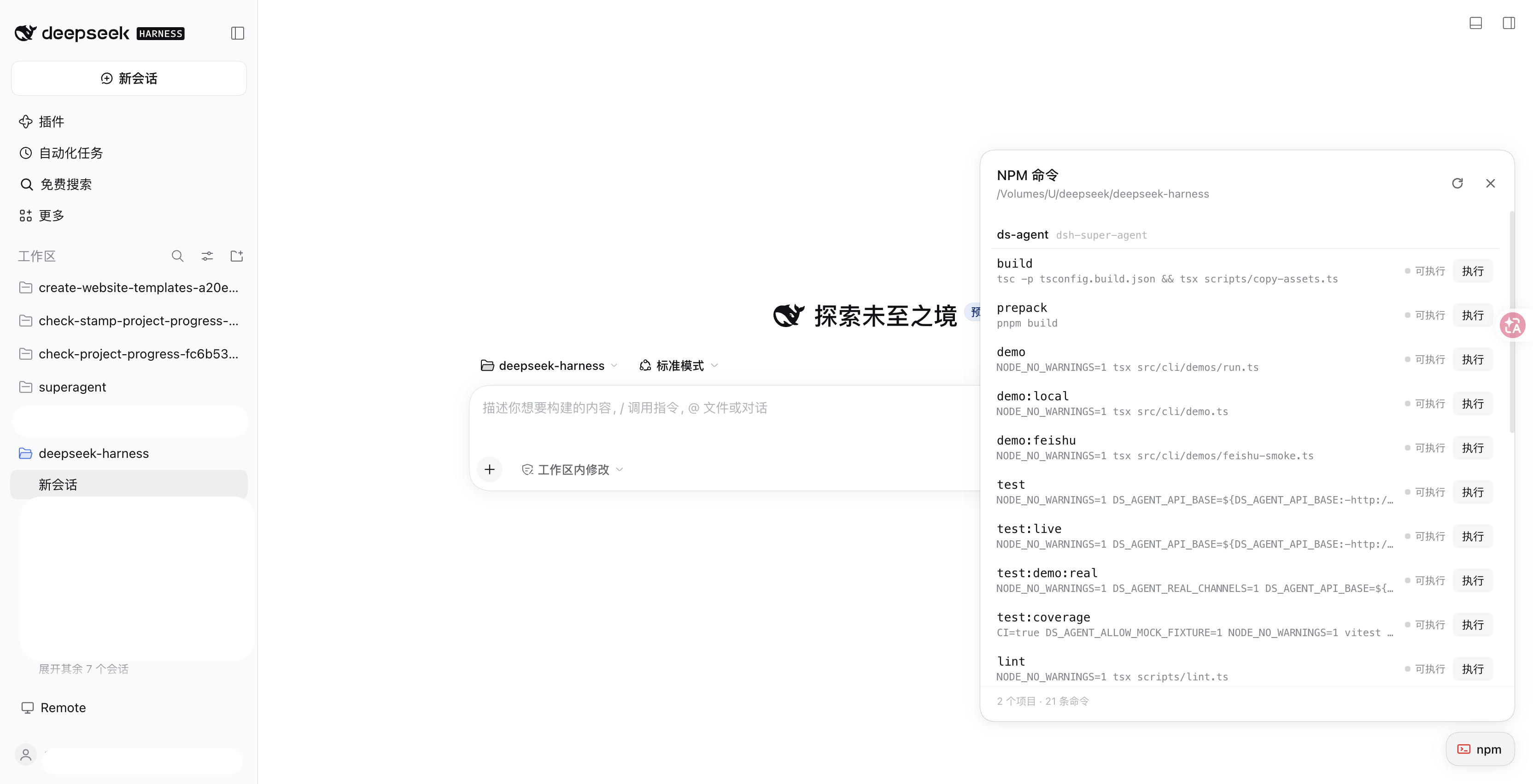
A floating button for the DeepSeek Harness Web UI. One click lists every npm script in your workspace, grouped by project, and lets you run them, stop the long-lived ones, and read their captured output. Any http(s) address printed by a script becomes a clickable link that opens in a new tab, so a dev server's debug URL is always one click away.
Features
- Floating launcher — a small button pinned to the bottom-right corner; nothing is added to your panels.
- Grouped by project — scans the whole workspace, so a monorepo or several subprojects each get their own section of scripts.
- Live status per command — running / runnable / stopped is shown next to every script. Long-lived commands such as
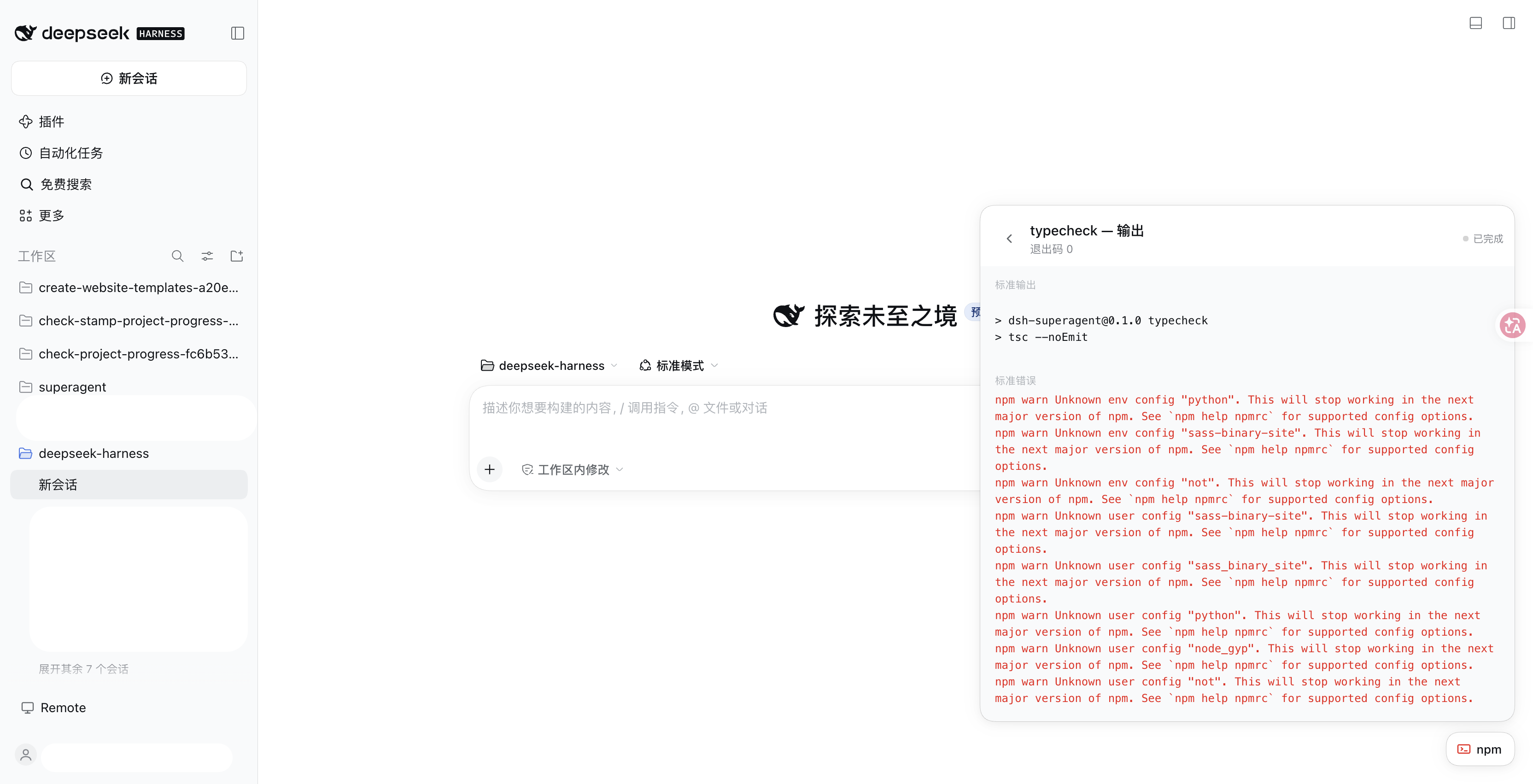
npm run devkeep a running state until you stop them. - Captured output — stdout and stderr are collected while a script runs and stay readable after it exits.
- Clickable URLs —
http://andhttps://addresses in the output are rendered as links (new tab) and collected into a shortcuts row above the log. Dev servers that print their debug address work out of the box. - Bilingual UI — follows the Harness interface language (English / 简体中文).
Install
Requires a running DeepSeek Harness. Either path works.
Web UI
-
Open the Harness Web UI and go to Plugins in the sidebar.
-
Paste this spec into the install field:
github:zouzhipeng/dsh-npm-script -
Confirm, make sure the bundle is enabled, then refresh the page.
CLI
dsh plugin --profile web add github:zouzhipeng/dsh-npm-script
The bundle is selected automatically. Refresh the Web UI afterwards.
The package is also published on npm as @zouzhipeng/dsh-npm-script; publishing there only adds download statistics, installation still resolves from GitHub.
Update
Re-run the install command to pull the latest version:
dsh plugin --profile web add github:zouzhipeng/dsh-npm-script
Uninstall
Remove it from the Plugins page, or run:
dsh plugin --profile web remove @zouzhipeng/dsh-npm-script
Usage
- Click the floating button at the bottom-right to open the panel.
- Scripts from every
package.jsonare listed, grouped by project. - Click a command to run it; running commands show a stop button.
- Open Output to read stdout and stderr. URLs in the output are clickable.
Press Esc to close the panel. While viewing output, the first Esc returns to the command list.
Configuration
Optional settings can be overridden through config in the profile's cordis.yml:
| Field | Default | Meaning |
|---|---|---|
scanDepth | 3 | Maximum directory depth to scan for package.json. |
maxOutputBytes | 262144 | Bytes of each output stream kept in memory (tail). |
maxSpillBytes | 8388608 | Maximum bytes spilled to disk. |
graceMs | 5000 | Grace period before force-terminating a stopped command. |
historyLimit | 20 | Number of past runs retained. |
scanCacheMs | 5000 | Cache lifetime for the project scan. |
How it works
The plugin has two halves:
- Host (
index.js) resolves the current workspace through Harness'sworkspaceRegistry, scans it forpackage.json, and launches scripts through thesubprocessservice. All HTTP routes are restricted to loopback. - Client (
client.js) renders the floating button and panel in theshell.overlayslot and talks to the Host over same-origin JSON routes.
Scripts are spawned with NO_COLOR=1, TERM=dumb, PAGER=cat and GIT_PAGER=cat so tools emit plain text and printed addresses stay intact. The client strips ANSI escapes as a fallback.
Requirements
- DeepSeek Harness with the
webprofile. - Any platform supported by Harness (macOS / Linux / Windows).
- Commands come only from the
scriptsfield ofpackage.json.
Known limitations
- Only
http://andhttps://addresses become links (ws://is excluded — a browser cannot open it directly). - The command list comes from
package.jsonscripts; arbitrary npm subcommands are not included. - Host-side code changes need a
dsh webrestart (node-side hot reload is off by default); Client changes apply on refresh.
License
简体中文
为 DeepSeek Harness Web 界面添加一个悬浮按钮:点击后按项目分组列出工作区里所有 package.json 脚本,可直接运行、停止常驻命令(如 npm run dev)、查看捕获的 stdout / stderr。输出里的 http(s) 地址会变成可点击链接并在新标签页打开,同时在日志上方汇总成一行快捷入口。
安装
Web 界面 Plugins 页填入 github:zouzhipeng/dsh-npm-script,或执行:
dsh plugin --profile web add github:zouzhipeng/dsh-npm-script
装完启用 bundle 并刷新页面。也可从 npm 安装以显示下载量。
使用
点击右下角悬浮按钮打开面板;按项目分组列出脚本;点命令执行,执行中的命令显示停止按钮;点「输出」查看日志,日志里的网址可直接点击。按 Esc 关闭面板,查看输出时第一次 Esc 先返回列表。
配置
在 profile 的 cordis.yml 中通过 config 覆盖,可选项:scanDepth(3)、maxOutputBytes(262144)、maxSpillBytes(8388608)、graceMs(5000)、historyLimit(20)、scanCacheMs(5000)。
限制
- 仅
http:///https://地址识别为链接,ws://不识别。 - 命令只来自
package.json的scripts,不含任意 npm 子命令。 - Host 半代码改动需重启
dsh web,Client 半刷新页面即可。
许可
Comments
Loading…
Similar plugins
by cloader
One-click dev-process launcher for the DSH web GUI: per-workspace launch configs (frontend / backend / other command groups), a session-header start button, and an in-session console tab streaming live process output over SSE. Host half spawns and supervises the processes (tree-kill on Windows, ring-buffered output); browser half mounts through the official slot system — no DSH source changes.
★ 0
TypeScript
Aug 26, 2026
dsh plugin --profile web add dsh-devlaunchLow-code project workspace for the DSH web UI. A multi-level file tree with a push-status ledger, in-panel source view and edit, pre-push static checks, and a scaffold for an empty workspace. Requires
★ 0
NOASSERTION
JavaScript
dsh plugin --profile web add dsh-project-panelManage development projects from the DSH web UI in a draggable floating window: add/remove, one-click start/stop/restart, hot-reload restart on file changes, and real-time persistent logs.
★ 0
dsh plugin --profile web add @dsh-user/dsh-project-managerby zhangkaiqiu
Saves per-workspace dev commands behind a header button, starts and stops them as process trees, and exposes four tools so the agent can list, start and stop those saved commands and read their logs (
★ 0
MIT
JavaScript
Nov 13, 2026
dsh plugin --profile web add dsh-dev-launcherby LittleChenLiya
Runs one goal as parallel subtasks and merges the reports into one answer; the run survives a host restart, spending is capped, and the cost is printed. Its HTTP routes have no DSH access check, so a
★ 5
↓ 8.8k/wk
MIT
JavaScript
Nov 22, 2026
dsh plugin --profile web add @xiangyixie/dsh-superagentby leanderli
DSH Web UI 的文件与变更面板插件:为当前会话的工作区目录提供一体化的 文件浏览 / 搜索 / 预览 / 编辑与 Git 操作(状态、暂存、提交、拉取、推送、 分支、历史、diff 等),在浏览器里以居中模态面板呈现,无需离开 WebUI 即可完成 日常文件与版本控制操作。
★ 2
MIT
JavaScript
Oct 10, 2026
dsh plugin --profile web add dsh-files-git