

easyeda-agent
Manifest valid★ 865JLCEDA Pro (EasyEDA Pro) Automation: Giving your AI harness the "hands" to design boards — a set of typed schematic/PCB actions, with three integrated access forms: CLI / Agent Skill / stdio MCP. Carrying on JLC's mission of "not making money from selling boards, but taking responsibility for training Chinese engineers" | EasyEDA Pro automation: the hands of your AI harness — typed sch

easyeda-agent
面向 EasyEDA(嘉立创EDA专业版)的 AI 原生自动化层
Version 1.4.5. Schematics are driven by components, pins, and the connectivity graph: first design the Lib circuit and geometry in local data, then compose single pages with
sch composeand execute + read-back verify withsch apply. Release status, build steps, and outstanding acceptance items are in 1.4 Release & Verification.
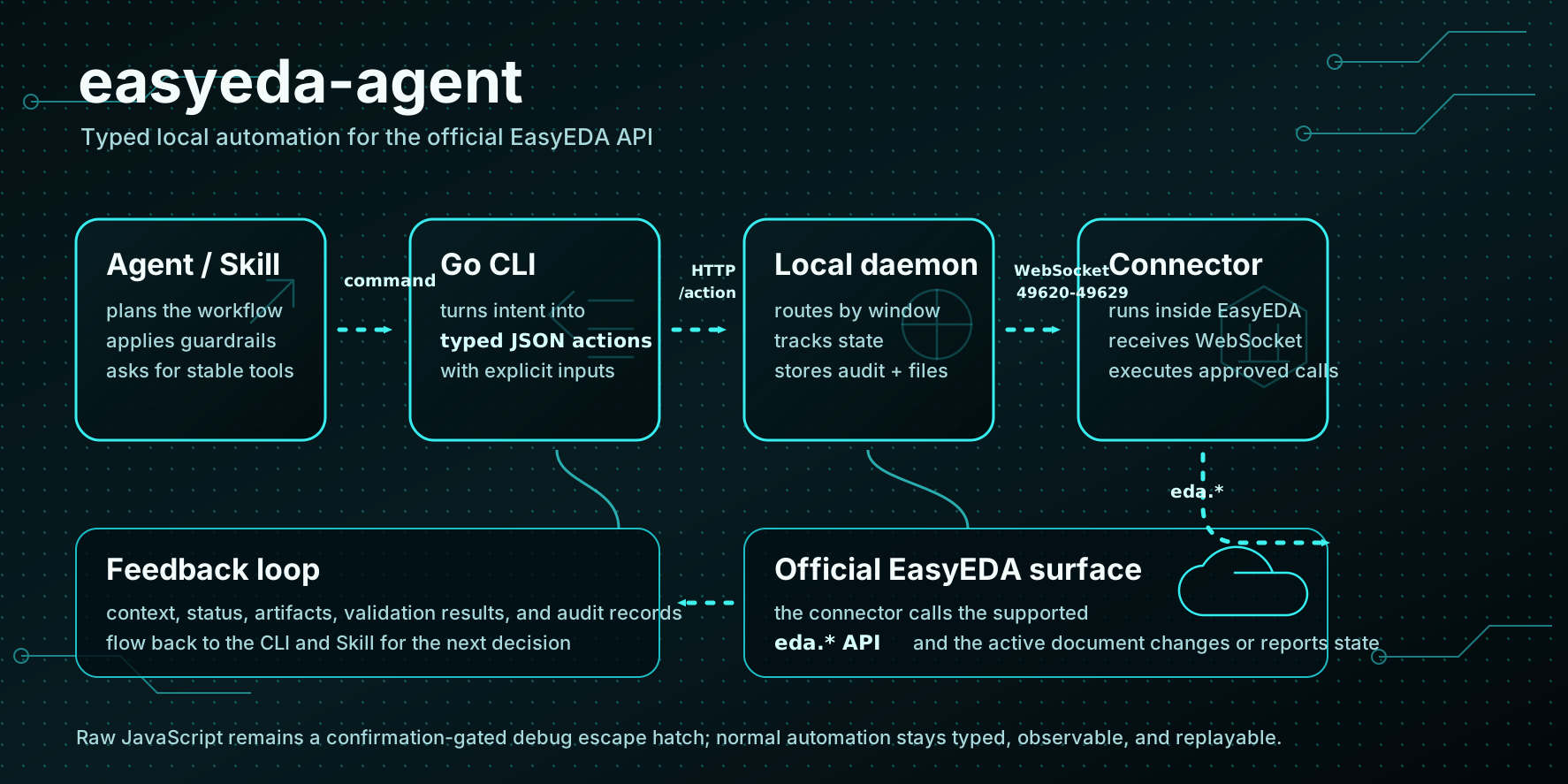
easyeda-agent turns the official EasyEDA extension API into a typed, observable, Skill-friendly system. The EasyEDA plugin stays ultra-thin — it connects to a local agent and only executes approved actions; the Go CLI/daemon owns the protocol, state, artifacts, validation, and user-facing workflows.
Why this exists
The upstream run-api-gateway proved the critical entry point: code can run inside EasyEDA and access the official eda object. But it treats "raw JavaScript execution" as the primary workflow — powerful, yet too fragile for AI agents.
This project's connector is genuinely usable: the daemon binds to a fixed single port 60832 by default (no port overflow; automatically takes over stale easyeda daemons when the port is occupied), the connector locks onto that port, validates the handshake, self-heals on reconnect, and dispatches a set of typed action catalogs to the official eda.* API. debug.exec_js remains a temporary in-task debug escape hatch.
- Skill describes expert workflows and guardrails;
- Go CLI/daemon exposes stable typed actions;
- EasyEDA connector plugin is only a bridge to the official
eda.*API; - Artifacts, screenshots, DRC results, and audit logs are first-class outputs.
How it works
- A Skill or human runs an
easyedacommand; - The Go CLI validates inputs and submits the typed action to the local daemon;
- The daemon tracks connected EasyEDA windows, routes each action over WebSocket, and records audit logs/artifacts/validation results;
- The connector extension runs inside EasyEDA and calls the official
eda.*API; - Structured results flow back to the CLI and Skill, and the next step is planned based on the real editor state.
The action catalog now covers schematics, PCB, document navigation, board-level binding, artifact export, and diagnostics. The full list and roadmap are in docs/FEATURES.md.
Standing on giants' shoulders
We don't reinvent the wheel; we stack mature layers of capability so AI agents can use them directly:
- Official
eda.*API — the 86 namespaces exposed by JLCEDA Pro itself, the true capability foundation; - Upstream
run-api-gateway— proved the critical entry point that "code can run inside EasyEDA and access theedaobject"; - Mature AI Agent Skill paradigm — use Skills to describe expert workflows + guardrails, and use typed actions to make every step observable, verifiable, and replayable, instead of forcing the model to brute-force "raw JS execution".
On top of these three layers, easyeda-agent fills in the engineered middle layer: self-healing connector, typed action catalog, real bbox validation, gated design flows, and the flagship feature below — the circuit block library.
Core capabilities & features
Capability overview (full list in docs/FEATURES.md):
| Capability domain | What it does |
|---|---|
| Circuit block library (flagship) | Community-built, attribution-tracked mature peripheral circuit blocks (easyeda blocks, 37 blocks: 19 ready / 13 verified / 5 draft): CH340 USB UART, ESP32 auto-download, button debouncing, USB-HUB, buck converter… sch block-apply places + wires + cross-checks the netlist in one command; topology copied as-is, only rebind pin nets to reuse |
| Schematics | Canonical connectivity graph → Lib local geometry → sch compose single-page compact Z-pattern composition → sch apply; normal designators separated from functional Roles, pink dashed frames with 0.2 inch titles, each frame independently tightened by content with minimum padding preserved |
| Mechanical gates & audit | Local data checks, post-Apply per-pin/net/NC/geometry read-back; sch gate --strict four-phase (layout-lint→check→bridge-check→drc); cross-page net-name audit sch nets --strict + block reconciliation sch reconcile |
| PCB | Auto-placement, board outline, keep-out zones, rule-aware short trace routing, 4-layer power planes, copper pour, silk avoidance, DRC/pcb check |
| Design flow | Gated main spine from customer-toned requirements to finished product (S0–S6 + P0–P10), milestone confirmations, save checkpoints |
| Artifacts | BOM (with LCSC C-number fill), netlist, export, native screenshots, audit logs, record→replay |
Feature: Circuit block library
Fixed-module peripheral circuits can be copied directly. ESP32 auto-download circuits, CH340 USB flashing, button debouncing,
USB-HUB… the internal topology of these circuits is fixed; redrawing each time means re-hitting the same pitfalls. The circuit block library distills them
into verified, reusable circuit blocks (currently 37 blocks: 19 ready / 13 verified / 5 draft)—
sch block-apply completes placement + wiring + netlist reconciliation in one command; you only rebind the few external wires (ports)
to the MCU nets. Pins are referenced by functional name so there is zero renumbering; components point straight to the standard component library (BOM-ready).
- Community co-building + attribution: each block carries
author/contributors, learn once to contribute, benefit forever; - Verification gates: a block must pass
place → wire → check → DRC=0before entering the library — not just "looks right" prose; - Three-dimensional knowledge: components (swappable choices) + schematic link notes + PCB layout electrical characteristics, one block covers it all;
- Direct AI consumption: the agent checks the block library before placing peripherals; a hit means copy, saving an entire module's selection and wiring.
The library is embedded in the CLI:
easyeda blocks ls/show/searchavailable offline (no daemon/window needed) · Contributing guidestandard-blocks-contributing.md
Installation
Full onboarding & usage notes: Quick Start → — the three elements (CLI / connector
.eext/ Skill) installation, version alignment, daemon startup, upgrade discipline and common gotchas cheat sheet, all in one page. Below is the condensed version.
easyeda-agent has three components that must be paired: CLI/daemon, connector .eext plugin, and
the easyeda-agent Skill; EasyEDA Pro is the host that runs them and must have "allow external interaction" enabled. On upgrade,
the CLI, Skill, and running daemon must exactly equal latest; the Connector only upgrades across major/minor compatibility lines —
a lagging market patch within the same compatibility line does not affect usage.
Install the easyeda CLI/daemon first, then the EasyEDA connector — pick either channel: the installer prints the GitHub Release .eext download URL, or one-click install from the LCSC official plugin marketplace. CLI/daemon and Skill must be exact same version; the Connector only needs matching major.minor — no upgrade needed if the market version is only behind on patch:
ℹ️ Plugin rename notice (2026-08): Per marketplace management requirements, the plugin display name has been changed to EDA Agent Connector (no longer containing "easyeda"). Confirmed with the marketplace admin that the internal package name
easyeda-agent-connectorand uuid remain unchanged — simply re-upload the same entry — existing users' in-place auto-updates are unaffected; no action required.
curl -fsSL https://raw.githubusercontent.com/zhoushoujianwork/easyeda-agent/main/install.sh | bash
The one-click script: installs/updates the easyeda CLI/daemon; auto-detects installed clients and installs/updates the easyeda-agent skill to the corresponding directory — Codex (~/.codex/skills/easyeda-agent), Codex Desktop shared directory (~/.agents/skills/easyeda-agent), Claude Code (~/.claude/skills/easyeda-agent); prints the connector .eext import URL.
After initial install, upgrades do not require re-running the script — use easyeda update:
easyeda update              # CLI 二进制(sha256 校验 + 原子替换)+ skill 目录 → latest
easyeda update --check      # 只读:cli / skill / connector 三方版本对齐表
easyeda update --check --exit-code   # CLI/Skill/daemon 非 latest 或 Connector 跨兼容线则退出 10
easyeda update --version <x.y.z>     # 钉版本;--skill-only / --cli-only 缩范围
When GitHub large-asset downloads fail three times consecutively, the installer and easyeda update will attempt
https://gh-proxy.com/ transport, but only enable it when checksums.txt has already been fetched from GitHub, and still verify against that
SHA-256. You can use EASYEDA_GITHUB_PROXY=https://your-mirror/{url} to switch mirrors, or set it to off
to disable; the mirror is only for availability, not a supply-chain trust root.
The connector .eext is outside the auto-upgrade scope (sideload has no in-place update) — patch differences within the same major.minor are directly compatible;
update will only block and print a re-import URL when crossing minor/major.
Dev builds (git-describe version numbers) do not overwrite by default; use --force to force upgrade; use sudo easyeda update when the binary is in the root directory.
Control skill installation via environment variables:
curl -fsSL .../install.sh | EASYEDA_INSTALL_SKILLS=codex,agents,claude bash  # 指定目标
curl -fsSL .../install.sh | EASYEDA_INSTALL_SKILLS=none bash  # 跳过 skill
curl -fsSL .../install.sh | EASYEDA_SKILL_PRESERVE=1 bash  # 保留本地改动
curl -fsSL .../install.sh | EASYEDA_VERSION='<vX.Y.Z>' bash  # 指定版本(跳过 API 查询)
Encountering 403 / GitHub API rate limits: the script by default calls api.github.com once to resolve the latest
release; anonymous calls are limited to 60 per IP per hour — corporate egress / NAT / CI can easily hit the cap. Two
ways out (also printed on script error):
export GITHUB_TOKEN=<token>   # 或 GH_TOKEN;已登录 gh CLI 时会自动取 `gh auth token`
gh auth login                 # 等价做法,额度提升到 5000/小时

curl -fsSL .../install.sh | EASYEDA_VERSION='<vX.Y.Z>' bash   # 或者直接锁版本,完全不碰 API
Available tags are in Releases.
The Skill slug is easyeda-agent (the suffix is intentional, to distinguish from official EasyEDA tools). Only install the skill from the registry:
# ClawHub(make release 时自动同步发布,版本与 repo 对齐)
clawhub install easyeda-agent
SkillHub also has an official CLI, which is incompatible with other similarly-named
skillhubtools. When version alignment with the CLI/connector is needed, use the one-click installer above or theskills.tar.gzfrom GitHub Releases.
EasyEDA must have "allow external interaction" enabled for the connector's WebSocket to connect to the local daemon.
Recommended onboarding prompt for AI Agents
Pass the content below to the Agent with your design requirements. It asks the Agent to verify toolchain and data evidence first, then write to EDA, avoiding guessing from screenshots or trial-and-error:
请使用 easyeda-agent 完成 EasyEDA Pro 任务。

开始前先确认三个组成部分处于兼容的发布版本:
1. easyeda CLI/daemon
2. easyeda-agent Skill
3. EDA Agent Connector 插件

把 easyeda update --check --exit-code 作为当前会话第一条命令。只有 CLI、Skill、运行中
daemon 可验证且精确等于 GitHub latest,且所有 Connector 与 latest 同 major.minor 时继续。
否则运行 easyeda update 并重启 daemon;纯 patch 更新保留现有 Connector,不重开 EasyEDA。
仅当 Connector 跨 minor/major 时安装命令所示 GitHub Release 的
easyeda-agent-connector.eext,保存文档并完全退出、重开 EasyEDA。任何组件升级后立即结束
当前 Agent 会话并新开会话,从版本检查重新开始。确认已开启“允许外部交互”,再运行
easyeda health 核对目标工程、页面和版本。

绘制原理图时先读取或建立本地 canonical connectivity JSON,以器件、完整物理引脚、
稳定网络 ID、pin→net/NC 为权威数据;先在本地计算器件 XY、朝向、连线与功能 Lib,
再生成 diff/Apply 队列。Apply 后逐脚回读,运行 layout-lint、check、bridge-check、DRC,
显式保存并导出图片检查。不要直接依赖截图猜接,不修改原位号,不把 GPIO 号当器件物理
脚号,也不要把未验证或仍有 WARN 的结果描述成通过。
Optional: MCP integration
The mcp/ in the repo is a local stdio MCP adapter layer, making it easy for MCP-capable agents like
Codex to directly discover and invoke easyeda_* tools. It reuses the existing easyeda CLI/daemon and does not bypass
typed actions, audit, workflow gates, or the official eda.* API; the arbitrary JavaScript
debug.exec_js domain is not exposed through MCP.
npm --prefix mcp ci --ignore-scripts
codex mcp add easyeda-agent \
  --env EASYEDA_BIN="$(command -v easyeda)" \
  -- node "$(pwd)/mcp/src/server.mjs"
Restart the agent client to use it. Other MCP clients use the same stdio command/env configuration;
the full tool list and dev verification are in mcp/README.md.
Demo
Access-control board example: local data → SCH Apply → real schematic
Components, physical pins, stable net IDs, and NCs are stored in the local connectivity graph. The Agent first computes component placement, orientation, and wiring inside the functional Lib based on measured pin geometry, then composes the page and writes to
EasyEDA via sch apply, reading back to verify. Designators and component identity remain unchanged.
23 components · 165 physical pins · 28 nets · 2 schematic pages
Power & RF MCU
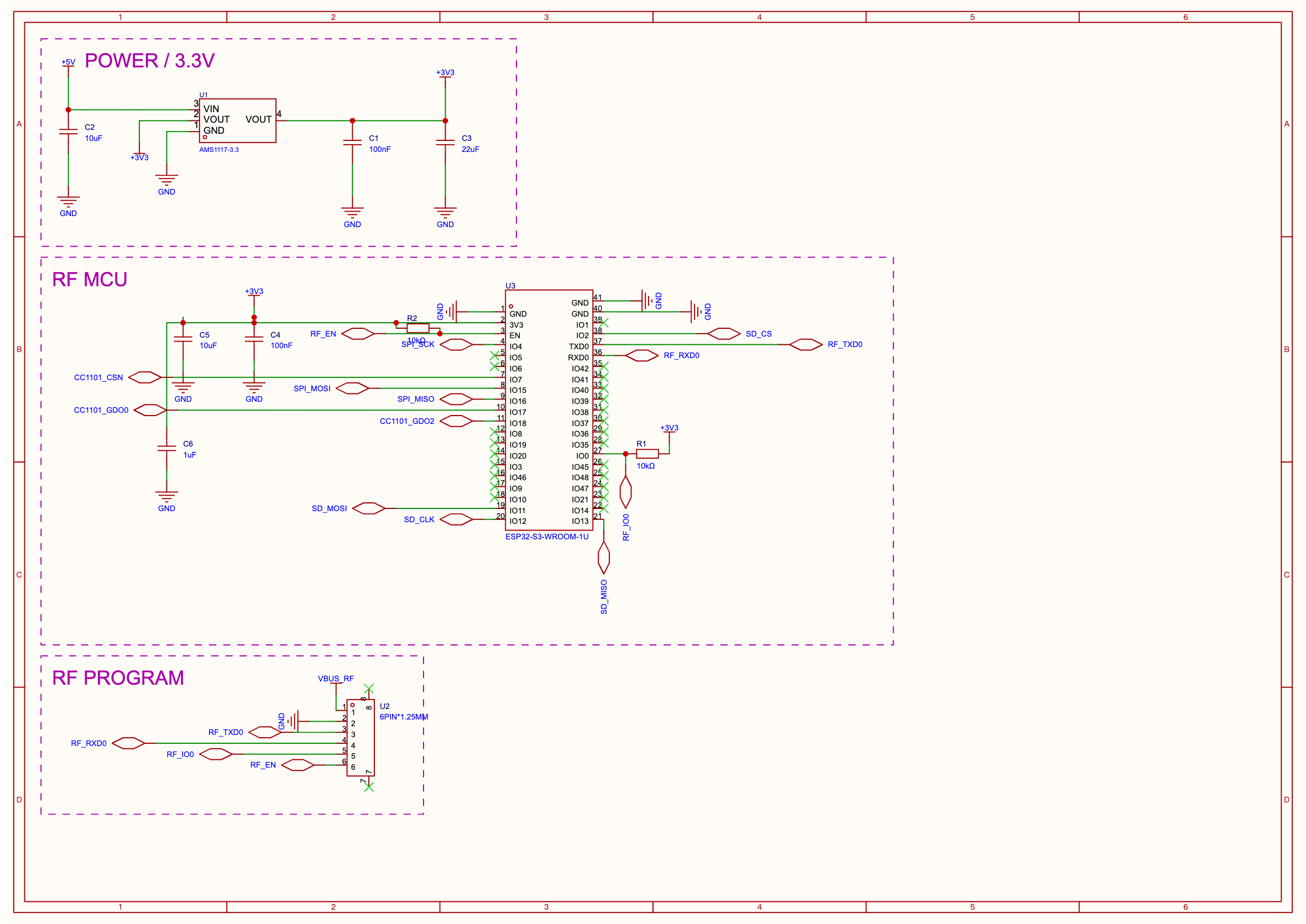
Power, RF MCU, and download interfaces are each a Lib; peripherals connect by pin direction with staggered port lengths, pink dashed frames and 0.2 inch titles computed from data.
Intercom & Interfaces
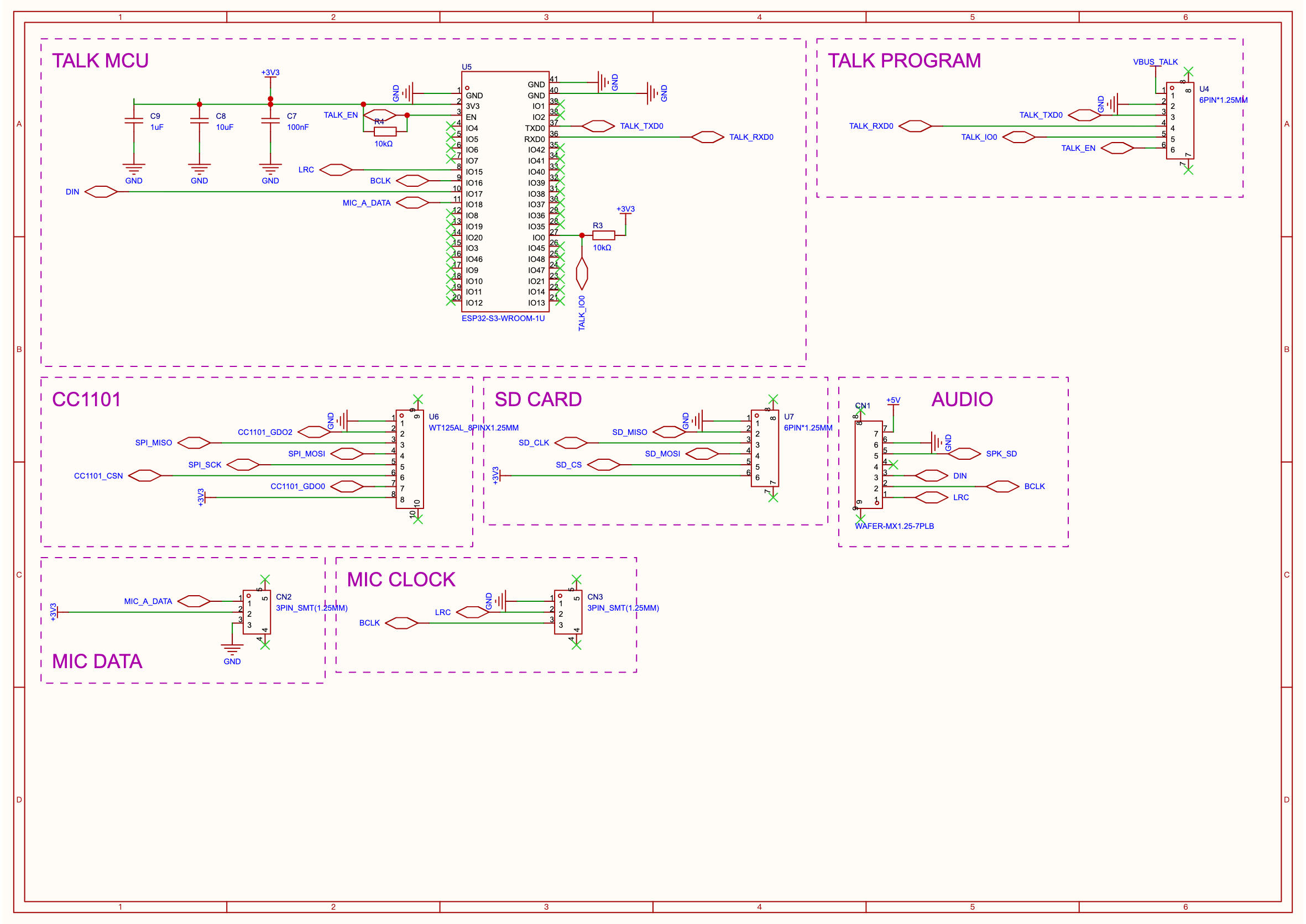
Arranged in Z reading order from top-left, each frame tightened by content with minimum padding; same-row top-aligned, next row advances by max height. Titles use space above or below to reduce height.
Actual Apply execution
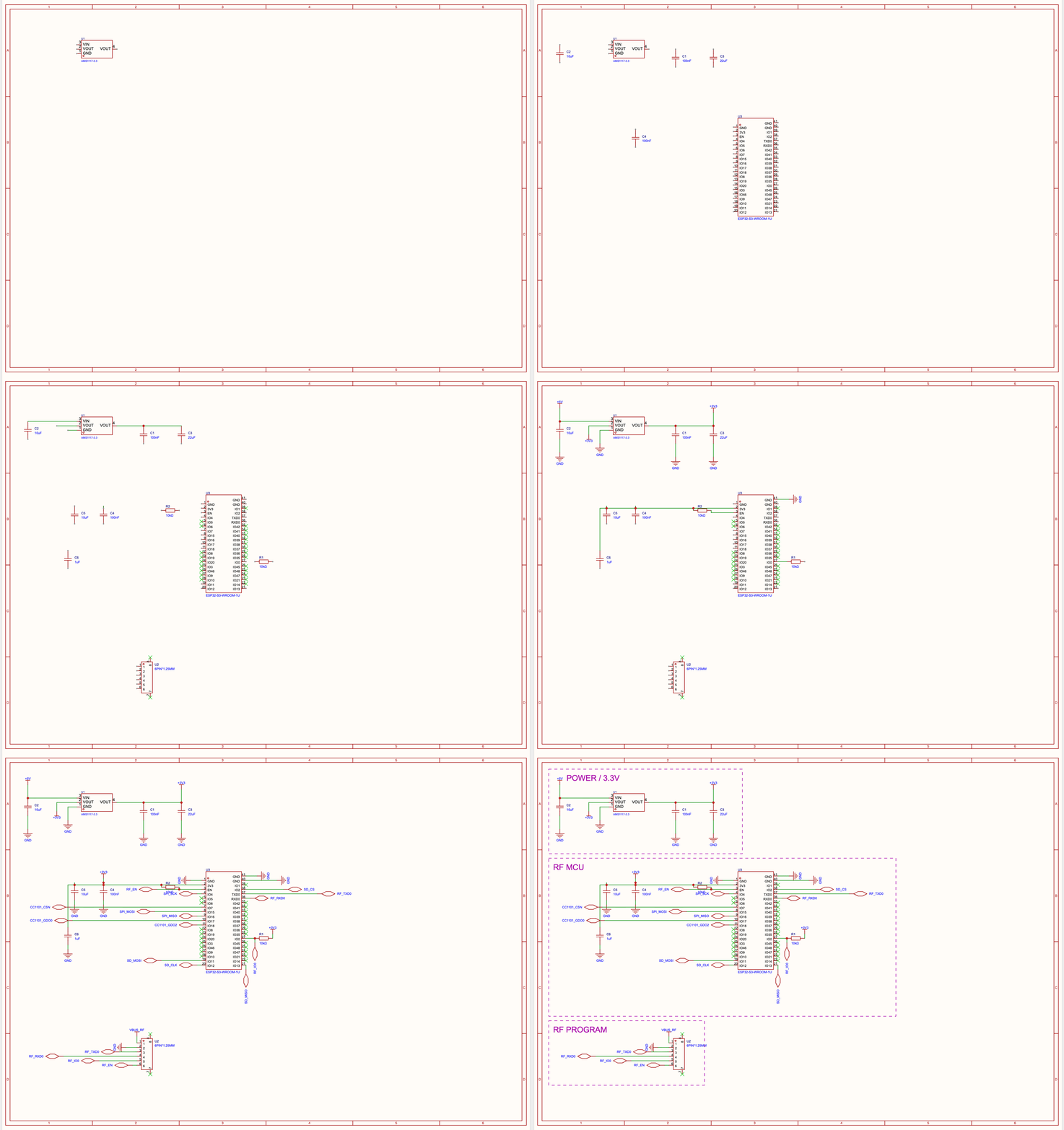
The GIF uses 12 key-stage captures from the actual Apply of the power & RF MCU page, played at accelerated speed; the two still images are from EasyEDA official exports, with display names anonymized. The recording script and reproduction steps are in Apply GIF Capture. Both pages' layout and connection checks have 0 errors and 0 warnings; official DRC still has 3 WARNs, so the strict gate did not pass, and some text avoidance remains to be refined. See 1.4 Release & Verification for the full verification scope.
Historical PCB case: ESP32-S3 4-layer board
Full hands-on case: one requirements doc → AI fully auto-designed an ESP32-S3 4-layer board — 19-component schematic + 4-layer PCB (GND inner layer / VCC power layer / antenna keep-out / M3 four-corner),
pcb drcConnection/Clearance both at zero,pcb check0,layout-lint100/100, with native screenshots and a full process retrospective.
The historical recording below is from the real EasyEDA canvas of the ESP32 regression board, showing PCB layout, board outline, and copper pour:
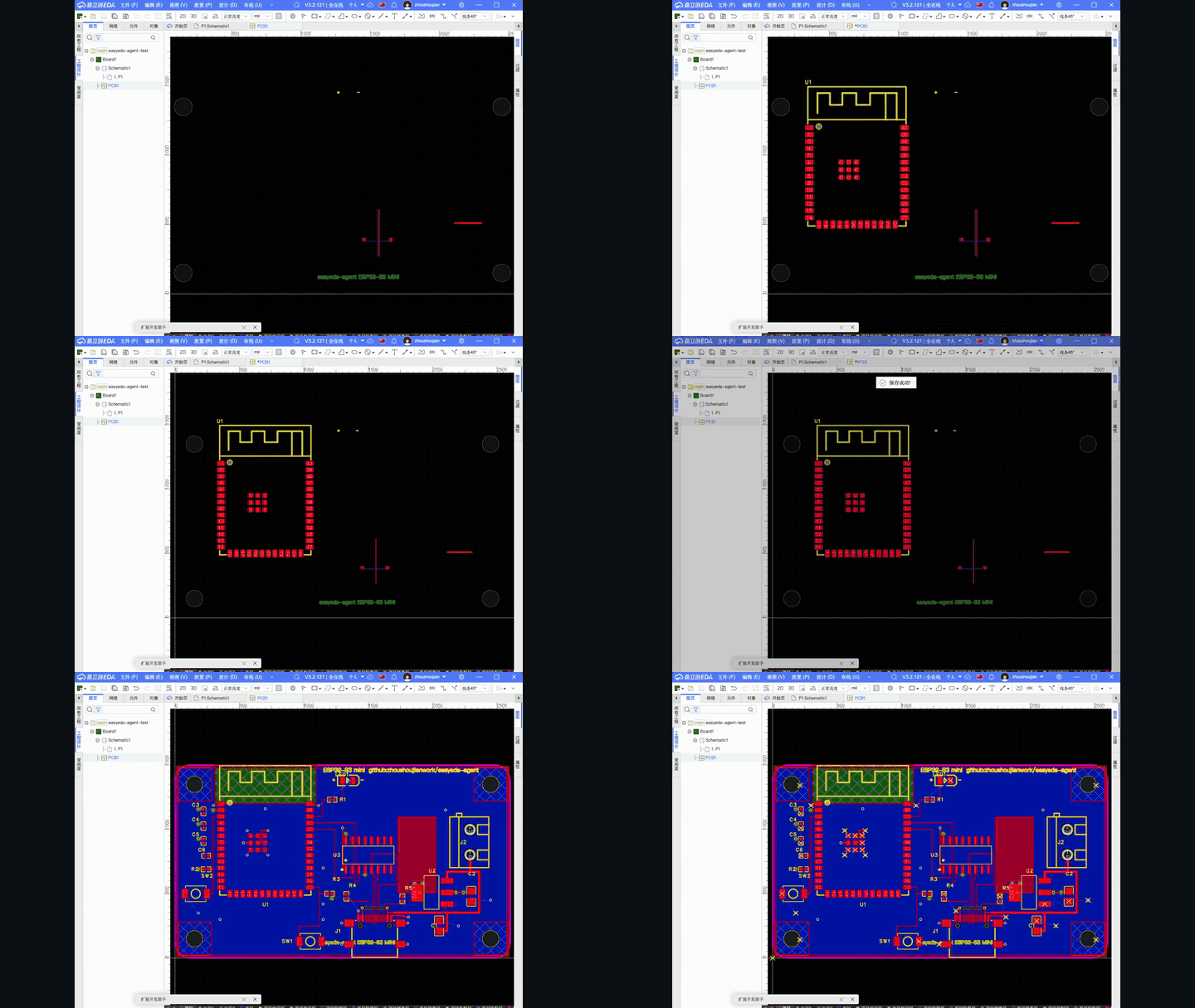
The board below was produced by the agent driving the full PCB workflow — auto-placement → outline fitting → rule-aware routing → 4-layer power planes → silk collision avoidance — and verified on the real EasyEDA canvas (DRC 31 → 3, No-Connection to zero):

Before/after on the same board:
pcb outline-fit board outline fitting (utilization 17% → 71%) | pcb silk-align silk collision avoidance |
|---|---|
 → →  |  → aligned result shown in the finished board above → aligned result shown in the finished board above |
The PCB GIFs and screenshots in this section come from the real ESP32 regression board process (schematic → import PCB → 4-layer stackup → placement → GND inner layer / VCC signal plane → antenna keep-out + check → silk/LED polarity → slotting). This is a historical regression case independent of the access-control board example; the original requirements are in esp32MiniRequire.md.
Capability list (supported)
Exposed as typed CLI subcommands (easyeda <domain> <verb>). The 1.4.5 verification scope and outstanding items are in 1.4 Release & Verification.
Schematics — full functional map (40+ supported subcommands by domain + roadmap) in docs/cli/schematic.md (CLI index: docs/cli/); summary:
- Components & libraries: place real components from JLC/LCSC libraries by uuid, swap part numbers (
replace), rebind symbol/footprint, deterministic C-number resolution (resolve-lcsc);modifyattribute merge semantics (patching top-level fields no longer clears custom attributes, #175). - Wiring:
connect/autoconnect(scorer picks direction — collision/component-penetration/title-block/fanout all geometric cost, netport vertical stacking penalty keeps dense pin-column labels horizontal)/disconnectpairwise delete; auto-rotation compensation for power/ground symbols. - Data & layout: connectivity graph preserves stable component IDs, pins, nets, and NCs; legal numeric designators kept as-is, functional names stored as Role.
sch composecomposes a single page offline from designed Lib geometry, arranging left-to-right in Z order; each frame tightened independently by internal content, same-row top-aligned, next row advances by current row's max height.sch frame apply/checkgenerates and verifies pink dashed frames and 0.2 inch titles with minimum padding. The composer does not infer arbitrary peripherals, does not auto-paginate, or delete source pages. - Conversion & validation:
sch applyserially executes the planned queue, checks preconditions and reads back pins/nets/NC/geometry; on failure re-reads and re-plans.sch gate --strictfour-phase (layout-lint→check→bridge-check→drc), covering overlaps, dangles, shorts, and official DRC;layout-scoreprovides layout quality diagnostics. - Cross-page net audit & reconciliation:
sch nets --strict(net-name variants/single-pin net mechanical interception) +sch reconciledesign-intent reconciliation + netlist golden table per-pin comparison — "legal connection" and "correct connection" are gated separately. - Circuit block library:
block-applyone-click instantiates verified topologies (37 blocks: 19 ready / 13 verified / 5 draft, offline query), placement + wiring + netlist reconciliation in one command;extract-layoutreverse-derives templates from real boards. - One-call
sch read(components + nets + checks), BOM/netlist export (auto LCSC C-number fill), page map SVG/PNG/PDF.
PCB — Layout
pcb new-board— creates a new board + empty PCB page from a schematic and binds them (CLI version of "New PCB / Schematic to PCB"), thenpcb import-changesfor layout from scratch; distinct fromboard.createwhich only links.pcb auto-place— module-aware heuristics: satellite components placed on the side of the pin they connect to, 2-pin components auto-rotated, multi-chip spread; spacing rule-aware (derived from live DRC clearance),--assembly-gapas fallback for hand-solder spacing.pcb outline-fit(fit board outline to components) /pcb outline-round(rounded-rect board outline).pcb layout-lint— layout quality + placeability score (route MST + cross-net crossings), predicted before routing.pcb silk-align— designator position-aware collision avoidance re-layout (v2): scores 4 directions for each designator by local gap + board position + congestion axis, avoiding others' pads/component bodies/keep-outs/board outline/other labels; reports squeezed-out rather than overlapping pads.pcb silk-add/pcb silk-set— add free silk text strings (board notes / LED polarity+/−markers, configurable layer/font/width/rotation, JLCPCB-readable defaults) + batch-adjust existing silk, with--align --refreference alignment (center board notes to board outline, align labels to component edges).pcb add-component— add a single component to an existing PCB and connect its pad nets (bypasses broken incrementalimport_changes).
PCB — Routing & Copper
pcb route-short— heuristic short-trace routing: per-net MST, rule-aware wire width (signal vs power), obstacle-aware L orientation, defaults to skipping power/ground nets (they should be poured).pcb pour(rule-aware copper to board-edge inset) /pcb pour-fit/pcb via-stitch/pcb rip-up.pcb power-planes— 4-layer power assignment: GND + power each get a dedicated inner plane + per-pad via stitching; after pour, flip GND inner to Inner/PLANE (signal-layer pour → flip type → re-pour verified recipe, clean DRC), matching the common customer stackup GND=Inner / VCC=Signal (brought regression board DRC 31→0, No-Connection to zero).pcb region(copper keep-out / antenna clearance) /pcb fill/pcb slot(slot cutting / MULTI-layer board hollow).
PCB — Stackup, Rules, Manufacturing
pcb stackup— set copper layer count (2/4/6…/32) + inner layer types (signal↔plane/inner).- Full-chain rule awareness — daemon reads the board's live DRC rules (
pcb drc-rules) and complies; falls back to authoritative JLCPCB fab rule reference (real board-type export) when missing.pcb drcruns checks. pcb export-dsn(Specctra DSN, for external Freerouting, with keep-out injection) /pcb import-autoroute/pcb snapshot.
Infrastructure
- Typed action protocol (
--helpself-describing,easyeda actionscatalog) +debug.exec_jsprototype escape hatch. easyeda notify— pops a non-blocking toast in the EasyEDA window (info/success/warn/error/question), so the flow can announce each step in real time ("routing done, next: copper pour").- Connector self-heal reconnect watchdog (auto-reconnects after daemon restart / window backgrounding) + daemon debounced auto-save.
Not yet supported / platform walls
Honest boundaries. The 2026-07-01 scan of the official marketplace (docs/marketplace-coverage.md) corrected these — the real walls are only in interactive UX APIs; most "results" (routing/vias/teardrops/net length) are actually reachable and went into the absorption list rather than being blocked:
- Maze-grade auto-routing (dense / any-distance / push) — the daemon only does short, clear heuristic routing. Full routing goes through external Freerouting (DSN round-trip assets ready); turnkey integration is deferred (requires Java; awaiting official auto-router past
@alpha). - Interactive routing UX — interactive menus (push-drag routing, real-time equal-length serpent, de-looping) have no
eda.*API. But their outputs — differential-pair geometry, fanout drills, equal-length serpentine — can be written viapcb_PrimitiveLine/Via.create, so they are implementable as our heuristics (absorption list, not a wall); only the drag UX is UI-exclusive. - Controlled impedance Z0 — a real wall: stackup Er / dielectric thickness / copper thickness are unreadable via
eda.*, so Z0 widths can't be computed. But net length is readable (pcb_Net.getNetLength), so equal-length/skew/timing-margin reports are feasible (absorption list) — this was previously mislabeled as a wall. - Teardrops — no typed create API; but a document-source injection path (like
eext-balance-copperdoes net-less fill) may work, unverified. Manually applied in the UI for now. - No programmatic undo —
eda.*has no undo/redo; rollback is hand-rolled (data snapshot + reverse ops). - Incremental
import_changes— no-op for API-added components (platform limitation); place the full circuit before first sync, or usepcb add-component. - Silk density limit —
silk-alignavoids labels where whitespace exists; layouts denser than the labels can't fully de-overlap (reportsunresolvedCollisions) — loosen the layout.
Marketplace coverage matrix + priority absorption list in docs/marketplace-coverage.md; action catalog in docs/FEATURES.md; eda.* API coverage map in docs/ecosystem-survey.md.
Repo Structure
cmd/easyeda/                 CLI 入口(人和 Skill 都用)
internal/app/                CLI 命令实现
internal/daemon/             本地 daemon:/health、/eda(连接器 WS)、/action
internal/protocol/           与连接器共享的 typed action 协议(actions.go)
extension/                   EasyEDA 连接器(.eext)源码 + 构建(TypeScript → esbuild)
skills/easyeda-agent/        合并后的公开 Skill:工作流、参考、脚本、规范数据
docs/                        架构、协议、功能/路线图、规范、决策
Design positioning
Raw JavaScript execution is still useful for debugging, but it is not the primary AI interface. The default interface should be typed actions: explicit inputs, predictable outputs, artifact handling, validation hooks.
Further reading: Quick Start & Usage Notes · Feature List & Roadmap · Architecture · Protocol · Skill Design · Dev Environment & Debugging Manual
Thanks
Special thanks to JLC EDA (EasyEDA Pro / JLC EDA) for opening its extension plugin channel and official eda.*
API. The entire automation layer is built on this open plugin platform — without it, this project would not exist.
easyeda-agent always acts as a thin, well-behaved "citizen" in the official plugin ecosystem; every capability here ultimately
reduces to JLC's own eda.* calls. Thanks to JLC for letting us build such a useful plugin.
Cited projects & prior work (credits)
Built on these OSS projects — thanks:
- @jlceda/pro-api-types — official EasyEDA Pro
eda.*API type definitions (the connector type-checks against it). - Freerouting — external maze-grade auto-router, our
pcb export-dsn/import-autorouteround-trips against it. - spf13/cobra (CLI framework) · coder/websocket (daemon ↔ connector) · esbuild (connector bundling).
- Official EasyEDA extensions (github.com/easyeda) — we studied their
eda.*API usage and algorithms (not copying UI) as prior work; absorption list indocs/ecosystem-survey.md. Notably,eext-run-api-gatewayproved the in-editor code channel, andeext-export-design-reportinspired the design-report reading. - Unabsorbed candidate: polyclip-ts (polygon booleans) — for future silk fill avoidance (see
docs/ecosystem-survey.mdA10).
License
MIT — use freely, modify freely, commercial use OK; just keep the copyright notice.
One exception: the four files under extension/src/beautify/ are ported from
Easy_EDA_PCB_Beautify (author m-RNA),
retaining its Apache-2.0 license (full license text in
extension/src/beautify/LICENSE; attribution & change log in
NOTICE). Both are compatible and do not affect overall MIT usage.
Star History
Thanks for every star.
Comments
Loading…
Similar plugins
Cadence SKILL (Virtuoso Lisp) assistant for EDA engineers: official-doc-anchored API lookup (3557 entries across 5 IC6.1.8 manuals, signature confidence levels, never invents APIs) plus zero-execution
★ 0
dsh plugin --profile web add cadence-skillby AmethystLuna
Embedded C/C++ AI engineering plugin — firmware skills (FreeRTOS, Keil, HardFault, state machines) + 1% Rule / Plan Verification Gate discipline | 嵌入式 C/C++ 工程 AI 插件:固件技能与 agent 纪律。 For Claude Code, C
★ 25
↓ 988/wk
MIT
JavaScript
Oct 26, 2026
dsh plugin --profile web add dsh-embedded-workbenchby GanyuanRan
Make AI coding agents architecture-aware: baseline-first, evidence-verified, drift-checked, and safe across long tasks.
★ 1.4k
↓ 35/wk
MIT
Python
Oct 25, 2026
dsh plugin --profile agent add aegisby shuguang1994
Make any project AI-agent-ready in one command. Adaptive tech stack detection (7 languages × 14 frameworks × 61 components), auto-generates AGENTS.md, docs skeleton, CI/CD, and testing infrastructure.
★ 23
↓ 19/wk
MIT
JavaScript
Oct 14, 2026
dsh plugin --profile web add project-blueprintby datit309
Engineering workflow system for AI coding agents — mandatory planning, TDD, verification, review, and intelligent codebase graph analysis.
★ 23
↓ 6/wk
MIT
JavaScript
Oct 28, 2026
dsh plugin --profile web add supergraphby LoveDoLove
Veyra — Engineering Intelligence for Coding Agents. Persistent, evidence-aware, project-isolated engineering memory and unified hybrid search (memory + RAG documentation) for DeepSeek Harness.
★ 3
↓ 634/wk
MIT
JavaScript
Oct 27, 2026
dsh plugin --profile web add @lovedolove/veyra