
dsh-lazy-mcp
Manifest validMCP gateway for dsh that connects each server on first use and disconnects it after an idle window; tool lists are cached on disk, existing mcpServers files can be imported, and child-process environm
dsh-lazy-mcp


A lazy-loading MCP gateway for DeepSeek Harness (DSH). No MCP server starts at boot: each server connects on first use and is released after an idle window. Tools and resources are bridged into the model's tool catalog, and the Web UI shows live server state.
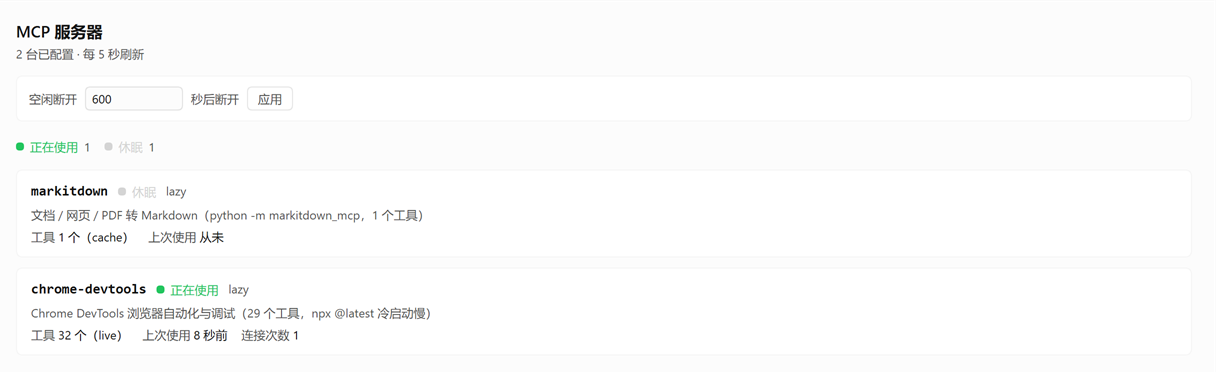
The status panel: per-server state, lifecycle, tool count, and the adjustable idle window.
Why this exists
@deepseek-ai/dsh-mcp-client connects every configured server while the plugin activates and awaits the initial connection plus tool discovery, so:
- every server is live before the Harness's first turn;
- a slow or broken server delays startup;
- servers stay resident until the Harness restarts (its only
idle-shaped knob,reconnect.maxDelayMs, governs reconnect backoff, not idle shutdown).
This gateway starts nothing at boot.
| Behaviour | dsh-mcp-client | this plugin |
|---|---|---|
| Server process at Harness startup | started | not started |
| Server starts | at plugin activation | on first tool call that needs it |
| Server stops | only on config reload / Harness restart | after idleDisconnectMs idle |
| Standing tool definitions | one per MCP tool, sent every request | 3 fixed gateway tools |
| Tool schemas in context | all, always | only when mcp_tools is called |
| Describing a dormant server | requires a connection | served from cached metadata |
| Per-server lifecycle | one behaviour | lazy / lazy-keep-alive / eager / keep-alive |
Install
Requirements: Node.js 20 or newer and a DSH profile (the Web profile is the usual one). The package has no @deepseek-ai/* dependency, so a Harness peer-range change cannot break it; its single runtime dependency is the MCP TypeScript client SDK, the same SDK the official bridge uses.
Option A — install from GitHub
dsh plugin --profile web add github:zhe97396-tech/dsh-lazy-mcp
Then restart dsh web. The Host half and the browser half are both loaded from the installed package, and a running Harness cannot pick up a freshly installed module without a restart.
Option B — install a release tarball
Download dsh-lazy-mcp-<version>.tgz from the Releases page and install it through the plugin manager (or dsh plugin --profile web add ./dsh-lazy-mcp-<version>.tgz), then restart dsh web.
The plugin is enabled by an - id: lazy-mcp row in the profile. A configuration-only change normally hot-reloads, but when it ships inside a replaced package the manager defers it to the restart (the result reads application: "restart-required"). Toggling the row off and on — the plugin manager's set_plugin on include:lazy-mcp — forces a re-compose and applies the new configuration immediately, without a restart.
Two halves
| Half | File | Loaded by |
|---|---|---|
| Host | index.js | the bundle row in cordis.patch.yml |
| Browser | client.js | the dsh.client declaration in package.json, served by dsh-client-modules |
The browser half imports no DSH Client package: React comes from the browser module table and every color is a theme token, so it follows light and dark without a second stylesheet. Its __ModuleLoader__.load({ id }) uses the exact package name, which is why the package name, the Loader row name, and the naming manifest must be renamed together.
The two halves are wired only by the read-only JSON route the Host half registers at /lazy-mcp/state and by the shared panel id lazy-mcp.
Where it actually lives
| What | Where |
|---|---|
| Profile dependency + bundle list | ~/.dsh/profiles/web/package.json |
Installed package — a real directory with its own node_modules | ~/.dsh/profiles/web/node_modules/dsh-lazy-mcp |
| Vendored tarball (only when installed from a tarball) | ~/.dsh/profiles/web/.local-packages/dsh-lazy-mcp-<version>.tgz |
| Enablement override written by the plugin manager | ~/.dsh/profiles/web/cordis.patch.yml (- id: lazy-mcp) |
| Source | this repository — not read at runtime |
The plugin's settings live in this package's own cordis.patch.yml, loaded as the bundle's patch layer — not in the profile's cordis.patch.yml. To override a setting from the profile layer instead, add an - id: lazy-mcp entry with a config there; the profile layer wins.
Rebuilding after a code change
cd dsh-lazy-mcp
pnpm install
pnpm run check      # syntax check of both halves
pnpm run lint       # package identity / manifest consistency
pnpm run verify     # self-check harness (starts a real MCP reference server)
pnpm pack           # dsh-lazy-mcp-<version>.tgz
Bump version first, so the new artifact gets a distinct name and the old one can be pruned, then install that tarball through the plugin manager and restart dsh web.
Configure
The package ships with no servers configured (servers: []), so nothing is spawned until you add entries to the lazy-mcp row's config:
- id: lazy-mcp
  config:
    idleDisconnectMs: 600000        # disconnect a lazy server after 10 minutes idle
    connectTimeoutMs: 30000         # deadline for connect + tool discovery
    callTimeoutMs: 60000            # deadline for one tools/call
    # cachePath: !!js dshHomePath('lazy-mcp/tool-cache.json')   # default: <DSH_PROFILE_DIR>/lazy-mcp/tool-cache.json
    servers:
      - name: docs                  # ^[A-Za-z0-9_-]{1,32}$, unique
        transport: stdio
        lifecycle: lazy
        description: Documentation lookup
        command: npx
        args: ['-y', 'some-mcp-server']
        # env: { SOME_TOKEN: '...' }   # optional, merged over the scrubbed env
        # cwd: 'C:\path\to\project'    # optional
        # idleDisconnectMs: 120000     # optional per-server override

      - name: knowledge
        transport: streamable-http
        lifecycle: lazy
        description: Internal knowledge base
        url: https://mcp.example.com/rpc
        # headers: { Authorization: !!js '`Bearer ${process.env.MCP_TOKEN}`' }
Every field is optional except a server's name, transport, and that transport's target (command for stdio, url for streamable-http). An invalid configuration fails activation with the exact offending path named.
Environment scrubbing
A stdio server's child environment is the parent environment minus every name matching KEY|PASSWORD|SECRET|TOKEN (case-insensitive) and minus every DSH_* name, then merged with the server's explicit env. This matches the shipped subprocess seam's definition, so a child server never inherits this process's model credentials. A server that needs a secret must receive it through its own env mapping. Env values are never logged and never written to the cache — only the key set is, and only to detect a configuration change.
Importing an existing MCP setup
Point configPaths at any JSON file containing a standard mcpServers object and its servers appear here. This is how an existing Pi (pi-mcp-adapter), Claude Code, Cursor, or .mcp.json setup becomes reusable without copying commands by hand — the other tool stays the source of truth.
- id: lazy-mcp
  config:
    configPaths:
      - '~/.config/mcp/mcp.json'          # Pi shared config
      - '~/.pi/agent/mcp-adapter.json'    # Pi adapter config
Standard fields are translated: command/args/env/cwd become a stdio server, url/headers become a streamable-http server. A leading ~/ in a path, and ${VAR} / $VAR in args, cwd, env, headers, and url, are expanded from the environment — an unknown name is left literal rather than becoming an empty string, so a mistake stays visible.
Pi-specific tuning is honoured where this plugin has an equivalent:
| Pi field | Effect here |
|---|---|
lifecycle | used directly (lazy / lazy-keep-alive / eager / keep-alive) |
idleTimeout | minutes in Pi, converted to idleDisconnectMs |
disabled: true / enabled: false | the server is skipped |
type: "sse" | rejected with a clear error — SSE is not supported |
directTools, includeTools, excludeTools, and searchKeywords are ignored; they have no equivalent here.
Precedence and overrides
Later sources win on a name collision:
- each
configPathsfile, in order - an inline
mcpServersmapping in the row config - the native
serversarray - per-field
overrides
overrides patches individual fields of an imported server, so you can give it a description or a lifecycle without restating its command:
    overrides:
      chrome-devtools:
        description: Browser automation and debugging
        lifecycle: lazy-keep-alive
An entry with disabled: true removes that name entirely, which is how you switch off an imported server without editing the other tool's file.
Tolerance rules
The imported files are a live source that can change under you, so a problem there must not stop the Harness from starting:
| Situation | Behaviour |
|---|---|
a configPaths file is missing | warned and skipped |
an overrides key matches nothing | warned and ignored |
a configPaths file is malformed JSON | activation fails loudly |
a server entry is invalid (no command or url, bad name) | activation fails loudly |
The rule is: absence is tolerated, corruption is loud.
Lifecycle modes
Set per server with lifecycle. The default is lazy.
| Mode | Connects | Idle-disconnects | Use when |
|---|---|---|---|
lazy | on first use | yes, after idleDisconnectMs | the default: cheap to start, used occasionally |
lazy-keep-alive | on first use | never after the first use | expensive to start — you do not want to re-pay startup every idle window |
eager | begins at activation | no, unless idleDisconnectMs is set explicitly | you want it warm, but a slow server must not delay startup |
keep-alive | begins at activation | no, unless idleDisconnectMs is set explicitly | always-available servers |
eager and keep-alive start connecting when the plugin activates but activation never waits on them, so a slow or broken server cannot delay Harness startup. A failed background connect is logged, not thrown.
After the first successful connect, a lazy-keep-alive server is reported as pinned=yes and its idle timer is never armed again.
All four modes recover the same way: if a connection drops, the next call reconnects. There is no background health check or reconnect loop.
Metadata cache
The first successful connect writes the server's tool list to <DSH_PROFILE_DIR>/lazy-mcp/tool-cache.json (atomic temp-file-plus-rename write). While a server is dormant, mcp_tools answers from that cache and does not start the server:
mcp_tools { server: "docs" }                  -> cached list, server stays dormant
mcp_tools { server: "docs", refresh: true }   -> connects and re-reads live metadata
The cache is keyed by a fingerprint of the server's transport, command, arguments, working directory, URL, and env key set. Changing any of those makes the entry unusable, so a stale cache can never describe a server that has since been reconfigured. A missing, unreadable, malformed, or wrong-version cache is never an error; it just means no server has cached metadata yet.
After an idle disconnect the record falls back to the cache, so mcp_servers reports tools=13(cache) rather than claiming live metadata it no longer has. If the cache write has not landed yet, it reports (memory) instead — the in-process list is still used rather than forcing a reconnect.
Tools
MCP exposes three primitives: tools (functions the model calls), resources (documents and data it can read), and prompts. This gateway bridges the first two. Prompts are not bridged.
| Tool | Connects? | Purpose |
|---|---|---|
mcp_servers | never | List servers with lifecycle, state, tool count, metadata source, last error, connection count |
mcp_tools | only with refresh: true | List one server's tools with input schemas; served from cache while dormant |
mcp_call | yes, on demand | Invoke server + tool + arguments, then reset the idle timer |
mcp_resources | yes, always | List one server's resources and resource templates; report "no resources" rather than failing |
mcp_read_resource | yes, on demand | Read one resource by exact uri, then reset the idle timer |
Typical flow:
mcp_servers                                        -> which servers exist, which are dormant
mcp_tools    { server: "docs" }                    -> cached list; server NOT started
mcp_tools    { server: "docs", refresh: true }     -> starts it; live list
mcp_call     { server: "docs", tool: "search",
               arguments: { query: "x" } }         -> runs it; resets the idle timer

mcp_resources      { server: "kb" }                -> what it can READ; connects
mcp_read_resource  { server: "kb",
                     uri: "kb://doc/42" }          -> the body; resets the idle timer
Concurrency: two calls that need the same dormant server share one connect attempt; calls to different servers are independent.
Resources
mcp_resources is the read half. It exists because some servers put nearly all their value in resources — a filesystem server exposes files, a knowledge base exposes documents, a database server exposes schemas and rows — and a tools-only bridge connects to those and then shows you nothing.
It always connects. mcp_tools can answer from cache while dormant; a resource list cannot, because holding one stale is worse than paying for a connection. A dormant server therefore wakes on the first mcp_resources call, and the idle timer reclaims it as usual. A server that answers "method not found" for resources/list gets a plain sentence saying so, not a failure.
Binary bodies are never inlined. A resource carries either text or blob. A base64 body would spend the context window on bytes the model cannot use, so it becomes a size notice — the same projection the official dsh-mcp-resources uses:
demo://resource/dynamic/blob/42  text/plain
[binary resource: 72 base64 characters; available to programmatic callers]
Text bodies are returned whole up to 8,000 characters per body, with the uri and mime type above them.
Templates are listed, not expanded. A template like demo://resource/dynamic/text/{resourceId} is shown as-is with a note to substitute the variables and read the resulting uri; the gateway never guesses what belongs in a placeholder.
Both tools connect through the same ensureReady the tool side uses, so a resource read shares the lazy lifecycle, the idle reclaim, and the delivery vocabulary. Neither is ever cached to disk — only tool metadata is.
Status panel
The browser half adds one entry to the sidebar (sidebar.panellist, order 40, label MCP) and the panel behind it (main, key lazy-mcp). The shell owns the button: a sidebar.panellist id addresses the main panel of the same name, so this plugin writes no navigation code and supplies only an icon (through the slot's { size, active } props) and a panel body.
The panel polls /lazy-mcp/state every 5 s and shows, per server: a state badge, lifecycle, tool count with its metadata source, last-used time, and connection count. Opening it cannot wake a server — the route reads the in-memory records and never touches a transport.
| Badge | Meaning | Derived from | Token |
|---|---|---|---|
| 正在使用 (in use) | socket open, used within 120 s | status === 'ready' and last call within 120 s | --dsw-alias-state-success-primary |
| 已连接 (connected) | socket open, idle | status === 'ready', idle longer than that | --dsw-alias-brand-primary |
| 连接中 (connecting) | connect in progress | status === 'connecting' | --dsw-alias-state-warn-primary |
| 休眠 (dormant) | no process, no error | status === 'dormant', no recorded error | --dsw-alias-state-idle-primary |
| 连接失败 (failed) | last attempt failed | lastError present — wins over the transport state | --dsw-alias-state-error-primary |
The status labels are Chinese in the UI; the meaning column above is the reference for a localization change (see Contributing).
The last row is the one that matters: a server whose connect threw keeps status: 'dormant', so the Host records lastError beside it and the panel reports failure rather than a reassuring grey dot.
Only three of those five are real Host states. The Host has exactly dormant, connecting, and ready; the panel splits ready into two colors by recency. 正在使用 and 已连接 are the same underlying state — the socket is open and the tool list is live in both — and the 120-second line between them is presentation only: it changes nothing about behaviour and nothing about when the server is dropped. The only line that does anything is idleDisconnectMs.
So, with the defaults, one use produces this timeline:
a call ──┬─ 0–120 s ────── 正在使用   (ready)
         ├─ 120–600 s ──── 已连接     (ready)
         └─ > 600 s ────── 休眠       (dormant, process released)
The countdown is armed at connect and reset by every use, so the window is "10 minutes since the last activity", not "10 minutes since connecting". Activity means mcp_call or mcp_tools { refresh: true } — both touch the server. mcp_servers and a cached mcp_tools do not reset it, because neither touches the server; that is what makes "look at the tool list" free.
To watch all three states in a couple of minutes, set the window to 180: 120 s of 正在使用, 60 s of 已连接, then 休眠.
The route exposes names, states, and counts only — never the transport target (which can be a command line) and never an environment value. GET is read-only and cannot wake a server. webServer is a soft dependency read through ctx.get, so headless and SDK profiles load the plugin with the three gateway tools and simply have no panel.
The in-conversation chip
The panel is one click away, but the question "is anything connected right now?" should not cost a click. The browser half therefore also registers into conversation.session.header.utilities — the right-aligned Session utilities, between the session-log download (order 0) and dsh-better-sidebar's bottom toggle (order 10) — as a small chip.

The chip in the session header: a green dot and the connected server names.
| Condition | Chip |
|---|---|
| Every server dormant | Nothing is rendered |
≥1 server ready, none used in the last 120 s | Accent dot + the connected names |
≥1 server ready and used within 120 s | Green dot + the connected names |
≥1 server connecting | Accent dot + the names |
Rendering nothing when everything is dormant is deliberate. Absence is the signal, and a chip in every session — including the many that never touch an MCP server — would be permanent clutter carrying no information. The tooltip carries the detail: the connected names, the failed count, and the effective idle window.
The chip and the panel share one poller: a module-level store with a listener set, so the two consumers produce one request per interval instead of two, and polling stops entirely when the last consumer unmounts.
The idle window is adjustable from the panel
The panel carries one setting: the idle window, entered in seconds. The stored value is milliseconds and the Host validates the range (MIN_IDLE_DISCONNECT_MS…MAX_TIMER_DELAY_MS), but seconds are what a person can picture — 600 is a window, 600000 is a number to misread.
| Verb | Effect |
|---|---|
GET /lazy-mcp/state | The snapshot |
POST /lazy-mcp/state { "idleDisconnectMs": 1800000 } | Set the window, re-arm every connected server's deadline, persist |
DELETE /lazy-mcp/state | Drop the override and restore the configured value |
Precedence: the panel wins over the row config. The override is persisted at <cache directory>/settings.json — beside the metadata cache, so the plugin owns one directory and reuses the cache path's own fallback chain — and it survives a restart. "Restore default" deletes the file rather than writing an empty object, because an absent file is the canonical "no override".
Two deliberate limits:
- A per-server
idleDisconnectMsin the config is not moved. It is a deliberate per-server decision, so only servers without one follow the panel. The snapshot reportsidleDisconnectMsExplicitper row. - Re-arming touches only
readyrecords. A dormant server has no deadline to move, and arming one would show a timer that is not running.
Neither verb connects, disconnects, or reconfigures a server. The request body is bounded to 4 KiB and validated before anything is written.
Delivery classes
A failed mcp_call reports how far the request got, because retrying a call that may already have run is how you double-charge a card or post a comment twice. Every failure message carries [delivery=…] plus explicit guidance.
| Class | Meaning | Guidance given to the model |
|---|---|---|
not_sent | The request never reached the server; nothing ran | Fix the cause and retry |
server_error | The server answered with an MCP error | The tool may have partially run; read the error first |
may_have_run | The request was sent and the outcome is unknown (timeout, cancellation, transport loss) | Do NOT retry automatically — confirm the effect or ask the user |
A may_have_run failure also resets the connection, so the next call starts from a clean transport.
Conservative by design: a rejection that happens after dispatch is classified may_have_run even when it is probably harmless. Client-side argument validation by the MCP SDK also lands in may_have_run, not not_sent, because this plugin cannot prove nothing was sent. Erring pessimistic is the safe direction.
Idle lifecycle
- Activation registers three tools and marks every server
dormant(excepteager/keep-alive, which begin connecting in the background). No process is spawned and no connection is opened. - The first
mcp_tools { refresh: true }ormcp_callfor a server connects it and arms the idle timer. - Each later use re-arms the timer.
mcp_toolswithoutrefreshdoes not, because it never talks to the server. - When the timer fires, the transport/client is closed, the child process is released, and the server returns to
dormantwith cached metadata intact. - Plugin unload or HMR disposes every live connection through
ctx.effectand waits for any in-flight cache write.
Verification
verify.mjs drives the plugin's real apply() in a fresh Node process with a stub Cordis context, exercising the implementation rather than a copy of it:
pnpm run verify # or: node verify.mjs
It covers the empty configuration; the cache round trip (including "serving the cache did not reconnect"); all four lifecycle modes; all three delivery classes; standard mcpServers import with precedence, overrides, ${VAR} expansion and Pi's minutes-to-ms idleTimeout conversion; the tolerance rules; the cache path fallback; a real Pi configuration when one exists on the machine (skipped otherwise); and the resource half (listing, reading, template substitution, and the binary projection). Current result: 76 checks, 0 failures. It spawns the MCP reference server through npx, so the first run downloads that package, and it needs network access.
CI runs the check, lint, pack, and the full verification harness on Linux and Windows.
Two one-off probes sit beside it for the question "what does this server actually expose?":
node probe-capabilities.mjs   # tools / resources / prompts capabilities, one server
node probe-resources.mjs      # full resource + template surface, plus one read
This harness exists because the DSH Loader pins an imported module generation: a running Harness cannot pick up edited plugin JavaScript without a restart, so in-host testing cannot see code changes. See Development notes.
Known limitations
- Text-only results. Raw MCP blocks are summarized: text passes through, images/audio/resources become explicit
[image omitted: …]markers. The official bridge additionally performs durable image projection through the attachment service; that is deliberately not reimplemented here. - Binary resources are reported, not delivered. A
blobbody becomes a size notice; the bytes stay with the server. Programmatic callers would need the official bridge. - No re-notification sync. If a connected server changes its tool list mid-session, the cached list is refreshed on the next connect rather than by a
list_changedsubscription. Resource lists are never cached, so they are always read live. - No OAuth. Authenticated servers use static
headers. - No prompt templates, resource subscriptions, or task-based execution.
- No
directTools. Every MCP tool is reached throughmcp_call; none is registered as a first-class tool with its own schema in the tool catalog. - No
includeTools/excludeToolsfiltering, and nosearchKeywords. mcp_serversreports cached state and never probes a dormant server.- UI status labels are Chinese. Behaviour is unaffected; a localization PR is welcome.
Development notes
Two behaviours of the DSH plugin system shape how this package must be worked on.
- A workspace-authored bundle is installed as a symlink, so its dependencies must live beside the source.
install_bundlelinks the workspace directory into the profile'snode_modules, and Node resolves the realpath, so it looks fornode_modulesnext to the source file. Hence the.npmrcnode-linker=hoisted: pnpm's default isolated layout keeps dependencies undernode_modules/.pnpm, which is unreachable from the symlinked path. The failure mode isfailed to import/Cannot find package …. Installing a packed tarball or from GitHub sidesteps the whole problem. - Edited JavaScript needs a
dsh webrestart. The Loader pins the resolved module generation, so toggling the row off and on re-applies the config (which does hot-reload) but re-imports the cached module. Changing the entry file path or the package name does not defeat this. Edit, then restart.
Three defects worth remembering
- The metadata cache silently never wrote in production.
resolveCachePathtrusted$DSH_PROFILE_DIR/$DSH_HOME, but the Host process does not inherit them — those variables are injected into shell tool calls, not into the Host. The harness passed because it supplied an explicitcachePath. Fixed with a~/.dshfallback and now covered by a test that deletes those variables first. Only live testing could have caught this. - An idle-disconnected record kept claiming live metadata, so the cache was never consulted and
mcp_toolsreconnected instead of describing. The harness caught this one, but only because the cache test asserts on connection counts rather than on the returned text alone. - A timer assertion was flaky. Waiting 8s for a 6s idle window passed most runs and failed occasionally under load. Every idle assertion now waits more than twice its window. A test that races a timer needs a margin, not a guess.
The lesson for this plugin: assert on the state machine, not on rendered text; never trust an environment variable the Host may not have; and give every timer assertion a generous margin.
Contributing
Bug reports, fixes, and documentation patches are welcome — see CONTRIBUTING.md for the development setup and the repository invariants.
License
MIT © 2026 zhe97396-tech
Comments
Loading…
Similar plugins
by wings1848
Lazy MCP gateway for DeepSeek Harness: one stable proxy tool instead of N tool schemas, servers connect on first use and idle out, metadata cached to disk.
★ 10
↓ 119/wk
MIT
TypeScript
Oct 20, 2026
dsh plugin --profile web add dsh-mcp-lazyMCP server marketplace for DSH: browse a curated, npm-verified catalog and install MCP servers into the current profile with one click, live without restart.
★ 0
dsh plugin --profile web add dsh-mcp-marketby appthin
MCP management page in DSH Settings: list, enable/disable, restart and delete MCP servers, edit them in form or JSON mode, expand a server to see the tools it registers, and paste-import MCP configs f
★ 12
↓ 569/wk
MIT
JavaScript
Oct 15, 2026
dsh plugin --profile web add dsh-mcp-manager-plusby whiteS18
MCP server management panel in Settings: add, edit, enable/disable and delete servers across user and workspace scopes with form or JSON editing, and auto-register discovered MCP tools as native conve
★ 0
MIT
JavaScript
Oct 8, 2026
dsh plugin --profile web add dsh-mcp-servers-panelDeepSeek Harness bundle: manage MCP servers — list, probe, add from pasted project references, toggle, remove, rotate credentials. Official dsh-mcp-client contract compliant.
★ 0
NOASSERTION
JavaScript
dsh plugin --profile web add @dsh-contrib/dsh-mcp-managerA CodeGraph tool scoped to the session's own indexed project, resolved from its workspace directory. One MCP server is launched through npx per project root and shared by every session working there;
★ 0
dsh plugin --profile web add dsh-plugin-codegraph-project