

dsh-pricing-badge
Manifest valid★ 1Shows the DeepSeek API peak and off-peak hours, the current model's output price and the account balance in the Web UI.
dsh-pricing-badge
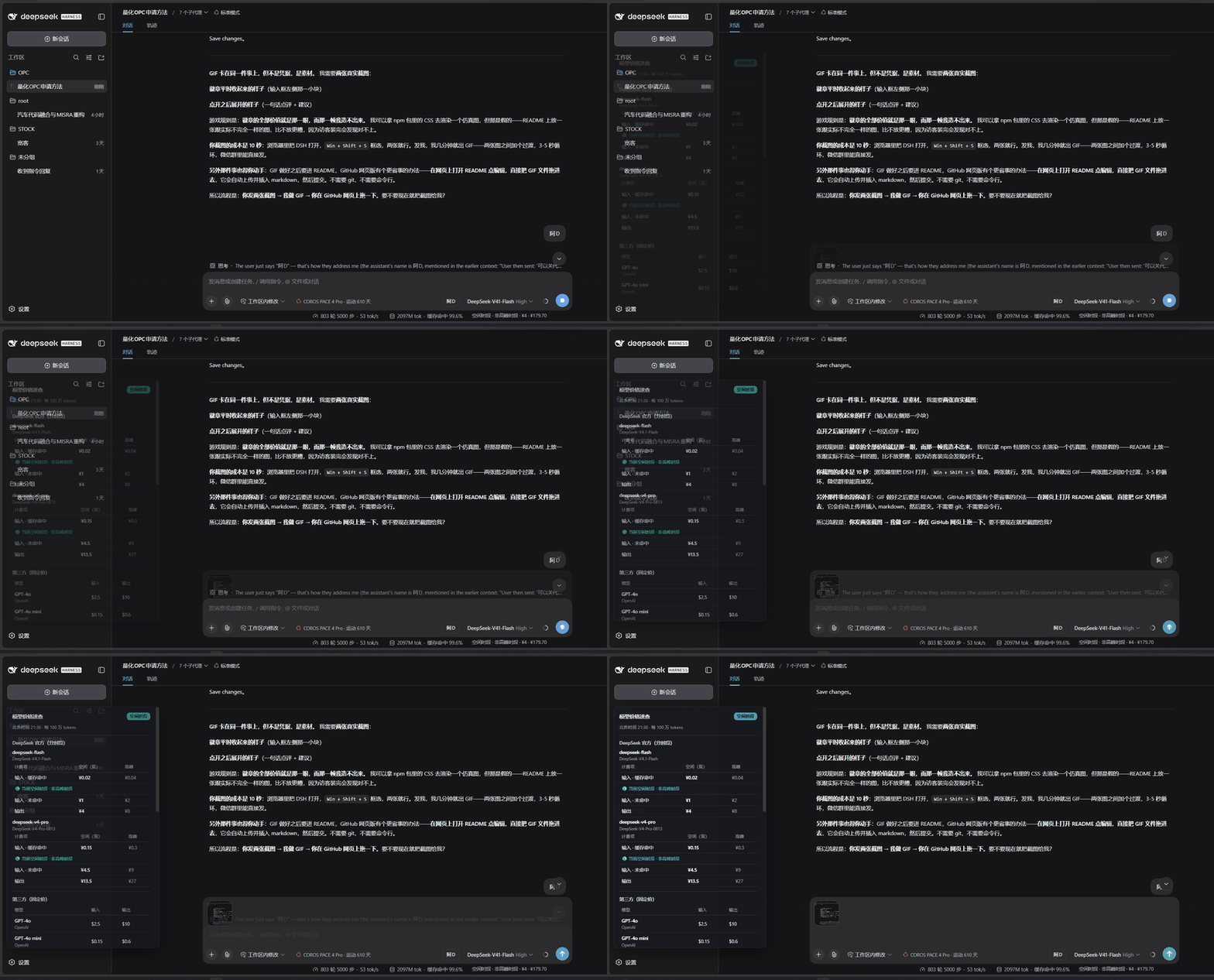
The capsule in the status bar expands into a live price reference.
DeepSeek Harness(DSH)Web UI 插件:在输入框下方显示一个「高峰 / 空闲」指示灯(附当前模型输出价与账户余额),点击展开「模型价格速查」——DeepSeek 官方分时段价格 + 第三方模型固定价。
- 纯工具、纯前端:不发起任何模型请求,不产生 token 费用(余额读取由服务端代取)。
- 自动计时:按北京时间实时判定当前是高峰还是空闲时段,每 30 秒刷新一次。
- 当前模型输出价:根据会话当前模型,显示对应输出价格(DeepSeek 分时段、第三方固定价)。
- 账户余额:显示 DeepSeek 账户余额,每 30 秒自动刷新。
- DeepSeek 官方(分时段):
deepseek-flash(DeepSeek-V4.1-Flash)与deepseek-v4-pro(DeepSeek-V4-Pro-0813),展示输入(缓存命中 / 未命中)与输出的空闲、高峰价格。 - 第三方(固定价):OpenAI / Anthropic / Google / Kimi / GLM / Qwen / MiniMax / xAI 等主流模型的输入、输出价格。
价格与时段规则来自 DeepSeek 官方定价页。官方可能调价,请以官方页面为准。
效果
- 输入框下方一个纯文字胶囊(无圆点):如
空闲时段 · 中秋节假期 · ¥4 · ¥110.00(时段 · 原因 · 当前模型输出价 · 账户余额)。 - 点击后弹出价格表,当前时段列高亮,另一时段列置灰作对比;缓存命中行下还有「当前时段 + 原因」说明。
安装
普通用户从 npm 装,一行就够:
dsh plugin --profile web add dsh-pricing-badge
dsh web

--profile <name>是必填。DSH 的plugin命令本质是把参数转发给 profile 目录里的 pnpm, 不带会直接报error: required option '--profile <name>' not specified。 用默认的网页界面就是--profile web,自定义 profile 换成对应名字即可。
插件随配置生效,刷新页面即可在输入框下方看到指示灯。
验证是否装好
dsh --profile web --dump-config
输出中应出现以 dsh-pricing-badge 命名的一层(# == dsh-pricing-badge),并有 name: dsh-pricing-badge 的 Loader 行。
开发者:从本地目录 / tarball 安装
本包已带预构建产物(lib/index.js 与 lib/client.js),无需任何构建脚本,也不会触发 pnpm 的构建授权。
方式 A:从本地目录安装
cd dsh-pricing-badge
dsh plugin --profile web add .
方式 B:从 tarball 安装(推荐,可分发给别人)
cd dsh-pricing-badge
pnpm pack   # 或 npm pack,生成 dsh-pricing-badge-0.1.0.tgz
dsh plugin --profile web add ./dsh-pricing-badge-0.1.0.tgz
卸载
dsh plugin --profile web remove dsh-pricing-badge
自定义
改价格
编辑 lib/client.js 顶部的两个数组即可(单位:每 100 万 tokens):
DEEPSEEK_MODELS:DeepSeek 分时段模型,结构{ name, label, sub, idle: {hit,miss,out}, peak: {hit,miss,out} }(元)。THIRD_PARTY_MODELS:第三方固定价模型,结构{ provider, model, input, output, currency, source },currency为"USD"或"CNY"。
加法定节假日
已内置 2026 年全年法定节假日(元旦 / 春节 / 清明 / 劳动节 / 端午 / 中秋 / 国庆),放在 lib/client.js 顶部的 HOLIDAYS(含名称与日期范围)。判定规则与官方一致:
- 高峰 = 北京时间周一至周五(不含法定节假日)9:00–12:00、14:00–18:00。
- 其余(含周末、法定节假日全天)为空闲;调休上班的周末仍按周末判空闲。
每年国务院发布新放假安排后,更新 HOLIDAYS 数组即可,结构 { start, end, name }(日期为北京时间 YYYY-MM-DD,含首尾)。
加更多模型 / 提供方
- DeepSeek 系:往
DEEPSEEK_MODELS追加一项,结构{ name, label, sub, idle: {hit,miss,out}, peak: {hit,miss,out} }。 - 第三方:往
THIRD_PARTY_MODELS追加一项,结构{ provider, model, input, output, currency, source }。
数据来源
- DeepSeek:https://api-docs.deepseek.com/zh-cn/quick_start/pricing/
- OpenAI(GPT-4o / mini / o3):https://platform.openai.com/docs/pricing
- Google Gemini 2.5:https://ai.google.dev/gemini-api/docs/pricing
- Kimi:https://platform.kimi.com/docs/pricing/chat
- 智谱 Z.AI:https://docs.z.ai/guides/overview/pricing
- 通义 Qwen:https://help.aliyun.com/zh/model-studio/model-pricing
- MiniMax:https://platform.minimax.io/docs/guides/pricing-paygo
- 最新世代(GPT-5.6 / Claude Opus 5.5 / Gemini 3.x / Grok 4.7):https://llm-stats.com(聚合器,建议核对官方页)
价格为调研时点值,可能变动,以各官方定价页为准。国产厂商中 Kimi / Qwen 为人民币价,智谱 Z.AI / MiniMax 官方国际站以美元标价,故混用
¥/$。
发布给社区
方式 1:npm 发布(最省事,用户无需构建授权)
npm login                  # 首次需要登录 npm 账号
npm publish --access public
# 用户:dsh plugin --profile web add dsh-pricing-badge
发布前 npm pack 已包含预构建的 lib/,安装方直接拿到产物,无需构建授权。
方式 2:GitHub 直接安装(源码分发)
dsh 支持 dsh plugin --profile web add github:you/dsh-pricing-badge,但 git 安装拉的是源码,需要构建脚本。若想走这条路:
-
给
package.json增加"scripts": { "prepare": "node ./scripts/build.js" }(自包含、不依赖 monorepo)。 -
用户首次
add会被 pnpm 拦截构建,需按其提示把包键加进 profile 的pnpm-workspace.yaml:allowBuilds: dsh-pricing-badge: true并建议锁定 commit:
github:you/dsh-pricing-badge#<sha>。
授予构建权限 = 允许该包代码在安装时于你的机器上执行。只对可信源码授权。
方式 3:直接发 tarball
把 npm pack 得到的 .tgz 发给对方,对方 dsh plugin --profile web add ./dsh-pricing-badge-0.1.0.tgz 即可,零构建授权。
方式 4:社区插件市场收录
- awesome-dsh-plugin:DSH 插件精选列表,可提交 PR 收录。
- dsh-plugin-marketplace:社区插件市场与注册表。
目录结构
dsh-pricing-badge/
├── package.json        # dsh.bundle(补丁层)+ dsh.client(浏览器半边)
├── cordis.patch.yml    # 插入 Loader 行的补丁
├── lib/
│   ├── index.js        # Host 半边(注册 /pricing-balance 路由,代取余额)
│   └── client.js       # 浏览器半边(指示灯 + 价格表 + 余额显示)
└── README.md
许可证
MIT
Comments
Loading…
Similar plugins
Shows DeepSeek API balance and tells whether the current moment is peak or off-peak pricing time, with a live countdown to the next switch.
★ 0
dsh plugin --profile web add dsh-balanceby zi7tian
DeepSeek Harness (dsh) web plugin: shows whether DeepSeek API pricing is peak or off-peak, plus a countdown to the next switch, below the composer.
★ 0
MIT
JavaScript
Oct 9, 2026
dsh plugin --profile web add dsh-deepseek-billing-periodby Arun1016
Account balance and per-session cost pill for DeepSeek Harness (dsh) web GUI: official peak/off-peak pricing, per-model breakdown, no credentials stored.
★ 0
MIT
TypeScript
Oct 9, 2026
dsh plugin --profile web add dsh-costby LucienLL
DeepSeek Harness plugin: peak/off-peak price watch, live account balance with tiered low-balance alerts, and a top-up button for the main web UI
★ 0
MIT
JavaScript
Aug 26, 2026
dsh plugin --profile web add dsh-peak-price-panelby tuoLuoSuan
Peak / off-peak billing badge for the DeepSeek API - click to see which rate you are on right now. A DSH plugin.
★ 0
MIT
JavaScript
Oct 7, 2026
dsh plugin --profile web add @tuoluosuan/dsh-peak-badgeby Webificio
DeepSeek off-peak alert, account balance and live Session cost estimate for the DeepSeek Harness Web UI
★ 0
MIT
JavaScript
Sep 15, 2026
dsh plugin --profile web add dsh-deepseek-cost-watch