

dsh-video-bg
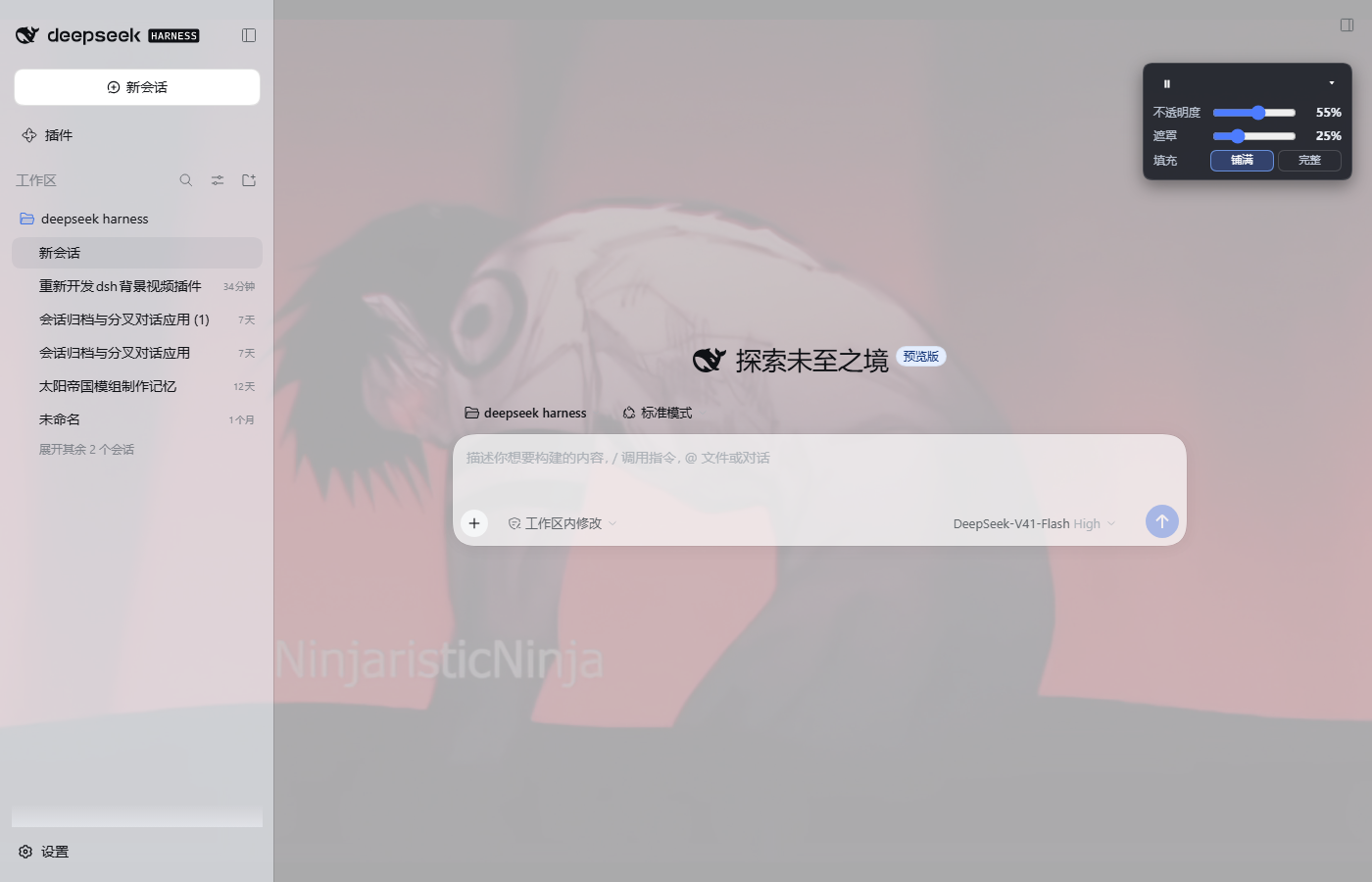
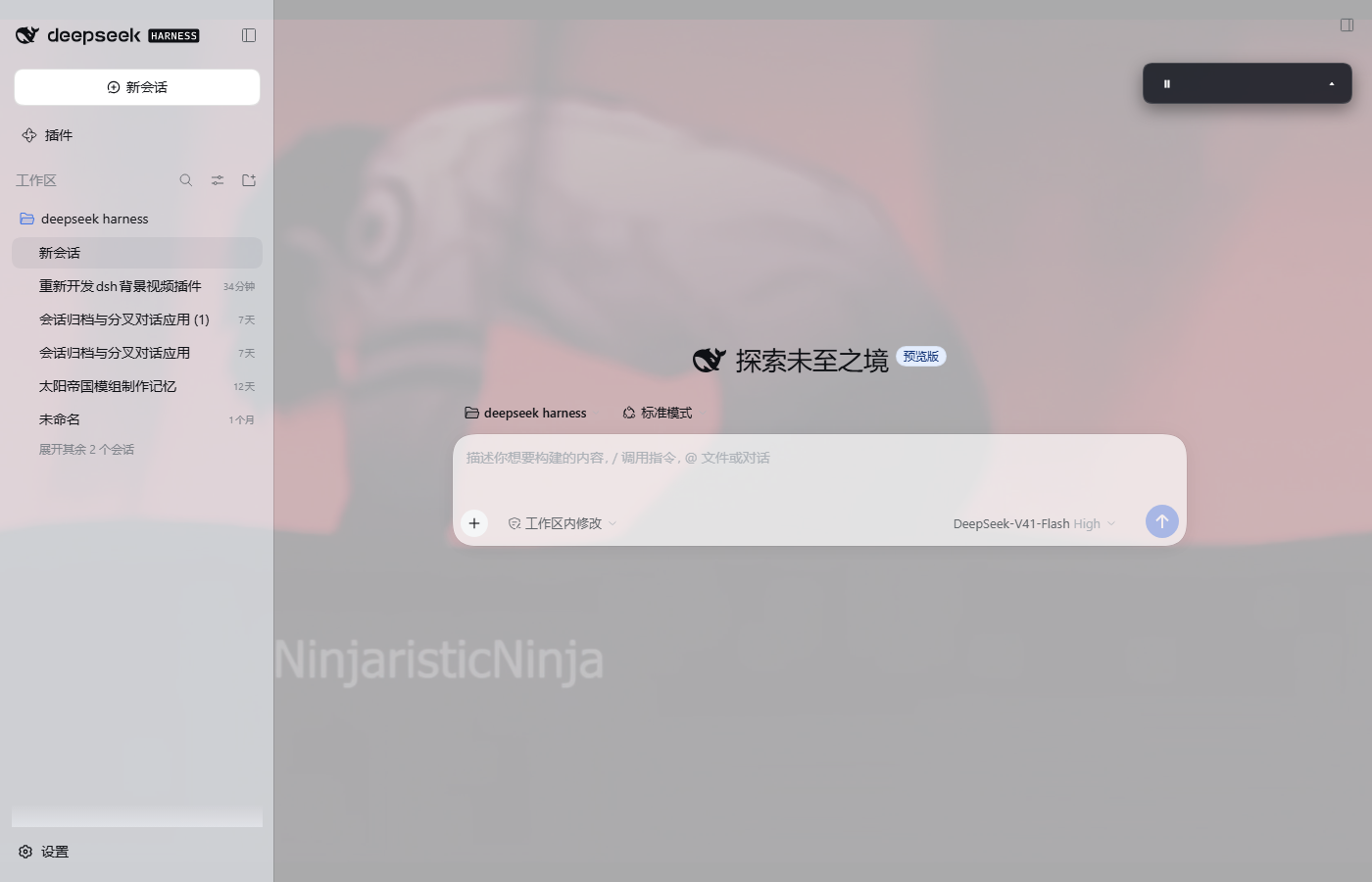
Manifest valid★ 1Play a local video behind the DeepSeek Harness chat UI, with play/pause, opacity, scrim and fit controls.
dsh-video-bg
English | 中文
Loop a local video as the background of the DeepSeek Harness chat UI — on the
plain Web surface (dsh web) and inside DSH Desktop, which renders the same web
app. The panels become translucent so the video shows through, while chat
bubbles and the composer stay readable.
Features
- Background video: a fixed, full-viewport
<video>painted atz-index: -1and streamed from the host over HTTP, so a multi-hundred-MB file plays without ever being uploaded. HTTP Range (206/416) support lets the browser seek and read ahead. - Translucent UI: the shell's design tokens (
--dsw-alias-bg-base,--dsw-specific-sidebar-fill,--dsw-specific-input-major, …) are remapped to semi-transparent colors for both light and dark themes, so every surface that uses a token becomes translucent automatically. Chat bubbles and the composer keep near-opaque fills. - Floating control (top-right): play/pause, video opacity, dark scrim for
contrast, fit (
cover/contain), and collapse. Choices persist inlocalStorage(dsh.videoBg.v3); the video pauses when the window is hidden. - Clear failures: a missing or unreadable file shows a warning badge and a console diagnostic instead of silently doing nothing.
- Local only: video bytes never leave the machine. The plugin registers two loopback HTTP routes on the existing DSH web server; no external service, no telemetry.
Requirements
- DeepSeek Harness 0.2.x (
engines.dshinpackage.json), Web or Desktop. The bundle is validated against the installed runtime before it loads. - Node 20+ (the host half only uses
node:fs,node:path,node:url). - A video file readable by the host process (not the browser). MP4/WebM/MOV/
MKV/AVI/OGG/TS are recognized; anything else is served as
video/mp4.
Install
The package is a normal DSH bundle, so any of these work:
# From GitHub (plain JavaScript — no build step, no build-script approval)
dsh plugin --profile desktop add github:zhang-guangjie/dsh-video-bg
dsh plugin --profile web add github:zhang-guangjie/dsh-video-bg

# From a local checkout (useful while developing)
dsh plugin --profile desktop add link:/absolute/path/to/dsh-video-bg

# From npm, once published
dsh plugin --profile desktop add dsh-video-bg
You can also install it from the GUI's plugin manager (Plugins → install /
browse). Installing a bundle selects it in dsh.profile.bundles automatically —
do not add the row by hand.
Desktop note: with the shipped profile, a newly installed bundle is applied live (the running composition recomposes and the page receives the new client entry). If your profile is startup-only, fully quit and restart DSH Desktop once.
Configure the video
Resolution order for the file:
- plugin row config
videoPath; - environment variable
DSH_VIDEO_BG_PATH; - the bundled
media/background.mp4(a small default clip).
Set videoPath in your profile's own patch layer
($DSH_HOME/profiles/<profile>/cordis.patch.yml):
- id: ui-video-bg
  config:
    videoPath: 'D:\my-video.mp4'   # any local path; ~ is expanded
    fit: cover                     # cover | contain
    opacity: 55                    # initial video opacity, 0-100
    veil: 25                       # initial scrim, 0-100
videoPathandfitare read by the host;opacity/veilare only defaults for a browser that has no saved slider values yet (the control's own values win afterwards).- The row id is
ui-video-bg; changing the config hot-reloads the plugin when HMR is enabled. - Environment alternative: set
DSH_VIDEO_BG_PATHbefore starting DSH.
Using it
The floating control at the top-right has:
| Control | Effect |
|---|---|
| ▶ / ⏸ | Pause / resume the background video |
| 不透明度 / Opacity | Video opacity (0–100%), persisted |
| 遮罩 / Scrim | Dark veil between video and UI (0–100%), persisted |
| 填充 / Fit | cover (fill the window) or contain (show the whole frame) |
| ▴ / ▾ | Collapse / expand the settings panel |
The badge next to the toggle reports buffering and file errors. A missing file is
also reported by GET /video-bg/status and logged by the host.
How it works
- Host half (
lib/index.js, exported from the package root) declaresinject = ['webServer']and registers a prefix route:GET/HEAD /video-bg/media— streams the configured file with single-range support and a revision-based cache key (?v=<size>-<mtime>), so a changed file is fetched again instead of served from a stale media cache.GET /video-bg/status— JSON withok,rev,size,mime, the effective path/source and the configured defaults.
- Client half (
lib/client.js, exported as./client) is a lazywindow.__ModuleLoader__.load({ id, factory })bundle.apply(ctx)mounts everything insidectx.effect(...), so disabling the plugin or hot-replacing it removes the attribute, styles, video, scrim and control. - Both surfaces: the browser requests the routes same-origin; DSH Desktop
serves the document from
dsh-app://app/and forwards every other path to the same authenticated loopback host, so both work unchanged. All URLs in the client are document-relative (video-bg/media), never absolute.
Privacy and security
- The video is read by the host process and served only on the loopback web server that DSH already runs for the GUI. Nothing is uploaded, and the plugin makes no outbound requests.
- No credentials, cookies, or environment values are read or exposed. The status endpoint reveals the local path of the configured video, which the GUI already shows in the control tooltip.
videoPathis configuration, not user input: treat the profile patch as trusted configuration, like any other DSH row config.
Compatibility and market metadata
dsh.bundle.patch→cordis.patch.ymlinserts theui-video-bgrow.dsh.client.platform: "web"+exports["./client"]→ served by the client module system.engines.dshandpeerDependenciesgate the bundle to the matching DSH runtime; the host half imports no@deepseek-ai/*package, it only consumes the injectedwebServerservice.- Display metadata lives in
locale/en.json/locale/zh.json, the icon inassets/icon.svg, and the storefront screenshots inscreenshots.json. - No build step is required, so GitHub installs need no
allowBuildsapproval.
Troubleshooting
| Symptom | Check |
|---|---|
| Warning badge, no video | GET /video-bg/status — error: "missing"/"unreadable" names the cause; fix videoPath |
| Video plays but is barely visible | raise opacity, lower the scrim, or pick contain/a brighter clip |
| Another skin/plugin covers the video | skins that hardcode opaque surfaces can out-paint the token remap; disable the skin or the other plugin |
| Just installed, nothing appears | the profile may be startup-only — fully restart DSH; on Web reload the page |
| Large file takes a moment to start | the browser fetches the first ranges from disk; the rest streams with range requests |
Development
# syntax check (plain JavaScript, no build)
node --check lib/index.js
node --check lib/client.js

# install into a test profile and boot the Web surface on a spare port
dsh plugin --profile mytest add link:/absolute/path/to/dsh-video-bg
dsh --profile mytest --no-open --port 0
The host and client contracts are documented in the official DSH references for client modules and the web server; this package intentionally has no runtime dependencies.
License
MIT
Versions
| Latest version | Published | Size |
|---|---|---|
| 0.4.0 | — | — |
Comments
Loading…
Similar plugins
by OrderG-X
Inline video and audio playback inside DeepSeek Harness: a play_video tool plus a native player at the turn tail, served by a signed Range-capable streaming route.
★ 0
MIT
JavaScript
Oct 16, 2026
dsh plugin --profile web add dsh-video-previewby xiaokaizhou
Renders local audio/video paths as inline, playable previews in DSH chat: replaces paths with <audio>/<video> players backed by same-origin /api/media-preview/* route, with explicit error statuses.
★ 0
MIT
JavaScript
Sep 21, 2026
dsh plugin --profile web add media-previewby squirrelbullet
Floating controller overlay for DeepSeek Harness with voice input and game-like button layout.
★ 0
MIT
JavaScript
Aug 22, 2026
dsh plugin --profile web add dsh-client-ui-vibecontrollerby zerorigin-studio
Web chat entry for DeepSeek Harness: a sidebar button opening chat.deepseek.com in a dedicated desktop window under dsh-desktop, with in-webview fallback for plain web environments.
★ 6
↓ 146/wk
MIT
JavaScript
Sep 23, 2026
dsh plugin --profile web add @zerorigin-studio/dsh-deepseek-chatby tsonglew
Audio/video preview viewer for dsh-better-sidebar: native playback with Range-seeking streaming route
★ 3
MIT
JavaScript
Aug 14, 2026
dsh plugin --profile web add dsh-media-preview在 DeepSeek Harness (dsh) 桌面端内嵌 chat.deepseek.com:双入口聊天面板(中央主面板 + 右侧栏标签页)、多桌面宿主自适应驱动、持久登录会话,零运行时依赖。
★ 1
MIT
JavaScript
dsh plugin --profile web add dsh-deepseek-chat-embed