

TokenLedger
Manifest valid★ 199Relay-site attributed token usage for DeepSeek Harness — zero config, no credentials
TokenLedger


Precisely account for DeepSeek Harness token usage and attribute it to the relay that actually served the request — no configuration, no credentials required.
Token-usage accounting for DeepSeek Harness, attributed to the relay site that
served each request. The existing Web GUI (dsh web) and renderer-neutral
consumers share the same host-owned aggregation. Zero configuration.
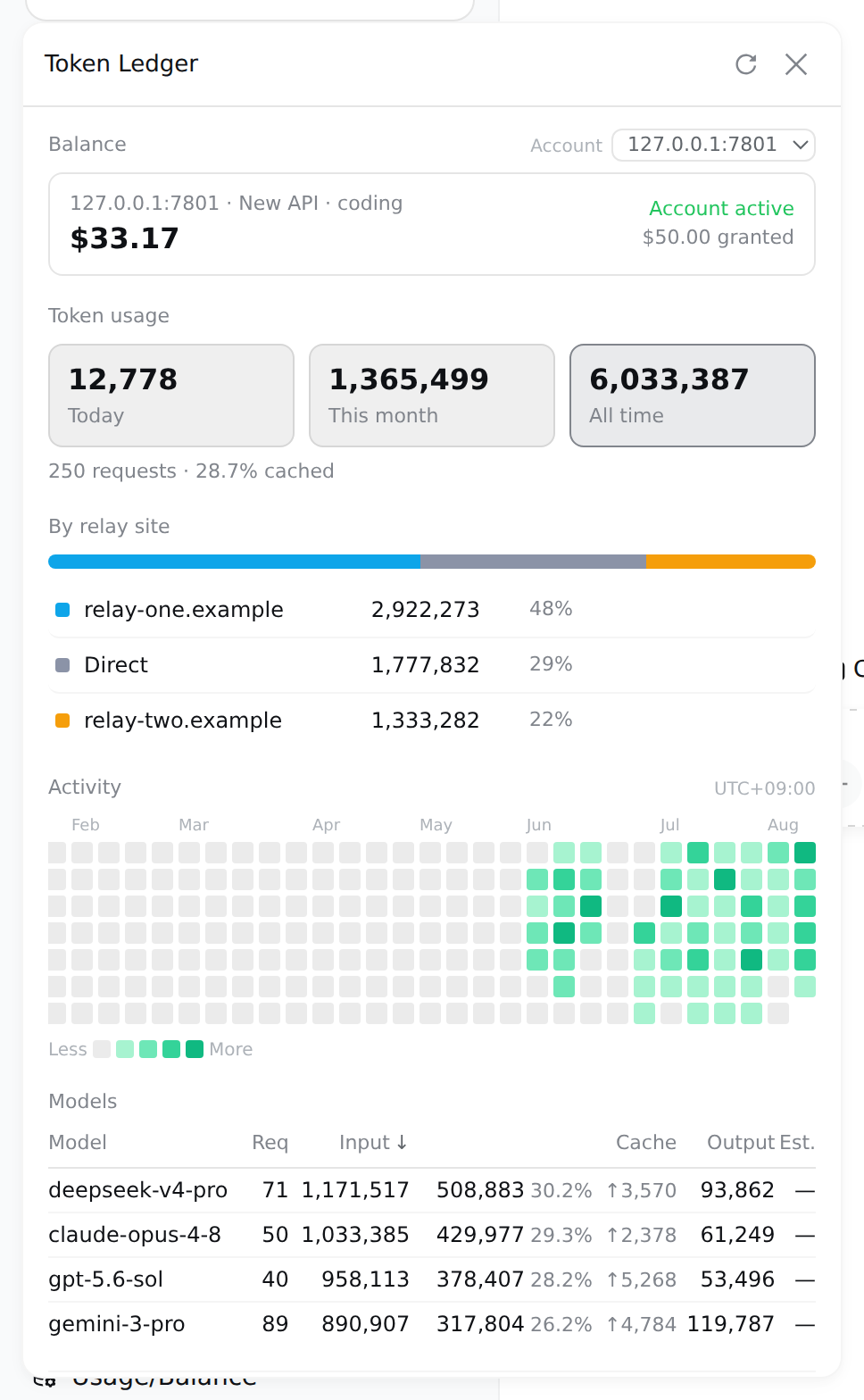
Demo data and a local simulated relay; every figure is computed by the real code paths, only the data is fake. No API key or raw upstream response is sent to the browser.
At a glance
| Capability | Details | |
|---|---|---|
| 🎯 | Relay attribution | Groups by the normalized origin of each provider's baseURL — multiple keys on the same site collapse into one row; the site name is the domain, not a routing alias you made up |
| 📁 | Per-project attribution | Usage is grouped by the directory a session was started in — registered workspaces use their titles, unregistered ones use the directory name, and sessions started in subdirectories are still counted |
| 🔍 | Zero-config discovery | Relays are read from the host's provider configuration, so you never have to fill anything in again. Only baseURL is read; adjacent credentials are never touched |
| 💳 | Balance | DeepSeek official, New API, Sub2Api — one regular key per account is enough; keys without a hard limit report "used" instead of a fake balance |
| ⏳ | Subscription quotas | More providers sell plans instead of balance — 5-hour / weekly / monthly windows each roll and reset on their own, with one progress bar and one reset time per window |
| 📊 | Usage analytics | Today/this month/cumulative windows, drill-down by site/model, cache hit rate, one-year activity heatmap (hover to see that day's model breakdown) |
| 🧮 | Cost estimation | Rate tables segmented by effective date, banded pricing, peak/off-peak hours; unpriced models show a dash instead of 0 |
| 🗂 | Export & diagnostics | CSV / JSON export, index health, and rows that couldn't be attributed are listed separately |
| 🔒 | Read-only loopback | Two endpoints accept loopback GET only, guarded at the peer socket address level; prompts, tool arguments, and response bodies are never read |
Quick start
Requires the DeepSeek Harness web profile (@deepseek-ai/dsh >= 0.1.0-rc.6).
dsh plugin --profile web add "github:zh667/TokenLedger"
Restart any running dsh web and hard-refresh the browser. A "Usage Ledger" entry will appear at the bottom of the sidebar.
Upgrade/uninstall:
dsh plugin --profile web update dsh-tokenledger
dsh plugin --profile web remove dsh-tokenledger
Reinstalling the same spec re-resolves it, so a fresh add pulls the latest main (verified, not assumed).
To pin a specific version, you must use the full 40-character commit SHA. The package manager compares the ref against the list broadcast by git ls-remote, which contains only full SHAs and branch/tag names — short SHAs match nothing and will immediately report Could not resolve:
| spec | |
|---|---|
github:zh667/TokenLedger | ✅ |
github:zh667/TokenLedger#main | ✅ |
github:zh667/TokenLedger#947247a | ❌ short SHA can't be resolved |
github:zh667/TokenLedger#947247a86f0835f0e746695538569b1a76356dd1 | ✅ |
If an unresolvable spec has already been written into package.json, add will also fail — it resolves the entire manifest first. Fix that line and then run install.
After installation, /tokenledger diagnostics prints the current routing attribution and the routes in the index — check this when troubleshooting "why isn't my relay showing up", no guessing needed.
Ready to use: no configuration, and full usage and relay distribution is visible without any credentials. Balance is the only feature that uses a key, which the host already stores for you.
Commands
All the panel's questions are answerable from the CLI — both read the same queries, no second aggregation.
/tokenledger                      # 全部时间
/tokenledger 7                    # 最近 7 天
/tokenledger 30 api.example.com   # 某个中转站,最近 30 天

/tokenledger site                 # 列出发现到的中转站
/tokenledger site add <路由名> <地址>
/tokenledger site rm <路由名>

/tokenledger export csv 30        # 导出
/tokenledger diagnostics          # 索引健康度
/tokenledger reindex              # 丢弃索引,从头重建
Supported account types / Providers
| Provider | Mode | Credentials | Upstream endpoint |
|---|---|---|---|
| DeepSeek official | Balance | provider's apiKeyEnv | /user/balance |
| New API family (incl. One API, VoAPI and other forks) | Balance/quota | provider's apiKeyEnv | /api/usage/token/ + /api/status |
| Sub2Api | Balance / quota / subscription | provider's apiKeyEnv | /v1/usage |
| Moonshot / Kimi | Balance | provider's apiKeyEnv | /v1/users/me/balance |
| Zhipu GLM / Z.ai | Balance | provider's apiKeyEnv | /api/biz/account/query-customer-account-report, falls back to /api/paas/v4/balance when unavailable |
| OpenRouter | Balance | Management Key | /api/v1/credits |
| OpenCode Go | Subscription | provider's apiKeyEnv, or local auth.json | /zen/go/v1/usage |
| Kimi For Coding | Subscription | provider's apiKeyEnv | /coding/v1/usages |
| MiniMax Coding Plan | Subscription | provider's apiKeyEnv | /v1/token_plan/remains |
| Zhipu GLM / Z.ai Coding Plan | Subscription + balance | provider's apiKeyEnv | /api/monitor/usage/quota/limit |
Except for OpenRouter, all you need is a regular API key — the same one already configured for that route and used to send requests. OpenRouter's usage endpoint only accepts a Management Key; using an inference key returns 401. The panel will tell you exactly which key is required, instead of throwing a 401 at a key that was fine all along.
Subscription tier has no balance to read; instead it exposes several rolling windows: one progress bar, one percentage, one reset time. Amount and windows can coexist — Z.ai has both a wallet and a Coding Plan; both are read, and a failure on one side does not affect the other.
The "local auth.json" on the OpenCode Go row is a convenience: when no apiKeyEnv is configured on the route, it reads the file where the OpenCode client itself stores keys (~/.local/share/opencode/auth.json), and the key is only sent back to its original source. If the file is missing, unreadable, or has changed format, it is treated as "no credentials" and quietly falls back — no error is raised.
These subscription APIs have no public schema. If a field is in the wrong place, the card says where it looked, rather than leaving a blank card — that message can be passed back to us directly.
The relay stack is auto-detected via route fingerprints, probed once at first balance lookup and remembered. Vendor domains skip probing — origin picks the reader; multiple routes from one vendor merge into one account (wallet), opposite of relays.
New API quotas are per key: two keys on the same site are two separate quotas, listed separately in the panel. After configuring the user-center API, balance can also be displayed.
Sub2Api's /v1/usage has three shapes, all recognized by the panel: keys with a total quota or rate limit read the quota and the 5-hour / daily / weekly windows; keys belonging to a plan group read daily/weekly/monthly cycles; the rest are wallet balances. Only the last shape carries a balance field, so the first two used to show as empty cards.
Configuration
No configuration is usually required. Relays are read from the host's provider settings.
When you need to override, write it into your existing settings.yaml (hot-reloaded on change, no restart needed):
tokenledger:
  # 只在自动发现看不到时才需要——比如组合里没挂 settings 服务,
  # 或 provider 是 agent preset 在 agent.cordis.yml 里挂的
  relays:
    my-route: https://relay.example.com/v1

  # 费率表,用于费用估算;不配就显示破折号,不会猜
  rates: []

  # 探测中转站跑的是哪套程序。默认关闭,第一次查余额时会自动探一次
  fingerprint: false
Declared endpoints
For providers not in the built-in tables, declare their API yourself—no release needed:
tokenledger:
  endpoints:
    - origin: https://relay.example.com   # 必须是你已配置的某条 provider 的同源地址
      displayName: 我的中转站
      path: /api/quota
      # raw: true    # 有些控制台接口要裸密钥,不要 Bearer 前缀
      fields:        # 值是响应 JSON 里的取值路径,不是表达式
        total: data.balance
        granted: data.total
        used: data.used
        currency: data.unit
        plan: data.plan_name
      windows:
        - kind: weekly          # session / daily / weekly / monthly / billing
          usedPercent: data.week.percent
          resetsAt: data.week.reset_at
fields and windows specify value paths — they describe "where the number is", not "how to fetch it". There are no expressions, and nothing is ever evaluated. A wrong path simply makes that field absent; everything else displays as usual.
This lets a config file decide "where to send a keyed request," so boundaries are hard-coded, not policy:
- Requests are sent to the origin of the matching provider, the
origin:field is only the lookup key. Declaring an address that was never configured produces no requests. pathmust be an absolute path starting with a single slash.//host/xis a protocol-relative URL that would resolve to a different host; the origin is re-validated after construction.- GET only, no request body; method / headers in the declaration are ignored.
- The key is still taken only from that provider's own
apiKeyEnv; the declaration cannot specify any credential. - Cross-origin redirects fail immediately and are not followed — that would be the easiest way to bypass the first rule.
- Response bodies have a size limit and a timeout.
- Cannot override built-in readers: it is only consulted when the built-in table has no answer.
These cards are marked "custom endpoint" because the numbers come from paths you configured — a wrong path is a config issue, and the UI must make that visible.
What is an "unknown route"
The relay distribution may show a row "unknown route". It means: these requests went through a route that no longer exists in the current provider configuration — it was renamed, deleted, or was on another machine's config at the time.
It differs from "Direct/Official" by design:
- Direct/official = this route is configured and does not point to any relay; requests truly hit the vendor directly
- Unknown route = we have no idea where it went
Previously these two were merged into one bucket, and on one real machine 88% of tokens showed as "direct/official", when a large portion actually went through relays. Displaying "can't read" as a definite answer is the exact error this project guards against everywhere else; this was one hole we missed.
No data is lost, only the label was wrong. Aggregation rows are stored by (sessionId, day, site, provider, model); the route name was always there. Reconfigure that route (same name suffices) and the directory change triggers an index rebuild, automatically reattributing historical traffic.
Per-project attribution
Besides "by site" and "by model", the panel has a "by project" section: which project burned this month's money.
The grouping key is the directory at session start, not the host's workspace id. This is deliberate:
A DSH workspace (ctx.workspace) is a registration of one directory — create(path) first calls fs.realpath, and the same canonical path has only one record; session membership is sessionPath(id) === record.path, strict equality. So a workspace is exactly one project; it is not a container holding several projects.
Grouping by workspace id silently misses two kinds of usage:
- Sessions started in subdirectories (
cd src && dsh): cwd and registered path are not equal, so it belongs to neither; - Projects never registered as a workspace in the UI: they simply don't exist.
These two categories are most likely the majority. Hence: group by cwd, name by workspace title. Same principle as the relay rule — sites are grouped by the origin normalized from baseURL, not by routing alias, because a route called deepseek could point anywhere. cwd is what actually happened; the workspace title is a label someone typed.
Sessions without cwd get their own row labeled "unrecorded directory" and are not discarded — otherwise the per-project rows wouldn't sum to the total, and no one would notice.
workspace is an optional dependency: without it, everything still works—rows just show directory names instead of workspace titles.
Correctness & data semantics
Usage folding has three easy-to-get-wrong spots, all covered by tests (test/usage.test.js):
Failed requests still bill. Usage is emitted both on assistant/message and from assistant/chunk as {type:'usage'}. If a request fails after reporting usage, assistant/message never arrives — but the provider already charged. Subscribing to assistant/message only systematically undercounts this part.
The same (turn, step) is reported twice. The later sample replaces the earlier one; when replacing, the original day and route it was attributed to must be decremented.
Orphan usage chunks carry no identity. assistant/message includes provider and model; the usage variant of StreamChunk does not. The failed-request record must fall back to the last request/header, recognizing reason: 'resume' (process restarts re-send the header; that's not a model change). Unattributable entries are recorded as explicit unknown, never guessed.
Semantics: inputTokens, cacheReadTokens, cacheWriteTokens are mutually exclusive buckets; only their sum is the billable input. reasoningTokens is a subset of outputTokens, display-only; adding it to the total would double-count. Days are split by the host process's local time zone, which the panel labels.
Attribution is fixed at fold time; history is never rewritten. When the relay-site set changes the index is rebuilt from scratch—otherwise new sites would look like "just started."
Privacy & security
- Content is never read. Only counts and identifiers: token counts, model names, provider route names, site domains. Prompts, tool arguments, and response bodies are neither read nor stored.
- Credentials stay host-side. Keys are resolved by the host's credentials service on demand (via
apiKeyEnv), used once and discarded, always through theAuthorizationheader, never in URL query strings. The browser never sees a key. - Loopback protection. Both HTTP endpoints are registered as exact routes, placing them outside the RPC trust boundary; the handlers self-guard: non-GET is rejected, and both the peer socket address (unforgeable) and the Host header are validated.
- Relay fingerprint detection uses no credentials, relying on route 404/401 characteristics.
API
The browser panel reads these two endpoints, loopback GET only:
| Endpoint | Description |
|---|---|
GET /api/tokenledger/usage?days=&site= | All panel data: three-window totals, by day/model/site, one-year activity and per-day model breakdown, account list, index diagnostics |
GET /api/tokenledger/balance?account= | Balance for a given account |
The package also works as a library for consumers outside DSH:
import { foldUsage, bySite, byModel } from "dsh-tokenledger";
import { LedgerStore } from "dsh-tokenledger/store";
import { readBalance } from "dsh-tokenledger/balance";
Harness and Blue
ctx.tokenLedger preserves its original object identity and nine members for existing consumers: store, sweep, totals, byDay, byModel, bySite, sites, diagnostics, and reindex.
Blue UI and Web UI are both included in the same dsh-tokenledger npm package. After installing the bundle:
- Regular Harness/Web environments keep the original text
/tokenledgercommand and loopback HTTP panel. - When a Blue host is detected, the same plugin Fiber mounts the native dashboard, and Blue overlay commands replace the text commands; on Blue uninstall or registration refusal, the text commands are restored.
- Blue reads the same
usagePayload()through the apply-local controller, publishes no extra Cordis Service, and maintains no second usage accounting.
Full architecture and acceptance records:
docs/BLUE-MIGRATION.md.
Development
npm test          # 含浏览器半边——它能在 Node 里被物化和测试
npm pack --dry-run
The browser half has no build step: it is a hand-written __ModuleLoader__ bundle, React is provided by the host as a peer dependency, and styles are hand-injected. It can therefore be loaded and tested under Node.
Blue PR acceptance does not require cloning the Blue repo. Install the pinned Blue CLI from this repo's root, add the current plugin snapshot to the managed blue profile, then start:
npm install --global pnpm@11 @dsh-blue/blue-cli@0.1.2-alpha.1
blue plugin add "file:$PWD"
blue
After entering Blue, run /tokenledger and verify real usage, refresh, account switching, pagination, and exit cleanup. After modifying plugin source, re-run blue plugin add "file:$PWD" and start again; file: installs materialize the plugin's own dependency closure and do not depend on a TokenLedger workspace link on the developer's machine.
Credits
- OpenRouter, Moonshot/Kimi and Z.ai/GLM balance response parsing is referenced and adapted from
Ychris12138/dsh-usage-stats(MIT); TokenLedger adds origin-based identification, account merging, Management Key hints, and currency anti-guessing on top, see NOTICE - Heatmap quantile bucketing and hover details reference
xiufengsun/TokenTracker(MIT) - New API billing semantics are read from
QuantumNous/new-apisource
Links
Thanks to the LINUX DO community for their help and support.
Thanks to the LINUX DO community for their help and support.
DSH 生态 / The DSH ecosystem
The host
deepseek-ai/deepseek-harness— the agent harness this plugin runs on
Where to find plugins — these index community plugins; worth a browse before you install
awesome-dsh-plugin/awesome-dsh-plugin— bilingual list categorized by featureAdamPlatin123/awesome-dsh-plugins— auto-scans thedsh-plugintopic, with a compatibility status column0xsline/awesome-deepseek-harness— hand-curated, plus an auto-generatedCATALOG.mdbruc3van/awesome-dsh-plugin— scenario navigation, starter kits, and popularity rankings
Upstreams this panel reads
QuantumNous/new-api— relay software; the panel's quota conversion semantics are read from its routing and billing source
⚠️ Unofficial: TokenLedger is an independent third-party project, not affiliated with, sponsored by, or endorsed by DeepSeek. Links above carry no such implication. "DeepSeek" and related marks belong to their owners.
License
Compatibility
Versions
| Latest version | Published | Size |
|---|---|---|
| 0.1.0 | — | — |
Comments
Loading…
Similar plugins
by xie-tj
Persistent token-usage ledger and Web Usage dashboard for DeepSeek Harness.
★ 2
MIT
JavaScript
Sep 15, 2026
dsh plugin --profile web add dsh-plugin-usage-ledgerby LeemanCheung
Persistent token usage records and dashboard for DeepSeek Harness
★ 12
MIT
TypeScript
Sep 27, 2026
dsh plugin --profile web add dsh-token-usageby Hades03
DeepSeek Harness plugin: DeepSeek balance and per-provider/model token usage in a draggable overlay.
★ 0
MIT
JavaScript
Oct 20, 2026
dsh plugin --profile web add dsh-model-quota-usageby y2zyyr
Persistent local token usage sidebar and settings page for DeepSeek Harness (DSH), with automatic history discovery and a durable SQLite ledger.
★ 3
↓ 219/wk
MIT
JavaScript
Oct 4, 2026
dsh plugin --profile web add @y2zyyr/dsh-token-usage-sidebarby shinjiyu
Zero-config web_search for DeepSeek Harness when you are not on the official DeepSeek API.
★ 4
MIT
TypeScript
Aug 15, 2026
dsh plugin --profile web add dsh-plugin-searchby ChrisLou-bioinfo
DSH plugin: token usage statistics across all sessions as a settings page (zero-dep, no build)
★ 0
MIT
JavaScript
Oct 8, 2026
dsh plugin --profile web add dsh-usage-lite