
dsh-quick-update
Manifest validRow-level check, update and uninstall controls for the DeepSeek Harness Plugins page, including Git-installed plugins.
dsh-quick-update
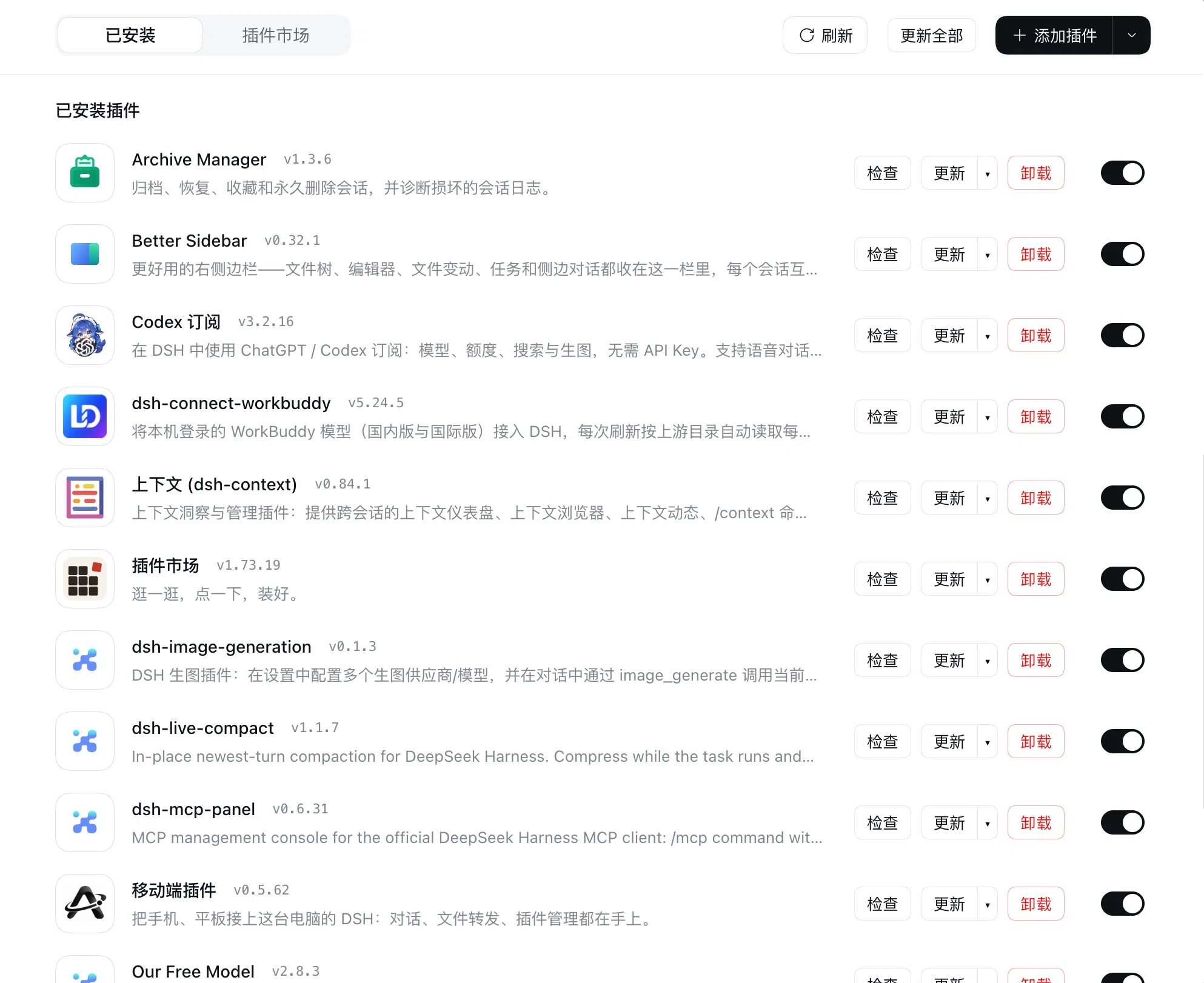
在 DeepSeek Harness 的「插件 → 已安装」列表里,给每个插件直接配上 检查 / 更新 / 卸载,不用再点进详情页;Git 安装的插件也能检查新提交。
功能
-
行内按钮(开关左侧):
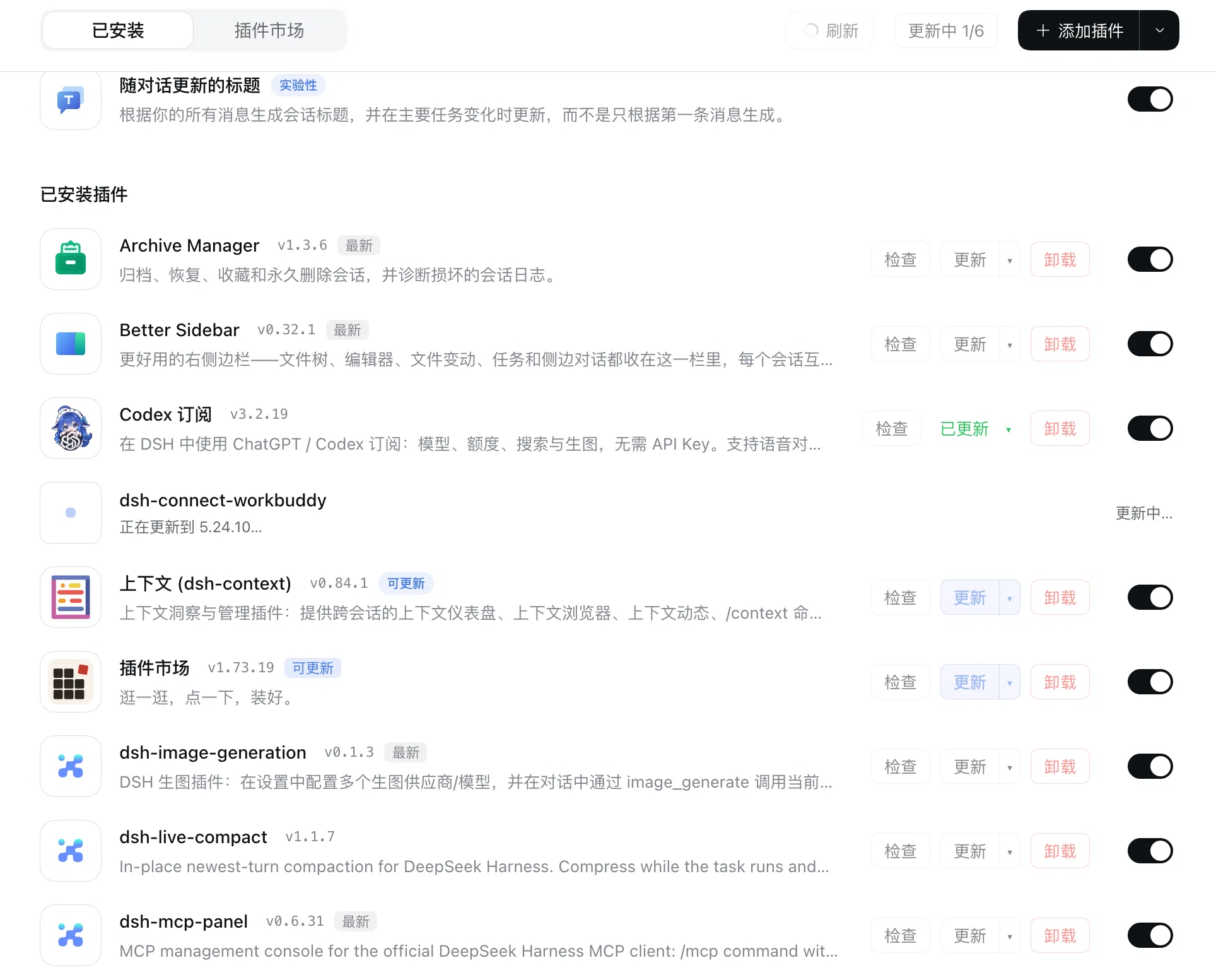
检查更新 ▾卸载检查:只查这一个插件(registry 或 Git 源);卸载进行中该行不可再检查;更新:有可用版本时蓝色高亮;右侧▾打开版本弹层,列出所有可安装版本(含latest/预发布/已弃用/需要更新 DSH标签、发布日期、安装来源),选哪个就装哪个;卸载:红色,两次确认(第一下变"确认卸载"),调用 Host 官方卸载逻辑。卸载期间该行的检查按钮变灰——插件正在被移除,已经没有什么可查的了。
-
工具栏
更新全部:逐个串行更新,显示更新中 n/N。Git 安装的插件也包含在内(从新提交重装,失败自动装回原 commit);按钮悬停会说明其中几个是 Git 重装。一个插件更新失败不会中断其余插件,失败的名字和原因会显示在按钮上,按钮可以再点一次重试。 -
提交类更新的确认:当待更新项里包含「只有新 Git 提交、没有发布新版本号」的插件时,会先弹一个确认:
全部更新/跳过这些插件/取消。选「跳过」则只更新有正式版本的插件。 -
跟随页面刷新:点页面自带的
刷新会触发本插件的逐行检查,所有插件同时检查(不是排队一个个来),每行显示「检查中…」,完成后按钮变蓝;不会在进入页面时偷偷检查。 -
并发数量:
刷新按钮右侧的输入框决定同时检查几个插件。留空或填0表示不限制(全部一起查),默认就是留空——框里显示的灰色0是占位提示,不是你填的值。只有你输入的数字才是正文颜色。只能填非负整数;网络吃不消时可以调小。输入框后面的灰色!悬停会弹出与页面其它提示一样的气泡,说明它的含义。 -
名字右侧状态标签:
最新(灰)/可更新(蓝,页面没自己打标签时补位)/可更新但最新版不兼容当前版本 DSH(黄,悬停给出所需依赖)。 -
页面模式下自动关闭原生更新框:页面自己的更新确认框是带模糊遮罩的模态,插件在更新结束后(成功或失败)会主动关闭它,避免整页一直模糊。
-
合并计数:页面自带的「N 个插件可更新」只统计能装的新版本;只要存在 Git 提交更新,本插件就把那句话替换为合并口径:
N 个插件可更新(含 M 个 Git 新提交)(灰色 native 文案会被隐藏,悬停解释口径),更新全部的数量与它一致。 -
Git 源支持:读
pnpm-lock.yaml得到已安装 commit,用git ls-remote比对远端分支;更新时把指定 commit 直接装到已安装的那一份上(不先卸载),失败自动装回原 commit。GitHub 等 host 走自动探测的系统代理。 -
更新期间该行会被同尺寸占位行顶住,不再"消失"。
安装
任选其一,装完重启一次 DSH(Host 半边要注册 Git 检查路由):
# 从 GitHub 安装
dsh plugin add github:zghoto/dsh-quick-update

# 或本地目录
dsh plugin add /path/to/dsh-quick-update
也可以在「插件」页 → 添加插件 → 安装第三方插件 里选目录 / 粘贴包名。
要求
- DeepSeek Harness 0.2.x(使用官方
pluginManagerremote 与页面data-*钩子) - 仅 Git 源插件需要
git(macOS 自带;Windows 需装 Git for Windows) - 支持 macOS / Windows / Linux;Windows 与 macOS 的系统代理都会被自动探测
原理与限制
页面只提供「整页签」级扩展点(plugins.tab),没有行内动作插槽,所以这些控件是注入页面 DOM 实现的。只使用页面的稳定数据属性:
[data-plugin-group="bundles"] li[data-plugin-package]— 已安装行[data-plugin-toolbar]— 工具栏
按钮状态、检查/更新/卸载都走 Host 的 pluginManager(listBundles / listVersions / updateBundle / removeBundle)与页面自己的动作,结果与官方页面同源。代价是:DSH 大版本若改动这些 data 属性,控件会静默消失(插件只记录警告,不会弄坏页面)。
Git 更新为什么不用卸载
Host 的 removeBundle 会拒绝卸载正在运行的 bundle,错误码是 bundle-in-use:这个 bundle 贡献的代码行里有一行已经被活着的 fiber 加载。接管了 ctx.compaction 的插件(例如 dsh-live-compact)就属于这一类——它的引擎在 DSH 里常驻运行,卸载必然被拒。
所以 Git 更新不先卸载,而是把新 commit 直接装到已安装的那一份上:
installBundle("<repo>#<new-commit>", { saveExact: true, enabled: true })
Host 按整条 spec 字符串判断「是否已安装」,而新 commit 让这条 spec 与 profile 里记的那条不同,因此不会撞上 already-installed,pnpm 会在原位把包换成新 commit。失败时再用旧 commit 装回原样。
许可
MIT © zghoto
English
Row-level Check / Update / Uninstall controls for every row of the Plugins page, including Git-installed plugins.
检查checks one plugin;更新 ▾updates to the chosen version (all installable versions with tags, dates and their source);卸载removes the bundle through the Host's own removal path after a second confirmation. The row's检查button is disabled while the removal runs, because there is nothing left to check.更新全部updates every offered plugin one after another, Git rows included. One plugin's failure does not stop the others: the button names what failed and why, and can be pressed again.- The page's own Refresh also drives a per-row check, so badges and buttons agree with the page; nothing is checked when the page merely opens. Every row is checked at the same time rather than one after another, so the page answers in the time of the slowest check instead of the sum of all of them.
- The Concurrency input, right after the page's Refresh button, says how
many checks run at once. It takes a whole number of zero or more, and it is
left empty by default: the grey
0in the box is a placeholder, not a number the person typed, so only what they type is shown in the colour of text. An empty field or0means all of them at once, which is fastest. A smaller number is there for a network that cannot take them all, and the choice is kept. The grey!after the field opens the same bubble the page's own tooltips show, explaining it on hover. - The controls appear with the page: the plugin waits for the page rather than for a fixed moment, so nothing is missing on the first look.
- Status tags beside the name:
Latest,Update available, and a warning tag when the newest version requires a newer DSH. - Git sources are compared with
git ls-remote; the update installs the exact commit over the installed copy without removing it — the Host refuses to remove a bundle whose code is running — and rolls back to the previous commit on failure. The system proxy is detected on macOS and Windows.
Install with dsh plugin add github:zghoto/dsh-quick-update, then restart DSH
once. Requires DSH 0.2.x; git is only needed for Git-installed plugins.
The Plugins page has no per-row action slot, so the controls are injected into
its DOM using stable data-* attributes. A future DSH release that renames
them disables the controls instead of breaking the page.
MIT © zghoto
Comments
Loading…