

dsh-git-style-zeta
Manifest validConfigurable Git commit and pull request prompt instructions for DeepSeek Harness
dsh-git-style-zeta
Configurable Git commit and pull request guidance for DeepSeek Harness (DSH). The plugin contributes two optional sections to DSH's native system prompt, edited from its own page in Settings.
This is prompt guidance, not enforcement. It cannot guarantee that every commit contains attribution. It does not run Git, install hooks, change Git settings, modify Codex or Claude, or rewrite existing commits. Its prompt preserves existing authors and co-author attribution, including attribution from other agents.
Settings
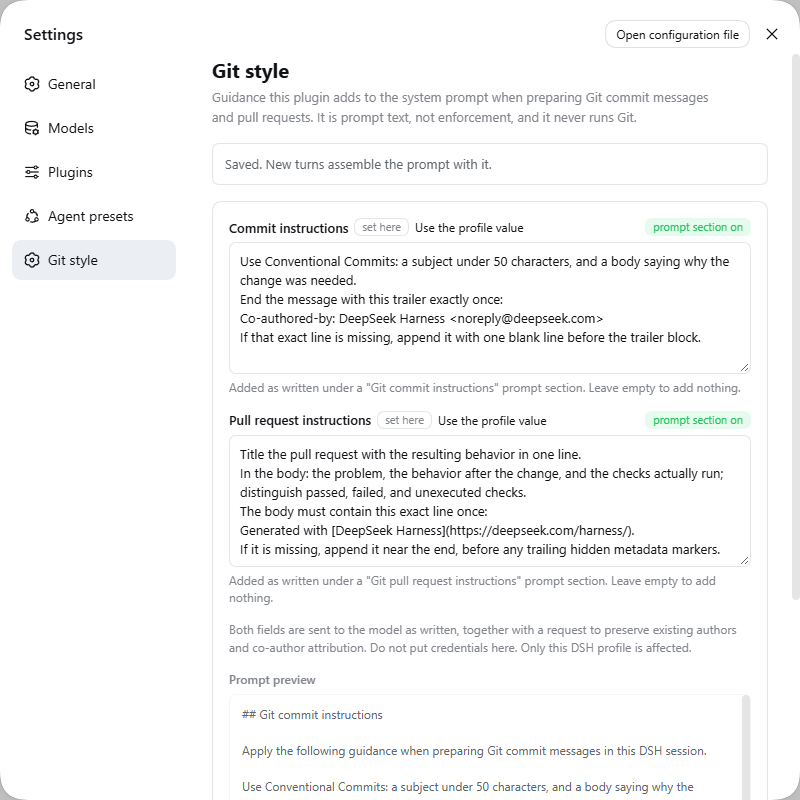
Both fields are optional and work independently. An empty field adds nothing. The preview shows exactly what the plugin contributes, and a saved change applies to new turns without restarting the host.
In a session
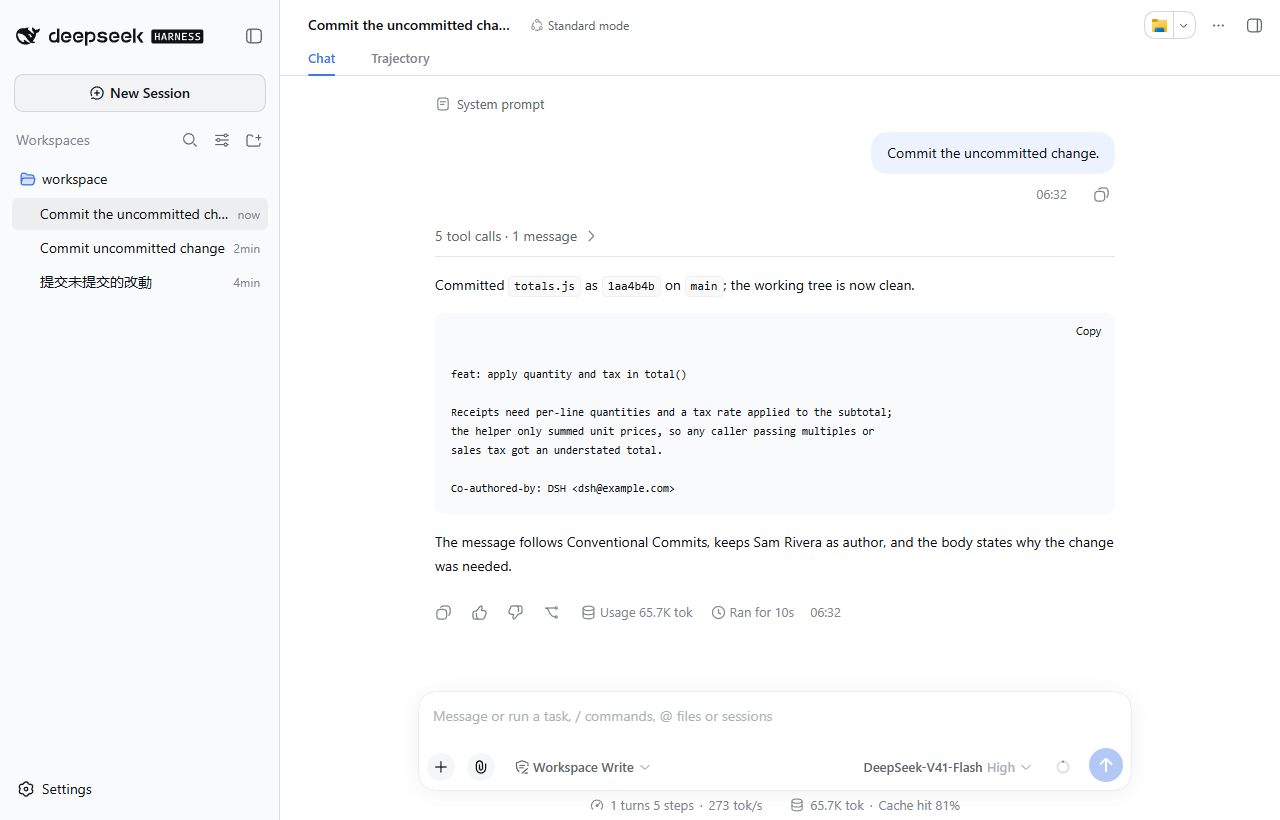
Asked only to commit, the session followed the configured style and added the co-author trailer.
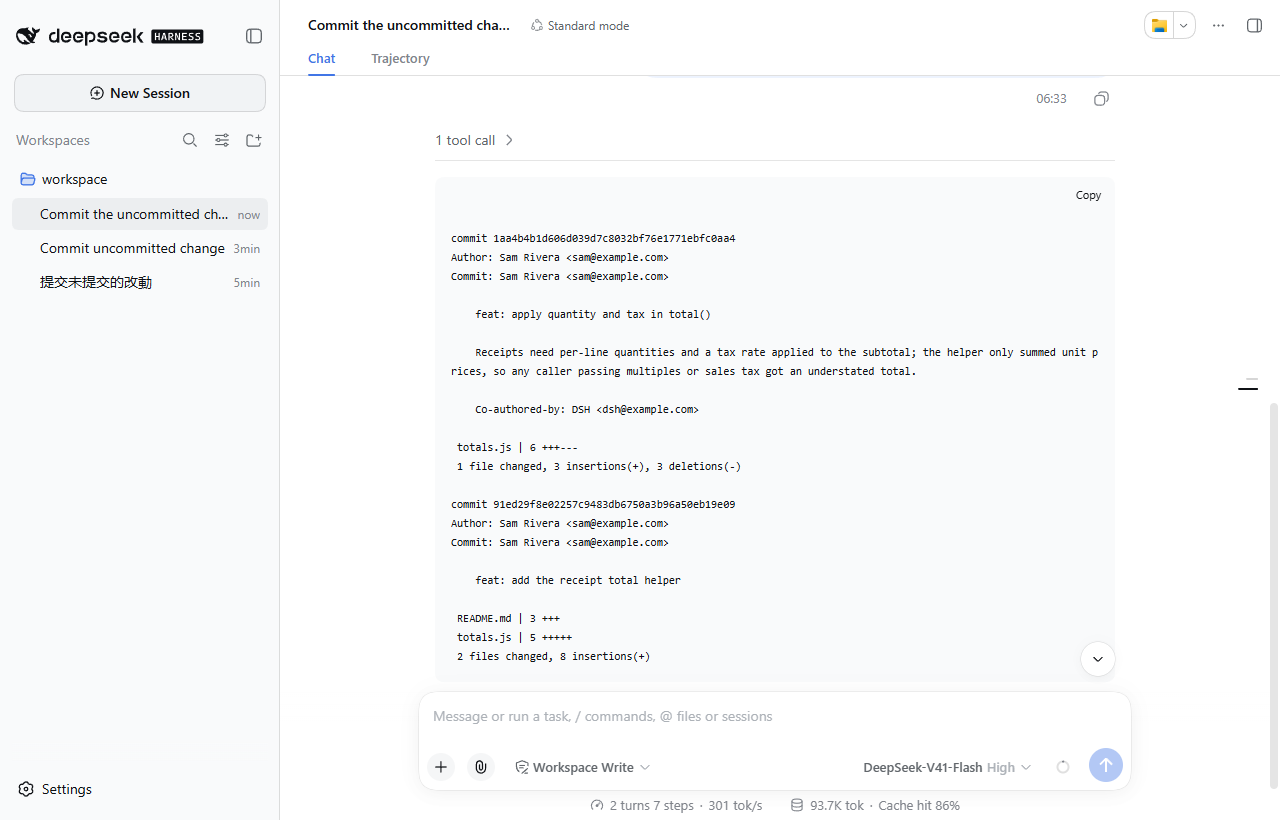
The commit keeps the repository's existing author and carries the trailer.
Install from npm
dsh plugin --profile web add dsh-git-style-zeta
# restart the host
Profiles are separate install roots. Replace web with the target profile and
install the plugin into each profile that should use these instructions.
Configure
Open Settings and pick Git style. Saving writes a user layer in the host's
settings document, which is where a field's set here badge comes from; Use the profile value clears that layer again.
| Field | Default | Used for |
|---|---|---|
git-commit-instructions | "" | Commit messages |
git-pr-instructions | "" | Pull request titles and descriptions |
A field that is omitted, null, empty, or whitespace-only disables its prompt
section.
To ship a default with the profile instead — for a headless host, or a machine
with no settings storage — set the row in the profile's cordis.patch.yml,
normally $DSH_HOME/profiles/web/cordis.patch.yml. The bundle already inserts
the git-style-zeta row, so configure it with id rather than another
insert entry:
- id: git-style-zeta
  config:
    git-commit-instructions: |-
      Use Conventional Commits: a subject under 50 characters, and a body saying why the change was needed.
      End the message with this trailer exactly once:
      Co-authored-by: DeepSeek Harness <noreply@deepseek.com>
      If that exact line is missing, append it with one blank line before the trailer block.
    git-pr-instructions: |-
      Title the pull request with the resulting behavior in one line.
      In the body: the problem, the behavior after the change, and the checks actually run; distinguish passed, failed, and unexecuted checks.
      The body must contain this exact line once:
      Generated with [DeepSeek Harness](https://deepseek.com/harness/).
      If it is missing, append it near the end, before any trailing hidden metadata markers.
That row is the layer Settings edits over, so the settings page wins while it
holds a value. DSH replaces the row's entire config when applying an
override, so keep both fields in the override when you use both.
The plugin adds your text as written and always asks the model to preserve existing authors and co-authors. Write each rule so the model can decide it by looking at the text: name the exact line, say it appears exactly once, and say what to do when it is missing. A condition the model has to interpret, such as "only when it is absent", is read less reliably — in one demo run the model took it as needing an explicit request and skipped the trailer. Do not put credentials in prompt text. Only the DSH profile loading this plugin is affected.
Update
Install the version explicitly, then restart the host:
dsh plugin --profile web add dsh-git-style-zeta@0.2.1
Remove
dsh plugin --profile web remove dsh-git-style-zeta
# restart the host
Remove the git-style-zeta override from the profile's cordis.patch.yml if
you added one. There are no Git hooks or Git settings to restore. Existing
commits remain unchanged.
Maintainers
Run npm test for the source tests. Release automation and npm Trusted
Publishing setup are documented in docs/releasing.md.
Screenshot conditions are recorded in docs/images/README.md.
Released under the MIT License.
Comments
Loading…
From the same category
by awesome-dsh-plugin
A curated list of plugins for DeepSeek Harness (dsh) · DeepSeek Harness 插件精选列表
★ 25.5k
CC0-1.0
Python
Nov 23, 2026
by woniuniuniu
DeepSeek Harness 自媒体工作台插件:一句话记灵感,一键生成脚本、封面、配图和分镜
★ 1.7k
↓ 5.6k/wk
MIT
JavaScript
Nov 18, 2026
dsh plugin --profile web add dsh-media-deskby 0xsline
DeepSeek Harness (DSH) ecosystem: curated plugins, tools, and infrastructure from dsh-external/hub and the public dsh-plugin topic.
★ 1.4k
CC0-1.0
Python
Nov 6, 2026
by keli-wen
Hire Google's Antigravity CLI (agy) as a fast Gemini staffer for Claude Code, OpenAI Codex, and DeepSeek Harness.
★ 917
MIT
JavaScript
Nov 19, 2026
dsh plugin --profile agent add agy-staffby SAOS-3624
Scene-aware storyboard for DeepSeek Harness: 9-16 numbered cells with timestamps + transcript + an audio envelope, packed into ONE image (384 tokens). Two tools: video_storyboard and video_zoom.
★ 594
↓ 17k/wk
MIT
JavaScript
Nov 23, 2026
dsh plugin --profile web add dsh-video-storyboardby omdsh-dev
DSH(DeepSeek Harness)插件:把 ego-lite 浏览器(给 AI Agent 用的 Chromium)接入 HARNESS——13 个结构化 ego_* 工具(文本语义快照、语义定位点击、表单填充、截图、CDP 控制、任务空间隔离),内置 ego 运行时,Linux + Chrome 开箱即用,无需克隆官方仓库或手动构建。
★ 570
↓ 13.5k/wk
NOASSERTION
TypeScript
Nov 23, 2026
dsh plugin --profile web add dsh-ego-browser