
dsh-sage-mode
Manifest validSage mode: a read-only advisory session mode for DeepSeek Harness — answer, advise, review, teach, brainstorm, and diagnose with read/search/web tools only.
dsh-sage-mode · Sage Mode
English | 中文
A read-only advisory mode for DeepSeek Harness sessions.
Enter with /sage, leave with /sage off.
While the mode is active, the session keeps only read/search/web tools. Every tool that edits, deletes, or executes is hidden from the model and denied at execution. At the same time an advisory system-prompt section turns the model into your thinking partner: it answers, advises, evaluates, explains, brainstorms, and diagnoses — instead of changing your workspace.
The name comes from Sage (贤者): the wise one gives counsel, not a hand.
Why
Coding agents are built to act. Sometimes you do not want action — you want to understand code, compare approaches, learn a concept, brainstorm, or debug an error. Sage mode gives that intent a first-class switch: the agent can still read your repository and search the web, but it cannot touch anything.
Usage
| Input | Effect |
|---|---|
/sage | Enter Sage mode: read-only tools only, advisory prompt injected |
/sage <question> | Enter the mode and send that question as your next message (images/files allowed) |
/sage off | Leave; the full toolset is restored immediately |
Typical uses: understanding an unfamiliar implementation, learning a codebase, comparing
design options, brainstorming, pasting a stack trace. When you are ready to actually change
code, run /sage off.
Entering the mode changes what the model can call, not the sandbox: hidden tools are removed
from the request's tool catalog entirely, and anything that still reaches dispatch is refused
by a tools.guard() that returns "let the user run /sage off first".
Tools kept (default)
read read_image glob grep web_search web_fetch ask_user_question skill
cordis_inspect_list cordis_inspect_query load_workspace_dependencies
Everything else is hidden — write edit ops_replace, pwsh/bash and background jobs,
subagent/send_message, plugin_manager, todo_write, present, goal and team-task
tools, and so on. Names that do not exist in your composition are ignored, so one list works
across agent presets.
Reference
Optional dependency: dsh-ops
The fast read-only tools — ops_glob, ops_grep, ops_inspect_local_file — come from
dsh-ops, a separate bundle. Sage mode declares them
as an optional dependency (optionalTools in cordis.patch.yml):
- dsh-ops installed → those tools are adopted into the allow list and stay available.
- dsh-ops absent → the names are ignored and everything else keeps working. A missing optional provider is never an error.
To adopt a read-only tool from any other bundle, extend the map without touching the code:
config:
  optionalTools:
    some-other-plugin: [their_read_tool]
Also see
- dsh-ops — the optional source of the
ops_*tools. - Sage mode repository — this plugin.
Install
Open Plugin Manager in the Harness and enter this repository's URL as the install spec:
https://github.com/zero360-TYN/dsh-sage-mode
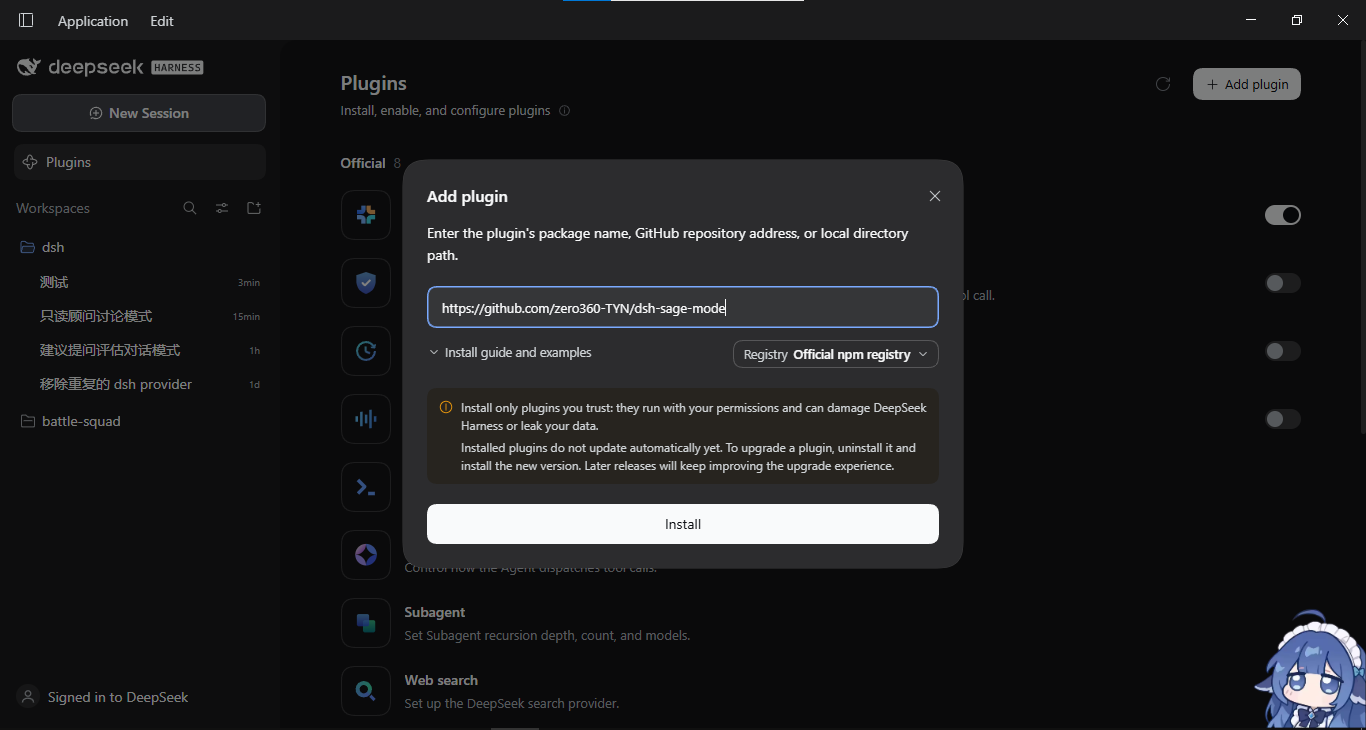 The manager reads a GitHub repository URL as a git install spec, clones the package, adds its
sage-mode row, and activates it. Updating later means installing the same URL again; a fresh
JavaScript module generation needs an app restart to load.
Alternative: install from a local directory
From a checkout, point the manager at the absolute path instead:
plugin_manager(action: "install_bundle", target: "<absolute path to this repo>")
That installs the package as a link, so editing files in the repo affects the live plugin directly — convenient while developing.
Configuration
The row's defaults live in cordis.patch.yml. Your own overrides belong
in the profile's user layer ($DSH_HOME/profiles/<name>/cordis.patch.yml). A patch replaces
the targeted row's whole config, so restate every key you want to keep:
- id: sage-mode
  name: dsh-sage-mode
  config:
    command: sage          # command name (default: sage)
    sectionOrder: 3255     # prompt section placement
    allowedTools: [read, grep, web_search]   # keep only these
    optionalTools:         # optional deps: adopt their read-only tools when present
      dsh-ops: [ops_glob, ops_grep, ops_inspect_local_file]
    section: |             # the full advisory prompt
      ...
Unknown keys fail at load instead of being ignored, so a typo cannot silently disable your configuration. Missing keys fall back to their defaults.
How it works
- State lives in the session log. The mode folds the
command/run+command/donepair the commands service already writes, so it adds no custom event type — an unknown event type would make older readers refuse to reopen the session. Resume and fork restore the mode automatically. - Enforced per agent.
agent.ctx.tools.restrict({ allow })hides the mutating tools andagent.ctx.tools.guard()denies anything that still reaches dispatch. Both disposers are owned byagent.ctxand kept in the plugin's own effect, so agent disposal and plugin unload both unwind them. - Zero
@deepseek-ai/*dependencies. A profile-installed bundle resolves those only from the dsh installation, so the plugin uses Node builtins plus services reached throughctx. - The prompt section is registered on the agent's own scope and returns an empty string while the mode is off — no token cost when unused.
Known limits
- Applies to the current session only; other tabs and sessions are unaffected.
- Under PTC mode the
run_codetransport itself is kept (otherwise the whole tool surface becomes unusable), but the generated SDK exposes only the permitted read-only tools. - Plan mode's
exit_plan_modeis hidden too; leave plan mode with/plan offor/sage off. - Sandbox and approval policy are unaffected — this plugin governs which tools the model holds, not filesystem permissions.
Test
node test/self-test.mjs
Covers config validation, the session-log fold, the command contract, restriction/guard registration and release, the fallback mask for unusual compositions, and admitting agents that already existed when the plugin loaded.
License
Comments
Loading…