

dsh-notes-wall
Manifest validDeepSeek Harness Sticky Notes Wall Plugin: quick notes in the sidebar, six-color papers, pin/flag, can be fixed to the Windows desktop and always stay on top, data stored in local notes.json. Sticky notes wall for DeepSeek Harness.
便签墙 · Sticky Notes for DeepSeek Harness
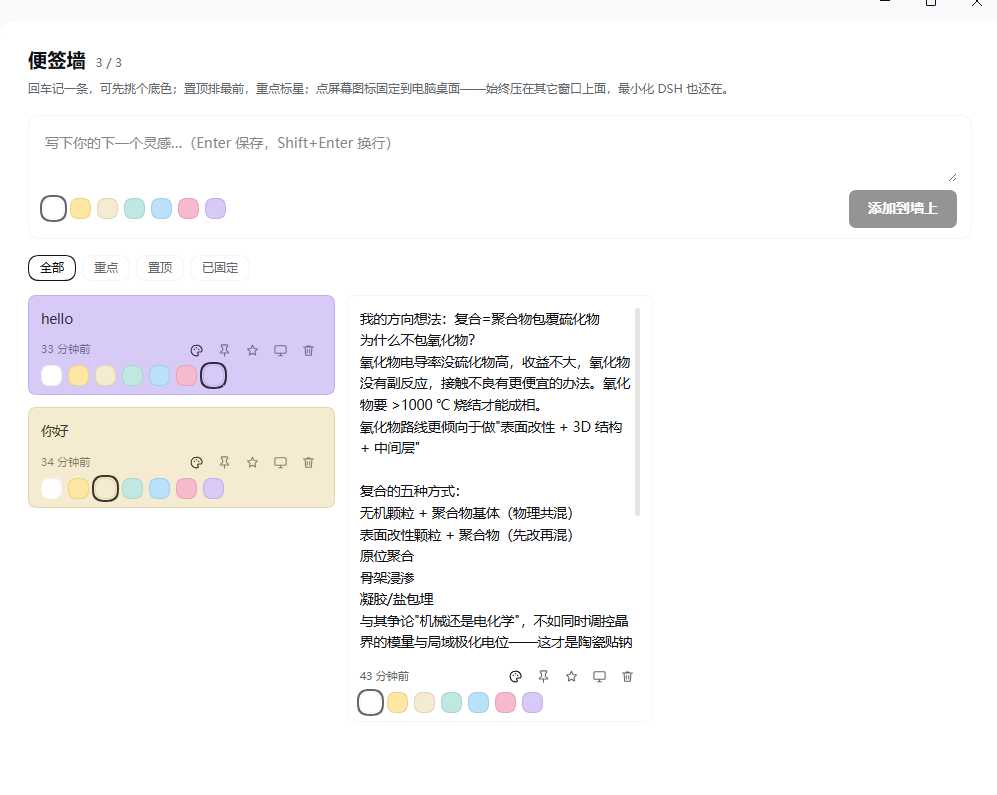
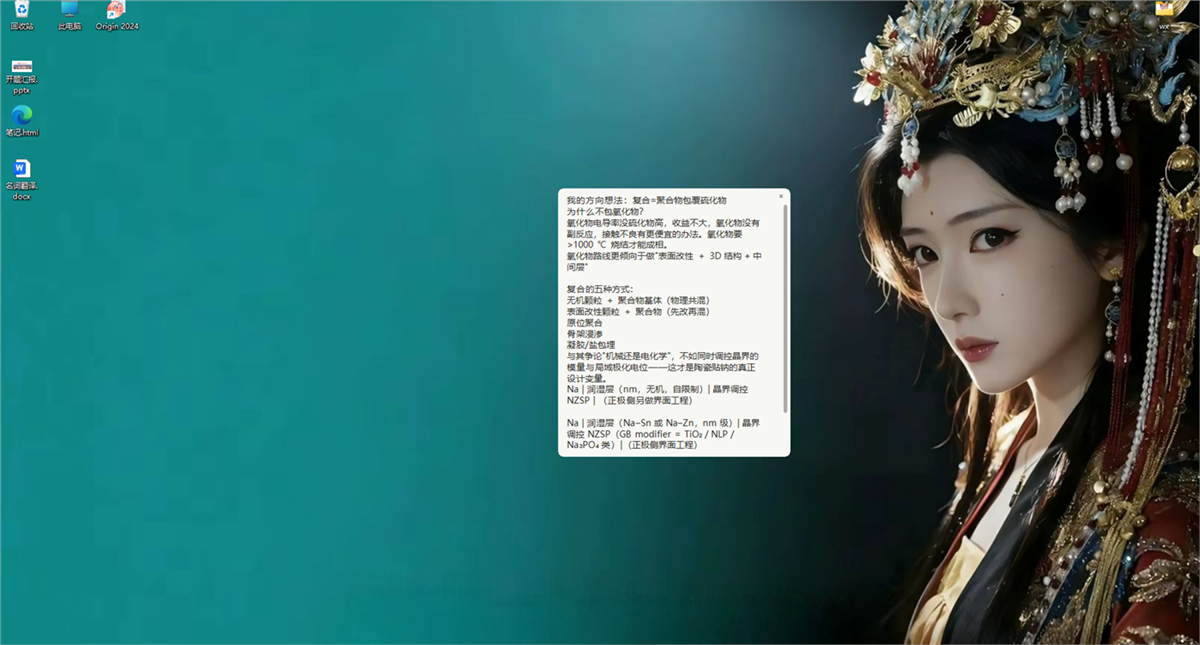
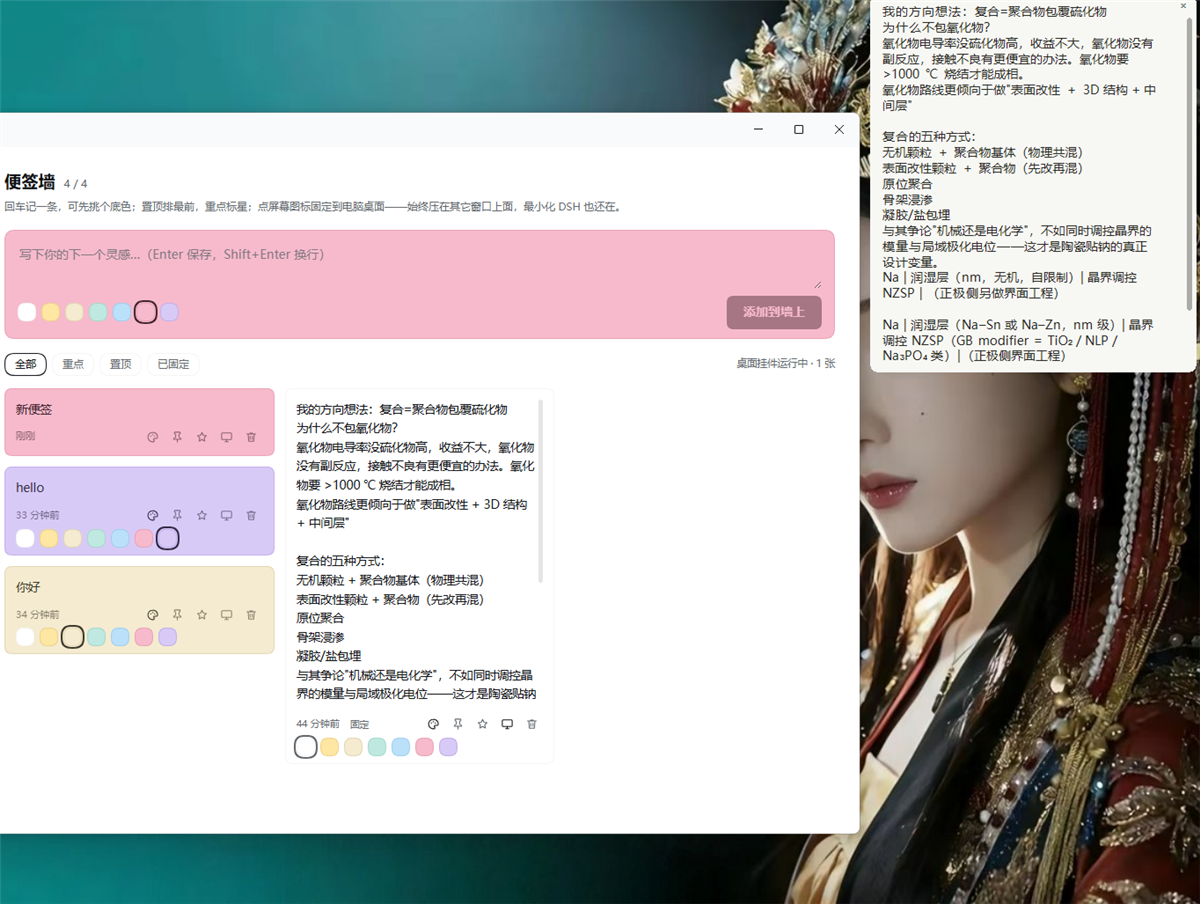
一个给 DeepSeek Harness(DSH)用的便签墙插件:左侧栏一个入口,随手记灵感与待办,六种纸色,一键置顶/重点/删除;可以把单张便签固定到 Windows 桌面上,始终压在所有窗口之上,最小化 DSH 也还在。
这是一个 DSH bundle 插件(Host + Client 两半),不是独立应用。
预览
功能
- 左侧栏入口:便签墙作为主面板,和「插件」「自动化任务」并列。
- 随手记:回车即存,Shift+Enter 换行;输入框里先挑底色,输入框会跟着变色。
- 六种纸色:奶油黄 / 米白 / 薄荷 / 天蓝 / 蜜桃 / 薰衣草,已存在便签可随时换色。
- 置顶 / 重点 / 一键删除:置顶排最前,重点高亮,删除不弹确认。
- 局部加粗:输入框里选中一段文字,按
Alt+B或点B按钮,就把它标成加粗;再按一次取消。加粗在便签墙和窗内浮动卡片里都会显示。 - 双击改旧便签:双击任意便签的文字,内容会回到顶部输入框,在那里改字、加粗、换底色,按 Enter 或点「保存修改」写回原便签;Esc 取消。
- 输入框高度可拖:输入框下方有一条拖动条,上下拖调整高度(上限 60% 屏高),双击复原;高度会记住。
- 桌面便签(Windows):点卡片上的「屏幕」图标,弹出一个无边框、始终置顶的独立小窗;可拖动、可拖边角改大小、可滚轮/拖滑轨滚动;右上角
×取消固定。 - 持久化:所有便签写入
$DSH_HOME/dsh-notes/notes.json,重启、换浏览器都在。
安装
需要已经装好 DSH(本插件在 DSH 0.2.x 上开发)。
-
把本仓库放到一个不含空格的路径下,例如
D:\.dsh-plugins\dsh-notes; -
在 DSH 的「插件」页用「添加」指向该目录,或命令行:
dsh plugin --profile <你的 profile> add "link:D:/.dsh-plugins/dsh-notes" -
重启 DSH,左侧栏出现便签图标。
包名 dsh-notes-wall;bundle 补丁里注册的插件行 id 是 dsh-notes。
桌面便签部分依赖 Windows 的 PowerShell + WinForms;面板本身跨平台,非 Windows 上固定便签会退化为「窗口内的浮动卡片」。
使用
| 操作 | 位置 |
|---|---|
| 新建便签 | 顶部输入框,回车或点「添加到墙上」 |
| 修改已有便签 | 双击便签文字 → 文字回到输入框 → 改完回车或点「保存修改」(Esc 取消) |
| 加粗一段文字 | 在输入框里选中,按 Alt+B 或点 B 按钮;再按一次取消 |
| 调整输入框高度 | 拖输入框下方那条拖动条,双击复原 |
| 换底色 | 输入框底部圆点(新便签)/卡片上的调色盘图标(已有便签) |
| 置顶 | 卡片上的图钉 |
| 标重点 | 卡片上的星标 |
| 删除 | 卡片上的垃圾桶(立即删除) |
| 固定到桌面 | 卡片上的屏幕图标;桌面小窗右上角 × 取消 |
加粗是怎么存的
不引入富文本格式:选中加粗只是在文字两侧加了 **,所以 notes.json 里仍然是可以直接读、直接搜、直接导出的一行纯文本。
- 便签墙面板、窗内浮动卡片:渲染成真正的加粗
- Windows 桌面小窗:WinForms 的 Label 不支持局部字重,所以显示时会把
**去掉,文字保持常规字形 - 没闭合的
**不会被当成标记,原样显示,不会丢字
数据与文件
- 便签数据:
$DSH_HOME/dsh-notes/notes.json - 桌面小窗的位置与大小:
$DSH_HOME/dsh-notes/widget-pos.json - 挂件进程 PID:
$DSH_HOME/dsh-notes/widget.pid(用于避免重复实例) - 包里还有
widget.ps1(桌面小窗)与test/smoke.mjs(Host 存储逻辑的自测)
目录结构
index.js            Host 半:笔记存储 + JSON 路由 + 拉起/停止桌面挂件
client.js           Client 半:侧栏图标、便签墙面板、窗内浮动卡片
widget.ps1          Windows 桌面便签(WinForms,无边框置顶窗口)
cordis.patch.yml    bundle 补丁:插入一行插件
locale/{zh,en}.json 插件管理页显示的标题与描述
icon.svg            插件图标
test/smoke.mjs      Host 路由与存储的自测(node test/smoke.mjs)
自测
node test/smoke.mjs
覆盖:空状态读取、写入往返、空白便签丢弃、颜色白名单、缺失 notes[]、非法方法、2000 条上限、磁盘落盘、坏文件降级。
License
MIT,见 LICENSE。
Comments
Loading…
Similar plugins
by LoveStudyXin
Sticky-note wall in the DeepSeek Harness sidebar: quick capture, image notes, pin/search, local backups, and an agent tool so a session or an IM bot can add notes.
★ 0
MIT
JavaScript
Nov 6, 2026
dsh plugin --profile web add dsh-sticky-notesby DynaMyhome
DeepSeek Harness 笔记工作区插件:右栏笔记树 + CodeMirror 6 实时预览编辑器(Typora/Obsidian 手感)、行内/行间公式、真表格、代码卡片、回收站
★ 0
MIT
JavaScript
Oct 4, 2026
dsh plugin --profile web add dsh-notesby 439436269-ctrl
Sticky notes in the DeepSeek Harness sidebar: a notes panel with auto-save plus note_create / note_list / note_update / note_delete tools.
★ 0
MIT
JavaScript
Nov 7, 2026
dsh plugin --profile web add @vfvrpq/dsh-sticky-notesby Rebebberd
给 DeepSeek Harness 的封闭知识箱:基于你导入的资料提问、出题、记笔记,回答标注出处,数据全部留在本机。
★ 0
MIT
JavaScript
Oct 27, 2026
dsh plugin --profile web add dsh-notebookby VoodooB0Ys
DeepSeek Harness 桌面提醒(Windows):原生 Toast + 全屏兜底卡片,需要授权/提问/完成/出错时叫你一声,点一下回到对应对话
★ 3
↓ 103/wk
MIT
JavaScript
Oct 5, 2026
dsh plugin --profile web add dsh-desktop-notifyby Natte
DeepSeek Harness 待办插件:侧栏入口行 + 主面板页,宿主侧持久化,agent 可读写
★ 0
MIT
JavaScript
Oct 27, 2026
dsh plugin --profile web add dsh-sidebar-todo