

dsh-qqbot-plugins
Discovered★ 4DSH QQ 机器人插件市场索引 · 收录扩展包(extension packs)
DSH QQ 机器人插件市场
这是 dsh-qqbot 的插件索引仓库。
机器人面板里的「市场」页签读的就是本仓库根目录的 index.json。
收录规则
每个插件是仓库里一个独立目录(约定放在 packs/<id>/),目录结构与机器人本地的
extension-packs/<id>/ 完全一致:
packs/<id>/
  qqbot-pack.json        # 可选:{ name, author, version, description, homepage }
  tools/*.mjs            # 模型可调用的工具
  commands/*.mjs         # / 开头的斜杠命令
  hooks/ inbound/ outbound/ botplay/
然后在 index.json 的 plugins 里加一条:
{
  "id": "your-pack",
  "name": "你的扩展包",
  "author": "你的名字",
  "version": "1.0.0",
  "description": "一句话介绍",
  "repo": "zaofan-make/dsh-qqbot-plugins",
  "path": "packs/your-pack",
  "tags": ["工具", "示例"],
  "kinds": ["tools", "commands"],
  "files": ["qqbot-pack.json", "tools/hello.mjs", "commands/hello.mjs"],
  "cover": "https://raw.githubusercontent.com/zaofan-make/dsh-qqbot-plugins/main/packs/your-pack/cover.png"

}
files 必填,列出 path 目录下所有文件(相对路径)。装的时候按这个清单逐个下载,
不走 GitHub 目录 API —— 那个接口在墙内连不上。
⚠️ 带界面卡片(
ui/)的包,files里也要列上ui/<卡片>/card.html这些文件, 否则装完卡片是空的。现有的build-index.mjs会自动扫全目录,不用手写。
kinds 是包里带了哪几套扩展点(tools / commands / hooks / inbound / outbound /
botplay / ui),面板据此显示标签。
cover 可选,卡片封面。两种写法都支持(2026-10-26 起):
// ① 外部图床链接(推荐:图不跟着仓库走,GitHub 抽风也不影响)
"cover": "https://i.ibb.co/xxxxx/cover.png"

// ② 包内文件名(文件放 packs/<你的包>/cover.png)
"cover": "cover.png"
- 写完整 URL 时原样保留,市场不会做任何镜像改写 —— 你自己挑的图床自己负责稳定性。
- 写包内文件名时,构建脚本会转成仓库地址(jsdelivr),面板再按 jsdelivr → gh-proxy → ghproxy → raw 四级降级。
- 都不写时,自动探测包目录下的
cover.png / cover.jpg / cover.webp / cover.gif。 - 建议用直链(
https://xxx/a.png),别用需要跳转的分享页(https://xxx/view/123),面板的<img>拉不到图。
工具怎么写
// tools/hello.mjs
export default {
  name: 'hello_pack',
  description: '打个招呼',
  inputSchema: { name: { type: 'string', description: '名字' } },   // ← 扁平写法!
  run: async (args) => `你好,${args.name || '世界'}`,
};
⚠️ ** 是 dsh 的扁平写法**:直接 , 不要包成标准 JSON Schema 的 (会被 以 拒掉)。
命令怎么写
// commands/hello.mjs
export default {
  name: ['hello', '你好'],           // 可以是数组(多个别名)
  description: '打招呼',
  usage: '/hello [名字]',
  handler: (ctx) => `你好呀 ${ctx?.command?.raw || ''}`,   // ← 是 handler,不是 run;返回字符串
};
自定义设置面板(可选)
在文件里再导出一个 qqbotSettingsPage,面板里就会出现 ⚙,用户填的值会存成配置,
执行时通过 ctx.config 读到:
export const qqbotSettingsPage = {
  title: '我的设置',
  schema: [
    { key: 'text',  type: 'string', label: '回复文字', default: '你好' },
    { key: 'times', type: 'number', label: '重复次数', default: 1 },
    { key: 'on',    type: 'bool',   label: '启用',     default: true },
    { key: 'tags',  type: 'list',   label: '标签' },
    { key: 'mode',  type: 'select', label: '模式', options: ['普通', '高级'] },
  ],
};
自带界面卡片(可选,v1.11.0 起)
扩展包可以带自己的界面 —— 用户装完之后,设置页或悬浮球里会多一个页签, 里面跑的是你写的 HTML。
放一个 ui/ 目录:
packs/<你的包>/
  ui/
    <卡片目录>/
      card.html      ← 必需
      card.css       ← 可选
      card.js        ← 可选
card.html 顶部注释声明元信息:
<!-- qqbot-ui: { "id": "myui", "slot": "settings", "title": "我的面板", "order": 50 } -->
| 字段 | 说明 |
|---|---|
slot | settings(设置页,全局一份)或 dock(悬浮球,每个机器人一份) |
id | 可选,覆盖目录名。两张卡想共用一份配置就给相同的 id |
title | 页签文字 |
order | 排序,小的在前(默认 100) |
装包时自动归位:slot=settings 的卡片会被复制到用户的
{PROFILE_ROOT}/.qqbot-extensions/ui/<id>/;slot=dock 的留在数据根不用动。
只补不改 —— 用户改过的不会被覆盖。
卡片里能用的 API:
qqbotExt.getConfig('profile' | 'data')     // 两级配置(全局 / 本实例)
qqbotExt.setConfig({...}, scope)
qqbotExt.store.load() / save(v)
qqbotExt.kernel.get('服务名')               // 宿主服务
qqbotExt.api('/你的路由')                   // 你在 hooks 里 registerRoute 的接口
qqbotExt.cap('fs.read' | 'appendSilent' | 'text', ...)
qqbotExt.dock.sid / peerId / context() / history(n)   // 仅 dock 卡
卡片跑在 Shadow DOM 里(样式与面板双向隔离、崩了只白自己那张卡)。
装完之后大概长这样(左边设置页、右边悬浮球):
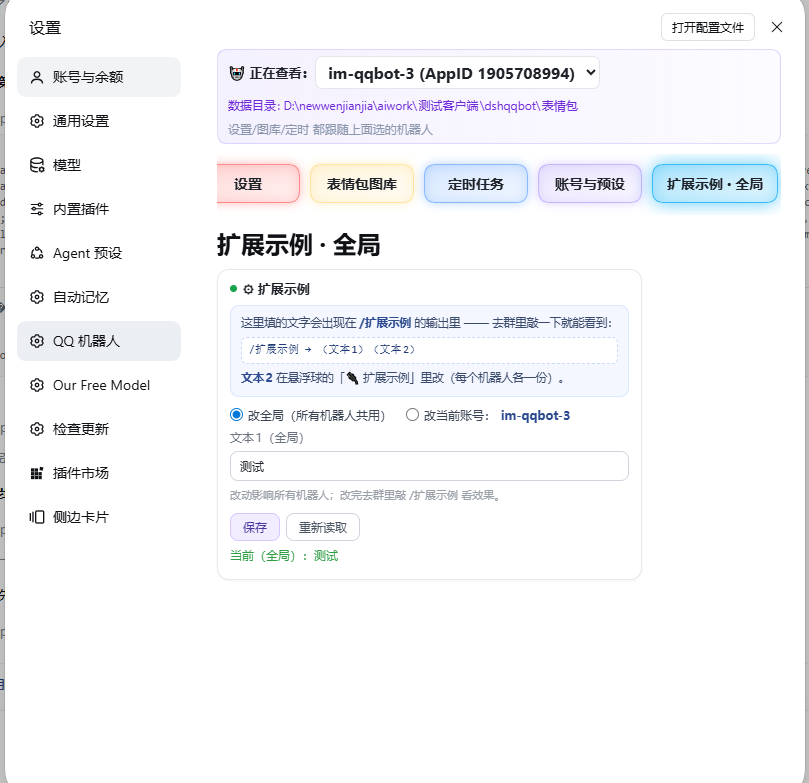
完整 API 和硬边界见插件仓库的
docs/extension-contract.md§1 末尾「第六套:ui/」。想抄现成的:插件自带示例
examples/ext-ui/demo/(settings + dock 两套)。
提交新插件
加 packs/<id>/ 目录,然后在本地跑一次构建:
node scripts/build-index.mjs    # 重新生成 index.json
node scripts/check-packs.mjs    # 校验
提交时把 packs/ 和 index.json 一起带上。
许可
各插件版权归各自作者,本仓库仅作索引与分发。
怎么提交自己的插件
只加目录,不要改 index.json(它由 Action 自动生成):
packs/你的插件id/          ← id 只能用字母数字-_
  qqbot-pack.json          ← 元信息(必填)
  cover.png                ← 可选,卡片封面(自动探测)
  tools/xxx.mjs            ← 可选,给 AI 调用的工具
  commands/yyy.mjs         ← 可选,/命令
qqbot-pack.json 长这样:
{
  "name": "我的插件",
  "author": "你的名字",
  "version": "1.0.0",
  "description": "一句话说明",
  "homepage": "https://github.com/你/你的仓库",
  "tags": ["工具"],
}
提 PR 后会自动跑检查(manifest 字段、node --check、禁二进制、inputSchema 格式);
合并到 main 后 Action 自动重建 index.json —— 不需要你自己维护文件清单。
两个人同时提 PR 也不会冲突,因为各自只加自己的目录。
Comments
Loading…
Similar plugins
by belowthetree
qqbot 连接QQ机器人插件,方便易用,安装快捷
★ 0
MIT
TypeScript
Aug 30, 2026
dsh plugin --profile web add dsh-qqbotby arrow1031
Deepseek harness plugin for QQ-Bot adataper
★ 0
MIT
JavaScript
Sep 20, 2026
dsh plugin --profile web add dsh-qq-botDSH QQ bot bridge plugin, connect DeepSeek Harness with QQ bot.
★ 0
dsh plugin --profile web add @sunjuntao/dsh-qqbotby tencent-connect
让 QQ Bot 接入 DeepSeek Harness(dsh)的官方插件
★ 443
MIT
TypeScript
Oct 29, 2026
dsh plugin --profile agent add @tencent-connect/dsh-qqbotby YUsaltyfish
DeepSeek Harness 的原生 QQ 机器人插件:微内核 + 9 个子插件,Linux/Windows 通用。收消息、发图、生图、发表情,装完就能聊。
★ 10
↓ 16.5k/wk
MIT
JavaScript
Oct 29, 2026
dsh plugin --profile web add dsh-onebot-qqby 23bear
QQ 官方机器人通道:在 QQ 群或私聊里直接与 DSH 会话对话 —— 收到消息后唤醒/续接一个 DSH Session,把回答发回 QQ
★ 0
MIT
JavaScript
Oct 15, 2026
dsh plugin --profile web add dsh-plugin-qq-bot