

dsh-meme
Manifest valid★ 427DeepSeek Harness Sticker Plugin — find them, send them, learn them: pure-text meme battles, emotion-driven proactive image sending, send images just like QQ/WeChat, AI-powered auto-learning, custom stickers, and freely switch between multiple styles.
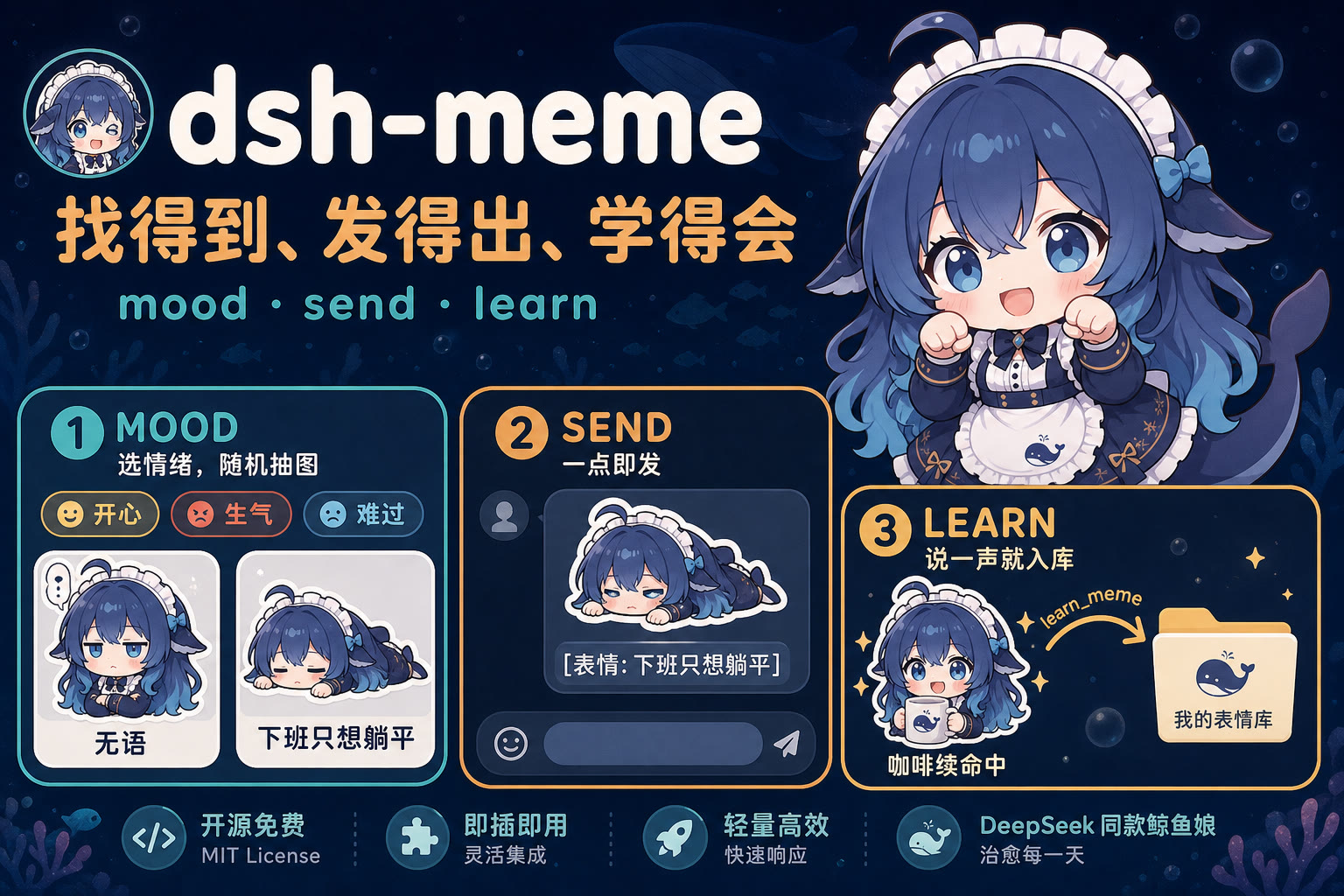
表情包插件 dsh-meme — 找得到、发得出、学得会





Landing page: yyh-001.github.io/dsh-meme (meme packs are previewable; add the dsh-meme-pack topic and a previews/ folder to your repo to get indexed)
Pack downloads: yyh-001/dsh-meme-packs (after downloading the ZIP, import it directly from the settings page)
dsh-meme (formerly dsh-expression) is the meme pack plugin for DeepSeek Harness — findable, sendable, learnable:
- Meme duels with plain text: UI shows the image, model receives
[表情: 描述], no image input needed - AI auto-learn: user says "入库",
learn_memeingests the latest user attachment (no attachment ID needed), auto-classifies - Proactive mood-based sending: pick a mood bucket, system samples captions randomly, model picks one to paste into reply; for a specific image ("猫" "比心" "摸鱼") use keyword search instead
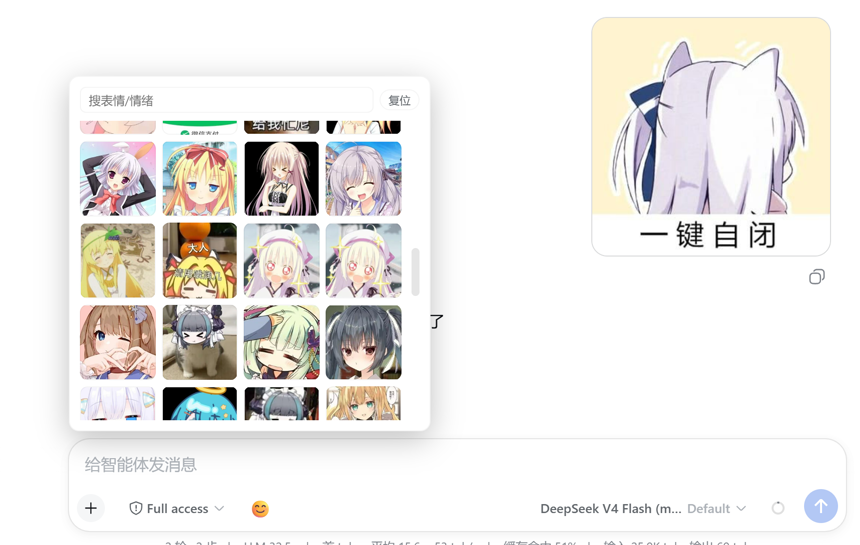
- Send like QQ/WeChat: 😊 floating panel in input box, click to send directly
- Zero third-party deps: only node:sqlite, ready to use
Chat / feedback: QQ group 993579665 (click to join)
To file an issue: at the bottom of the settings page panel there's a “Feedback / File an issue” link that opens the repo's “Feedback / Bug” form with the plugin version and runtime environment pre-filled. You can also pick a template yourself from Issues.
Installation
Published on npm (dsh-meme). One line to install into any DSH profile (e.g. ~/.dsh/profiles/web/):
dsh plugin --profile web add dsh-meme
# 等价于:
pnpm add dsh-meme
The old package name dsh-expression is deprecated; please use dsh-meme instead. The plugin's internal id remains dsh-expression, so existing installations are unaffected.
Or install directly from GitHub / locally:
pnpm add github:yyh-001/dsh-meme   # 或
pnpm add file:/path/to/dsh-meme
Note: pnpm has a “new package safety period” (default 24h); freshly published versions are silently rolled back to older ones. In a hurry, add
dsh-memetominimumReleaseAgeExcludeinpnpm-workspace.yaml.
Runtime requirement: Node ≥ 22.13.0 (relies on the built-in
node:sqlitemodule; Node 22.5–22.12 needs the--experimental-sqliteflag, Node 20 is not supported).
Config
One built-in pack is included: dafeiyu-001 (Da Feiyu, 24 images), ready to use with no configuration at all. “Official Meme Pack #1” (official-001) is no longer distributed with the plugin; install it with one click from the “Discover” tab in settings (the marketplace provides Release ZIPs with SHA-256 verification).
Settings page “Packs” tab: click “Edit” on a card to switch to that pack (for image management), and use the toggle in the card's top-right corner to control whether the model may use this pack to send memes (multiple packs can be enabled at once). The plugin scans the built-in memes/* and subfolders containing index.db under the “Scan directory” (default ~/.dsh/meme-packs). Importing a ZIP places it in the scan directory and switches to it immediately. Settings are persisted in ~/.dsh/dsh-expression.json and survive plugin upgrades.
Ready to Use
用户: 发个无语的表情包
模型: send_meme tag=sad → 随机几张 caption → 把 [表情: …] 贴进回复
前端: 按描述配图,对话里看起来就是表情
Click 😊 left of the input box to pick and send with one click.
![斗图示例:用户发一张,模型接一张,前端把 [表情: 描述] 配成图](https://raw.githubusercontent.com/yyh-001/dsh-meme/main/docs/chat-example.png)
Tools
| Tool | Purpose |
|---|---|
send_meme | Get candidates via two modes: tag for random mood sampling, query for keyword search (caption/keywords/image name, multi-word); scope = all enabled packs. Web mode writes [表情: 描述] into reply, frontend renders image |
learn_meme | Learn image: user says "入库" (defaults to latest user attachment); can also pass attachmentId / imageUrl |
Meme Format (Default)
UI shows the image, model only reads/writes text tokens — bypasses dsh image admission check:
- Model and floating panel both send
[表情: 描述](no URLs) - Frontend renders images only in chat bubbles by caption (Think / trajectory / tool cards stay text-only)
- Quote variants (
“”/"") are normalized before matching - No candidate match: falls back to tokenized match against captions/keywords; if still no hit, shows raw description instead of bare
[表情: ...] - Uploaded images remain attachments, enter session as-is; learning goes through
learn_meme
UI
The “Meme Packs” panel in settings has three top-level tabs (no sub-tabs):
- Packs: cards list installed packs (built-in / imported / custom / marketplace download). Cover images are taken from within the pack itself (local routing, no remote previews), with count and category tags shown; clicking a card switches to that pack and opens its meme tab (the whole card is clickable; buttons and toggles inside the card absorb their own clicks). Within the page you can search / filter / upload / edit / delete; “← Pack List” in the top-left goes back
- Pack toggles: each card has a toggle on the right; enabling it allows the model to use that pack to send memes. Multiple can be enabled at once (no more “in use / installed” badges — state is read only from toggles and buttons).
send_memedraws candidates from all enabled packs; if none are enabled, the model is told to open the settings page. Installing / importing / creating a pack auto-switches to it and turns its toggle on - New Pack / Import Pack: at the top of the Packs tab. Importing means selecting a plugin-exported ZIP; after import it auto-switches to it. Newly created packs auto-enable their toggle
- Export: available on every pack card — exports that pack's ZIP without needing to switch to it first
- Update: shown only when the marketplace has a newer version (compares the pack's own version against the marketplace catalog's); the Discover tab only handles installation — no update button on installed entries, updates happen on the Packs tab
- Delete: “Delete” on the pack card — built-in, marketplace-download, and user-created/imported packs all go through this single entry (a confirmation modal within the app, not a native browser dialog). Deleting a marketplace-download pack also clears its subscription record; deleting a built-in pack comes back with the next plugin upgrade or reinstall; deleting the current pack auto-switches away first (the management connection is attached to it)
- Submit: on the current pack card — exports the pack ZIP and opens a pre-filled GitHub submission form
- Discover: shows the GitHub pack catalog. Clicking a card previews the pack's images (installed packs read local data; manifest-hotlink packs read their manifest directly and can list hundreds; others use preview images from the marketplace catalog. Clicking an image opens the original). Cards also show the pack's download count (server-side fetch of GitHub Release
download_count, summed across versions of the same pack, cached for 30 minutes; manifest-hotlink packs without a Release don't show one), sorted by downloads descending by default (packs without download counts go last; ties keep catalog order). Clicking “Install” downloads the Release ZIP, verifies SHA-256, and auto-switches; a progress bar appears on the card during download (percentage if upstream sendscontent-length, otherwise rolling stripes + bytes downloaded). Installed entries don't show a button (updates happen on the Packs tab) - Settings: scan directory (with an in-app “Choose Directory” browser), ambient prompt toggle (turning it off stops the model from initiating meme duels), and edit prompt
- Upload dialog: image preview + category dropdown (pick / create / delete category) + description + keywords
- Edit dialog: same category dropdown; edit category / description / keywords
- Chinese category display: dropdowns and cards show Chinese like “生气 (angry)”
- Category filters take effect instantly
图库:已安装图库卡片列表,点卡片进它的表情包页
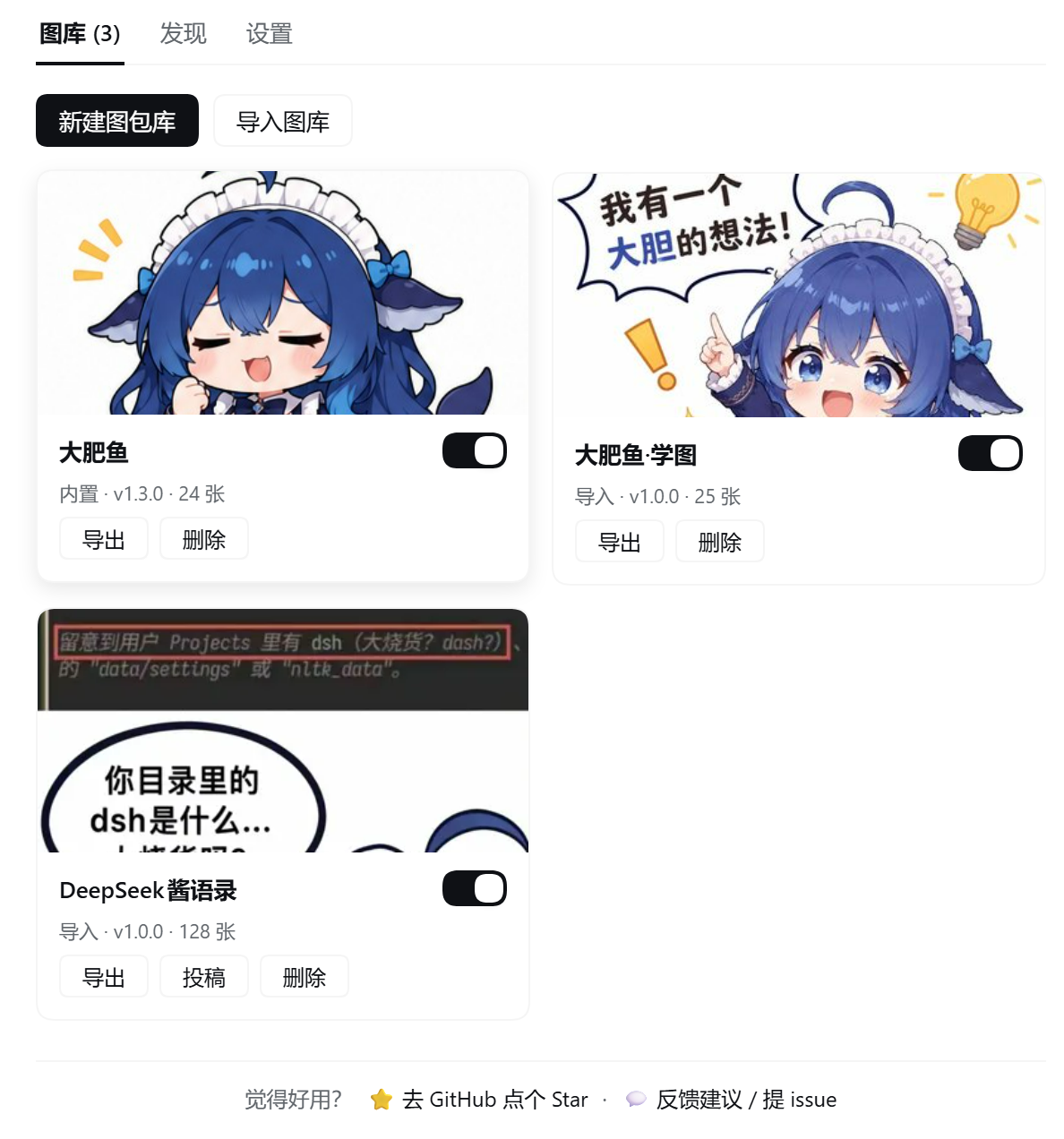
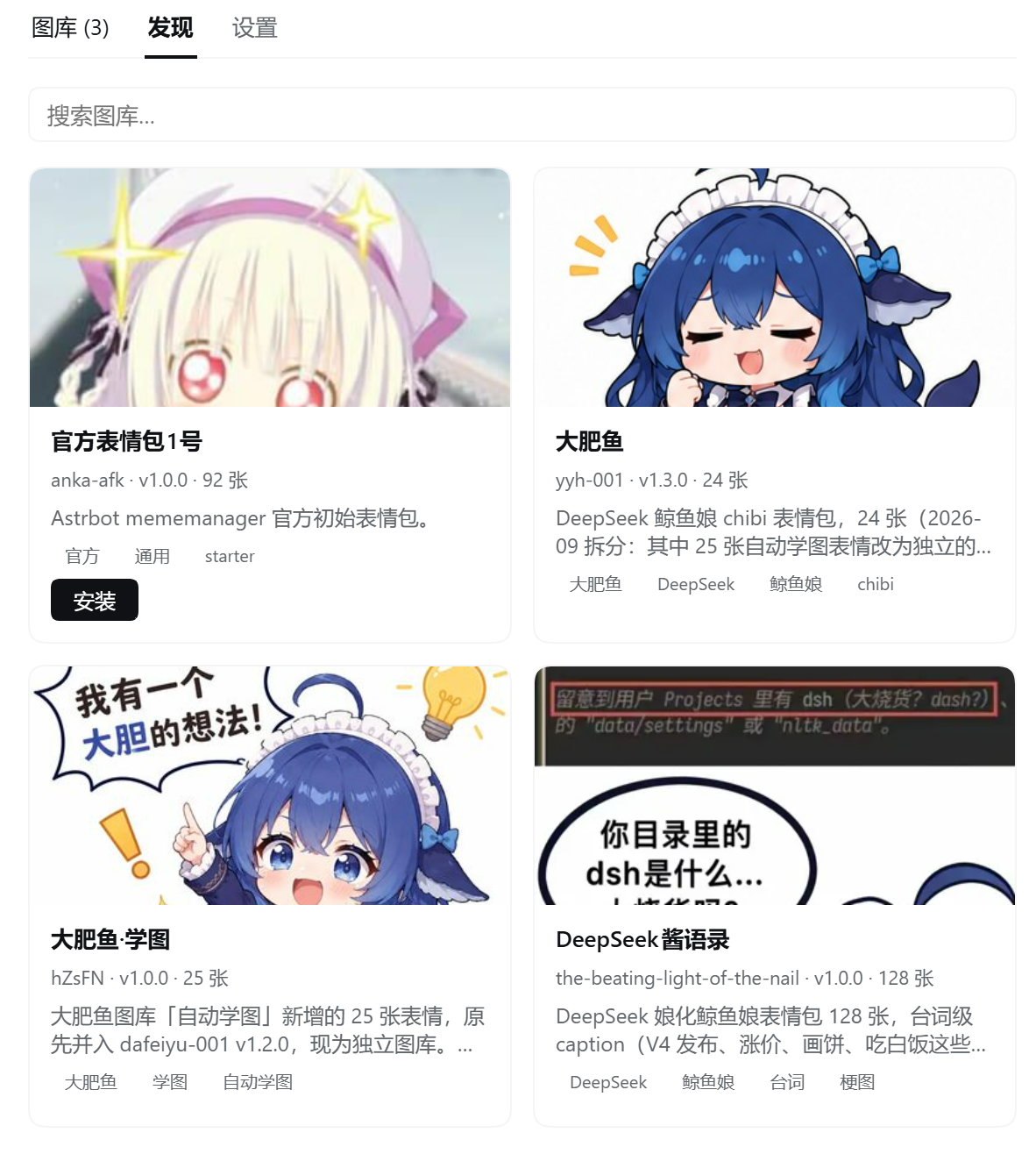
发现:图库市场(点卡片预览图片、按下载量排序、安装带进度条)
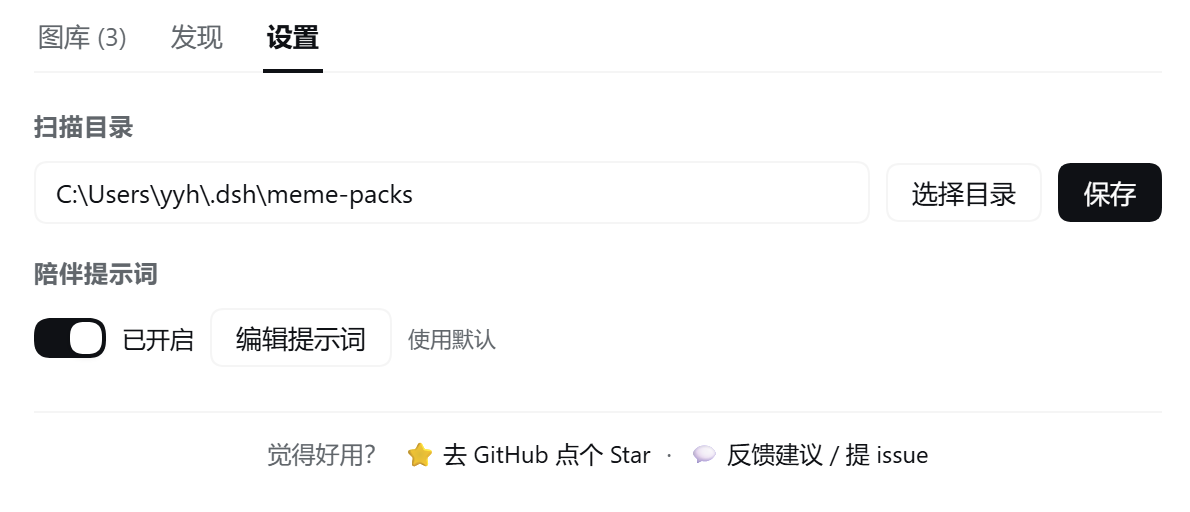
设置:扫描目录与陪伴提示词开关
Input box 😊 for one-click meme sending: open the panel → top area shows pack tabs (built-in, imported, marketplace) → search or browse thumbnails directly → click one to send immediately.
Sharing Your Meme Packs
Two options: send it to a friend, or submit it to the public dsh-meme-packs marketplace.
New & submit
Settings page → Packs → New Pack at the top. Fill in name, ID, and description; after creation it auto-switches to the empty pack (and turns its toggle on). Add images, then click Submit on the current pack card → exports the ZIP and opens the submission page.
The plugin downloads the pack ZIP and opens a pre-filled GitHub form (name, description, image count). After logging in, drag the ZIP into the "Pack ZIP" field, add source and license, then submit. Once reviewed it's added to the marketplace. No Token config or paid upload needed. If the browser blocks the page, click "Open GitHub form" below the notice. Export ≠ submitted or indexed.
Send to a friend
- Settings → Packs → Export on that card, get
dsh-meme-<图库id>.zip - Send the ZIP to them
- They go to Settings → Packs → Import at top, pick the ZIP, auto-switches to the new pack
Please use the ZIP exported by the plugin. The “Download ZIP / 下载源码” on GitHub repo pages is source-compressed and import will fail.
Add to landing page
- First export the ZIP as above, extract to a folder (should contain
index.db,manifest.json,memes/) - Create a new GitHub repo, put the folder contents at the repo root
- Add
previews/with 6–12 thumbnail images (jpg/png) — the landing page uses these for previews - Repo Settings → Topics, add
dsh-meme-pack
Optional: attach the plugin-exported ZIP to a GitHub Release so others can download and import directly. You can also git clone then put the repo into the scan directory (change the path under “Scan directory” in settings, or use “Choose Directory” to browse).
Pack Marketplace
Settings “Discover” tab reads dsh-meme-packs/catalog.json by default: click a card to preview pack images, click “Install” to download the GitHub Release ZIP directly, verify SHA-256, install and switch — no manual download needed.
- Both GitHub Release ZIP and per-image manifest formats are supported; spec at docs/remote-pack-spec.md
- Catalog source is swappable: default is raw-first with jsDelivr fallback (raw is more up-to-date, jsDelivr works better on some networks); to use your own catalog, set
settings.remoteDirUrlorconfig.remoteDirUrlin the plugin patch - The UI currently only offers “install from catalog”; the per-image manifest subscription backend (incremental fetch) still exists but the entry is hidden until needed
What It Does
| Capability | Notes |
|---|---|
| Mood-based sampling | Six mood buckets: happy / angry / sad / shy / confused / daily; randomly sample N captions for the model to pick from |
| Keyword search | query substring-matches across caption/keywords/image name; space-separated multi-word; all-hit preferred, random within tier (repeated searches give different batches) |
| Auto-learning | learn_meme defaults to the latest user attachment; can also pass a URL; image recognition requires the current model to support image input |
| Text-token sending | [表情: 描述] → frontend renders image; only chat bubbles are rendered |
| Input-box one-click | 😊 button left of the session input → floating panel → pick and send with one click |
| Proactive mood sending | Drops a meme when the vibe's right; short tail after sending, let the image speak for itself |
| Management API | Upload / edit / delete / delete category — all done on the settings page, data is persisted |
| Pack switching | Click “Edit” on a card in Settings → Packs to switch and enter; scan directory defaults to ~/.dsh/meme-packs |
| Export / Import | One-click ZIP packaging of a pack for sharing; importing someone else's pack auto-switches (zero-dependency implementation) |
| Pack marketplace | Discover tab reads the GitHub catalog; one-click install of Release ZIPs with SHA-256 verification; “Update” appears on the Packs tab only when a newer version exists |
Daily Commands
send_meme tag=sad limit=8          # 难过桶随机 8 张,挑一行 [表情: …] 贴进回复
send_meme tag=happy                # 开心/卖萌
send_meme query="猫"                # 关键词搜:caption/关键词/图名里带「猫」的(比抽情绪准)
send_meme query="生气 猫"           # 多个词:全都命中的排前面;tag+query = 在该情绪里筛
learn_meme                         # 收录最近一张用户图(不必填 id)
learn_meme imageUrl="https://…"    # 收录任意图片 URL
Mood dictionary: happy excited (cute/cute-like/likes) / angry angry / sad down (speechless/begging) / shy shy / confused puzzled & surprised / daily daily (sleeping/going to work/good morning). Provide only tag to get a random batch; provide query to search by word — whole-word misses auto-split and retry, still no match falls back to random sampling in that mood.
Three Iron Rules for the Model
See the full contract in the send_meme tool description.
- Write the
[表情: 描述]from the candidates verbatim into the reply — no URLs, no markdown image conversion - If no hit, try different words, moods, or fall back to text — don't force-send
- Keep it brief after sending; let the image do the talking — no restating, no describing the image's content
Pack Sources
One pack is built in; the other two are on demand:
-
Da Feiyu (
id: dafeiyu-001, 24 whale-maid chibi images) built-in:happy3,confused2,sad2,shy2, plus one each ofangry/baka/color/cpu/daily/fool/givemoney/like/meow/morning/see/sigh/sleep/surprised/work. -
Da Feiyu · Learned (
id: dafeiyu-learned, 25 images, maintainer hZsFN) not built-in: auto-learned memes from PR #3, originally merged into dafeiyu-001 but now split into its own pack. -
Official Meme Pack #1 (
id: official-001, now marketplace-installed, no longer built-in) sourced from Astrbot mememanager official starter memes: -
Upstream repo: anka-afk/astrbot-meme-pack-official-01 (
mainbranch), maintainer anka-afk -
Composition:
index.db(SQLite index with per-image caption/keywords) +manifest.json(category notes + source attribution) +memes/<tag>/images +previews/ -
⚠️ Upstream provides no LICENSE: this set lacks explicit redistribution permission. Bundling it with the plugin as a personal default library is fine; if you publicly redistribute, please keep the upstream source attribution in manifest.json.
Plug Into Your Agent
| Component | Notes |
|---|---|
| dsh-meme | This plugin: MemesStore (mood sampling) + send_meme (send) + learn_meme (learn) + management API |
| dsh-companion | Persona + Hermes memory + message channels; provides the send service |
| Packs | Built-in dafeiyu-001; official-001 and other packs installed via marketplace “Discover”, or import shared packs |
dsh-meme/
  index.js          插件入口:memeRoot 配置 + 管理 API + learn_meme/识图
  memes.js          MemesStore:SQLite 索引 + 情绪桶随机抽图 + 路径安全
  client.js         前端:设置页面板(上传/编辑/删除) + 😊 悬浮窗 + [表情: 描述] 配图
  cordis.patch.yml  bundle patch(纯 insert,热挂载免重启)
  memes/
    dafeiyu-001/    内置大肥鱼(24 张鲸鱼娘)
  package.json      name / inject / peer deps
  README.md
  LICENSE
Known Limitations
learn_memeauto-recognition depends on the current default model supporting image input (if unsupported, specify tag/caption manually);- On disk tags are still fine-grained (angry/baka/…); the model only knows the six mood buckets; when captions don't align, the frontend normalizes quotes before rendering.
License
Compatibility
Versions
| Latest version | Published | Size |
|---|---|---|
| 0.1.27 | — | — |
| 0.1.28 | — | — |
| 0.1.29 | — | — |
| 0.1.30 | — | — |
| 0.1.31 | — | — |
| 0.1.32 | — | — |
| 0.1.33 | — | — |
| 0.1.34 | — | — |
| 0.1.35 | — | — |
| 0.1.36 | — | — |
| 0.1.37 | — | — |
| 0.1.38 | — | — |
| 0.1.39 | — | — |
| 0.1.40 | — | — |
| 0.1.42 | — | — |
| 0.1.43 | — | — |
| 0.1.45 | — | — |
| 0.1.46 | — | — |
| 0.1.44 | — | — |
| 0.1.49 | — | — |
Comments
Loading…
Similar plugins
by FeWOO
DSH 表情包插件:默认表情 + 社区梗图双包,输入区一键发送,模型也能理解并回发。
★ 1
MIT
JavaScript
Oct 26, 2026
dsh plugin --profile web add dsh-deepseek-memeby HDHKVT
把 DeepSeek Harness(DSH)接到 QQ 的插件:通过官方 QQbot 将私聊消息传进指定的 DSH 会话,答完自动发回;图片、文件、动图、表情包、视频、B 站链接都能处理。
★ 0
MIT
JavaScript
Oct 24, 2026
dsh plugin --profile web add dsh-qq-relayby moononnn
一个在DSH上使用的表情包插件,在和agent聊天时让ta自然的插入表情包
★ 4
MIT
JavaScript
Aug 25, 2026
dsh plugin --profile web add dsh-biaoqingbaoby hellodigua
让 AI 回复加入自定义表情,支持Bilibili、小红书、贴吧、知乎等多平台表情包,或自定义表情
★ 50
↓ 1.1k/wk
MIT
TypeScript
Oct 22, 2026
dsh plugin --profile web add dsh-emojiby YUsaltyfish
DeepSeek Harness 的原生 QQ 机器人插件:微内核 + 9 个子插件,Linux/Windows 通用。收消息、发图、生图、发表情,装完就能聊。
★ 10
↓ 16.5k/wk
MIT
JavaScript
Oct 28, 2026
dsh plugin --profile web add dsh-onebot-qqby h-k-c
DeepSeek Harness 图片插件:贴图不会让对话报错,模型自动判断是否需要看图(支持智谱/魔搭免费视觉模型,图片在聊天窗口正常显示)
★ 0
MIT
JavaScript
Aug 15, 2026
dsh plugin --profile web add auto-vision