

dsh-song-mv
DiscoveredCode-rendered music videos for DSH: beat-synced scenes, kinetic lyrics, story props drawn in code, encoded with ffmpeg. Ships as a plugin and a CLI.
song-mv
English · 简体中文
Give it a song and an .lrc and it draws a beat-synced video, one frame at a
time, on a canvas. Lyrics are typography, not a subtitle bar.
What the video looks like is a decision you make, not a default you inherit. A look picks the colour world, a small set of elements builds the imagery, and every shot declares a camera move and an event — so the result moves like a film instead of holding like a poster.
A song about a paper boat gets paper, rain, and a boat that crosses the frame; it does not get an office.
| the same shot, seven looks | |
|---|---|
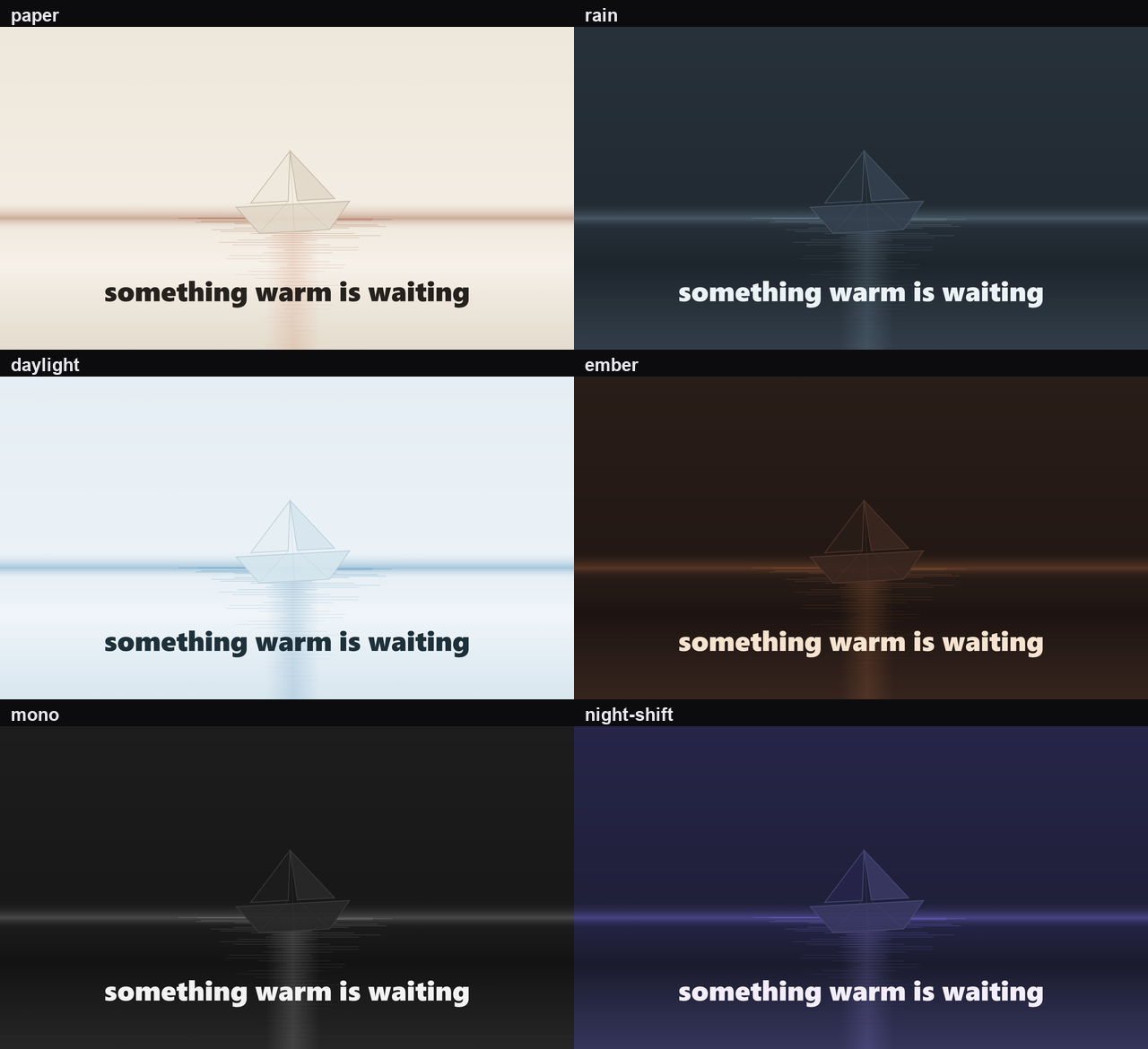 | One field/water shot with the same lyric in each colour world. Only the look changes. |
Two ways to run it. As a DSH plugin, so you can just ask your agent for a video. Or as a CLI, if you'd rather drive it yourself.
song  ─▶ analyze ─▶ features.json ─┐
                                   ├─▶ render ─▶ frames ─(pipe)─▶ ffmpeg ─▶ .mp4
storyboard.json ───────────────────┘                              ▲
lyrics.lrc ─────────────────────────────────────────────────────────┘
▶ 54 s demo (webm, silent) · contact sheet

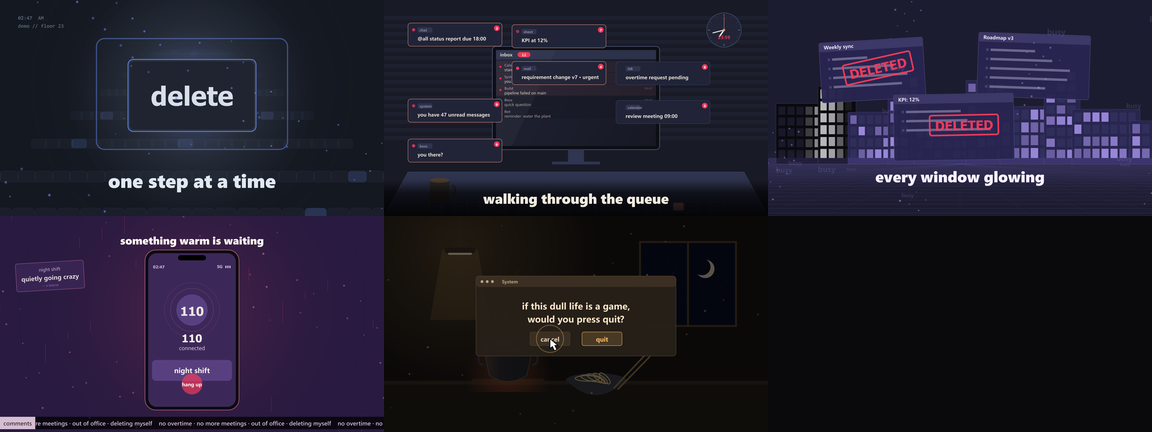
Frames from the demo. Every pixel is drawn by code — no footage, no images, no
bundled fonts. The audio is synthesised by ffmpeg and the lyrics were written for
this repo; see examples/synthetic-demo.
About the test songs: this was built and tuned against commercial tracks I bought
on NetEase Cloud Music, together with their .lrc files. Those recordings, their
lyrics and the videos rendered from them are not in this repo. What's here is the
engine, the storyboard format and the synthetic demo.
A frame is a pure function of time. renderFrame(t) gives you the same pixels on
every run, which is why you can change one line, re-render, and diff the two —
and why rendering spreads cleanly over a worker pool.
A shot is a camera plus an event
The engine applies a camera around every scene, so nothing renders still by accident. Each shot picks a move in its storyboard entry:
{ "id": "03_sink", "start": 43.4, "end": 72.0,
  "palette": "build", "camera": "push", "cameraAmount": 0.09,
  "scene": { "type": "field", "params": {
    "layer": "water", "horizon": 560,
    "motif": "boat", "motifAt": [1080, 600, 240],
    "travel": [-220, 0], "stage": "sink", "sinkAt": 0.5,
    "lyricStyle": "karaoke" } } }
push pull panL panR tiltUp tiltDown rollCW rollCCW arc
driftUp driftDown none are the moves. Inside the scene, three depth planes
move at different rates for parallax, the motif crosses the frame on travel, and
stage gives it an arc — enter, drift, sink, return — so a song can be
told with one subject rather than six unconnected images. Beat events (rings,
kicks, camera punches) come from the analysis, not from a hand-keyed timeline.
See docs/motion.md.
What you draw with
A shot is either designed (you list elements and the engine draws them) or one
of the shipped scene types. designed is the default lane and it needs no
JavaScript:
{ "type": "designed", "params": {
  "elements": [
    { "kind": "plane", "at": [0.5, 0.80], "size": [1.02, 0.42], "vp": [0.62, 0.6],
      "cols": 7, "rows": 6, "fill": "panel", "depth": 0.4 },
    { "kind": "rect", "at": [0.22, 0.34], "size": [0.26, 0.30], "fill": "bg",
      "stroke": "line", "lw": 4, "form": "box", "material": "fabric" },
    { "kind": "text", "at": [0.22, 0.31], "size": 34, "text": "面 馆",
      "fill": "text", "track": 8, "plate": "panel" },
    { "kind": "figure", "at": [0.44, 0.50], "size": [0.055, 0.25], "pose": "stand",
      "fill": "shadow", "rim": true }
  ],
  "camera": "panR", "cameraAmount": 0.08, "backlight": 0.5, "dof": 8 } }
Ten verbs (rect ellipse line poly arc text dots band blob
grid, plus plane and figure), nine colour roles that follow the look,
per-element depth and depth-of-field, form shading (box / cylinder / sphere),
materials (paper, grain, metal, glass, water, fabric, wood), key light with
opt-in rim light, and keyframe tracks when a thing has to act rather than sit.
Everything is in docs/imagery.md.
When no arrangement of elements will do, write a scene — three lanes, cheapest first, and the gates measure both:
song-mv new-scene gutter --out scenes/gutter.mjs   # scaffold that renders immediately
song-mv check-imagery --storyboard storyboard.json # composition: planes, horizon, density
song-mv check-frame   --storyboard storyboard.json --features features.json  # the picture
song-mv check-motion  --storyboard storyboard.json --features features.json  # the movement
That last one is the gate that matters most, because a still can look right and do nothing:
shot            type     len   score   pixels  shift  frames
03_sink         field   28.6s    0.48     0.16    6.4  0/7  ← static
Re-composing that shot with a camera push, a sinking boat and rain in the near
plane took it to 2.16 with every frame pair changed. docs/scene-pipeline.md
walks the loop.
Lyrics are timing, not text
The fill follows the voice when the .lrc is word-timed
([00:37.67]<00:37.67>把名字从手机里 <00:39.79>悄悄删掉了); otherwise it falls
back to a constant reading rate. When a line's tag sits well before its first
word mark, the line is shown at the word, not at the tag, so the text lands
with the vocal.
Most "the lyrics are off" complaints are the file, not the renderer. Streaming
exports often ship song.lrc and song.std.lrc, and the .std variant is
derived by stamping each line with its last word mark — so lines arrive late
by a different amount each time:
line                       word-timed   .std    lag
把名字从手机里 悄悄删掉了         37.67    43.42   +5.75 s
聊天记录停在最底下                28.61    29.85   +1.24 s
song-mv check-lyrics song.std.lrc --duration 200.9
# vs song.lrc: 49 matching lines, 49 stamped late, median lag 1.96s
# PROBLEM: derived using each line's LAST word mark
docs/lyrics.md covers the offset tag, the gap column, and when a long gap is
the source's fault rather than yours.
The two decisions
Everything that goes wrong with a generated music video goes wrong here, so the skill makes them explicit before any JSON gets written.
1. The look. One colour world for the whole film.
| look | world | for songs about |
|---|---|---|
paper | warm off-white, ink, folds | memory, letters, tenderness |
rain | wet blue-grey, cold light | grief, distance, the city at night |
daylight | bright neutral, clean air | hope, morning, release |
ember | deep red-brown, low light | anger, heat, obsession |
mono | black and white | archive, grief held still |
night-shift | dark blue neon, screens | late-night work, irony, dread |
cafe | cream and caramel, warm lamps | small hours, comfort, quiet comedy |
2. The imagery. Five to eight concrete things the viewer will see, each traceable to a lyric line. "A paper boat going down a rain gutter" is imagery; "sadness" is not. If a section has nothing to show, reread the lyric — do not reuse a scene from the last song.
docs/looks.md covers the palettes, the tonal ladder a look has to satisfy, and
how to add a world. docs/art-direction.md is the ten-point brief that decides
what goes in the frame — read it before writing any shot JSON.
Install
Requirements (two, both installed by you)
| dependency | version | where to get it |
|---|---|---|
| Node.js | ≥ 20.10 | nodejs.org — LTS release |
| ffmpeg | ≥ 6.0 | ffmpeg.org/download.html — unzip, put bin on PATH |
node -v          # v20.10 or newer
ffmpeg -version  # any version prints fine
ffmpeg is not bundled and not downloaded for you, on purpose (see
Licensing). If it's missing, render stops and prints the download
link for your platform instead of guessing. There's no postinstall step and no
binary in the package.
On macOS/Linux, if npm install can't find Cairo/Pango headers:
brew install pkg-config cairo pango libpng jpeg giflib librsvg
# or
apt install build-essential libcairo2-dev libpango1.0-dev libjpeg-dev libgif-dev librsvg2-dev
As a DSH plugin
git clone <this repo> dsh-song-mv
cd dsh-song-mv && npm install        # fetches canvas; run it once to check it builds
dsh plugin --profile desktop add "link:$PWD/dsh-song-mv"
# restart DSH once so the bundle layer picks it up
That adds a song-mv skill to the agent's skill list, plus the CLI. The skill
walks the agent through: read the song → decide the look and the imagery →
new the working folder → doctor → preview → the three gates → render →
qa.
If you don't have a dsh command (the desktop app doesn't always put it on
PATH), there are two equivalent routes:
- ask your agent to install it — DSH has a plugin manager, and the agent can do the file edits below for you;
- edit the profile by hand: add
"dsh-song-mv": "link:/abs/path"to~/.dsh/profiles/desktop/package.json→dependencies, add"dsh-song-mv"to the same file →dsh.profile.bundles, runpnpm installin that directory, restart DSH. Step by step: docs/publishing.md.
As a plain CLI
git clone <this repo> dsh-song-mv
cd dsh-song-mv
npm install          # builds/downloads the canvas native binding
node tools/cli.mjs help
Everything below works the same with the plugin installed. The plugin only adds the agent skill on top of these commands.
Five-minute quickstart
# 1. one command per song: copies the audio, finds its .lrc, analyses it and
#    writes a six-shot storyboard you can edit
node tools/new.mjs work/my-song --audio song.flac
#    work/my-song/{song.flac, lyrics.lrc, features.json, storyboard.json, notes.md}

# 2. check the storyboard before spending a render on it (milliseconds)
node tools/doctor.mjs --storyboard work/my-song/storyboard.json \
  --features work/my-song/features.json

# 3. rewrite the shots: the look, the imagery, the cuts (docs/art-direction.md)

# 4. look at it: one still per shot, 17 tiles, one PNG
node tools/sheet.mjs --storyboard work/my-song/storyboard.json \
  --features work/my-song/features.json --out work/sheet.png

# 5. the three gates
node tools/check-imagery.mjs --storyboard work/my-song/storyboard.json
node tools/check-frame.mjs   --storyboard work/my-song/storyboard.json --features work/my-song/features.json
node tools/check-motion.mjs  --storyboard work/my-song/storyboard.json --features work/my-song/features.json

# 6. render. Workers default to cores-1 (max 8)
node tools/render.mjs --storyboard work/my-song/storyboard.json \
  --features work/my-song/features.json --audio work/my-song/song.flac \
  --out work/mv.mp4 --crf 18

# 7. check the encode
node tools/qa.mjs --file work/mv.mp4 --storyboard work/my-song/storyboard.json
Render speed
Frames are independent, so rendering spreads over a worker pool by default
(--workers, or -j 1 for a single process).
| workers | 12 s of a designed-heavy section | speedup |
|---|---|---|
| 1 | 97 s | 1× |
| 2 | 53 s | 1.8× |
| 4 | 29 s | 3.3× |
| 8 | 17 s | 5.7× |
| 12 | 15 s | 6.5× |
A 3:20 film with 17 shots renders in 2.5 minutes on 8 workers (6026 frames, ~40 fps); the same film single-process takes 25 minutes. Parallel and single-process output are byte-identical — the grain plate is seeded, so every worker draws the same one.
What costs the most, in order: designed shots with depth of field (346 ms per
frame), designed without it (157 ms), and field shots (30 ms). Post
(vignette, grain, levels) is about 17%. song-mv bench measures your own film.
analyze options
| flag | meaning |
|---|---|
--fps 30 | frames per second of the beat grid (must divide the sample rate) |
--bpm 106.67 | force the tempo when you know it; energy voting can't tell 80 from 160 |
--out features.json | where to write the analysis |
Tempo detection reports the winning grid plus tempoCandidates, the runner-up
metrical levels. If the pulse feels half-speed, that's expected: pass --bpm.
What a storyboard looks like
{
  "title": "demo",
  "duration": 181.5,
  "lyricsFile": "lyrics.lrc",
  "look": "paper",                   // the colour world for the whole film
  "post": { "grain": 0.02,           // film grain
            "levels": { "black": 0.16, "white": 0.92, "gamma": 0.96 } },
  "safety": { "maxFlash": 0.7 },     // clamp on full-frame flashes
  "shots": [
    {
      "id": "05_water",
      "start": 95.1, "end": 119.8,
      "palette": "intense",          // still|tender|build|release|intense|peak|dawn|fade
      "enter": "cut",                // cut|dissolve|wipe|glitch
      "loud": true,                  // camera punch on the beat
      "scene": {
        "type": "field",
        "params": {
          "layer": "water",          // paper|water|rain|snow|ink|motes|thread|window
          "motif": "boat",           // boat|window|moon|lantern|chair|birds
          "motifAt": [980, 600, 180],
          "horizon": 640,
          "lyricY": 880
        }
      }
    }
  ]
}
A few things worth knowing:
- Shots have to tile the timeline. No gaps, no overlaps, and the last
endis the song duration.doctorchecks all of it in milliseconds. paletteis a mood, not a colour. The look turnsstill,peak,dawninto actual values:peakis the loudest colour the world owns. Scenes read palette fields (p.accent,p.text, …), so changing the palette recolours everything.enteris how a shot comes in. Adissolveinside the same set is treated as a cut, because a dip to black mid-scene is a mistake, not a transition.- Cutting one long shot into three is normal: give the later shots
t0Offsetequal to their offset inside the block and props keep their timing instead of replaying their entrances. paramscarry the copy. Every string the demo shows comes from its storyboard, not from the engine.
Schema: docs/storyboard.md. Scenes and their parameters: docs/scenes.md. Everything else is in docs/GUIDE.md, which is the one file to read first.
Lyrics
lyricsFile points at a standard .lrc:
[00:00.50]one step at a time
[00:05.80]walking through the queue
[00:18.40]delete the noise
For each timestamp the engine finds the active line and hands it to the scene,
which decides how it shows up: slam, word-by-word bounce, rubber stamp, RGB-split
glitch, karaoke fill, echo wall. Lines without a timestamp are ignored, so a
plain-text lyric file will give you a video with no lyrics. Timestamps can carry
one to three decimal places, since editors disagree. [offset:±ms] is honoured.
Lyrics are a literary work, so only ship an .lrc you have the right to use.
Licensing
The code is MIT. What the repo does not contain matters as much as what it does:
- No music, no lyrics, no fonts, no ffmpeg. You supply all four at run time, and
.gitignorekeeps them out of commits. - ffmpeg runs as a separate process and is never linked or bundled. Per the GPL FAQ that's mere aggregation: your video is yours and the repo carries no ffmpeg obligation.
- Fonts are referenced by family name (
Inter,Microsoft YaHei,Noto Sans CJK) and rendered by whatever your OS has.
If you redistribute a packaged artifact (zip, Docker image, single binary) with
node_modules inside, you become a distributor: canvas brings Cairo
(LGPL-2.1 / MPL-1.1) and, in canvas v3, Pango (LGPL only). Read
THIRD-PARTY-NOTICES.md first.
The usual risk in a project like this isn't the MIT dependencies, it's demo
assets: a commercial track, a scraped .lrc, a font committed "just for the
example". So examples/ ships the storyboard format — shot tables with
placeholder copy — and one synthetic demo, whose audio ffmpeg generates and whose
lyrics were written here.
To be precise: this repo has no recording of a published song, no .lrc
transcribed from one, and no video rendered from one. A storyboard is neither a
recording nor a lyric sheet, but if you fill one with someone else's lyrics and
publish the render, that's your call and it isn't covered by the MIT licence.
Repository layout
engine/
  core.mjs         Features, Lyrics, canvas ctx, post FX (levels/scan/grain/vignette), createEngine
  looks.mjs        the seven colour worlds; eight states interpolated from four palettes
  elements.mjs     the declarative layer: twelve verbs, colour roles, depth, motion, key light
  materials.mjs    paper, grain, metal, glass, water, fabric, wood
  motion.mjs       easing, camera (push/pull/pan/tilt/roll/arc/drift/handheld), reveals
  primitive_fx.mjs style-neutral imagery: grain, folds, water, rain, motes, ink, thread, light, motifs
  scenes.mjs       designed + field + typeOnly, plus the nine office-pack scenes
  actors.mjs       the prop registry used by `designed` actors
  lyric_fx.mjs     lyric treatments: slam / bounce / wall / sliced / karaoke / decode
  story_fx.mjs     the office pack's props: stamp, ticker, phone call, towers, kitchen, floor plan
  prng.mjs         seeded randomness (same seed → same frame)
tools/
  new.mjs         one command per song: audio + lrc + features + storyboard
  analyze.mjs     ffmpeg decode → WAV → FFT → features.json
  plan.mjs        draft a storyboard from the energy curve
  doctor.mjs      static validation in milliseconds, before any render
  preview.mjs     render a few stills
  sheet.mjs       one PNG of one still per shot, with an index
  check-imagery.mjs / check-frame.mjs / check-motion.mjs   the three gates
  check-lyrics.mjs  lyric timing audit (.std traps, offsets, gaps)
  render.mjs      full render, worker pool, raw frames piped straight into ffmpeg
  bench.mjs       where the milliseconds go
  qa.mjs          luma curve + flash detector that knows about cuts
  cli.mjs         one entry point for all of the above
  lib/analyze.mjs pure-JS FFT / mel bands / tempo grid (no Python, no librosa)
  lib/pool.mjs    worker-thread pool with ordered writes
skills/song-mv/   the agent-facing workflow
examples/         synthetic-demo (a neutral 54 s track) and scenes/ (a hand-written scene)
docs/             GUIDE.md first, then imagery / looks / motion / lyrics / scene authoring
FAQ
Why canvas instead of a browser? Frames are generated headlessly and piped to ffmpeg as raw RGBA. No page load, no screenshot timing, no 60 fps ceiling, no GPU needed, and the output is deterministic.
Can I add a scene? song-mv new-scene <name> writes one that renders
immediately: draw with ctx.g, read the palette from ctx.pal, the lyrics from
lyricsOf(ctx).activeAt(tv), primitives from ctx.lib, easing from ctx.mo,
the camera from ctx.cam. Register it in SCENES and point a shot at it.
The gates disagree with me. They're meant to. check-imagery knows nothing
about music, check-frame knows nothing about motion, check-motion knows
nothing about composition. All three failing at once means the shot is wrong, not
the gates.
Why is the first frame black? A dissolve or glitch entry fades in from
black. Start the first shot at 0 with "enter": "cut".
Rendering is slow here. Raise --workers, drop dof on shots that don't
need it, prefer field for wide shots, and iterate with --start 60 --end 90
plus song-mv preview. A slice of 90 frames tells you almost everything.
Can I use a photo? Load it with canvas.loadImage() inside a scene, and make
sure you have the rights to it.
License
MIT © 2026 dsh-song-mv contributors. See LICENSE.
Comments
Loading…
Similar plugins
by ayst-z
DSH 插件:把一支 MV 写成代码(music-code-mv)。确定性的 Canvas2D / Three.js 镜头在无头 Chrome 里逐帧渲染,再用 ffmpeg 编码;并带一个中文图形界面「MV 工坊」。 / DSH plugin: render code-driven music videos, with a Chinese MV Studio GUI.
★ 4
MIT
JavaScript
Oct 15, 2026
dsh plugin --profile web add dsh-music-code-mvby zemul
dsh-better-sidebar 的视频文件预览插件: 在侧边栏打开 .mp4 .webm .mov .mkv .avi 等视频文件时,内联渲染一个可播放、可拖拽进度条的 <video> 播放器。
★ 8
↓ 402/wk
MIT
JavaScript
Aug 27, 2026
dsh plugin --profile web add dsh-video-previewby Rudyy898
Like Codex/Claude Code: drag any file or folder (no format limit) onto the DSH web page and its real absolute path is inserted into the composer instantly — no typing paths by hand. Workspace-first sm
★ 1
MIT
JavaScript
Aug 27, 2026
dsh plugin --profile web add dsh-drag-pathby AnakinCao
DSH web plugin (dsh-better-sidebar companion): code file preview with per-language syntax highlighting, symbol outline navigation (class / method / variable) and in-file search
★ 0
MIT
JavaScript
Aug 26, 2026
dsh plugin --profile web add dsh-code-navby jypjypjypjyp
Music composition for DeepSeek Harness: the model writes a score against a bundled composing skill, and a play_score tool renders it as an inline card with a piano roll, Web Audio playback and WAV/JSON export.
★ 1
JavaScript
Oct 19, 2026
dsh plugin --profile web add @jypjypjypjyp/dsh-music-studioby lavapapa
A DSH Web plugin that keeps long answers and detailed prompts side by side with a dockable Composer.
★ 3
↓ 246/wk
MIT
JavaScript
Oct 10, 2026
dsh plugin --profile web add dsh-composer-layout