

dsh-theone
Manifest validOne main chat for DeepSeek Harness, with automatic history routing and topic workspaces.
TheOne for DeepSeek Harness
English | 简体中文
Unofficial community project, independently maintained. Not affiliated with or endorsed by DeepSeek.
One main chat for your projects and past conversations. TheOne routes each message to the relevant topic, mounts a short summary, and runs it in a dedicated DSH working session. DSH stores the original conversations and runs models and tools; TheOne stores the topic catalog, summaries, and routing state.
The TheOne · Main chat entry stays at the top of the sidebar, with a soft orange glow in light mode and pale blue in dark mode. It belongs to no project workspace and is hidden from the ordinary session list. Upgrading detaches older main chats from workspaces while preserving their logs. New main chats use a dedicated directory under the DSH data directory; existing topics keep their original working directories.
Compatible with DSH 0.2.0-rc.2 and Node.js 24.
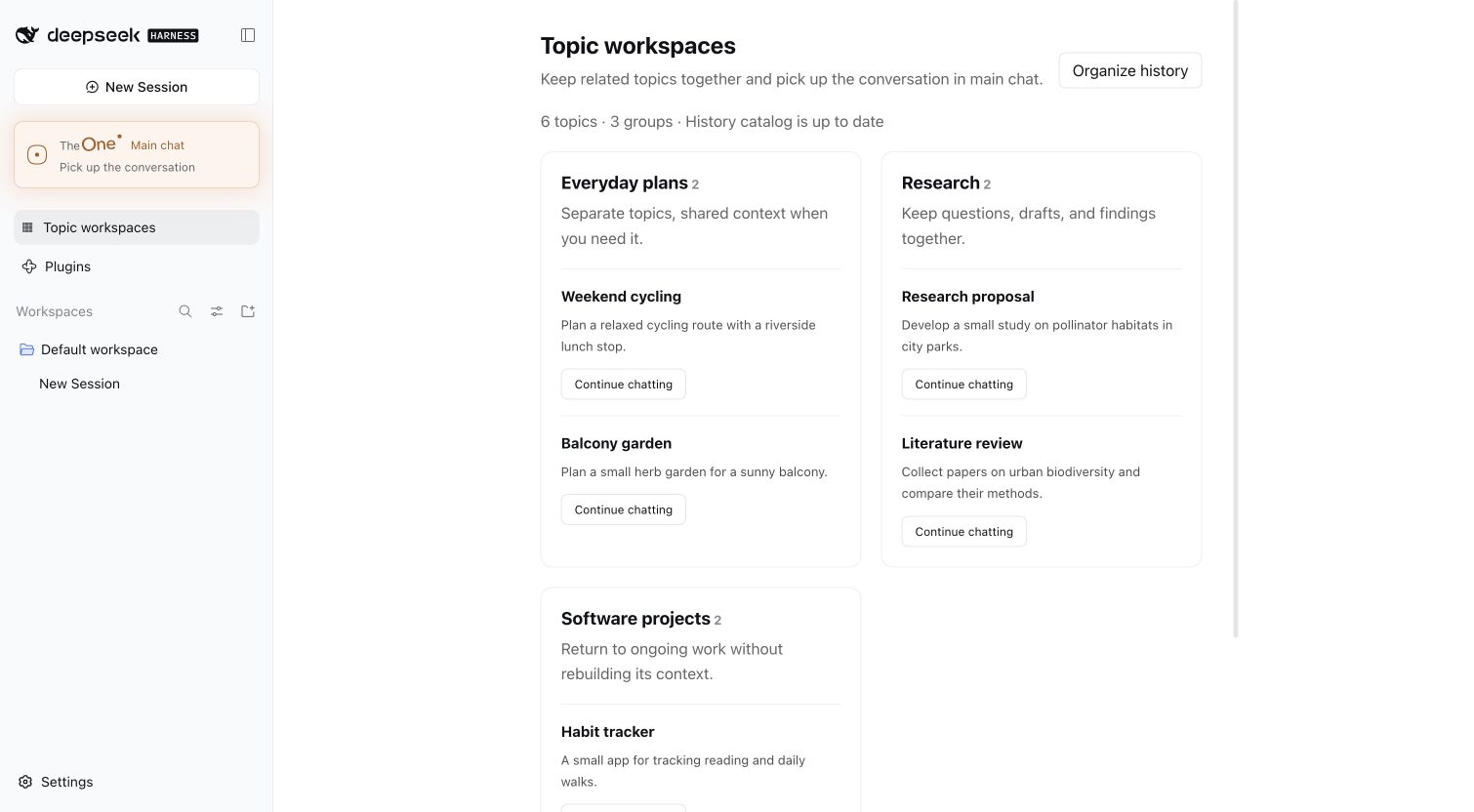
Screenshot from an isolated DSH profile with fictional example topics.
Install and start chatting
- Configure your API provider in DSH and select a working chat model.
- Open Plugins → Add plugin, paste
https://github.com/YunongDai2005/dsh-theone, and install. - Open TheOne · Main chat in the sidebar and start chatting.
v0.3.6 enables LLM routing by default and reuses DSH’s model calls and API credentials. No additional API key is needed. By default, routing, topic workers, and the entry's context capacity follow the model selected in DSH before opening TheOne. To change models, select another regular chat model in DSH, then open TheOne again.
The public repository includes the compiled backend and web client. Installation needs no local build or lifecycle scripts. You can also use the DSH CLI:
dsh plugin --profile web add github:YunongDai2005/dsh-theone --ignore-scripts
DSH does not currently update plugins automatically. Follow its plugin page instructions to uninstall and reinstall. If your default model is already theone/gateway after upgrading, select a configured regular model once before opening TheOne. The plugin remembers the model selection across restarts; DSH manages the credentials.
The database defaults to $DSH_HOME/theone/contexts.db, or ~/.dsh/theone/contexts.db when DSH_HOME is unset. Keep this directory when reinstalling to retain your topics. Run one profile process per database.
English and Chinese UI
The sidebar, settings, catalog, buttons, and status messages follow DSH’s active language and update immediately when you switch it. DSH uses the system/browser language when no language is explicitly selected. Changing languages keeps the same main chat.
Historical topic titles, summaries, and original conversations stay in their original language.
Settings and entry interaction
Right-click the fixed TheOne button and choose Settings. The page lists 14 runtime options; 11 can be edited through dropdowns and input fields. Database location, manual catalog file, and entry identifier remain read-only.
Save settings persists the editable options in the existing TheOne database. Restart DSH to apply them; saved options take precedence over deployment defaults for those fields. The page shows unsaved changes and pending restart status. Discard changes restores the last saved form. Stale saves from another page are rejected rather than overwriting newer settings. API credentials remain managed by DSH or the configured environment variable; the settings page never returns a key value.
Model dropdowns currently offer the known current model and Follow DSH. They do not yet enumerate the complete provider catalog. To follow a different DSH model, leave the fixed provider and model unset, then select that model in DSH and open TheOne.
While main chat is open, the entry has a subtle glow that follows the pointer: orange in light mode and pale blue in dark mode. The glow fades when the pointer leaves the button.
History catalog and topic workspaces
The plugin reads existing DSH sessions in the background through ctx.sessionQuery. It prefers completed compaction summaries, then uses bounded excerpts of user messages and replies for the remaining content. Each extraction batch covers at most eight turns and uses the model configured in DSH. It does not summarize entire long sessions again.
Related topics are grouped into Topic workspaces, accessible from the sidebar. Each topic keeps a separate working session. Choose Continue chatting to resume it through main chat, or View original chat to open its DSH source.
These workspaces are logical groups stored by TheOne. Native DSH workspaces are tied to disk directories; this version preserves existing execution directories. Imports store summaries and source event ranges. Continuing an imported topic uses a dedicated worker that reads sources on demand, rather than copying a whole mixed conversation into its execution history.
Catalog entries, groups, source ranges, and indexing progress live in TheOne’s SQLite database. DSH keeps the original logs. The plugin organizes history at startup, updates after chats, and periodically checks for changes. Unchanged sessions do not trigger new model calls. Each scan processes at most 64 extraction batches and continues remaining work later. Initial indexing takes time and uses your configured API quota.
Routing uses the catalog and DSH full-text search to retrieve up to 16 candidates for the LLM. If search fails, it falls back to the existing catalog and checks additional entries. A proposed new topic triggers up to three further batches of catalog checks. While indexing is incomplete or entries remain unchecked, a complete standalone request may create a topic if every review agrees that it needs no missing history. Unresolved historical references ask for clarification. This keeps independent tasks usable during indexing, but a candidate miss can still create a duplicate topic; it does not prove that all history has been searched. An explicit 新话题: (Chinese for “new topic:”) request can still create one.
Set THEONE_HISTORY_CATALOG=false to stop automatic indexing while keeping existing entries and groups. Failed sessions appear in the status and are retried later; one failed source does not block the others.
Entry context and usage-based compression
The entry reports the backing model's context window and default output allowance from DSH, including adapter configuration overrides. It does not set a separate fixed context capacity. DSH still chooses when to compact, which old region to replace, and how much recent conversation to retain; its normal capacity thresholds remain in use.
When DSH compacts through the TheOne provider, the plugin creates a bounded reference checkpoint from the topic catalog and completed routing calls:
- Hot: the current topic, a topic used in the past day, or a topic used in the past seven days with at least three successful calls in the past 30 days. Retain a longer summary and up to three recent user/reply pairs when space permits.
- Warm: another topic used in the past 30 days. Retain a shorter summary and up to one recent pair.
- Cold: older topics or topics without recorded TheOne usage. Keep a short summary and state; omit their dialogue excerpts. A resumed topic becomes current and receives priority again.
Only successful calls heat a topic. Failed requests and clarification do not increase its frequency. Usage survives entry reconstruction. Checkpoints are redacted, bounded by the model capacity and the compaction output allowance, and can be compacted again without multiplying retained excerpts. Compression makes no additional model call and never runs a worker or a tool. Original DSH logs, source ranges, topic summaries, and working sessions remain available for history retrieval.
This changes the gateway checkpoint, not workers' ordinary DSH compaction. It activates when DSH compacts; age alone does not start a background compression job. An explicitly configured separate DSH summarization provider uses that provider's summary policy instead.
Current features
- The LLM selects an existing topic, a new topic, or clarification. Code validates the target and plans
KEEP / MOUNT / SWAP / CREATE / CLARIFY. - Each project has a dedicated, resumable DSH working session. Returning to a project resumes its worker.
- Routing calls the configured DSH provider through
ctx.llm.prepareCall(). It sends a short catalog, the current input, and up to 12 recent text messages, without tools or full history. - Routing makes an additional model call, separate from the reply, with a 2,048-token output limit and a 30-second timeout. Additional catalog checks may make further calls. These use your API quota.
- Failed calls, invalid JSON, unknown topic IDs, truncation, and cancellation do not switch projects or start workers. Permission/rate-limit errors, or three consecutive other errors, pause routing for 60 seconds.
theone_search_historylets a worker search its dedicated session and approved historical event ranges on demand: at most 10 windows and 8,000 characters of excerpts.theone_update_statesaves up to 800 characters of progress. Completed DSH compaction summaries are reused, redacted, and limited to 1,200 characters, without summarizing the whole session again.- SQLite stores catalog, source ranges, mounts, and execution state. DSH logs store original inputs, tool results, and replies. Historical instructions are treated as reference material.
- Main chat accepts one active request at a time. Cancellation propagates to routing and the worker; in-progress inputs are not replayed automatically.
Optional configuration
A normal installation needs none of these variables.
| Variable | Purpose / default |
|---|---|
THEONE_HISTORY_CATALOG | Enabled by default; false stops background indexing |
THEONE_DATABASE_PATH | Override the catalog database path |
THEONE_CONTEXTS_PATH | Manual catalog JSON; omitted means an initially empty catalog |
THEONE_GATEWAY_KEY | Gateway identifier; default |
THEONE_ROUTER_MODE | llm (default) or rules |
THEONE_ROUTER_TRANSPORT | dsh (default); legacy uses the earlier direct DeepSeek integration |
THEONE_WORKER_PROVIDER / THEONE_WORKER_MODEL | Fixed model override; set both together. Otherwise follows DSH selection |
Only THEONE_ROUTER_TRANSPORT=legacy uses THEONE_ROUTER_API_KEY, THEONE_ROUTER_BASE_URL, and THEONE_ROUTER_MODEL. The default integration does not read that key.
A manual catalog contains ContextDescriptor[]: id / title / summary / entities / keywords / lastState. Entries are inserted only on first initialization. Workers cannot use the theone provider.
Development and tests
git clone https://github.com/YunongDai2005/dsh-theone.git
cd dsh-theone
npm ci --ignore-scripts
npm run typecheck
npm test
npm run pack:plugin
Tests use real DSH services, AgentLoop, sessions, SQLite queries, JSONL persistence, and compaction, with mocked models and no external API calls. Demo catalogs contain fictional data.
Packaging produces .dsh-test/dsh-theone-0.3.5.tgz, containing the backend, web client, configuration, and bilingual documentation. It excludes API keys, chat snapshots, and databases.
For isolated local development, run npm run install:local and npm run start:local. Data lives under ~/.dsh-theone; configure a model in that separate DSH profile. Copy .env.example to .env to adjust the port and other settings. Do not commit .env.
Service API
ctx.theone.searchHistoryDetailed(contextId, query, limit) returns windows within approved ranges, text projections, source error codes, and a partial flag. searchHistory() returns only the windows.
Manually linked historical sessions require an approved inclusive range through store.addSource(contextId, sessionId, {startSeq, endSeq}). Automatic imports use validated complete-turn ranges classified by the model. Only dedicated workers may link an entire session.
Known limits
- Main chat identity is stored in the current browser for the current web path. Another browser may create another gateway while sharing the same topic workers through the database.
- This version supports text input and forwards replies after worker steps commit. Token-by-token forwarding, image output, tool cards, and approval UI forwarding are not complete.
- Candidate retrieval uses short catalog entries and DSH full-text search. Embeddings and vector search are not implemented. The LLM extracts topics and groups related entries. Multi-mount and automatic worker rollover are also pending.
- Catalog updates and DSH logs are not a transaction across databases. Check the original session when an interruption leaves request state uncertain. Hard power-loss recovery has not been validated.
- Indexing requires readable DSH logs and has not been tested at large scale. History tools scan approved source ranges; gateway log rotation is pending.
An earlier AI Box replay scored 75/79 with a manually curated catalog. This does not establish routing accuracy for new users. TheOne has not been deployed to AI Box. See the historical v0.1 acceptance report and v0.2 web client report.
Comments
Loading…
Similar plugins
by exoticknight
One-click native conversations with independent workspaces for DeepSeek Harness
★ 0
Apache-2.0
JavaScript
Sep 24, 2026
dsh plugin --profile web add dsh-just-chatby omdsh-plugins
Chat mode for the DeepSeek Harness web GUI: a Chat/Work switch above the conversation, a workspace-free session-intent surface, and the managed Chat workspace its conversations are kept in
★ 0
MIT
TypeScript
Sep 3, 2026
dsh plugin --profile web add @omdsh-plugins/omdsh-chatmodeby xmuwenxiang
Deepseek Harness插件,可以直接在Deepseek Harness中使用网页版deepseek进行聊天,并将聊天过程直接迁移到Deepseek Harness进一步进行开发。主要目的是节省前期方案讨论时的token
★ 11
↓ 115/wk
Apache-2.0
TypeScript
Sep 7, 2026
dsh plugin --profile web add dsh-webchatby drscrewdriver
给 DeepSeek Harness 侧边栏加一个会话内容检索——标题/内容一键切换,还能按用户/回复/工具筛选
★ 3
↓ 24/wk
MIT
TypeScript
Oct 1, 2026
dsh plugin --profile web add dsh-session-search-toggleby Iambatman1928
Chat agent for a DeepSeek Harness session: characters and personas, several archive threads per character, an undoable/rewindable local transcript, and an event book.
★ 0
MIT
JavaScript
Sep 25, 2026
dsh plugin --profile web add dsh-xingyeby anweat
Complete context workbench for DeepSeek Harness: trajectory, inventory, cache history, message forge, and session-log recovery
★ 3
↓ 309/wk
MIT
TypeScript
Sep 9, 2026
dsh plugin --profile web add dsh-context-console