
dsh-quick-prompts
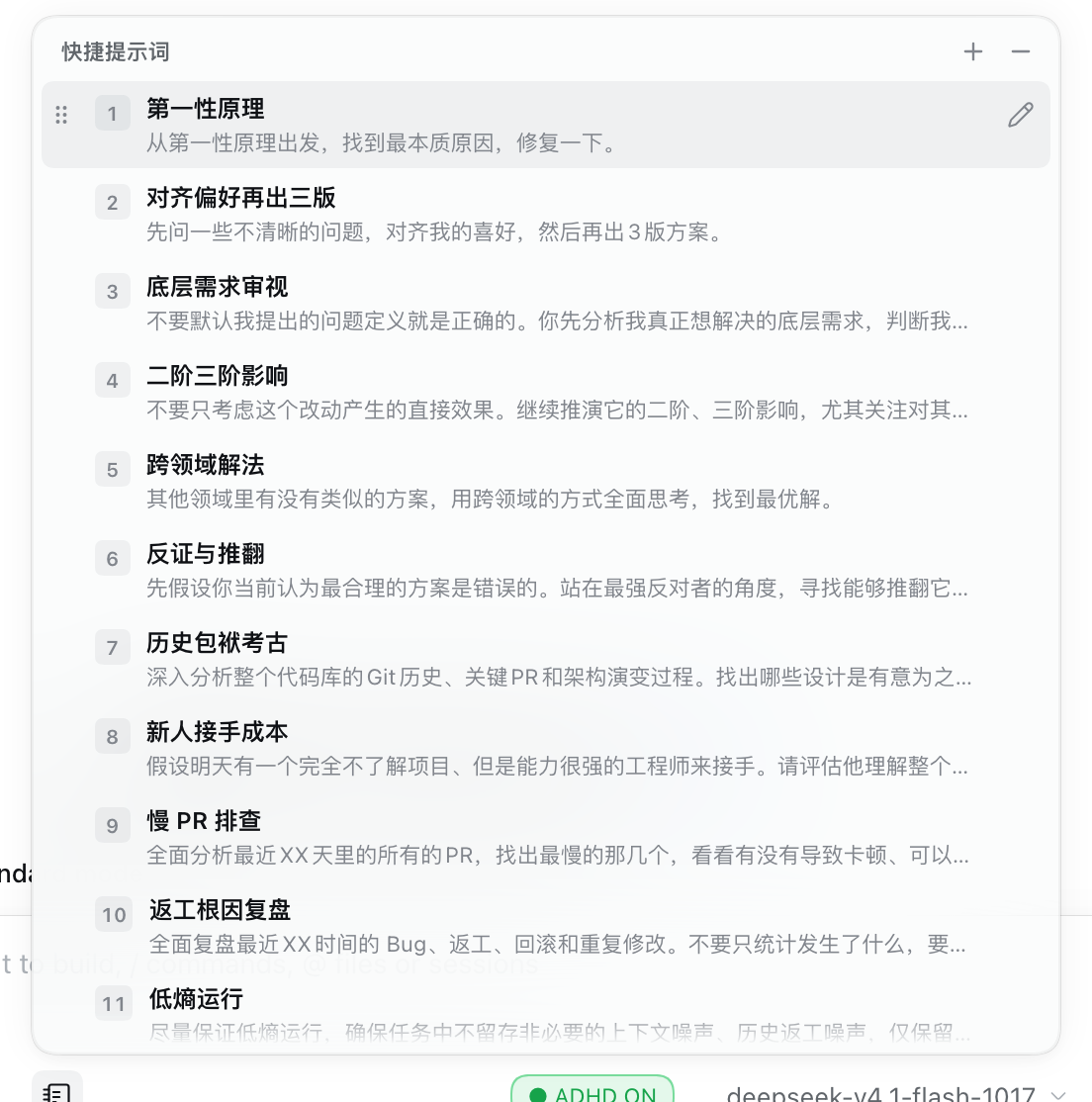
Manifest validPrompt presets in the DeepSeek Harness (dsh) composer: pick one, it is inserted at the caret and focus returns to the input.
dsh-quick-prompts
Reusable prompt presets inside the DeepSeek Harness
(dsh) composer. One notebook button in the composer tool row — between the
permission selector and the ADHD badge — opens a list of prompts. Picking one
inserts it into the draft at the caret and hands focus back to the composer,
so you keep typing and press Enter to send. It never sends anything by itself.
Install
dsh plugin --profile web add github:yuanyuanzhang0815/dsh-quick-prompts
dsh plugin add registers the bundle in your profile automatically; the running
profile then reconciles it on its own. Restart dsh only if the button does not
appear. Installed from GitHub there is no build step: client.js is plain
browser JavaScript, loaded by the module loader inside the web app.
For local development, link a checkout instead:
dsh plugin --profile web add "link:$HOME/.dsh/plugins/dsh-quick-prompts"
Remove with dsh plugin --profile web remove dsh-quick-prompts and drop the
dsh.profile.bundles entry.
What ships in the box
Fourteen presets, all editable, all replaceable — they are starting points for thinking prompts rather than fixed commands:
| # | Label | Prompt |
|---|---|---|
| 1 | 第一性原理 | 从第一性原理出发,找到最本质原因,修复一下。 |
| 2 | 对齐偏好再出三版 | 先问一些不清晰的问题,对齐我的喜好,然后再出3版方案。 |
| 3 | 底层需求审视 | 不要默认我提出的问题定义就是正确的。你先分析我真正想解决的底层需求,判断我有没有把症状误认为原因、把手段误认为目标。如果存在更值得解决的问题,直接指出来。 |
| 4 | 二阶三阶影响 | 不要只考虑这个改动产生的直接效果。继续推演它的二阶、三阶影响,尤其关注对其他模块、用户行为、系统复杂度和长期维护成本的潜在影响。 |
| 5 | 跨领域解法 | 其他领域里有没有类似的方案,用跨领域的方式全面思考,找到最优解。 |
| 6 | 反证与推翻 | 先假设你当前认为最合理的方案是错误的。站在最强反对者的角度,寻找能够推翻它的证据、反例和边界情况。然后重新评估方案,看看有没有更好的解法。 |
| 7 | 历史包袱考古 | 深入分析整个代码库的Git历史、关键PR和架构演变过程。找出哪些设计是有意为之,哪些是历史遗留,哪些是为了解决已经不存在的问题而引入的。识别可以安全移除的历史包袱。 |
| 8 | 新人接手成本 | 假设明天有一个完全不了解项目、但是能力很强的工程师来接手。请评估他理解整个项目需要付出的认知成本,找出那些命名混乱、抽象过度、职责不清晰、需要大量上下文才能理解的代码,并提出简化方案。 |
| 9 | 慢 PR 排查 | 全面分析最近XX天里的所有的PR,找出最慢的那几个,看看有没有导致卡顿、可以优化的地方。 |
| 10 | 返工根因复盘 | 全面复盘最近XX时间的 Bug、返工、回滚和重复修改。不要只统计发生了什么,要分析这些问题背后有没有共同的根因。把能够预防的共性问题沉淀成项目规则、自动化或者Skill,避免我们反复支付同样的成本。 |
| 11 | 低熵运行 | 尽量保证低熵运行,确保任务中不留存非必要的上下文噪声、历史返工噪声,仅保留正向流程。 |
| 12 | UX 打磨到可交付 | 从用户体验的视角,去对整体产品UI、UX设计做优化,去掉无用说明、改掉用户不懂的晦涩文字、最大程度简化用户操作,优化后使产品达到可交付的标准状态。 |
| 13 | 跨领域经典变体 | 目前存在的问题是否是其他领域经典问题的变体,有无成熟的解决方案,请进行跨领域的广度搜索核实这一点。 |
| 14 | 用产品语言解释 | 用产品经理能听懂的话解释。先说这件事对产品、用户和边界的影响与取舍,再讲技术实现;不要堆纯技术术语,也不要把实现细节当成结论。如果一句话说不清,先给结论再展开。 |
Using it
- Click the notebook icon → a 520 px panel opens above the composer, clamped to the viewport, opening upward or downward depending on the space available.
- Each row shows a one-line preview. Hover or focus a row and it expands to the full body, so nothing has to be guessed from a truncated line.
↑/↓move,Enterinserts,1–9and0insert the first ten entries directly.Esccloses.- Inserting into a non-empty draft adds a blank line between the old text and the prompt. The caret then sits at the end of the inserted text, in the composer.
- Every row starts with a six-dot grip: drag it to reorder, or focus a row and
press
Alt+↑/↓. The order is saved when you drop it. - Pencil (appears on the hovered row) edits that row in place: label, body, 保存 / 取消. There is no separate editor page.
- Plus in the header appends a new blank row, opened in the same inline editor.
- Minus next to it toggles delete mode: every row shows a red trash button, one click removes that entry, and a centred undo bar keeps it recoverable for five seconds. Row clicks and digit shortcuts are disabled while deleting, so a near miss cannot insert anything.
Storage
Everything the user changes lives in the browser, not on disk:
localStorage['dsh-quick-prompts.presets.v2'] holds the whole list as
[{ id, label, content }], so it can grow and shrink. A row with an empty body is
skipped when picked. The older positional key …presets.v1 is read once and
migrated on the next save. Clear both keys to get the shipped fourteen back.
How it plugs into dsh
index.js— host entry, a no-opapply(); the plugin is client-only.cordis.patch.yml— inserts the bundle asquick-prompts.client.js— the whole UI: styles, preset store, menu, inline row editor, pointer-drag reordering with a FLIP animation.package.json—dsh.clientdeclaresinject: ['slots'],platform: 'web', and the bundle patch;dsh.bundleis whatdsh plugin addreads.
The button registers into the conversation.input.left slot (a session-scoped
list slot in the composer tool row). Insertion uses the plugin-facing
inputActions contract: captureInsertion() for a compare-and-swap token,
insertText(text, span), with setDraft() as a fallback. Focus and caret are
restored through the DOM, because the contract has no focus(); the insertion
survives the re-render that follows because the caret is re-asserted on the next
animation frame.
Credits
Forked from dsh-prompt-chips
(MIT) rather than written from scratch: its slot registration, caret insertion and
keyboard navigation already worked. What changed here:
- four fixed chips → an editable preset list stored as a whole (add, edit, delete, reorder), with the fourteen prompts above as defaults;
react-domportal → a viewport-clamped fixed panel, so the menu cannot be clipped by the composer's overflow;- Chinese copy by default, Lucide stroke icons to match dsh's own toolbar, drag reordering with a FLIP animation, and focus handed back to the composer.
License
MIT — see LICENSE, which also carries the upstream dsh-prompt-chips copyright.
Comments
Loading…