
dsh-columbina-pet
Manifest validA 2D-only fork of PC2005-cloud/dsh-pet (MIT) that drops upstream's 3D skins; it can be installed alongside dsh-pet.

dsh-columbina-pet
哥伦比娅 2D live 桌宠 · DeepSeek Harness 插件
四套形象 · 76 句三语原声台词 · 天气播报 · 真实物理 · 表情包时刻



这是什么
把愚人众第三席「少女」哥伦比娅放进 DeepSeek Harness 的桌面:她会浮在窗口最上层,被拖动时有真实的物理摆动,会按时间与场景轻声说话,会用官方原声念出台词,也会播报今天的天气。
本仓库是 dsh-pet(MIT)的2D 专用分支:保留并深化了 2D live 形象、语音台词、菜单与物理,移除了尚未完善的上游 3D 形象切换,补上了天气播报与开源所需的文档、占位与版权说明。
英文简介:A 2D live desktop pet of Columbina for DeepSeek Harness — four sprite sets, 76 official voice lines in zh/ja/en with synced subtitles, weather reports, and real physics. 3D mode from upstream has been removed on purpose. See NOTICE.md for asset licensing.
预览
| 桌面模式 | 右键菜单 |
|---|---|
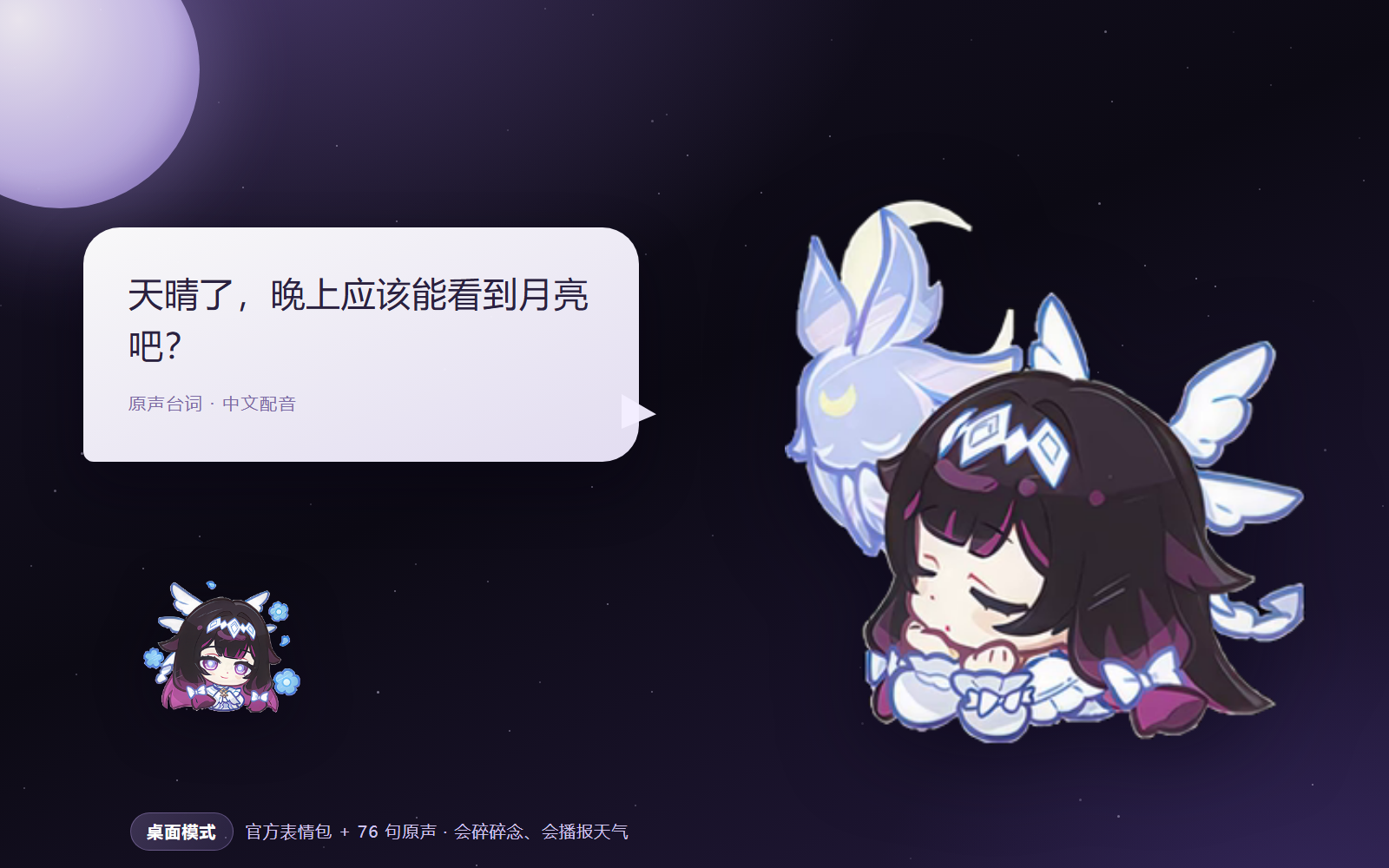 | 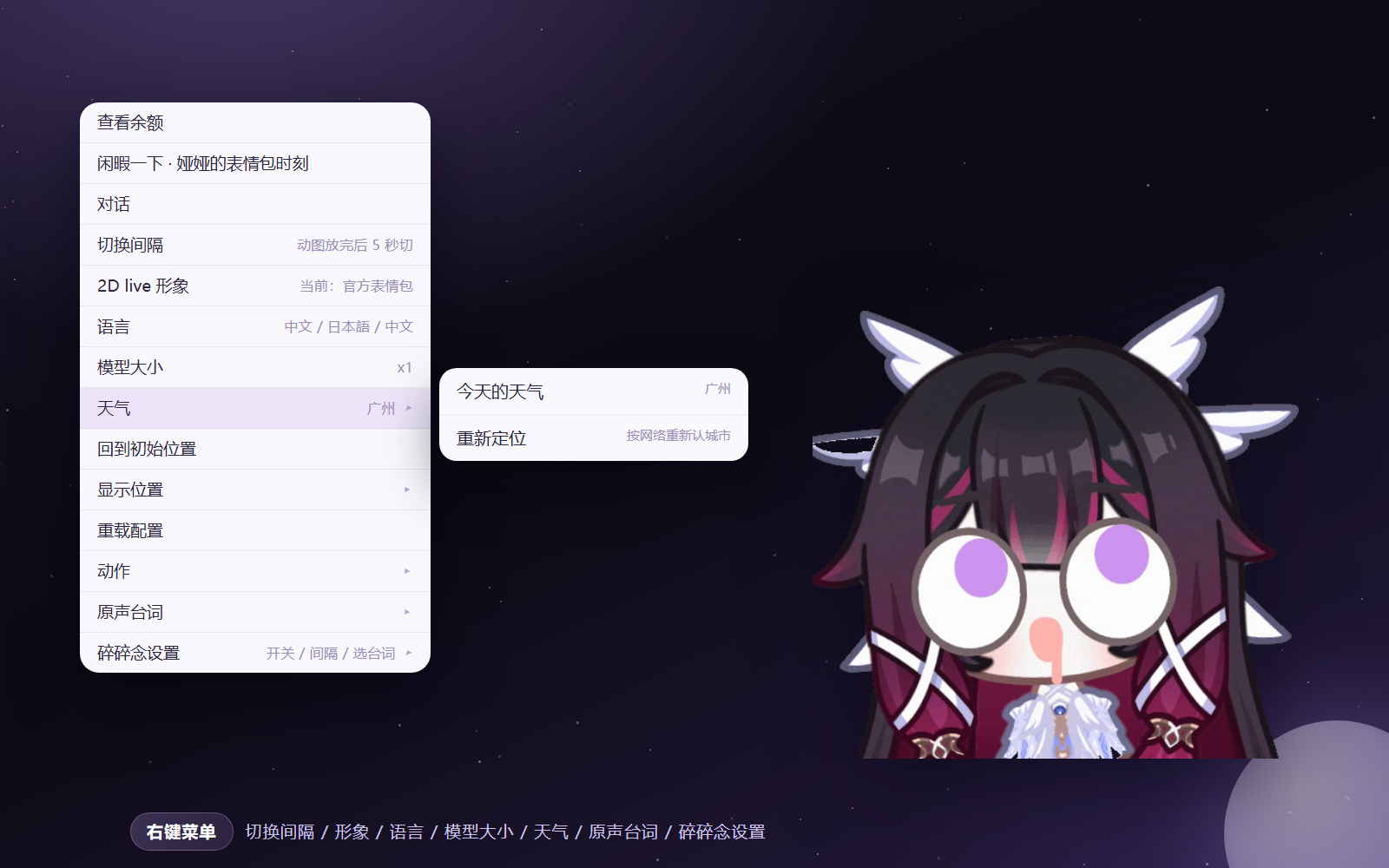 |
| 四套 2D live 形象 | 设置面板 |
|---|---|
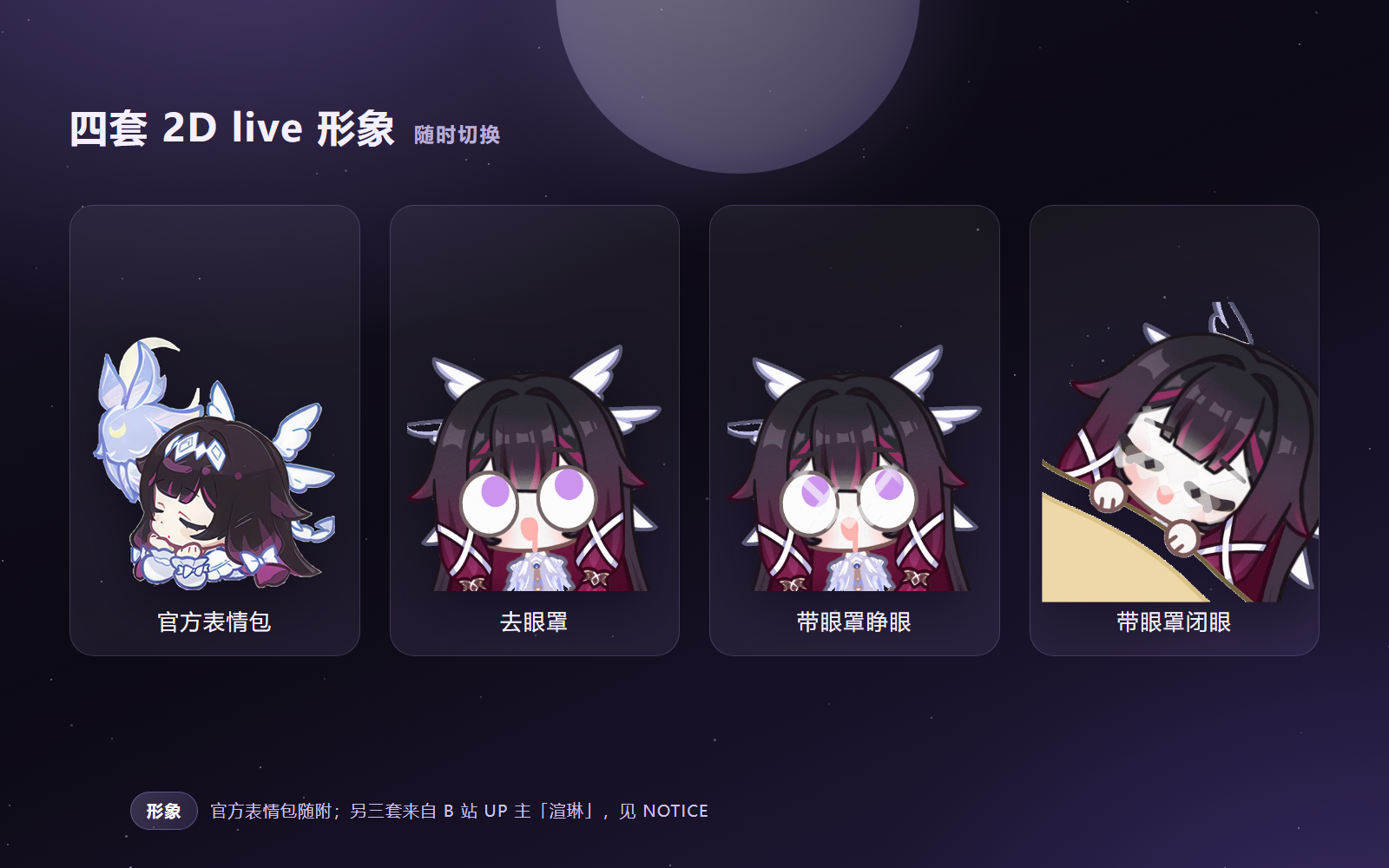 | 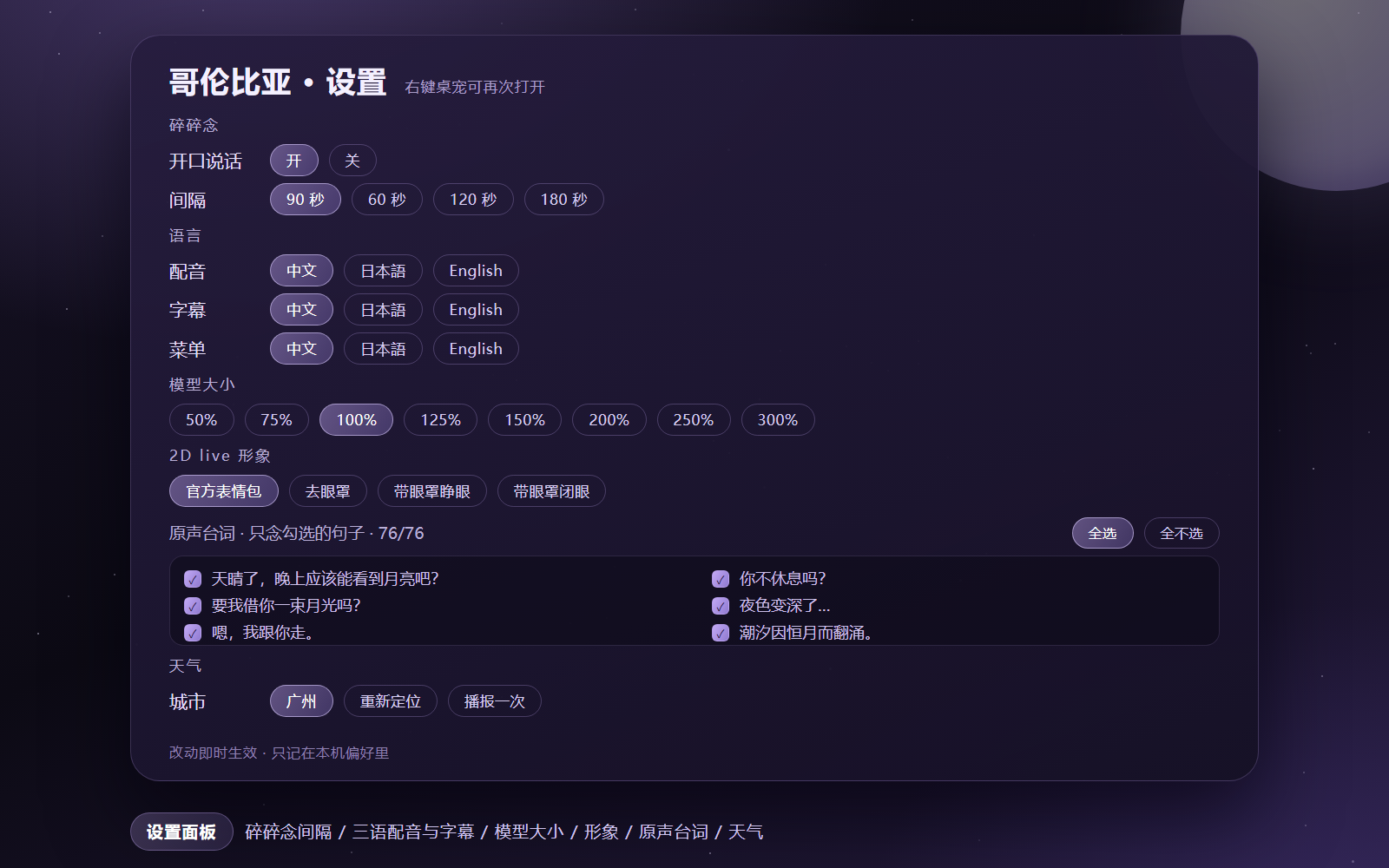 |
特性
- 四套 2D live 形象:
official(官方表情包)、nochoker(去眼罩)、open(带眼罩·睁眼)、closed(带眼罩·闭眼)。右键菜单「2D live 形象」即时切换,每套自带待机 / 点击 / 拖拽 / 事件动作树(共 246 个 webm)。 - 三语原声台词:76 句哥伦比娅官方语音,按中 / 日 / 英整理为 94 段切片。配音语言与字幕语言分开设置;有声音必有字幕,一句长台词会按播放进度分段换字幕。
- 按场景碎碎念:问候、午夜、安慰、感谢、提问、玩耍、友人、睡前、认真、俏皮十组场景池,按时间与近期出镜率抽签,不连续重复;开局前 12–22 秒保持安静。
- 工作气泡优先:正在向用户汇报时,桌宠不会抢走气泡;它的话结束后自动把气泡还给工作状态。
- 天气播报(v10.4):菜单「天气 → 今天的天气」,先用气泡给出摘要(城市、天气、当前温度、今日温度区间),隔一拍再用原声台词接一句应景的话;断网时给一句兜底台词,不会卡死。
- 真实物理:拖拽甩出弧度、松手下落、落地回弹、窗口贴边停靠,参数全部可配。
- 菜单即设置:切换间隔、2D live 形象、语言(配音 / 字幕 / 菜单)、模型大小 0.5–3×、原声台词勾选、碎碎念开关,菜单本身也随语言切换。
- 时刻表情包:12 张心情图(好耶 / 抱抱 / 期待 / 出发 / 好吃 / 思考 / 睡觉 / 困了 / 贴贴 / 唱歌 / 谢幕 / 晚安),由台词标签与场景挑选。
环境要求
| 项 | 要求 |
|---|---|
| DSH | 0.2.x(已在 0.2.1-rc.2 桌面版长期使用) |
| Node.js | ≥ 22.12 |
| 系统 | Windows / macOS / Linux |
| Electron | 43.3.0(首次运行自动下载,或手动 node scripts/ensure-electron.mjs) |
安装
ℹ️ 可以与上游
dsh-pet并存(1.0.4 起):本插件的路由前缀、bridge scheme、用户目录、会话身份都已迁到dsh-columbina-pet*命名空间,不再和上游抢/dsh-pet-7340。为兼容旧书签仍会尝试注册旧前缀,旧前缀被上游占用时静默跳过。
通过 DSH 插件管理安装(推荐)
-
打开 DeepSeek Harness 桌面端 → 设置 → 插件 → 添加插件
-
在输入框里粘贴仓库地址:
github:Yuanawaqwq/dsh-columbina-pet也可以贴完整地址
https://github.com/Yuanawaqwq/dsh-columbina-pet。 -
安装完成后完整退出 DSH 再打开(关窗口、刷新页面都不算重启)。
-
第一次桌宠没出现,说明本机还没有 Electron 运行时:按提示再重启一次,或手动运行
node node_modules/dsh-columbina-pet/scripts/ensure-electron.mjs
手动装进 profile
cd ~/.dsh/profiles/<你的 profile>
npm install dsh-columbina-pet
然后把它加进 profile 的 package.json:
{
  "dependencies": {
    "dsh-columbina-pet": "^1.0.0"
  },
  "dsh": {
    "profile": {
      "bundles": [
        "@deepseek-ai/dsh-base",
        "dsh-columbina-pet"
      ]
    }
  }
}
完整退出 DSH 再打开(关窗口、刷新页面都不算重启)。
从 npm 安装(1.1.11+)
cd ~/.dsh/profiles/<你的 profile>
npm install dsh-columbina-pet@1.1.11
装完同样把 dsh-columbina-pet 加进 profile 的 dsh.profile.bundles,然后完整退出 DSH 再打开。
从 GitHub 安装
cd ~/.dsh/profiles/<你的 profile>
npm install github:Yuanawaqwq/dsh-columbina-pet
从本地源码安装
cd ~/.dsh/profiles/<你的 profile>
npm install file:C:\path\to\dsh-columbina-pet
# 或 Linux/macOS
npm install file:/path/to/dsh-columbina-pet
说明:仓库自带约 150 MB 的 2D 形象与语音素材,npm 包 tarball 约 148 MB、解包 161 MB。体积偏大,国内直连 registry 可能较慢;网络不好时优先走 GitHub 或 Release 附件,或按下面的镜像写法加速。
国内网络加速(可选)
先看一眼自己走哪条线更快(数字越小越快):
curl -o /dev/null -s -w 'github %{time_total}s
' https://github.com
curl -o /dev/null -s -w 'npmmirror %{time_total}s
' https://registry.npmmirror.com
如果 github 明显慢于 npmmirror,按下面的镜像走:
| 环节 | 常规地址 | 国内镜像写法 |
|---|---|---|
| 插件安装 | github:Yuanawaqwq/dsh-columbina-pet | https://ghfast.top/https://github.com/Yuanawaqwq/dsh-columbina-pet(或把前缀换成 https://gh-proxy.com/) |
| 依赖安装 | npm install | npm install --registry=https://registry.npmmirror.com |
| Electron 运行时 | node scripts/ensure-electron.mjs | 先设 ELECTRON_MIRROR=https://npmmirror.com/mirrors/electron/,再运行同一命令 |
| 语音包(外置素材) | node scripts/ensure-voice.mjs | DSH_VOICE_PACK_URL=https://ghfast.top/https://github.com/Yuanawaqwq/dsh-columbina-pet/releases/download/v1.1.0/dsh-columbina-pet-voice-1.1.0.tar.gz node scripts/ensure-voice.mjs |
Windows PowerShell 里设置环境变量:
$env:ELECTRON_MIRROR = "https://npmmirror.com/mirrors/electron/"
$env:DSH_VOICE_PACK_URL = "https://ghfast.top/https://github.com/Yuanawaqwq/dsh-columbina-pet/releases/download/v1.1.0/dsh-columbina-pet-voice-1.1.0.tar.gz"
镜像都是第三方服务,可用性会变;下载失败就换一个前缀,或直接走仓库自带的
dsh-columbina-pet-*.tar.gz(Release 附件里另有一份完整包)。
素材外置(可选,1.0.2+)
素材可以从插件目录里搬出去,放在 ~/.dsh/columbina-pet/assets/:宿主按「外置根优先、包内兜底」读取,形象、表情包、字体、图片与 config.jsonc 都适用。
# 复制到外置根(保留包内原文件)
node scripts/migrate-assets.mjs
# 校验后删除包内素材(插件目录立即瘦身)
node scripts/migrate-assets.mjs --move
健康检查
宿主在 GET /dsh-pet-7340/healthz 暴露一次自检:版本、Electron 路径、Helper 是否在跑、素材根,以及最近的启动错误(launch-error.json)。排障时先看它:
curl http://127.0.0.1:<DSH 端口>/dsh-pet-7340/healthz
assetRoots.externalActive 为 true 且 externalFileCount > 0 时,说明外置素材已经命中(1.0.3+)。
第一次启动
首次使用需要 Electron 运行时(约 100 MB,从 npmmirror 下载,可用环境变量换源):
node node_modules/dsh-columbina-pet/scripts/ensure-electron.mjs
# 可选环境变量:DSH_PET_ELECTRON_VERSION / DSH_PET_ELECTRON_MIRROR
下载好后桌面会出现哥伦比娅;右键她可以打开全部设置。
右键菜单
| 菜单 | 作用 |
|---|---|
| 切换间隔 | 碎碎念与动作的间隔(常说话 / 适中 / 安静 / 很安静 / 只动手) |
| 2D live 形象 | 四套形象即时切换 |
| 语言 | 配音语言、字幕语言、菜单语言分别切中 / 日 / 英 |
| 模型大小 | 0.5× – 3×,窗口限制在屏幕工作区内 |
| 天气 | 今天的天气 / 重新定位 |
| 原声台词 | 按场景分组勾选允许说的句子;「打开设置面板」看完整清单 |
| 碎碎念设置 | 开 / 关桌宠主动说话 |
配置
配置分三层,后面的覆盖前面的:
- 包内默认:
assets/config.jsonc - 用户覆盖:
~/.dsh/dsh-pet/main-config.jsonc(只写要改的键即可,pets按id合并) - 单只宠物覆盖:
~/.dsh/dsh-pet/pet/<id>.jsonc
素材同样支持用户覆盖(优先于包内):
| 素材 | 用户目录 | 包内目录 |
|---|---|---|
| live 形象 | ~/.dsh/dsh-pet/main-animation/webm/ | assets/webm/ |
| 表情包 | ~/.dsh/dsh-pet/memes/ | assets/memes/ |
| 外置素材根(1.0.2+,优先级最高) | ~/.dsh/columbina-pet/assets/ | — |
常用字段(assets/config.jsonc 内有完整注释与默认值):
| 键 | 说明 |
|---|---|
pets[].name / size / position | 名字、初始大小与出现位置 |
physics | 重力、回弹、阻尼、贴边等物理参数 |
animations | 动作树:待机、点击、拖拽、事件、动作分组 |
memes | 表情包文件名与触发标签 |
workStatusTexts | 会话工作状态气泡文案 |
whisperPrompt | 桌宠人设(供对话 / 主动说话使用) |
语音系统
语音是一个 classic script sidecar:runtime/electron-helper/voice/voice.js,在 Electron 页面里直接跑,不需要构建。
- 语音索引:
runtime/electron-helper/voice/voice-index.js(window.__COLUMBINA_VOICE,含台词表、语义词组、四套 skins、表情包标签)。 - 音频:
runtime/electron-helper/voice/official/<lang>/<n>.<ext>(76 句 × 三语),切片音频在voice/clips/。 - 设置镜像:
runtime/electron-helper/voice/voice-settings.js是默认值的静态副本;菜单里的调整也会写进浏览器localStorage(键columbina-voice-local-v1)。 - 想加台词:在
voice-index.js的lines/menu里加条目,把音频放进对应语言目录,重启桌宠即可。菜单标签会映射到台词下标,改标签别忘了同步改menu。 - 想换角色:替换四套
webm动作、assets/memes、voice/official/*与voice-index.js,再把assets/config.jsonc里的名字与人设改成你的角色。
「打开设置面板 / 选择台词」的侧边栏面板由姊妹插件 dsh-columbina-theme 提供,本仓库不含它。不装也能用右键菜单完成所有设置。
天气播报
- 定位:
ipwho.is的 IP 归属(城市、经纬度),只在需要时请求一次,缓存 24 小时。 - 预报:
open-meteo.com免费接口,取当前温度、湿度、风速、当日最高 / 最低温与 WMO 天气码,缓存 20 分钟。 - 城市名本地化:当字幕语言是中文且定位在中国时,用 open-meteo geocoding 反查中文城市名。
- 天气码 → 天气词 → 台词场景(雨 / 雷 / 雪 / 风 / 其他),再按字幕语言给出中文 / 日文 / 英文摘要。
- 断网或超时(9 秒)会弹一句兜底台词并结束,不阻塞后续交互。
- 调试接口:页面内
window.__columbinaVoice.weatherInfo(true)返回当前天气对象,.weather()触发一次播报。
目录结构
dsh-columbina-pet/
├─ lib/                    # 预构建的宿主与浏览器插件(DSH 实际加载这里)
├─ src/                    # TypeScript 源码(参考;构建配置未随包发布)
├─ runtime/electron-helper # 桌宠运行时:主进程、精灵、渲染、语音 sidecar
│  └─ voice/               #   voice.js、voice-index.js、官方原声与切片
├─ assets/
│  ├─ webm/                #   四套形象的动作素材
│  ├─ memes/               #   12 张时刻表情
│  ├─ fonts/               #   气泡字体
│  ├─ pic/                 #   光标与通知图标
│  ├─ preview/             #   README 预览图(不随 npm 包发布)
│  ├─ config.jsonc         #   默认配置
│  └─ logo.png             #   插件图标(≤256 KiB)
├─ scripts/ensure-electron.mjs
├─ cordis.patch.yml        # 挂载声明
├─ NOTICE.md               # 素材版权声明
└─ package.json
二次开发
lib/是打包产物,DSH 运行时加载的是它;src/只是源码参考。修改src/后需要自己按 TS 工程重建lib/(上游构建配置未随包发布)。runtime/下是可直接改的 classic script,改完node --check <file>.js自检,重启桌宠即生效。- 页面里调试:
window.__columbinaVoice暴露state()、speak(text)、whisper(scene, force)、weatherInfo(force)、weather(force)、setLang、setScale、setSkin等接口。
已知限制
- 本分支只含 2D 形象,上游的 3D 形象切换已移除。
assets/fonts/上首软糖体.ttf是非开源字体;对外分发或商用前请确认授权,或替换成自己的字体。- 官方语音、形象与表情属于同人二创素材,仅建议个人非商业使用,详见 NOTICE.md。
lib/与src/可能存在版本差(以lib/实际行为为准)。
致谢与版权
- 上游:dsh-pet(MIT,Copyright © 2026 PC2005-cloud),本仓库的骨架、runtime 与大部分工程实现来自它。
- 角色与素材:详见 NOTICE.md。
- 2D 形象:「官方表情包」版由本项目整理;「去眼罩 / 睁眼 / 闭眼」三套由 B站 UP 主 @渲琳 使用 EmoteLab 制作,原作见 【EmoteLab】捏了哥伦比娅和桑多涅!。感谢作者分享,如作者希望下架请联系移除。
- 主题与设置面板:dsh-columbina-theme。
License
Compatibility
Versions
| Latest version | Published | Size |
|---|---|---|
| 1.1.11 | — | — |
Comments
Loading…
Similar plugins
Native desktop pet for DSH that follows agent activity, supports Codex pet packages, and imports approved pets directly from Petdex without its CLI.
★ 0
dsh plugin --profile web add @ysyyhhh/dsh-petby YangShen-SWE
A Windows desktop pet for official DeepSeek API balance, usage, and animated reactions in DSH.
★ 8
NOASSERTION
PowerShell
Oct 21, 2026
dsh plugin --profile web add dsh-plugin-simple-petby nszm
Floating desktop companion for DSH: a draggable character on the overlay — tap to charge energy, blinking and emotes, naps, synthesized WebAudio sounds and particle effects. Bring your own: any photo
★ 0
BSD-3-Clause
TypeScript
Oct 27, 2026
dsh plugin --profile web add dsh-pet-lingchongby sereinmono
A plugin that adds a desktop pet to your DeepSeek Harness, supporting the Codex pet format.
★ 6
TypeScript
Sep 11, 2026
dsh plugin --profile web add dsh-desktop-petby AlannerFranklin
Turns an uploaded picture into a floating desk pet by cutting out its background in the page, with idle animation and a live account-balance bubble.
★ 1
MIT
JavaScript
Oct 20, 2026
dsh plugin --profile web add dsh-cutout-petby hasan-aghayev
Floating desktop pet for DeepSeek Harness with a growing local pet library
★ 0
NOASSERTION
JavaScript
Sep 23, 2026
dsh plugin --profile web add dsh-pet-companion