
dsh-prompt-improver
IdentifiedImproves conversation drafts with optional conversation, memory and project context, side-by-side previews, a dedicated model and one-step restore; never sends messages automatically.
DSH Prompt Improver · 提示词增强
简体中文 · English
在 DSH 输入框中,把草稿整理成更清晰的提示词。直接替换,或先对照预览,再决定是否采用。
插件 0.2.6 · 适配 DSH 0.2.1-rc.3 · MIT 许可证
插件市场 · 安装与上手 · 常用设置 · 使用指南 · 问题反馈
看看它如何工作
在输入框中一键增强
写下草稿,点击输入框底部的星光按钮。增强只修改草稿,不会自动发送消息。

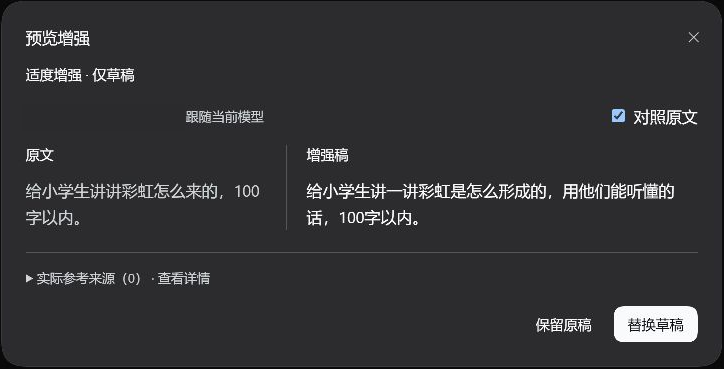
对照原文,再决定是否采用
选择“先预览,再决定”,即可并排查看原文与增强稿。点击“替换草稿”采用结果,或“保留原稿”继续编辑。
按需要调整增强方式
在 DSH 设置 → 提示词增强 中选择增强方式、参考范围和模型,点击“保存设置”生效。
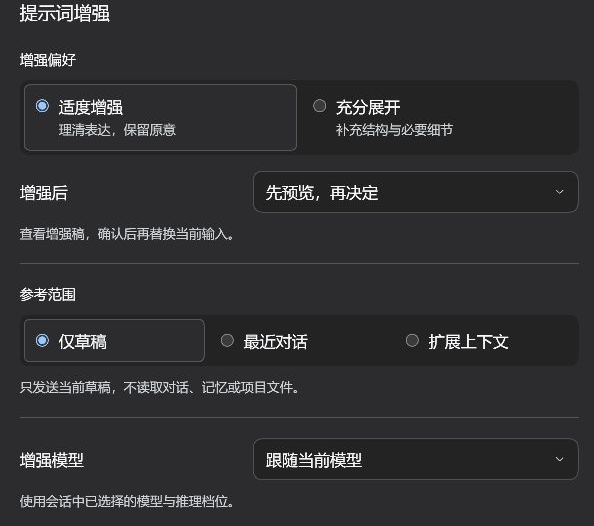
以上为 2026-10-27 在 DSH 0.2.1-rc.3 / 插件 0.2.3 中重新截取的真实界面;0.2.4、0.2.5 的构建和依赖修订,以及 0.2.6 的包名变更均未改变界面。演示使用“仅草稿、先预览”,并非首次默认配置;图片仅保留相关界面,个人配置字段已遮盖。
安装与上手
安装前
- 已安装 DSH 0.2.1-rc.3,并配置好可用模型。
- 能访问 GitHub 和 npm 依赖源。
通过插件市场安装
打开市场安装页面查看截图和安装方式。已安装 dshmarket 的用户,也可在 DSH 的“插件市场”中搜索 dsh-prompt-improver。
市场条目目前指向 v0.2.6 的预构建包。不同分发源可能存在同步延迟;搜索不到时,可先通过市场页面或下方 Release 入口安装。
从 GitHub Release 安装
从 v0.2.6 Release 下载 .tgz 安装包和 SHA-256 校验文件,或使用下面的命令从同一版本标签安装。两种方式均包含预构建的 lib,无需在本机编译插件。
旧版用户注意:0.2.6 起仓库和安装包改名为 dsh-prompt-improver。已安装 dsh-link-prompt-enhance 的用户须先按改名迁移步骤移除旧包,再安装新包;现有增强设置继续沿用。
使用 DSH Desktop 时,先备份原插件和 desktop profile 配置,等待任务结束并正常退出 DSH,再运行以下 PowerShell 命令。将占位路径替换为实际安装目录:
$dshCli = '<DSH 安装目录>\resources\runtime\cli\bin\dsh.cmd'
& $dshCli plugin --profile desktop add 'github:Yocaihua8/dsh-prompt-improver#v0.2.6'
使用 DSH Desktop 自带的 CLI。独立 CLI 用户将 desktop 替换为已有 Web profile 的名称。Release 安装包、开发分支及回滚步骤见安装与回滚指南。
需要修改源码时,可以单独克隆本仓库,运行 npm ci、npm run check 和 npm pack;构建脚本与契约源文件均已包含。环境要求和完整命令见开发说明。
0.2.5 将仓库锁定依赖的审计告警从 40 项降至 0 项,继续适配 DSH 0.2.1-rc.3。该结果针对本仓库的依赖树,宿主自带依赖不由插件覆盖;范围及兼容验证见验证记录。
第一次增强
- 重启 DSH,在普通会话的输入框中写下草稿。
- 点击模型选择器左侧的星光按钮,等待增强完成。
- 默认直接替换草稿;检查内容后自行发送。希望先比较结果,可在设置中改为“先预览,再决定”。
增强进行中,再次点击同一按钮可取消。采用结果后,按钮会变成返回图标,点击即可恢复本次增强前的原文。
常用设置
| 设置 | 首次默认值 | 什么时候调整 |
|---|---|---|
| 增强方式 | 适度增强 | 理清表达、保留原意;需要补充结构与必要细节时选“充分展开” |
| 增强后 | 直接替换草稿 | 希望先对照检查时,选“先预览,再决定” |
| 参考范围 | 最近对话 | 独立问题选“仅草稿”;需要记忆和项目片段时选“扩展上下文” |
| 增强模型 | 跟随当前模型 | 希望与聊天使用不同模型时,选“指定专用模型” |
升级会保留已有设置;旧版增强方式会在首次读取时迁移。专用模型不可用时会提示失败,不会自动换用其他模型。更多说明见使用指南。
数据与费用
- 草稿和所选参考范围内的内容会发送给增强模型,费用按该模型服务的规则计算。
- “仅草稿”不读取历史、记忆或项目文件;“最近对话”最多参考最近 3 轮已完成对话。
- “扩展上下文”可读取个人及同项目记忆、当前项目片段,需要宿主所有者权限和相应服务支持;不会写入记忆。
- 增强不会上传附件正文,结构化
@引用会校验并恢复。模型仍可能遗漏要求,采用后请检查内容。
读取范围、限制及异常处理见数据与上下文。
更多文档与反馈
Versions
| Latest version | Published | Size |
|---|---|---|
| 0.2.6 | — | — |
Comments
Loading…
Similar plugins
Improve the current chat draft before sending with a confirm-before-apply comparison.
★ 0
↓ 48/wk
dsh plugin --profile web add @joe0001/dsh-prompt-optimizerOne-click prompt refinement for the DSH composer: the ✦ button next to Send rewrites the draft into an agent-ready prompt in Standard or Light mode, with Revert and Retry; asks follow-up questions thr
★ 0
dsh plugin --profile web add dsh-smart-promptby xiyue718
DSH 提示词优化插件:在聊天输入框一键优化未发送的提示词。 / Optimize unsent prompts in the DSH chat composer with the default model.
★ 0
TypeScript
Sep 21, 2026
dsh plugin --profile web add @dsh-external/ui-prompt-optimizerby sun04222
Adds an ✦ button to the DSH composer that rewrites the current draft into a clearer, more specific prompt in the same language, with one click to restore the original, plus an enhance_prompt tool the
★ 1
MIT
JavaScript
Oct 27, 2026
dsh plugin --profile web add dsh-prompt-enhanceby 1015677515
Captures the agent's own self-reported mistakes into a categorised lesson library that is re-injected into the system prompt every turn (each captured draft is confirmed or edited by the user before i
★ 4
MIT
JavaScript
Oct 20, 2026
dsh plugin --profile web add github:1015677515/dsh-prompt-ErrorNotes-deskby ruiyukirin
DSH 输入框一键提示词增强按钮 | One-click prompt enhancement for the DeepSeek Harness composer: rewrite the unsent draft into a clearer, more specific prompt, restore the original with one click. Ported from Tencent WorkBuddy's EnhancePrompt design; independent model call that never touches the session log.
★ 1
MIT
JavaScript
Oct 25, 2026
dsh plugin --profile web add dsh-prompt-optimization-master