
dsh-relaunch
IdentifiedRestart button for the Harness desktop app: one sidebar entry that closes every Harness process and starts the application again, launched without a console window and without a close-confirmation dia
dsh-relaunch
English | 中文
Restart DeepSeek Harness from its own sidebar.
🎯 The app has no restart command. This adds one — and unlike editing the application's own files, it survives application updates.
Windows only. The relaunch is implemented with Windows facilities (
wscript.exefor a windowless launch,taskkillto terminate). On macOS and Linux the rail entry still appears, but pressing it fails cleanly rather than doing something unexpected.
Why
DeepSeek Harness ships no UI for restarting itself. The top bar has an
Applications menu, and a restart item exists in the source — but it sits
behind a development flag that production builds never satisfy, so it is not
reachable.
The obvious workaround is to patch the application's app.asar. That works
until the first update: the updater replaces the archive wholesale, your patch
disappears, and the button is gone again. Editing another program's installed
files is also the kind of thing you have to redo forever.
So this does it from the outside. A plugin lives in your DSH profile, which updates do not touch. It adds a rail entry to the sidebar; pressing the button in the panel behind it closes Harness and starts it again.
Features
| ⚡ One click | A rail entry beside the shipped panels |
| 🚫 No console flash | The worker is launched windowless, so nothing blinks on screen |
| 🚫 No confirmation dialog | Restart asks nothing; the panel's button is the confirmation |
| 🔁 Survives updates | Installed as a profile plugin, not carved into the app |
| 🔒 Explicit | The restart never fires on its own — it needs the button |
| 🌐 Localized | English and Chinese, following the app's language setting |
What it looks like
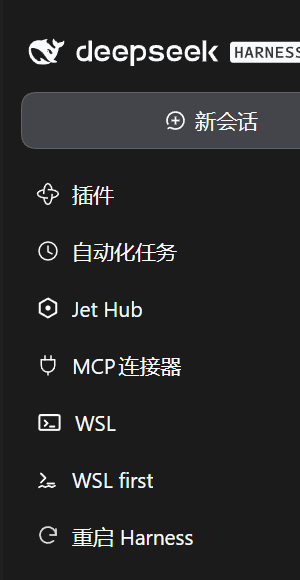
The rail entry sits with the shipped panels:
Selecting it opens the panel, whose single button performs the restart:
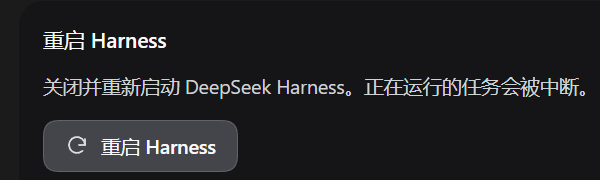
Both images are captures of the running application, not mock-ups.
Install
npm install @yishuiliufang/dsh-relaunch
Then add it to your profile's package.json:
{
  "dsh": {
    "profile": {
      "bundles": ["...", "@yishuiliufang/dsh-relaunch"]
    }
  }
}
The bundle ships its own cordis.patch.yml, which inserts the plugin row
process-wide. A profile restart is required — the loader reads its
composition at startup, and the sidebar does not gain the entry until then.
Use
Click the circular-arrow icon in the left rail. The panel has one button.
Pressing it:
- Sends a request to the plugin's own Host route.
- Waits a moment so the response can reach the browser first.
- Terminates the running Harness processes.
- Starts the application again, verifies it stayed up, and records each step.
Everything running is interrupted. That is what a restart is — DSH checkpoints sessions as it goes, so your conversation history survives, but a task executing at that moment does not.
How it works
The restart cannot be done from inside the plugin, because the plugin runs inside the process being restarted. Leaving it to an in-process call would mean the process kills itself mid-response, and any child it started would die with it. So the work goes to a detached worker:
rail button
  └─ POST /dsh-relaunch/restart          (Host half, authenticated route)
       └─ wscript.exe launch-hidden.vbs  (GUI subsystem: no console allocated)
            └─ DeepSeek Harness.exe      (ELECTRON_RUN_AS_NODE=1: Node, windowless)
                 └─ restart-harness.mjs  (terminate → wait → start → verify)
Two details are load-bearing:
- The launcher is
wscript.exe, notpowershell.exe. PowerShell is a console-subsystem program: starting it allocates a console window that flashes on screen, and the WMI route used to detach it cannot ask forCREATE_NO_WINDOW. The Harness executable is a GUI-subsystem binary, so running it in Node mode produces no window at all. - The worker strips
ELECTRON_RUN_AS_NODEbefore restarting the app. That variable is what makes the worker run as Node instead of as the desktop app. It is process-scoped, so it is inherited — and an Electron binary that inherits it starts as a bare Node runtime with no application logic and exits within a second, leaving nothing running.test/host.mjspins this.
Requirements
- Windows.
- DSH desktop
>= 0.1.7-rc.2(engines.dsh).
The plugin declares no @deepseek-ai/* peer dependency and imports none of
their values. That is deliberate: at startup DSH runs a compatibility check over
every profile bundle, and if even one peer range fails to cover the running
version, the whole bundle is skipped — cordis.patch.yml never takes effect and
it looks like "installed but nothing happens". With no peer range to check, that
failure cannot occur here.
Configuration
None. The plugin has no options; the route and the delay are fixed.
Known limitations
- Windows only, as noted above. The rail entry appears elsewhere but the restart fails there.
- Running tasks are interrupted. Not a bug, but worth repeating.
- The plugin needs a profile restart to appear. Installing it while Harness runs links the package, but the sidebar picks up the entry only after the app restarts.
- Only one restart should be in flight at a time. The button disables itself while a restart is running, but nothing prevents a second window from pressing it too.
Project layout
dsh-relaunch
├── index.js            # Host half: registers the restart route
├── client.js           # Client half: the rail entry and its panel
├── restart-harness.mjs # The detached worker: terminate, wait, relaunch, verify
├── launch-hidden.vbs   # Windowless launcher (wscript → Node mode)
├── restart-harness.ps1 # Transition shim; see CHANGELOG for why it remains
├── locale/             # Plugin-list metadata (en, zh)
├── icon.svg            # Plugin-list icon
├── test/
│   ├── manifest.mjs    # Package/manifest wiring (16 checks)
│   ├── host.mjs        # Route contract and the relaunch environment (11 checks)
│   └── client.mjs      # Client mount, localization, panel states (17 checks)
├── cordis.patch.yml    # Bundle layer: inserts the plugin row
├── dsh-plugin.json     # Plugin manifest
├── CHANGELOG.md        # Release notes
└── package.json
Tests
npm test
No DSH host and no dependencies are needed — the suites import only Node
builtins. host.mjs covers the environment leak described above, which is the
one bug in this project that produced a worse outcome than having no plugin at
all.
Changelog
See CHANGELOG.md for what changed in each release.
License
MIT
Comments
Loading…
Similar plugins
by IHS470
DeepSeek Harness restart button in the DSH desktop window title bar
★ 3
↓ 125/wk
MIT
JavaScript
Oct 3, 2026
dsh plugin --profile web add dsh-plugin-restartby 13520rygvv
DSH desktop plugin: a one-click restart button in Settings, plus a customizable shortcut.
★ 1
JavaScript
Oct 24, 2026
dsh plugin --profile web add @local/dsh-restart-buttonby StabCut
DSH Desktop sidebar restart button: orderly relaunch of DSH Desktop from the sidebar settings row (based on desktopActions.requestRestart).
★ 0
MIT
JavaScript
Aug 21, 2026
dsh plugin --profile web add dsh-plugin-restart-desktopby FuriousKinght
A button at the foot of the sidebar that restarts the DSH desktop app and reloads the page when it comes back.
★ 0
MIT
JavaScript
Oct 15, 2026
dsh plugin --profile web add dsh-restart-buttonby StarMoon-win
Sidebar restart button for DeepSeek Harness Desktop: one click fully quits and reopens the app.
★ 0
MIT
JavaScript
Oct 20, 2026
dsh plugin --profile web add dsh-restartby SakuraYH1080
One-click Quick Restart for DSH Desktop: quits and relaunches the app from the account menu.
★ 0
MIT
JavaScript
Oct 22, 2026
dsh plugin --profile web add dsh-quick-restart