

dsh-output-setting
Manifest valid★ 1DSH output settings plugin: auto-expand reasoning/tool nodes, code block font size & line height, model output language (auto/Chinese/English)
dsh-output-setting
English | 简体中文
An output-presentation settings plugin for DSH (DeepSeek Harness). It gathers "how process nodes expand", "how large code blocks are" and "which language the model answers in" into a single settings page — all applied live, no restart needed.
Where to configure: Plugins → dsh-output-setting (the plugin's own detail page, not a separate group inside Settings).
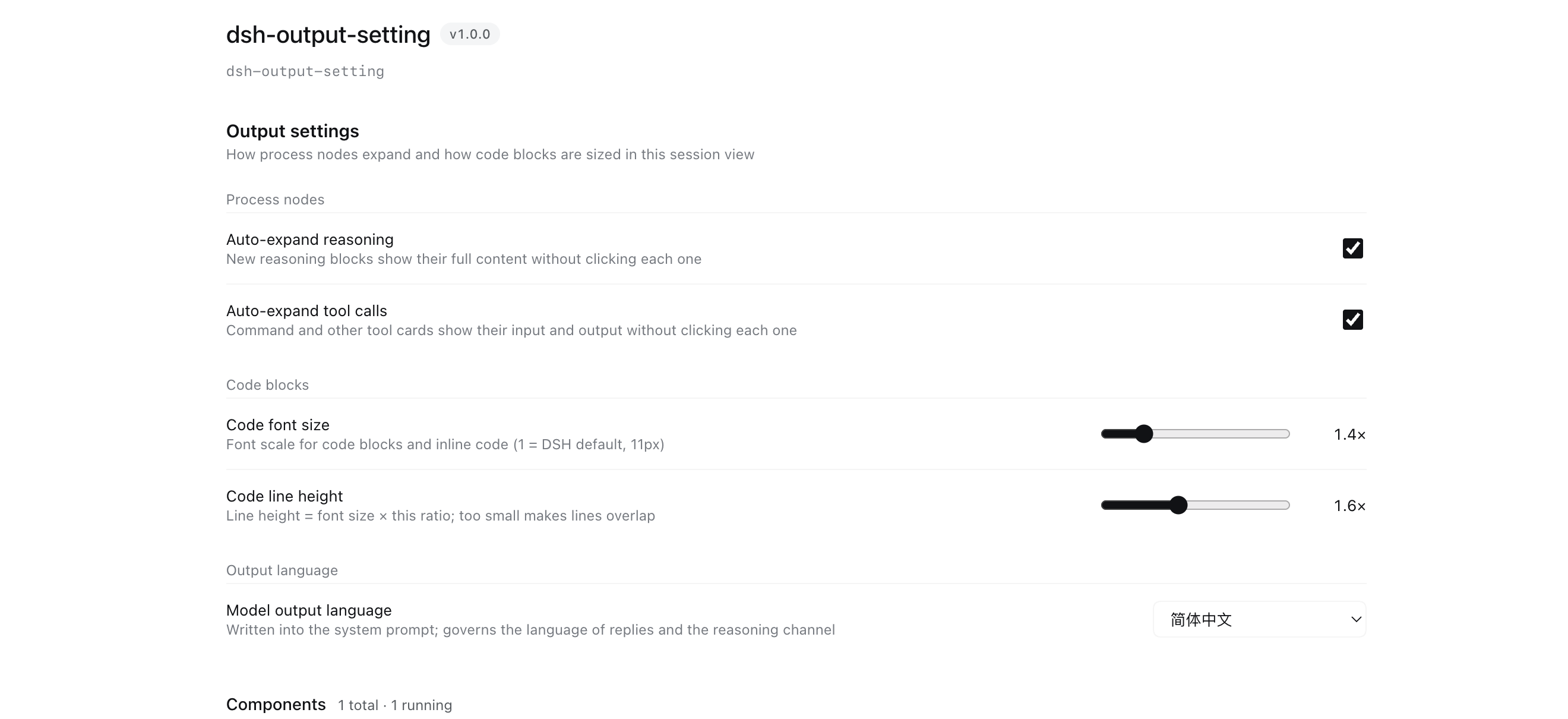
Settings
| Group | Setting | Type | Default | Description |
|---|---|---|---|---|
| Process nodes | Auto-expand reasoning | switch | on | New reasoning blocks show their full content |
| Process nodes | Auto-expand tool calls | switch | on | Command and other tool cards show input and output |
| Code blocks | Code font size | slider 1–3 | 1.4× | Font scale for code blocks and inline code (1 = DSH default, 11px) |
| Code blocks | Code line height | slider 1–2.5 | 1.6× | Line height = font size × this ratio |
| Output language | Model output language | select | Automatic | Automatic (follow UI language) / 简体中文 / English |
"Model output language" is written into the system prompt (not AGENTS.md), so it also constrains the hidden reasoning/thinking channel — AGENTS.md arrives as a user message and cannot reach that channel.
Install
Published on npm as dsh-output-setting.
Use the plugin manager; three sources work:
# 1. From GitHub (no npm publish needed)
plugin_manager(install_bundle, "github:yijiezhong/dsh-output-setting")

# 2. From npm (published)
plugin_manager(install_bundle, "dsh-output-setting")

# 3. Local development: link the source directory
plugin_manager(install_bundle, "link:/path/to/dsh-output-setting")
Make sure dsh-output-setting ends up in the profile's dsh.profile.bundles
(the plugin manager does this for you; see below for the manual route).
Manual install
cd ~/.dsh/profiles/desktop
pnpm add github:yijiezhong/dsh-output-setting
node -e "const f='package.json',j=require('./'+f);j.dsh.profile.bundles.push('dsh-output-setting');require('fs').writeFileSync(f,JSON.stringify(j,null,2)+'\n')"
Dependencies
npm install # installs the @deepseek-ai/schemastery declared in package.json
package.json declares exactly one dependency:
"dependencies": { "@deepseek-ai/schemastery": "~3.18.4" }
Why pinned to 3.18.x: on this machine the profile shared layer
(~/.dsh/profiles/node_modules) holds the old 3.18.1, which has no .volatile().
Desktop does not pass bareModuleBaseUrl, so bare specifiers resolve through plain Node
resolution — without a local copy the plugin hits the old version →
z.number().volatile is not a function → module load fails → Config is missing → the
settings page never appears (listConfigs reports status: "absent", yet fiberPhase
still says active, which makes it very easy to misdiagnose). So it must ship its own 3.18.4.
⚠️ Do not move it into peerDependencies — as a peer it gets intercepted back to the
shared old 3.18.1 and the failure above returns. (This does not contradict official plugins:
they also keep schemastery in dependencies and only put @deepseek-ai/cordis in peer.)
react and cordis are not declared — the DSH runtime provides them (official client
plugins likewise only require("react") without listing it; official plugins were measured at
0 import cordis sites). peerDependencies.cordis was tried once and made npm pull a redundant
308K cordis copy into the plugin, so it was removed.
Development notes
- Changing the host half (
host.js) requires an app restart.disable → enable, renaming the file, andremove + installall fail to reload the module (Node caches ESM by URL;dsh-hmronly watches patch files). Verify a reload by writing a marker file as a side effect — do not trustfiberPhase. - Changing the client half (
client.js) only needs a page refresh (Cmd+R). Note thatCmd+Rresets the whole DSH UI language to the browser language; switch languages from the settings panel when testing localization. - The settings UI registers into
plugins.bundle.config(a keyed slot, key = this package name) and renders between the plugin page's description and its component rows.
License
MIT
Comments
Loading…
From the same category
by awesome-dsh-plugin
A curated list of plugins for DeepSeek Harness (dsh) · DeepSeek Harness 插件精选列表
★ 18.3k
CC0-1.0
Python
Oct 10, 2026
by 0xsline
DeepSeek Harness (DSH) ecosystem: curated plugins, tools, and infrastructure from dsh-external/hub and the public dsh-plugin topic.
★ 1.2k
CC0-1.0
Python
Oct 10, 2026
by pax-beehive
Open-source CLI, schemas, resolver, and DSH agent tools for DSH Plugin Hub
★ 450
MIT
TypeScript
Oct 6, 2026
by xiajiajun516
DeepSeek Harness (DSH) backup & restore plugin — export, import, migrate and sync your complete DSH configuration, plugins, MCP servers, skills and workspace. One-click migration to another machine.
★ 176
MIT
TypeScript
Oct 8, 2026
dsh plugin --profile web add dsh-config-managerby yjh051108
推荐组件(非必须):DeepSeek Harness 运行时注入器;已随 dsh-routing-suite 单仓库化保留,本仓库继续维护/发布。
★ 164
TypeScript
Sep 18, 2026
dsh plugin --profile web add @dsh-external/dsh-super-injectorby jigjoy-ai
A CLI that turns a goal into a pull request - and a sandbox for testing concurrent AI coding agents on the Mozaik runtime.
★ 124
MIT
TypeScript
Oct 2, 2026