

dsh-usage-stats
Manifest valid★ 187Provider balances, subscription quotas, and token-usage analytics for the DeepSeek Harness Web GUI (dsh web).
dsh-usage-stats


Multi-provider account monitoring and token usage analytics for the DeepSeek Harness Web GUI.
Provider balances, subscription quotas, and token-usage analytics for the DeepSeek Harness Web GUI (dsh web).
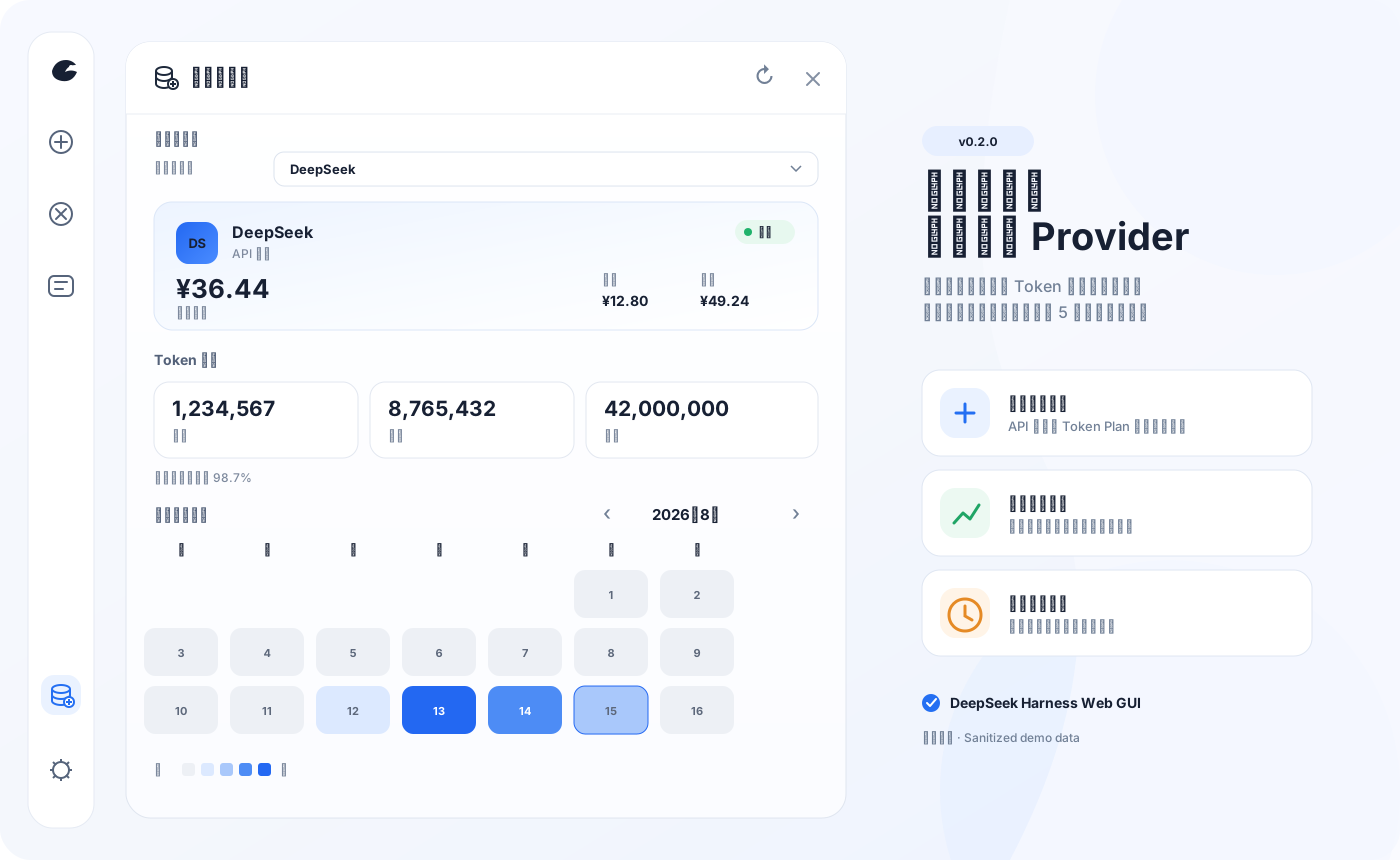
The preview image uses sanitized demo data; the plugin never sends API keys, cookies, admin PATs, or raw upstream responses to the browser.

🐋 OrcaRouter sponsors this project and is available as an optional OpenAI-compatible provider. Learn more · Referral link.
At a Glance
| Capability | Description | |
|---|---|---|
| 💳 | Unified account cards | API providers show balances; Token Plans show windowed quotas; the panel presents one provider at a time |
| 📊 | Token usage analytics | Today, this month, cumulative, cache hit rate, monthly calendar heatmap, with drill-down by date/provider/model |
| 💰 | Estimated cost & budgets | Matches historical prices by event time; provides daily/monthly cost, session-level aggregation, and optional budget alerts |
| 🔄 | Background monitoring | Accounts refresh adaptively based on active/detail/background state; intervals are configurable or can be fully disabled, while local token aggregation keeps running independently |
| 🧩 | Extensible adapters | Supports New API, Sub2API, generic balance templates, and declarative JSON Pointer custom queries |
| 📦 | Safe export | Provides daily/session CSV and versioned JSON; Unicode, CSV formula prefixes, and incomplete costs are all handled safely |
| 🔒 | Local-only security boundary | Data endpoints accept loopback GET only; OrcaRouter presets are written only via explicit loopback POST with anti-CSRF headers; credentials are resolved server-side only |
Interface supports Chinese and English. Browser only requests the selected provider; auto-refresh is server-scheduled. Manual refresh updates usage, provider list, and forces refresh of the current account only—no batch forced requests to other providers.
Quick Start
Requires the DeepSeek Harness web profile (@deepseek-ai/dsh >= 0.1.0-rc.6).
Install the exact version from npm (stable) by default; this is the same package used by the DSH Desktop Market:
dsh plugin --profile web add "@ychris12138/dsh-usage-stats@0.3.3"
Use dsh plugin --profile web add "github:Ychris12138/dsh-usage-stats" only to test an unreleased source/RC. GitHub main may be ahead of npm stable; source installs must not be treated as acceptance of a marketplace install.
Then restart any running dsh web and hard-refresh in the browser. A "Usage/Balance" entry appears at the bottom of the sidebar.
Marketplace GUI Install (DSH Community Market, Path A standard source)
This repository integrates following the standard source (Path A) of the DSH Community Market catalog adapter guide, with no changes to the Market code required. Two catalog data files are built in:
catalog/catalog-source.json— source manifest (catalog-source.schema.jsonv1.0.0)catalog/v1/plugins.json— standard provider page (catalog-provider-page.schema.jsonv1.0.0)
Prerequisite (important): Marketplace-hosted installs only accept exact stable versions from the npm registry; git entries are browse-only. The npm name dsh-usage-stats is already taken by another project, so the catalog entry identity uses @ychris12138/dsh-usage-stats. The current stable/catalog version is 0.3.3; each new version is published in the following order:
- Run
npm run release:sync -- <version>to syncpackage.json/package-lock.json/catalog/v1/plugins.json, thennpm run check:releaseblocks any identity or version drift. - Publish the scoped public package:
npm publish --access public. - Publish the contents of
catalog/v1/plugins.jsontohttps://ychris12138.github.io/dsh-usage-stats/v1/plugins(GitHub Pages; manifest and endpoint must share the same origin, HTTPS 443, no credentials). - In DSH Plugin Market → Source Management → Add Source, paste the manifest URL:
https://ychris12138.github.io/dsh-usage-stats/catalog-source.json; once selected, proceed to the "recovery-safe install boundary" GUI install.
If the catalog points to a not-yet-published version first, the marketplace install will fail-closed — this is expected behavior. A release is only complete after npm, Pages catalog, and the actual Desktop Market install have all been verified.
Upgrade/uninstall:
dsh plugin --profile web update "@ychris12138/dsh-usage-stats"
dsh plugin --profile web remove "@ychris12138/dsh-usage-stats"
兼容安装器:无法使用 dsh plugin 时展开
PowerShell, Command Prompt, and macOS/Linux terminals use the same command:
npx --yes github:Ychris12138/dsh-usage-stats
The installer copies runtime files into ~/.dsh/profiles/node_modules/@ychris12138/dsh-usage-stats and idempotently enables the plugin in profiles/web/cordis.patch.yml with a quoted scoped identity. Re-running updates in place without duplicating config; legacy name: dsh-usage-stats and unquoted name: @ychris12138/dsh-usage-stats are auto-migrated. If DSH_HOME is set, that directory is used instead.
dsh plugin and npx are two independent install paths — pick one; do not keep both a manual Cordis entry and a bundle registration, or the plugin will be mounted twice.
# 预览,不修改文件
npx --yes github:Ychris12138/dsh-usage-stats --dry-run

# 检查现有安装
npx --yes github:Ychris12138/dsh-usage-stats --check

# 安装但不修改 Cordis patch
npx --yes github:Ychris12138/dsh-usage-stats --no-enable
If npx is not available, you can run node scripts/install.mjs from the source tree.
Supported Account Types / Providers
The plugin auto-discovers official DeepSeek routes and provider profiles in llm-pi-ai. Only providers with a public account interface or an explicit monitor are queried for remote accounts; no extra credentials are needed for token usage statistics.
| Provider / adapter | Mode | Default credential | Upstream endpoint |
|---|---|---|---|
| DeepSeek | Balance | provider apiKeyEnv | /user/balance |
| OpenRouter | Balance | OPENROUTER_MANAGEMENT_KEY | /api/v1/credits |
| OrcaRouter | Balance | ORCAROUTER_API_KEY | /v1/balance (older deployments fall back to the billing summary endpoint) |
| Moonshot / Kimi API | Balance | provider apiKeyEnv | /v1/users/me/balance |
| OpenCode Go | Subscription | OPENCODE_GO_API_KEY or local auth.json | /zen/go/v1/usage |
| Z.ai / Zhipu | Subscription | ZAI_API_KEY | Coding Plan quota/subscription |
| Kimi For Coding | Subscription | KIMI_API_KEY | /coding/v1/usages |
| MiniMax Coding Plan | Subscription | MINIMAX_API_KEY | /v1/token_plan/remains |
| Ollama Cloud | Subscription | OLLAMA_API_KEY | /api/usage (5-hour + weekly window) |
| New API | Balance | provider inference token | /api/usage/token/ |
| Sub2API / Passion | Auto-detect | provider apiKeyEnv | /v1/usage |
| Sub2API panel (real) | Balance | provider inference token | /user/balance (reuses apiKey) |
| General / Declarative | Balance or subscription | credential ref in config | restricted GET + JSON |
Providers without a public account interface still get their tokens counted; the card shows "Not supported" and never guesses a balance.
Credentials & Provider Configuration
Credentials are resolved by Harness from ~/.dsh/.credentials.yaml. The installer does not read, create, or modify that file. Do not commit real keys, cookies, or admin tokens to Git, public issues, or paste them into coding agents.
Account Refresh
Default refresh intervals: active 1 minute, detail 2 minutes, background 15 minutes. For strictly rate-limited New API or corporate relays, you can adjust the global policy or disable automatic account refresh entirely:
# ~/.dsh/profiles/web/cordis.patch.yml
- insert:
    - id: usage-stats
      name: "@ychris12138/dsh-usage-stats"
      config:
        refresh:
          enabled: false
          activeMs: 60000
          detailMs: 120000
          backgroundMs: 900000
All three intervals must be integers between 60000 and 86400000 ms. To stop, use refresh.enabled: false; do not fill in an oversized timeout. Once disabled, each identical provider config still allows the first query; afterwards, normal panel reads only return cached data and do not hit upstream on cache expiry. The account endpoint's refresh=1 (Retry) can still explicitly refresh, and provider/monitor config changes trigger one new query for the new config.
The legacy disableBackgroundRefresh: true config is still equivalent to refresh.enabled: false; when both are present, the explicit refresh.enabled wins. This switch only disables automatic upstream refresh for accounts; it does not disable local token usage aggregation.
Estimated Cost & Budgets
Budgets are an optional, non-sensitive setting, disabled by default. Amounts are only computed when provider, model, event time, and currency can all be reliably determined by the built-in pricing rules; unknown relays, subscription routes, cache writes without prices, or mixed currencies display — as a whole, never partial costs or FX conversion.
# ~/.dsh/profiles/web/cordis.patch.yml
- insert:
    - id: usage-stats
      name: "@ychris12138/dsh-usage-stats"
      config:
        budgets:
          currency: USD
          daily: 5
          monthly: 100
Budgets use local calendar day/month boundaries: below 80% is normal, at 80% is warning, at 100% is critical. daily / monthly must be positive numbers or null; the current version does not perform FX conversion, so when the budget currency is incompatible with the reliable price currency, the status stays unknown.
The panel's current provider is stored in the browser's namespaced localStorage and restored on page refresh or DSH restart. If that provider has been deleted, the plugin clears the stale value and falls back to the original DeepSeek/configured provider fallback. This choice is not written to DSH settings, the server-side cache, or the new API.
Balance-type Providers
DeepSeek, Moonshot, etc. reuse the corresponding provider profile's apiKeyEnv by default. For example:
# ~/.dsh/.credentials.yaml
DEEPSEEK_API_KEY: sk-your-key-here
OpenRouter is an explicit exception: the official account credits endpoint requires a Management Key and cannot reuse the regular inference OPENROUTER_API_KEY. The plugin reads a separate reference by default; if not configured, it displays "Not configured" and never probes with the inference key:
# ~/.dsh/.credentials.yaml
OPENROUTER_MANAGEMENT_KEY: sk-or-v1-your-management-key
The plugin displays OpenRouter balance as total_credits - total_usage, showing cumulative used and total credits simultaneously. A regular key's /api/v1/key only describes that key's spending limit and is not treated as account balance. Custom references can be configured via adapter: openrouter-balance and credentialRef in monitors.openrouter.
OrcaRouter prefers its balance endpoint /v1/balance, aggregating paid, free, and promo credits into current available balance; when older deployments lack that endpoint, it falls back to the OpenAI-compatible billing summary endpoint from the official docs (subscription endpoint total quota + usage endpoint cumulative usage, converted from US cents). Any available path that returns unrecognized data shows a clear error state; unknown results are never treated as 0. Infinite-quota sentinel values display as ∞, and OrcaRouter routes still do not participate in this plugin's model price estimation.
Token Plan Providers
# ~/.dsh/.credentials.yaml
OPENCODE_GO_API_KEY: sk-opencode-your-key
ZAI_API_KEY: your-zai-key
# 中国区 Z.ai 用户可选;默认 global
ZAI_API_REGION: bigmodel-cn
KIMI_API_KEY: your-kimi-key
MINIMAX_API_KEY: your-minimax-key
# 中国区 MiniMax 用户可选;默认 global
MINIMAX_API_REGION: cn
OLLAMA_API_KEY: sk-ollama-your-key
OpenCode Go tries in order: Harness credentials, ~/.local/share/opencode/auth.json, and finally the explicit OPENCODE_GO_AUTH_COOKIE + OPENCODE_GO_WORKSPACE_ID compatibility fallback. The Bearer usage endpoint is not a public API and may change with upstream; the Cookie is equivalent to login credentials and should not appear in logs or issues.
Ollama Cloud reads OLLAMA_API_KEY, calls /api/usage to show two subscription windows (5-hour session + weekly), with no balance; usage is converted to a progress bar using the 0..1 ratio.
The Ollama adapter only applies to configured providers and never adds accounts automatically: it is selected when the provider id is ollama, or when its baseURL host is ollama.com (including subdomains); local Ollama (localhost:11434) is not treated as a cloud quota account. Special proxies/custom endpoints can be bound via an explicit monitor:
# ~/.dsh/profiles/web/cordis.patch.yml
- insert:
    - id: usage-stats
      name: dsh-usage-stats
      config:
        monitors:
          relay-ollama:            # 你配置的 provider id
            adapter: ollama
            usageBaseURL: https://ollama.example.com
            credentialRef: OLLAMA_API_KEY   # 非已配置 provider 时必填
Z.ai global region uses api.z.ai; the China region uses open.bigmodel.cn. MiniMax prefers the official www.minimax.io / www.minimaxi.com Token Plan endpoints, parsing the 5-hour and weekly window remaining ratios and reset times.
New API, Sub2API & Custom Monitors
Merge config under the existing name: "@ychris12138/dsh-usage-stats" Cordis entry; do not add a second plugin entry. Monitor keys must be provider ids that actually exist in Harness; unknown providers, adapters, or invalid mappings prevent plugin startup before route and timer registration. Exception: when a monitor explicitly provides both usageBaseURL and credentialRef, it is considered self-contained and is temporarily materialized as a provider before provider registration visibility (suitable for providers loaded later on the Harness settings page); in that case the provider does not need to already appear in the registry.
展开 monitor 配置示例
New API queries /api/usage/token/ with the provider inference token by default and reads the instance's own quota_per_unit from /api/status:
# ~/.dsh/profiles/web/cordis.patch.yml
- insert:
    - id: usage-stats
      name: "@ychris12138/dsh-usage-stats"
      config:
        monitors:
          relay-a:                 # Harness provider id
            adapter: new-api
            # 仅旧实例的 /api/user/self 回退需要:
            fallbackCredentialRef: RELAY_A_MANAGEMENT_PAT
Fallback only occurs when /api/usage/token/ returns 404/405 AND a separate admin PAT is configured; the inference token is never treated as admin credentials. For older instances requiring a User ID, add fallbackUserIdRef.
CC Switch-style generic balance:
        monitors:
          relay-a:
            adapter: general
            warning:
              warnBelow: 5
              criticalBelow: 1
Sub2API-style /v1/usage:
        monitors:
          relay-a:
            adapter: sub2api
            warning:
              warnBelow: 5
              criticalBelow: 1
Note: the
sub2apiadapter corresponds to the/v1/usageprotocol exposed by some Sub2API deployments. Real Sub2API panels (Wei-Shaw/sub2api line) do not provide this public endpoint; use thesub2api-authadapter to read the panel's own balance instead (see below).
Real Sub2API panel balance (sub2api-auth): Sub2API panels expose upstream subscriptions uniformly as APIs, but upstream providers typically have no public balance endpoint. sub2api-auth queries the panel's balance using the provider's own inference API key, same as CC Switch's General template: GET {baseUrl}/user/balance, Authorization: Bearer {apiKey}, reading body.balance. No separate panel credentials needed — the API Key configured for that provider on the DSH model page is reused directly:
        monitors:
          relay-b:
            adapter: sub2api-auth
(Optionally) If /user/balance returns a UTF-8 amount corresponding to body.unit, that currency is displayed; otherwise it defaults to USD. Today's used quota is supplemented from GET /api/v1/usage/stats?period=today's total_actual_cost when available; if not found, balance display is unaffected.
Automatic detection of real Sub2API panels (sub2api-auth): as long as you configure a Sub2API panel as a regular provider in DSH (bringing its API key), the plugin probes that provider's GET /api/v1/settings/public. If the fingerprint matches a real Sub2API panel (returns data.affiliate_enabled: boolean), it automatically uses sub2api-auth with that provider's API key to read the balance — no explicit adapter needed for that provider, and no extra credentials. An explicit adapter always takes precedence over auto-detection; providers without an API key configured are never probed.
# 只要这些(不需要单独的 SUB2API_* 凭据)
# DSH 模型页里为 Sub2API 面板配置 provider,baseURL 指向面板,API Key 填可用的密钥
Passion (provider id passion or domain *.passionapi.com) is auto-detected. Wallet responses show balance; quota_limited or responses containing subscription automatically switch to quota window mode.
Declarative custom queries only support restricted GET + JSON Pointer, no JavaScript:
        monitors:
          private-model:
            adapter: declarative
            mode: balance
            request:
              path: /account/balance
              auth:
                type: bearer
                credentialRef: PRIVATE_MODEL_API_KEY
            extract:
              root: /data
              remaining: /available_balance
              used: /used_balance
              total: /total_balance
              currency: /currency
Supported adapters: deepseek-balance, openrouter-balance, moonshot-balance, zai-balance, new-api, sub2api, sub2api-auth, general, opencode-go, zai-token-plan, kimi-token-plan, minimax-token-plan, declarative.
warning.warnBelow and warning.criticalBelow are absolute balance thresholds. Balances and Token Plans with total quotas automatically produce normal / warning / critical remaining-ratio states (defaults 30% / 10%).
Usage
- Click “Usage/Balance” in the sidebar.
- Use “Current Provider” to switch account cards; only one provider is displayed at a time.
- Use
‹/›to switch months; click a heatmap date to view that day's provider/model breakdown. - Refreshing from the title bar updates Tokens, the provider list, and forces a refresh of the current account.
安全导出 / Secret-free export
The three download endpoints export only whitelisted aggregated fields and do not include credential ref/value, Authorization, Cookie, raw upstream responses, prompt/reply content, or file paths:
/api/usage-stats/export/daily.csv: Four token categories and full cost estimates, per day × provider/model./api/usage-stats/export/sessions.csv: Session title, provider/model set, Tokens, full cost estimate, and last activity time./api/usage-stats/export.json: Full aggregated data withschemaVersion, public pricing provenance, budget, and account-safe status.
CSVs use UTF-8, RFC 4180 quoting, and spreadsheet formula protection; Unicode titles open directly. Costs are exported only when costComplete=true; unknown or mixed currencies remain blank or null—partial amounts are never emitted.
“Last 14 days” is calculated on the local calendar and shows only dates within the window that have usage; future timestamps are not counted. The same model served by different providers is tracked separately, e.g. deepseek-official · deepseek-chat vs ark · deepseek-chat.
Agent 友好安装 / Agent-friendly installation
复制给 Codex、Claude Code 或其他本地编码 Agent
Install or update dsh-usage-stats from:
https://github.com/Ychris12138/dsh-usage-stats

Constraints:
- Resolve DSH_HOME from the environment; otherwise use ~/.dsh.
- Do not read, print, edit, or request .credentials.yaml, auth.json, cookies, or any API key.
- Do not expose the plugin through a reverse proxy.
- Do not restart or terminate an existing dsh process without asking me.

Procedure:
1. Confirm node, npx, and dsh are available.
2. Prefer the exact npm stable used by Desktop Market: `dsh plugin --profile web add "@ychris12138/dsh-usage-stats@0.3.3"` (or update the existing scoped package).
3. Use `github:Ychris12138/dsh-usage-stats` only when I explicitly ask to test unreleased source/RC code.
4. If dsh plugin is unavailable, use the compatible source installer only with my approval: `npx --yes github:Ychris12138/dsh-usage-stats`.
5. Do not combine bundle installation with an existing manual dsh-usage-stats Cordis entry.
6. For npx, require a verified package and exactly one Cordis entry, then run again with --check.
7. Report the exact package identity/version, installation path, and resolved profile paths.
8. If dsh web is running, report that a restart is needed and stop.

Optional account setup (never handle secret values yourself):
- OpenRouter account balance requires OPENROUTER_MANAGEMENT_KEY, not the inference key.
- OpenCode Go may reuse local auth.json or use OPENCODE_GO_API_KEY.
- Z.ai uses ZAI_API_KEY; China accounts may set ZAI_API_REGION=bigmodel-cn.
- Kimi and MiniMax use KIMI_API_KEY and MINIMAX_API_KEY.
- Never ask me to paste a key or browser cookie into chat.

Optional monitor setup:
- Read configured Harness provider ids and ask which id should receive a monitor.
- Add only non-secret config under the existing dsh-usage-stats Cordis entry.
- Store credential reference names, never credential values.
- Validate relative request.path and JSON Pointer fields beginning with /.
- Do not enable cross-origin, insecure HTTP, or private-network access unless I explicitly request it.
Run check-only, no modifications:
npx --yes github:Ychris12138/dsh-usage-stats --check
Installer exit codes: unknown args return 2; file, version, or config validation failures return non-zero. On success it prints the validated version, install dir, and patch path. Agents don't need to parse or rewrite YAML themselves.
隐私与安全 / Privacy & security
- API Keys, OpenCode
auth.json, Cookies, and admin PATs never appear in browser responses, plugin caches, or logs. - Sub2API
sub2api-authreuses the provider's own inference API Key (the one configured on the model page); no additional panel credentials are introduced or persisted. - Custom monitors require HTTPS, same-origin relative paths, manual redirect handling, and JSON responses by default, with a 1 MiB body limit.
- Before sending credentials, IPv4/IPv6 resolutions of the target domain are filtered and one allowed connection address is pinned, preferring public addresses; HTTPS domains resolving to
198.18.0.0/15may be used as synthetic fake-IPs for proxies such as Clash/Mihomo. Literal198.18/15and other private/special addresses are still rejected by default, preventing DNS-rebinding bypass of private-network restrictions. usageBaseURLmust not embed username/password; headers such asAuthorization,X-API-Key,API-Keyare injected via credential ref.- The nine data endpoints accept GET only; the OrcaRouter integration route's GET returns a boolean status only, and its POST performs a local settings mutation only after an explicit user click, requiring a non-simple custom action header. All routes validate both the peer socket and the Host header, supporting IPv4, IPv4-mapped IPv6, and
[::1]:port. - The usage cache
~/.dsh/storages/usage-stats-cache.jsonstores only aggregated Tokens, session ids, opaque revisions, and fold cursors—never prompts, replies, or file paths.
A local reverse proxy causes the plugin to see the proxy's own loopback address. Do not expose the endpoints to your LAN or the public internet via a reverse proxy; if you must use a proxy, add reliable authentication and access control at the proxy layer. Report security issues privately via SECURITY.md.
正确性与数据口径 / Correctness
Token counts come from provider-reported usage in assistant/chunk or assistant/message events and are not local estimates. Later samples for the same turn/step replace earlier ones, and values are aggregated by provider/model.
Costs are explicitly labeled as derived estimates: each usage sample uses its own event time, the original provider/model, and four token buckets to match against lib/pricing.js; when a sample is replaced, the old cost is subtracted first and the new cost is added. "Current price × historical cumulative tokens" is never used. The derived cost for each session continues to flow into usage.sessions, the session CSV, JSON export, and overall billing aggregation; the plugin does not inject any session UI into the DSH composer.
- Active sessions only process newly appended events.
- Persisted sessions use an opaque revision (Harness's
list(); the olderlistSnapshots()remains compatible); when unchanged, logs are not re-read. - Persisted logs are read through Harness's
open(id, "read")read handle (the olderreadFrom()remains compatible); the handle is closed immediately after each read. - Sessions that have left the live store (e.g. finished sub-agent runs) have their persisted logs back-filled by id at the next aggregation, and their tokens are counted toward daily/model totals without waiting for a background full scan.
- Gaps in the seq sequence, log rewrites, or live/persisted switches trigger a full re-folding of that session.
- Aggregation uses single-flight, and the cache is saved atomically within the same critical section.
validate:livecompares per session the raw artifact,session.history, the plugin endpoint, and the official token projection; missing files or inconsistencies return non-zero.
API
| Method | Path | Response |
|---|---|---|
GET | /api/usage-stats/usage | Token totals, derived costs, session details, and daily/monthly budget status aggregated by date/provider/model |
GET | /api/usage-stats/providers | Provider list, account mode, adapter, status, and warning summary |
GET | /api/usage-stats/account?provider=<id> | Unified balance or Token Plan snapshot for the current provider; refresh=1 forces a refresh |
GET | /api/usage-stats/balance?provider=<id> | 0.1.x balance-compatible route |
GET | /api/usage-stats/subscriptions | 0.1.x Token Plan-compatible route |
GET | /api/usage-stats/session-context?session=<id> | Route/model/account for the current live session and a session-cost snapshot from the same incremental fold |
GET | /api/usage-stats/export/daily.csv | Secret-free daily provider/model CSV |
GET | /api/usage-stats/export/sessions.csv | Secret-free session CSV |
GET | /api/usage-stats/export.json | Versioned usage, budget, pricing provenance, and account-safe JSON |
GET | /api/usage-stats/integrations/orcarouter | Secret-free boolean status indicating only whether the OrcaRouter preset is writable/already present |
POST | /api/usage-stats/integrations/orcarouter | After an explicit user request, idempotently adds the preset via revision-guarded path mutation; requires application/json and X-DSH-Usage-Stats-Action: add-orcarouter |
Except for the OrcaRouter POST above, non-GET methods return 405; non-loopback requests return 403. API JSON responses use Cache-Control: no-cache; download responses use Cache-Control: no-store and a fixed filename.
开发与验证 / Development
npm install
npm run check
npm test
npm pack --json
npm test runs fully offline and covers the bundle, client-side rendering and request races, server-side security boundaries, balance/Token Plan adapters, caching, and installer idempotency. Real-data validation requires running dsh web first:
npm run validate:live
node scripts/check-balance.mjs
All server-side scripts respect DSH_HOME. check-balance.mjs may display real balances; do not paste its output into public issues.
兼容性与致谢 / Compatibility & credits
The current npm stable is 0.3.3; the full release gate for v0.3.3 is in docs/release-checklist.md, and the change summary is in docs/release-notes-v0.3.3.md. The plugin depends on the Harness client module loader, the Cordis service, and session persistence; when Harness pre-release interfaces change, corresponding adaptations may be needed.
Reading persisted and active sessions branches on capability detection, not on version numbers, so the supported range >= 0.1.0-rc.6 remains unchanged: 0.1.3-alpha.1–0.1.5-rc.2 use list() snapshots + open(id, "read") read handles, while 0.1.0-rc.7–0.1.2-rc.1 use listSnapshots() + readFrom(); active sessions support both seq/snapshotEvents() and the legacy events array. session/disposed exists across this range (when it is missing, finished sessions are back-filled by the background full scan instead). The cache format is still version: 5; old caches are reused directly and re-folded in place.
display.currentSessionPill continues to be accepted as a v0.3.0 legacy boolean configuration key to avoid startup failures caused by old configs; the current client no longer registers any composer UI, so this key no longer has a visible effect. The session-context server API temporarily retains its original response semantics for v0.3.0 API compatibility and future integrations.
- Javis603/token-monitor: Reference for multi-provider quota normalization and Z.ai limit parsing.
- xiaoqi20/dsh-opencode-go-usage: Reference for DSH credential integration, OpenCode
auth.jsonfallback, and Bearer usage endpoint.
This project reimplements a unified account protocol, adapters, and a single-vendor UI; it does not copy the reference projects' interfaces.
License
Compatibility
Versions
| Latest version | Published | Size |
|---|---|---|
| 0.3.0 | — | — |
| 0.2.10 | — | — |
| 0.2.9 | — | — |
| 0.2.7 | — | — |
| 0.3.3 | — | — |
| 0.3.4 | — | — |
| 0.3.2 | — | — |
| 0.2.8 | — | — |
| 0.3.1 | — | — |
| 0.2.6 | — | — |
| 0.3.5 | — | — |
| 0.3.6 | — | — |
Comments
Loading…
Similar plugins
by 2327644800
Personal usage analytics & activity dashboard for the DeepSeek Harness (dsh) web GUI: token totals, session activity, GitHub-style contribution heatmap, model / reasoning-effort / tool / skill / plugin rankings, streaks and insights. Aggregates real session events through ctx.sessionPersistence; no dsh core changes, no prompt content leaves the machine.
★ 0
Apache-2.0
JavaScript
Aug 26, 2026
dsh plugin --profile web add dsh-usage-analyticsby kai-GitHubaccount
DeepSeek 余额 + Token 用量面板(DSH Web):三级预警、自定义阈值、一键充值、缓存命中率 | Balance & usage panel for DeepSeek Harness
★ 0
MIT
JavaScript
Sep 21, 2026
dsh plugin --profile web add dsh-usage-panelby xie-tj
Persistent token-usage ledger and Web Usage dashboard for DeepSeek Harness.
★ 2
MIT
JavaScript
Sep 15, 2026
dsh plugin --profile web add dsh-plugin-usage-ledgerToken usage statistics for DeepSeek Harness. Per-channel usage with balances and plan quotas for mainstream providers, CNY cost estimates, and daily charts — a settings-sidebar section.
★ 1
NOASSERTION
TypeScript
dsh plugin --profile web add @linxin666/dsh-stats-panelby yokesky
DeepSeek Harness (DSH) 用量统计面板 — usage statistics dashboard: GitHub-style heatmap, daily token trend, model usage donut.
★ 3
↓ 118/wk
MIT
TypeScript
Aug 15, 2026
dsh plugin --profile web add @yokesky/dsh-usage-lensby XEsx630
All-session token usage statistics for DeepSeek Harness
★ 0
MIT
JavaScript
Oct 20, 2026
dsh plugin --profile web add dsh-usage-stats