

dsh-account-usage
Manifest valid★ 2Add a "Settings: Account" page for dsh, allowing quick viewing of DeepSeek balance, usage information, and OpenCode Go quota details, while also providing quick links to the respective official websites.
dsh-account-usage


DeepSeek Harness(DSH)网页界面插件:在设置面板新增「账户」页,一站式查看 DeepSeek 平台余额/用量与 OpenCode Go 配额。


📑 目录
📸 界面预览
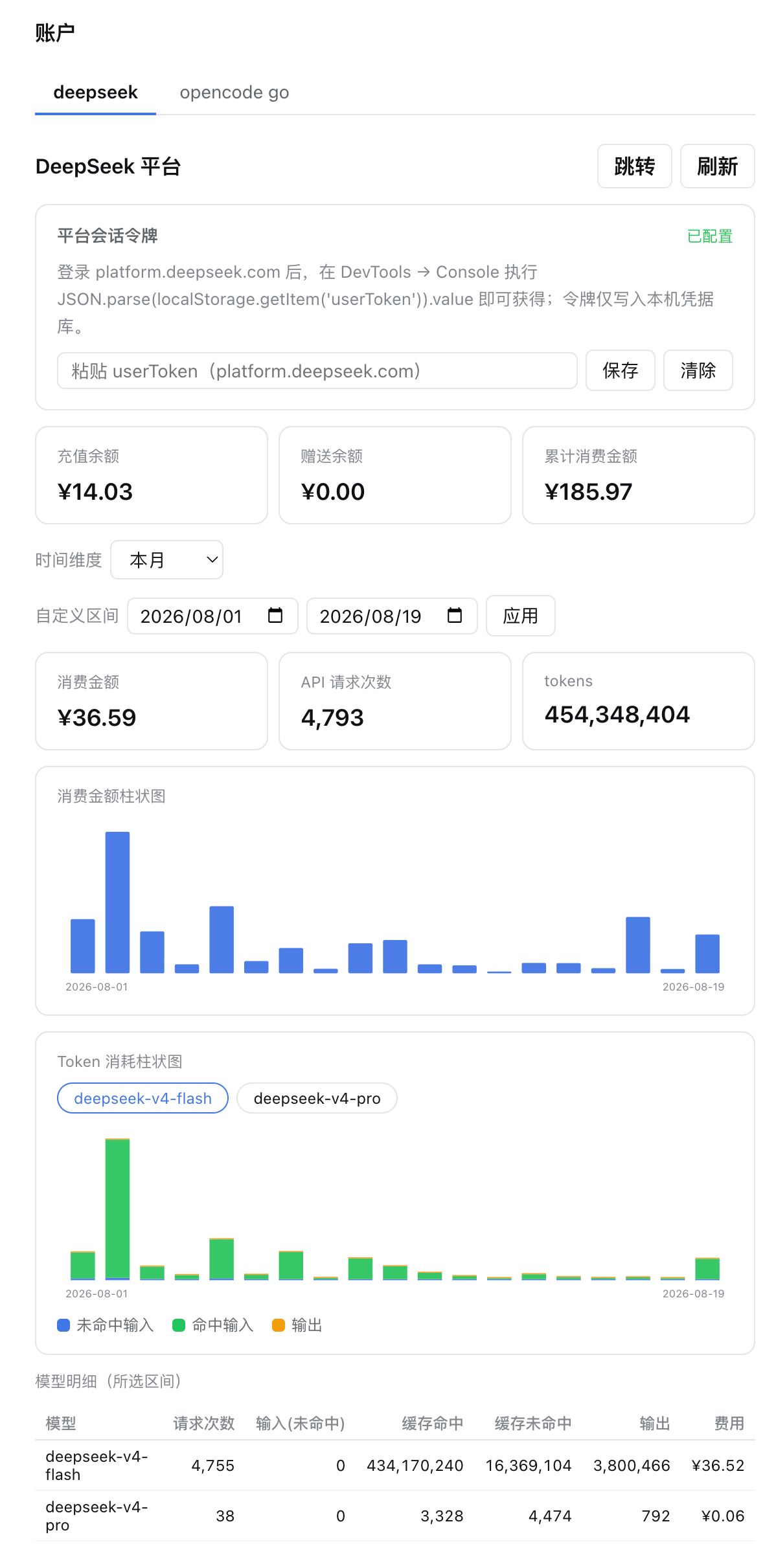
DeepSeek 平台页:余额概览、时间维度与自定义区间、每日消费/Token 柱状图、按模型明细表。
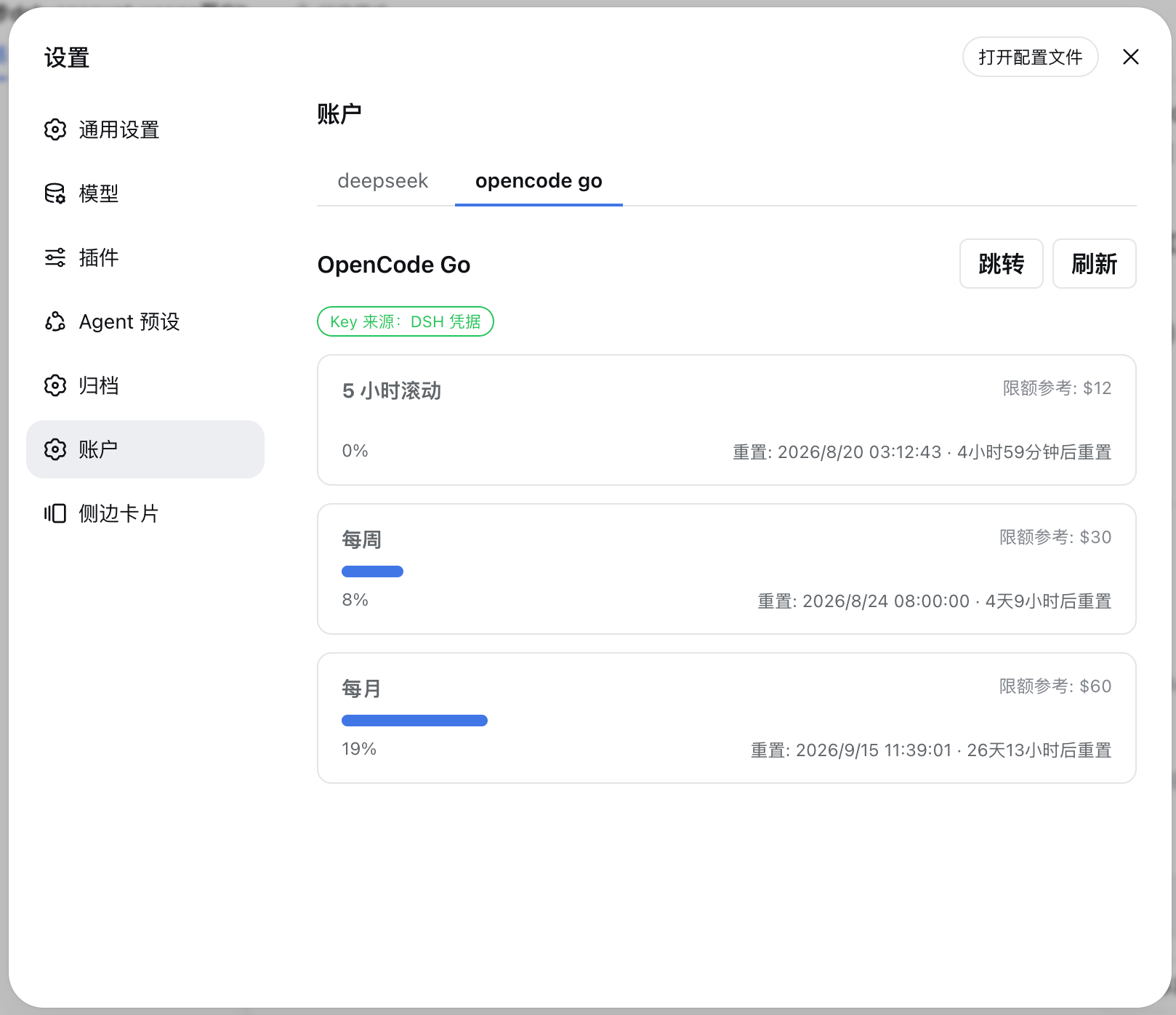
OpenCode Go 配额页:5 小时滚动 / 每周 / 每月三个窗口的用量进度条、重置时间与限额参考。
✨ 功能特性
| 功能 | 说明 |
|---|---|
| DeepSeek 平台概览 | 充值余额、赠送余额、累计消费金额、本月消费金额、本月 Tokens |
| 每日柱状图 | 消费金额与 Token 消耗双图表,SVG 渲染,鼠标悬停查看每日明细 |
| 时间维度切换 | 今天 / 近 7 天 / 近 30 天 / 近 90 天 / 本月 / 上月 / 自定义区间 |
| 按模型明细表 | deepseek-v4-flash / deepseek-v4-pro / 其他:请求次数、输入/缓存/输出 Tokens、费用 |
| OpenCode Go 配额 | 5 小时滚动 / 每周 / 每月三个窗口的用量百分比与下次重置时间 |
| 自动刷新 | 页面挂载期间每 60 秒自动轮询最新数据 |
| 双语言界面 | 完整的中英文切换支持 |
🚀 快速开始
前提条件
- 已安装 DSH CLI 与 pnpm(
dsh plugin内部转发到 pnpm)
安装
# 方式一:从本地源码安装(开发)
dsh plugin --profile web add <absolute-path-to-plugin>

# 方式二:从 GitHub 安装
dsh plugin --profile web add github:Ycet/dsh-account-usage
包声明了 dsh.bundle 补丁层,dsh plugin 会自动把加载项合入 profile 的 bundle 层,无需手动编辑 cordis.patch.yml。
手动合并补丁层(可选)
# ~/.dsh/profiles/web/cordis.patch.yml
- insert:
    - id: account-usage
      name: dsh-account-usage
启动
- 重启网页应用:
dsh web - 打开 http://127.0.0.1:3080 并刷新页面
- 设置面板出现「账户」页
⚙️ 配置说明
DeepSeek 平台令牌(必需,仅影响 DeepSeek 面板)
用量接口是平台控制台的私有接口,需要你的平台登录令牌:
-
打开 DevTools → Console,执行:
JSON.parse(localStorage.getItem('userToken')).value -
在插件「账户」页的令牌输入框直接粘贴并保存(写入
~/.dsh/.credentials.yaml的DEEPSEEK_PLATFORM_TOKEN)
手动写入凭据文件(可选)
# ~/.dsh/.credentials.yaml
DEEPSEEK_PLATFORM_TOKEN: <令牌>
令牌只存储在本机凭据库,浏览器与网络请求均不携带它往返上游以外的任何位置。
OpenCode Go Key(通常无需配置)
插件按以下顺序自动查找:
- DSH 凭据
OPENCODE_GO_API_KEY(~/.dsh/.credentials.yaml,在「设置 → 模型」配置 opencode-go 时通常已存在); - OpenCode 自身的
~/.local/share/opencode/auth.json(opencode-go条目,type 为api)。
📖 使用说明
- 在设置面板「账户」页顶部切换 deepseek / opencode go 两个标签查看对应数据;
- DeepSeek 页可切换时间维度(今天 / 近 7 天 / 近 30 天 / 近 90 天 / 本月 / 上月),或选择「自定义区间」后点击「应用」;
- 柱状图支持鼠标悬停查看每日明细;模型明细表展示所选区间内各模型的请求次数、Tokens 与费用;
- OpenCode Go 页展示三个配额窗口的用量百分比、下次重置时间与限额参考,可一键「跳转」到 opencode.ai 或「刷新」;
- 页面挂载期间每 60 秒自动刷新;「打开配置文件」按钮可直接定位本机 DSH 凭据文件。
🔧 工作原理
双面插件(宿主 + 浏览器),数据通道为宿主注册的同源 HTTP 路由:
| 部分 | 文件 | 作用 |
|---|---|---|
| 宿主 | index.js | 注册三条 GET /api/account-usage/* 精确路由(deepseek-summary / deepseek-usage / opencode);经 ctx.credentials 解析密钥,固定白名单上游 URL,15s 超时 + 30s 缓存 |
| 解析聚合 | lib/aggregate.js | 纯函数:平台信封解包后的每日/每模型 token、费用、请求次数聚合 |
| 浏览器 | client.js | 手写惰性 CJS 客户端包:注册 settings.section(id account),渲染账户页(SVG 柱状图、维度选择器、模型表、配额进度条),挂载期间每 60s 自动刷新 |
| 组合 | cordis.patch.yml | dsh.bundle 补丁层,安装时自动合入 |
数据源
| 用途 | 端点 | 认证 |
|---|---|---|
| 账户概要 | platform.deepseek.com/api/v0/users/get_user_summary(+/get_user_info) | Bearer <userToken> |
| 每日 token 明细 | platform.deepseek.com/api/v0/usage/amount?month=&year= | Bearer <userToken> |
| 每日费用明细 | platform.deepseek.com/api/v0/usage/cost?month=&year= | Bearer <userToken> |
| OpenCode Go 配额 | opencode.ai/zen/go/v1/usage(官方) | Bearer <sk-opencode-…> |
🧰 环境变量
| 变量 | 默认 | 说明 |
|---|---|---|
DSH_ACCOUNT_USAGE_TIMEOUT_MS | 15000 | 上游请求超时(毫秒) |
DSH_ACCOUNT_USAGE_CACHE_MS | 30000 | 平台数据缓存 TTL(毫秒) |
DSH_ACCOUNT_USAGE_MAX_MONTHS | 3 | 单次查询可覆盖的最大月份数(超出自动裁剪) |
DSH_ACCOUNT_USAGE_OPENCODE_CACHE_MS | 60000 | OpenCode 配额缓存 TTL(毫秒) |
⚠️ 已知限制
- DeepSeek 平台用量接口为未公开的私有接口,字段可能随平台升级变化;插件对响应做防御式解析,字段缺失时降级为「—」而非报错。若页面长期显示「—」,请重新抓包确认字段并反馈。
- 「累计消费金额」「API 请求次数」字段不在公开文档中:累计消费按命名启发式在概要响应中搜索(找不到则显示「—」),请求次数读取模型条目上的
count/requests/request_count/req_count/calls字段。两者均在真实令牌实测后校准。 - OpenCode Go 的限额($12/$30/$60)为套餐参考值,端点未返回限额;套餐调整时以 opencode.ai 页面为准。
- 服务绑定
0.0.0.0时本插件路由对局域网可达(与 DSH 其他本地插件相同的既有限制,默认127.0.0.1无此问题)。
🛠️ 开发
node --check index.js          # 宿主语法检查
node --check lib/aggregate.js  # 聚合模块语法检查

# 本地安装(开发迭代):
dsh plugin --profile web add <absolute-path-to-plugin>
# 修改源码后需重新安装(先 remove 再 add,或提升版本号后重新 add),再重启 dsh web
修改 client.js 后需重启 dsh web(重新生成 boot-graph 哈希),再强制刷新页面。
[!NOTE]
dsh plugin在 Windows 下经 shell 转发 pnpm,安装路径不能含空格;工作区路径含空格时可先在无空格路径建目录联接(mklink /J)作为安装网关。
🤝 贡献
欢迎提交 Issue 与 Pull Request:发现问题请携带界面截图与版本号到 Issues 反馈;改进请按 Fork → 分支 → PR 流程提交。
📄 许可证
本项目使用 MIT 许可证。
Comments
Loading…
From the same category
DeepSeek Harness plugin for Reactive Resume: bridges your resumes and job applications into a Harness session over MCP.
★ 41.7k
↓ 115/wk
MIT
Aug 24, 2026
dsh plugin --profile web add dsh-plugin-reactive-resumeby dsh-market
The plugin market inside DeepSeek Harness — browse, search, one-click install · DSH 可视化插件市场
★ 11k
↓ 311.6k/wk
MIT
TypeScript
Nov 6, 2026
dsh plugin --profile web add dshmarketby Tencent
Let AI agents use your real, logged-in browser without interrupting your work. CLI + extension for browser automation across any shell-capable AI agent.
★ 10.1k
↓ 14.8k/wk
MIT
TypeScript
Nov 5, 2026
dsh plugin --profile terminal add @wxg-prc-cpg/browser-skill-dsh-pluginby superdesigndev
OpenRouter for agent tools. Join community here: https://discord.gg/6mQYYfFMAn
★ 7.2k
NOASSERTION
Python
Nov 6, 2026
dsh plugin --profile web add treg-dshby yjh051108
dsh-routing-suite — injector + router-standard kit: install the runtime injector first, then the task-aware reasoning-mode router preset (measured P1-P23).
★ 7k
MIT
JavaScript
Sep 18, 2026
dsh plugin --profile web add @dsh-external/dsh-super-injectorby Q00
Agent OS: the agent gets smarter on its own. We just hold the line: Interview-gated, staged evaluation, budgeted evolution loop. MCP server, 14 runtimes: Claude Code, Codex CLI, Gemini CLI, OpenCode,
★ 6.3k
MIT
Python
Nov 5, 2026