

dsh-3d-viewer
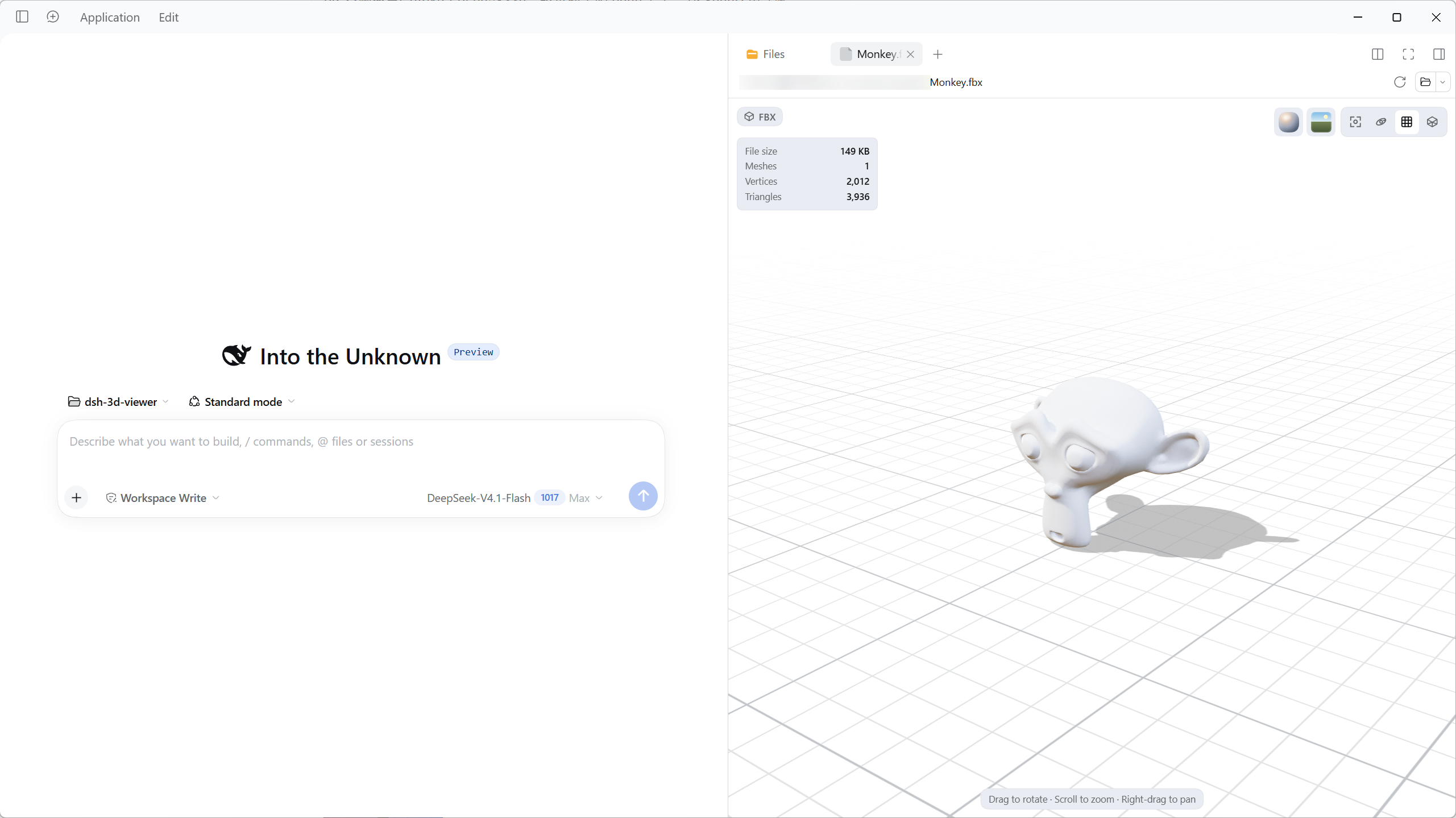
Identified★ 1Preview FBX, OBJ, glTF/GLB, and STL models in the right sidebar with orbit controls, PBR materials, four built-in HDRI environments, and animation playback.

3D Viewer
English | 中文


Preview FBX, OBJ, glTF, GLB, and STL models from the current session's workspace in DSH's right sidebar. No uploads or network: open a model, orbit, zoom, switch materials and environments, and play embedded animations.
Installation and enabling
Distributed as the npm package dsh-3d-viewer. The prebuilt client.js bundles Three.js and the loaders; the four HDRI files ship in the package and are served by a small read-only host route on the local DSH server, so no network access is needed at runtime. React comes from DSH.
Install from npm (recommended)
- Open DSH Desktop and choose Plugins in the sidebar.
- Click Add plugin → Install a third-party plugin.
- Enter
dsh-3d-viewer(ordsh-3d-viewer@0.1.1to pin a version). - Set Registry to the official npm registry (npmmirror also works in mainland China).
- Click Install, then confirm 3D Viewer is On under Installed plugins.
- Open a model from any session. If no preview appears, refresh the page; if it still does not, restart DSH.
Updating: remove the old version under Plugins, then install the new one with a higher version.
Install from a local directory (optional)
Use this for offline or intranet distribution.
- Unpack the plugin directory anywhere; it must contain
package.json,client.js,index.js,cordis.patch.yml, and theassets/hdri/directory. - Open DSH Desktop and choose Plugins in the sidebar.
- Click Add plugin → Install a third-party plugin.
- Enter the directory's absolute path (for example
F:\plugins\dsh-3d-viewer) and click Install. - Confirm 3D Viewer is On under Installed plugins.
- Open a model from any session. If no preview appears, refresh the page; if it still does not, restart DSH.
Local installs link to the directory rather than copying it. Do not move, rename, or delete it, or DSH may not find the plugin on the next start.
Plugins run inside the DSH process; install only trusted sources.
Requirements
- DSH Desktop 0.2.2-rc.1 or newer (built and tested on 0.2.2-rc.1).
- WebGL 2 support; otherwise the preview reports an error.
- Model files in the session workspace, reachable through Files in the right sidebar.
Open a model
- Open any session and click the right-sidebar button at the top-right of the conversation.
- Open Files in the sidebar (or press
Mod+P). - Click any
.fbx,.obj,.gltf,.glb, or.stlfile. - The model opens in a preview tab. Large files and the first environment switch may take a few seconds.
Supported formats
| Format | Support |
|---|---|
| FBX | Meshes, hierarchy, materials, embedded textures, animations, and node data |
| OBJ | Polygons, o/g groups, normals, UVs, vertex colors, line/point primitives, mtllib/MTL, and common textures |
| glTF / GLB | Animations, skinning, embedded resources, and external .bin files and textures |
| STL | ASCII and binary STL; neutral double-sided PBR material; binary vertex colors preserved |
External resources (FBX/glTF textures, glTF .bin, OBJ MTL and textures) are read from the session workspace.
The four environments are the exception: the HDRIs ship inside the plugin package, and the Host half serves them from the local DSH server on /dsh-3d-viewer/hdri/, so switching environments never touches the network.
Notes:
- All formats: lights, cameras, and audio embedded in the file are removed; the preview uses its own lighting and camera.
- FBX: a missing external texture warns but does not block geometry.
- OBJ: a missing MTL falls back to default materials; missing textures use white placeholders.
- glTF / GLB: resources shared by several primitives are read once.
- STL: no materials or animations.
Not supported
- glTF extensions that need extra decoders: Draco, Meshopt, KTX2.
- Texture formats DSH cannot decode directly: TGA, DDS, EXR, and similar (shown as white placeholders).
- MTL
map_Ks/map_Nsare not fully mapped to PBR yet (Kd/Ks/Ns/dand diffuse/normal/bump/emissive/alpha/displacement textures are supported).
Code structure
| Path | Responsibility |
|---|---|
index.js | Host half: registers the read-only /dsh-3d-viewer/hdri/ route that serves the packaged HDRIs |
src/client.js | Plugin entry; registers document previews and Sidebar slots per format |
src/formats.js | Format registry: ids, extensions, title/badge keys, and format normalization |
src/bytes.js | Shared byte, text, path, MIME, and base64 helpers plus the cancellation error |
src/ui/ModelViewer.js | Viewer container: loading/error state, format binding, and scene lifecycle |
src/ui/ViewerSurface.js | Pure presentation: toolbar, stats, animation bar, and status overlay; renderable without WebGL |
src/ui/AnimationBar.js | Animation transport; playback state and 30 Hz progress updates re-render only this small component |
src/ui/chrome.js, icons.js, primitives.js | Toolbar, data-driven material/environment popovers, stats panel, icons, and formatting |
src/ui/styles.js, dictionaries.js, options.js | Styles, English/Chinese copy, and UI options |
src/scene/createSceneView.js | Scene orchestration: renderer, camera, controls, lifecycle |
src/scene/environment.js | HDRI fetch from the host route, decode, PMREM construction, and per-id caching |
src/scene/materials.js | Phong/Lambert → PBR conversion, material presets, and wireframe material |
src/scene/ground.js | Infinite grid shader and shadow receiver; grid pixels are generated once per page |
src/scene/animation.js | AnimationMixer, clip timeline, and progress notifications |
src/scene/camera.js, lighting.js, render-loop.js, postprocessing.js, blue-noise.js | Framing and keyboard orbit, lighting, frame scheduling, MSAA/ACES post-processing, and blue-noise dithering |
src/loaders/workspace.js | resourceAddress parsing, workspaceFiles reads, absolute-path fallback, texture Blob/white fallback, and resource cleanup |
src/loaders/model-loader.js | Async FBX / OBJ / glTF / GLB / STL loading and table-driven format dispatch |
src/loaders/gltf.js | glTF/GLB external buffer/texture prefetch (deduplicated by resource), animation wiring, and cleanup |
src/model.js | Synchronous FBX / OBJ / STL parsing, stats, and resource disposal |
src/vendor/FBXLoaderPbr.js | Vendored Three.js FBXLoader with metalness/roughness custom-attribute support |
tests/run.mjs | Test entry; each tests/*.mjs runs in its own process |
icon.svg | Plugin icon; DSH metadata requires it at the package root |
assets/hdri/ | Packaged HDRI files served by the host route (Poly Haven CC0) |
License
MIT; see LICENSE. Third-party notices are in THIRD_PARTY_NOTICES.md, including Three.js (MIT) and Poly Haven HDRIs (CC0; see assets/hdri/LICENSE.md). React is provided by DSH and is not distributed with this package.
Comments
Loading…
Similar plugins
by dhb861832993-star
PBR 3D model preview plugin for DeepSeek Harness — GLB/GLTF game art with textures, material channel inspector, orbit controls. pbr3d fence + pbr_render tool.
★ 6
MIT
JavaScript
Sep 4, 2026
dsh plugin --profile web add pbr-renderby lishLRF
DSH 插件:在 DeepSeek Harness 的 Web 界面查看 OBJ/STL/STEP 三维模型,并转译为标准化、LLM 可读的 JSON(含语义分析),一键发送给 AI。
★ 3
MIT
TypeScript
Aug 23, 2026
dsh plugin --profile web add dsh-3d-model-viewerby AumiSatori
Configurable DSH UI surfaces, overlay sidebars, task and Artifact cards, custom user-message bubbles, local media and particle backgrounds, welcome animations, and focus mode.
★ 7
↓ 204/wk
MIT
JavaScript
Nov 4, 2026
dsh plugin --profile web add dsh-ui-beautifyby s1lverex
Blender for DeepSeek Harness: headless render/convert tools for 3D models plus a three.js viewer panel in the workbench sidebar
★ 0
MIT
JavaScript
Sep 25, 2026
dsh plugin --profile web add dsh-plugin-blenderby zhangx413
DeepSeek Harness plugin: a photo of a surface becomes a complete tileable PBR material set, fully local via ComfyUI (FLUX.2 Klein 4B instruction edit + deterministic PBR derivation). GUI workbench, fi
★ 12
MIT
JavaScript
Nov 5, 2026
dsh plugin --profile web add dsh-pbr-materialby blockman0321
Floating sidebar overlay for DeepSeek Harness: independently rendered workspace/session browser in the official shell.overlay seat, without touching the official sidebar or grid.
★ 1
MIT
JavaScript
Oct 27, 2026
dsh plugin --profile web add dsh-sidebar-overlay