
dsh-snip
Manifest validSnipaste-style screenshot for DeepSeek Harness: press F1 (a real Windows global hotkey) to freeze and dim the whole screen, drag a region, then draw red boxes and click-to-type text annotations with w
dsh-snip
DeepSeek Harness 的轻量截图标注插件。
交互方式和 Snipaste 一致:按 F1(或点剪刀)→ 整个屏幕定格压暗 → 鼠标框选 → 选区下方工具条上画红框 / 写文字 → 完成。 浮层是宿主侧拉起的系统级全屏窗口,不是页面里的图片,所以能截桌面端以外的任何东西,页面里也不会出现任何截图预览。
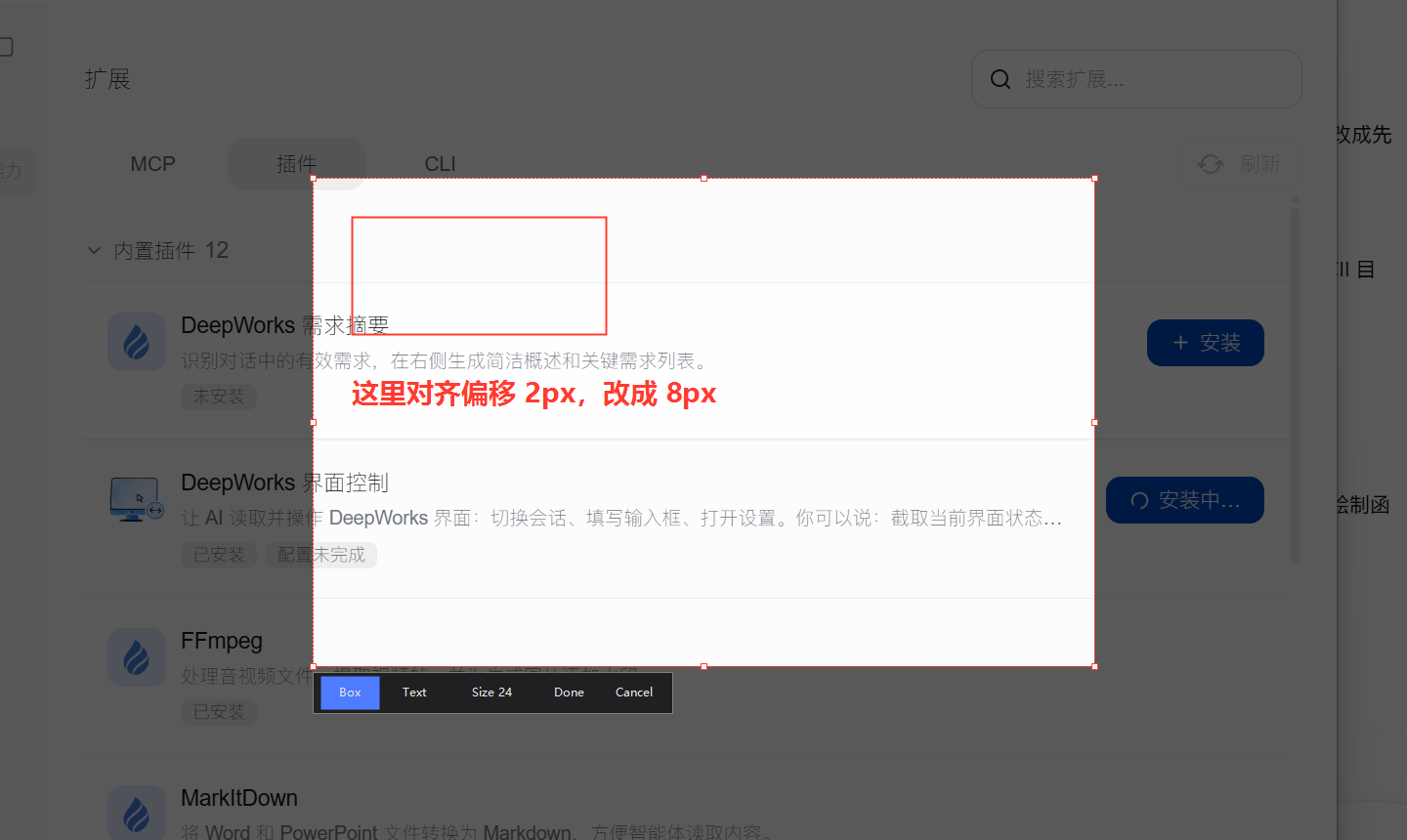
截图状态:整屏压暗 → 框选 → 红框 + 文字(滚轮调字号)→ 工具条 Box / Text / Size / Done / Cancel
English: A Snipaste-style screenshot tool for DeepSeek Harness. Press
F1anywhere (a real Windows global hotkey) and the whole screen freezes and dims; drag a region, then annotate it with red boxes and click-to-type text whose font size follows the mouse wheel.Escexits,Enterconfirms. The annotated image is composited at native resolution and dropped into the composer. Windows 10/11 only (uses Windows PowerShell + WinForms); everything runs locally.
用法
两个入口,行为完全一致:
- 点输入框工具行的剪刀图标(模型选择器左侧、语音按钮旁);
- 按
F1:宿主侧注册的全局热键,DSH 在后台、焦点在别的应用上也能触发。
进入截图后:
-
屏幕整体压暗(含任务栏与其他应用),拖动鼠标框选目标区域;松手后选区恢复原亮度,可以拖边角微调、拖框内移动。
-
选区下方弹出工具条:
按钮 作用 Box 在选区里拖出红色方框外框。可画多个 Text 在选区里点一下就地输入文字(回车确认),滚轮调字号(8–200 px) Size N 当前字号,滚轮会实时变 Done 合成并投递 Cancel 取消 -
快捷键:
Enter确认(还没框选时先按Enter= 整屏);Esc退出截图(正在写字时先取消这条文字);双击选区内确认。 -
完成后:标注图按原分辨率合成为 PNG,自动作为附件放进当前输入框(同时写剪贴板兜底)。
- 按钮路径:直接回填到那次请求;
F1路径:结果先落到%TEMP%\dsh-snip-hotkey\*.ready.png,页面每 0.9 s 取一张回填(页面最小化时等你切回来再取)。
结构
| 文件 | 作用 |
|---|---|
lib/overlay.ps1 | 全屏浮层本体:定格压暗、框选与手柄、工具条、红框、文字、合成导出。纯 ASCII(PowerShell 5.1 编码坑) |
lib/hotkey.ps1 | 常驻热键助手:RegisterHotKey 抢 F1,按下拉起同一个浮层,结果改名 .ready.png 入队;父进程消失即自杀 |
lib/index.js | 宿主半:拉起浮层 / 拉起热键助手 / 结果队列 / 自检路由 |
client/index.js | 浏览器半:一颗按钮 + 轮询取热键结果 + 投进输入框(页面里没有截图预览) |
lib/capture.ps1 | 维护用:一次性整屏抓帧(调试/自检,不参与截图流程) |
结果约定:脚本把 JSON 写到 -Out 旁边(<png>.meta.json),宿主读文件而不是读 stdout——这样 spawn 完全不需要 stdio 管道。
安装
# npm(收录进市场之后,市场里点安装也是这条)
dsh plugin --profile desktop add dsh-snip

# 直接从 GitHub 装
dsh plugin --profile desktop add github:XXP-AI-SPACE/dsh-snip

# 本地开发(link 到源码)
dsh plugin --profile desktop add "link:F:\工作之后\3-DSH\plugins\dsh-snip"
装完冷启动桌面端(宿主半需要),浏览器半刷新页面即可。 发布/收录流程见 PUBLISH.md。
自检
# 宿主路由是否在
Invoke-WebRequest http://127.0.0.1:<GUI 端口>/dsh-snip/status -UseBasicParsing

# 整条链路(浮层会自己画一个样例选区并确认,约 1 秒闪一下)
Invoke-WebRequest 'http://127.0.0.1:<GUI 端口>/dsh-snip/capture?probe=1' -UseBasicParsing

# 纯几何自检(不弹窗)
powershell -ExecutionPolicy Bypass -File lib\overlay.ps1 -SelfTest
可调项
lib/index.js顶部:HOTKEY_KEY(默认'F1',可改F2…F12)。client/index.js顶部:SLOT/ORDER(默认conversation.input.right+1000,即模型选择器之前;想放最左改成conversation.input.left)。lib/overlay.ps1顶部:$HANDLE(手柄判定半径)、$MIN_W/$MIN_H(最小选区)、颜色与字号上下限在Adjust-Font/ 常量区。
热键排查
- 助手日志:
%TEMP%\dsh-snip-hotkey\hotkey.log(注册成功会写hwnd=与listening: F1)。 - 如果
F1已被别的程序占用,RegisterHotKey会失败:日志写RegisterHotKey failed,助手退出,/dsh-snip/status里hotkey.helperAlive为false。换HOTKEY_KEY即可。 - 助手会盯着 DSH 主进程(
-ParentPid),应用退出后 300 ms 内自行退出,不会留下孤儿进程或占着 F1。
已知边界
- 浮层是 TopMost 的全屏窗口,会盖住任务栏与所有应用;
Esc或 5 分钟空闲会自动退出。 - 它抓的是浮层出现前那一帧,所以浮层里的内容不会截到自己。
- 多显示器按虚拟屏幕整体覆盖(负坐标屏也算)。
- 不做:编号角标(1、2、3 号方框)与标注清单、撤销、箭头/椭圆/马赛克。
Comments
Loading…
Similar plugins
by zhishengplus
An annotation pen for the DeepSeek Harness image lightbox: circle, label, then keep moving / resizing / re-editing every mark — and send the annotated PNG straight into the composer. 给 DSH 图片预览加一支画笔。
★ 1
MIT
Python
Oct 10, 2026
dsh plugin --profile web add @dsh-plugin/dsh-image-annotateby thezavtrak-a11y
Draw on a pasted screenshot in the DeepSeek Harness web GUI: pen, arrow, rectangle, ellipse and text stamps, flattened into a PNG attachment at the image native resolution.
★ 0
MIT
JavaScript
Oct 4, 2026
dsh plugin --profile web add dsh-image-annotateby deepseekbluefish
WeChat-style in-app screenshot button: drag a region, fine-tune with 8 resize handles, Enter to capture and Esc to cancel; auto-numbered PNGs plus a [Shot N HH:mm] marker written into the composer. Wi
★ 0
MIT
PowerShell
Aug 24, 2026
dsh plugin --profile web add dsh-screenshot-pluginby JackEngineer
One-click DSH screenshot: capture the DeepSeek Harness window (or the whole desktop) and drop the PNG straight into the composer draft
★ 0
MIT
JavaScript
Oct 17, 2026
dsh plugin --profile web add dsh-quick-screenshotby TangerineSplendor
Windows screenshot plugin for DeepSeek Harness: live desktop selection, annotations, global hotkey, and direct image insertion.
★ 0
MIT
JavaScript
Oct 24, 2026
dsh plugin --profile web add dsh-plugin-live-shotby janewas
Annotate a pending composer image in place (pen / box / arrow / typed text) and insert the PNG back next to the original. Minimal footprint: nothing in DSH UI is restyled, no host routes, no dependenc
★ 0
MIT
JavaScript
Sep 14, 2026
dsh plugin --profile web add dsh-image-annotate