

dsh-agent-office
Manifest validA living pixel office for DeepSeek Harness. Watch real agents think, use tools, and wait for you.
Agent Office
Tiny coworkers. Real work. Watch your DeepSeek Harness agents work in a living pixel office.
简体中文 · MIT · Zero runtime dependencies · No extra API key
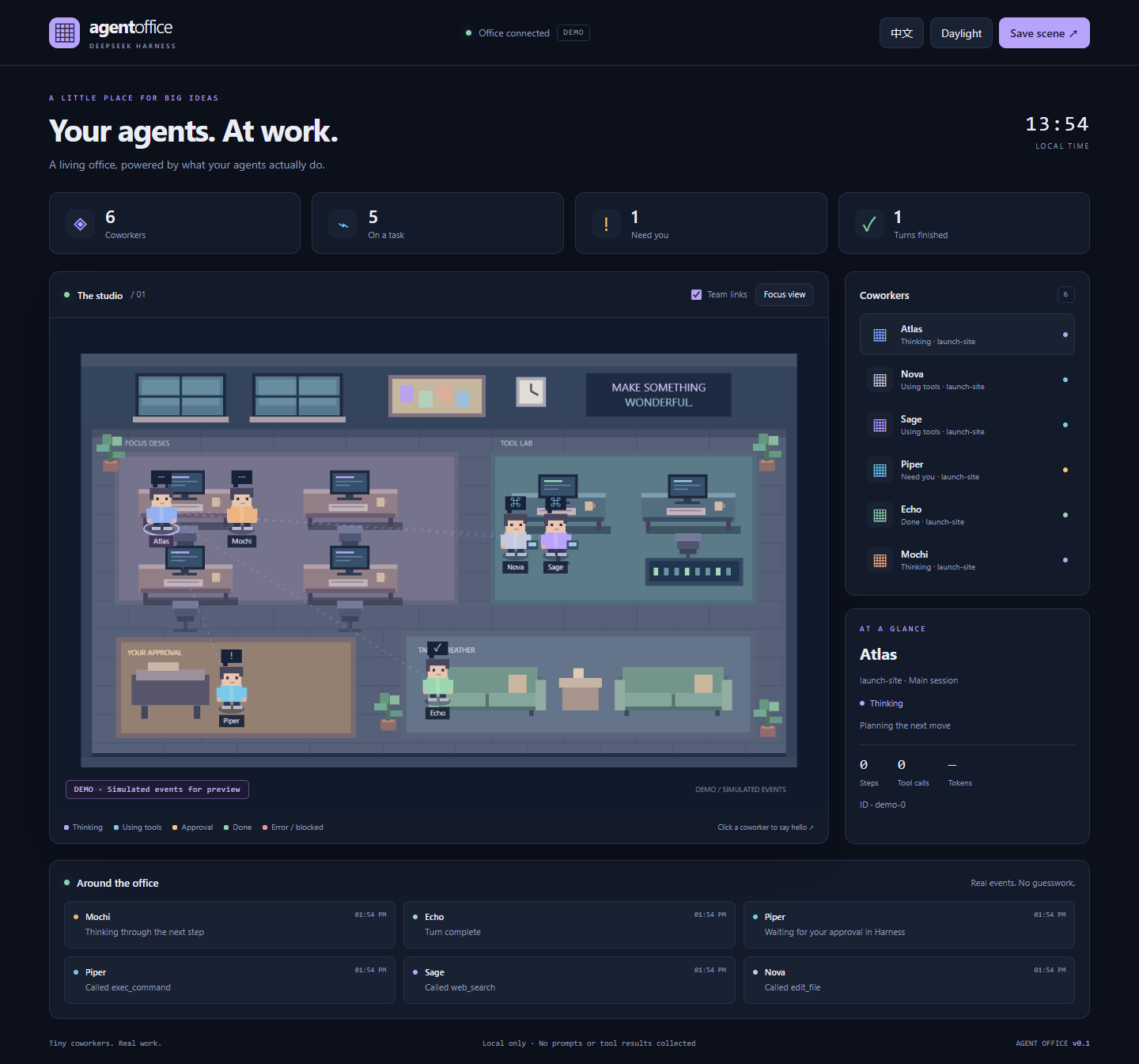
Your agents leave their desks to use tools, queue up when they need approval, and take a breather when a turn finishes. Click a coworker to inspect their activity. Everything in live mode comes from Harness session events.
Try the office in 10 seconds
Clone this repository and run:
git clone https://github.com/xx-ytg/dsh-agent-office.git
cd dsh-agent-office
node src/demo.mjs
Open http://127.0.0.1:4319. No install, build step, model, or API key required. Demo mode uses simulated events and is visibly labeled. This command previews the UI; it does not connect to a running Harness.
Connect your actual agents
Requires Node 22.19+ and DeepSeek Harness 0.2.1-alpha.4. This first release deliberately declares only the DSH version whose API was checked. New DSH releases need compatibility verification before widening engines.dsh.
From a directory containing the downloaded dsh-agent-office folder:
dsh plugin --profile office add ./dsh-agent-office
dsh --profile office web
If the CLI is not globally installed, replace dsh with npx @deepseek-ai/dsh@0.2.1-alpha.4. Configure your model in the Harness profile as usual. Open http://127.0.0.1:4319 alongside the Harness UI and start a task. The office logs its URL to the terminal when loaded.
To install into an existing profile, substitute its name for office. A server restart is needed after installation. Stop the standalone demo before enabling the plugin: both default to port 4319. The first release is a separate browser dashboard, not an embedded Harness sidebar or an operating-system desktop overlay.
Source checkout / overlay
Generate an overlay with the absolute module path:
node scripts/make-patch.mjs > office.local.patch.yml
dsh --profile office web --patch ./office.local.patch.yml
The generated YAML uses an absolute path because DSH resolves plugin module paths from the profile. The overlay command works without installing the bundle.
What's inside
- Original procedural pixel art: focus desks, tool lab, approval corner, sofas, plants, and animated coworkers. No downloaded assets or font services.
- Real event projection for main sessions and subagent sessions. Parent links represent session lineage, not inferred conversations.
- Independent pending-tool and approval tracking; parallel requests do not prematurely clear a waiting status.
- Distinct completion, error, blocked, paused, and idle states. “Done” means a turn completed, not that the project passed acceptance tests.
- Clickable roster, activity feed, per-session steps/tool calls/reported tokens, and PNG scene export.
- English / 简体中文, midnight / daylight themes, focus view, mobile layout, and reduced-motion support.
- Reconnecting event stream with an explicit stale-state indicator.
- No model calls, extra API keys, runtime dependencies, telemetry, or changes to the agent loop.
Configuration
Edit the installed bundle row through your profile overlay:
- id: agent-office
  config:
    port: 4320
    maxAgents: 48
    maxEvents: 120
| Setting | Default | Range | Purpose |
|---|---|---|---|
port | 4319 | 1024–65535 | Loopback-only office server |
maxAgents | 48 | 1–200 | Tracked sessions; inactive sessions are evicted first |
maxEvents | 120 | 10–500 | In-memory activity history |
Up to 12 coworkers are drawn at once; all tracked sessions remain selectable in the roster. Selecting another session brings it onto the floor. If the tracking cap is full of active sessions, new sessions are ignored until a slot becomes available. Counters cover retained sessions since plugin startup, not lifetime totals. UI feed shows the latest six events.
The port is fixed rather than silently changed. If occupied, the plugin logs an actionable error and leaves Harness running. Change it in your configuration and restart.
Data and permissions
The office observes session/event and session/disposed at the profile root. It does not register tools, intercept execution, approve operations, or send data to a third party. Approval happens in the original Harness conversation.
Only session IDs, parent IDs, generated names, the last folder name of the working directory, tool names, lifecycle statuses, timestamps, and reported token counts enter the office projection. Prompts, assistant text, reasoning, tool arguments/results, full paths, and approval explanations are excluded. Displayed text is inserted as text, not HTML.
The HTTP server binds exclusively to 127.0.0.1, checks Host and Origin, has no write endpoints, and closes on plugin unload. Any process or user with access to this machine's loopback can read the displayed metadata. This version is intended for a trusted local machine, not remote hosting. Do not expose its port publicly.
State is in memory. Existing idle conversations and pre-load history are not imported; a session appears on its next observed event. A restart clears the office. A detached session remains as a paused/terminal entry until eviction. Tasks run in a different Harness process are not visible.
Development and verification
node --test
node --check public/app.js
Eight dependency-free tests cover concurrent tools/approvals, terminal reasons, bounded history, sensitive-data exclusion, token accounting, HTTP/SSE, host/origin protection, port conflicts, and cleanup. Published Cordis 4.0.5-alpha.2 and DSH SessionStore 0.2.1-alpha.4 were separately used to check real session append → plugin → HTTP state and unload cleanup. A full model-backed DSH end-to-end run has not yet been performed.
Browser checks cover desktop/mobile layouts, SSE updates, selection, both languages, themes, focus, and PNG export. See verification notes.
Share the little office
The preview GIF and screenshots in docs/ are ready for a GitHub README or release post. They are labeled demonstrations. Source: xx-ytg/dsh-agent-office. This plugin has not been published to npm.
Suggested repository description: A living pixel office for DeepSeek Harness. Watch real agents think, use tools, and wait for you.
Suggested GitHub topics: dsh-plugin, deepseek-harness, ai-agents, pixel-art, agent-observability.
License
MIT. Independent community plugin; not an official DeepSeek product.
Comments
Loading…
Similar plugins
by bwndlct
Session execution analytics and audit reports for DeepSeek Harness — see how your agent actually worked
★ 3
MIT
JavaScript
Aug 14, 2026
dsh plugin --profile web add dsh-session-auditby aaravarr
DeepSeek Harness (DSH) plugin — a subagent_with_model tool plus a live multi-panel subagent viewer.
★ 3
↓ 28/wk
MIT
JavaScript
Aug 20, 2026
dsh plugin --profile web add @aaravarr/dsh-subagent-maxby Napstablooky233
Visible dispatch panel for DeepSeek Harness — decide whether other agents help, pick free-lane helpers, and inject the division-of-labour policy.
★ 1
MIT
JavaScript
Oct 15, 2026
dsh plugin --profile web add dsh-agent-dispatchby geguanming
DSH Ox-Horse Office - a DeepSeek Harness web plugin rendering multi-agent sessions as a live pixi.js office
★ 5
↓ 371/wk
MIT
TypeScript
Sep 17, 2026
dsh plugin --profile web add dsh-office-pluginby andrepontesmelo
The DSH productivity suite: plugins + agent skills for the DeepSeek Harness, installable in one command.
★ 0
MIT
JavaScript
Sep 11, 2026
dsh plugin --profile web add @andrepontesmelo/dsh-suiteby esonx
Project-scoped organization and long-lived AI workforce layer for DeepSeek Harness
★ 0
Apache-2.0
JavaScript
Aug 26, 2026
dsh plugin --profile web add dsh-workforce